Problems? See this thread at archive.org.
Sorry, I got my Division 2 code; no worries there. I was interested in the reinstall of Windows.
I will likely do the full reinstall in the next week or so, as I plan to RAID0 two Evo Plus SSDs. Was more wondering if it’s best to install the “dell service code ISO” or a plain ol’ Win10 Pro ISO and key.
-
-
The only difference with the Dell ISO is that it has Dell SupportAssist, Digital Delivery Services, and Dell Update preinstalled so you're good with either to be honestLast edited: Apr 10, 2019mattcube64 likes this.
-
I believe the site said only the 8700/2060 combo would not have working side vents. You do not have an 8700.
EDIT: I saw in a later post you figured it out. As far as I know there isn't a different chassis, they only block the side vent internally so you don't need to replace the chassis when you upgrade.Last edited: Apr 10, 2019 -
So sent mine in for repair one two days ago, they got it yesterday, fixed it today, and shipping it back. Glad for the quick turnaround.
SlickDragon, mason2smart and pathfindercod like this. -
I received mine beginning of March before the first blow out, my GPU part # is 490-BEYV
Yours is the same, correct?
Nothing has changed?Last edited: Apr 10, 2019 -
Well my replacement arrived!
Windows got corrupted (kmode exception not handled BSOD) updating it on the SSHD (not a huge deal and I'm going to remove it and replace it with my nvme and 1TB SATA ssd.) Couldn't fix itself during diagnosis/restart so I'm doing a system restore real quick so I can use it as a backup drive if needed in the future.
Also noticed it has the AUO panel instead of the LG, not sure which is better but it does have a little light bleed, which I think I can deal with.
The main thing was the bracket for the panel was not glued correctly on my first machine, this one seems very flush.
Let's hope i don't encounter any other issues.. going to install my Nvme soon and reinstall windows. -
Nice !
Hope they changed it with the good parts
Mine is going for repair picked by UPS tomorrow... fingers crossed this time...
I think we need to gather informations about the GPU parts after and before repair to know which ones are the fixed parts.
Can we somehow see those GPU parts (ie: #"490-BEYV") under windows ? With GPU-Z ? -
Nope. They can only be inspected directly on the circuit boards.Last edited: Apr 10, 2019
-
Quick question, I'm about to install my ssd into my replacement machine but I'm wondering if I should reinstall windows on the old machine first then swap it over? Or just put the ssd into the new machine and enter the bios before even logging into windows and reinstall from there?
The ssd already has a windows image on it but it has some issues so I'm going to reinstall it. Just not sure how to go about it.
I could also boot with the SSHD, put the ssd in and format it, then remove the SSHD and install the windows USB and reinstall that way.
Any idea which way would be the most optimal? -
I'd say start fresh and install brand new copy on the ssd. I'd personally also ditch the sshd and buy an 860 evo instead.mason2smart likes this.
-
That's the plan, I'm just wondering what the best way to reinstall is, I listed my options above.
I am going to remove it, I have a 1TB MX500 I'm going to throw in. My boot drive is a 512GB SX8200 Pro.
Think I'll install it as a secondary drive, format it, remove the SSHD, leave just the Nvme, then boot up with the USB and install windows onto it. Idk.. -
I always find it easier to install from a bootable stick. But you gotta have one handy for such times. Last time I used my usb operated DVD drive though. That thing has saved my butt numerous times and cost me 20 bucks years ago.
-
I am using a bootable USB drive.
What I'm trying to say is, the ssd (sx8200 pro) is being pulled from my original 51m, and I'm going reinstall windows from the USB drive before I install it into my replacement machine, but I'm not sure what the best way to go about it is.
Do I reinstall via USB on my old machine then install the ssd into my new machine, or do I load into windows from the SSHD on the new machine, format the ssd, remove the SSHD, leave the formatted ssd in, and insert the USB with windows on it, and install it onto the formatted ssd? -
You could also take a ghost backup of the working windows image and use that to create a copy on the new drive. But it'll still need you to have a bootable media ready. I suggest that you use a secondary machine to create a windows install usb stick and do things the easy way.
-
Oh ok, so if you have a working copy of windows already on the new machine sshd, just copy that over to your ssd via a cloning utility and then make your ssd drive primary boot drive to boot from it instead.
-
Thought of cloning it but I'd rather not. Not only does it take awhile, but I've had it fail and not boot before or boot but have various issues (on my first machine) which ended up with me having to reinstall anyways.
I have a windows 10 USB and I'm currently downloading the Dell windows image that came with my machine by putting my service tag. Going to be using the Dell image to reinstall so I don't have to reinstall as many programs.S.K likes this. -
Never ever do they care about reputation, but more about them $$$. The thing is, it performs well when gaming (1080p) the temps seem much better than on my R5 (which is by now heavily modded). But the big difference is some people game in higher framerates (like myself) and i tend to like to not game with a framecap and just let my heatsink do the work.
By now it should be known that Dellienware would never implement an VC and people who think they already have, should study how and when a VC chamber works the best. Which is not in the configuration of the R5 nor the 51m. While i would agree how good it currently cools the 51m, IMO it's not superb. There are systems running dual 1080's with comparable temperature but with more heat output so Dellienware still has some ways to impove.
I won't forget how they throttle/cripple their systems. They brag about first upgradeable while they forget even Acer made an AMD socketed system. Not that it's a heavy hitter, just saying that what they did ain't that special in 2019. AMD was no where to find 3 years ago, now where talking about monolithic server cpu designs while intel has trouble supplying 14nm chips.
Maybe some other competitor will step up their game and prove Dell they ain't the only one's that can produce. 51m seems nice but still too good to be true (knowing how Dell operates nowadays )
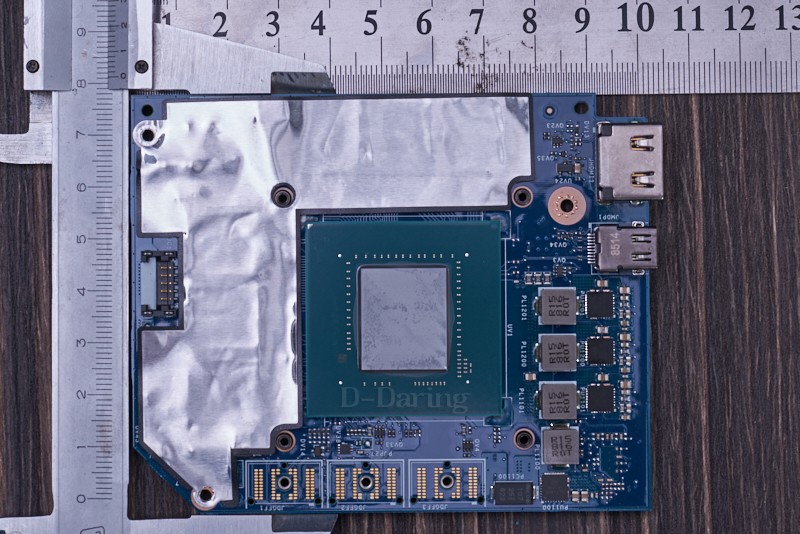
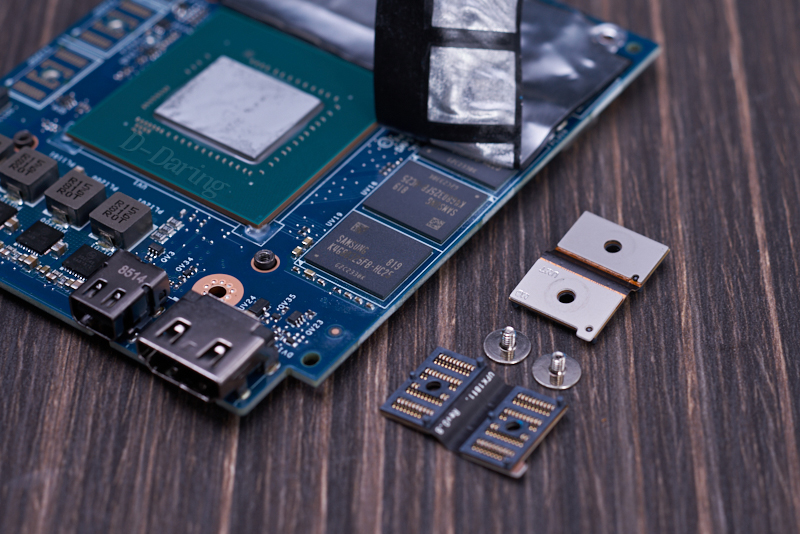
BTW DGFF precision cards seem to be lower spec than the AW 2080 cards. Seems like the chassis would not be able to dissipate mutch much heat with only 3* pipes.
Connector seems the same, and also seems to have the same placement as the 2080
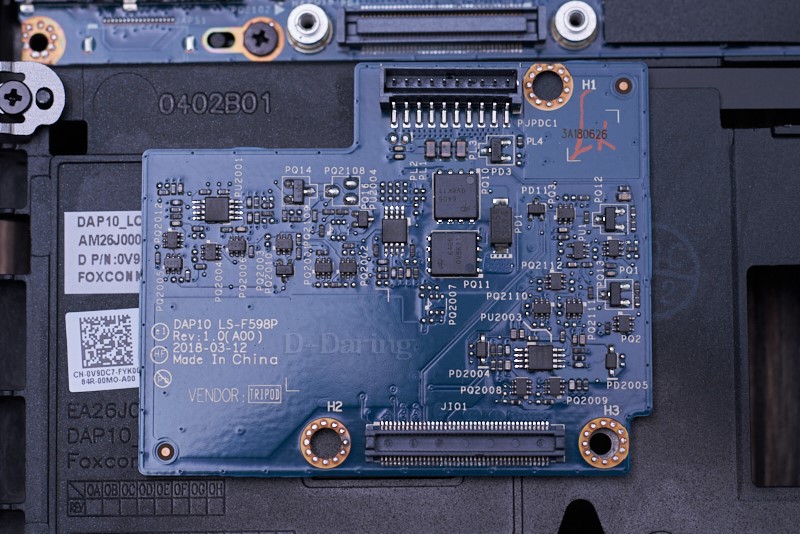
Still haven't found out what the small board is about still haven't found out it's called PSU(PowerSupplyUnit) card.
Proprietary ftw looks like Dell went All out.
(Lol jk i miss my old AW R5)
Attached Files:
Last edited: Apr 10, 2019 -
-
@_deadbydawn_ @pathfindercod
There really isn't much to it if you only want to to keep your system cool. For my cool profile I just matched my CPU and Cache voltage to .125V and reduced by .01V until it became unstable. Use "TS Bench" to test basic stability easily. Then gaming will test it more when you got it narrowed down. Make sure your TS config profile (in the installation directory) is not set to "read only" or nothing will stick.
My goal with this profile was to use the "quiet" fan profile when gaming and not have it reach over 75C. Can play Shadow of the Tomb Raider on whispering fans as to not interrupt my nice speaker system (not a fan of headphones).
If you want to get more advanced and go the opposite direction to Overclock as much as possible, you start fiddling with other settings. @unclewebb 's guide is very extensive for all the other options.
Lopt, SlickDragon, raz8020 and 6 others like this. -
The 51m arrived. Absolutely love it. The build quality is even better than my razer blade 15. Just wow.
One thing that is bugging me though (please dont laugh lol). I cant seem to get the left macro keys to cycle rainbow rgb spectrum with rest of keyboard. Is this just how it is or am I missing something?
I can change it to whatever solid color I wish but they do not cycle with rest of the keys. Oh well that's really my only qualm so far.
The track pad left click button feels very clicky compared to the right side as well. Just nitpicks at this point. Overall amazing laptop.
Also where do you get that rgb alien head wallpaper!?Last edited: Apr 10, 2019VoodooChild and S.K like this. -
Yeah that's the same that mine says (at least from what I remember).
-
If cool only means a cool cpu and a cool gpu to you while you don't pay any attention to the power circuitry then that's a recipe for disaster going forward in a full power configuration. Don't just rely on sensors data for cooling. Make sure that the components that matter are all cool, not just the cpu and gpu.
-
Anyone happen to know what RAM is better? My old machine had Samsung 2666, my replacement has Micron 2666.
-
Samsung is way better, however I'd personally go for Corsair Vengeance.
-
Thanks. Wonder if I can swap them or if they'd find out and charge me lol.
-
Swapping ram doesn't void warrenty here, so go ahead.
-
I mean swapping the ram from my old machine into the new one, before I send it back.
-
You're fine to swap out the Ram/SSD/HDD or whatever.
I should say provided it's the same capacity.propeldragon likes this. -
Cool, thanks! The Samsung memory is definitely better than Micron?
-
In my case the GPU partnumber is 490-BEYV (taken from the invoice), but it's the same on the original order on 14th March.
The MB is 486-36452, both in the original order and the invoice.
Which are the partnumbers of the supposed faulty components? -
Just ran display calibration on my Area-51m using a Spyder5 and the software that came with it. There's a definite improvement over uncalibrated. Used the same tool on my 165hz 1440p TN gsync monitor and it looks outstanding. I have the non-gsync panel.
mason2smart likes this. -
Nice! Is there any way to upload the profile? I think a lot of us would appreciate it!
-
Lowering the Voltage of Both GPU and CPU will directly affect power in the circuitry (thus cooling). But also I re-pasted, re-padded, and put K5-PRO on everything that needed it.
-
Here's a copy of my calibration profile. Keep in mind not all panels are the same and may need to be calibrated again over time. I ran this calibration at maximum brightness. If you want to try it, you'll have to change the file extension from .txt to .icm
Attached Files:
SacraficeMyGoat, Darkhan and Xatanú like this. -
-
You can find the part number on your invoice.
My first one that blew up was a 490-BEYV GPU and the second one I ordered is too... -
Look at the part number of mosfets instead and compare.mason2smart and c69k like this.
-
Your running a -1.25 undervolt?
-
Awesome, thanks!
-
Just finished the reinstall on my new system, everything seems to be working fine except I dont have Nvidia control panel.
I know a solution was posted early on in this thread but does anyone remember how to get it?
I've already installed geforce experience and upgraded my drivers. -
Update , ended up returning my 9700k/2070 51m to Microcenter because I wanted more GPU horsepower. So I rush ordered a 9700K/2080 model from HID. How can I tell what vbios I have? Do they all come with the 180w bios? I want to avoid the 200w for now
Sent from my iPhone using Tapatalkmason2smart likes this. -
I have same part # for my 2080 as well. Wonder if the new ones have a different part #?
First make sure both power supplies are plugged in. Go to AWCC and change the fans to performance mode and try running again.
What's the "new" part numbers you are seeing?mason2smart likes this. -
Cinebench r15.... Can't find it anywhere? Where are you guys getting it from? I can only find r20....
-
You'll find some good stuff here:
https://www.guru3d.com/files-categories/generic-benchmarks.htmlXxAcidSnowxX likes this. -
Got CPU tempos down to 73 during BF gameplay and GPU 68. Think I will ride these settings out for a while.
S.K likes this. -
I'll be getting my machine in the coming week. After i'm done with direct dye cpu installation and going SSD across all the storage options available in the laptop, i'll update the part details with pictures here along with specs.
P.S., I was discussing FurMark with HIDevolution engineers and they share the same opinion as myself that FurMark is a simple recipe to kill an otherwise perfectly normal GPU and it WILL kill any GPU out there if run for prolonged duration. If it doesn't kill it, it WILL weaken the power circuitry on the motherboard to an extent that in the future at some point in time, it will go POOF without leaving a clue. This happens because all these circuits are designed keeping in mind REALISTIC gaming loads, and not crazy balls to the wall full day stress tests with merciless overclock on the chip. I killed a liquid cooled 1080ti founders edition with FurMark in early 2018.mason2smart and jclausius like this. -
if it's any consolation, dell is not the only company behaving like this. pretty much every company does it. take for example, apple products, expensive as hell for pathetic hardware. is it immune to manufacturing defects? NO. they can't even get basic stuff like keyboard switches right and yet people are pouring money in to buy apple making them one of the most profitable companies in the world. microsoft surface pro? one would think after so many generations perfecting the laptop it will be perfect out of the box. sadly they are still riddled with problems. i can go on and on but we all get the point.
we can't shy away from buying the cool gadgets and techs we love, and product design cycles are getting shorter and shorter due to industry pressure to churn out new products faster than ever, which means something has to give and it's QC most of the time. consumers become the QC and problems get solved slowly down the line, if that product survives its life cycle that long. after all, the next big thing is just beyond the horizon. so i guess living with it is the next best thing?
back to topic, area-51m is truly a really well engineered gaming laptop despite the handful of GPU VRM burn outs. i hardly think this warrants as a deterrent to potential buyers.Last edited by a moderator: Apr 11, 2019mason2smart, Fire Tiger and pathfindercod like this. -
Notebookcheck runs 30 minutes furmark and prime at the same time on every reviewed laptop.
I agree, an intensive game is the best test scenario. Or AIDA 64 with fpu and GPU(s) for testing healthy limits. -
Let's not go down that rabbit hole. Macs are a disgrace to laptops. Lousy keyboards, pathetic electronics, blow connector pins instead of fuses, get water damage from the atmospheric moisture, planned obsolescence from IOS updates, thermally unstable and you have to carry a bucket full of dongle nests if you want to be somewhat productive for a short while. Being a former MSI and Acer user, I can safely say that Dell is doing more things right than it's competitors. I do not like MSI's support. AT ALL. I had a GT75 VR Titan Pro last year as a second gaming PC and it's back was so flimsy that I had to buy 3 during my ownership time as they kept cracking hooks every time I pulled it apart, even if using very minimal force in the RIGHT direction. Thermals were NOT impressive despite being such a behemoth of a laptop that it was. The GPU fan started making grinding sounds after a few months of usage and MSI took 3 months to ship just one bloody replacement fan after a hundred email reminders! I ended up selling it to a fanboy to just get rid of it. Before that I had an Acer Predator and it's chassis felt like a boiled potato. What I like about Dell is that they don't compromise on the structural quality of the machines and when something goes wrong, the support is kind enough to help you out promptly. Alienwares are built like tanks and I never had any problems in the last 7 years with them, though despite being a heavy gamer, I never went crazy about death benchmarks. Gaming is not just about pushing your computer hardware within an inch of it's life just to YAY over that extra frame that you squeezed out of it at the cost of longevity unlike most might think today.mason2smart and alexnvidia like this.
-
Anyone know how to get Nvidia Control Panel to show up? I downloaded Geforce Experience and updated the driver, but control panel is nowhere to be found..
Also, im having issues download stuff from the Microsoft store, it just constantly says "starting." Anyone know a fix for this?
I'd appreciate some help very much. -
Check here: https://merabheja.com/nvidia-control-panel-not-showing-in-windows-10/
Regarding Microsoft store, that is a buggy platform. There could be a gazillion things wrong with that. May be try and link your Microsoft account with Windows again and retry.
*OFFICIAL* Alienware Area-51M R1 Owner's Lounge
Discussion in '2015+ Alienware 13 / 15 / 17' started by ssj92, Jan 8, 2019.