Problems? See this thread at archive.org.
I would ignore it but 3600 bucks wasn’t ignored when they charged me lol. I have ocd but since everything else is fine I’ll keep it
Sent from my iPhone using Tapatalk
-
-
If you return it and get a perfect one, it will have the same scratches within a few weeks so don't bother and risk getting some other system which may or not be as good as the one you have. Just my two cents.SlickDragon, Amroth, alberty and 3 others like this.
-
UPDATE: turns out the laptop was the problem half an hour after my post came the call to support motherboard and gpu failure even though my gpu wasnt on the list of gpu's with issues so waiting on a date for new system to be delivered and old system picked upArrrrbol likes this. -
Can you smell some smoke? If so, what side on the rear of chassis?Arrrrbol likes this.
-
no mate but screen wouldnt stay on past log in screen at all but system would stay on all keyboard lights on just no picture and would warm up rapidly
left side exhaust vent would be warmest though if that helps -
I have been checking on Amazon and haven't found anything that's not made of microfiber, that's why I was asking. If all the microfiber clothes make scratches on this plastic I'd better be away of them and look for alternatives
-
Did you where on the 200w VBIOS? Did you undervolt the GPU with afterburner?
-
Gpu side (Gpu power delivery).
Try small very soft clothes intended for cleaning glasses and with proper cleaning liquid. -
done 200w vbios
no overclock or undervolt to gpu -
Burden of proof is on you, my friend. I shall await your findings.

-
I use compressed air to rid dust from the surface.Xatanú likes this.
-
my old msi had a sub ge72mvr Apache pro with i7 7700 and 1070
Attached Files:
jclausius likes this. -
-
I mean it’s etc Foster on Clevo. Can’t remember correctly if Clevo used more than one brands products. P870 is in 3 or 4 revisions as you know. Probably same for many other notebook brands as well.
http://s472165864.onlinehome.fr/anyware/manuels/P870DMG_ESM.pdfLast edited: Apr 15, 2019zdroj likes this. -
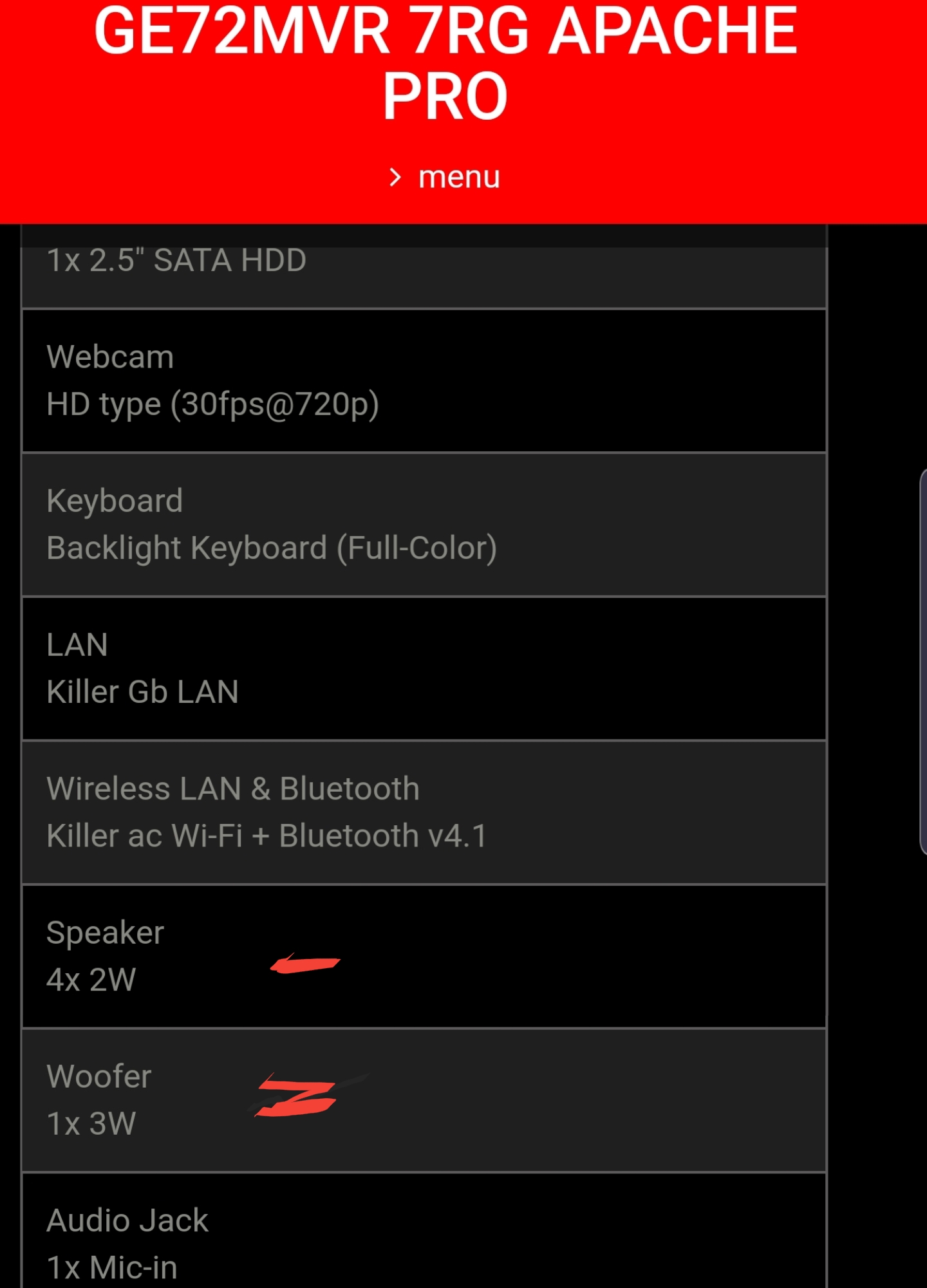
Need better/more detailed specs for proof. I doubt 3w is a real subwoofer. Need frequency reproduction and sound quality ratings. Putting a true subwoofer in a laptop would likely be waste of space and power in a portable device.
Found this: "A built-in laptop subwoofer will be limited in function. Regular subwoofers are usually at least a few inches (10 or so centimeters) deep to allow the subwoofer enough space to produce high quality low-frequency sound. Low-end sound produced by a subwoofer that is less than 1 inch (2.5 centimeters) deep will not be high quality."
I have yet to see a true subwoofer under 8 inches in diameter. tbh, I don't even like 8 inch subs. My 12 inch sub is at least 3 times heavier than an Area-51m and the amp that powers it is 2 1/2 times heavier. -
You mean its fake sub and not implement it in notebooks chassis will make better bass?
Not sure what you will with this. Point is that the Area-51m doesn’t have it.
Many other brands models have it... You said no.Last edited: Apr 15, 2019 -
A fake diamond is not a diamond and therefore a fake subwoofer is not a subwoofer. My statement still stands.
-
-
If there is really a problem with voltages in the >180w VBIOS versions as @Prema suggested, running the laptop with 200w GPU and no undervolting is very risky.c69k and Spartan@HIDevolution like this.
-
I have owned such notebooks, very underwhelming. I'd rather it not be there and see them use the space and power more efficiently.
-
Dont know why you are deliberately being obstinate here.
It is a dedicated base speaker... that improves overall sound of the system. Our Alienware skipped it for space for other things.
Some do it well. Other don't.
@Papusan although Logan Wade is "technically" correct lolAttached Files:
-
-
You said “use the space and power more efficiency”. If OEM’s remove features you’ll get less. Not more!! Easily explained here...
https://www.notebookcheck.net/Alien...2080-Max-Q-4K-UHD-Laptop-Review.416106.0.html -
You need to connect with didpaly port to get 240 hz. The monitor recognise the port you are using, and limit the hz to 60 on HDMI connection.c69k likes this.
-
In all fairness I did place a disclaimer in my original comment as to "my" definition of a subwoofer.
-
Anytime I can be obstinate with @Papusan is a good opportunity for a challenging debate/discussion that may result in learning something new. That is meant as a compliment.
Last edited: Apr 15, 2019mason2smart, raz8020, Rei Fukai and 1 other person like this. -
You're definitely right (when looking at your definition) but if we do it the wikipedia (most verified) way @Papusan pulls on the shorter end of the stick: "A subwoofer (or sub) is a woofer, or a complete loudspeaker, which is dedicated to the reproduction of low-pitched audio frequencies known as bass and sub-bass."
https://en.wikipedia.org/wiki/Subwoofer -
Wikipedia is a fake dictionary/encyclopedia No offense, but by that basic definition I can call a modified PVC pipe a subwoofer and everyone would look at me like I'm nuts. I mean, people look at me like I'm nuts anyway, but that's not the point here.
A subwoofer is a woofer driver used only for the lowest-pitched part of the audio spectrum. Typically under 200hz for consumer prducts, 100hz for professionial live sound, and under 80hz for THX approved systems. To accurately reproduce very low bass notes without unwanted resonances (typically from cabinet panels), subwoofer systems must be solidly constructed and properly braced to avoid unwanted sounds of cabinet vibrations. As a result, good subwoofers are typically quite heavy. (also from Wikipedia)mason2smart likes this. -
I though it was more appropriate for the laptop interior (circuitry, fans, vents...). In any case, for dust could be a good solution, but I suppose you will need something more rough for fingerprints or stainsmason2smart likes this.
-
no one would really want that quality sub in a laptop though surely these gaming laptops are heavy enough as it is with a proper high spec sub it would need wheels
dont get me wrong if you could get that kind of sub without the weight and id definitely want one i pay extra for the upgrades in cars for inbuilt subs love a decent one but not sure the weight would be worth it in a laptop -
Guys i have bought mini displayport to displayport cable to see if i can boost up my Hz but all i get is a black screen.
And the HDMI is only giving me 60hz pfff... -
Make sure you change input source to Display Port on the actual monitor. On my Alienware monitor I had to go into the monitor settings and manually change it.ThatOldGuy likes this.
-
You have to change imput method via the monitor settings (buttons on back or sides)
-
A "rectifier" is a diode most likely. Whoever made this gear seems to have already taken care of the need for a diode (Schottky or not).Vasudev likes this.
-
Pretty much my point of saying what I said. I always install my own custom subwoofer setups in my vehicles, it tends to make me calmer and I really miss it when it's not there.
-
Oh those are sexy. I might have to do that myself. Ironically I was thinking I wanted to change some of the icon pictures to make my folders look less boring. I swear you can read my mind buddy.Spartan@HIDevolution likes this.
-
Used DDU and reinstalled all Nvidia drivers ! works perfect now @ 240hz
thanksc69k and ThatOldGuy like this. -
This is why I don't game on PCs
Spent the last 3 hours last night, turning on my laptop for the first time & then trying to de-bloat it & turning off as much features that Microsoft is using to spy on people.
I used this to de-bloat: https://github.com/Sycnex/Windows10Debloater/blob/master/Windows10Debloater.ps1
This might have deleted some Intel or Nividia stuff though, I'm not sure.
Speaking of which, where do I go to see all the Dell Alienware drivers are up to date?
I selected the Windows update button & it updated some stuff, but what about the specific Alienware drivers? -
My last peeve is these panels they use in laptops today. I won’t ever understand why they keep most of them at 300 nits or below. It’s simply not bright enough. I miss the old 17 R5 TN panel that was at 400 nits. Makes a huge difference in gaming especially dark games. On the lg/AUO panel in the 51m, it’s simply not bright enough, especially in a well lit room. Given these panels aren’t upgradable and that backlights dim over time, I can see this being one reason I don’t upgrade in a couple years but sell it instead.
Sent from my iPhone using Tapatalk -
Just because it's a tiny subwoofer doesn't mean it's not a subwoofer, especially proportional to the regular midrange/ tweeter speakers. It's all relative. Dell could have included one in the A51m- there is definitely enough space in the chassis. I am 90% sure it wasn't included as a cost-cutting measure... same reason why we have less than half the ports of the older Alienware laptops.SlickDragon, Vasudev, zdroj and 1 other person like this. -
Why in the world would you run anything on your computer without knowing exactly what it's doing to your machine. Especially off the internet?? SMH
You can manually turn off services yourself, however I have never felt the need to disable any of the windows features as they are mostly designed to keep me safe from intruders and I have never felt that Alienware has ever included anything in their machines that would warrant me having to run some outside program to disable it. I know back in the 90's computers were shoved full of spyware and other crap from the manufactures, but I never had a problem with Alienware being like that.
You don't game on PC's? You're missing out.ReaceM likes this. -
i used to do the same with my cars but the systems in newer cars are really good and yeah same i miss them when gaming just a shame we arent at a stage in tech where they could be smaller lighter and produce same sound as the big heavy ones and in laptops
-
The laptop sent directly from Dell was loaded with crap!
CandyCrush, sticky notes etc... There were like 50 background apps running after I first turned it on.Vasudev likes this. -
Didn't game on PC, bought this laptop to game, thought it would be a easy plug & play...
-
To be fair, that's not an Alienware/Dell thing, that's Windows 10 being Windows 10. It'll do that with a fresh install right off a USB stick too.SpentaTONofMoolah4k likes this.
-
No..it will never be easy to play on a PC if you want it to be like a Nintendo or a playstation. Its not possible. The games for PC is being more and more demandig, for Playstation the hardware is the same...and the developers for games are limited. There is no limit for PCs...only the PC buyers wallet.propeldragon and SpentaTONofMoolah4k like this.
-
So... After talking to a Dell sales rep last night about extending warranty on both machines, and asking for a quote to be sent, I wake up to a $708 charge!!!
These assholes really charged me without my permission. Yeah, I was probably going to go forward with the purchase anyways, but what were they thinking when they decided to just charge me for this amount of money without asking me first???
With that said, did I get a decent deal atleast? Here's the breakdown.
2 years of onsite + 2 years of accidental = $354 x 2 for both machines = $708.
If I got a decent deal, I won't complain too much, but I'll still call him later and out him for charging me without me giving consent.
Anyone care to chime in and let me know if this is a decent deal? It seems to be a bit cheaper than what is listed on the website if you add the warranty at time of purchase.
I didnt want any of the garbage software that came with premium or premium plus. Just wanted basic hardware/onsite + accidental.c69k likes this. -
Hello,
Some news about the laptops about issues?
They fixit? -
Nope.
A few people found out the cause for their burnt units were burnt MOSFETS & a burnt GPU VRM, but that was specific to their units. -
I'm guessing there is no easy way to know what my Product key is for my purchase of Windows 10 Home 64bit with the laptop?
Is it listed anywhere on the box or on a piece of a paper anywhere? -
You windows active whan connext laptop on internetVasudev likes this.
*OFFICIAL* Alienware Area-51M R1 Owner's Lounge
Discussion in '2015+ Alienware 13 / 15 / 17' started by ssj92, Jan 8, 2019.