Problems? See this thread at archive.org.
They should send over new motherboards to everyone through on-site service. I am not sure if there are more than a few thousand of these units that were sold worldwide. Not everyone buys costly desktop replacements so it will be relatively easier for them. But let's see.
-
-
Yes, that’s how it’s working for me! Running cool with no issues for couple of days so far!
Sent from my iPhone using Tapatalk -
So today the ups guy showed up to collect my area51m while dell said the return was cancelled and it will be taken to a lab (i assumed to get repaired). Now i will have to order a new one. Has anyone any benchmark comparison for an a51m with 2080 and 2070? Thank you!
-
That's excactly what I needed to say here, I've accepted the swap for the exact same reasons you mentionnedVoodooChild likes this.
-
I was hella paranoid when I had my laptop and found out about the burning issues. However, these days I just use it and sometimes forget about the burning stuff. If mine dies I have 4 year complete care warranty but I've benched mine plenty of times. Just need to have a real few hour long gaming session to really find out.
But for everything I've done (photo/video editing included) it's been solid...*knocks on wood*
Interesting...so from what you guys have seen, this isn't a cooling issue anywhere?
Have you tested to see if the AMP runs at x8 speeds or x4 speeds? I thought the AMP was limited to X4 speeds unless it changed on the Area-51m. -
Don’t own an AGA to test the speed but I think I read a few pages back where someone said it was on x8 for the AGA not sure if it was theoretical or practical
-
I have a AGA but no GPU otherwise I'd test. Maybe someone else here with one can show us a SS or something of what it runs at.
X8 would be very good, almost no bottleneck on an external display even on a 2080Ti or RTX Titan.nkc likes this. -
i want an aga just for the usb ports wish it had usb c as wellLast edited: May 23, 2019
-
Can Dell release a firmware/bios update which limit the current passing thru the mosfets?
Considering the long delivery delay for the 2080 option (almost one month), can we say that no one still have a "fully fixed" computer?
We discuss a lot about faulty 2080's (and some 2070), but whats the rate of failure, how many people have a i9/2080 and use them on heavy load without any problems? -
I don't know if we can say there is still an issue with the 2080.
I haven't seen the burn issue yet on a machine with the newer mosfets of the 2nd batch, It might have happened, but no one posted here yet.
All the people we have their machines burned here after the release of the 2nd batch, either had a laptop that was purchased before the 2nd batch, or one ordered from HIDEvolution, who still had in their stock 1st batch machines at that time.
I also say this because I also wish this to be true, as I had a 1st batch machine that died. Now I have a 2nd batch machine on which I had to wait 1 month for. And really don't want it dying on me. -
A few pages back, @Donald@HIDevolution reported that they have received burned laptops with the stronger MOSFETs as well, so I don't think it's safe to say that the issue has been fixed in the second/third batch. It seems Dell still has no idea about what the problem is. It could be a combination of multiple factors, like weak MOSFETs, heat, pads not making proper contact, high voltages, long time session under stress/heat/high voltages... No one knows, so everyone is guessing
-
As it has been mentioned multiple times machines burn on "idle", it is therefore not thermals. Remember there is smoke and fire here, not some over throttling or a few abrupt shutdowns.c69k likes this.
-
THIS above. "I Know" is an bold statement. @Donald@HIDevolution said in his last post that even the Area-51M with revised parts burning down. I start wonder what is so very special with his machine vs the ones the others have got (with revised parts). Because it contain exactly same parts as Donald so nice informed also risk run into smoke and fire.
I prefer not do the same as the Ostrich. Put it's head in the sand and think this will never happen to me.Last edited: May 23, 2019raz8020, propeldragon, Vasudev and 4 others like this. -
The lane allotment should be x8 to DGFF, x4 to AGA, x4 to TB3. Having an x8 AGA would be nice but I actually really appreciate having a TB3 port that isn't hanging off the PCH - it just adds additional latency and competes with bandwidth for things like NVMe SSD's, etc, over DMI.
-
Getting my laptop today! What's the first thing I should do? Check it out or just go right in and repaste and pad?
Sent from my SM-N960U using Tapatalk -
Do you agree that some will have this machine for 5+ years without any issue until it’s sold to someone else who will also use it without an atom of an issue ?
-
Of course
 Even many of the Applebooks can have many years in front although they run 100C.
raz8020, Vasudev, Rei Fukai and 1 other person like this.
Even many of the Applebooks can have many years in front although they run 100C.
raz8020, Vasudev, Rei Fukai and 1 other person like this. -
Run dell diags. I would run a few benchmarks and slight undervolt to begin with. This will establish a baseline and make sure the machine is stable and ready for prime time. That way if an issue does occur you don’t have all the time and money wasted on pads etc.Mechanized Menace and VoodooChild like this.
-
Fak! I was in a rush this morning and forgot my 51m turned on ... I've been religiously turning it off after use because I don't want my house to burn down if the damn thing catches fire.... I don't leave it unattended for that reason.... And it's a 2 hour drive back home to turn it off....
Damn Dell, I wish they would just make a friggin statement so we know what the hell is going on.propeldragon, jclausius, Vasudev and 2 others like this. -
1. Create a backup image of the factory installation.
2. Update BIOS to 1.5.0
3. Undervolt CPU and GPU
4. Update drivers and tune up Windows
5. Benchmark to check if the machine can hold the heat or if you need to repaste and repadLast edited by a moderator: May 23, 2019Mechanized Menace, Fire Tiger and VoodooChild like this. -
It's better if you get a baseline figure of your system at "stock" rather than applying thermal compounds which may or may not have a massive change on your system.
There are already a few good advices above me so I would start with those things first. Good luck and keep us posted.
Sent from my SM-G965F using TapatalkMechanized Menace, Xatanú and Fire Tiger like this. -
My Macbook 2012 RET, still runs strong to date, once in a while something goes wrong, apple out of warranty service has been epic
-
Did a 11 hour marathon on Div2 raiding at 5GHz and GPU at 1975MHz. No smoke or fire...
Sent from my iPhone using TapatalkSherif_k, jclausius, pathfindercod and 4 others like this. -
My man! 5GHz is the way to go. Anything below, any it's pointless! Take the GPU to 2Ghz now.
Sent from my SM-G965F using TapatalkVasudev and LoneSyndal like this. -
I would, but I was playing on my lap for majority of the time. The fact that it wasn’t even hot was an interesting feat. That 5GHz didnt help much in the utter chaos that was the fourth stage...
Sent from my iPhone using Tapatalk -
Wow, if I were to spend 11 hours playing that game I think it would be me the one who burns in fire.
On the other hand, that game consumes an insane amount of CPU and GPU resources, that's one of the best stress tests you can perform. I tried it and it was consuming around 68% of CPU and it was set to 4.7 GHz and undervolted. I thought I could play silently without the fans cranking up but it was impossible to hold the heat no matter how much I undervolted without the fans spinning like crazy.
What CPU and GPU temps and usage were you getting with that OC settings? -
I do have an AGA, do I just fire up GPU-Z and check the lanes?
I had MAJOR stuttering and performance issues when using the USB ports on the back of the AGA for just even a keyboard and mouse. I haven't definitevely nailed down the cause of my major frame drop outs and stuttering, but it all went away when I don't have any USB devices plugged into the AGA
Man I wish I could do 5.0 on all cores. I'm basically somewhere around 4.4 ~ 4.5 on all core load (-.125 undervolt). 68f ambient and fans on full. I did repaste with Kryo. At 4.6GHz temps crack 90c.nkc likes this. -
I expect you all now got the final answers on the smoke and burn up. It seem's Azor don't have more to say about this case. Same statement now a second time. Case closed!

https://twitter.com/AzorFrank/status/1131450947496886272raz8020, electrosoft, jclausius and 7 others like this. -
Answering my own question, GPU-Z shows this running at 4xssj92, VoodooChild and nkc like this.
-
I do 5 and 2 constant , life is for the living
Please do test the AGA
So no go for USB then . If I could get a very sleek usb c hub , I just don’t want anything sticking from my left and right of the laptop lol...... I wish I could do DP to usb or something like that and use those ports at the back
So where is the other 4 hiding ?Last edited by a moderator: May 23, 2019 -
There are no AW notebooks where the TB3 is through CPU lanes, it's always through PCH.
No where, it's only 4 lane
What is the difference between PCI Express Gen3X4 lanes and Intel Thunderbolt 3 Plug and Play?
The Alienware Graphics Amplifier’s technology uses a direct hardware connection, while the Thunderbolt 3 technology is based on a platform with shared bandwidth. Alienware’s Graphics Amplifier will never share, or compromise, the bandwidth to your system’s GPU. Instead, it provides reserved high bandwidth directly to your system’s GPU with one unique cable connection. Alienware Graphics Amplifier utilizes four lanes of dedicated PCIe Gen 3. The Thunderbolt 3 specification is capable of either two or four lanes of PCIe depending on the OEM’s implementation of Intel’s technology. Alienware gains an advantage by having these lanes dedicated to graphics that are not shared by LAN, USB or display ports. -
Thanks fellas! Will update you all once I get it in muh hands!

Sent from my SM-N960U using Tapatalkjclausius likes this. -
For mine estimated delivery is at least 3rd of july, and the order is not yet launched (I just accepted the specifications).
-
How do we know if we are affected or not apart from the obvious case when it burns to death? I guess he means that they will just keep replacing the laptops whenever they burn, which is something expected for any equipment under warranty. But this is not very reassuring for us:
1. Functionality: I don't want to be worried all the time by the possibility of having a laptop that could burn, specially when I leave the computer working in some renders or whatever and I'm not at home. This is very limiting for a lot of people like me, not everybody bought the computer just for gaming. I use it mainly as a workstation and need a reliable system. I don't want to risk getting my house on fire so I'm really afraid of leaving it unattended, that's very limiting for me.
2. Cost: I don't want to run into extra costs by extending the warranty for some more years. Supposedly we have two years for all the products sold in Europe, which from my perspective should be enough to check if something has any manufacturing defect or not. I have never extended the warranty for any product and I have never had any problem. But everybody is rushing to extend their warranty and I don't feel comfortable with just two years (*) with this system, who will assure that I don't have a ticking bomb and it gets the crap out in a couple of weeks after my warranty expires? It's like you are being forced to get that extended warranty and it's not especially cheap.
(*) I would like someone to clarify this, as the law in Europe is clear (2 years), but when I enter my service tag in Dell's website it shows that I only have 1 year of warranty. This is confusing. -
I think people are just purchasing warranty for the amount of time they expect to use it. Not necessarily because of this issue. I always buy 2-3 years of extended warranty. Also, you need to keep in mind that without a percentage of failures we really do not know how wide spread the issue is. This is most likely a small subset of systems and it seems prevalent because most people come to a forum for issues. Take my Alienware M17xR2 for example had lots of problems was really active during that time here. Got my 15 R3 and had some issues with my initial system I came to the forum. Got a replacement and no issues for a couple of years barely came to the forum. Regarding the warranty concerns just reach out to Dell.
Sent from my SM-N960U using TapatalkFire Tiger and Xatanú like this. -
Sarcasm ?
Anyway... this was clearly NOT an answer for sure, either they are still looking for the problem or they find what's the problem and they don't want this be shown at the face of the whole IT world :/...
There's only one way to know. Got the laptop fix/swaped for those with dead units or order from now...
And spend some time... let's say one month, with default settings, all updates (bios, dell drivers, ...) and default thermal paste & pads.
If the laptop successfully survived : two options :
- If the temperatures & behavior is fine with default pads & paste : use it this way & pray...
- If temperatures or behavior is bad : Repaste & Repad & Pray...
Anyway, for my personal case I'll stick to the "extend-the-Premium-Warranty-before-the-expiration-date" option as this computer is a Dell & it's now a french unit with the swap it will provide some warranty to my company... I talked to the infrastructure manager they'll pay for it even if it's an Alienware... the manager told me that we're only working with Dell anyway...Vasudev likes this. -
I understand partially that postulate, but to me is a matter of cost/risk balance. Some of my laptops are more than 10 years old and they are still running like champs, and I find use for almost all of them. When I bough this laptop I was thinking of using it as my primary computer for 3-4 years, but after that time I was planning to keep using it for other matters for maybe 10 more years as secondary unit. It makes no sense to me paying for such a long warranty time and I haven't done it with my other computers because they are very reliable and the risk of failure is really low. The problem with this system is that the risk of failure is something between unknown and high, which changes completely the formula for calculating the cost/risk value and leans the balance towards being needed to purchase extended warranty.
This is just my thoughts.Last edited: May 23, 2019Mechanized Menace likes this. -
Warranty is there for piece of mind and Tbh Dell has a pretty good one, but I absolutely understand where you're coming from on this. I too have several laptops that have lasted a lot of them are dells and the two Dellienware laptops I have purchased are still kicking with no problems. Even my M17xR2 which had issues when I first got it was sorted out, and I used it often if not daily until I got my replacement 15 R3 (2 years ago). That one I use daily and no issues even though the forums made it seem like it was a failure. The design of the heatsink sucked for sure, but I can game on it np and can keep the temps handled. It does what I bought it to do, has been reliable and with that I am happy. Remember Dell didn't become one of, if not the largest technology companies by making crap products and leaving people out to dry.
Sent from my SM-N960U using TapatalkXatanú likes this. -
One thing for sure... If you went with the shorter 1 years warranty (spent all your money on the laptop) you're on your own afterwards!
Law in Europe is what's count. Dell's shortest warranty period (1 year) will come second. But you won't get Dell's help when the warranty is expired. You'll have to follow the warranty rules for your own country.
Yeah, within the warranty period.
But be damn careful if you buy spare parts to upgrade (cheapest way)... etc used Graphics on the web.Last edited: May 23, 2019raz8020, FXi, Vasudev and 1 other person like this. -
And it has begun...
Looks like if i get money somehow or someone wants to lend me a test or review system, I'll be getting the MSI GT76 now.Last edited: May 23, 2019Vasudev likes this. -
There is no way someone should buy used gfx card/motherboard for this system. I plan to use mine until the next iteration comes out, use the warranty and get a system swap. Hopefully, they'll have figured out what the issue is until that time.
It'll interesting to see what happens to the "new" batches which is supposed to ship out in June. If those crap out too, then we're in a rollercoaster for a long long time and I do not like the thought of that.
Sent from my SM-G965F using Tapatalk -
From what I have read from your post... You will have this laptop several years. I expect you will prolong the warranty as long it's possible get it from Dell (is it max 4 years?). Hope you get/got a good deal.
One thing for sure... There is a lot people out there with this model who never have read or know about the burning machines. They will run into a hell risky purchase if they want upgrade second hand graphics next year or the year after. And those used graphics won't be cheap. Neither with a good/long warranty. Not normal if you buy it used. -
Law in europe does not say 2 years. It says a device should work for it's expected lifetime. I believe on laptops/electronics it's around 3 years. The extended warranty is only for next day service. If the machine breaks down outside of that period you have to pay shipping costs but you do have warranty for 3 years.
-
Alienware command center had an update did it fix overclocking
-
-
Realtek seems to only effect audio through the headphone and speakers not hdmi? Is this the same with Nahimic in aw command center as well? Settings for the two seem independent?
Audio software is pretty damn confusingVasudev likes this. -
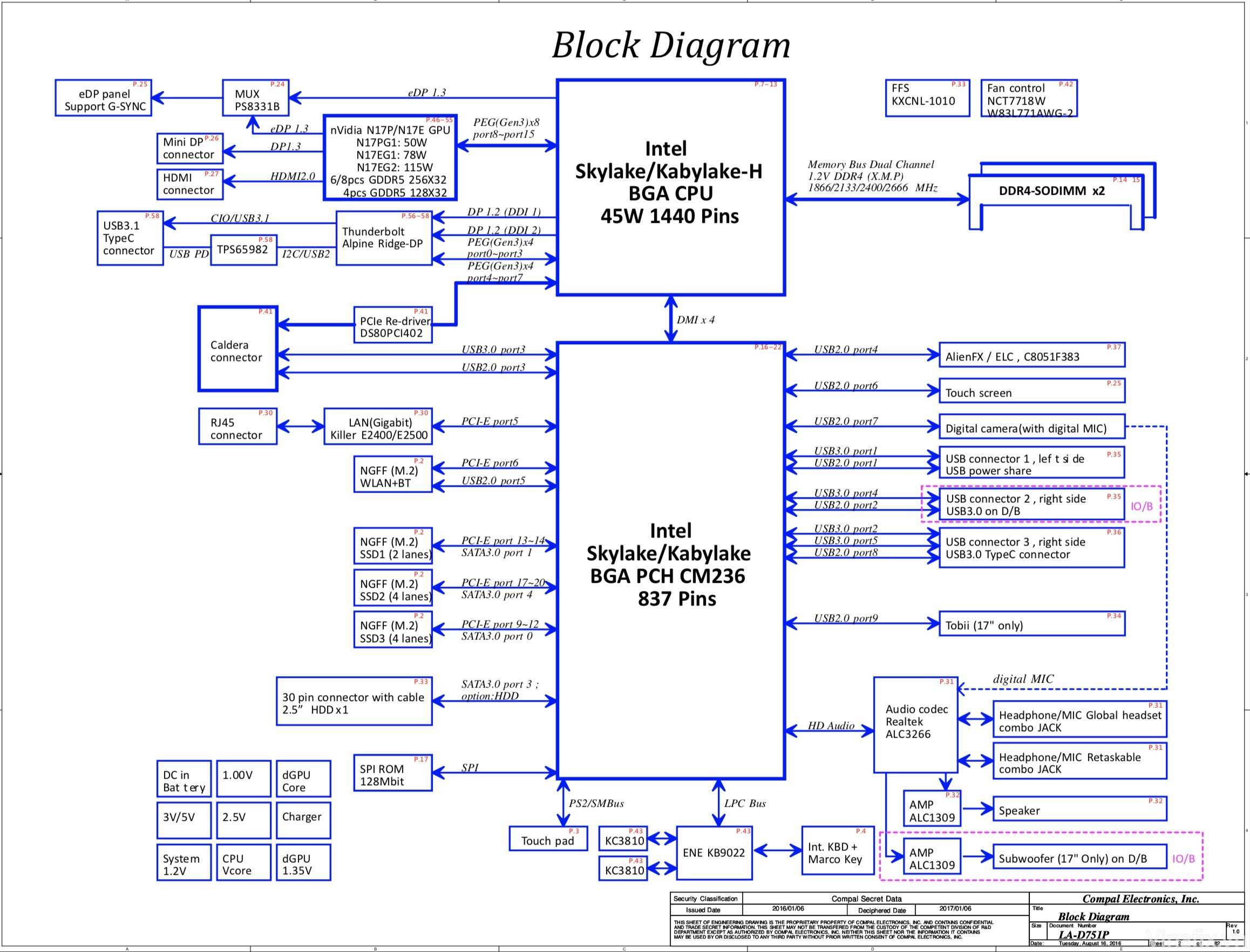
Attached is the first page of the 17 R4 schematics, showing what the AGA is routed through (they called it Caldera internally)
Attached Files:
raz8020, Zero989, mason2smart and 3 others like this. -
-
Yes, this will be my last laptop for a long time. I already have 2 years default next day warranty with this current one, will pay another $200 may be in 2020 (or whenever I'm offered a better deal) to extend it to 4 years in total. By them, I sure I will "burn" this system out and get a system replacement with a updated model, hopefully a more reliable "non-burning" version. Then, I'll buy some more warranty for that system and use it till it serves it purposes.
In my case, one thing is for certain. I will not, or more better-put, I refuse to use this system in a more conservative manner like using it at 4.5Ghz. I will tweak it to run to its max operating capacity and make sure I get my $4000 worth. If it burns, screw it, I will just ask for another one and it should be easier now that Azor has said publicly that the dead system will get replaced and I'll make sure he keeps his word!
Amen!

Sent from my SM-G965F using TapatalkVasudev, jclausius, mason2smart and 3 others like this.
*OFFICIAL* Alienware Area-51M R1 Owner's Lounge
Discussion in '2015+ Alienware 13 / 15 / 17' started by ssj92, Jan 8, 2019.