Problems? See this thread at archive.org.
Great temps!
Do you have steps on how to undervolt the GPU?
-
-
Hey all, I just inquired about warranty options and what they responded with was a bit confusing. They have two tiers—Premium and Premium Plus—and the main difference seems to be that Plus includes accidental breakage. Also, the pricing is mind-boggling—over $1000 for 5 years of Plus coverage.
Questions to the group: does anyone know if Dell ever offers discounted prices on warranties? Also, the agent seemed to imply that I had to decide on the purchase today (something about him even being able to extend the option to me since I had experienced a malfunction right after receiving my unit)—does anyone have experience buying a warranty from Dell well after they already have the machine?
Appreciate any and all thoughts on how I should go about considering a warranty purchase.hmscott likes this. -
What I would do if I were running the company and there was the risk you mentioned is placing a recall on all the laptops and revise one by one, and also releasing a note advertising that the company takes no responsibility for those people who refused to return the laptop. Samsung did something similar in the past with the Note 7 and they haven't lost trust or customers, they were transparent on the problem and that's a good thing. Being shady and hiding important things to the customers while at the same time capping and limiting functionalities just because they don't want to spend the money on good QA and fixes is not very wise, companies doing that will suffer a revenue reduction in the future because people are not dumb, they will just loose customers and reputation.Fire Tiger and hmscott like this.
-
I do agree but you have to find what's the problem here, even more when you are advertising your product as such a "first class performance" product and your engineers can't find TF is happening :/
From my POV as an ex-owner of the Galaxy Note 7, things started the same way with Samsung... :
As first they refused to admit by telling everyone exploding smartphone happened on a very small amount of units...
Then they said they find what was the problem, told everyone it was fixed...
Then they applied a software limit...
Then they did a massive recallhmscott, BADAZZYOUNGIN and Xatanú like this. -
Search for Mr Fox's GPU undervolt guide on this thread(few pages back) or YouTube. His soothing voice will make you feel like you've the fastest GPU on this planet! Hehe
I would've linked it here but I'm in bed already and trying to watch CSGO championship without waking the missus. It's very easy to find it really. Post your results here if you choose to take the route.
Sent from a Galaxy S9+
Wait for a few days and I'm sure they call you back with "updated prices". They ALWAYS do.
And imo, premium plus is a waste of money. I would go for the premium only for 3-4 years max which gives you NBD in home parts service. That should be good enough.
I've a 2 year default warranty and will upgrade to a 4 year warranty when they offer me the best possible deal. Right now, the ball is at their court so to speak.
Good luck.
Sent from a Galaxy S9+Last edited by a moderator: May 30, 2019giltee, Xatanú and clayton006 like this. -
Will take a look. Thanks!
Do you have a special application method for the CPU and GPU? X pattern ? Three lines with the longest being in the middle?Last edited by a moderator: May 30, 2019 -
Is there anyway when you UV the GPU to have it not run at the voltage and clock you set it at even when not under load?
As soon as I apply the UV, even outside of being under load, it jumps to the voltage and clocks I set. Which are currently 1900MHz @ .931V. -
Well depends to be honest. If I liked the company and I wanted to stay there, but they refused to let me do that. I would take two laptops then but hey that's just me.

Sent from my SM-N960U using TapatalkPapusan likes this. -
Is this still the correct video:
I would like to know this as well. I would probably just load a "default" profile.VoodooChild and Fire Tiger like this. -
I followed these videos. Credits to @Mr. Fox and Bob of all trades:
But I didn't lock the voltages (L) as Mr. Fox instructs because I don't want my GPU to run all the time at the top frequency. Just edit the curve, apply the settings and save them to a profile.
Because you are locking the voltage pressing the L key. Don't do that and the voltages will go up and down with the load.chewbakaats58, clayton006, SacraficeMyGoat and 2 others like this. -
Good work! That is a massive improvement. One thing that you can do more is to choose "Full Speed" fan profile instead of "Performance" as that runs the fans a little faster and will give you even better thermals in games than this.
This is the default behaviour of MSI Afterburner unless you LOCK the frequency in place on the curve. If it is not locked, it is only "capped" and the GPU will attain that frequency only under load. Once load removed, it will jump back down to rest clocks and voltages. I suspect that you have pressed the L key while on the curve window which has locked it into place.Last edited by a moderator: May 30, 2019 -
Gotcha! Thanks.
-
Quick tip to prevent Bios updates from getting pushed via Windows update. Disable UEFI Capsule Firmware Updates in your BIOS.
![[IMG]](images/storyImages/IMG-20190531-071731.jpg) raz8020, VoodooChild, Fire Tiger and 4 others like this.
raz8020, VoodooChild, Fire Tiger and 4 others like this. -
Thanks! Only a matter of time before they remove this option....>.<
-
QUESTION I hope someone/some folks can answer.
I ordered an Area 51m on 3/7. It delivered somewhere around 4/5. I shipped it back a few weeks later... I would imagine it arrived at the return facility about 4/30 or so.
I looked at my CC statement today, and I see the $3,700 or so charge. But I see no return/refund.
I go to Dell.com and see I have a Credit Memo (return invoice) that was created on 5/12 for the -$3,700. ... but again, no refund on my CC, yet today on 5/30.
I remember reading Dell is SUPER slow at this... so is this normal? I plan to call them tomorrow, but want to feel equipped with any relevant information. -
Excuse me, I had to update this information because I made a mistake, my GPU temps are not between 77-82 during Division 2, they are between 67-73. I have been playing during 20 minutes just to check if latest Dell driver improved my FPS and noticed my mistake.
They indeed improved my FPS framerate in Division 2 over the latest official from nvidia experience, now it's back to normal. The game also updated itself before playing so I don't know if the culcript where the drivers or the game.Fire Tiger, LoneSyndal and hmscott like this. -
Is this on 1.5.4?
Sent from my iPhone using Tapatalk -
It wont matter as long as his temps stays under 75, some have said 75 noticed throttle for me magic number is 78, soon as it hits 78c down clocks to 450-500mhz and becomes unplayable till temps go down to 77.
To fix this I limited my temps to max 77, yes it throttles some but nothing I notice in gaming, the software throttles just a little to keep temps at 77 but the bios just cuts your clocks like 90% which is ridiculous. So Basically I am tricking the bios from not seeing my threshold of 78 and shutting my GPU basically off. Hopefully this gets addressed soon?Last edited: May 30, 2019 -
I'm just going for a refund on this crap. According to my data collection, apparently Dell has something wrong with the 51m thermal system and the bios update makes it even worse . Temperature ran pretty low for some people at max (72-76), all stock. but some got it really high(85-86). It's obviously not a cooling scenario difference, it's a systematic failure.
Edit: all the differences take place at stock
PS: this test result data is collected in a Wechat group as an experiment.
Furmark 1.20.40 30min 1080p 8msaa latest NV driver bios 1.5.0 vbios 200w 1803 windows performance fan profile all the same factorLast edited: May 30, 2019hmscott likes this. -
How many of you are on 1903? Any issues so far?
-
I've been on 1903 for a bit. No real issues to speak of.SacraficeMyGoat likes this.
-
That's good. Notice any difference in performance?
-
I haven't noticed performance difference, go for it.
-
Alright thanks.
-
From what I see, it matches exactly. Everyone uses different benchmarks with different results and incorporating more into your stack doesn't make things invalid in the future. But since quoting people out of context is your hobby here apart from making meaningless comments on all topics, it's a good idea to not pick on people who don't even consider your comments worth reading and ignore you publicly. Got to have some minimum level of self respect. Right? Oh well, I wonder if it even makes sense to you.
So who else is buying a GT76 Titan along with Area 51m? I am considering one right now. I intend to keep the better performer and sell the one that lags behind. It will give me one more CPU to play with and who knows if I hit even a bigger jackpot on that one. Let's see. Last edited by a moderator: May 31, 2019iujona likes this.
 -
Sadly I can only afford one of the two. Let me know how much of a size and weight difference the GT76 makes.
My main concern is another dual power brick system I have to shove into a single PSU (if it exists for MSI). Second being the keyboard. If it is similar to the GS65/75 I used, it may be a no-go for me. At least you will have unlocked BIOS (if not, you got Sven to back you up). However, a non-upgradable GPU is a let down.
Sent from my iPhone using TapatalkXatanú, Fire Tiger and S.K like this. -
I am waiting for the launch date. The keyboard is not terrible on that thing, but it is nowhere near the territory of GT75 Titan. That mechanical keyboard was just awesome to type on! The only thing that made MSI remove that was probably to reduce the thickness of the laptop. This one looks a little thinner than the GT75. I could be wrong though.
-
I recently purchased the GS75 and returned it. Thermal issues, flimsy build quality, keyboard did not feel good at all even though it was Steelseries. The only good side was the trackpad.
One thing the A51m has over the GT76 is the Gsync. Having it at least keeps the smoothness of frames even if it drops below 144hz.
Sent from my iPhone using TapatalkXatanú likes this. -
Having no Gsync is not that big of an issue as long as I am getting more than 60 frames per second. But that's my personal preference. Some people might not like anything less than Gsync.
-
Ive seen screen tearing on certain games that pissed me off and would prefer to have it for the games that benefit it.
Sent from my iPhone using Tapatalk -
So 1.5.4 introduced GPU throttling at 75C?
I'm still on 1.5.0, kinda wish I stayed on 1.3.2.
If I remember correctly, my GPU doesn't throttle much until 85C I think -
Apparently.. Now Alienware Update app is trying to push it lol.
I hope the lower throttle is just a bug and it gets fixed soon.. -
I don't think it's a bug. I believe even the m15/m17 series had a recent update for this.
-
Well if it isn't a bug, we need to rage on social media and let them know this is NOT okay. The more people complain, the higher chance we have of getting this fixed.Xatanú, Rei Fukai and LoneSyndal like this.
-
-
unfortunately they won't care. They already have your money so you're useless as a customer so they use their marketing to trap more people to the Dell ecosystem. If you've made an 4/5000 dollar investment, you won't just throw that money away when something breaks down. you'll want it RMA'd and fixed up cause you paid for it right ?
well Dell (and Azor) is the type of company that will capitalize from our human emotional part (the part where we worked hard for our money/purchase and it breaks down we get very angry/upset) by making the warranty price almost of a new machine AANNDD by using out of spec parts so people will RMA. that will keep people buying expensive warranty when most people abandon a machine after three years heavy usage (mainstream consumer), while they forget they had the expensive extended warranty. But because it's an "old machine" (while old machine's can be very capable today with the right software) people tend to give up on it, and buy a new machine (usually the same brand) trapping people.
This is an hypothesis, but i've been observing some strange things with IT companies in the last decade. They all try to social engineer their way in to our lives, and ADS are just an obnoxious way they try to do it. There is alot more subtle social engineering going online within APPS or what kinda news we get to see.Papusan, Fire Tiger and etern4l like this. -
No, I'm still on 1.5.0
-
Then it's not an overclockable laptop anymore! That's just sad and downright ludicrous!
I'm never updating beyond 1.5.0 which came default on of my system which means the RAM will always run at 2400Mhz but I'll take that trade over a throttling 200W GPU with a max temp limit of 78C. That's bull crap!
When more games push the GPU in the future, it is bound to hit 78C eventually even with an undervolt. We need to be more vocal about this guys.
Sent from a Galaxy S9+alberty, Fire Tiger, LoneSyndal and 1 other person like this. -
Right, but in order to achieve that temps you have to undervolt a lot the GPU, there will be no way to play games with stock voltages. Dell should do something about it cause many non enthusiastic users don't have the knowledge or won't take the time to undervolt and would expect the laptop to work out of the box.Last edited: May 31, 2019Darkhan likes this.
-
Let us know your findings...
Is the new Alienware m17 2080 MAX Q a suitable alternative to the Area 51m?Last edited by a moderator: May 31, 2019 -
For everyone here complaining about this bios, ask Azor on this tweet I've sent :
https://twitter.com/Nomadsan/status/1134221465589407745 -
Someone I know find no difference after the update, might be a screen scenario for those faulty GPUs? Could only those faulty gpus have this throttle issue but the good ones can survive the update?
-
Can this source of yours provide proof with a graph and their BIOS version info running in background on a GPU intensive game?
Wonder what @iunlock thinks, if he still looks at this thread.
Sent from my iPhone using Tapatalk -
His furmark on 1.5.4 but he didn't offer the bios screenshot, just verbal confirmation.
Attached Files:
-
-
MSI Duke variant
-
I have also replied to your thread. More people need to do the same, Azor might not answer for the burn out issue but we need a definitive answer on this one.
@iunlock @Ultra Male @Papusan @Mr. Fox
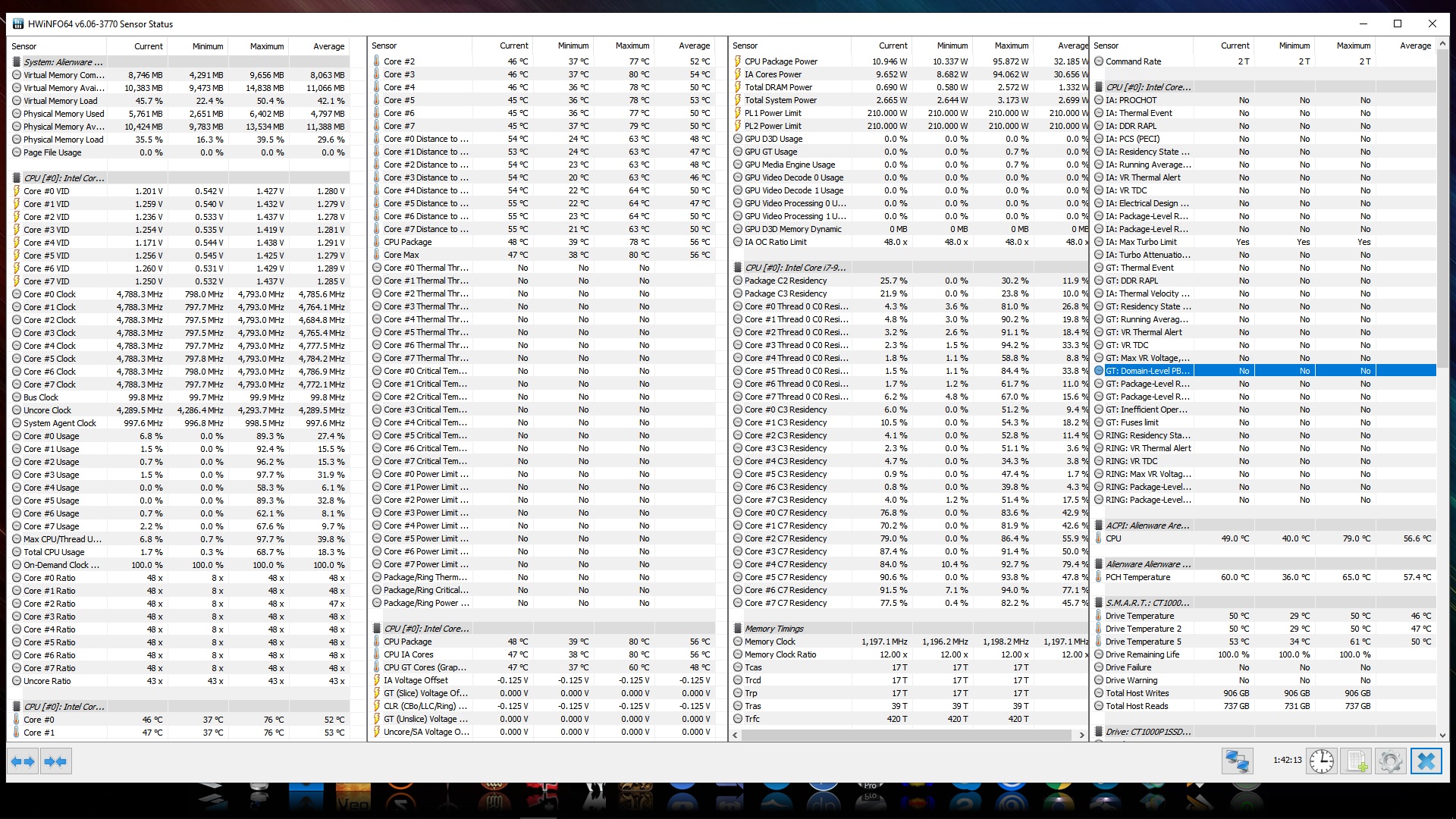
Hey guys,
HWinInfo says on the "Performance Limit Reasons" tab that my CPU is experiencing two errors:
IA: Max Turbo Limit
IA: Turbo Attenuation (MCT)
How do I fix these errors? Any inputs would be tremendously appreciated. Thanks guys
Edit: Added the screenshotAttached Files:
Last edited: May 31, 2019 -
-
My return only took about 1 week for the credit to show up. I would give Dell a call or a chat and see what they say.
Also for those people talking about GPU throttling set points, you can see that with GPU-Z if you go to the advanced tab. I would be curious to see what bios <1.5.0 shows vs 1.5.4 (or whatever the new one is).
*OFFICIAL* Alienware Area-51M R1 Owner's Lounge
Discussion in '2015+ Alienware 13 / 15 / 17' started by ssj92, Jan 8, 2019.


![[IMG]](images/storyImages/Screen-Hunter-188-May-31-01-08.jpg)