Problems? See this thread at archive.org.
Ouch! Bad luck!
-
Wowwwww finally caught up! Finals are over and I am back! How about coming back with some tests hot off the ....not press but GPU/CPU. LOL
BIOS 1.5.0 + 200W vBIOS:
CBR15 stock: 2034![[IMG]](images/storyImages/b8qzxgB.jpg)
CBR15 5.0Ghz: 2,136![[IMG]](images/storyImages/5cbxxex.jpg)
CBR20 stock: 4,912![[IMG]](images/storyImages/vz1whLt.jpg)
CBR20 5.0Ghz: 5,085![[IMG]](images/storyImages/A10ITlk.jpg)
FS GPU: 27,206![[IMG]](images/storyImages/LraYh1f.png)
BIOS 1.3.2 + 200W vBIOS:
CBR15 stock: 2,027![[IMG]](images/storyImages/oFn7tmG.jpg)
CBR15 5.0Ghz:![[IMG]](images/storyImages/5aW6Kvd.jpg)
CBR20 stock: 4,947![[IMG]](images/storyImages/pKBnE89.jpg)
CBR20 5.0Ghz: 4,949![[IMG]](images/storyImages/2L7g0XU.jpg)
FS GPU: 27,295![[IMG]](images/storyImages/ZTfjszo.png)
Stock CPU & GPU tests had no throttling or limit reasons. 5.0Ghz had thermal limit and VR current limit. I have yet to repaste my system...
What's interesting is, I was getting better performance on my previous 1.3.0 install over 1.5.0. Now going back to 1.3.2, doesn't seemed to have changed.
I suspect the difference will be seen more in gaming and longer run tests.
Just checked, mine is always there.
Did it have the smoking issue as well? -
-
Did somebody try a 9900K F cpu in their laptop yet? This comes without the crappy integrated graphics and is said to be a cooler version of the 9900K.
-
He could use a P870TM1 or P775TM1 as an alternative.
-
He already has a personal P8...
His 51M was provided to him by his company.
I think he's looking at the GT76 as an alternative now...raz8020, Rei Fukai, ssj92 and 1 other person like this. -
It's unfortunate the Area-51m launch had so many issues with QC.
I'm surprised how long it would take for a replacement system.
Btw, check your mail.
-
There seem to be no big difference in performance between 1.3.2 and 1.5.0? Are there advantages with one over the other in any other way? I'm downgrading today, and rather just do it once.
-
If you are on 1.5.4 then I'd say downgrade to 1.5.0. You don't even need to make a recovery USB I believe.
I'll stay on 1.3.2 for now and experiment with it more.Papusan likes this. -
So version 1.0.0.3 of vbios is up.... But it does not mention wattage.... 1.0.0.2 was the 200w, and 1.0.0.5 was the 180w..... I wonder if they are back to 190w with this 1.0.0.3 that they've left us with?.... All other files are gone.
Xatanú likes this. -
If you see the properties of the file it sais original filename was XXX_200W_1.0.0.3, so it must be a 200w biosRodrigo Yasuda likes this.
-
Basically they first released 1.0.0.5, deleted that, and now the newest version is 1.0.0.3?
-
-
They didn't delete it. Both versions are there. 1.0.0.5 is basically a 180W VBios update and version 1.0.0.3 is a 200W VBios update. I have upgraded to 1.0.0.3 on my system and will report back my findings later.Rodrigo Yasuda likes this.
-
Today there are about 10 driver updates. Guess what? They're all the exact same file size and version as the previous ones. Dell thinks that we are muppets probably
Last edited: Jun 13, 2019Papusan, alberty, custom90gt and 1 other person like this. -
Dell has been doing that for years on all of their models, it certainly makes it difficult to determine what is actually updated...raz8020, S.K, Papusan and 1 other person like this.
-
Thank you, I wonder if there is any difference in this ROM vs the others 200W or if they just changed the installer again.
I think it's some kind of automatic mechanism that pushes the content updates to the drivers website. I don't think they are doing that intentionally, it makes no sense. Something must be broken in the pipeline and I bet it's happening for all Dell products.
By the way, how are you monitoring driver updates? Are you using some tool like website watcher or are you checking it manually? -
So basically, BIOS V1.5.0 and VBIOS V1.0.0.3 would be ok to have installed? Latest "good" versions?
-
Just checked my bios it arrived 2 days ago version 1.5.4 how do I check my vbios version number?
-
I think you can just flash v1.0.0.3 either way and then you know for sure.
-
Forza Horizon 4, 5Ghz, GPU UV 1800mhz, Performance fan profile. max Details in 3440x1440
-
I flashed v1.5.0 (no recovery needed) and v1.0.0.3. Full power unlocked yet again! ;-)
-
Do you guys think I should swap my Area 51M for a new model M15?
I much more prefer smaller form factor, with as much possible performance. I do however drive a 144hz 1440p monitor,
Currently have i7 9700K + RTX 2080
And would most likely go for an m15 with RTX 2070 max-q and i7 9750H. (EDIT. if temps are good, might go with an RTX 2080 max q, if the price isn't TOO much higher)
What do you guys think? Once again, I really like the area 51M, but it being so large, hefty, and having 2 psu's still makes me kinda feel not okay about it. But of course the performance is undeniable.
But on the other hand I have something more reasonable as a laptop. And if we were to compare the Size % compared to the performance %, is it a good idea to switch?
Of course I still am not sure about the temps on the new m15, But At least I can say, my RTX 2080 now ha okay temperatures with me undervolting so much that I don't use the GPU at 100% anymore, but more at 95 ish %. Otherwise it gets too hot, and I don't want to repaste, am not good at it.
Also I don't need the upgradability of the Area 51M, As I buy a new system every 3/4 years.Last edited: Jun 13, 2019 -
So many cons... why have you even bought the 51m? The old m15 and m17 had the same Hardware GPU wise (compared m r1 series)
It sounds like the 51m was the wrong Notebook for you right from the beginning...Last edited: Jun 13, 2019 -
Alright, The reasons why I went with the 51M are as following:
- I had seen real massive thermal issues with the m15
- Didn't like the design of the m15, it was a downgrade comapred to the normal 15 imho, less lighting, uglier touchpad, worse chicklet keyboard.
- m15 didn't have g-sync (although I realise now I barely game on the laptop its own monitor)
- the max q machines were as expensive as the real deal, but drastically less performance, and then I was planning to get the 2080 max q, as I had a 4K monitor back when I bought the Area 51M, and running at native resolution is a must for me, and you cannot do that with the max q gpu's so well, And now that I have a 1440p monitor, I will have lower frame rates, but should be still acceptable I think, especially for games such as Overwatch.
- I also asked Frank azor if there is any chance we would see a smaller Area 51M, to which I got a reply that there were no plans whatsoever, only to see the new m15 to be announced 1 month later, as the m15 only just released, and wasn't expecting a refresh this soon.
So yeah. I went for the Area 51M. -
I would stay with the 51m, if you have a 1440p monitor than a 2070 max/Q is going to be a major downgrade in framerates. I barely hit 60+ on 1440p ultra with some games.VoodooChild and QUICKSORT like this.
-
Alright .. now you know your preferences and can decide what device you want to own.
Thats a something we cant do for you.
I would go the Performance way all day long... but you have different preferences and need to make a pro con list for yourself. -
1) Never listen to ANYTHING Frank Azor says. That person cannot be trusted.
2) I've had the m15 before, the keyboard is garbage, too cramped, and the thermals suck. So you'd be shooting yourself in the foot by downgrading.
yes the portability, battery life, is superb, but all the joy ends there. Your machine is a beast and has superior cooling, superior keyboard, superior screen, superior upgradeability, it stomps all over the m15 in every way, shape and form.
If you think the Area-51m is bulky, try owning an MSI GT75 Titan or a Clevo P870XX for a week, you'd be running to your (thin and light comparatively) Area-51m -
So I can't decide if it's worth waiting anymore. I was just told I am now going to wait till July 4th. That is now 2 months of being delayed. I am deploying soon and really need something. Really don't know what to do right now. I may need to cancel and figure something out.
-
My second choice after the Area-51m would be the MSI GT76 Titan. Superb specs, superior cooling system. Simply a solid laptop that will last you for long.
-
Hi all
could somone help me in regards to a problem with intel extreme tuning utility? it seems whenever i change settings it asks me to reboot and then once its rebooted it tells me The following settings could not be applied successfully and lists any changes i made.
9700k/rtx2700 -
Where are you from. The systems are starting to ship. Mine said June 26th and came last week.
-
Agreed, mine seems to have progressed quickly. I'm in Australia and I placed my order on the 7th of June and it went to shipped yesterday. Expected delivery is from the 18th to 26th of June.
Sent from my ONEPLUS A5000 using TapatalkLast edited: Jun 13, 2019 -
Has only run one of these on there 51m? Figured it would be fine. Would make the dual psu less of a hassle if you're on the go alot.
https://www.amazon.com/Out-AC-Power-Cord-Splitter/dp/B073HT9YFB -
I can feel your pain brother Ordered mine 51m (9900k, 2080) on 5th of May and still waiting and this is killing me... And I still don't know how more I still need to wait... I want this crazy machine in my possession now
-
I suspect that once they determined that the 1.5.4 BIOS gimps the machine enough to avert further catastrophes, they knew they could start quickly filling orders again and that 1.5.4 would hold people over enough until they could develop another BIOS update that eventually fixes the problems without requiring the aggressive throttling.
Quick question: I ended up cancelling my original order, which had a replacement incoming due to burning out, and just recently re-purchased the same machine for over $200 less (due to a stackable 1-day promotion). This time I went with the 2TB RAID 0 NVMe PCIe SSDs (for $90 more), instead of the 2TB non-NVMe RAID 0 PCIe SSDs + 1TB SSHD —was it a mistake, to pay $90 more for 1TB less storage, or will I notice the speed difference going with the NVMe option vs the regular PCIe SSDs?Last edited by a moderator: Jun 14, 2019 -
You will not notice a thing! Been using SSDs since years. Other than in synthetic benchmarks, you won't be able to tell the difference between an NVMe SSD and a non NVMe. Maybe if you copy large amounts like multiple gigs of data from one partition to the other you will notice the difference but most people don't do that in their regular usage so no.
OS Snapiness all comes down to the random 4K Read/Write which in this case, is very identical.
SSDs have come a long way, they are way too fast to be able to see or feel the difference between one and another, regardless if it was SATA or NVMe.
If anything, NVMe SSDs will add at least 5-10 seconds delay to the boot time due to the time it takes to initialize the NVMe controller upon boot up.
Take for example, my wife's 6 year old Dell Vostro 4570 which has a SATA Crucial MX100 SSD. From the moment she pushes the power button till she sees the Windows desktop, it takes 7-8 seconds. On my Alienware Area-51m with a dual 2TB 960 PRO in RAID 0, from the moment I push the power button, it takes like 10 seconds until I see the Alienware logo, then another 5 -7 seconds until I see the Windows loading spinning icon, then another 8 seconds till I'm actually on the Windows desktop. Pretty sad that a machine that costs 10 times more than that old 5 year old laptop takes so long to boot and no I have no HDD in my system so that can't be the problem.
Heck I even tried formatting one day without RAID, single drive AHCI setup, the boot up was still slow as heck. Again, that's due to the delay of the NVMe controller initialization during bootup.Last edited: Jun 13, 2019Rei Fukai, giltee, Papusan and 1 other person like this. -
My M18xR2 has 2x500GB 850 Evo drives in RAID0
My Area-51m has a 1TB 970 Evo Plus.
M18xR2 boots up faster lol, but in game loading and heavy transfers, the Area-51m wins by a decent amount.Rei Fukai, Papusan and Spartan@HIDevolution like this. -
I don’t have to use the Dell Deployment Package tool to install a vbios correct? I can just run the exe from desktop and install right?
Last edited: Jun 13, 2019 -
I live in the US. I have seen that some people I know else where that have ordered it this month and are already reviving it with the same specs as I am. It's very frustrating that I am still in wait and I don't have to much time left to receive it. There also is really no other choice for me at this time that available to buy and get here quick. So the only thing I can do right now is build a small pc and somehow bring my gaming monitor with me which I really don't think is going to work out.
-
What's the word on the 1.5.4 bios for 2070 systems? Any concerns / troubles / throttling?
Fire Tiger likes this. -
Thanks @Ultra Male —
That makes me really sad. I spent MORE to go slower on boot-up (which is one of the metrics I care about the most), and I spent MORE to get 1TB less of storage.
If I at least want to add a good aftermarket SSHD, is there one you recommend? I don’t understand why Dell does not offer it as an option to add a 1TB SSHD along with the 2TB NVMe SSDs like it does with the regular SSDs—do you know? -
Hi all
Just FYI
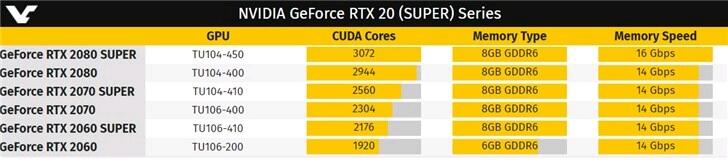
The Super RTX 20 SERIES is on it‘s way, your embedded RTX 2080, 2070, 2060 in your 51m will become GARBAGE very soonAttached Files:
FXi likes this. -
-
I’m waiting to see if there will be a refresh in Q4 or Q1 next year. Super GPUs, 1440p and 1080p 240Hz panels, and god I’d love to see Ryzen options.
3800X giving same performance as i9 with much better thermals and efficiency? Sign me up. And maybe AW will have it together by then. -
One thing for sure... Nvidia will continue milking on today's Mobile Turing cards. They aren't older than 4.5 months and you won't see a refresh to Super on long time. AMD have nothing they can compete with for notebooks. Nothing! Please, don't confuse with real desktop cards. And binning chips for Mobile cards take time.raz8020, c69k, Rei Fukai and 1 other person like this.
-
AMD likely to have Navi 20 next year at the latest to compete with 2080 Super/2080Ti. But yeah, I feel for everyone who just got RTX to see Nvidia sell the “unlocked” versions.
-
-
Whatever! Still soaring with the 2080!
Everything anyone buys will be obsolete eventually. Getting tech right on release is the only way to “reap the benefits longer”... sooo those who have had a 2080 for 4.5 months have been doing exactly that and will continue to do so long after even the “SUPER” versions are obsolete themselves.
electrosoft, VoodooChild, Truckasauras and 1 other person like this.
and will continue to do so long after even the “SUPER” versions are obsolete themselves.
electrosoft, VoodooChild, Truckasauras and 1 other person like this. -
You also spent more to run hotter - even if the delta in speed isn't particularly noticeable the M.2 onboard controller runs hotter especially in long transfers, and once the heat is introduced most motherboards / laptop cases don't have good thermal dissipation for M.2 drive spaces - so that heat builds up and adds to the overall temps.
On my GT80 the 4 M.2 slots were on either side of the CPU area on the opposite side of the motherboard. I noticed that when running CPU stress tests my M.2 drives - which were idle - would start to "heat up", and that heat stayed for a long time after running the CPU stress test.
When I ran performance transfer tests on the M.2's individually that were next to the CPU, the CPU temp went up and my OC headroom decreased... those 2 M.2's right next to the CPU remained the hottest all the time.
There was no active air flow over the M.2's as designed, but fortunately the GT80 top cover between the keyboard and the screen popped off easily, so I could point a USB fan at the M.2's and the CPU area for additional cooling. It helped benchmarks too
Those were SATA drives in my model, the next generation GT80S's got NVME PCIE 3.0 drives, and ran even hotter...
Now, there are new NVME PCIE 3.0 M.2 drives that do run almost as fast as the fastest NVME PCIE 3.0 M.2 drives, but cost the "same" as the mid-range priced SATA drives of today - this is a somewhat recent situation so shop around you may find you can get the fast PCIE 3.0 drives for the same price.
They still run hot and you may not notice a difference, but you are paying the same.
raz8020, Rei Fukai, giltee and 1 other person like this. -
Well when an upgrade card does appear, you would also have a chance to convert 51m to HDMI 2.1, where the m15/m17 are going to be locked to 2.0b.
tito37 likes this.
*OFFICIAL* Alienware Area-51M R1 Owner's Lounge
Discussion in '2015+ Alienware 13 / 15 / 17' started by ssj92, Jan 8, 2019.