Problems? See this thread at archive.org.
my headphone jack doesn't output sound trying to insert headphones, it tries but doesn't work on 1903.
-
-
are you on the factory image or a clean install of 1903?
Also, what's your Realtek Audio Driver version?
Finally, have you installed the following apps from the Windows Store:
Alienware FX 02
Alienware Sound Center
Realtek Audio Control -
Dell factory Image
Realtek Audio Driver ver 6.0.1.8603
Alienware command center nags at me to download additional software and I don't do it so I don't think so no. Looking at Installed Apps I do not see anything else installed. No I do have Realtek Audio Console installed. -
That's the version I'm using and it works on 1903.
You'll need to install the above apps that I mentioned then reboot and try again -
Do I need to uninstall the Realtek driver and the Realtek Audio Console then install those from Dell first?
-
What do you mean install them from Dell? Don't tell me you let Windows update install any driver for you?
For drivers, you need to only install them from Dell. As for the Realtek Audio Console, it only comes from the Microsoft App Store the Dell installer simply is a shortcut to the appstore app which I linked above. -
I mean go to Dell.com put in service tag and download the driver from Dell.com for Realtek driver and software audio console. Do I need to do that first?
-
Not really, since you already have that same driver installed, now all you need to do is to click on the below links one by one and install them from the Windows Store:
Alienware FX 02
Alienware Sound Center
Realtek Audio Control
![[IMG]](images/storyImages/RHNMYwO.gif) VoodooChild and hmscott like this.
VoodooChild and hmscott like this. -
I figured out I just have to shove the jack more forceful deeper inside. I was being to fragile with it because of the way it feels.
hmscott likes this. -
Back in the day, when Alienware's 15 inch laptops didn't have soldered RAM
 , what a given laptop supported and what Dell claimed it did were two different things. For example, my old aw15 R2 supposedly only supported 16GB of 2133MHz memory.
https://www.dell.com/support/articl...alienware-15-r2-system-specifications?lang=en
Yet, it took 32GB of 2400MHz memory with no issues. They just seem to have very little idea, almost as if someone in China designed the internals, in addition to building the systems, and they are just there to push that stuff.Last edited: Jun 16, 2019FXi, Rei Fukai, Papusan and 1 other person like this. -
It's hard to say without looking at timings. Latecies being the same the real world performance improvement might get close to the theoretical +11% in data intensive applications, but games would probably see less of an improvement. That said latencies tend to go up with frequencies too, unfortunately - which is why I didn't bother with 2800MHz memory for my m15.
The actual problem is that Dell uses very slow memory, so the best policy is to order as little memory as possible from them, throw it away and get HyperX Impact memory instead, at a significant discount to what Dell would charge.Last edited: Jun 16, 2019giltee likes this. -
Happy Father's Day to all of the fathers out there!
Xatanú, FXi, Fire Tiger and 9 others like this. -
Thank you and same to you if you are.
-
That's what she....S.K, BADAZZYOUNGIN and Sawtoothwav like this.
-
New look with fresh decals.
If they look ugly to you, that's OK because this isn't your machine anyway.
Just sharing so that if somebody likes the look then they can achieve the same.
![[IMG]](images/storyImages/IMG-20190617-101047-1.jpg)
![[IMG]](images/storyImages/IMG-20190617-101059.jpg) Last edited: Jun 16, 2019FXi, Virale, nkc and 1 other person like this.
Last edited: Jun 16, 2019FXi, Virale, nkc and 1 other person like this. -
I used this self adhesive vinyl for these. It has a really precise scale printed on the back which makes cutting stuff that much easier. Liquid proof stuff. Quite amazing!
https://www.amazon.com/gp/product/B07JN2953D/ref=ppx_yo_dt_b_asin_title_o02_s00?ie=UTF8&psc=1 -
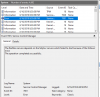
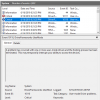
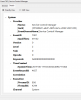
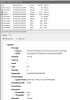
Hey guys, just started up my machine and opened event viewer and seen an error for Service Control Manager. Anyone have any idea what it is? First time ever seeing it..
Its Event 7001, Service Control Manager (The RasMan service depends on the SstpSvc service which failed to start because of the following error, The Operation Completed Successfully.
Anyone familiar with this at all?
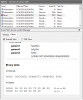
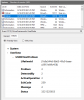
Edit: The second error just popped up as well.. Searching these errors didn't bring up much. But another critical error was just above the second image, that was related to Tobii, which i have disabled.Attached Files:
Last edited: Jun 16, 2019 -
-
Hmmm... not sure with the "Edge" logo this time around...

Just kidding. Enjoy the machine brother!
My next machine will have a "i9" logo as I got upgraded to a 9900K this time but that sticker is coming off on the very first day.
Sent from a Galaxy S9+jclausius, Fire Tiger and S.K like this. -
LOL, it was in the package so I thought WTH, just slap it on there so that things look streamlined, otherwise one small and one big wouldn't line up together perfectly and would look awkward.
By the way, next time you pull it apart, try to leave the DGFF connectors alone because their pins are VERY tiny and can get bent even with a big enough dust particle or thermal pad chunk that "somehow" lands at the wrong place at the wrong time. You can easily change the rear heat sink's thermal pad by flipping the DGFF daughter board over towards the CPU fan side. If you can't resist and "have to" take those connectors apart, try to use a magnifying glass or a high zoom camera lens to make sure there is no damage / deformation to the pins *prior* to putting it back together and there is no *alien* object lying at the connection point on the MB which could cause problems. Mine came damaged from HIDevolution and I wonder if they did it or it came like that from the factory. Since replacing those, I have taken them apart 3 times as I was playing with different motherboards back and forth, without any problems.Last edited: Jun 17, 2019 -
Click on "Details" tab and share that also. That's where the actual information resides for any errors.
-
Attached Files:
-
-
i had similar problems after setting up win10 1903. My microphone input wasnt working. And the Realteak control center wasnt working. Both audio jacks where standard set to headphone. Even the microphone one! But without Audio console i wasnt able to change the setting
My solution:
install the realtek audio driver from the Alienware 17 R5. The console is working with this one. That fixed all my problems.FXi, Fire Tiger and Spartan@HIDevolution like this. -
Ha, that explains a lot I guess! Was it also the case before Dell took over?Rei Fukai likes this.
-
nope, before that they where all Clevo based machines. Flextronics and Delta are also two ODM's that manufactur AW parts for Dell. Dell owns the AW designs, while Compal builds the machines and Flextronics and Delta provide the parts.
-
OK, so it sounds like Dell still actually designs the machines, which makes the widespread incompetence a bit more puzzling.Rei Fukai likes this.
-
Quick question please folks.
I'm thinking about pushing the button on a Lunar Light model although I noted the discussion quite a few pages back regarding the possibility of palm rest discoloration/yellowing.
I'd be really grateful if any Lunar Light owners could provide a quick update on how their A51m has fared to help me determine if this is common or just affecting a few.
Many thanks! -
I haven't had any yellowing at all after several weeks of use. I don't sweat much, but even if you have naturally sweaty hands I would say it's good practice to wipe down the keyboard after long gaming/ editing sessions.
Here's a quick video I shot for ya:
Farrago and Fire Tiger like this. -
Don't go hunting for Event Log Errors with Windows 10 if you plan on remaining sane. Unless you see a bug infront of you (ie. system crash, BSOD, error message) then don't bother going there,.
Speaking of going there, I clear my event log every few days because if I do face an error, I don't want to be looking through thousands of event log errors to be able to identify the most recent one I just had.
Clear Event Log Errors (save as .BAT and run as Admin
Code:@echo off FOR /F "tokens=1,2*" %%V IN ('bcdedit') DO SET adminTest=%%V IF (%adminTest%)==(Access) goto noAdmin for /F "tokens=*" %%G in ('wevtutil.exe el') DO (call :do_clear "%%G") echo. echo goto theEnd :do_clear echo clearing %1 wevtutil.exe cl %1 goto :eof :noAdmin exitLopt, Falkentyne, SacraficeMyGoat and 1 other person like this. -
Finally! Windows 10 isn't downloading the ancient firmware 1.3.2 despite having the latest BIOS. I just got this:
Papusan, FXi, hmscott and 1 other person like this. -
I went ahead and paused the updates when I saw that. I want to stay on 1.5.0..anyway to not accept this firmware download?
-
So which System BIOS and VBIOS firmwares are the best to use for best performance & temperatures, anyone know? cheers in advance for any answers, and I'll be sure to answer any questions I come across on here that I know the answers to.
You'd think that the latest ones were the best to use but that strangely doesn't seem to be the case lol... -
Of course. Dell don’t want that the owners (after all the fire and smoke) should run old firmware In short... Dell Forced M$ to don’t touch the latest and greatest
raz8020 and Spartan@HIDevolution like this.
-
Hi guys, for those of you who have done a repaste, is the amount of TIM and pattern you applied similar to a desktop setting?(i.e.: squeeze an X and then use the cooler to press it evenly) I heard from another discussion that you should use a little bit more paste since the pressure of the laptop cooler is weaker and thus will not spread the paste as evenly as desired.
-
WTF? How do I block this??? My computer also downloaded it and want to install it. :-(
-
From personal experience, don't use too much. A "rice grain" sized Cross (X) method is what works best for me. But if your paste can be applied even with a spatula, you could try that too.
Sent from a Galaxy S9+
Block it from the BIOS. Disable UEFI firmware capsule updates in the BIOS menu and It'll never bother you again.
Sent from a Galaxy S9+Last edited by a moderator: Jun 18, 2019_deadbydawn_, Xatanú, alberty and 6 others like this. -
Thanks for the tip! Do you mean like two rice grain sized crossed together? And may I ask what would you recommend for the GPU? I might need to do a repaste this week so any suggestion would be greatly appreciated!
Sent from my iPhone using Tapatalk -
Thanks!
-
I was going to do a full delid and LM job, but since this is a company owned machine I think that might be a little too much $ and time invested.
So I'll get the Gelid pads, do a repaste of CPU and GPU and call it a day I think. Probably the best middle ground
GreatD, VoodooChild and jclausius like this. -
If you extract the contents of the Realtek audio driver for the Area 51m you can find this folder inside: "RealtekHDAudio\Win64\ThirdParty\A-Volute\A-Volute APO\" with the all the nahimic binaries. You could try installing the "A-VoluteNh3ApoSwc.inf" from that folder manually. I think the package installer has a bug and does not trigger the installation of those services.FXi and Spartan@HIDevolution like this.
-
Does this also block update from Support Assist?
-
Thanks Amroth; very good of you to take the time to do this and much appreciated!Amroth likes this.
-
I don't think so, because it's an application controlled by Dell and they will keep pushing every update they release. I recommend removing that app and downloading the drivers manually from Dell website.
The other trick will only work for windows update application.VoodooChild, Spartan@HIDevolution and c69k like this. -
Its not a problem for me to let Supportassist updating, but I just do not want windows update to mingle into that kind of stuff.
Tomorrow, my 51m will be delivered.
Spartan@HIDevolution likes this. -
I was just finished my first repaste and repad. In anyone is wondering, I used only 2.0mm thermal grizzly pad and I only used about half of the 100x100 one. However I do found myself in a strange situation. I am not sure if it is the repaste, but now I see my GPU reach thermal limit on 66C which was really weird. I am running at 1.50 BIOS and the 200w vbios. Not sure what is going on.
-
Does anyone know what DAC the Area-51M has? I can't find any info on the product page. @ssj92 or @iunlock - do you guys happen to know? Or even just the general quality of what's in there?
Rei Fukai, FXi and Spartan@HIDevolution like this. -
Nice! Just recieved my pads in the mail this morning, going to repad after lunch.
How was the process? I hope I didn't waste money on pads... I bought 120x120 of 1mm and 120x120 of 1.5mm, and only an 80x40 of 2mm... If I only use 2mm I might not have enough, and I'll have wasted $45 on pads I won't use.
Let's hope my system is a little different! -
Update, I am not sure what exactly helped, but I turned off the buttery boost function in GeForce Exp (I have never opened it so I don't think it is causing the strange 66C throttling. I also opened my computer again and found that the two 1.5mm pads I used was not making a nice contact with the chips so I took them out and used 2.0mm pad instead. Then I also noticed that on the copper cooler of the GPU, there's only about three fourth of area is covered in paste, so I guess maybe I used too little paste on the GPU. Anyway, I did a repaste on the GPU to make sure every surface is covered in paste. This time I was able to return back to my old performance with an improved temp (maxed 80C in benchmark). I am totally lost here since it is my first time paste/pad a laptop. But I want to put these out anyway, maybe it could be helpful for someone else.
In fact I did a repad (see my above comment lol) In my case the 1.5mm was not making proper contact with the chips (there's no pressure mark like the others). I am not sure if that is reason that is causing my 66C throttling but I switched to 2.0 mm anyway. In general I would say it was a fun/taxing experience. The most difficult part for me was to cut the pad into the exact shape like the stock ones. However I didn't have a ruler so I just used a pair of scissors and cut them based on my eye estimation. If you don't mind take some time and do the measure and have some better tools for the cutting, I would say the entire repad should not cost you more than half an hour(not including take the beast apart) As to the dimension, I wasted $40~$50 for those 1.0 mm and 1.5 mm pads so I hope that you can return some of those if yours turned out to be like my case. In retrospective, I believe S.K.'s modified suggestion is the optimal one. Just go for 2.0 mm, it would still work even if it is too thick, your cooler will squeeze it anyway. Good luck my friend!c69k likes this. -
Ahh okay, thanks man!
Going to start pulling the machine apart now, I just hope I have enough 2mm...
*OFFICIAL* Alienware Area-51M R1 Owner's Lounge
Discussion in '2015+ Alienware 13 / 15 / 17' started by ssj92, Jan 8, 2019.