 Problems? See this thread at archive.org.
I'm actually a bit torn on if I should keep the machine or returning it. I like almost everything about it, but the random freezing issue bothers me alot. Also, there's the slightest bit of fan rattle once in a while. :-/
-
For what it's worth. Look how well designed the Asus G703 cools a Mobile i9 cpu and a lower end graphics card vs the hotter gpu & cpu offered in our Alienware 51ms..
![[IMG]](images/storyImages/1511494351879.jpg)
And now our Alienware 51m
![[IMG]](images/storyImages/FZjVSC8.jpg)
I think they engineered everything and then cut cost on the thermal engineering that should have been done. ASUS figured it out. Lol side cooling.. Sure a it obvious should be a standard. Asus has double the amount of cooling fins to sustain the amount of heat.
1 input per fan 2 outputs per fan 2 cooling fin setups per fan. Hmm sounds logical.
Alienware engineer. Hey if use the prototype design remove a little but of the copper save some $ there we can just use thermal limitations built into the laptop to throttle it so it works. It's essentially cheaper and easier. -
You can't loose out on anything if you return it. Nothing beats having money in your pocket and options for what proven high performance laptops come out. Its going to take alot for Alienware to step there game up at this point. The didn't do anything Clevo hasn't already done. They just did it worse and make you talk to India to order it. Maybe you will get lucky by the time your return is complete the revised version will come out of enough of us return the system. Or the R2 with the better screen and possibly a 2080ti. Wait what am I thinking they can't even cool a cpu let alone a monster like a 2080ti. Haha
-
I had power limit throttling after I solved the thermal throttling issue. I understand that it means that I'm up to the power limit set in the BIOS and that means I'm utilizing all of that room. However, I am not so sure it is a good thing; I have immense drops in FPS to the point where it is clearly problematic during games. When I check, it is not thermal throttling and not even really close to it - only power limit throttling.
I encountered this issue frequently on an older laptop (HP 15-ax250wm), where it was thermally excellent but ran into its power limits after a while at full turbo. The system then murdered its performance slightly afterwards. After turning the turbos down slightly on the Area-51m, I completely eliminated power throttling AND any thermal issues. When plugged in to my projector (Anthem on 110" screen!) the CPU heat never even passed 75C and I maintained 60 FPS with no noticeable dips (the limit of that particular display).
I'm no expert, if anyone can point me towards a good explanation of power limit throttling I'd appreciate it. -
From what I have seen
@Rei Fukai said the Vapor chamber in last years AW17R5 was fake... http://forum.notebookreview.com/threads/adding-vapor-chamber-to-a-heatsink.826742/#post-10841881
Dell's adverticed Vapor chamber in their press release last year. But any Vapor Chamber won't be more effective than how the engineers want it to be.
Hybrid (1-Piece) Vapor Chamber
Available from a growing number of manufacturers, one-piece vapor chambers are a cost reduced version of their two-piece counterparts, yet maintain the thermal performance characteristics while adding some unique capabilities... One piece vapor chambers make direct contact with the heat source, have a multi-directional heat flow, and can support clamping forces of up to 90 PSI. But they’re less expensive to produce because they require less tooling.
And you have the heatsink with glued on grills in Aw15R3. As you can see more copper doesn't always help Neither a cheap Vapor chamber heatspreader vs. propper copper cold plate.
![[IMG]](images/storyImages/OdNQI6R.jpg)
You mean its better? 100C from what I have seen
Last edited by a moderator: Feb 28, 2019 -
The current i9-8950HK + RTX 2080 version of the ASUS G703GX and MSI GT75 look like this:
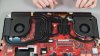
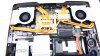 raz8020, Kormi, Mythbuster and 3 others like this.
 -
As stated before, I have a fairly modern Clevo - I could return this and wait for a revised model. I think maybe I will do that, even if I really want to love the AW... :-/
EDIT: It's done. I requested a return for full refund even thou it saddens me.Last edited: Feb 28, 2019 -
Has anyone used an AC or chiller to bring temps wayyy down yet? Interested here to see what is capable/sustainable on the 51m power wise when thermals are taken out of the equation. I'm assuming there are still the usual fairly (or "UNFAIRLY!"I would call it) low limits from Dellienware blocking the hardcore enthusiast who cares not for portability.
I did read the thread, saw some mentions of PL throttling, but just wanted to ask directly if anyone has chilled her out and stretched her legs yet. Thanks!raz8020, VoodooChild and Vasudev like this. -
As for the US repasting does not void warranty. This subject was beat to smithereens last year and toward the end of 2017. If you do a search you should even find some tweets about this, which @Mr. Fox and I were referring to when we were mentioning "...AW being on record..."
I've always been impressed with MSI and Asus cooling system. It really does outshine AW after a certain threshold, but that is a given being that the chassis is much bigger with more room. Yes, the heat sink design of the MSI and Asus are a lot better IMO for what they are. The AW models are ideal with GTX1070/7820HK or below. The temps are fantastic with that set up on AW's....
Also, keep in mind that what forces AW to go smaller is it's form factor as it is much more compact that MSI, Asus etc... So in ratio, if you look at the percentages of its cooling potential, the AW is actually pretty good for what it is. If you're basing it straight off of temp numbers then yea that's obvious... my Desktop stays below 50C's, but it wouldn't be right to compare that with something out side of its 'weight' class.
Where AW messed up with the 15R3/17R4 is not adding a side vent on the right side of the laptop, whereas almost everyone else did for that gen.Rei Fukai likes this. -
Seems to be about the same price. Also, all specs 2070 and above now come with 256gb nvme and 1TB SSHD.
-
Have you tried TS's disable power limits in FIVR window?
-
And if you start with the 2060 preset (to get rid of the SSD) and chose to change the GPU to a 2070 or a 2080, the power adaptor doesn't update leaving you with an impossible purchase.
This problem doesn't happen if you start with the 2070 preset and upgrade to the 2080, in this case the power adaptor updates...Vasudev likes this. -
Ive sended a ticket and this is what they said
Hi,
you will start seeing notifications to collect and redeem your free TCTD2 assigned to your Area51-m laptop from March 1, 2019.
I will keep your case open, and will check if the code was assigned and distributed with the help of our voucher system.
This is how it should happen: How to redeem your Game Key.
Best Regards,
David Gaal
Order Management Coordinator
Tobii Tech -
Here is the brand new released Alienware m17. It seems 100C is the norm. Going even thinner won’t help on the cooling. http://forum.notebookreview.com/thr...m17-owners-lounge.826893/page-6#post-10872872
The physics score suffers heavily due Cpu throttling.Last edited: Feb 28, 2019 -
Must be when the next batch is supposed to ship.
Btw guys my Area 51m backpack came yesterday. It's pretty big in my opinion. I didn't take any pictures yet. Do you all want to see some once I get my laptop in or are you guys not all that interested?Jaxigar, Kuronos, VoodooChild and 2 others like this. -
I had no clue they had such great heatsinks. We talk about 10 pipes. The cooper one must be very effective.
-
Just got a message my order is delayed due to part shortage. Estimated arrival 12-3.
Thats what the order said from the beginning so seems i aint getting it earlier.
My refund has been processed and the money is back on my account. Took them exactly a week from pickup. Very satisfied with that!c69k likes this. -
Even though I really like the 144hz, it's really smooth.
I cannot leave my 4K 27 inch monitor, the extra space thanks to the resolution, and the better immersion thanks to its size is something I got used to so much that going to the small monitor makes it a little difficult for me.
So Now I have my laptop next to my 27 inch monitor, side by side, basically running a 2 monitor setup.
Can anyone recomment me a laptop stand I can put this monster on?
Something that lifts the laptop significantly, not just a cooling pad or anything, more like this kind of thing:
https://www.amazon.co.uk/Kensington-Easy-Riser-Portable-Ergonomic/dp/B0007YB8NM
But of course it has to leave the vents open for breathing + keep in mind that the front of the laptop. (where the speakers are), has an angle, so where the laptop will rest at the bottom should be large enough to support it.
Anyone knows anything like that?
To be honest that kensington one looks really nice, you can also adjust the angle, but I think it's a little too undersized. Not sure though. -
I use a coolermaster notepal u3 plus. Use it without the fans and the 51m fits perfectly!
It not adjustable but gets my screen aligned with my external monitor and gives more breathing room for the fans.
https://www.amazon.com/Cooler-Master-NotePal-PLUS-Performance/dp/B00ED3WMTCpropeldragon, raz8020, Papusan and 2 others like this. -
I'm using the EXACT same one. Have had it for 10+ years. Excellent stand.
raz8020, jclausius and FrankieFrank like this. -
Thanks for the suggestion, but do you think it will work with my setup (see pictures)
Currently I have 2 issues I want to overcome, and one preferable option:
issues:
- As you can see in the image, the pc blows directly into the adapters which I don't like.
- I cannot put the laptop closer, because the laptop its body reaches my separate keyboard, especially when gaming on the keyboard, I put it more to the left fore more comfort for my arm.
Preferable option:
- I want the both screens their tops to align side by side, but this is optional, as the 27 inch monitor is the primary monitor and the laptop monitor is barely used.
![[IMG]](images/storyImages/ve3eQ1S.jpg)
![[IMG]](images/storyImages/qYgwpDz.jpg)
-
Maybe a stupid question, but does it matter which power brick is connected to which port?
-
I’ve had these problems with my returned unit aswell except the speaker grill. Although the touchpad and USB port on the left side weren’t troublesome, the screen wasn’t balanced in my unit aswell. My screen was more to the right like 1mm.
Other problems.
- scratches on the glossy bezel out of the box. (One of the clips of the bezel was not attached out of the box. I could however click it in so no problem. Poor quality control though)
- dead pixels alter 3 days, a whole line of 4 pixels on the left side.
- humming fan on low rpm, you felt it in the chassis of the laptop very noticable.
- lightbleed left corner and right corner, right corner the most. Could have lived with only that.
Hopefully the next unit is in pristine condition. You should think for these kind of dollars / euro’s everything is top notch.
I saw another question about temps. While Gaming my machine was very cool like 60 / 70 degrees for GPU and 80 / low 90’s for the CPU. I had a 9700k and RTX 2080. While benching the highest i’ve seen the CPU go was 94 / 95. Really good compared to the AW17r5 out of the box.Jaxigar, VoodooChild and nader_rizk2003 like this. -
My 17 R5 could OC 100 MHz on the cpu out of the box without reaching 85C+. So i would say the R5 is better than the 51m IF the paste application is good. Star citizen was at that time the only game (not even firestrike could bring my gpu down to its knees)
That could let my cpu hit 90C, but not even cross it. Mind you a fully unlocked 1080 can pull 210/215 watts. -
Answered your questions above.
this is how it lookes like.
jclausius, Darkhan, ssj92 and 1 other person like this. -
Thank you very much.
Also is that the ikea desk?
I was planning to buy that one. -
The touchpad thing isnt realy a defect imo, just a light space between the right side of the touchpad and the backframe, probably because there are no components directly under the left side. But it sucks if you have scratches out of the box.
-
Wow awesome, i’ve had 3 swaps for my aw17r5 before i got a perfect one. Loads of temp problems, the one i have now is decent. But stil hits 95 on the CPU while playing bf5. GPU has never been a problem and stays at 60 / 65 max. The i9 is just a difficult CPU to cool.
Yeah it is, this is the full desk.
-
I'll give that a shot this weekend. Good idea. I've done that in the past and didn't even think of it for some reason!
I think thermal problems will quickly become a reality at that point though, because if I limit the turbos half way between stock and stable, I don't get power limit throttling but I do get intense heat. It just seems insane to me the amount of difference in stress on the system for a 1000 point difference in firestrike.
After limiting turbos to a nice, stable, place I don't even go over 80C EVER. But if I try to get that extra .3-5 ghz, it blows up to 100C and has various kinds of throttling. That amounts to an ever so slightly higher score in firestrike and a few intangible FPS. Just doesn't make sense to me. As such, this thing runs completely beastly if you're willing to accept that its going to be 5% downclocked at max speed (or less) and not a desktop on the go. Which is contrary to the marketing, it just isn't what it was described to be. Instead, it's just something else. This will cause a lot of backlash towards people who wanted it to be their upgradable on the go desktop alternative.
As it stands, speaking for my unit at least, its a very stable, very powerful, beautiful looking laptop. You can get better performance out of a desktop that is half the price, but this has a little extra on top.
That said, all these benchmarks of m17, Area-51m, etc showing 100C are a bit disingenuous or I've been using the wrong laptop manufactures. I've had to essentially do the exact same ThrottleStop tweaks to every laptop I've owned or tweaked for friends in the last 3 years. From the i7-7700k onward. HP, MSI, Lenovo, Alienware. Did these 100C m17s do any undervolting, or limit their turbos even .1 or .2 ghz? These are shipped with stock settings and huge variations on chips. If manufacturers didn't list the HiGhEsTT GHZZ and instead came stock at stable clocks, we would then have some headroom to OC and do enthusiast stuff while the everyday joe wouldn't rush to youtube to claim thermal problems (that virtually everything seems to be suffering!)
Am I crazy? I feel like I'm coming from a reasonable position here, but I certainly see a lot of panic about thermals... While I'm sitting here with the fans barely humming and over 100 fps in Anthem on all maxed settings.Jaxigar, Fire Tiger, Vasudev and 2 others like this. -
The problems that @nader_rizk2003 stated I also have.
- The left usb is a little difficult to use, but I have a usb hub there, so that won't be used that often.
- Have the same small clicking on the touchpad, although in my case it's less worse, didn't even notice in normal use until so far. Only noticed it now.
- On my right top of the monitor I see that monitor inner bezels do vary, only on the left side at the bottom it's like 0.6mm, but near the top it's like 0.2mm. again not as big as mentioned there.
- There is this line in the middle of the speaker. A single plasitc horizontal line. When I press on it with my finger, it flexes easily, but nothing should be touching there so that's also fine.
So far these are all nitpicky stuff, that I don't care about. But I can perfectly see that after paying 3-4 grand, you want everything to be perfect. But unfortunately I have used many laptops and pc's and there is always something, and these are for me negligible.
Now the issues that you mentioned @FrankieFrank.
- I didn't have light bleeding. When moving my display by holding the top, the uniformity of the backlight changes. And sometimes the bleed becomes and stays visible. A little pushes and it gets away in my case. Weird, but again minor issue, and even when the bleed is visible, in my case it's a very small patch.
- OOF, Dead pixels, I hope I will not face that. That's not okay for. that's an instant return for me.
- No humming for me, however my laptop has coil whine. When not gaming, the fans are very quite, even more quite than the coil whine. But, when I'm typing or have my headphones on (even if nothing plays) I cannot hear it anymore.
So far for me, nothing that is a deal breaker. Everything is to my liking.Vasudev, VoodooChild, nader_rizk2003 and 1 other person like this. -
Agreed touchpad wasn’t a problem for me. Scratches we’re a bummer, dead pixels was the biggest problem though.
Aaah well got a nice discount on my second order so aint complaining. Its mass production quality issues are well known with mass production.Last edited: Feb 28, 2019 -
Agreed, shouldn’t be to nitpicky. The scratches out of the box and dead pixels we’re a dealbreaker for me.
Anno 2019 there shouldn’t be screens with dead pixels in them imo. For some strange reason with Alienware i’ve had the most pixels defects ever. Sometimes out of the box, sometimes after a few days or weeks.
I have a business and use 8 MacBooks, all of them not a single pixel defect out of the box. Trust me i’ve checked them all i’m real nitpicky when it comes to screens! -
Dell offered me a 10% refund if I wish to keep the unit. That's actually not half bad.
Again, does it matter which PSU goes where in the back? -
See the common factor here is the rear & side fins for multiple directions of cooling air in the proven designs. Why Alienware has done is something I would expect from a HP or a Compaq laptop if they even make those any more. Cutting corners and cutting costs on such a so called high end pc... Unacceptable.. It cannot run the 9900k cpu correctly with out reaching its own limits. That my friends is 100% false advertising at its finest. Plenty of room to ad 2-3 more copper.pipes or replace the cooling fins with silver coating or better yet reduce the size of the fan 6-8mm ad another coolong coil on the left and right of the fans to look similar to the Asus or MSI.
If you buy a 458 Itali and it claims to do something. Do you even have to question it!? Of course not.
If you buy a Alienware laptop from Dell should you assume they lied or cheated you in some way. You bet.
The Alienware we once knew prior to Dell rubbing in it would never be met with these poor QC n tests failures.
Explain your before price and specifications and your current new price after this huge discount to keep you having this laptop I'm quite interested in how much they are willing to save face. Thanks so much.Last edited by a moderator: Feb 28, 2019 -
Doesnt matter which of the 2 ports you use. There isn't any hierarchy between the ports.
-
Wow such anger and frustration. I’ve got a 10% discount and thats enough for me.
Do you even own the laptop or did you just decide to buy a bag of salt and drop it here?VoodooChild likes this. -
Thanks. Then that's not an issue at least. Not really sure what I should do. Ironically the machine never freezes while gaming (rock solid and quiet), only in idle to regular desktop stuff. Hmm.
-
What did you say your issues were to Dell?
-
Nothing at all. Just that I wanted to return it.
-
For me od done deal.
I returned mine today.
Im very upset but so many issues and machine for 4000$ should more than jusf good.
All return process was very smoth , I called customer care ,told them all this problems after 10 minutes I received number to put on the laptop box and courier day and time slot.
Looks like there is no perfect laptop yet and I will invest this money to build nice PC.raz8020, Papusan, VoodooChild and 1 other person like this. -
Sorry for changing subject. Is there any way to limit the battery charge to say 80% like with the XPS line and the Dell Power Manager. I installed all of the components for DPM but it doesn't seem to work on the Area51m.
-
You guys should atleast wait till you have your Devision 2 keycode when returning it LoL.
-
I think got lucky but it showed that IF AW has their things toghether their machines can perform. I'm still nowhere near a prema unlocked clevo machine. Even Clevo LGA without a Prema bios is practically useless, but they'll still outperform an AW all day long.
-
IMO you don't have to tell dell you ever put a second ssd in. If you happen to send it into the depot take your hardware out and put the oem stuff back. Parts being swapped out and voiding the warranty is the dumbest thing.
-
Yeah as long as nothing is damaged when doing the install, there is nothing wrong with putting your own SSD/memory in the system.toughasnails and Kormi like this.
-
Anyone know when the RTX 2060 version is coming In the UK?
-
![[IMG]](images/storyImages/mKJDtAd.png)
No we dont, No we dont, No we dont.
It should be updated soon since US and Canada both been updated with RTX 2060.
Give it a couple day/week ....VoodooChild, raz8020, Ryder23 and 3 others like this. -
New shipment of laptops due into HID on 12 March. Mine will be built when these arrive.....time is moving so damn slow.
SlickDragon, jclausius and Terreos like this.
*OFFICIAL* Alienware Area-51M R1 Owner's Lounge
Discussion in '2015+ Alienware 13 / 15 / 17' started by ssj92, Jan 8, 2019.


