 Problems? See this thread at archive.org.
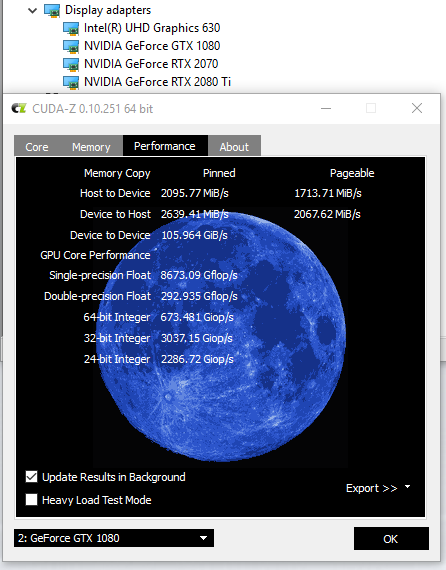
So I didn't have time to put my 1080 in my AGA... it's already in my TB3 enclosure. So I just decided to hook it up via the TB3 (again, going through my Belkin TB3 dock so it may be even more limited in performance) and it looks pretty normal to me. The "Device to host" is still way higher than yours.
Oh and regarding driver install, I did the whole DDU thing but ended up using the "DCH" 419.35 drivers from geforce.com. The non-DCH drivers didn't have the device ID for the integrated 2070 so they didn't work. Then I had to deal with getting the nVidia control panel app to install from the Microsoft Windows Store, fun stuff. Anyway, when I plugged the 1080 in, I didn't even reboot or anything. It just picked up the 419.35 drivers and used them.
-
Hey guys, does anybody knows if it fits in the everki Titan backpack?

-
The whole 8 heat pipe thing has been thoroughly discussed and debunked.
There is 100% confirmation there are 2 models.
Base model is RTX 2060 + i7-8700. This model gets no side vents and lighter heatsink.
All other models get the same 7 pipe shared heatsink with side vents.jclausius, VoodooChild, DannyB513 and 6 others like this. -
This has been discussed at length already, there is no 8 heat pipe version, only 7. They even updated their website removing the 8 heat pipe wording
I saw it mentioned earlier that it does, just doesn’t have padding on the top corners of the laptop, tight fit, but it zips closedjclausius, c69k, alaskajoel and 1 other person like this. -
Wait, so you got yours a full work week early?
When did you order? My earliest potential delivery is this Thur, so I’d love to be surprised. -
Wow mines opposite. It shows perfectly in BIOS and as an NVMe drive. I also see it under disk drives as NVMe 970 EVO Plus. BUT I do not see NVMe controller under storage controllers, which is my issue.
I’ll do a complete test using my kill-a-watt meter...once I find it lol
Wonder if this also affects benchmarks, I’ll have to see if Ihave it installed.raz8020 and ThatOldGuy like this. -
Which backpack do you guys want to use?
-
So @Papusan someone trusted me with one of their A51M's
Level 3 over clock on stock paste and no max fans is netting a big zero in performance. That is out of the box manufacture style.
L3OC
Falkentyne, ssj92, lsramair and 4 others like this. -
ordered Jan 15. Original delivery was Mar 12. order delayed to Mar 15. delivered Mar 11.
-
Ouch, that’s crazy! Are you in the US? My original order was Feb. 18th and was delivered today. Thats a long wait!propeldragon likes this.
-
Ah! Okay, you've been waiting a bit. I probably still have a while to go.
Congratulations! Enjoy the new toy!
***
Okay - so questions about RAID0 SSDs.
Yes, I know - for 99.9% of people asking, I get it, they don't likely need to RAID0 their drives. NVMEs are plenty fast as it is. "Other than synthetic benchmarks, there's no real-world performance increase," yada yada yada.
But at this point, we're all rocking $4,000+ laptops. These are better than what 99.99% of the population is using. So with that in mind, and knowing it's - in the grand scheme of things - a pittance versus the total cost of everything - is there value in going with 2x 970 Evo Plus in RAID 0 versus one?
I already bought both. I'll run my own tests and play my own games. But I'd love to get people's opinions here. So long as it doesn't run up against a PCIe bandwidth issue, surely there's still a noticeable increase in boot times, game level loads, etc. No, launching Chrome will probably feel exactly the same... but things like launching Excel docs, or Adobe Lightroom, etc are surely a fair bit faster on RAID0, yes? Or is it just a matter of reaching the peak capabilities of our machines with even just one? -
Only if you wanted 4tb since 4tb NVME is only available in 110mm. So Raid 2 2tb 970.
-
Oh damn.... mkay mkay. But damn..
-
I run 2 x Evo plus 1tb in raid... I tested both one at a time with achi and Samsung drivers and obviously in raid 0, and I found raid slight faster in benchmarks... I prefer raid because I prefer to work with 1 drive at 2tb vs 2 drives at 1tb each.Darkhan likes this.
-
What does this "out of box manufacture style" thing mean?
Is there some list of benchmark settings that everyone is following, and one of them being "out of box manufacture style"? -
It's basically where your computer comes from. Where they just box it up and ship it. No re paste, mods, optimizations and to much stock voltage. Usually the scores reflect this. For good or bad, until experienced users get these machines and show how true stock should run. (Is how to best explain it. And that is generally 100% better.)
Then send it out in the world as if that is what to be expected.
@Papusan looking better. 5.0 ghz and XTU does work, just not on ram though.
Full blown windows and no extra cooling.
5.1 ghz
5.1 Test. looks like it passes 20k no problem
Last edited: Mar 11, 2019ssj92, SlickDragon, Rei Fukai and 4 others like this. -
Thanks for the reply. Dell told me today there are 3 different models. I hope you are correct and they are wrong. Thanks.c69k likes this.
-
So i've played with the AW51m abit this evening, pretty happy with it. Stuck pixels didn't came back for now.
Performance is awesome, its so much better if you compare it with the Alienware 17r5. System is deadly quiet when idle and when gaming its not going full tilt. Stock paste is pretty awesome!Sven Boden, minc3 and c69k like this. -
Need help with a price check here. Was on the phone with Dell sales rep and built the following:
Lunar white
I7 9700K
RTX 2070
144 hz screen w/ g-sync, etc.
512GB RAID 0 (2x 256GB PCIe M.2 SSDs) + 1TB (+8GB SSHD) Hybrid Drive
16gb RAM
3 year premium warranty and 3 years accidental
Website shows 3828.99 before tax
Dell rep quoted me 3299.51 before tax
Can I do better? Not sure if he used the 12% coupon or not. Could I call another rep? -
Yes, there is no 8 heat pipes. Alienware boss said so himself.
They did say the 7 heatpipe is 4 or 5th version and claim its the better then the version with 8 peipes according to themselfs.c69k likes this. -
It looks like a better deal. If you use Paypal15 code to take 15% off it comes out to 3254.64 before tax. Looks like you got more than 12% off since his price is only 45 more than website.
15% off code is still functional in Dell website when I checked out at 19:10 ESTSlickDragon likes this. -
So you're saying I did good with him getting me that price? Im about to pull this trigger. lol
-
It is. He is getting you close to 15% off which is same as website. If you are interested in saving 45 dollars more, then quickly head to website and try the code. It worked for me when I tried it now.c69k likes this.
-
Can confirm. It works.
I was also able to dial back on the HD bc I have a 1TB 970 at my house already. I brought my total down to a little over 3K flat with the 1TB HD and 128 ssd instead of the Raid 0. Not bad. -
The warranty is so damn expensive, but I feel like it might pay out VERY well considering how new and different this machine is for Dell. Who knows how these things are going to be doing three years from now.
But on the FLIP side, it makes you wonder if it'll be worth it if everything is replaceable. -
Yup, here's more proof all laptops these days need tuning. I think mine was getting 17XX in CB 15 when I first ran it? and with an i9-9900K LOL
Could you check what the TDP of the 2070 is?Last edited: Mar 11, 2019SlickDragon likes this. -
As long Dell don't want change to correct specs on their sales pages in all languages this saga will live forever
And this mess won't be better as long Alienware Technical Support in their own tech forum (dell.com) spread wrong - false info!
It seems product Specialist Umar was only interested in edit their video's + the sales page in U.S.Last edited: Mar 11, 2019 -
If you order through ebates you could squeeze an extra 2% cashback (~$60), its based on pretax total.
-
Pulled the trigger.
Looks like im staying in the fold fellas. Sending the Razer back to Best Buy tomorrow.
For $578 more I am getting:
Stronger CPU
Stronger GPU
More storage and storage space
Bigger 144hz screen
Another year of warranty (3 instead of 2)
Better cooling
Upgradeability
I think this was a no brainer.
Only cons is the size and 2 bricks. This thing is massive compared to the Blade. But I have heard from this forum that its not as big as the m17 and I have seen the m17s at best buy so its not that bad!Rengsey R. H. Jr. likes this. -
Anyone who got XTU running on their Area-51M could help me figure out how to make it work on mine?
-
Just north of US...Canadi!
-
ok so it looks great and is clean and no issues. I do find that I'm getting mediocre FPS in Anthem and by mediocre, I mean less than 60 FPS @ 1440p.
I'm confused. not sure why it's not performing as it should be. Temps are ok...CPU maxxed out @ 80 and CPU @ 48.Last edited: Mar 11, 2019 -
It will never die.
What is your configuration? To do 1440p your using a external monitor? If so which one? Which output to external? 1 or 2 power supplies? Power mode settings? Overclocked? -
It is bigger than the m17 by both Depth, Height and considerably heavier.
It is not as "big" or heavy as the 17 R4, but is thicker (about equal weight with 2 power bricks)
BTW the width and depth dimensions on DELL's page are completely false. It is significantly less `Deep' and a little less Wide
AREA 51m Corrected
DIMENSIONS & WEIGHT
1. Height: Front 1.09" (27.65mm) – Rear 1.23" (31.2mm), Peak 1.7" | 2. Width: 403 mm (15.867") | 3. Depth: 311 mm (12.244") | Maximum Weight: 8.54 lbs. (3.87 Kg)
What is says on the web-page for reference:
DIMENSIONS & WEIGHT
1. Height: Front 1.09" (27.65mm) – Rear 1.23" (31.2mm), Peak 1.7" | 2. Width: 410 mm (16.1") | 3. Depth: 402.6 mm (15.85") | Maximum Weight: 8.54 lbs. (3.87 Kg) -
Anthem is a terrible game to benchmark with and could very well be the problem in and of itself. How are other games working for you?
If you are just starting out with Anthem, I'll give a suggestion... Save your time and play something else. Such a disappointment. What a dumpster fire!
Anyway, how is the game working on 1080p for you on the built in display and what are your specs? You should expect to be around 100 FPS @ 1080p Ultra with a 9700k+2080.HookemAZ likes this. -
Run HWIFO 64 and take screenshots for diagnosis. You are looking for around 75 FPS @ 1440 with Ultra Preset. But this game is a little unreliable.
If you turned on any of the non pre-set bells and whistles, it could be lower too.
Chart for Reference:
https://www.gameshedge.com/anthem-pc-benchmarks-optimization/
-
Are you looking at the same website I am?
https://www.dell.com/en-us/shop/cty/pdp/spd/alienware-17-area51m-laptop?~ck=mn
This is what that page states for me:
Height (rear): 1.23" (31.2 mm)
Height (peak): 1.7" (42 mm)
Height (front): 1.09" (27.65 mm)
Width: 15.85" (402.6 mm)
Length: 12.565" (319.14 mm)
Maximum Weight: 8.54 lbs. (3.87 Kg)
These dimensions seem accurate to me.
Length is definitely about 12.5" from back bottom to top front, as it's tapered down in the back and up in the front.
So overall it's 12.565" long from to back, that's what I just measured too.
Here is another page that shows the correct dimensions:
https://www.dell.com/support/manual...f32f47-45cf-4a08-ad99-b01eec4f3ce6&lang=en-usThatOldGuy likes this. -
What shenanigans is this? I haven't been on in a few days so I must've missed something juicy.
-
So i realized that only way to upgrade the AW area 51m's Display is by changing the edp display cable as well. Now i called dell today to find out if they will sell the 40 pin display cable itself. After looking into it for a while the dell representative told me they dont have the display cable itself. i can buy the whole display assembly if i want to replace my one with 144hz model. And the worst part is they dont even have any in stock. Do anyone know if there is any edp converter? like 30 pin to 40 pin. If anyone disassemble there display, i would like to know if they have 30 pin connector or 40 pin. Especially 144hz model.
-
Got it from Dell's rather large promo ("product Details") section below the builds, But yes it is correct in the smaller print
c69k likes this. -
I bought the Area 51-M back pack from Dell. It is gargantuan on the inside. They wouldn't all fit where the laptop goes, but just for s**** and giggles I put a Razer Blade Pro, MSi GE75, Lenovo C930, and Huawei Matebook X Pro in the backpack and there was still some room.Last edited: Mar 11, 2019mason2smart and Spartan@HIDevolution like this.
-
Frank responded (hopefully it can be changed in firmware):
![[IMG]](images/storyImages/Ta1QcDE.jpg) raz8020, SlickDragon, Kormi and 4 others like this.
raz8020, SlickDragon, Kormi and 4 others like this. -
So their is many ways to convert a 30 to 40 or a 40 to 30 I brought this up few pages back. If I was you I would wait for the 4k or 1440p for buying an upgraded assembly. Also they don't have them in stock because they are already short on production. That's also why the QC is so terrible. They are rushing to build these in China.trikolpona likes this.
-
They probably never thought about it or jusy dismissed it as an option. I know a laptop running a 2080 max q with a 8750h is drawing much less power, but having the area 51m run at a 15%-20% deficit with only the 330w doesn't seem too outlandish.DannyB513 likes this.
-
Sorry if this has been asked before, but I haven't come across an answer.
Is the CPU Performance option in the BIOS not available on the 51m yet? -
What issue are you having? Mine "just works" although on my new installation I only use throttlestop
You need BIOS 1.2.0 and it'll be thereSlickDragon likes this. -
That's just how they work in China. To them that's normal.
Back when I got my M17x R2 many moons ago the crossfire wasn't working. I had to open it up day one and found the crossfire cable was just taped on top of the connectors and not inserted. -
I'm on 1.2.0. It shows as disabled and it's not "blue" so I can't select it.
-
What CPU do you have?
*OFFICIAL* Alienware Area-51M R1 Owner's Lounge
Discussion in '2015+ Alienware 13 / 15 / 17' started by ssj92, Jan 8, 2019.


