 Problems? See this thread at archive.org.
I cleaned it up a bit and got a tiny bit more paste on to see if that would help. It’s even worse now. I think I’ll have to get some thermal right paste. Any recommendations for GPU paste?
-
-
Phobya nanogrease, TFX or GC Extreme for both CPU and GPU... whatever you find around you.
-
So i've just spent all morning fighting with AWCC.
I've removed it and reinstall multiple different versions using spartans guide and the overclock controls and alienfx just refuse to work.
I've monitored the software using process monitor and can't see anything obvious. The logs say nothing useful.
The event log shows the following:
Application: AWCC.Background.Server.exe
Framework Version: v4.0.30319
Description: The process was terminated due to an unhandled exception.
Exception Info: System.AccessViolationException
So it's clearly trying something it doesn't have permission to do but i have no idea what.
It's such a piece of **** software and i'm at the point of just resintalling windows now to try and fix the damn thing.
Wish i could control the fans outside of this software and just be done with it forever. -
I found (I hope Dell doesn't read this thread
 ) a way we are able to control the fans of our systems via AWCC (sorry to hear that
@ratchetnclank). When I duplicated Thermal Profile "Cool" as "Cool-1" I managed to set offset of the fans. I set up 46% for CPU and GPU and now the fans are running at 44%. Whatever you select as offset there are difference between 2-5% which for me is awesome. Also the GPU is able to run above the capped 50W (as Cool profile runs max 50W GPU).
) a way we are able to control the fans of our systems via AWCC (sorry to hear that
@ratchetnclank). When I duplicated Thermal Profile "Cool" as "Cool-1" I managed to set offset of the fans. I set up 46% for CPU and GPU and now the fans are running at 44%. Whatever you select as offset there are difference between 2-5% which for me is awesome. Also the GPU is able to run above the capped 50W (as Cool profile runs max 50W GPU).
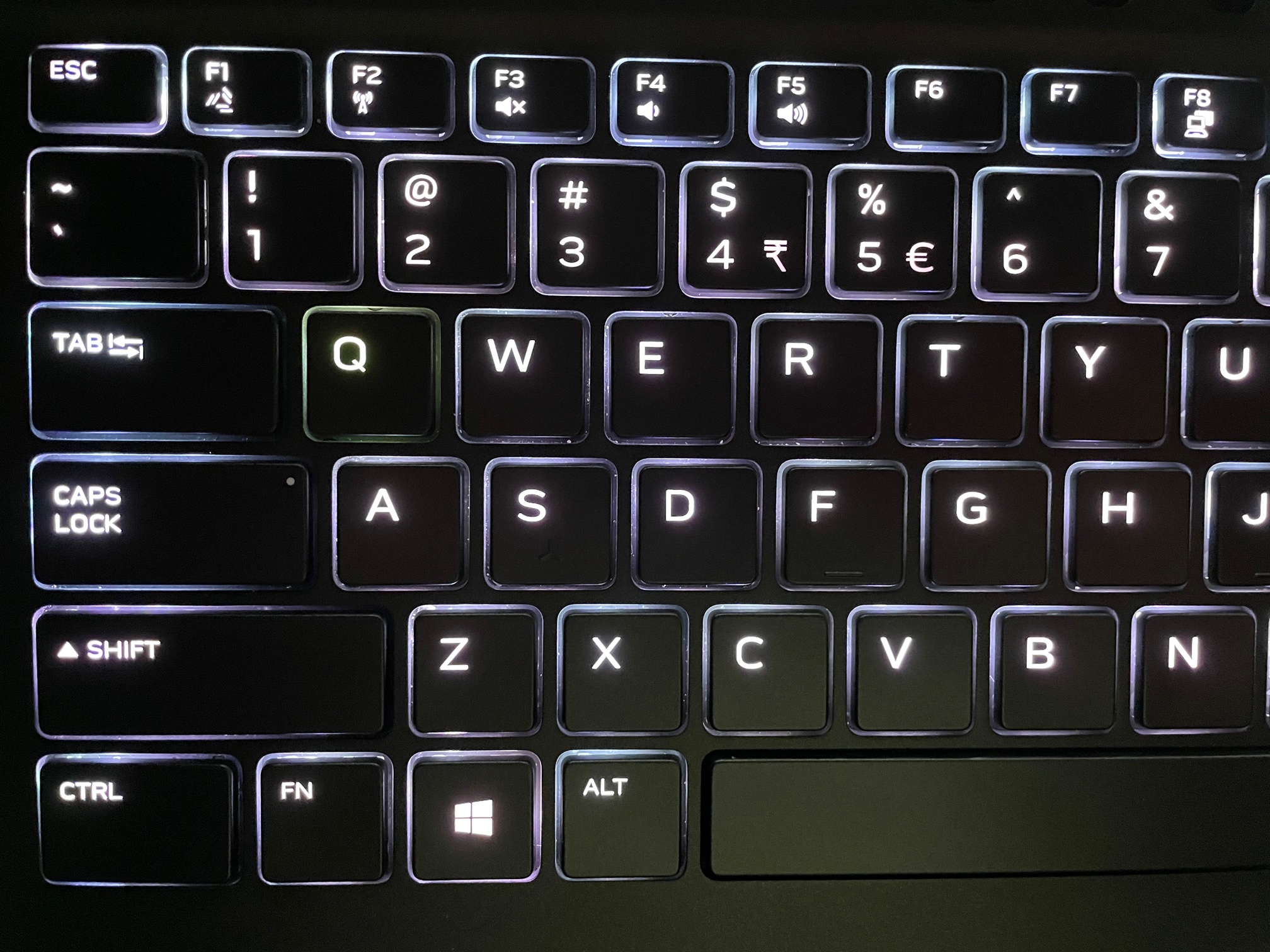
I also experiencing a problem with FX for 2 days... now the key "Q" is lighting with different color. I was playing "This war of mine" 2 days ago when my keyboard starting to lights with the colors of the game and "Q" key just stopped working as expected. I don't know if this is a hardware or software problem. Did someone experienced something like that?Attached Files:
-
-
I had a similar thing with Metro Exodus where the keyboard would stay white after playing as metro used the alienfx api.
Had to go into AWCC and reapply my normal profile to fix it.
Just spent another hour of my life reinstalling via some reddit guide and that doesn't work either so i guess it's time to go nuclear on the OS.Normimb likes this. -
Is it an idea to install Windows on another partition and install AWCC on that alone, and there you can set up your lights etc, and then do not boot into that Windows ever again, until and unless you want to make a change?
-
I suppose i could do that but it seems a waste of hard drive space.
I've reinstalled windows now and it works perfectly. I'm just going to try never update it.normand668 and Normimb like this. -
-
****iest software ever invented. I understant and share your pain. It's been like that for the past 5 years. @Spartan@HIDevolution is the only good guide on how to help reinstall this ****ty software. I wish we could have a name of the engeneer who worked on this program. At least we would be able to give a name to SPUPIDITY.normand668, Papusan and Spartan@HIDevolution like this.
-
AWCC talks and works wiht your bios. That is one of the reason why it is so full of bugs. Don't think there is any solution to make this software work well. Even spending hours with tech support and they could not reinstall properly. Ending up in giving me a new laptop multiple occasions. That's how much this software is bad.normand668 and Papusan like this.
-
It's really important when you unistall AWCC to delete all the regestry file (regedit). Don't forget:Ordinateur (computer) \HKEY_LOCAL_MACHINE\SOFTWARE\DELL\AWCCService.
Also i recommend to use: revouninstaller software when you unistall AWCC. And while your at it i also recommend to unsistall realtek audio driver (works with AWCC). I use DDU to uninstall this sofware sometimes it helps. Don't give up, eventually it will work.
Edit: also i suggest you reset bios. This should help. -
Thick paste and lot's of paste is what is needed for this laptop. TFX 1st choice, Phobya Nanogrease 2nd choice, Mx4, Kryonaut. not thick enough = worst then original paste. 3 pea size is needed for CPU. Since the paste needed is thick it should be applied in a X patern (no spread) for best results.DreDre likes this.
-
Too much paste is also bad. A paste is just there to fill the inconsistencies/gaps between the CPU/GPU and Heatsink. Bare metal will always transfer more heat quickly. Paste helps close the gaps which further enables to transfer heat.
Copper thermal conductivity: 385.0 W/mK
Phobya Nanogrease thermal conductivity: 16 W/mK
Thermal Grizzly Conductonaut thermal conductivity: 73 W/mK
Looking at the above. Its clear that copper is the best. If you use Thermal Grizzly Conductonaut properly, it can definitely transfer more heat than Phobya Nanogrease. However too much paste can actually reduce the thermal conductivity as it will never match the conductivity of copper.
Using too much paste is a waste. Also it can actually increase temps. I have used MX-4. During intense gaming, I have seen temps drop by around 4C. Idle CPU temps have dropped by about 2-3C. I have not mentioned full load CPU temps as they reach 100C anyways, albeit slower but definitely 100C. -
No....Area 51MR2 needs more paste.
So far i have tested: LM conductonaut, Kryonaut, Phobya nanogrease and Thermalright TFX on this laptop. Best results are what i said. It needs a lot of paste (TFX) for the CPU. GPU doesn't matter. Try it
Last edited: Jan 8, 2021DreDre and Justin Stuever like this. -
I totally agree with @Normimb - the thick paste is better. I will order TFX to give it a shot. BTW did someone try IC Diamond? I think this is thickest paste I have ever used.
DreDre, normand668 and Normimb like this. -
I did do all of that. In the end i spent less time reinstalling windows and all my programs and games than i did with the various reinstall processes. It really is just junk software i suspect it's something to do with the universal windows apps as they are really locked down so if anything else is trying to access files/components for them it gets denied.
-
Alienware Area-51m R2 Drivers 07-Jan-2021
Make sure to right click on the file you just downloaded before you extract it, go to Properties, then hit Unblock from the bottom right as it may be blocked since it was downloaded from the internet, if you don't do this before you extract it, then all the files contained in the ZIP will have a blocked status and may not install correctly.
To prevent this automatic blocking of files in the future so you don't have to go unblocking every file you download to ensure it runs properly, follow the guide in this thread:
http://forum.notebookreview.com/threads/are-you-sure-you-want-to-run-this-file-yes-or-no.825668/
New Intel Dynamic Tuning Driver
New Thunderbolt Driver
New LAN Driver
New WLAN Driver
New Bluetooth Driver
New Tobii Driver
New Alienware Command Center
New OC Controlalberty, chewbakaats58, normand668 and 3 others like this. -
Upgrading to the Intel AX210 is totally worth it! I am getting LAN like speeds but via wireless and better range.
This is the trusted seller I bought 3 of them from:
Intel AX210NGW M.2 NGFF WiFi Card Dual Band BT5.2 for PC better than AX200 Card | eBay
The standard shipping is way too slow though so I bit the bullet and paid an additional $30 USD for expedited shipping but if you're not in a rush just go with the slow shipping.
The Amazon listing is almost double the price even though it's faster so it ends up being the same if you opt for the fast shipping from the eBay seller which I trust since I bought form him beforechewbakaats58, Vasudev, normand668 and 2 others like this. -
Thanks for the precious information. I'm gone start shopping.
Edit: Just placed the order at amazon.com. For some reason this card is really difficult to buy in Canada. I am going to have to wait 2 weeks shipping but it will be worth if i can get rid of the latency i experience with Killer 1650 (wich appears to be a AX200 intel card). Thanks @Spartan@HIDevolutionLast edited: Jan 9, 2021Spartan@HIDevolution likes this. -
Completely agree. Have been playing with different pastes and agree this machine takes a lot more than you would normally use on a desktop or individual heatsink. TFX has been my best results so far.
-
After having tested the 10900KF in the R2 and confirming it worked i switched back to a 10900k and repasted I found thus far that Kryonaut has been the best paste, Having said that I have not yet tested this TFX people are talking about so when i tear down my 2nd R2 i will test that.
I am looking forward to testing a pre binned delided 10900k in the not to distant future.Justin Stuever likes this. -
I always liked kryonaut and sometimes this is the best paste for certain situations. It is very easy to apply and good for beginner but....it's been report by many users that it degrades very fast. Others have had no issue. Personnaly i think if the heatsink doesn't sit flat on the CPU it will degrade fast but if the contact is great then it will perform well.
I have made a comparaison between Kryonaut and TFX for the GPU on my 51MR1. TFX was 1C cooler for the GPU but...it's not a conclusive test. I should have done the test for the CPU would have been bettter.
Now for the 51MR2, after +10 repaste attemps with different paste i am pretty certain of two things: 1- Thicker paste is better for the CPU (notice how the heatsink vaport chamber is not even, you can fill a wave with your finger that's how bad it is). 2- TFX is better for this laptop at a condition of putting enough (3 pea size will cover the all die and a bit more once the pressure of the Heatsink is applied). That will give you a 7C reduction in temps approx.
Good luck.normand668, Papusan and Justin Stuever like this. -
The heatsink on my first 51mR2 is a lot better than the one on the 2nd one I bought. Maybe they changed something with the manufacturing?
17 JUL 2020
14 Dec. 2020
I did order the first one the day it was released in Australia. The date shown is the received date not the ordered date.Justin Stuever likes this. -
Anyone have any idea of thermal pad sizes for GPU/cpu on the newer model my thermal pads near GPU look like they were torn / have paste on them
TFX helped my GPU a lot 3-4 degrees but I didn’t have enough left for my cpu so I did a very thin coat.. I ordered more should I reapply or does it look good enough (I did spread method but it took me 30 mins to spread it that thinly for cpu and make it cover all)
Cpu https://ibb.co/519Y0MD
GPU https://ibb.co/bdL7PQC
On GPU side way too much thermal paste when taking off first time stock
https://ibb.co/K68GS0xJustin Stuever likes this. -
This with a good Corsair waterblock (h150i). I have used it a couple of times when I was empty for something better.
http://forum.notebookreview.com/thr...ers-welcome-too.810490/page-801#post-11037924normand668, Spartan@HIDevolution, Normimb and 2 others like this. -
I expect 8 ~ 12 months is what I expect it to last on a system like the 51mR2 and its murderous temperatures.Justin Stuever likes this. -
Question. Has anyone actually been able to get there ram to run at 3200 ?
I bought 2x 3200 32g sticks from Dell didn't work. Bought 2 16g 3200 from dell didn't work.
bought 2x 8g at 3200 still didn't work.
Though the option in bios is there you cant enable it. -
Matches up exactly with my personal experience with the 51m R2.
-
Since day one. touched nothing in the BIOS. This is the 3200 MHz RAM from Dell. The model number of the sticks are in my signature:
-
Did you buy the 3200 with the laptop or did you buy 2933 and then upgrade?
If it's the latter then you may need to contact dell to sort it. I imagine they have some sort of bios control which stops us slapping in any 3200 sticks.Spartan@HIDevolution, etern4l and Papusan like this. -
For the first one I didn't and the 2nd one I did.
-
I'm assuming these are compatible with the R1 as well? If so, looks like I need to upgrade!
-
Yes they're compatibleFXi, Normimb and chewbakaats58 like this.
-
Last edited: Jan 11, 2021Satanello, Normimb, Papusan and 1 other person like this.
-
Lol they have skipped the 1.5.0 and gone for 1.6.0
That's interesting...
Maybe now everyone will run 3200 xmp profile. -
-
Remember new models is on its way. Do not be surprised if the upcoming bios versions for EOL products contains some surprises
 FXi, DreDre, normand668 and 2 others like this.
 -
Been out of the thread for a while.
New models as in R3 or just hardware revisions? -
The way Dell has been treating their flagship laptop that's "up gradable" I am sure this one is EOL and a r3 is on the way with 3x series cardsDreDre, Normimb, etern4l and 1 other person like this.
-
-
Probably with 3000 series graphics but with some changes for the screw attachment on the DGFF card/HS to hamper upgradeability and with Rocket if Intel disclosure their new chips. The usual. The major change in design will most likly come with Alder lake and DDR5 next year.Rei Fukai, normand668 and Normimb like this.
-
Can someone confirm if the new bios 1.6 lets xmp memory like hyperx work. Thanks Travis
-
Yeah time to cripple performance of the R2 now (all the reviews are done.). Carefull everyone with the updates.
-
Ssomeone tested this new bios? I've just repacked the Hyperx kit because I decided to send beck to the seller.... LOL
Inviato dal mio LYA-L29 utilizzando Tapatalk -
Which kit exactly? Why would you do that?
-
My kit was 2x16Gb 3200 (but I can only reach 2933 cause I ordered my pc with 2933 memory).
I usually play only Guild Wars 2, old dx9 engine with dx12 unofficial mod (I can't have bench numbers because this game doesn't have an integrated bench).
Inviato dal mio LYA-L29 utilizzando Tapatalk -
OK. The benefit of HyperX is not that it runs at 3200 or not, but that in both cases runs at lower CL Whether it runs at 2933 or 3200 shouldn't matter - in both cases it will be faster than Dell-supplied value RAM, which you can confirm using memory benchmarks.Papusan and normand668 like this.
-
Etern4l, my dell supplied 32 gb of ram running specs are: 2933MHz, 17-17-17 @ 1.2v. Does HyperX have a lower CL than the oem? I seen that HyperX has the following advertised specs: 2933MHz, 17-19-19 @ 1.2v.
-
The 1.6 didnt help the ram it did add new processors though
Last edited: Jan 11, 2021 -
That is a new and welcome development - the first batches (and in general, the memory they supply in earlier AW models) were much slower CL20 in this case AFAIR, or maybe you just got lucky. Or maybe they are reading NBR forums!
*OFFICIAL* Alienware Area-51M R2 Owner's Lounge
Discussion in '2015+ Alienware 13 / 15 / 17' started by Spartan@HIDevolution, May 9, 2020.




![[IMG]](images/storyImages/tenor.gif)


![[IMG]](images/storyImages/maxresdefault.jpg)


