Problems? See this thread at archive.org.
I don't think you can run the copper IHS with the 51m R2 heatsink as it is not the same height off the base off the CPU and will offset the heatsink from the GPU. I was interested in the same thing but was worried about the overall height of the rockit cool copper IHS.
I recently delid'd my 10900k and used grizzly conductonaut for cpu and thermalright TFX past for both heatsinks. Dropped 8-10°C across all cores in a true perfect comparison. I was able to run 48x in a continuous run in CBR20 still under thermal throttle limit where before I was only able to hit 46x continuously without throttling.
I would personally still stick with 10 cores at 47-49x depending on bin vs dropping to 8 cores @ 50x.
@Normimb I opened it back up last night and put some conformal coating on my CPU board since I travel a lot and didn't want the liquid metal conductonaut to short my CPU. It had spilled out a little around the die but hadn't made its way to the copper dots yet.
When I reassembled I didn't have enough Thermalright TFX so I used some grizzly kryonaut instead.
I also did not have enough conductonaut left to do the "extra" amount that worked so well for me on my last (2nd) attempt. It ended up more like my first attempt and I gained back about 6 more degrees than the stock OEM solder and paste.
I wouldn't blame this on the kryonaut vs thermalright paste, but rather the amount of conductonaut used. My first attempt I "dabbed" a thin amount as seen on most youtube videos and had same +6°C results across all cores. I didn't know on the first attempt if it was the delid/ conductonaut or the MX4 paste. After seeing the same results switching from Thermalright/-10°C to Kryonaut/+6°C I would say that there is obviously not a 16°C difference in the proper application of paste, but this was really based on the amount of conductonaut used. Both times I used a "sparing" amount of conductonaut my temps increased from OEM. Sorry I hope that makes sense just trying to share my experience in delid on the 10900k.
@Papusan I will PM unclewebb again and let him know what I am seeing with it for sure. I read through his response for @Normimb's post and it looks like he is attributing it to HWinfo vs TS monitoring the multiplier, when in my case they both matched and both dropped by 1x and both had similar performance drops in CBR20 scores.
-
-
Thank you @Justin Stuever and @Normimb for the advices!
@Normimb I am using the laptop mainly for work so more cores === faster work for me I am using around 2 pea drops of paste - I am very familiar with these things. On my old system Alienware 15 R3 I was put liquid metal and I have never exceeded the low 70s, but on Area 51m r2 scenario is different. About the undervolt you were right. I tried TS Bench and with -115 and I got WHEA errors. The strange is yesterday when I tried CBR with -0.115 it didn't get any errors. Thank you once again about the info - it was very precious!
@Justin Stuever can you share with me CBR20 thermals with x47 and x48 multiplier? Personally I don't see any benefit if the CPU will run with 100 or 200mhz higher.Normimb likes this. -
Thank you sir I appreciate your help and response with this. I think you hit the nail on the head that this is related to the thermal velocity boost flag throttling me. I have tried with and without the disable and lock turbo power limits box as well as playing with the turbo short and long power limits and disabling them there as well. None of this changed anything. I don't what what or why but Quick CPU and XTU do not share this issue for me. I can only dupicate this with TS 9.2 and 9.29.
I haven't touched my bios through any of this. I looked through it but it is very very DELL limited bios when you enable OC. If we had a way to disable TVB in our bios I like you I think our issues would be resolved. Is there any way to incorporate this into your software? Thanks again much appreciate your time and support. -
Sorry I didn't save any screenshots, but when I get home this weekend and relid and repaste again correctly I will. I also have my best baselines and benches using my AGA and 2080TI so my 2080S isn't adding any heat to the heatsink. This lets me play games cooler than @Normimb in the mid to low 60s with Cyberpunk @ ultra/psycho but at same time I can't run 49x continuously in CBR20 like he can with his "magic" 2% chip.
My system is very stable @ -100MV in Quick CPU, Throttlestop, and XTU without any errors or BSOD whether using the internal GPU or AGA. When I try to get more than that it works for some, crashes for others, and BSOD after sitting idle for a while.
I previously agreed with you that it wasn't worth it for me to delid/repast for 200mhz, but my temps were getting so bad that I was willing to try something. It worked for me as dropped 8°C- 10°C. And honestly the first time you do this machine taking your time will take an hour or so. After 3-4 cycles I can blow through it in 20-30min. Just be careful with the wifi card cable connections, I had a weak crimp and had to get the magnifier out to re-crimp it.
Before delid I could run CBR20 @ 46x continuously with my coolest core @ 89°C and warmest @ 97°C. After correcting my error in conductonaut from first delid attempt, my second delid with conductonaut/thermalright TFX dropped all cores by 8-10C from OEM stock lid/paste. I was able to run 46x @ 79°C - 87°C continuously in CBR20 with same ambient temp/humidity according to sensor in my office. At 47x I was at low 90s and at 48x I was high 90°C just under thermal after 10 mins of CBR20. Again, this is all while using AGA and the internal 2080S sitting @ 35°C Idle/42°C during CBR20 bench. If you are using internal GPU this might increase your CPU since they share the heatsink.
For what it's worth I think these numbers are really more relevant to me and where I live in the world, my temp, humidity, mean sea level and most importantly my particular build/chip.
I would say give it a shot after seeing my results on a 2 month old machine. -
On my desktop board, Thermal Velocity Boost is always disabled so I never gave this a second thought. The next version of ThrottleStop will include a feature to disable TVB. Intel XTU and Quick CPU must do this by default. ThrottleStop has always ignored this option.raz8020, Satanello, normand668 and 3 others like this.
-
Completely understand. I am glad we are on the right track. Let me know if you need a tester, I'll gladly give it a shot and report back, or let you remote in and play if need be. Thanks again!
-
Check your message box. The updated version is ready for a test.
I included the disabling of Thermal Velocity Boost. Check the FIVR - Overclock option to disable TVB and if this box is clear, TVB should be enabled so your CPU will slow down a little when it hits 70°C or whatever the magic number is on your computer.
For testing, I ran Cinebench R20. With the Overclock box not checked, TVB is enabled and the CPU is using the 50 multiplier instead of the 51 multiplier. HWiNFO reports what the problem is.
![[IMG]](images/storyImages/QNV1n0P.png)
While Cinebench continues to run, I checked the Overclock box. HWiNFO no longer reports TVB throttling and the multiplier is back up to a steady 51. A big jump in power consumption for a 2% increase in CPU speed. Not really worth it but fun all the same.
![[IMG]](images/storyImages/iM1LQO9.png) Last edited: Dec 30, 2020dmanti, 4W4K3, tilleroftheearth and 6 others like this.
Last edited: Dec 30, 2020dmanti, 4W4K3, tilleroftheearth and 6 others like this. -
Does anyone need a brand new from Dell 1080p 300hz panel and lid assembly for the 51m? Dell sent two for some reason instead of just the one I needed to swap, so it’s sitting here collecting dust. Price is negotiable. Message me if interested
therock2284 likes this. -
Hi again,
I just asked RockitCool about the copper IHS if it is with different height compared to the OEM. Here is what they answered me:
So the copper IHS should be OK with the height. I will try it and will let you know when I got it in my hands. The only thing is that I think to delid/relid the I7 10700k, because the i9 10900k is not that good in performance. Maybe in future I will order binned silicone lottery chip, but for now the differences between i9 and i7 are not big enough for the work I do.Justin Stuever, Satanello, ratchetnclank and 2 others like this. -
Great stuff sir. I should have some time to get into it this weekend and give you some feedback. Thanks again.
-
-
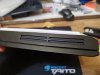
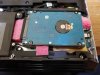
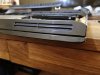
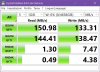
Hello, I've just completed to add a new Segate ST5000LM000 5Tb hard drive on my R2 with little "ghetto mod".
Everything is working well
 Justin Stuever and Vasudev like this.
 -
Keep your data always backed up with any Seagate Drive. They have horrendous reliability, speaking from experience and from online forums.
The best and fastest way to backup your data!
PS: Nice random 4K Read speed!
-
Thank you Spartan, this drive will be used for Macrium Reflect image of the primary ssd and to have available an extra copy of my data ready to be used (usually to read data) .
I have usually at least 3 copies of all my data:
1 Hp microserver with couple of raid 1 hdd; 2 Two independent external hard drives
3 this new copy on primary laptop.
P. S. : Guys, HAPPY NEW YEAR!!
Inviato dal mio LYA-L29 utilizzando TapatalkLast edited: Dec 31, 2020Vasudev, Papusan and Spartan@HIDevolution like this. -
You keeping the bottom off? Or is the first pic with it squished in?
Why not just use a enclosure via usb3? -
@Justin Stuever @unclewebb
Hello,
I can confirm that this is working 100% for my 10900K! (checking the overclock disable the annoying Thermal Velocity Boost)
The other issue i had was with the new AVX feature. I would set it a 1 and this would apply to all the profils i had (performance, game, internet and battery). Unchecking it would not reset it to 0. I had to tick it then set 0, then apply and solved! (suggestion: It would be nice if the AVX feature could be for a specific profil only, l would only use it for gaming)
I really enjoy the new window powerplan settings you added. Great feature especially when switching to battery mode. Great work sir!Last edited: Jan 1, 2021Vasudev and Justin Stuever like this. -
ThrottleStop 9.2.9.3
https://drive.google.com/file/d/1nCKPjhlPXd1Ij4dkbnJBrFUQNFIQcZfj/view?usp=sharing
New Features
- added control of Thermal Velocity Boost to the FIVR window.
- added reporting of Thermal Velocity Boost (TVB) throttling to Limit Reasons.
- added a long term TS Bench test and updated the user interface.
Thermal Velocity Boost might be a useful feature when running one of Intel's 10 core wonders in a laptop so I decided to create a separate feature in the ThrottleStop FIVR window to control this. The Limit Reasons window will light up in red if your CPU speed is being reduced due to TVB throttling.
ThrottleStop already has this feature. ThrottleStop is not great at reading minds so you have to tell it exactly what you want. If you want the first profile not to use any AVX Offset, check AVX Offset and set it to 0. For the second profile, if you want to use an AVX Offset of 2, check the AVX Offset box and set this to 2. Now when you switch profiles back and forth, ThrottleStop will apply an offset of 0 in the first profile or 2 in the second profile.
If you have a profile and AVX Offset is not checked, ThrottleStop assumes that you do not want ThrottleStop touching that setting. It will not automatically go back to an offset of 0 unless you specifically tell it to go back to 0.
Thanks for the feedback.Last edited: Jan 1, 2021 -
Very well explain and it makes a lot of sense.
Thank you for the new version (laptop)
On more question please. When running TS bench to test stability of the undervolt, sometimes HWinfo reports WHEA errors but not ThrottleStop. What should i do, wich one should i trust?Last edited: Dec 31, 2020Justin Stuever likes this. -
ThrottleStop reports errors when running the TS Bench test but it does not specifically report WHEA errors. You need to keep using HWiNFO so it can report the WHEA errors.
When running HWiNFO and ThrottleStop together, HWiNFO will clear the throttling flags out of the CPU so Limit Reasons will not be able to report any records of throttling. Limit Reasons should be able to report any continuous throttling when HWiNFO is running. Any intermittent throttling will likely be cleared out of the CPU before ThrottleStop has a chance to report it if you are also running HWiNFO.
Not sure when I added this feature. It is definitely in TS 9.2.9.2 that I posted above.etern4l, Papusan and Justin Stuever like this. -
I was hoping you would say (never mind HWinfo) that would give me more room to undervolt
Seriously i fell more intellingent after you gave me all those explaination. (or maybe i should say less ignorant)
Happy 2021.Papusan and Justin Stuever like this. -
I was able to take 9.2.9.2. for a spin tonight. Worked great. Held any multiplier with and without TVB at idle. Of course after temps hit 60C with TVB checked it would drop 1x under load. Very stable and acting great now!
We need more people to try it out and report back as well. As for now I don't see any issues. Thank you @unclewebb -
On another feedback report, I relid'd and pasted again earlier this week when I added some MG 422B conformal coating to my CPU to avoid any issues with the LM leaking while traveling. I didn't quite have enough conductonaut to add the extra that had worked so well. I also was out of Thermalright TFX so I had used Kryonaut. After this process I gained back +6°C over OEM again like my very first Delid with this machine.
So I ordered 5g of conductonaut, and 6.2g of Thermalright TFX to make sure I would have enough this time. My previous best results were using a little extra conductonaut and Thermalright TFX and it dropped me 8-10C over OEM. When I got home today I used the "extra" conductonaut and went back to the thermalright TFX. Boom even better results than my previous best. With same ambient temp, humidity, and clock speeds, I dropped back down about 2°C lower than my previous best for a total of -10°C to -12°C below OEM under load. Also about 4°C lower than OEM at idle. @49x/-100°C my idle is at a nice 30°C average in 21°C ambient with 35% humidity in my office. My max temps with CBR20 under load @ 48x and -100C UV have dropped from previous best of 93 to 91 and stable.
I don't blame the performance on the kryonaut. I think you need a little more conductonaut for this CPU than I was applying. I had poor results both times I used it sparingly with the only other variable being the thermalright TFX vs kryonaut. And I know there is not a 16°C performance difference between these paste.
For reference for anyone else that wants to delid this machine. Go for it. It is easy, quick, and yields very good results. I would recommend the Thermalright TFX for paste and the conductonaut. I would also recommend applying some conformal coating to your CPU and making sure you dry it and cure it thoroughly before you reassemble. As far as the amounts of LM and paste, I would say get the LM to where it barely starts to shift to one end when you tilt the chip but doesn't pool up and try to slide off. Do the same with the inside of the IHS. When I used it where it barely looks flat and doesn't shift at all, it had poor results and gained 8-10C over OEM. Also don't use any RTV or glue for the IHS. I tried that and it isn't worth it as it adds more space between the IHS and die. As for the paste, I actually like to make a pyramid that leaves about 1/4" outside of itself open on the IHS and is about 1/4" tall. Probably at least twice what most people use on desktops if not 2.5-3 times as much. I think the 3 pea size is great reference.
I am sure I am not doing everything the "perfect way" and don't want to give anyone bad advice. I just wanted to share my experience and results with this particular machine in hopes of helping. If anyone has any suggestions for me please feel free. I am just glad I think I have it dialed in now with much better performance.
I think I am at the limit of my particular OEM bin CPU. I can't get a 49x/-100C uv bench using CBR20 without 2 cores thermalling a couple times, but I can get 48x all day. That's good enough for me for an OEM non lottery CPU. I would personally like to see if there is anyone out there with THIS machine that can bench CBR20 at 50x+ without a thermal, with average ambient conditions. Good luck and HAPPY NEW YEAR!!!!Last edited: Dec 31, 2020Normimb likes this. -
Justin here are my results a 50X, ambiant 22C, -100Mv undervolt for CBR20.
Here is 51X with thermal throttling.
@Spartan@HIDevolution 10900k should be able to run 51X if he sets his undervolt at -100Mv. I also believe that @Melvin Rousseau could run 50X no issue with the same undervolt.
The point i am trying to make is that even if i was able to bench 50x in CBR20 with simply an undervolt is almost like cheating. I know that my 10900K will not be stable with this kind of undervolt for everyday usage. Actually my chips does give me WHEA errors (in HWinfo) if i run TSbench for a long time when my undervolt is above -55Mv.
What i am also trying to show is the difference in benchmark score is not much.
I think we should concentrate on finding stability with this 10900k. So i will probably be running 48 or 47X for every day usage and 49x for gaming. The last thing i want is another BSOD.raz8020, Papusan, Justin Stuever and 1 other person like this. -
I only reference the benchmarks as it is a way to compare hardware. Not an example of what your machine can run at continuously.
Wow those are great results! I honestly didn't think it would be possible but I guess there is that much difference in bin quality on these chips. I was wanting to see if it was possible for this laptop cooling system and a high bin chip. You definitely have one sir.
Are you able to leave your -100mv UV without any issues? I haven't seen a BSOD or whea error at -100mv which is my regular setting for past month. Your temps are about another 8-10°C lower than mine under load and the best scores I can get in CBR20 is about 6250 @ 49x. Anything higher throttles and drops score. Is your chip a silicon lottery chip or OEM Dell bin?
I am not worried about creating a bench machine from a laptop platform. I set my system at the same 49x for gaming and 48x for normal operating as well. To me the results are more of testing what your hardware is capable of and improvements made by changes, not what you can sustain. If you can't run it in CBR20 continuously for 1 hr then its not really a viable setup. When I leave mine at 49x and play cyberpunk my CPU temps run mid 60s when I'm using the AGA. Maybe its due to the AGA and my internal 2080S not creating any additional heat for the heatsink to remove. Just curious to see where the differences in performance are coming from. -
My first 10900K (the one i broke trying to delid) was from Dell and it was like yours. I could not run 49X in CBR20 without thermal throttling, even with an unstable -125 undervolt (i didn't know at the time that it was not stable, i only found out trying to unpack a big file game and then with TSbench. Even some other CPU bench would not show me errors like prime 95, aida64 and occt, they all made me think my undervolt was stable.)
My second 10900k (i purchase a the store for some 861$ canadian...outch.) was behaving differently from the start. Running 49X CBR20 my cores would only need 1.17volt average compare to the previous chip wich would need 1.25volt average with the same settings. At the end of the test my max watt was: 211watts for the good chip and 250watts for the not so good chip. I believe this cooling vapor chamber could not support 250watts and hardly sustain 211watts for a short period of time.
I recommend you run TSbench long test with your undervolt of the core voltage first and look at HWinfo WHEA errors. Reduce the undervolt untill you have no more errors. Now you have your stable Vcore undervolt numbre for this specifix multiplier 4?X. Then do the same for the cache offset. The undervolt of the core and cache do not need to be the same. I hope your -100 undervolt is stable but i dout it is (nothing personnal but i had 2 different chips and they were the same in term of undervolt capacity so i speak from personnal experience).
You are right when you say running AGA will keep your CPU cooler in the shared heatsink. I personnaly i opened the laptop 2 days ago to replace the kryonaut i had on the GPU for the better TFX and my GPU runs even cooler while gaming wich also translate in cooler temps of the CPU with the shared Heatsink.
Below is an example of the errors we can find in HWinfo even if ThrottleStop test appears to be normal.
Last edited: Jan 2, 2021Papusan likes this. -
Great info! Thanks for sharing. I ran through most of my tests the same way with 1hr long bench testing voltages and looking for whea errors. I didn't check for cache errors though. I will check with TS long bench and try to find some errors and see if I can confirm it is running correctly. So far I have never seen any issues, bsod, freezes or any trouble installing big game files like cyberpunk.Normimb likes this.
-
Not sure how your laptops are setup by default but I just wanted to let you know that I discovered another type of throttling today. I added control and reporting of V-Max Stress throttling to ThrottleStop. V-Max Stress is what my Asus BIOS calls this type of throttling. If the CPU detects that the voltage is too high, it will reduce the CPU speed by 100 MHz. Very similar to the Thermal Velocity Boost (TVB) feature. You can see in the pic that the VID voltage does not have to be that high to trigger V-MAX throttling. The CPU is also not fully loaded.
http://forum.notebookreview.com/threads/the-throttlestop-guide.531329/page-1262#post-11067956
@Normimb - I found that for my 10850K, I do not need to adjust the Cache offset at all. I need to test this again. Adjusting the cache offset seemed to make very little difference to power consumption. Try leaving this at +0.0000 and see if the WHEA errors go away. You could also try lowering the cache multiplier by 1 or 2.Last edited: Jan 1, 2021Papusan, Normimb and Justin Stuever like this. -
Very nice addition! I don't normally see vmax throttling, but when I was playing with 9.2 first release I did see some vmax flags in HWinfo when playing with static voltage. Thanks for letting us know. Any other changes from 9.292 to 9.294?Last edited: Jan 2, 2021
-
I have been trying different ways to trip my WHEA errors and so far can't make it error with the -100MV with any type of bench, large file unpacking, or extended idle periods. I can't find the cache error row in HWinfo. Does it only show up when/if there is a flag?
-
If you run TSbench and don't see any errors after 5+ minutes, then this probably means it is stable. Congratulations.
Now maybe your CPU can be overclock more. You should test. This might help you run 49X CBR20. Some have reported this CPU can support -130Mv undervolt.
The error line only appears when it detects an error.yes.etern4l and Justin Stuever like this. -
Unfortunately, that's what I have had it since I bought it and tested it in the beginning. So not gonna help me much. When I went to -110mv in my testing it would error, BSOD, and I got a lot of errors in TS. I'll keep an eye on it and see but since I have been running it for several months I think I got lucky with the undervolt.Normimb likes this.
-
Hi do you still have the screen for sale let me know thanks.
-
Yes, PM sent -
Did you run the TSbench at 49X?
Because i only get WHEA errors at 49X. For example i can undervolt -100Mv and + not errors either in TSbench or HWinfo WHEA errors at 46,47,48X. Problem starts at 49X when aroun -65 Mv undervolt.Justin Stuever likes this. -
Yes but I hit thermal in TSbench @ 49x after about 30-40 seconds and then begins dropping MHz. I typically test TSbench @ 48x continuous for stability. I'm in low 90s @ 48x continuous. No whea or TS errors @ -100MV with either.
Very strange considering how much more efficient your CPU is.Normimb likes this. -
Ok thanks for the info. Here is how i see it. At 49X my chips wich already runs very low voltage (stock) will give errors if i reduce power to much. Now your chip will thermalThrottle before it reaches this point to 48x and then will not show you WHEA errors since in needs less power to run 48X compare to 49X.
My chip can be undervolt -125Mv no problem at 48X without any WHEA erros or TS errors but at 49X= WHEA errors above -50Mv(new number just did intensive test today).
In any case just like @Papusan told me. Max undervolt is for benching and fun. For stability i will run this chip at 48X now with at a very stable undervolt (am i trying to convince myself now? won't i get bored not opening this machine again and try to make it better?).Papusan and Justin Stuever like this. -
That makes perfect sense to me. I am not gonna loose sleep over a few hundred Mhz on an OEM CPU. After initial setup and improvements I don't really run benches anymore. And like you I look for what my machine can handle and then back off a click or two for stability and lifespan. I wasn't even going to delid this thing til my performance got worse after a month. I don't know what we can do after conductonaut and TFX. Pretty much maxxed out. It is a monster of a laptop, but still limited by thermal and watts so no point in worrying about what the CPU is capable of since we can't get there in this machine. I am now thinking about upgrading my Skulltrail machine since I already have the dual 480 radiators, pumps, case, reservoirs etc. How do yall feel about Ryzen CPUs? Was thinking 5950X and X570 crosshair hero.Normimb likes this.
-
@Normimb Even the new coating they bragged about in the sales page is a ticking bomb if you aren't careful. What a mess. Black will always be the color in my heart.
Got my M17 R3 last summer. I do use it almost daily and no other keyboard. Now the left part of the handrest had a little darkish shine in the correct light. Tried to clean it, doesn't remove. So even though it has the coating it will stain for some people. I clean my hands and don't eat when gaming so it's nothing obvious.
Also, the W and S keys are starting to loose some coating around the letters as those are the most common keys used in gaming. Any ideas if keycaps make sense and where to get them?
M17 R3 lunar white starting to stain + abrasiveFXi, DreDre, Spartan@HIDevolution and 2 others like this. -
That's terrible. I had my doubt about this finish and i am very carefull when i use and clean it. Peronally i already have notice that the finish of the clear coat on the cover is not even under certtain lights ((not enough to complain about but still imperfect).
I am glad i was able to convince Dell to keep my warranty active another 2 year.Papusan likes this. -
Dell should have put with a pair of some ok quality Gaming Gloves in the Lunar White boxes
In the old days they used to send with a cap in the notebook package. Gaming gloves would be useful. Or Aw branded external keyboard. Both gloves and KB in the box would be fantastic
![[IMG]](images/storyImages/zubehoer_2_01.jpg) Last edited: Jan 4, 2021
Last edited: Jan 4, 2021 -
LOL. Maybe they ran out of glove thanks to...covid.
One thing i noticed. My watch bracelet (stainless stell) leaves some grey marks on the left side of the palmrest. It can be remove with water but i find it strage. Time will tell how long this will last.Last edited: Jan 5, 2021FXi likes this. -
Your not kidding! My first 51m R2 I ordered black for this reason. Don't really care about color. Then I had the black all greased up and thought the white would be cleaner. Now with my 2nd 51m R2 in white I simply decided not to touch it . I use my external aw510 keyboard and 610m mouse on the road and the Logitech play pad at the house. I figure if it just don't touch it, it might stay whiteFXi likes this.
-
Its been a while since I posted anything here. Idle temps with 0 fan speed and light usage.
CPU - 10900k - Stock Settings
GPU- 2080 Super - Stock Settings
Paste - Arctic MX-4Attached Files:
-
-
@unclewebb sorry for the late reply. I have tested 9.294. Everything is working great.
For the cache offset, i find i see no difference when i look at the voltage (core # vid) in HWinfo while running a stress test but....i see a big difference in temps if i set an offset undervolt for the cache compare to when i don't. Also setting a too high undervolt for the offset cache gives me BSOD, errors in TSbench and WHEA errors. So i believe that the Offset cache is active for the undervolt for my 10900K.
I have tested ,at 49X all cores, ajusting the multiplier for the cache trying remove WHEA errors and it did not change anything. 43X 44X 45X. (46X=BSOD). My chip runs very low voltage. Thanks for the suggestion.Justin Stuever likes this. -
So with the mobile 3000 series being released in a week, when should we see them in the Alienware machines?
FXi likes this. -
hopefully you will see them in current ones inside AGA's the moment they get released. lol.
-
Opened up my laptop today to put in my silicon lottery CPU I just got that is delidded. I found thermal paste leaking out of the GPU. I wasn't sure if I should clean it out or not so I left it. I put a 5.1 10900k in all cores from silicon lottery and it was way worse then my previous CPU that came with the laptop. I was getting temps of 100 degrees when my other cpu was staying below 90. I Dont understand how this could be unless my original chip was godly..(used same fan/overclocked settings I messed around with it for hours and had worse performance) Any ideas or reccomendations Kinda mad that my laptop is performing worse now. I used mx4 on GPU And CPU (Even my GPU is now getting hotter then before probably because my CPU is too)
pics if it helps. Should I have used something other than mk4 on gpu?
https://ibb.co/xzqB42g
https://ibb.co/JBP04SX
https://ibb.co/hXwRfMW
https://ibb.co/xzqB42g
Cpu https://ibb.co/TRdgPFk
any obvious problems?Last edited: Jan 7, 2021 -
Try to put some better paste like Phobya or GC. It looks like this time DELL's paste is very good. When I first time did open my laptop I put Kryonaut (I got only this at home) and my temps were worse compared with the OEM paste (3-4C degree). 2 months ago I tried Phobya and GC and the temps were way better. Also keep in mind delidding (sometimes) is making a small difference in height of the IHS, so it is possible the heatsink is not making a good contact with GPU or CPU. Open the laptop again and look how the paste is spreading over the cpu and gpu. Also I would clean all paste over the mobo.Normimb likes this.
-
I edited my post realizing I was dumb but take a look let me know. Doesn’t look bad to me although while cleaning the funk got some on the pads
https://ibb.co/q0nLsrK (On right side) it’s hard to get off those lol guys near gpu -
That's not that bad on the paste. You would rather have that than not enough. I had poor results with MX4 on my first delid repaste with this machine. I have used Kryonaut and Thermalright TFX. The TFX is definitely the best paste for this machine. If you didn't glue your delid down you can check it as well and make sure you have a good LM application. I have redone mine several times and found that these 10900ks need a little more LM than you would think. When I use it sparingly I get very poor results. I use a little extra and it works great.
*OFFICIAL* Alienware Area-51M R2 Owner's Lounge
Discussion in '2015+ Alienware 13 / 15 / 17' started by Spartan@HIDevolution, May 9, 2020.