Problems? See this thread at archive.org.
You know ... your right ... I forgot the 10700K is a full size CPU with the standard nickel plated IHS. LM makes little difference on such applications ... duh ... I knew that but forgot. Def going to delid ... well, I'll have somebody do it for me (iUNLOCK) can handle such soldered chips I think ...
Were there significant gains with any of you when replacing stock Dell paste with Kryonaut or some other paste? Did you repad and if so what height? I've read 1.5 but not sure on which Fujipoly to buy ..
-
I only use the grizzly kryonaut paste, I gain about 5 to 10 degrees! -
Another question ... I have my keyboard backlighting set up the way I like it in the Command Center program but it always changes to the all light blue whenever I run certain programs. Bugs the hell out of me LOL ... I've doubled checked and there are no programs/games linked to any given profile/theme in Command Center/FX so can't figure out how to get it to keep my setting ... thanks for any info. Also, going to be sending my machine to get delidded/repasted/worked over by iUNLOCK here in the next month or two ... delid with custom Rockit copper heatsink should drastically improve temps ... aim to keep this rig for at least 5 years, like my R4 17 so figure it's a worthwhile investment...
-
Don't you miss that? Dell have just swapped my AW17 R4 for an A51m R2. Although I very much prefer the design of the A51, I have to admit the sound was significantly better on the R4. In fact, I absolutely hate the sound of my A51 because it sounds like a simple 2 box stereo rendering whereas the R4 came across with true virtual surround.Rei Fukai likes this.
-
Speakers are **** on the Area 51M. I use headphones almost exclusively so it's not a huge deal to me, but trying to game on the speakers over the fan noise is awful.
-
I have both the R4 17 and the Area 51m ... I enjoy the sound on both ... tbh ... I think the sound on the Area 51m R2 is superb. I enjoy the "Alienware" sound profile, selectable in Command Center the most as it does give a nice sound effect. I think it's just as loud and effective as the R4 17. I can't seem to find a way to create custom profiles on the 51m R2, however. My R4 17 has an Alienware sound center sort of thing, launchable from the task bar icon which allows tweaking of various sound options. Am I missing something? Does the Area 51m R2 also have software to create custom profiles and/or tweak sound settings? I keep thinking there may be some software I forgot to download ... all that being said? I game with noise canceling headphones almost exclusively..
Normimb likes this. -
I just tried the profile creation works very well! -
Re: custom sound settings for Area 51m ... it's buried in Command Center ... under the "Fusion" section ... I think the surround effect is quite nice. Overall, the sound could be louder but something like Equalizer APO, a really powerful, open source equalizer/pre amp could handle that.
They made this sort of hard to find but goes a long way to improving the Area 51m sound...
-
Thanks for the heads-up. When I switch to the Equalizer tab I can find no way to adjust the sliders or is that option only available if you create your own new profile?
I downloaded and installed Equalizer APO as per your recommendation but the configuration tutorial says you need to install Room EQ Wizard which is no longer possible as the page is missing and after searching the site, it appears to have stopped development 10 years ago. -
Equalizer APO does not require anything else to work. It's a standalone equalizer.
At least that's how it's been since I started using it 5 years ago.Normimb likes this. -
On the equalizer page, there are 6 presets underneath the sliders that you can click on but that can't be changed; the furthest right square/icon, with the little person outline is a personal option where you can set the EQ sliders to whatever you like/prefer ...
Also,... as others have mentioned, Equalizer APO is a standalone EQ requiring nothing else to work. It's not the most intuitive of interfaces but it is very capable once you get the functions down. You'll need to assign each of your sound devices to it. It has a preamp that will allow you to significantly boost the volume beyond what your system maxes out at .. similar to the preamp slider in the Android app "Poweramp" ...
Best of luck,
~s1rrah -
Repasted the Area 51 R2 today ... my god the factory paste! What a feckin mess! LOL ... ended up using Noctua NH-1 as it's just so much easier to spread than Kryonaut. Might not have put enough ... not sure ... did my typical super then full IHS spread/coat. Temps are good ... bit better than before but was hoping for more. Will most likely try again tomorrow. Do you all recommend spreading the paste evenly and very thin or just putting the pea sized glob in the middle and letting the heat spreader do the spreading? If pea size glob, I'll use Kryonaut ... but I think NH-1 tests just a degree behind it so it's fine too and so much easier to work with ...
Here's general temps after an hour long session of Horizon Zero Dawn at Ultra settings. It's among those games that heat my CPU up the most so I generally use it as reference ... high 60's here and there but mostly mid 70's with occasional, brief spikes to 85 depending on the scene ... was set for 5ghz but didn't quite report the full 5ghz for some reason ...
...
What a mess ... being my first time breaking down a laptop, I admit to being completely terrified LOL:
...
Crazy amount of paste from the factory
Pads seem to be making good contact ...
jc_denton likes this. -
As i said to you before. This 51MR2 needs a lot of paste. 2 or 3 pea size and TFX is the best. X Patern. Forget what you knew about repasting 17R4. This system needs regular paste and it needs a lot.
Envoyé de mon SM-G965W en utilisant TapatalkPapusan likes this. -
You guys will probably not like my method, but I never spread paste manually. I always just put a blob of thermal paste on the center of the CPU and let the heatsink spread it for me as I screw it in.
Justin Stuever likes this. -
I tried the 1.7 bios to say that the pc heats up more than the 1.6! but I see an improvement in the games I run between 75 and 80 degrees before it was between 60 and 70 degrees with an i7 10700k cpu
-
That's the way most people do it.Justin Stuever and Clamibot like this.
-
The sound of the Area 51MR1-2 is the same as your 17R4. You must have a software issue (wich is more then frequent with AWCC)
I recommend you try this:
First: Make sure «audio enhancement» is active in windows ( if it's not active, the equalizer in awcc will not work)
Second: Reinstall: Realtek audio driver (that's the software that creates your equalizer and sound tweak in awcc)
Third: Completely reinstall AWCC following @Spartan@HIDevolution guide: http://forum.notebookreview.com/threads/alienware-command-center-clean-install-guide.834263/ (you can also use the software revo uninstaller to help you delete the remaining files)
Good luck -
Ok, well I will have to learn how to use it.
On my previous AW17 R4, it was possible to select the sound processing format and I had it set to 7.1. I cannot find any such setting on my A51m. It seems to allow for 2 speakers only. I thought the A51m had more? -
-
BTW: also in the interest of better sound with the Area 51m? Go into Command Center, go to the Fusion area, click on the speaker icon on the left of the screen ... once on the sound settings page, be sure to enable Alienware Surround ... also, under Smart Loudness, turn it to the max setting and be sure to select "LOUD" as your main setting. This significantly improves not only the surround effect but especially the overall loudness. I just played for a good two hours (Horizon Zero Dawn) with fans on max and the sound was excellent and quite loud ... give it a try ...
-
I'm using the 1.3.0 bios (March 2019 release) ... iUNLOCK who will be delidding/tuning this rig for me in a month or so said to leave it at that as (he claims) many of the later bios revisions, especially the latest, are worse so I'm going to take his advice and leave it at that ... and apparently, I've read that you can't go back to older bios' with this machine but not sure if that is true or not. After repasting (and pretty much before, too) ... everything I play at max/ultra settings generally stays below 80C on the CPU, averaging mid 70C range .. the GPU rarely gets out of the high 50C range ... I'm happy with that, especially since I'm running a static, all core 5ghz overclock with windows power at High Power. 20C from CPU throttle point is great as far as I'm concerned fans are sort of noticeable at FULL speed but it's a soft, white noisy sound that isn't too irritating and I generally wear headphones so not an issue. Keeping a 125w 10700K under 80C is quite good IMHO...
-
I will definitely give that a try but just so I can experience the same as you, could you take a screenshot so I can see what you have the other dials set at please?
-
in fact the bios on the r2 is easy to downgrade I went from 1.6 to 1.7 then I went back to 1.6!
-
Good to know ...
-
Here go mate ... one custom created, very professional infographic for your informative pleasure ...

...
...
The loudness setting boosts the overall volume significantly ... easy to hear, even with my fans at full speed while gaming ...
Hope that helps...
~s1rrah -
BTW: here's some more post repaste gaming temps. A Plagues Tale: Innocence on Ultra at 1080p. Static 5ghz overclock with Windows power settings set to High Performance (ie: no CPU frequency drops). For whatever reason, MSI Afterburner reports on screen as slightly under 5ghz but all other monitoring apps show 5ghz. Odd .. anyway, this is a pretty hot game too ... not as scorching as Horizon Zero Dawn but still fairly demanding. Overall ... quite pleased with the temps and have decided not to redo the paste job until I can send it off for some professional care (delid, relid with larger, custom copper IHS, lapping of heatsink surfaces, etc.) ...
-
I also run a i7 10700K but with a 2080Super. I have recently gotten into Generation Zero and noticed my CPU maxing at 100C and GPU hitting 86C. Strangely, no other games really get to this point particularly the GPU temps(CPU always gets to 100C). Would you recommend a repaste? By chance do you have pics of when you reapplied the new paste for reference? Have gone through the whole gamut of ideologies on applying thermal paste and just want to be more informed on the best method as all heatsinks are different particularly this one.
Open to all feedback. -
please delete this mods ..
-
Hey there ... I'll get Generation Zero and do some captures showing my CPU temps; perhaps this will help clarify the benefit of a repaste (or not). Also, important to note, I've set my overclock up to be static. It never downclocks and voltages are constant, which is the hottest running scenario but also the best performance. If you have windows or command center set to "balanced" power, then your clock speed will go up and down. I like to get my cooling dialed in and then just run a constant overclock with no power management ... full power ... full clocks all the time.
Also, when gaming, I always run my fans at max.
And I totally forgot to take pics of my repaste application ... basically, though ... I put the pea sized blob in the middle and used my finger (while wearing a tight fitting nitrile glove) to evenly spread a thin, complete coverage layer over the entire CPU/GPU surface. I've found this works beautifully when using easy to spread pastes like Noctua NH-1.
Just played an hour of Metro Exodus on ultra settings and CPU temps stayed around 65C to occasionally hitting 70/72C ... good stuff.
I'll post some Generation Zero vids with temps displayed a bit later ... -
reset the bios then a repaste if it does not change anything -
BTW ... here's a vid I just did playing Metro Exodus with the fans at full speed and with the Command Center sound settings like I showed in that graphic a bit earlier ... I've also got an Opolar side vent cooler running at full speed as well ... when gaming, you can't even hear the fans ... my camera is about a 1.5 feet from the front of the laptop here, BTW ... I zoomed in to better see the screen so it looks like the phone is right against the speakers but it's not ... in my opinion and once the "smart loudness" setting has been adjusted to "LOUD" ... the sound is quite good ...
...
Go to the very end, after the game ends/quits and you can hear the fans by themselves ...
~s1rrahLast edited: Apr 4, 2021c69k likes this. -
Thanks for the response and going the extra mile on this. Just for more context(info I should have provided earlier) I dont run any overclocks(Overlock profile set to off) and have AWCC to run GZ at Performance thermal profile and the High Performance power profile. I wanted to use Thermal Grizzly Kryonaut would the same finger spread method apply or will the pressure from the heatsink be sufficient to spread a middle blob?
-
My bios is currently 1.6.0. Just curious, how would I go about resetting the bios and how would this help?
-
must enter the bios key f2, parameter exit, restore default, save ant exit its should resolve the temperature problem -
I prefer Kryonaut as well but didn't want to mess with it as it's so hard to spread. That being said .. use Kryonaut and just do the pea sized blob and let the cooler spread it across the CPU IHS when you put it back on. Kryonaut, even after I heat it up by putting the syringe in super hot water for five minutes, is SO damn hard to spread without gaps forming and leaving exposed CPU surface ... NH-1 tests only about 1 degree behind it and is working fine ... plus spreads like a dream. With the nitrile/latex glove method, I can have a perfectly applied layer in a matter of seconds ... just bought Generation Zero ... been wanting to check it out anyway ... $14 at CDKEYS ... I'll post some vids later tonight showing temps. But yeah, I run max power settings with a constant 5ghz overclock. Curious to see what temps will be. So far, Horizon Zero Dawn is the most CPU intensive/hottest game I play ... stays in the mid 70's on CPU for the most part but does occasionally and very briefly spike to mid 80's ... but for just a second then back to low/mid 70's ...
-
I did as you suggested and played for about 20 minutes or so and noticed that the max the CPU got to was 84C and GPU 76C when playing Generation Zero. Seems like this help quite a bit, thanks for the advice. Any reason why this would have happened?
-
-
I stand corrected sir
I owned the 15R3 wich was it's twin except the 15 didn't have a subwooffer. I assumed (falsly) the 17R4 had the same spec. So yes, probably the 17R4 have better sound since it had a sub.Papusan likes this. -
Hey there .. .just played an hour or so of Generation Zero ... at first I was running my typical, static 5.0ghz overclock ... temps would range from 70C all the way up to 95 ... then I reset the bios and went back in and temps were staying in the upper 60's to around 72C ... but then I noticed the processor was running pegged at 3.6ghz ... oddly, this didn't effect my frame rates much ... so then I started playing with upping the processor speed in small increments ... 4.0ghz saw temps staying in the low 70's ... maybe peaking at 75C here and there ... 4.3ghz still stayed in the 70's almost all the time with the occasional spike to 80C ... but once I was at 4.6ghz? Temps would stay in the mid 70's but some what frequently hit 84 to 85C and very rarely, 90C. Past 4.6ghz and I was mostly in the upper 70's and peaking at 95C here and there. So resetting the bios defaulted me to 3.6ghz and therefore the extremely low temps ... weird. Do you have a way of monitoring your clock frequencies as you play Generation Zero? Would be interested in what frequencies your hitting, maximum ... and how that translate to peak highs while you play. But like I said ... I didn't notice a terrible difference in FPS between say 4.0ghz and 4.6ghz ... even running at 3.6ghz, which is essentially with no Turbo/boost at all saw very decent and enjoyable frame rates ... I'll most likely repaste this week and see what is up with that ... interesting findings ...
-
Thats ok
Dell have had more weird soluitions than not offer subwoofers in the newer models. Fake aka glued on heatsink grills is a lot worse than no sub.Normimb likes this. -
sometimes this happens on the other hand I find that its always heating up, you use the full speed mode during your game session?
-
I'm not too much into OCing but I do use CPUID HWMonitor for temp monitoring. At peak highs of 83C(with bios reset) the frequencies get to 4.9GHz; the highest on 2 of the cores being 5.089 and 5.090GHz. Current idle frequencies right now between 47-53C are between 3.73-3.8GHz; with some fluctuating lows as far down as 797MHz
-
For majority of my heavy hitting games such as Generation Zero, Control, Doom, Gears 5 to name a few, I set my thermal profiles to Performance. Hardly ever used the full speed profile; never noticed decreased performance or throttling even when I was hitting 100C on the CPU.s1rrah likes this.
-
You'll only notice it in high fps gaming. Something like counter strike or another esports title where the cpu needs to try and keep up with the the amount of frames the gpu is pushing.
-
Interesting ... for whatever reason, when I reset to defaults in BIOS, my machine wouldn't go beyond 3.6ghz when playing in Generation Zero or otherwise. I had to enter overclock settings to get it to boost over 3.6ghz ...
-
Thanks for the screenshot, buddy.
Yes, the loudness control has made quite a difference and the uninstall/reinstall of the Realtek drivers also seems to have improved things however, the sound quality is nowhere close to that of my AW17 R4. Despite having set the 7.1 virtual surround to on, the sound is still just basic stereo. -
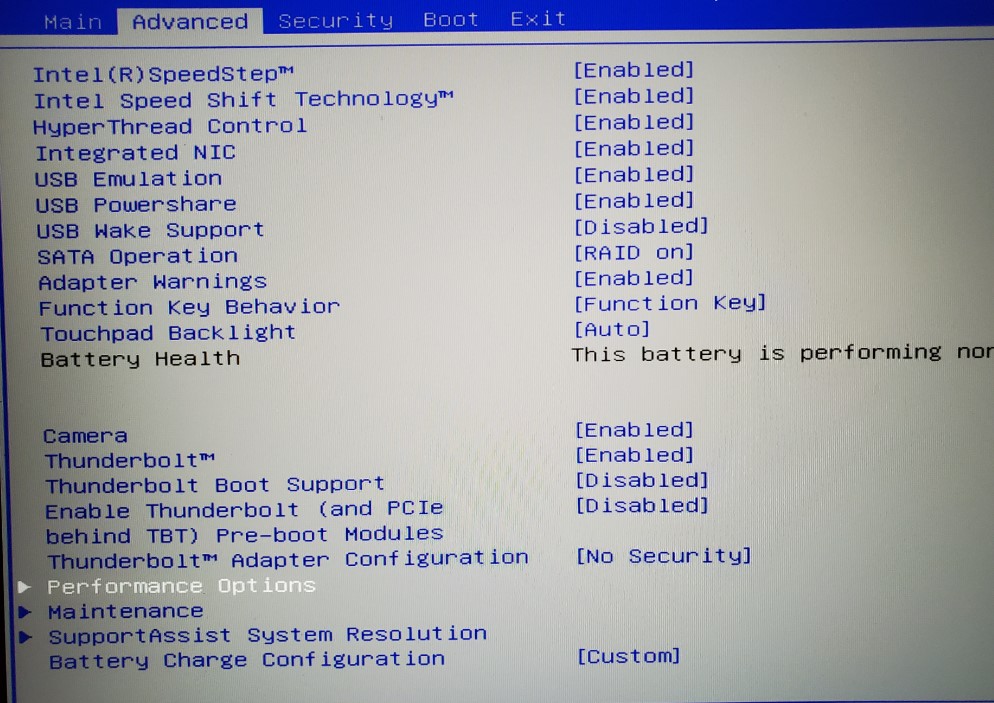
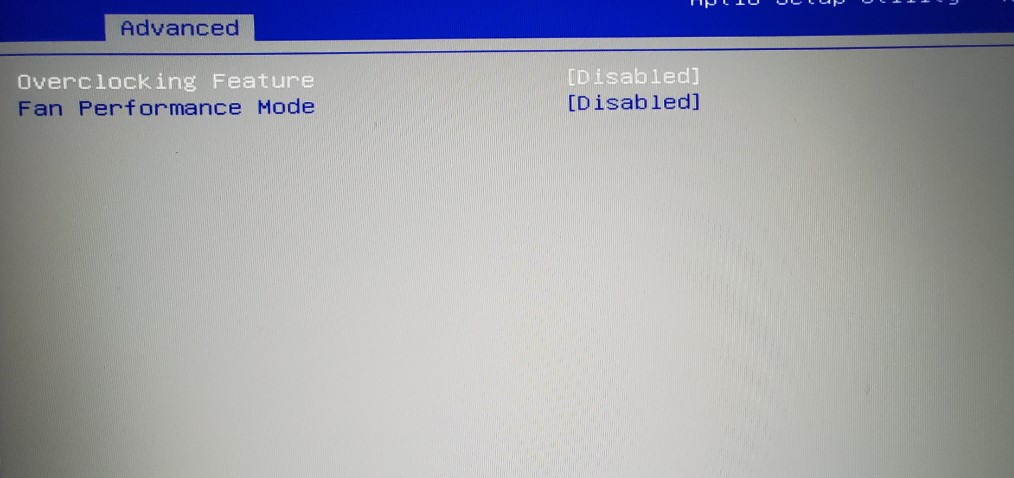
May be related (or not) but while going through the bios I noticed a few settings under performance options(images attached). I will take all roasting for not particularly going through my system to see what's there(Bios is something I try to steer clear of unless it's on an as needed basis) but(dumb question upcoming) what do these particularly do? They were disabled before I reset the bios as @Asdesas had suggested and remained so after.
I'm assuming the Overclocking feature allows you to apply the AWCC overclock profiles?Attached Files:
-
-
it is normal that it is to be deactivated after reinitialization of the bios since all the parameters by default have been loaded! after you can redo the settings you need, you just have to reactivate the functions you need
-
That's just the thing though, they both were deactivated prior to the reverting to default parameters. I haven't messed with any of those settings since getting this laptop 6 months ago.
I'm assuming that the overclocking feature enables the overclocking in AWCC but what does the fan performance mode do?
*OFFICIAL* Alienware Area-51M R2 Owner's Lounge
Discussion in '2015+ Alienware 13 / 15 / 17' started by Spartan@HIDevolution, May 9, 2020.