Problems? See this thread at archive.org.
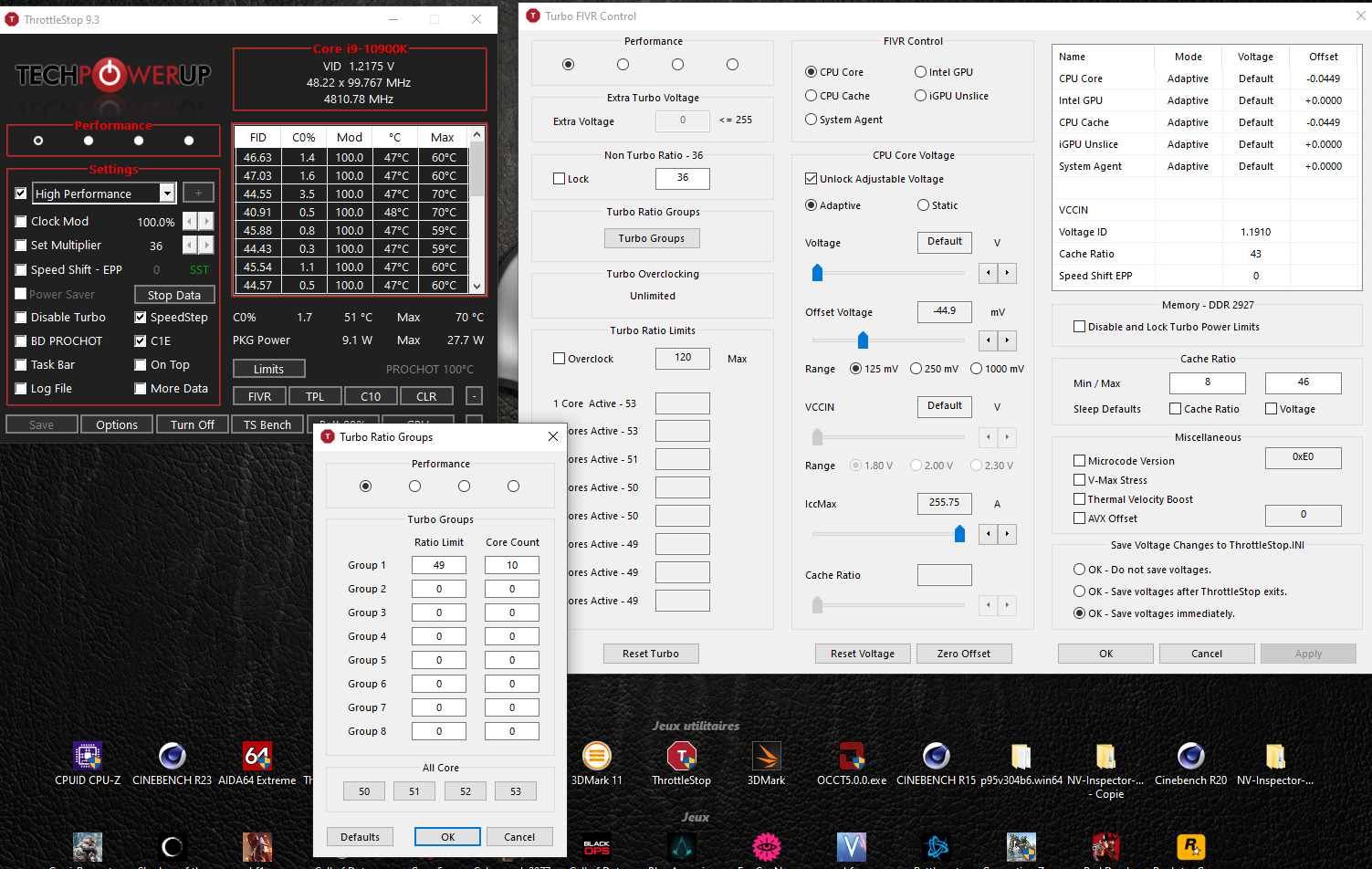
Edit: use the same settings for cache ratio. -44.9.
Maybe you should set all cores at 48X with a -60mv for a start or even better a 47X all cores with a -70Mv core and cache.
Test after and if you ever get a BSOD always suspect a to agressive undervolt.
-
-
Probably not what you hope for. Even thinner on its way. The sick thin and lighter trend continue from Dell Alienware... NEW THINNER AW LAPTOPS ON THE HORIZON
Justin Stuever, ole!!!, Normimb and 2 others like this. -
i was hoping to see an R3 release of the Area-51m, guess that ain't gonna happen

-
Yeah I believe this is most of us are hoping for..but the problem is we need a 200+ watt version of the notebook 3080 but I feel like that's not happen either. And if that doesn't happen it's almost forcing our hand out of the laptop space. I've absolutely loved my 51m R1 with the 2080 and wouldn't mind sticking with the line but who knows where it's going to go from here. I'm also not thrilled with them giving up on the graphics amplifier port too on their newer R5 line.Justin Stuever likes this.
-
Yeah it looks like barring any unforeseen circumstances the Alienware Area 51M R2 is probably the last of the Dell series with desktop processors and semi thick chassis. They are pushing the Apple narrative with thinner and lighter chassis. This is truly the end of an era with Dell/Alienware of enthusiasts quality notebooks. Although these new notebooks are boasting RTX 3080s and RTX 3070s they are barely beating a RTX 2080 Super 200w in most games. In the benchmark tests I have seen for other games the RTX 3080 is still not beating a RTX 2080 SUPER 200w version. The Clevo X170 SMK with Prema BIOS is the only notebook left that can only be thought of as an enthusiast notebook. Me being an Alienware fan since its inception my heart is hurt and angry. LOL.Last edited: May 2, 2021chewbakaats58, Normimb, ratchetnclank and 1 other person like this.
-
Mind if I ask how did you apply your paste and how much was used?
-
Sure. For the GPU, I used a pea size drop of paste and for the CPU, I used the cross method. As for how much was used, I wouldn’t say too much. A 3.5g tube of the paste will be more than enough. For cross method I did not go edge to edge on the CPU, more like started from around 15% within the block. CPU still needs to be undervolted regardless of how good the paste is. GPU is showing excellent results.
-
Thanks for the response and breakdown. I have a 10700K so I may not undervolt if I repaste.
-
Not a problem
Also as a reminder if this your first re-paste. Make sure your thermal pads are properly aligned before putting the heatsink back on. -
Strange fan behaviour ...
AW Command center used to very effectively control the fan speed on my A51m ... all the profiles worked, full speed, quiet, etc and the fans responded perfectly when selecting any given profile (ramping up or down depending on profile). Now, however, no matter what profile I select ... the fans never change and stay pegged at 52% ... even when gaming, the fans never change speed. This is troubling. I'm real big on manual control of fans and not having this ability is driving me nuts. Any suggestions on how to fix this? Thanks for any input...
Joel -
Just out of curiosity I would like to ask the 10900k owners on what undervolt value have you guys used along with max 10 core boost (especially underclocked). I tried -45 mV and 4.6 GHz but I still have the CPU hitting 100C on balanced fan mode very quickly.
-
I use a -120mv undervolt but it may not work for you. You just have to take baby steps and using -.25mv in increments until it BSODs to find a good undervolt value. CPUS don't always respond to the same values. Good Luck.Last edited: May 3, 2021Papusan and Justin Stuever like this.
-
First, don't waste your time on balanced fan mode. If you are testing or doing anything on machine to need max procs you need to be on full speed on thermals and max performance on power setting. All of our testing is based on those settings.
I am stable at 47x -100mv core, 43x -60mv cache. No WHEA errors or BSOD. I get more errors and issues when I try to increase the cache undervolt.
I am stable under 90° on CBR20 with those settings as well as gaming. I would start at -60mv on core and -30 mv on cache and sneak up on it using TS bench looking for errors as well as HWiNFO64 looking for WHEA errors at the bottom of sensors tab. I would drop the cache back down to 43x as well since this seems to play a large roll in thermals.
-
Hello everybody. First of all, introduce myself, is my first post in this great forum, I thank you very much for your help. I want to say that my language is not English and I use the google translator, I am sorry if I am not writing correctly.
I have an Area51m-r2 for 6 months and recently bought a 10900KF, without dedicated graphics, which works fine. But my question is, why does AWCC tell me that the cpu is not supported? I can't handle parameters of this cpu in AWCC even though it is a "K" version that is unlocked .. any suggestions?
I have another little question .. Is there any way to control the keyboard lighting without the AWCC? I don't like having to depend on this application for this.
Thanks for your help, greetings. -
if i remember correctly the KF is not officially supported.
-
Let me help you...again
Before you mentionned you used a pea size thermal paste for the CPU and an X patern for the GPU.
Here is your answer: The best thermalpaste for this laptop is Thermalright TFX for BOTH cpu and gpu. Use the X patern. A pea size on the CPU is not enought
Here is another answer to your questions: You mentionned you run test on Balanced fan profile = WRONG. Always run full speed fan profil for benchmark, gaming on such a powerfull CPU.
And for the correct undervolt now: I gave you some guideline to start. Now run some benchmakrk (ThotlleStop benchmark and look for errors. If no errors you can increase the undervolt)..
Please follow my advise and you'll have the best settup for your laptop.ninedragons, Papusan and DreDre like this. -
Hey guys I am new here as a friend of mine told me about this forum. Today I received my Alienware Area51m R2. Everything worked good so far at the beginning.
I got a I 7 10700 with 16gb ram and a 2070 super.
i also put in my Samsung 2 tb qvo and my 1tb 970 Evo later That Day. And afterwards it I got no Audio Audio device with a red Circle Icon on the bottom Right of the Screen.
I manually reinstalled Windows and all the drivers.It didnt change anyrhing. Still no Audio.
And After countless attemps to reinstall Windows in Order to solve this Problem i finally got a purple dead pixel quite a big one.
What can I Do besides sending the laptop back?I Need help IAm so desperate right now. -
so you've got a purple spot on the display and no audio, and you just received it? i would RMA it immediately.Justin Stuever, DreDre and Papusan like this. -
You may want to reread his original response in terms of his application to CPU and GPU. I do understand your recommendation for Thermalright TFX, but should that stop someone from using another type of paste? The general outcome is proper heat transfer and and cooling of the system. We're all here to share info, experience, and insight; in this instance paste is more a recommendation and not a rule in terms of the brand in my opinion.circuit likes this.
-
So for the GPU, I used Pea-size. Results are impressive.
For CPU, its the cross method. I can run the laptop at full-speed and run 3DMark and I usually do not reach 100C on stock itself. However running the fan at full speed all the time isn't really an option + I prefer having the convenience of it ramping up by itself.
Now with that out of the way, I wonder if anyone here has figure out how to work the fan profiles on AWCC. Balanced gets the fan to 80% even during high heat. I prefer to have my own profile (if I can learn how, I have tried and failed many times). These devices aren't exactly cheap and should perform well out of the box without much user modifications.
So, aim is to get either decent undervolts so that balanced profile works or have my own configuration for fan speeds so that it does go to 100% when needed and not when I force it to run at full speed. -
I would like to see the results of the benchmarks they do with their repast with tfx to know if it's really better than other thermal pastes
-
Most pastes perform within 2-3C of each other. Real difference can only be seen if someone uses more risky methods such as liquid metal and/or delidding to use liquid metal between the chip and IHS.MogRules likes this.
-
I just wanted to see their test to compare them to mine to see if there is a real difference, since I just replaced my i7 10700 with an i9 10900k and which I repast only with grizzly kryaunaut -
Balanced will get the fans to 80% but it won't do it before the cpu hits 100'c. If you need to run under 100'c then you need full speed on the fans.
I tend to run balanced 90% of the time but when gaming i stick it on to full speed. -
Your are correct. He did apply the x patern for the CPU wich is fine. So i was wrong on this one.
I am trying to help him and give him the best answer. I am not trying to sell him any product here. But the best is the best, just can't lie about it: https://albestech.com/review-pasta-termica-thermalright-tfx/#htoc-risultati-dei-test-e-performance
also: http://forum.notebookreview.com/thr...and-liquid-metal.806840/page-48#post-11084441
The main reason i recommend using the X pattern for both CPU/GPU is because the thicker paste performs best with this laptop. Since the paste is thick the (plastic bag boiling water) X-patern will spread the right amount of paste accross all the CPU/GPU and the excess will be pushed out (wich is fine).Last edited: May 4, 2021 -
-
LM conductonaut is not improving temps ton the AREA 51M R1 and R2. Tested by me and many other users. LM conductonaut gives better results on previous Gen lattops. M15, M17 thinner latpops. Tested by me many times and many other users.
AWCC fan contol is absolute garbage and you won't be able to do what you wish to do. It will not follow the fan curve you set it to. Like you say if your goal is a quiet gaming laptop then a good undervolt at very low clock speed is what you should aim for. How about you set all cores at 37X (or disable turbo in ThrottleStop) while gaming and see if you are satisfied with the results. I just tested it in BF1 an my temps were 75GPU 74CPU running at 80% fan speed for both CPU GPU.Last edited: May 4, 2021 -
I'm not sure if it's due to my recent bios update and as well, installation of the latest version of that Intel Tuning Thermal thingamagig ... or the fact that I recently repasted with Noctua NH-1 ... but temps are crazy good now ... Horizon Zero Dawn (1440p to external monitor and 1080p) would always put my CPU up to at least 90+C after just a few minutes of game play ... now I hardly ever see temps break out of the 70C area ... even the notoriously hot running Generation Zero stays happily around the upper 70C region ... I'm not sure what is responsible for this but it's awesome ...
Here's a decent bit of gameplay, Horizon Zero Dawn, 1440p, "Very High" settings ... and temps are outstanding throughout ... and BTW ... the fan profile in Command Center was set to "Performance" for the entirety of this session. Go full screen to see the temp data in the lower right ...
Pleased I am.
... -
I put thermal equilibrium in the office and for each game I set the profile to full speed, as soon as I start a game the fan goes into full speed automatically and as soon as I quit the game it switches to thermal equilibrium automatically
a firestrike test that I just did
-
Reading that table gave me nausea. But I get what you mean. TFX is slightly better.
-
How exactly did you do this? Through AWCC?
-
Yes you go into the library you add your game, then you can configure it by clicking on the game you can choose the fan mode, the performance mode for each game
-
when i see a 3dmark test from a person who repastered with tfx lower than mine then i would say yes
-
I don't know who you are refering too but your CPU scrore is not good. Your cpu is thtrottling.
Here's my average score dayly driver no overclocked to compare. Pay attention to the purple line. No throttling like yours.
Here is MINE:
And here is YOURS
Attached Files:
Last edited by a moderator: May 5, 2021 -
-
PSA for anyone playing COD Cold war. I installed the game the first night it was available and have been updating and patching since then. I was starting to get black screens and crashes. I was up to date on all of my drivers (4/29/2021 Nvidia) and windows updates. Was also running warm with the game at 85° with an occasional 90+.
I went and uninstalled battle.net and all COD versions. Reinstalled from scratch. Temps back down to mid 70s and no more crashes.
If you haven't deleted and reinstalled I would highly recommend it. Apparently their patches and updates are trash now. Needs a clean install. -
Thanks for sharing. Personally everytime i try to play those games, i am always upset to see that an update is again required. This goes for COLD WAR and ADVANCE WARFARE.
-
Thread was cleaned and a series of bickering posts deleted. I am afraid I cannot guarantee that no innocent babies went out with the bathwater.
Sometimes a post can have a trolling effect even if it wasn't meant as such. Other posters can help in those cases by not taking it as bait
Oh, and don't post bait in the first place
Normimb, Papusan, zacwhite15 and 2 others like this. -
sorry dannemand, coulnd't help it after reading everything that had been going on. but thank you for cleaning up the thread
Dannemand and Justin Stuever like this.
-
More Firestrike tripe ... LOL ... 5ghz overclock ... 10700K/2070 Super ... temps in the 50C range but shot up to max of 88C during PhysX test ... haven't really worked on a max overclock but this particular chip/machine seems fairly comfortable at 5ghz...
-
what do you use as software to overclock the graphics card?
-
I have been using EVGA precision X1 for a while since I use it to tune my 2080TI hybrid in my AGA. Works well. No issues but doesn’t undervolt the 2080S in the 51m R2 but it doesn’t run hot with a 125ram/150 core overclock. Also I have used the MSI afterburner with success undervolting and overclocking the 2080S. Take small increases at a time and make sure it’s stable with extended gaming and performance tests.
Last edited: May 5, 2021 -
In that Firestrike run I had not overclocked the graphics card at all. It was running at stock speeds. I overclocked the CPU to 5ghz. I have not tried overclocking my graphics card at all just yet but might try in a bit. I used Throttlestop to overclock/undervolt the CPU.
-
Here is a new Firestrike run with the graphics card overclocked ... details of both CPU and GPU overclock below. Resulted in a rather large increase in the benchmark score. Almost to stock 2080 levels. The little peaks you see in the purple CPU frequency graph are not indications of throttling. That is simply when the CPU occasionally ramped up to 5.1ghz. I have no idea if these settings will work for every day use/gaming but going to try. I doubt it but who knows. Benchmarks are one thing ... daily use is altogether different. ;-)
CPU overclock: 5.1ghz
GPU overclock: +200 core / +150 memory
...
Last edited: May 6, 2021 -
I tried this setting on watchdogs legion online in ultra its last 10 sec and failed the game yet the temperature does not exceed 60 degrees, the rtx 2070 does not support too much overcloking of the ram for me!s1rrah likes this. -
It's working for me so far but I had to back the ram overclock down to +125 and core frequency down to +150. Also had to drop the CPU back to 5.0ghz ... 5.1ghz would probably work okay if I added more voltage but 100mhz gain really isn't worth it ...
-
After more testing I was still having crashes. I ended up reverting back to the 461.72 Nvidia driver for the 2080S and it fixed all of my problems. This has been 2 days with the game open and playing hours at a time with no crashes. No instability. Apparently all of the drivers after February are garbage from Nvidia for the RTX cards and COD Cold war.
-
What is the fastest Nvidia GPU you can get for the Area51m and how difficult is it to upgrade the GPU on the system?
-
2080 Super. Would not be hard at all to upgrade. On the R1, you can only go up to a 2080.
*OFFICIAL* Alienware Area-51M R2 Owner's Lounge
Discussion in '2015+ Alienware 13 / 15 / 17' started by Spartan@HIDevolution, May 9, 2020.