Problems? See this thread at archive.org.
I update through Geforce Experience. I know that the ones issued by AW are better optimized but they are usually behind. And I've learned through experience that once the support starts dwindling for the laptops, so do those manufacturer optimized drivers. You eventually end up having to get from Nvidia directly. Just my 2 cents.
-
yeaah I think that too, thankyou for your reply
-
I use DaVinci Resolve for video editing and the one on thee Dell site has problems with 17th version of the program. So i've downloaded the latest one from Nvidia and things work properly. Waiting for the latest one from Dell is sth impossible because they will never catch the latest driver from Nvidia.
-
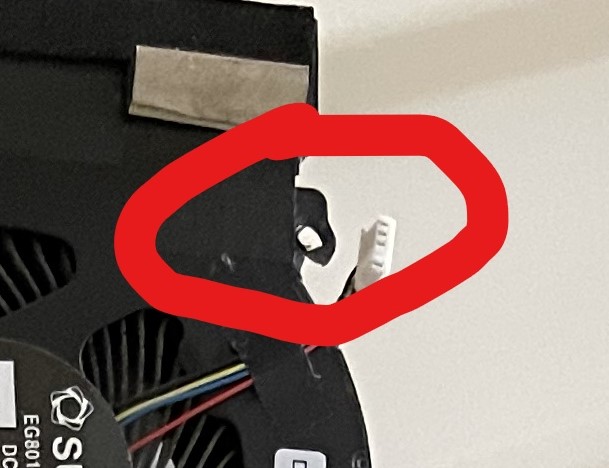
How bad do you guys think a damaged screw hole on the heatsink will be in the long run. I honestly have no idea when this broke and whether I should contact dell for a replacement heatsink. I noticed it during the last re-paste. Image attached.
Note: It is on the GPU side. Laptop doesn't really move around anywhere. Would this potentially get worse?Attached Files:
-
-
@Normimb @Papusan
Dell has replaced the CPU, heatsink and and ram (don't know why they replaced the ram though) but the system is still overheating and thermal throttling.
This is their bullsh!t reply after I told them that the system is still overheating.
"In reference to the issue you have reported I would like to inform you that temp range for the gaming laptops is different from other computer and normal laptops .
I would also like to inform you that These systems are designed to maintain system stability when the CPU temperature reaches a set temperature (termed the Thermal Control Circuit (TCC) activation point,). The TCC is activated and adjusts the CPU frequency down by a couple of hundred MHz to reduce the temperature rise. This allows the system’s thermal control mechanism to catch up (The frequency will never be below the Base Frequency Mode, e.g. Intel i9 8950 HK). This slight drop in frequency can sometimes be mistaken for a performance drop. It is a design feature common to all Gaming Notebooks and it helps to optimize the system performance and prevent systems from exceeding 100 ℃. The TCC point for the following systems is:
- Alienware 13 R3, 15 R3/R4, and 17 R4/R5 - TCC = 97 ℃
- Alienware M15, and M17 - TCC = 100 ℃
- Alienware Area-51m R2 - TCC = 100 ℃"
Last edited: Apr 26, 2021Vistar Shook, Papusan, jclausius and 1 other person like this. -
Dell support is trying to get rid of you. They are hiding behind a programmation feature. If you can show them it's running below the base clock or take a print screen when you see 101C or more they will have no other choice but replace parts again and maybe a new system.
Complain, call back, speak to someone else etc... don't give up.
But first you have to be certain it overheats. Can you run CBR20 at 48X with a reasonnable undervolt of -60 core and cache (utlimately you have to find out what is your CPU best undervolt with testing but -60 seems safe at 48X), max fan speed and not exceed 96C before the end of the test?
(let it cool down 5 minutes before each test)
Are all the cores within 10C of each others? (if not maybe bad repaste job issue, badly spread or not enough)
Make sure to use ThrottleStop and set all 10 cores at 48X before you run the test (avoid awcc for selecting clock speed since it's not accurate) monitor your temps and clock speed with HWinfo. Post a print screen of the HWinfo after the test so we can analyse clock speed, temps, voltage.DreDre, Vistar Shook, jclausius and 1 other person like this. -
This is spot on. I am only able to run a single test at 48x before thermal throttling. I run 47x at -100mv and stay under 90 during this test. The factory Dell settings will thermal every time. We have more processor than this laptop is capable of cooling. And that's not a bad thing to me. I'd rather have more and tame it to maximum allowable than not have enough and run cool. Of course it would be nice if they could engineer a better way to cool it, but without that I'd rather have it like it is now than be anemic. Just my opinion.Last edited: Apr 26, 2021Normimb likes this.
-
I would probably flatten it out and throw a washer under your screw to grab it better and send it!
-
I called up Alienware and am checking if they can do a warranty replacement since it’s bent and broken. They are running all sorts of weird stress tests to check if the laptop is overheating. Of course with their tests, temps just seem to be fine. My GPU won’t go past 75C lol with their stress tests. The moment I play COD or run 3D Mark, it hits 86C
-
That is about right for me. Playing COD Cold War right now and after about 10 games it sits around 85°. I think your machine is probably fine and just dealing with the same issues as the rest of us. I think you might be disappointed after you exchange it and its no different.
EDIT: Sorry I read it wrong was referring to CPU. My GPU only gets to 70-71° with CPU at 85° playing COD Cold warLast edited: Apr 27, 2021 -
Yeah. You are lucky though, on mine it hits 86C within the first game (especially if it’s domination or hardpoint) match. Seems like they are saying my CPU is overheating. They might just send a replacement for the CPU (we all know it won’t do much) and probably the heat sink.
-
I have my system set to 47x and -100mv and it sits at 80° in game menus and runs 85° and even pings 90° occasionally in Cold war. That is running about 85-90° on CBR 20 test under same settings. On CBR20 I can run 48x but it gets up to about 95-97° and sometimes hit thermal. Did you repaste? or LM? I delid'd and repasted using TFX and Kryonaut LM. Dropped me another 8-9°.DreDre likes this.
-
Just finished my talk with Alienware. They are sending me a new heatsink. I will just buy a paste and keep it for then. At the very least I will get newer thermal pads and a heatsink without a broken screw socket. Anyone know if the technician will just use my thermal paste (or is it against company policy)?
Undervolt is part of the plan. I just have a couple of remote interviews this week and don't want to BSOD while I am in the call lol. -
Congrats on the new parts.
I have read several people say they were able to get a tech to use their paste. Just play nice and ask would be my suggestion.
I would see if they will allow you to install it.
As far as I have seen everyone has been able to hold a -60mv core/cash undervolt under 49x. If you are worried about BSOD start there and work your way up 5MV at a time til you have WHEA errors, freezes and BSODs. I am able to run at -100mv core and -60mv cache @ 47x and am very stable. Most are not. For some reason others like Normimb can run way cooler than me at 49x but are not as stable as I am with the undervolt. Every machine is different. I suggest trial and error and test. Get throttlestop if you don't already have it.DreDre likes this. -
Thanks

I will keep a paste ready for when the person comes. In the past, I had a decent experience with a Dell tech (very friendly guy) with my old M15x (he did allow my own paste). That laptop had been serviced 4-5 times (all for different issues, including dust getting within the screen). Hopefully this one will allow me too. Worse case, if he doesn't I think I will just return the paste. Getting tired of opening and closing this thing, not to mention the risks involved with screwing up something in the process. Once I am done with my interview tomorrow, I am going to start messing around with it to lower the temps. -
ask the technician if you can keep your old heatsink ... in my case I already have two spare heatsinks and a MOBO. usually the dicipadores bring the pasta from the factory
-
Yeah the heatsink will already have paste on it. I just want to wipe that off and use my own paste which should give better results. I prefer to do it then rather than later because opening up the heatsink wears out thermal pads every time you do it. So this will be like a new heatsink with my own paste which should be an ideal situation.
Dell Canada never lets you keep older parts. I am sure this person will be taking the old heat sink away. I can definitely ask him but I highly doubt he will let me keep it. -
Thanks for the advice.
Could you please send me the screenshots of your ThrottleStop settings? I don't wanna mess it up and wanna be sure that it's the right settings. -
That is way!!!!!! too much for this GPU.
The 2080super runs really cool on the the R2 compare to the the R1 2080. Mine never reaches 75C with a good thermal paste (themal right TFX) on COD black ops or modern warfare. Also 86C is the max temp allow by dell in AWCC so i am pretty certain you GPU is thermal Throttling in games and your FPS should drop badly. You should monitor your GPU clock (Mhz) in HWinfo. Look for the lower Mhz recorded after a gaming session. If it's under 1500 Mhz (i expect 500 Mhz) this means your FPS also droped to something like 15FPS or worst. That's how dell is protecting your system when overheating. It's consider «unacceptable» since the game becomes unplayable for a moment. It is beyond specs and tech support will have no other choice but to replace or repair your laptop if you can show them that your GPU clock drops badly while gaming. This has happened to me for my 15R2, R3,R4. I showed them on a remote session and they had no other choice but to repair/replace.
A gaming laptop should not drop to 15FPS at 1080p while gaming. Most Alienware that have heating issues do. UNACCEPTABLE.
PS.On a remote session with dell don't let them run their stupid support assist test. Ask the person to run a game and monitor Mhz of the GPU. That's how it should be done. Real world situation. -
Exactly. For some weird reason my GPU has thermal issues. Not sure why. The new heat sink will probably fix it. The did run their stupid support assist test which probably showed a benchmark test from the year 2000 and they told me that the thermals are fine. However, thankfully I had logs from GPU-Z that showed temperatures from real world games and I ran a 3D Mark benchmark that showed the GPU instantly thermal throttling. They approved the new heatsink right away.Justin Stuever and Normimb like this.
-
Good news.
The replacement heatsink will come with thermal paste already applied from factory. (since you might not have the TFX before the tech comes with parts) Pay attention that the technician removes the plastic sheet covering the thermal paste and thermal pads (seen that before) and how he re-screw the heatsink (he has to follow an order 1 to 8 while screwing it back on the MB.
Hopefully this will resolve your issue with GPU but for even better results a repaste with TFX will improved it even more.
Final advise. If it's still not working correctly, call dell right away and do not wait. Dell have this policy that if they can't repair in a 30 day period, that they must consider a replacement system. In Canada it's 2 major parts repair attempt. That would be the GPU/CPU/ and/or MB.
But i hope it goes well. This is a good laptop when dell don't screw it up with updates or bad parts.Vistar Shook, Papusan and Justin Stuever like this. -
Thanks for the heads up. Does it normally happen for a tech to not follow procedure properly? I will keep an eye and guide him.Normimb likes this.
-
Agree! I run EVGA Precision X1 on my GPU with 125 memory clock and 150 GPU clock (2070MHz in HWiNFO64) and playing COD on ULTRA and DLSS set to quality I run 70-72 max.Normimb likes this.
-
Here where i live the tecnician is never the same or from the same company. I usually help them with the procedure because they are not Alienware specialist but technician that works on any brand of laptop. In general they are competent but 1 out of 5 (guessing from personnal experience) is incompetent or just don't care.
Stay close and watch him work. If he breaks anything then you'l know.
Hope it goes well for you.Justin Stuever and Papusan like this. -
It seems that Alienware does not offer RTX 2080S in Canada anymore for Area 51m R2. Also they have kept the same prices as the one with RTX 2080S but has a RTX 2070S instead.
-
Looks like that is the same for me for the US Dell website. I guess they ran out of 2080S. Wonderful. Hope we don't need any for warranty. I'm sure they set a few aside but who knows anymore for Dell.
Edit: Also looks like they are out of the 10900K options. Only option I see is for 10700, not even the overclockable K option. Poop on that noise. -
I've been waiting for the exchange pc for a month and they still haven't contacted me to confirm ...
-
Yeah i noticed that too. I still have 2 year warranty on my system. I am pretty sure when it breaks, they will offer me the M17R4 or M17R5 since they won't have the parts in stock. I am disapointed in dell at kepping and not offering replacement parts for older system. We are not talking 10 years old system, but sometimes 2 year old and worst 1 year old system.Last edited: Apr 29, 2021
-
Just saw this on the website as well. I've been putting off buying a 10850K a while now as a planned future upgrade. Think I will pull the trigger as I doubt the support for 11th gen will come to fruition. Seems a bit like they're on a slight discontinuation trend or hopefully they're scaling back due to shortages.
-
You'll be pretty screwed if you bought the cheapest SKU to save on costs for later get the better graphics from Dell Store. See also *OFFICIAL* Alienware m15 R4 / m17 R4 Owner's LoungeVistar Shook, etern4l and Normimb like this.
-
Not only the laptop is not upgradable but the way they manage spare parts i would say : It's not even repairable.
«Alienare laptops: the most UNrepairable, UNupgradable laptop in the world»
That would make a good sales speachLast edited: Apr 29, 2021Rei Fukai, Vistar Shook, etern4l and 3 others like this. -
What a far cry from where they used to be. Alienware used to be known for their upgradeability.
It's time to find a new brand everyone.DreDre, Vistar Shook, Normimb and 1 other person like this. -
Probably will be a desktop for me for my next upgrade if alienware have nothing worthwhile (eg no bga thin and light crap). I know clevos still exist but the design of them to me is pretty ugly it's not the thickness or anything but the overall design and build quality looks cheap and when spending £3500+ on a laptop i at least want to enjoy the look of it.DreDre, Clamibot and Justin Stuever like this.
-
Yeah I definitely get that. Their looks are a bit of an acquired taste for some.
Personally I like the look because it's sleek (to me) and minimalistic. I also like industrial style designs. Flashy isn't for me.
One advantage to the minimalistic design is that nobody will want to steal your laptop. However, you want to also enjoy the look of your machine, otherwise you'll want to throw up every time you look at it. -
Depends on what AW model you talk about I expect you talk about the models going from 2015 and forwards. A fully own proprietary HW design far from the standard paired with own fully locked firmware will always be the worst combo. Newer doesn't always mean better
http://forum.notebookreview.com/thr...0b-alive-thread.795048/page-313#post-11092455
The DGFF design should never ever have seen the light....
![[IMG]](images/storyImages/26SW8zi.jpg) Last edited: Apr 29, 2021
Last edited: Apr 29, 2021 -
I knew nothing about alienware before 2016 wich was my first ever purchase of an Alienware Laptop. I liked the look ot their product line up, there website and publicity really gave me confidence i was gone buy a top quality product. Best decision i made was to take extended warranty and reniew it before it reach it's end. So when my 15 R2 failed badly i was offered an R3 that also failed at gaming and then and R4, then M15R2, Then area 51M and finally 51MR2. So far they have either failed terribly at what they were designed to do....gaming or the replacement parts were unavailable and the solution offered was the new version of the laptop.
Only the Area51M R1 and R2 i would consider quality product but they too are destin to fail because of the stupid decision Dell takes.
So yes DGFF should have never seen the light since will never be able to upgrade or purchase a replacement when it fails...and with my 5 years experience i am very confident my R2 will fail before the next 2 year.Last edited: Apr 30, 2021c69k, jclausius, Clamibot and 1 other person like this. -
I was searching around for curiosity and wondered if anyone ever tried to run an i5 in the R1 or R2? Gaming wise, the i5 isn't far behind and has a much lower power draw. Could perhaps get a little more power out of the GPU or just much better thermals than the red hot intel i7s and i9s?
-
Gaming really wants 8 cores, any power/heat savings you get with an i5 won't be worth the lower performance.
Just look at Metro Exodus Enhanced, which asks for 8 cores for everything except the minimum, you should expect that to be the trend as we move forward with games developed for the new consoles. -
this may be a dumb question, but has anyone tried stuffing a i9-10980XE into their Area-51m R2?
-
Unfortunately the i9 10980XE won't fit as it is an HEDT CPU that needs an LGA 2066 socket. The Alienware Area 51M has an LGA 1200 socket on its motherboard.
-
duh! i didn't even check to see if it was the same socket. now i feel dumb. LOL i swear, im smarter than this.Clamibot likes this.
-
We all have these bloopers from time to time. Recently, I forgot to check if my desktop was plugged in when it wouldn't turn on. The KISS principle flew over my head that day.
-
Happy to announce that the heatsink finally got replaced. During the replacement, after talking to Dell they allowed me to apply Noctua NT-H2 thermal paste that I owned. I am not able to make the GPU go past 75C. Previously it would hit 86C. Ran a few stress tests and 75C is all it does.
Edit: this is without any undervolting and under clocking. Everything is at stock.Last edited: Apr 30, 2021Normimb, ratchetnclank, etern4l and 1 other person like this. -
Seems good. Happy for you.
Now final test: Play COD (cause that's were you first reported the problem was). -
Thanks
I tried COD as well. It won’t go past 75C on that too. -
Great news then it means it's ok.
Now when you will undervolt the CPU, the GPU will also benefits from it because they have a shared heatsink. Enjoy your gaming laptop now
-
does anyone have any news about the Area 51m R3, or any updates that will use 30 GPU series ? when will it be launching?
-
does anyone have any news about the Area 51m R3, or any updates that will use 30 GPU series ? when will it be launching?
-
No news. We expect it has reach it's EOL (end of life). Msi and Clevo did not release any 200Watts+ RTX3080. Only 150watts.
The thin, overheating, thermal throttling, power trhottling new king appear to be the new M17R4. And to follow dell's great policy: totally unupgradable, unrepairable since everything is soldier on the MB. -
By any chance are you able to share a screenshot of your throttlestop settings. It’s my first time undervolting with it.
*OFFICIAL* Alienware Area-51M R2 Owner's Lounge
Discussion in '2015+ Alienware 13 / 15 / 17' started by Spartan@HIDevolution, May 9, 2020.