Problems? See this thread at archive.org.
Some mad scientist made this
-
Attached Files:
belarusrulez, Nicolas Paiva, Lopt and 1 other person like this. -
-
Actually, it takes UV to change color, or I noticed if the plastic base is black and you paint it with a light color, it turns into pinky-purple like color. I could be wrong but this is my observation when painting plastic.
-
I kindly demand some video evidence to show how well it works.
 Lopt, Nicolas Paiva, Korben_Dallas and 2 others like this.
 -
How hot do these get playing on your lap?
-
Does anyone know if we could monitor our temps on the smartphone already ?
![[IMG]](images/storyImages/8Zm6iet.jpg) FXi likes this.
FXi likes this. -
The pictures show the cooling pads software branded “ Advancing Gene” I assume the same people that make the SSD heatsinks ?
The ad text makes it sound like they are making a lot of special accessories for Alienware?
I’ll admit it LOOKS nice and it does have what most coolers DON’T have separate power for the fans.
Sent from my iPhone using Tapatalk -
I know my Alienware desktop has it. Alienware CC software notification asked me if I want to link the desktop to my phone.
I have the Alienware Area 51 R5.
that is correct. Even fiberglass changes color after awhile in sun light.Last edited by a moderator: Jan 27, 2020 -
Not unless there is some other changes I need to make to the Mobile connect app, then I can only send texts and phone calls from my pc. No option to look at temps on my phone. That would be interesting though.
-
-
Ok installed 2nd Samsung 970 EVO PLUS 1 TB so now I have 2 TB internal should hold me for a while I hope, and used the Advancing Gene heatsinks on both SSD's they fit fine. I really like the Advancing Gene heatsinks design, can't attest to whether they work any better but they sure look good
Anyone have any opinion on letting the Samsung magician software load with windows and run in the background all the time ? Does it do anything for the drive besides the flashy screens and Temp monitoring ?
Or do most folks just run it once and a while to check the drives ? -
Finally got some straight answers from Dell thanks to @thattechgirl_viv :
"The memory bump that Dell is offering is due to a new motherboard revision and they are only using it (per Dell rep) on orders that call for the memory upgrade.
They only offer 2933Mhz memory up to 32GB.
The new motherboard P/N is F1CCK and the old one is P/N DHWX9.
I also asked about the 9900KS support and they said that most likely they will not be supporting it."FXi, ssj92, belarusrulez and 11 others like this. -
Interesting though their website allows 2933 ram with 64gb configured.
Prema likes this. -
So basically in other words dell is saying all previous buyers of the area51m are left out to dry and they wont be helping
So much for the "most upgradeable laptop ever" -
That's a shame...
Edit: Guess we should all start getting MB issues and keep getting replacement MB's until we get this new revision!Fire Tiger and Lopt like this. -
Notice the new M/B part number ?...…. The new motherboard P/N is F1CCK …… LOL
Last edited by a moderator: Jan 28, 2020ssj92, Fire Tiger, Prema and 2 others like this. -
Yeah lol!!!
On another topic, I wonder if the new mobo can be downgraded to 1.5.0 BIOS or lower...Fire Tiger likes this. -
I doubt it’s even worth the effort getting one of the new M/B’s
I don’t think the RAM speed would be particularly noticeable.
And who knows what new problems it may have.
It’s just interesting to see how the company operates / unfortunately confirmed my worst suspicions.
Never believe anyone’s marketing hype, just buy the best you can afford at the time, and if you are able to get more out of it great but don’t count on it no matter what they say.
Sent from my iPhone using Tapatalk -
XMP only works on 1.8.1+ and stops working when downgrading...
@maoshen1234
Is your motherboard a F1CCK revision?Last edited: Jan 28, 2020FXi, ssj92, Lopt and 1 other person like this. -
I have said this from the beginning. Cheapo made motherboard was the main culprit. Not even good enough for Intel’s memory specs for last years Intel core processors.
Everything that Dell and Azor promised from the release is shooten down. Neither Worlds fastest and worlds most upgradeable gaming notebook.
Not even sure if you can use downgraded firmware on the new revision boards. And you won’t be able to use faster ram than 2400MHz if Dell allows you to downgrade bios below the crippled bios version. Pest or Cholera... Your choice. See... faster ram or crippled firmware. -
I've been hunting a replacement gaming laptop since I ditched my 51M, but it's actually really hard to come by another laptop with similar specs for the right price.
I may be able to get a new 51M (new-new, not refurbished) for a very good price (lower than what I sold my first unit for).
Since the thread is REALLY long, what are the pros/cons if I were to rebuy the 51M new today compared with the launch units?
Are there still HW issues? Are all new units TDP capped? Is the software still crap? Will I still need to add/replace pads, repaste CPU/GPU? Etc etc... can anyone please summarize a bit? New vs old (I'll go with a better CPU etc, so I'll still have a powerful rig). -
Very disappointed with how this situation was handled, as a buyer I feel fooled, having one of the first motherboard revisions I would have expected at least one update to the advertised stock speed at the time of 2666Mhz. Very disappointed...
-
Dell switched my clicking hard drive for a brand new one
Guess what, it already show up a lot of errors (01 and 07 values)
![[IMG]](images/storyImages/Annotation-2020-01-28-132608.png)
These values climbs up after each sollicitations
Its a shame Dell put Seagate drives in such a high priced machine.Last edited: Jan 28, 2020 -
no, every area 51m should work.Docsteel, Lopt and Fire Tiger like this.
-
Does your RAM reach speeds above 2400mhz?
-
yes, now I can run my 3200Mhz original memory to 2400, 2666, 2933 max.belarusrulez, Lopt and Fire Tiger like this.
-
Nice one and you didn't get a new MB or order the faster memory when purchased? Did you have to go to BIOS 1.8.1?
-
I had bought a lot of high speed memory to try. bios 1.8.1 is a must have.Lopt and Fire Tiger like this.
-
What memory eventually worked and when did you buy your laptop if you don't mind me asking? Thanks for answering all these questions, I'm intrigued.Docsteel likes this.
-
2019 May. You may not to focus on what memory is. I'll post the solution after someone post the memory.Lopt likes this.
-
Last edited: Jan 28, 2020
-
-
You would likely go sterile with this on your lap for any length of time - these are desktop replacements, not Chromebooks
Tim V. likes this.
-
21-21-21...now that looks like a custom profile and not XMP...
Post your CPU-Z memory tab...
Edit: OK, that's Samsung RAM default JEDEC:
Last edited: Jan 28, 2020 -
Mine timing is using JEDEC 2933 standard.
I think ShaggySVK's is a test bios which can set timing him/her self. -
-
maybe you are right. XMP or not XMP. Timing is trained and fixed by bios. And higher frequency must need special memory info.
-
Why is there so much secrecy around this? Has some sort of hack been introduced? I just want to know how to get faster than 2400mhz? I have Hyperx memory and am willing to update BIOS to 1.8.1 but there is no point if the memory isn't going to run at 2666mhz.
Maybe I'm just not understanding your posts but it seems I'm not getting the full story. -
Cmon....dont let us play guessing games... How?
Fire Tiger likes this. -
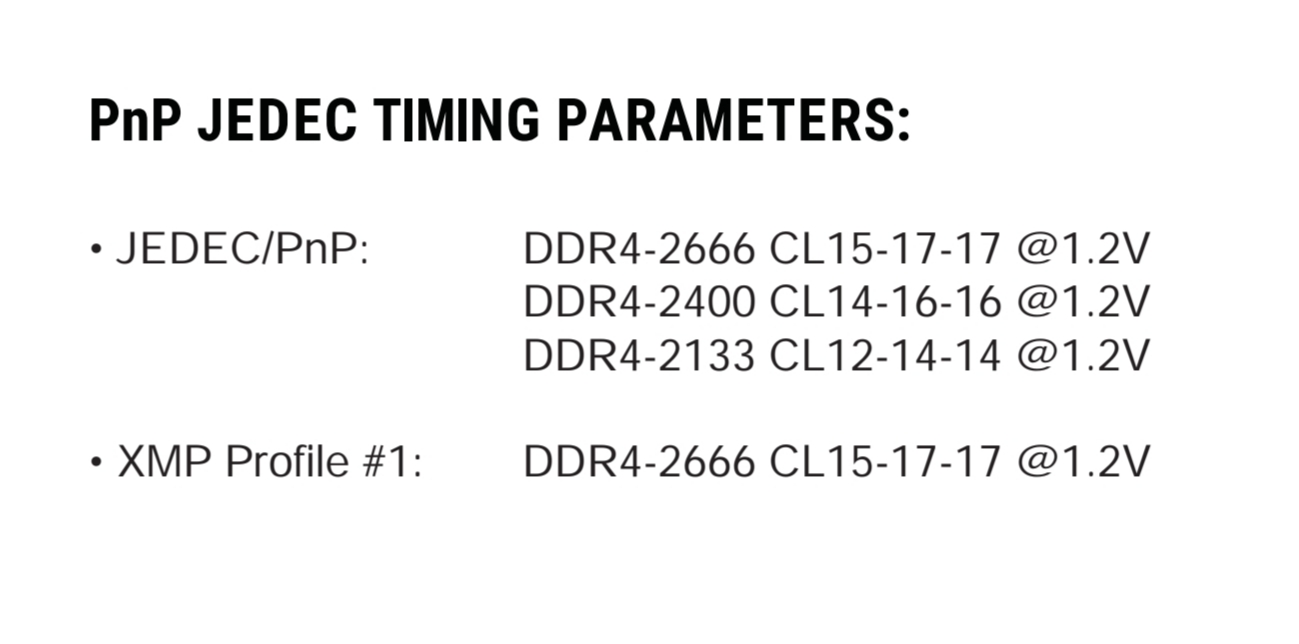
You guys have to use RAM with higher JEDEC and BIOS 1.8.1+.
This is the frequency the system boots up with automatically without selecting an XMP profile.
As an alternative you can program your existing RAM with up to 2933 JEDEC by using Thaiphoon Burner on a Clevo or MSI system running a PremaMod BIOS (factory Intel BIOS has SPD write locked) and then puting the RAM back into the A51M:
JEDEC ≠ XMP
CPU-Z memory tab will show you the RAM´s current max JEDEC:
EDIT:
The current BIOS still has issues picking the highest JEDEC if too many profiles are present on the RAM.
In order to force the highest speed you can remove the lower speed bins manually via Thaiphoon Burner and just leave the one you need (e.g.):
Last edited: Jan 29, 2020FXi, ssj92, belarusrulez and 9 others like this. -
I use it, and if you want it to operate correctly and get the best speeds you will need to switch to AHCI and then most likely manually designate the driver. I installed that same drive literally last weekend.
What was interesting is that the temps are about the same as the crappy Hynix one, but the speeds on it went up for read only with the switch to AHCI..... the difference in speed from RAID was tremendous... I was getting like 2500 and the 970 shot up to like 3300... with the drive half full.
There is a process to do this change (RAID to AHCI) without having to reinstall Windows....
Well, on the flipside you can go to 64 GB on the older motherboard.... wonder if this is true on the new one or the limit is just for 2933 XMP memory?
The real FPS change in a game might at best be around 5% _if_ it was a memory intensive game.... most are not. -
what are the memory kits that work at 2933MHz without mod?
Fire Tiger likes this. -
@Prema
Flashed 1.8.1, have 3800mhz BDies installed -> no xmp or higher than 2400 possible
Fire Tiger likes this. -
Will this 2933MHz kit work without mod?
-
Surely Dell must be doing something other than this mod to get it to work from the factory, could it be that a motherboard revision has been released that works from the offset. Where as the process mentioned by @Prema works due to the 1.8.1 BIOS and whatever its enabled, obviously using the memory hack to get around the requirement for a new MB? Hope that makes sense, been a long day.
-
-
Ah ok so it will without without the mod as long as we buy RAM that supports the JEDEC? However, if it doesn't then we need the mod or the revised MB if there is such a thing?
I currently have the same memory posted by @Korben_Dallas, but rated to 2666mhz.
In theory all I need to do is update BIOS, if so I can do it tonight for you guys?
I have 2 x HX426S15IB2/8
Attached Files:
Last edited: Jan 28, 2020 -
-
-
Thanks Prema, I will try the 1.8.1 BIOS in the next few hours and report back.Prema likes this.
-
Ah ok that makes more sense now Thank You !
Sent from my iPhone using Tapatalk
Another question I have, it looks like that HyperX is CL 17 and my Kingston is currently running CL 15 RCD 17 RP 17 RAS 35 RC 60 XMP 1.2v
It first glance even though it would be running at 2666 instead of 2400 if the CL is lower won’t it actually be slower ?
Sent from my iPhone using TapatalkLast edited by a moderator: Jan 28, 2020
*OFFICIAL* Alienware Area-51M R1 Owner's Lounge
Discussion in '2015+ Alienware 13 / 15 / 17' started by ssj92, Jan 8, 2019.