Problems? See this thread at archive.org.
That heatsink is actually visible by looking through the vents at the top-back of the laptop. It is not beneath the palm rests, unless I missed that when I did my re-paste.
I can tell you that cranking up my cooler lowers both the idle and load temps on my GPU, with the greater impact at load vs. idle. This cooler really does move a lot of air and has been very effective for me with this laptop.
-
we will see
 delivery tomorrow but i cant test it this Weekend ^^
@Prema what Version of Thaiphoon burner is enough to edit the Jedec?Fire Tiger likes this. -
Catching up on the thread after a busy (and painful..) birthday week; the 1.8.1 throttle workaround is intriguing. Will try this later today and reflash 1.8.1. If I can have gsync and reasonable thermal limits then that solves my only complaint with the a51m.
(Other than being limited to a normal 2080 though fingers crossed for a 3070/3080 option in the future!)Fire Tiger likes this. -
You make a valid point. I have owned a lot of cooling pads over the years...probably much more then this single unit in cost.
And I agree about rewarding innovation.Lopt and Fire Tiger like this. -
Played destiny 2 and rage 2.
My gpu stays very cool but....my cpu is hitting 81%
Anyone with a 2070 hitting those temps on games?Fire Tiger likes this. -
81 isnt anything to be alarmed about on the cpu..Docsteel, Biker Gremling, MogRules and 2 others like this.
-
Most Area51m owners doesnt report figures only expressions (high - low temp, throttle etc), very few users reports graphs and table temps. Mine doesnt throttle at all and my avg GPU clock speed is 1920-1950 @ CPU 4.9ghz at games. However, if all CPU cache are all loaded to 100% then yes it throttles to 46 and thats it.
Applications Tested :
Blender, XTU stress , Cinebench ( temp actually goes 90s and throttle) only and if only all cache are loaded.
The key here is to find the right voltage values for your chips. Im going to make my own thread and I will post my monitor calibration settings, After burner profiles and throttle stop configuration.
Anyhow, Im not a dell defender, I feel sad for those who got faulty units, but the community should also be partially blamed for not providing an accurate feed back.
At last, I placed the order of my unit mid jan, its possible I got the latest rev vrm pads. Also, the paste is higher quality compared to the launch units, I replaced the paste with Gelid Extreme and didnt notice much of improvments.
It is also probable the new 3x series has a low Thermal generation or dell can actually supply it with an improved sink (possibly with vapor chamber or a new thing we dont know yet)MogRules and sasman1964 like this. -
That isn't the problem. The cpu is completely unaffected by this and everyone in here is more than capable of tuning their system for better thermals.
There's a bios level throttle that reduces your gpu to 500mhz once it reaches 75-78C on any bios beyond 1.5.0.
They all do it, only workaround was to downgrade the bios until this new hwinfo fan curve discovery. This had the downside of making gsync nonfunctional in newer a51m systems.Fire Tiger likes this. -
Dont let it hit 78, set the max to 77, your GPU will throttle by 1 step if it reaches this temp.
In ACC, just make a profile, dont overclock it or any thing and then disable CPU overclocking and just set the thermal limit of GPU to 78 or 77.
Then proceed with Afterburner and clock your GPU.
I stress it with furmark, heaven, gaming you name it.it throttles heavily to protect the Vram. I used to have it in some games where the gpu throttles to laughable 800 mhz then I decided to undervolt and manage temperature offset in ACC.Docsteel likes this. -
How much do you under clock your GPU ?
I’m not sure I like it as a solution unless it’s only temporary, why be happy with further gimping your system to cover Dell/Alienware missteps ?
At some point we are going to want to get MORE performance out of these expensive laptops as games become more demanding not less.
I can understand if your proposing a Temporary way to alleviate the annoying thermal throttle, but in no way should consumers be complacent about things like this.
It’s like expecting someone who bought a new Tesla and finds it wont really go 55mph
And suggesting “ just ease off on the pedal” it goes 45mph just fine.
Sent from my iPhone using TapatalkFire Tiger, Biker Gremling, sasman1964 and 1 other person like this. -
The solution is relatively easy, just open ACC select any overclocking profile, disable CPU overclocking, enable GPU overclocking set the maximum temperature to 77-78, set the Cuda frequency to 0, same for the GPU memory.
The reason why the new bios throttle down the GPU is I believe is single CPU heat pipe is routed to GPU heat sink, causing it to heat further when the CPU is under heavy loads, many faulty GPUs are reported back to Dell I suppose, this isnt a work around, this is the solution.
Dell could make per PC profile
https://imgur.com/a/1UfJeDU#e3aERtF
AfterBurner Profile
http://www.mediafire.com/file/0ugzfsp6e46tipm/Profile4.cfg/file
Test this out and report back if you please. -
We all do these things already. Fact is it should not be necessary and in most cases it isn't necessary. Many run 1.5.0 which alleviates the thermal throttle and opens complete freedom for whatever you want to do up to nvidia regulated TDP.
Many of us also run custom voltage curves to run at 1900-2000mhz at 900/950mV to control temperature without sacrificing performance.
I keep my thermal limit at 80C. Rarely hits that, but when it does I feel good knowing I didn't get my $3.5k machine turned in to a chrome book for 10 minutes as it panics and saves itself from relatively normal laptop operating temperatures.Biker Gremling and devilhunter like this. -
I think I can disprove that theory, my system is 2080 but with I-9 9900KS which runs considerably cooler then the K version.
My CPU temps under stress are 86c typical max just day to day is 30c - 77c
But again all that may be cool for you, but I am not in the habit of spending a good chunk of money for something that is represented as being able to perform to certain specs and then finding out it’s all lies and that I actually need to further reduce the performance just to be able to use it for its intended purpose.
If I only wanted that level of performance I could have saved a lot of money and just got a MaxQ based system.
All of us here are very familiar with all the tricks you’ve mentioned so far.
No offense if your happy with gimping you’re system further and simply forgetting what Dell/Alienware said this system could do by all means carry on enjoy.
For me I think I will continue to bother them until they either fix it or I get tired of it and move on to a different system.
Sent from my iPhone using TapatalkDreDre, VoodooChild, GTVEVO and 4 others like this. -
How you got the KS ver on area51m?
-
Im getting same results on the latest bios, I fully understand your case average plug in play doesnt know about the throttling and probably running an under performance machine, you just simply open ACC and select the profile.
One question, on your current bios, did you have to use Afterburner to increase the frequency? -
I ordered my system from HIDevolution and I guess they like me.
Sent from my iPhone using Tapatalkdevilhunter likes this. -
Don't necessarily have to use afterburner to increase frequencies but it is more efficient to just set the voltage and frequency curve at the same time. All I did was test for my maximum stable core clock at an unfettered voltage, then knocked max mV down to 900mV in the curve while setting the highest offset to 10 lower than my chip's best overclock potential. Have been using it this way for weeks now and it hasn't had a single problem yet.
Additional tip, I played around in task scheduler to ensure that msi afterburner and throttlestop load well after AWCC on startup since AWCC takes ages to set up for reasons that I'll never understand. This ensures that my throttlestop and afterburner settings are always applied over AWCC's default garbage, because otherwise these settings are disrupted when AWCC applies the OC profile for thermal limiting to 80C.
Theres probably a more elegant solution to setting a thermal limit but I haven't found it.
I also run my Cpu a bit warmer than most people probably find comfortable. Can hit the mid to high seventies when gaming but it fires at 4.9ghz on all cores.
Way I see it is, if I survive til the end of the year hopefully the laptop will too which will be long enough for me to replace it with a nice Ampere and Ryzen 4 based mini atx system if Dell doesnt change their ways. :^]Last edited: Jan 31, 2020Biker Gremling likes this. -
Yes
-
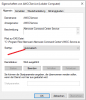
You mean a time-delayed (e.g. one minute) start, right? This works for me. And you can set the AWCC-service from "Automatic-delayed" (or similar, I`m a german guy) to "Automatic", see screenshot. Maybe AWCC will start faster.
Asus GPU Tool should work. I think I read it somewhere here. I haven't tested it.
This is not a high temperature for a CPU, especially not in a notebook. Throttling begins at ~100 degrees, significantly later than with nvidia gpus (88 degrees for RTX2080). But my CPU mostly runs at around 60-65 degrees (gaming). Not because of the low temperature (I don`t care), but because the fan-control uses less RPMS so (1700/1700 and 2200/2000 in many games at the silent fan profile. With a high cpu temperature this profile uses 2500/2300 in every game). So, the fan control (maybe mainly) uses the temperature of the CPU. And I don't need a very high cpu-clock for 60 or 120 fps gaming (it makes almost no or little difference). But if you want (the most people I think) maximum frames per second (no cap or ingame-settings, that are too hard to keep the configured fps-cap stable) you should use the highest possible clock, yes.Attached Files:
Last edited: Jan 31, 2020 -
-
Does anyone know which software ( if any ) controls the headphones out jack detection on the Area51m ?
I've been experiencing annoying issue where the laptop does not detect when I plug in headphones off and on, usually if I plug unplug and replug several times that gets it to see it but today that's not working.
If anyone has any ideas that would be appreciated
Ok I had a brain fart / reinstalled Realtec drivers and that seems to have fixed it for today …. but somehow I think this is a recurring issue.Last edited: Jan 31, 2020Fire Tiger likes this. -
If you’re referring to Asus GPU Tweak II, it does NOT work on the AW51m.
If that’s not what you mean than sorry to have posted.Silentfan and Fire Tiger like this. -
Why should we not be allowed to let it run wild to 87c (if thats our choice) like Clevo, MSI, Asus, Acer and every other manufacturer allows, if thats what we want?
You cannot and should not advertise this as the fastest and most upgradeable laptop when you are putting extremely restrictive limits on it in comparison to other manufacturers...Last edited: Jan 31, 2020Spartan@HIDevolution, Silentfan, S1ammin and 2 others like this. -
It has worked for me fine on the 1.7.3 BIOS admittedly setting it any higher than 78c does cause aggressive throttling.
Setting it at 78c allows it to throttle but down to 1700 (or there abouts) instead of 300mhz.Spartan@HIDevolution likes this. -
Anyone using two 970 Pro 1TB in raid0 configuration? Is it worth it compared to a single 970 Pro?
-
My impression is that these drives are so fast already that RAID gets you nothing, I run two 970 EVO PLUS 1TB drives in ACHI
Sent from my iPhone using TapatalkBiker Gremling, Papusan, Virale and 1 other person like this. -
I've been running 2 x 1TB WD SN750s in RAID 0. Performance is mixed. A few things got slightly better, a few slightly worse, but overall the trend is that it's slightly slower by a negligible amount. Just using it this way as RAID 0 should, in theory, wear the drives evenly as opposed to using one heavily. Just a personal preference. I think we're capped out on the PCIe x4 connection if I'm not mistaken.Lopt and Korben_Dallas like this.
-
Hi,
I apologize if this mssg is redundant, I just want to share my experience with applying liquid metal (Conductonaut) on gpu and cpu. I removed the old paste using some cotton and alcohol, it took a while, especially when cleaning the heatsinks. I haven't delidded the cpu (9900K) and I didn't touch the stock thermal pads (I did remove the stock paste a couple of days after getting the laptop). The temp difference on the cpu is negligable in my case, let's say 3-5 °C with my current setup. On the gpu side, it did perform quite better than before, hitting 645 in octanebench for rtx gpus as opposed to the 630 it got prior. Before applying the LM the gpu would hit it's upper temp limit set by the AW CC, now that's not the case. Let's say the first hand benefit is the obvious noise reduction and some boost on the gpu end, as for the cpu, if I don't undervolt it with throttlestop, it hits 100 in cinebench (on the stock oc mode) so there is no visible benefit there. I was thinking of delidding it, but at the current time I just don't have the spare amopunt of time. Did anyone do it on the i9 9900K? -
I just bought one from dell outlet. I’m not int benching anymore. So my question is , the configuration I got , i7-9700K paired with RTX 2070 and 16GB 2666mhz Ram. Screen is 144hz , 256GB m.2 and 1TB hybrid hdd. Is this a good setup ?
I got it for $1600GTVEVO likes this. -
The best config you can get if you don't want to hassle with thermal throttles and crippled bios firmware. I love my 9700k+2080 but i hate that i have to run older biosses to make full potential of it.Lopt, Papusan and Rengsey R. H. Jr. like this.
-
I bit the bullet and ordered a new 51M. Went the 9900K/RTX2080-route and ordered with 2x 256GB M.2-disks to get two M.2 heatsinks, and only 8GB RAM. I'm switching to a M.2 970 Plus 500GB / Intel 660P 2TB and 2x16 2666MHz RAM.
Dark Side Of The Moon, with 144 Hz screen and G-Sync.
Actually a bit thrilled for this.
Last edited: Feb 1, 2020Lopt, pathfindercod and Fire Tiger like this. -
Well I can say, welcome to the crippled team! *applause*
Sent from my GM1917 using TapatalkBiker Gremling, c69k, Lopt and 2 others like this. -
you would probably be getting 2050 MHz avg clock speed , compare it to 1950 MHz at 77
it’s not worth at all the extra 100 MHz .
but you are right, you should be able to tweet your machine the way you want.
I could be very wrong, I think the heat sinks weren’t designed for that or VRM faulty. 77 is still low temp for GPUs nowadays to be frankFire Tiger likes this. -
You prob should have opted for a clevo or waited for an R2 u gunna be downgrading the bios as soon as u get it, your gsync gonna be broken and Webcam non functional because of it, Tobii sucks, and if you choose not to downgrade bios well.. Your gpu going to throttle hard after 80c gg, I've had to open mine 10 times just to get the right thermal paste in here and thermal pads., and will be opening again soon to replace thermal paste again because heatsink is not flush with my gpu. This laptop is pretty much.... Bga trash. BUT I'm living with it and hoping they can fix the issues in r2.. I can't even get my 9900ks to run at 5ghz because bos doesn't officially support it :/ no plant to either.
Sent from my GM1917 using Tapatalk -
Thanks for the pep talk bro... ;-)jclausius, Docsteel, RMLJD and 1 other person like this.
-
There is a potentially new way to bypass the latest BIOS GPU limits by using HWInfo to control the fans and by using either GPU Tweak or AWCC to set a higher thermal limit. Which should mean the only restriction you'll have is the memory being limited to 2400mhz. You'll love it!RMLJD, Spartan@HIDevolution and pathfindercod like this.
-
not all clevos chassis are good, P7 throttles like no tomorrow, the P8 performs very similar to area51m.
however, I agree with with the R2 model things might be better with an upgraded vapor chamber heat sink (designed for 10900k) the sad part is 10th series has been delayed. Can’t say the same for rtx 3.
It should be noted the P8 clevo is considerably more expernsive than area51mRMLJD and pathfindercod like this. -
The HWInfo workaround is going perfectly for me so far. Reflashed to the most recent BIOS and set up a fan profile via HWInfo as described on via @ Silentfan 's link, and boom. Haven't encountered a thermal throttle yet with my temp limit set to 80. Lacking a real fan curve is jarring and has caused my idle temps to go up but I'll keep it this way for the time being. The price I pay for gsync.
Silentfan and Fire Tiger like this. -
Big ask, but could you screenshot your exact settings in HWInfo in regards to the fan profiles, please? Would massively appreciate it.Spartan@HIDevolution likes this.
-
![[IMG]](images/storyImages/4872d5c1f61a38d7a34382f261092719.png)
Same as in the tutorial link. Wish we could set a custom curve using this method but oh well.
edit: this is for Balanced btw.Fire Tiger and Silentfan like this. -
Gratz, make sure you change audio profile to "Alienware " in ACC once you get it.
For some reason the default profile makes lot of noise when you the audio is 100% -
If it’s not too late you might want to look into picking up an I-9 9900KS and selling the K
Performance is about the same but KS runs cooler.
I like mine.
Sent from my iPhone using Tapatalk -
Yes, the KS should make more clock with the same voltage possible (or the same clock with less voltage = cooler).
-
I saw a article on wccft that the super gpu are coming to laptops, let’s hope for a dgff version. Not that i need it anyway
-
KS are just better binned 9900K. If you have a bit luck you can get an 9900K with better results than an average KS will give you.
Why should we buy a CPU that is not fully supported by our A51m?
we allready had an comparision Due to the lower Powerlimit the KS will not perform the same if you need more than 120W powerlimit. Your KS runs btw with aprox. 95w Limit... Thats why you are throttling to 4300 and have good thermals.
Last edited: Feb 1, 2020 -
That`s right. KS = selected K = but better chance to get a good cpu for 4,7 GHz (K stock clock), if you buy a KS. I think, I don`t tested it. I think you have more experience with that. But of course there are even better ones (normal K too, yes).
-
The problem is still the crippled Power Limit.
-
no picture
since you are experienced user with 9900k, mine running @ 4.9ghz @ -0.125 V adaptive for core and cache core.
is it a crappy cpu? Ran 2 hours in XTU and doesnt fail.Fire Tiger likes this. -
Ok, yes, that`s a problem (but for gaming with 4,7 GHz 95w is for the most games enough, but of course not for some - and future - games, rendering, bechmarking...).
If your CPU is really stable (lengthy tests are necessary, XTU isn`t enough), that's very good (+200 MHz OC on all eight cores and -125mv offset undervolting, if I understood you correctly). -
I played BF5 for lengthy time, the only test that BSOD my unit is Throttle STOP running all caches together and yes Im running @ -125 mv on all cores + cache cores as well.
Rendering software manages to throttle down to 47xx or something, the cpu only throttles when all caches are fully loaded. Intel XTU utilizes the CPU 100% this is why I used it.
I dont know what testing software you guys considering.
Cinebench R20 score is 47xx
*OFFICIAL* Alienware Area-51M R1 Owner's Lounge
Discussion in '2015+ Alienware 13 / 15 / 17' started by ssj92, Jan 8, 2019.