Problems? See this thread at archive.org.
I just wanted to share this if anyone have not seen it.
Liquid Cooling Area 51M
-
-
Maybe you guys can show us those better Performance with lower temps in your A51m?
 i can do the same tests with 9900k. Then we will see If this is 1000000% true...
Last edited: Feb 3, 2020
i can do the same tests with 9900k. Then we will see If this is 1000000% true...
Last edited: Feb 3, 2020 -
Might possibly be able to try .... IF the BIOS was not locked down tighter than Fort Knox.
Sent from my iPhone using Tapatalk -
But they claim the KS is faster than a 9900k with 170w PL, even with 130W Bios Lock I just want to do a fair comparison and limit my 9900k to 170w.
we could do:
Cinebench R15
Cinebench R20
TS Bench 64m (16 or 8 Threads, up to you)
TS Bench 256m (16 or 8 Threads, up to you)
all tests with max clock we can put in our Powerlimit (your 130w and my 170w).
if what you say is true, your 9900KS results should be better than my 9900K ones. Please post your results with CPUz mainboard window, to show that the PC is an A51m.
Have fun
Last edited: Feb 3, 2020Fire Tiger likes this. -
logically speaking a KS is always going to be superior to a regular K right?
The KS is a higher binned chip so the performance in genral is going to be better, unless you got super lucky with a really nice binned 9900k -
Why make it so difficult? Just run stock 9900K clock speed (47x all cores). Equal for all
This is within power limit for both chips
If 48x is doable for the KS chips, then put it 48x. Cinebench R15 and 3DMark Fire Strike is a good start.
If you're able to run [email protected] on all cores within the 130w power limit your chips will still lose vs similar clocked 9900K if both chips stay below throttle point
-
Thats quite interesting, the 9900ks costs more than the 9900k yet performs worse?
-
This K vs KS discussion... is it really worth it to buy a KS?
Will it just work to change it and what are the gains/losses? -
I Mean if you manage to find one that is, I would get it tho, stays alot cooler than the 9900k in the 51m
Sent from my GM1917 using Tapatalk -
Already tried explain why it perform worse vs. clock speed in my previous post #18545Fire Tiger, Darkhan and Terreos like this.
-
I understand the KS is better overall, but the TDP limit would cripple it? Also, are there any real world reviews on lower temps for the KS?
-
With some love maybe the KS chips can come on par with my stock clocked 9900K
![[IMG]](images/storyImages/2274540.jpg)
5 years old, and still awesome
![[IMG]](images/storyImages/2289194.jpg) Last edited by a moderator: Feb 3, 2020jclausius, Rei Fukai, Darkhan and 1 other person like this.
Last edited by a moderator: Feb 3, 2020jclausius, Rei Fukai, Darkhan and 1 other person like this. -
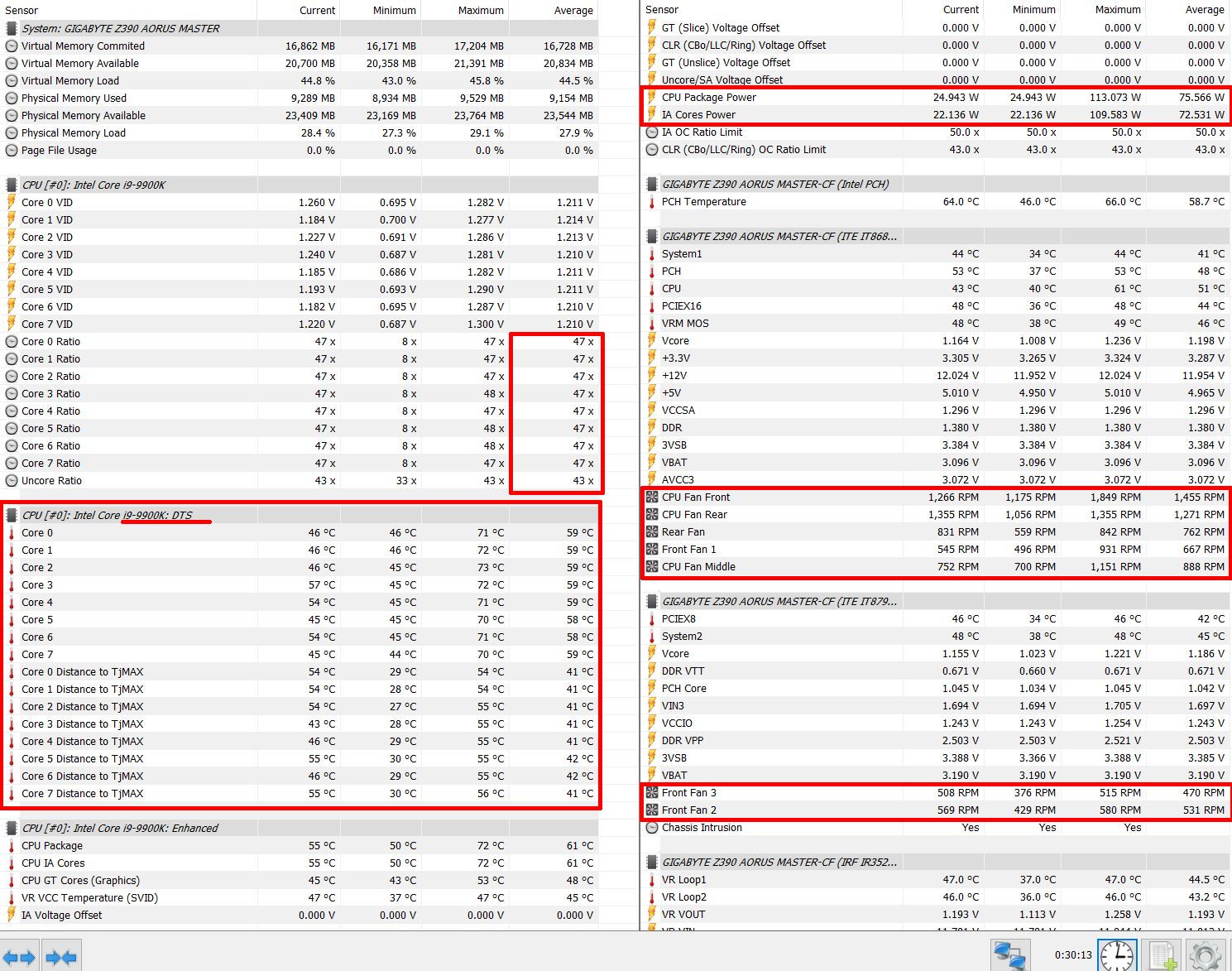
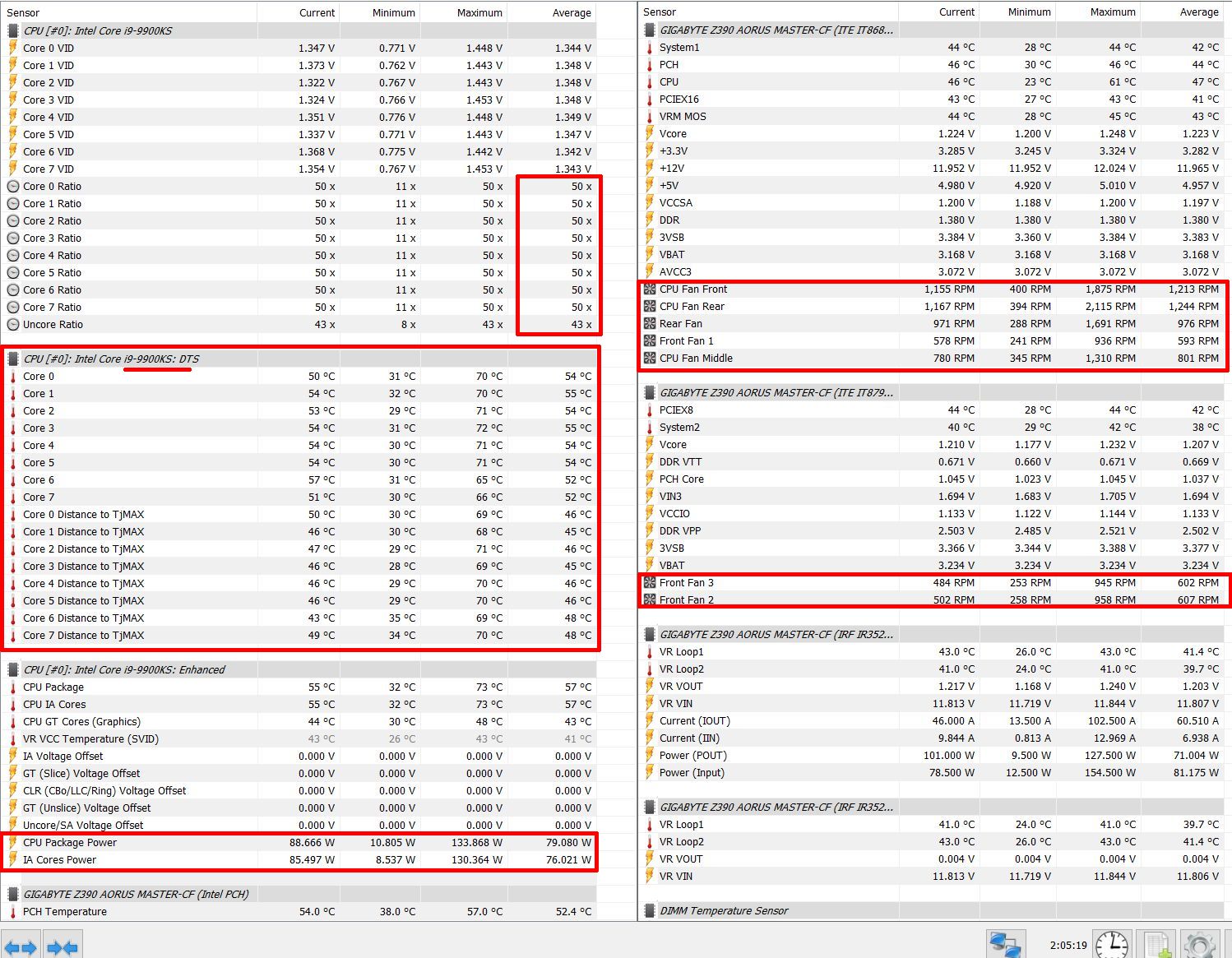
I only have some HWinfo logs from my desktop-PC. I did few small tests with stock settings in AC Odyssey. No LM, no lapping, no copper IHS or something else. Just install with kryonaut and an air-cooler. With the KS @ 5,0 GHz all core i've nearly the same power consumption (CPU package power) as before with the 9900K @ 4,7 all core. Overall runs the KS with higher clock cooler and less fan-speed.
Attached Files:
Last edited: Feb 3, 2020 -
-
I've removed quite a few posts here. Civilized discussions are always welcomed here, but when people start getting personal the posts get deleted.
Sup3rKillaX, Fire Tiger, Nicolas Paiva and 2 others like this. -
That's almost 5C cooler, but is this from 51M or a general comparison? Someone mentioned that the KS would be TDP crippled in a 51M?
I'm not gonna overclock, so I guess KS could be good for me. Also, obviously I can sell the K so the difference won't be huge. -
Just a small test under same conditions in my system between K and KS.
There is a difference of more than 10°C degrees + less fanspeed (in my case).
My 9900K runs on 5,0 GHz all core in AC Odyssey much hotter and needs more power. Avg temps around 71-76°C. For comparison i could set my KS on 47x and you will see that the KS needs for the same performance less power and generated less heat. In the end it doesn't matter if K or KS, it's depending from your chip.
A comparison from Optimum Tech:


Just an example. Not all 9900k CPUs perform equal like in the chart. It exits enough good samples of the 9900K which perform better as some 9900KSLast edited: Feb 3, 2020Lopt likes this. -
that is the point. Its just the chance, getting a good chip, that is higher with 9900KS. If your K is running hotter with same power consumption and same clock speed, then your K´s IHS is soldered very bad. But that risk have all soldered chips.
I have seen 9900k CPUs at same clock speed with temp differences of 10+ degree.Lopt and Fire Tiger like this. -
So at the end of the day the KS is actually only a binned K? A regular K may be worse, as good or better, but a KS will always be at the very lowest better?
I may actually get a KS after all. But as it's not even readily available yet, I'll try out my regular K meanwhile.nightingale, Lopt and captn.ko like this. -
this.
not necessarily but with a good chance. But yes: the worst KS will be better binned than the worst 9900K, as every KS can run 5Ghz.
The user has the choice: try his luck or pay more (and still need luck ) , but KS is still limited to 130W!
Lopt likes this. -
What does the 130W limit mean in practice? What's the K limit?
-
With 130w Limit the CPU will throttle its clockspeed at 130w power consumption. 9900K has 210w limit.
5ghz will go past 130w easy with multicore load. -
130 watts mean 4,9 ghz @ 1.3V total volt on my 9900k
Thus good luck with 5ghz and 5.2 ghz for the KS ver.
DATE TIME MULTI C0% CKMOD CHIPM BAT_mW TEMP GPU VID POWER
2020-02-03 00:00:12 49.00 98.1 100.0 100.0 0 89 49 1.2499 130.6
2020-02-03 00:00:11 49.00 94.1 100.0 100.0 0 85 51 1.2610 117.1
2020-02-03 00:00:13 49.00 97.6 100.0 100.0 0 87 49 1.2534 126.4
2020-02-03 00:00:14 49.00 95.8 100.0 100.0 0 86 49 1.2474 129.0
2020-02-03 00:00:15 49.00 94.7 100.0 100.0 0 84 49 1.2751 119.3Last edited: Feb 3, 2020Papusan likes this. -
Sorry if I'm dense... what does this mean IRL then? 210W is much more than 130W, so why could one argue that the KS is much better if it's limited to 130W?
-
Guys, why my GPU RTX 2080 crashes if I increase frequency by 150 mhz? Again, after burner is stable at 130+ Mhz core Average GPU performance 1920-1970 Mhz @ never exceeding temperature of 77C
Tested with BF5 , Metro -
I would do it, but currently i am using 9900K. I tried KS from a friend, got ~4.8GHz all cores at PL130W, there is no discussion here, i can't hit 4.8GHz on my 9900K below than 150W.
If you talking about raw performance, it's obvious 9900k at 200W+ will perform better, but if there was no PL, 9900KS would easily surpass the regular version even at ~15% lower power. -
I would get KS chip if I could do, Testing it in Cine R20 should be getting more score compared to 9900K but no one came up with a proof.
I dont know why the KS performs worse compared to the K at the same frequency? What does R0 stepping mean? Intel vulnerability bug? -
This only applies to the A51m. The KS is not officially supported by Alienware. The 130W Power-Limit is not at a desktop mainboard with a corresponding bios update.
Lopt and Nicolas Paiva like this.
-
that was my question... All those ,,advantages,, are silicon lottery. Better temps? Yes, if you get a good chip. More Speed? Yes if you get a good chip.
Can a 9900K be better than KS? Yes... you get the point
lets say you run cinebench oder some other rendering task. If those task need more than 130w the 9900KS with reduce its speed to match the consumption. During gaming 130w should be enough in most cases. Rendering is another story.
then your friend got a good KS and you a bad K. Thats it. Its all about silicon lottery.
OC not stable.Nicolas Paiva likes this. -
is this normal? Repasted with Gelid Extreme, can only get 130 + Mhz, here is my profile.
![[IMG]](images/storyImages/2020-02-03.png)
-
Sure i can agree with that. But my point is 9900KS ~generally~ has a better binned chip than a regular 9900K, so they should perform equal even if KS is using lower power. If dell support the chip, you could get the same clocks at lower voltage and temps overall.
-
yes its normal. Other guys only can run + 70mhz or +50mhz. +130 is upper average, so no need to worry about
yes they should. I have never compared them clockwise and i think in an side by side test, they would perform similar. Maybe @Papusan have more evidence on this topic.devilhunter likes this. -
So generally speaking, the KS should perform at least as good or slightly better than K, but with lower temps?
Speaking without OC of course. -
I was disappointed when in ACC you could drag core frequency all the way up to 200 Mhz+ this is why I thought mine is under performing.
My GPU score in TimeSpy is 104xx -106xx on average while CPU score is 104xx
Thanks for your great insight on Area51m
Rep+ -
Yes, and it doesnt have IGPU. But the real question is why they limit it to 130 W?? if it is intended to be used on desktops.
Something is not right here, the KS could be faulty IGPU units? -
you can not say it generaly ^^. Stock is 4700Mhz for 9900K and 5000Mhz for 9900KS
Now it depends on your luck in the lottery / paste job skill level
- bad soldering -> worse temps
- high voltage -> worse temps
- bad paste job - worse temps
- bad UV capacity - worse temps
KS has just a higher chance getting a lower voltage (= better chip). Thats it.
@devilhunter The 130w limit is due to the A51m Bios, as 9900KS is not fully supported by Dell. And it actualy has IGPU. 9900KF is the version without IGPUNicolas Paiva and Lopt like this. -
Not only that, some tests shows the IHS isnt flat across the DIE this is why you get certain cores hotter than the others and vice versa.
Some "enthusiasts" grind it both sides till they expose the copper part and then apply the paste on it.
I dont believe the soldering is what causing spike thermals but I could be very wrong (if you get more than 5C after deliding then its solder related. -
My 9700K runs 5.2 Ghz all day.... maybe its due to having a 2070 instead of a 2080, but still... I just use a custom profile to OC the CPU, but don't touch the GPU.
-
That's a very sweet deal actually.
-
In my limited experience so far biggest advantage is lower temps, in practice it will probably perform s little bit lower in scores on the Area51m simply because you can’t adjust anything really on the CPU it’s not supported by the BIOS but mine runs at 4.998 MHz according to intel maximizer however that software can test it but can not control it as the BIOS is a joke.
Sent from my iPhone using TapatalkPapusan and Fire Tiger like this. -
Mine can only reach + 130 as well.
Sent from my iPhone using Tapatalk -
I'm really sorry... I was getting heated.. My apologies.
Sent from my GM1917 using Tapatalk -
You all have excellent GPUs, I get a maximum of +115 on the core
-
Thats nothing to worry about you will never notice the difference between +50 and +150 ingame. Enjoy this GPU XD
Lopt, Korben_Dallas, Silentfan and 1 other person like this.
-
The real question here, is modding CPU heat sink with extra pipes or adding a vapor chamber can offset area51m problems? Can it run 10900k?
I found a couple of small dia heat pipes that can be fit without conflict with the area51 "rip cage"
adding extra tubes can actually delay cpu temp spikes
I would love to experiment with the heat sink, found a couple for 250$ and decided not to do so.Fire Tiger and Lopt like this. -
room temperature: 20 degrees
max fan
-
10900k cant work in a 51m I don't think, also where did you find this heatsink?
Sent from my GM1917 using TapatalkRei Fukai likes this. -
Chinese websites and ebay, you can find Area51m heat sink.
I can mod it with vapor chamber but its going to take not only time but resources as well.Papusan, Nicolas Paiva and Fire Tiger like this. -
-
@Korben_Dallas is the cinebench run with realtime priority?
-
Nice Results!
What did you do to get the temperatures on the i9 9900k @ 5.0Ghz to be so low under full load?
I can run mine at i9 9900k @ 5.0Ghz with -95.0mV offset, but it will always reach 100 Celsius and throttle down.
My average room temp is between 23-25 Celsius. I have re-pasted the CPU two times now with Thermal Grizzly Kryonaut. The temps are a bit better than stock, but nothing different in regards to max temp.
I have tried it both on 1.5.0 and 1.8.1 bioses.
Cheers!
*OFFICIAL* Alienware Area-51M R1 Owner's Lounge
Discussion in '2015+ Alienware 13 / 15 / 17' started by ssj92, Jan 8, 2019.