 Problems? See this thread at archive.org.
Somewhat old but still valid...
GUIDE | NVIDIA CONTROL PANEL 3D SETTINGS OPTIMIZATION
Afraid for the Smoke?
![[IMG]](images/storyImages/giphy.gif_cid=790b7611b1647f86674996ecddee2be35ff7d20c7a4f588d&rid=giphy.gif)
Can't remember last time I used settings other than High Performance (Cpu and Gpu). And still no smoke from burned electronics here home at Papusan's casa matriz. The only smoke come from my cigars
-
-
System is more responsive and benchmark scores are better with the High performance Windows power profile and Prefer maximum performance set in the NVIDIA Control Panel. So, if that is the goal it will serve you well. If the goal is maximizing battery life using a laptop because a person runs off of battery power, then using power saving strategies will be the route to take. As a general rule, I disable all power management options in Device Manager device properties as well. I do not allow Windows to turn off components to save power. I disable Hibernation and never use sleep. I do not want any kind of adaptive behavior and prefer to control everything manually myself. Everything just works better for me that way and I have never had a need for using a laptop on battery power for an extended time. And, that obviously isn't even relevant on a desktop.
I can identify no benefit whatsoever to having hardware acceleration enabled in the web browser. I don't know of any concrete benefit to the strategy of having it enabled. In fact, only the opposite is true. I experience more glitches with that enabled. I have not identified a reason for the option to exist and I haven't identified any problems having it disabled.Last edited: Mar 18, 2020Ashtrix, DreDre, Spartan@HIDevolution and 2 others like this. -
I keep cpu and gpu on high performance all the time on all my machines...
DreDre, Docsteel, Fire Tiger and 1 other person like this. -
What system is more responsive? We are talking about the GPU power setting here, right?
I haven't seen any material benchmark result benefits from using the High Performance NVIDIA setting, could be my particular system/GPU I guess.
The two main benefits of using hardware acceleration in a browser are performance and efficiency. Tasks best performed by the GPU can be executed accordingly. Believe it or not, Chrome can make a better decision about whether to use the CPU or GPU than you. As a result the experience is smoother at a lower power cost. More concretely, disabling HW acceleration in Chrome, as anyone can quickly verify, results in noticeably higher power draw and choppier screen refresh (e.g. during scrolling) - this is still noticeable on AC power, although to a lesser extent. -
As I said, I've had too many issues with browser acceleration enabled and the convenience of having it disabled serves me better. If you're not having them, I suspect there is something to be said for leaving it enabled even if you don't see a benefit you don't have to mess with any settings. I pay no attention to power draw and always use AC power. I almost never use my laptops running on battery power, so I have never experienced any issues like choppy scrolling. I could see where that would be annoying, but so are the problems I have encountered with browser acceleration enabled. Those are not the fault of the browser as much as buggy GPU drivers.
An example of an issue I have encountered is with browser acceleration enabled is that Chrome opens to a black screen/window and no web pages will render, or some web pages crash with an "Oh snap!" error due to buggy GPU drivers. I can take time to drop whatever I was planning to do and troubleshoot it, or drop back to an older GPU driver, or I can just turn off browser acceleration and keep going without missing a beat. Guess which one I am going to do if I am not having any other problems with my system?Last edited: Mar 18, 2020DreDre, Lopt, Fire Tiger and 1 other person like this. -
I've actually seen more than a few times where it had to be disabled to prevent issues, particularly if you are running a game or app in Windowed mode and have a browser up. I generally disable it as well.Mr. Fox, Lopt, Fire Tiger and 1 other person like this.
-
Hello guys,
I wanted to share this video's that allows you to use without you rtx 2080 above the 75 threshold. You don't need to go back to 1
5.0 bios and still setup the rtx 2080 beyond 80...you can use the 200wvbios or the 180wvbios.
Also if anyone of you would point me or share his 9700k stable overclock will be much appreciated for this machine.
Another curiosity... When undervolting cpu I've found jagginesh specifically in superposition benchmark (extreme). If you leave it as default I don't get any jaggis, to in area51m, gt73evr 7rf, ...
Many thanks in advance for sharing your findings in what I do believe is the best desktop replacement ever... Just my opinion and probably the luck I had with my unit.
9700k rtx2080Fire Tiger likes this. -
The person who created that video is a member here @Helifax , I'm sure he shared that here earlier, he has some other good videos as well on the Area 51m.
In regards to your 9700k OC every CPU is different. Mines has been stable for a couple of months now at 5ghz all cores with a -105mV undervolt. I have seen some on here with 5.1 and 5.2ghz. -
Thanks Fire Tiger!
I guess you leave all in auto but -105mv undervolt, probably using xtu or throttle stop.
Thanks for the reply. I'm also looking about something touching the CPU core voltage, turbo post max, avx, ... And do some testing... But started from a ground base...
I am now also researching on how undervolting apparently affects or creates jaggines/suttering on games.
I was surprised when I saw that in superposition benchmark, starwars jedi,... And how it completely disappeared or clearly improve when undervolt was off or minimum. And I tested in several laptops...
Maybe someone more knowledgeable that the one writing can share some opinions about this possibility of how undervolting can create suttering in games or specific programs... Probably not in all of them... But apparently yes in some... Even when all tests are been pasted when deciding for an specific undervolting... I'll get more tests on that... -
What's your nVIDIA Control Panel setting for 3D Settings > Power Management?
Make sure it's NOT set to OPTIMAL!
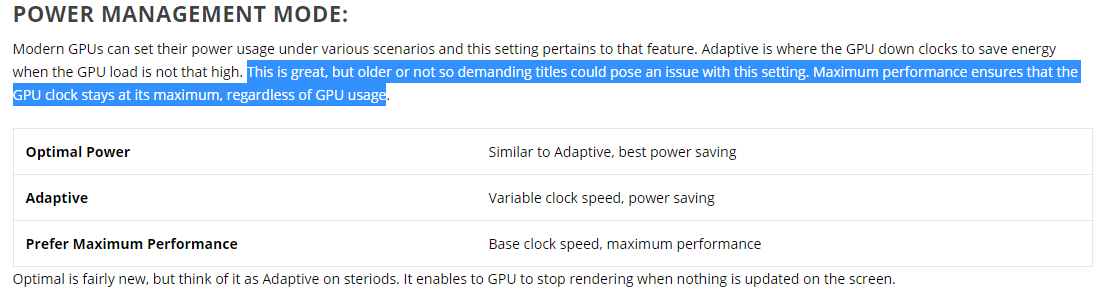
Right click on your desktop then choose nVIDIA Control Panel. Go to Manage 3D Settings from the left pane, then scroll down a bit until you see power management. If you see it's set to OPTIMAL which is the default setting when you install a driver. That's your issue.
Optimal Power means when there is no draw on the screen, the GPU clock speeds is set 0 MHz to save power and then ramps up once it needs to. Sounds great on paper, works like crap. This is the number one reason why anyone might experience crappy performance from their nVIDIA GPU. What's worse, is that's the default setting in the nVIDIA Control Panel after you install a new driver often leading people to blame the driver for bad performance when it's just the fault of nVIDIA's clowns.
Set the power management to Adaptive which puts the GPU at lower clock speeds when no GPU intensive apps are in use and it would ramp the clocks up when needed. That actually works. It's the best balance between getting lower heat from the GPU and good performance in games.
When benchmarking, for the optimal results, it's best to set the power management to High Performance.
Mind you, after you change the power management to whatever you set it to, a reboot is mandatory for the new clocks to take effect.
Classical nVIDIA Swiss CheeseFire Tiger likes this. -
I use ThrottleStop for my overclock and undervolt settings. Below is a screenshot of my setup within ThrottleStop.
I haven't changed much on the below part. If anyone has any recommended changes let me know.
-
Why did you tick Clamp for Turbo Boost Long Power Max?Fire Tiger likes this.
-
I have no idea what it means the only setting I changed in the TPL box was the speedshift range.
-
You can put Cashe 3 bin below Core clock speed.
With Clamp option enabled, this will force the CPU to throttle below its default speed when CPU reach max power limits instead for slowing down the clock speed a few notches.
But I doubt the chips will reach 210w before thermal throttling
Last edited: Mar 18, 2020Ashtrix, Normimb, Fire Tiger and 1 other person like this. -
Where do I find this bro, clearly I can't see it for looking at it.
I have removed the 'clamp' option as mentioned as well, thanks for these suggestions, always appreciated! -
Here...
Verify that the settings stick with click on FIWR windows after "save".Fire Tiger likes this. -
Cheers brother..... what should I be setting them too? This is new territory for me, even if you can give me an example then I can mess about with it and make changes to ensure stability.
-
As I said in previous post. 3 bin below core... 47xFire Tiger likes this.
-
Changed and seems to have taken, thanks for this!
I had to pull back the UV to -95mV to pass the TS Bench.Last edited: Mar 19, 2020Papusan likes this. -
You're welcome bro Fire

Yeah, you'll have to pay the price for better performance, or make progress in oc' competing - Papusan @ HWBOT Nothing come for free, LOOL
Not a happy camper in this awful corona times...
Quarantined with the Laptop from HellLast edited: Mar 19, 2020 -
There is zero chance of me competing I don't even know what I am doing hahaha.
Yeah, I saw that over on Reddit, not a good experience. It was his/her post before that one, that prompted me to check my DPC Latency. -
-
In case anyone with this issue is interested, I have an update. The solution I mentioned above only worked, temporarily. The issue returned and I can't seem to get any help from tech support. Clearly, this is a repeatable issue with these models. I'm going to jump through some more tech support hoops a bit longer, then I'm going to just do a clean factory re-image. If memory serves me, that worked for the second battery after trying everything else under the sun. This is the third battery (second laptop) with this same problem, so clearly, something's wrong that the Dell Engineers are either overlooking or uninterested in correcting.
I'll report back if/when I have a helpful update.Virale and Fire Tiger like this. -
Here is link to the new Nvidia Super cards. https://www.notebookcheck.net/NVIDI...Us-flex-their-muscles-in-3DMark.458478.0.html.
Says the 2080 Super will be running at 150 watts. Which means less performance then we already have?Last edited: Mar 19, 2020 -
Lol, thank you man! And thanks for everyone for being cool. It's okay about the rep points - I greatly appreciate anything, heh. And thank you to the folks who had clear answers to some of my questions! Greatly appreciated I'm actually not truly used to posting on boards with rep systems, so I'm always kinda forgetting to use the thanking and reputation... But I am grateful.
So! Getting on to things, I actually got AWESOME news last night, and it just so happens that production on my laptop was actually finished. I placed my order 10 days ago - Monday night of last week, March 9th. Damn cool, particularly since I was truly and sincerely concerned - I mean, ****, it feels like the goddamn world is coming apart at the seams and it's really goddamn difficult to know precisely what will or will not be effected by this.
I'm very, VERY glad I pulled the trigger when I did, since I'm spending a LOT more time inside, and to me, well... A laptop is basically like the absolute most EXCITING consumer object I ever get to buy, to be truthful; I am REALLY not a car guy - been driving the same '04 Camry for 9 years that my mom handed down to me when she got a new one. I live a fairly nomadic life and I don't really move in anywhere with long term plans of staying, so laptops really are not only practical for me, but I also just think they are the coolest-looking, neatest and most awesome "electronic device" of any sort that a person could own, basically. I've kind of always had this "thing" for laptops, I remember being a kid in the '90s and I always had a cheap tower and monitor in my room growing up (haha with unrestricted internet) so I got very used to how things worked like a lot of us. But my parents had laptops and could use their computers in bed, on the coach, whereever! I remember being so envious of them. Of course, they were using their laptops to do legitimately important work stuff, which I did not quite grasp then.
My dad had an IBM Thinkpad back then from '95 or so, while my mom had some hugely thick Macintosh Powerbook, which exactly did not look to dissimilar to my dad's Thinkpad. I loved playing with the Thinkpad mostly, of course. I think back then was when I sort of fell in love with BIG laptops that always had a certain weight and depth to them which I felt was important. I have never been a big fan of the overall trend of making laptops thinner and lighter - but of course now, laptops are starting to get a little bit absurdly thin. I kinda think the newest generation of Alienware laptops might fall into that category? Maybe not.
Anyway, obviously I picked up the A51M in no small part because it was a purposeful throwback of sorts to the way that Gaming Laptops still mostly looked like ~10 years ago, or so, which is an aesthetic I was always fond of. Of course, this is its own sleep and cool design, and I am like... pretty absurdly excited that all of a sudden it's scheduled to show up tomorrow. Not sure if I'm quite ready. I actually have a couple more somewhat technical queries...
- First off, it sounds like the base RAM that they give you is, like, kinda crappy and could easily (and not all that expensively) be replaced by even the same quantity of RAM and perform notably better. Besides, 16gb seems just a little on the low side if you're going to, say, use 4k or VR, seems to me that 32gb of good memory might be useful for that.
-Next one. So, in my current Alienware 15 (R1), there is a 1GB 7200RPM HDD, old school-style. Don't think it's even a hybrid drive, just straight-up HDD. Now, as far as I know this Area-51M I am getting comes with a single 512GB GB m.2 SSD. That should leave me an empty hard drive bay to put in the HDD from this machine that I've had for 6 years - lotta stuff on there. Putting an HDD in there won't mess with anything, generate too much noise or heat? m I am of two minds about the whole thing, part me feels like I should just start over and get anorhwe 512gb m.2 SSD of the same type or something. Any advice? If I can just pop the HDD in I'll be fine I think... -
I imagine only 200W 2080 Super's would be considered upgrades if you're already on a 200W 2080. The only big change was faster memory (15.5 vs 14.0 Gbps), but OCing eats into some of that anyway.
-
Ahh, here it says 150-200. I was getting worried... https://www.notebookcheck.net/NVIDI...Mobile-GPU-Benchmarks-and-Specs.452534.0.html
-
If those specs are accurate that's disappointing... no memory upclock. If that isn't there I don't see the point in these, other than keeping their lineup fresh I guess.
-
I've ordered mine that same day and got the shipment notice yesterday too, but I live in italy so this is when the "fun" begins...
I don't know if it is crappy but I know that I have already ordered and received some 32 GB (2x16) hyperx memory and I'll swap that in as soon as I finish the windows configuration. When it comes to VR I have some experience though, some VR games will use 32GB of RAM if they can, that is because some of this games are still in early access, one good example was Blade and Sorcery that was always trying to use more than 16GB, this was also a good incentive for me to get 32GB with a possibility of an expansion to 64GB in the year should I feel like I need it.(I already use editing software that I know will use all 32GB of RAM)
That is also my plan, initially I'll add the secondary 1TB hdd that is now in my AW17 R1 then I'll change that too with and hybrid one that I already own that is 2TB. When it comes to noise I know that I hear it in my laptop now, I don't know if I'll hear it when inside the A51m but I guess I will, when it comes to heat I don't think it will be a problem at all, but as I've said I don't have the laptop yet I'm just a guy who has done some homework.Last edited: Mar 20, 2020 -
I understand the most super thing in the Supers is the price. They are very similar to non supers (about 5% faster), but MUCH cheaper at launch. It's a marketing gimmick.Tim V. likes this.
-
Heat isn't really a big issue, though some prefer to add a heat sink spreader to a 2nd M.2 drive. The only thing to be aware of is you will need to change the BIOS from RAID to AHCI or Windows won't see it properly. I added a 2nd M.2 drive, a 970 Evo Plus (1TB) which is a popular drive, it was a no-brainer as long as you locate and follow the steps for the RAID to AHCI settings. Don't forget: you still have another drive bay for a cconventional 2.5" SATA Drive as well on top of the two M.2 slots.... you could even add a third drive like a cheap but still useful 860 EVO drive with say 2TB....
16GB is fine for gaming, and VR I assure you, its the VRAM that mattes most in those cases.Last edited: Mar 20, 2020 -
Macrium Reflect Rescue Disk v7.2.4797 (with RAID support and cloning to dissimilar hardware supported).
Use RUFUS to make a bootable USB Flash Disk from it
@Mr. Fox @Papusan @Fire Tiger @iunlock @ssj92 @kojack
Note: I never install Macrium Reflect, I only boot from the USB Flash Disk to create or restore images. That way I have none of its bloated background services running in the background.
Be smart...be like Spartan...![[IMG]](images/storyImages/TitkkWK.gif) Last edited: Mar 20, 2020aeffect, Fire Tiger, ssj92 and 7 others like this.
Last edited: Mar 20, 2020aeffect, Fire Tiger, ssj92 and 7 others like this. -
Great stuff! I've been backing up and restoring images all day. It's such a useful tool.
-
I've literally just completed my re-install and now about to create an image to capture all the regedit/service changes before I go on and install drivers.
Whats the best way for me to go about this now with limited access to another laptop (work laptop with limited priveledges such as no installing of .exe)? Should I just connect to the internet and download Macrium (that was my plan).Spartan@HIDevolution likes this. -
Just create the Macrium Rescue Disk and boot off it
No need to install the programLast edited: Mar 20, 2020Fire Tiger, iunlock and Papusan like this. -
Any of you guys playing Call of Duty Warzone? I'm dealing with an issue where the game crashes/close out to the desktop after 5min or so into a game. No errors or anything. On latest nvidia drivers 442.74. Temps of cpu and gpu are both fine.
-
I wanted to thank specially Spartan and Fire Tiger for sharing their findings in Nvidia rtx2080 setup and i9700k overclocking. At present the system is running at 5ghz - 142.6mv (performance profile Throttlestop) without no further issues. I've been testing games, superposition, cinebench, ... no more jaggis/stutters.
So thanks a lot.
Also this video I found could be interesting, after what Spartan after following his recomendations.
Docsteel, Fire Tiger, etern4l and 1 other person like this. -
@Mr. Fox @Papusan
What is the downside of running the laptop fans at max blast all the time?
The reason I ask is because in the BIOS I tried OC Level 3 (which is 5.1 GHz) and it worked and was stable but I didn't like the fact that if you choose any BIOS overclocking the fans are at full blast 24/7. sounds good for benchmarks but I was worried how this would take a toll on the fans or the laptop in general on the long run. -
Alt tabbing crashed it immediately for me. The issue was discord overlay, turning it off fixed it.
Don’t know what else it could be, maybe try to check game files using battle.net.chewbakaats58 likes this. -
I just checked that video, it's BS man, all he is saying is to turn all eye candy off. That may be good for benchmarking and winning scores but not for you to enjoy games at the max eye candy. Why did you buy an Area-51m with an RTX GPU if you want to turn all eye candy off??
-
I did the check game files thing and that had no effect unfortunately. I turned off my msi afterburner overlay thinking that might be it too but same result.
-
I agree...
I think everyone should form their opinion on what they want from their system, and read up on what each setting does and test. Do you want FPS? Make some trade offs and lower quality! Do you want eye candy? Crank up the quality settings!
“Optimizing settings” is subjective. Depends on why is optimal to you...
For example, optimized settings for me are settings such that I get max fidelity and max frames balanced:
- No throttling, Max performance (so my fans are performance or full speed, depending on the game)
- All quality settings are on/max
- Any ray tracing (if available) are off to avoid unnecessary FPS hit for what I still consider to be a minor visual upgrade
- Any other setting changed to shoot for 100+ FPS at all times. Ideally 144.
Doom Eternal, BFV, PUBG, Mordhau, Hunt, all run 120+ FPS and look gorgeous.Jhort, RMLJD, Fire Tiger and 2 others like this. -
I was pretty shocked to see mine coming out of a Chinese manufacturing plant, then go to Shanghai. I called up Dell/AW and spoke to a sales rep, and she told me that my laptop was actually being built in Malaysia and was not going to go through China at all - I found this reassuring, given how horrifying and draconian their crackdown on the quarantine is. Things are not really operating by rational logic too well right now, so I was very relieved to hear that it was just going to come from SE Asia rather than China. Not that it would be a big deal, she said - of course it turns out mine DID come out of China, but there were not any issues (it seems) like she said. On the UPS tracking site, it said it cleared customs and is on its way to California cross-continent now.
So it's not coming today, but hopefully it will come on Saturday or Monday. I can wait a bit, I mean, April 1 was when I expected to hear that it would be delayed by a month because of coronavirus quarantine interfering with production. So I am deeply relieved to see it on its way.
I think we are on the same page about the RAM and adding more storage. Seemed to me that the SSD upgrades on the Alienware site are like... INSANELY overpriced, kinda like the RAM. Makes absolutely no sense to me to pay way more than you need for what are probably sub-par SSD/RAM...
I was a bit curious about seeing the Intel Optane as an option - though I dud not choose it. Out of curiosity, is it really that much better than other SSD drives? I mean, it's been a while now and it's not just being used in combination as a caching drive....
Also, I have, uh.... A really stupid question that I am frankly embarrassed as hell to be asking regarding the use of SSDs and HDDs together... Now um, obviously you use the SSD as the boot drive to run your OS, that part is clear. What I have always wondered and never quite figured out is this:
When running Windows 10 on a Solid State Drive, does it make a difference (in terms of the performance of the game) whether you install the game itself onto the SSD or the HDD? I always sort of assumed it did make a difference of one kind or another in terms of performance, but I'm not really sure if that's true. I would honestly much rather just have everything on SSD and not have to mess around with Hard Drives anymore.
But yeah, I would love to know the answer to that question - again, when running your OS on an SSD, does it make a difference in terms of performance to install the game into your SSD rather than HDD?[/quote][/QUOTE]Last edited by a moderator: Mar 20, 2020 -
Posted about this a few years ago... http://forum.notebookreview.com/threads/17-r4-custom-cooling-pad-150-cfm.806797/page-2#post-10565387
I can add in that you should expect at least 20.000 hours lifespan for fans used in notebooks. Good desktop chassis fans is rated for 50.000 hrs. If you use your machine 8 hours a day, then do your math.
My old AW17 from 2013 have still the orginal fans. My son use it now and they run mostly on max fan speed when he game or need max Cpu power. Aka mostly all his freetime. Stop being paranoid regarding fan lifespan when running at full blast. The important thing is to clean them often enough so they don't run unbalanced due dust. Unbalanced fans = shorter lifespan
-
Fans are a mechanical part, so they won't last forever. Just don't let fear paralyze you. It's like people that fear overclocking will shorten the life of their CPU and GPU. Yup, sure will. But, not before it's too old, slow and obsolete to matter.
Bear in mind that none of this contemplates premature failures, or failures induced by end-user accidents and plain old stupidity.
In other words, if the parts are not defective and last their rated lifetime, and you don't do anything silly or make a serious mistake that result in damage, they'll wear out--eventually--but the laptop will probably belong to someone else or be rotting in a landfill before that happens.
Be smart... like a Fox
^^^^What Brother @Papusan said... 100%Last edited: Mar 20, 2020 -
It’s fine where I live with the virus, I’m staying home regardless but the situation is bad and what we have in Italy is just a “preview” of what is actually going to happen in the other countries unfortunately I believe...
Going back to the topic: installing windows on the SSD makes your boot time and windows faster but then it changes depending on where you install each program (or game).
If you have the game on the HDD it will load slower compared to the SSD this is why you want to have a big SSD in this machine when the next gen starts this fall. SSDs make a lot of difference in game and only when the next gen releases you will really see what a game changer they are.
I have chosen a 1TB Samsung M.2 NVME SSD (970 evo plus) for the Area 51m and I plan to expand with another TB in the future in the using the second slot.Last edited by a moderator: Mar 20, 2020Fire Tiger likes this. -
-
When you say A, then you have to say B
etern4l, Mr. Fox, iunlock and 1 other person like this. -
It may be the sensational nature of US news but it seems bad there.
Be safe! -
We should always use air quotes whenever we say that word.Last edited: Mar 21, 2020
*OFFICIAL* Alienware Area-51M R1 Owner's Lounge
Discussion in '2015+ Alienware 13 / 15 / 17' started by ssj92, Jan 8, 2019.


