Problems? See this thread at archive.org.
completely..have a couple of issues I haven't been able to sort out. Was hoping to get some help.
Haven't been able to get support assist to work for a few weeks. Says its downloaded but won't open. I've used Revo Uninstaller to uninstall it and remove all registry files. I've re-download different versions to no avail.
Now I'm stuck with another issue that just showed up tonight. I went to try and download support assist again, and now my Windows Store is bonked. Microsoft store is sort of grayed out in the tiles and all apps from the Microsoft store aren't working. When I try and open an app it says "this app can't open." I also keep getting a notification that windows store has just been installed every time I restart or try and open it.
I've tried reinstalling the Windows Store via powershell and that hasn't done anything either.
Any idea what's going on? All thjs Microsoft shenanigans started right after downloading support assist for the 100th time.
Edit: It also says "Windows Store cache may be damaged." I've tried running various cmd lines to reset it but nothing is working. Hopefully I don't need to reinstall windows completely..
-
-
So I've been plagued by the Area 51m Throttling issue for a long time now. I always end up being too busy to follow through and commit to fixing it but enough is enough. Is there any bullet proof proven path to resolving this? Dell Support is flat out defiant no matter how much I push with them and I just want to make the best out of my last Dell laptop that I will ever buy.
I take it back. I found the thread and post that started it in this thread, attempted the downgrade from 1.7.3 to 1.5.0 but it still won't take. Keeps leaving me at 1.7.3Last edited by a moderator: Mar 21, 2020Fire Tiger and etern4l like this. -
Did you disable the Firmware update setting in the BIOS?
I've also found using Asus GPU Tweak and setting the GPU limit to 77c stops the aggressive throttling. You could give that a try before trying the BIOS roll back as you'll potentially lose G-Sync if you have a more recently produced machine with a Chi Mei panel.Spartan@HIDevolution and c69k like this. -
You mean the capsule updates? Yes. I'll check again though.
Checked, it was enabled again.
I disabled it, saved changes and reset, held ctrl + esc, got into recovery, chose rollback, let it do its thing, and same problem. Attempting again using the Recovery option.Last edited by a moderator: Mar 21, 2020Fire Tiger likes this. -
For what I’ve heard the US news is reporting barely half of what is actually going on here
I've had a similar problem once, as far as I can tell there's no real way to reinstall the windows store but reinstalling windows, my problem wasn't too big so after trying all sorts of things I gave up.Last edited: Mar 21, 2020RMLJD likes this. -
Same result. I confirm UEFI capsule updates are disabled, save changes/reset, go to BIOS recovery, chose Recover, it rebooted multiple times, then it's showing 1.7.3 and capsule updates ENABLED. Other settings are retaining.
-
Did try this? How to restore the Windows store app
then you must've create the recovery USB incorrectly. It works for me and I've done it more than 5 times.
Try to recreate the USB and follow the instructions slowly one at a time and double check every step.Last edited by a moderator: Mar 21, 2020 -
I’ll try that next. Thank you.
-
Is there anyway to get into the BIOS immediately after the downgrade and before it enters Windows? You might be able to disable it before the first restart post BIOS update.DreDre likes this.
-
Yes there is, that's what I always do.
Additionally, one can disable the Windows Update service temporarily before downgrading and until they ensure they have Firmware Capsule updates disabledDreDre, Papusan and Fire Tiger like this. -
Hi All
Just a quick question, for the people who have repasted/changed thermal pads, how much of a change did you see?
I've been going through posts and gotten a vague idea that it improved things (with most going with Thermal Grizzly/Phobya products etc) but I'm not sure if this will mitigate the throttling enough for it to be usable again. I have always keep a stock of Thermal Grizzly paste and LM but have no pads currently.
In terms of what people did, I believe they fall into these categories:
CPU+GPU - non LM
CPU+GPU - LM on CPU but not the GPU (was there a reason for not doing GPU, is it aluminium?)
CPU+GPU+pads - non LM with e.g. Toshiba pads
CPU+GPU+pads - LM on CPU but not the GPU with e.g. Toshiba pads
The other variances of course being the hardware itself with most people having the 2080 but with a variety of 9700k/9900k (from what I could see) and that some people delidded the cpu.
I thought it might be worth asking again about this as people seem to be playing around with the hardware (changes such as the above) and software (bios, vbios, OC curves, UV, thermal limits, fan settings etc) frequently so it can be difficult to get a good idea as to what people would recommend retrospectively and their general results.Virale likes this. -
@pan0phobik You're experiencing exactly the same things as me from how it sounds.
In terms of the USB, I recreated the drive itself at least 5 or 6 times without it working, along with creating the BIOS with different versions dozens of times. I put a full list of every individual step I took here: http://forum.notebookreview.com/threads/official-alienware-area-51m-owners-lounge.826831/page-1919
@Fire Tiger This was what I thought might be the issue but admittedly amongst all the confusion, frustration and different methods I went through, I'm not sure if I actually ended up doing this..
@Spartan So in order to do this, are you going into the BIOS every time it resets or just the first time after recovering?Fire Tiger likes this. -
You mean in order to disable Firmware Capsule updates? Off-course only once after the BIOS was flashed and I never look at it again.
-
Yes I did and unfortunately it did not work, my problem was that sometimes the windows store couldn't update one specific app and kept crashing , as I said not too big of a problem but annoying considering that I use that app a lot. Hopefully it will not be the same with the A51m when it arrives
-
@Mr. Fox
Does the Intel Dynamic Platform and Thermal Framework Driver contain anything particular to a specific laptop in terms of thermals and when the fans spin up or it's just a general driver?
I'm asking because the one listed on the Area-51m Drivers page is ancient and there is a much newer one on the Alienware 13 R3 drivers page. Can I use that instead? Is it like a general Intel Chipset driver where you can update? -
I think Papusan won't be happy that you install intel dptf
 Papusan likes this.
 -
This solution literally worked. Like whaaaat?! Lol, this is the most random steps ever that I would have never thought to do but go figure.... https://www.reddit.com/r/CODWarzone/comments/flbb47/pc_crash_warzone_fix_its_finally_gone/
"1." First thing I did was Launch the game, immediately after launching, I browsed to my Modern Warfare Install folder (ex:C:\Program Files (x86)\Call of Duty Modern Warfare) and renamed "ModernWarfare.exe" and "Modern Warfare Launcher.exe" to "ModernWarfare1.exe" and "Modern Warfare Launcher1.exe” (others have confirmed you don’t need to rename Launcher) CUZ WHY THE FUK NOT
"2." Second thing I did after installing, went to "Display Settings" -> Scroll to bottom -> Graphic Settings -> Classic App - > Browse to Modern Warfare Install Folder and Select ModernWare1.exe -> Once Added, highlight it and select "Options" -> Select "High Performance" and Save. Did the same for Modern Warfare Launcher cuz at this point I will do anything. MAKES FUKING SENSE TO DO THIS SO THE GAME PRIORITIZES GPU BEFORE CPU. (Just to note: doing only step 2 without step 1 continued my crashing)Virale likes this. -
does the USB’s file system matter?
-
Mine is FAT
For those of you who have the LG 173WFG 17.3" FHD screen, here is the Spyder5Elite Color Calibrated profile:
Download LG 173WFG.icm
PS: I don't like the calibrated profile, it's a bit too warm/pinkish for my taste. Just letting you know.Last edited: Mar 21, 2020Jhort likes this. -
Hey guys - out of curiosity, do you all know what sort of panel I will be getting on my Area-51M? I mean, I got the highest-quality one with eye-tracking, g-sync, etc.... The display is seriously, deeply important to the laptop, given that it's the part you are looking at almost the entire time you're using it... A laptop with a crappy panel is generally a pretty crappy laptop, and one worries about these things. From what I've read, seems like I will end up with the LG17WFG 17.3" display, which is the one that fits the calibration... Is that a particularly good panel?
Like, on this Alienware 15 R2, I have an utterly and totally *awful* display panel - it is a LGD04B9 for reference and if this forum allowed vulgarity, I would use a large number of extremely colorful phrases to describe what a piece of garbage it is and how utterly inadequate and unimpressive it was given a laptop of its strength. There is a reason why I *always* hook this up to an external monitor if I ever possibly can.
The display is just... Even with a good calibration, even on max brightness - it looks dim, drab dull and dreary... Not to mention dismal, dark, dusky and *dingy*. I could go on, but the point is hopefully made It may SHOCK you to know that Dell was using the same panel for it's cheapo Inspiron 15-inch model at the time. *rolls eyes*
So yeah, give me some good news (I could SERIOUSLY use some) and let me know if the LG173WFG is a *good* high quality panel. And that Dell isn't being cheap with this laptop and sticking some piece of crap on there - like they did with the current laptop I paid nearly $2k for (see sig) and it is a powerful and high-functioning laptop about which I have had no other real complaints aside from the panel quality. And even the panel, low-quality is, has held up very well over the years and been well taken care of, so it is still without a scratch or dent or dead pixel - I suppose that is something.
Um, otherwise I am just still (im)patiently waiting for this badass new laptop to arrive. I am so glad that I will have like... at least a project of SOME sort - upgrading and working on my laptop, overclocking it, getting the right parts, getting it all set up properly. It's a fun thing to dweeb out about, and I love being a bit of a nerd about it, I mean, I want to play awesome games at awesome settings, and it would be so cool to play like FPS games like Wolfenstein/Doom (the remakes) and NOT have the screen being like.... choppy and laggy and weird whenever I look around the room or a bunch of enemies are around. My understanding is that G-SYNC kinda fixes this, yes? I'll believe it when I see it, but I almost cannot imagine an experience THAT nice, or awesome.
Oh, also - waiting for this laptop is like... really freaking difficult! The tough part is how much they tease you with various dates to tease you! Actually, it feels like they give you LESS information now than they used to, like I remember they would have it "in production" as a status, and now it just goes from "ordered" to "shipping", ah well.
Alienware initially had April 1st as my arrival date, which worried me greatly as I loathe April Fools Day. But then it shipped out on Wednesday, as I said, and the UPS tracking page said it would get here onLast edited: Mar 21, 2020 -
So thankfully I had a restore point from a few days ago and that got Windows Store/Apps working again.
Now I'm just stuck trying to get SupportAssist working again. If anyone could help me out I'd appreciate it.
I've uninstalled it along with all remnants in the registry but reinstalling it doesn't seem to work. I've tried older versions as well. -
I also got this error when formatting the USB drive. I didn't think it was a problem but at this point I feel it's worth noting -
-
can you try wiping the flash disk using diskpart (lemme know if you don't know how to do this) then when creating the partition, only create a 1024MB partition and leave the rest unpartitioned.
-
Finally went through and just did every single step again meticulously and it worked. Successfully on 1.5.0. Now to see how Doom Eternal handles later...
Thanks again folks. Now to fix my Dell Inspiron 17 3000 100% Disk Usage problem that NOTHING seems to fix! http://forum.notebookreview.com/threads/dell-inspiron-17-3000-hard-disk-stuck-at-100-use.832266/Virale and Spartan@HIDevolution like this. -
You didn't need to do any of that! a regular system should not have this behaviour. One thing I can think of from the top of my head is it you have Dell SupportAssist installed perhaps uninstalling it might fix the issue.
If all fails, try pressing F12 while booting up, then choose SupportAssist and restore the laptop back to factory state. If you still cannot solve this then I might need to login to your laptop via TeamViewer and do my magic.Fire Tiger likes this. -
Why? Why on earth you want to have this in your machine? This disgusting driver works as a hub and communicate with firmware, sensors on MB and software so the machines can be "functional with flawed thermal design". I expect Dell machines from older gen and opposite can't use same software so Dell engineers have made small changes in the driver. Maybe it can install but will probably not work exactly as intended.
https://software.intel.com/en-us/ar...-dynamic-platform-and-thermal-framework-intel
Yeah. A usless driver. Dell tried push this on us with Haswell Extreme processors 2013/14. Wasn't needed with the weaker non Extreme processors. The cheap man fix!
Normimb and Korben_Dallas like this. -
Thanks, just wanted to confirm my assumption that one should not use these across diff. systems as they were probably intended for the sensors of a particular taptop unlike the Intel Chipset Drivers, Intel Management Engine, IRST, etc.jclausius likes this.
-
Normimb, Korben_Dallas and Spartan@HIDevolution like this.
-
sounds great on paper, only wish it worked. I guess this is the same BS like nVIDIA's Optimal setting in power management
-
There is absolutely no need for this type crippling if they designed the notebook correct from the beginning! A lot cheaper let the software lower the power and heat, than create a proper working cooling. If the notebook is too thin for good enough cooling, then put in weaker hardware.
But as all know... Weaker hardware cost less.. This means Dell can't put the price tag as high they want. What is better than add in max specs to up the price point and then cripple performance down to less expencive hardware? Rotten business as usual.Last edited: Mar 21, 2020lestat2k7, etern4l and Spartan@HIDevolution like this. -
You mean in regards to the Dell Inspiron I posted?Last edited: Mar 21, 2020
-
Massive change, the paste gives you the bulk of the benefit, so if you don’t have better pads, just repaste the TGK or PhNG and you’ll get a very good temp decrease.
Pads for me were to squeeze out the last bit of cooling and to look out for VRMs/etc. Also, don’t forget the passive heatsink on the flip side of the 2080. The cards I’ve seen burn were on that side/those components.Fire Tiger likes this. -
yes, that is not how the OS was designed to work. you disabled everything basically not allowing the OS to do what it was designed to (AKA Virtual memory, Superfetch, etc) and still that wasn't the cause of the issue as you discovered.Fire Tiger likes this.
-
I’ll try restoring back to factory default again and see what happens. Thank you for offering so much consistent help here. Appreciate it.Spartan@HIDevolution likes this.
-
Well just coming back to say I have now tried - I kid you not - six different MiniDP -> DP adapters with my Valve index on my 9900k/2080 A51M, and it just will not work.
I've tried every trick in the book (except for rolling back drivers, because that's stupid and new games down't work). Changing refresh rate. Plugging and unplugging. Restarts. EVEN A FULL WINDOWS REINSTALL with as little Dell as possible. HDCP error every time.
I managed to get it to work ONE time - no idea what triggered it that time. But never since. I can get it to work every third or fourth attempt when I disable Direct Display mode - but that's not recommended and sure enough, it causes a fair bit of artifacting in the bottom 20% of the frame.
Device works flawlessly in my old desktop (3820 + 1080). F-ing Alienware is problem after problem after problem. Most likely my last one, ever. I really love the idea of this device - I can deal with heat and I can deal with noise. But between the abysmal ordering and shipping process, the fact they straight-up LIED to us on 2666 RAM (unless maybe I've missed something in the last couple months), the supremely questionable and entirely NOT-transparent firmware updates, and now the fact their absolute top-end laptop advertised as VR-Ready doesn't work with the premier VR device on the market ensures I don't want to deal with this again. That's to say nothing of the laughable AW CC software, case staining (I have luckily avoided but my friend has not), and of course, the horrendous burn-out worry at launch that never did really get sorted out.
/rant
Truth is, I just want the dang headset to work
i9 9900K/2080/2x 1TB 970 Evo Plus in RAID0/64GB
This things should be a beast. It should make things easy. But it's been a lot of headaches. And has been more frustrating than any of the custom builds I've done in the last ~12 years, and any other laptop I've had (save for that white CD Macbook Gen 1 with the annoying cracking palmrest that I had to get fixed every 60 days for 3 years).Last edited by a moderator: Mar 22, 2020 -
Have you tried the oculus rift S adapter?
Have you tried the Mini DisplayPort adapters on other laptops?
If valve doesn’t offer a Mini DisplayPort in the box (like oculus) maybe there are some problems with that. What I know is that the oculus adapter should be the best but it’s hard to find as it comes only with the rift S.
I’ve used the rift S with the adapter on my old AW17 R1 when I had the 1070 in it with no problems, I can’t speak about the A51m just yet but this is my experience so far.Last edited by a moderator: Mar 22, 2020 -
Check this article, it states that
So uninstalling and blocking that update might also help with your issue on your Dell laptop.pan0phobik and Papusan like this. -
I have a couple of questions:
- I was planning on cloning the content of the ssd that comes with the A51m into the 970 evo plus so that I would avoid reinstalling windows and all the drivers; would I be able to do the entire process internally, by putting the unformatted 970 evo plus in the secondary slot, boot windows and use a cloning software and then swap the drives or would I need an external device to format one of the two drives before/after the process?
- is one audio jack headphones+microphone and the other only for microphone?
Thanks in advance -
-
Update:
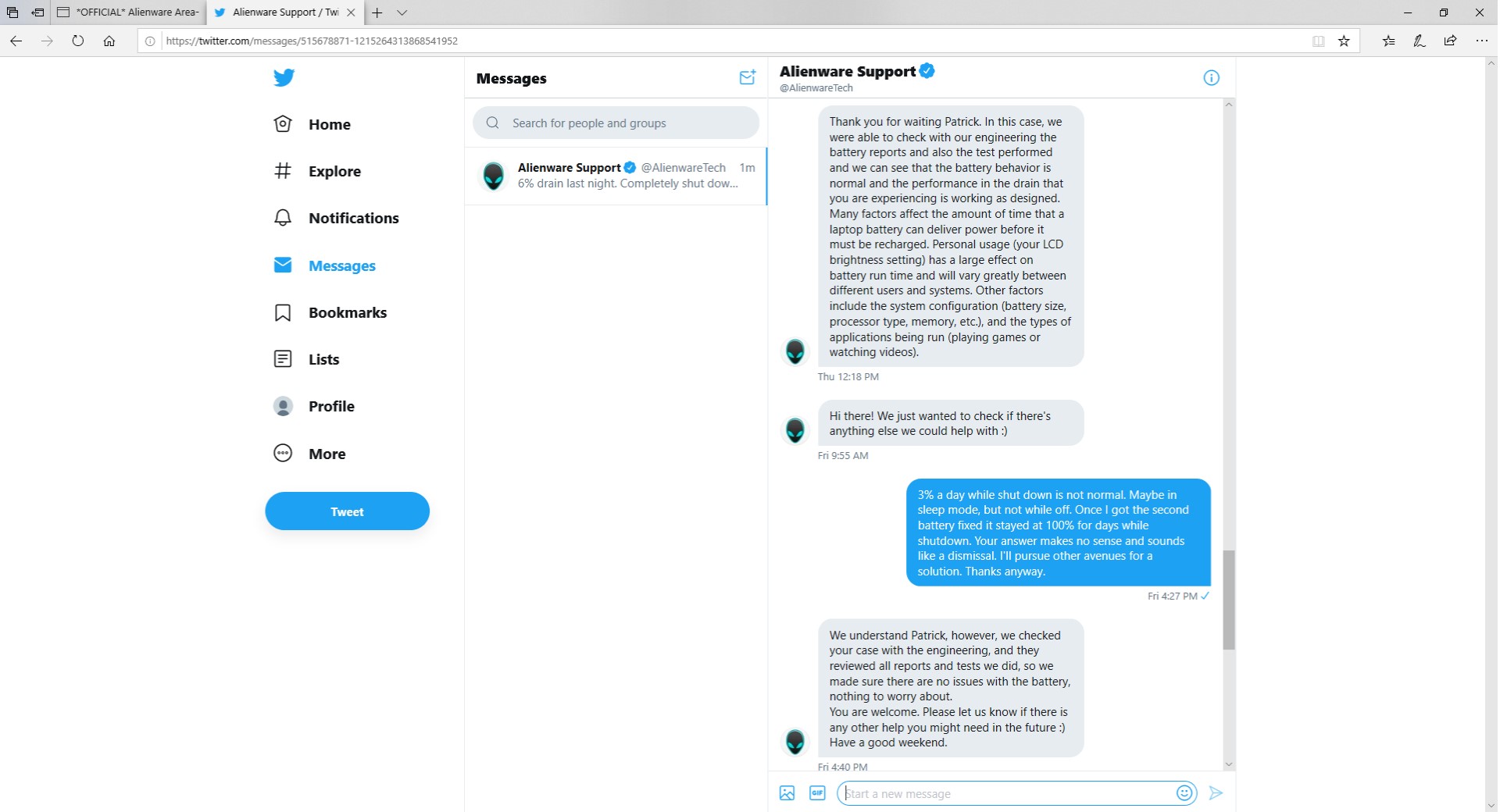
According to "Dell Engineers" 3-6% Battery drain per day is considered normal and expected behavior in the off state. Can anyone confirm normal drain per day assuming laptop is completely shutdown with nothing connected, etc. etc.?
Attached Files:
Last edited: Mar 22, 2020Papusan, Fire Tiger, etern4l and 2 others like this. -
-
"Dell engineers" could be onto something here:
Li-ion self-discharges about 5 percent in the first 24 hours and then loses 1–2 percent per month; the protection circuit adds another 3 percent per month.
https://batteryuniversity.com/learn/article/elevating_self_discharge -
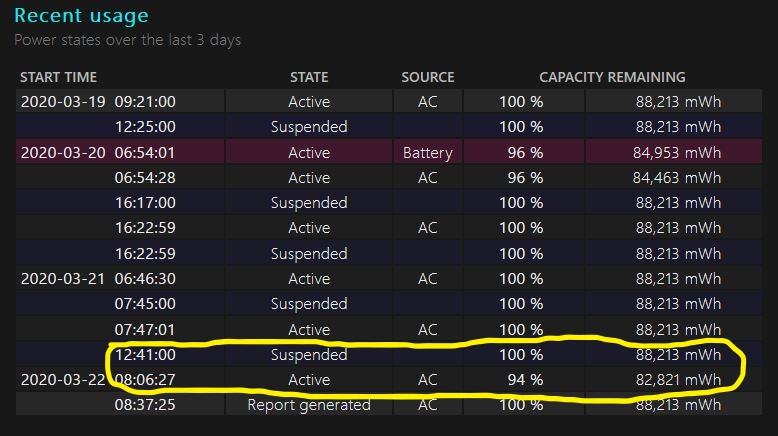
3% a day seems a bit high to me. Sometimes it drops 6% in less than 24 hours.
This is the third battery with this issue. First laptop (replaced due to screen bleed) they replaced the first battery. Second battery did it, too and we ended up just reinstalling windows. That fixed it because battery stayed at 100% for days at a time in off state.
I guess I'll end up reinstalling windows on this laptop to see if that works, but I thought everyone might want to see what tech support is saying for this issue since I'm not the only one experiencing it.
Here's the 6% from last night:Attached Files:
Last edited: Mar 22, 2020 -
-
Is it a day or in the first day, and then it falls off? 3% during the first 24h seems expected. What's the discharge rate after 2 and 3 days.Last edited: Mar 22, 2020
-
Laptop is not new. Maybe a month and a half since received.
Average rate of drain each day varies from 2-3%, but on occasion it can drop 6%, as it did last night (see previous post) and a couple times before that. Same problem as with previous laptop over two batteries. On Friday night, it didn't drain at all. Stayed at 100%. It's very strange. powercfg /wake shows zero, event logger shows no indications, powershare usb bios setting off, etc. etc.
So, it's not even behaving the same every night. I've tried everything I could find on the internet and even found some obscure possible solutions. So far, no fix. -
Again, 3-6% in the first 24h would be in the right ballpark. If you leave it for 3 days and see more than say 7% discharge, then you have hard evidence of an issue.PDUB72 likes this.
-
Sorry, I edited previous posts. Yah, it's not new. This has been going on for some time.
-
Well my 51M has been running nicely... Until this morning when I notice really heavy vibration coming from the fans... More so the gpu fan over cpu but now what? Am I scerwed I cant afford to deal with issues >< I generally run my fans max speed while gaming.... Am I in trouble?
Sent from my GM1917 using Tapatalk -
I have had no problems with mine.
Vacuum the fans. Had to open my sons m15 and was stunned over the impacted lint crammed in them.Last edited by a moderator: Mar 22, 2020 -
that dosent sound like dust, just took this video. It's a clicking coming from the center.... This is annoying I don't even think it's possible to replace the fans without a new heatsink assembly.
Sent from my GM1917 using Tapatalk
*OFFICIAL* Alienware Area-51M R1 Owner's Lounge
Discussion in '2015+ Alienware 13 / 15 / 17' started by ssj92, Jan 8, 2019.