 Problems? See this thread at archive.org.
The easiest to do is, do the recovery image backup onto a USB drive. Shut down the laptop, pop the new drive and boot with the image from the USB.
-
-
The boot priority sequence is just a menu in the bios that has
can u plz explain a bit more, yes i have put the windows 10 media tools onto the usb and made a bootable usb drive. I should say the windows 10 media creation tool and made a usb boot drive. What do I do, press f12 and boot from it with the sshd disconnected? I think thats what im doing here.Last edited: May 10, 2020 -
I don't quite remember where to search , but the laptop has an option from alienware to do a recovery of the original image. I can't seem to know the location. I did a disk image backup through alienware software.
-
I think i got it guys, ill show my results later...jeepers,,,,
I ended up using Aomei software. I didnt think it worked at first, it kept doing the same crap but then after hiting f12 the HHD1 option was there to boot with which was my 970 evo and it loaded up my image. I just use a bootable usb drive. I then had to set the drive in the bios to boot from which I didnt think was going to work. Here are some SS,
![[IMG]](images/storyImages/20200510-031258.jpg)
![[IMG]](images/storyImages/20200510-030904.jpg)
My god I dont think I could have taken another second of using the sshd.Last edited by a moderator: May 10, 2020Fire Tiger and LoneSyndal like this. -
F12 (boot menu options) > SupportAssist > Factory Restore > choose location to the drive you want! bingo!
![[IMG]](images/storyImages/UHxtbV3.gif) DreDre, Rengsey R. H. Jr., Papusan and 3 others like this.
DreDre, Rengsey R. H. Jr., Papusan and 3 others like this. -
Just wanted to report all is well, I love my new laptop. I have bought 2 BGA gaming laptops in the past few months and even tho I love my helios 300 for the 750$ BF deal I got and it runs very well, this is on another level. Since alienware was there own company, just starting out how rough it was owning some of there first laptops that came out to now shows the amount of progress. My temps stay in the 60s with the 9700 non k as well as my gpu, but im not pushing them though. I love it! Hope it stays stable, im glad I finally purchased one. I was going to buy a low config one months ago, but im glad I held out for the 2080 even though it was a 1100 dollar upgrade
 .
.
I want to buy some of that ram that supposedly gives us better performance.
I will also say, with the SSHD, i was getting some massive freezing during my BF5 play sessions. With the new 970 NVMe drive i noticed none what so ever. I was worried it had something to do with the stock Dell OS install or something else but it was the SSHD causing it.
Since I have been a 15' and under laptop guy for many years the 17 inch screen really shines and helps with tight shots in FPS. It really impressed me, I have a little Back light bleed in the upper right hand side but its not bad. Back lite bleed never bothered me a ton, although I do love my OLED screens. So yea the big beatifull screen impressed me right away, I got it with GSYNC and 144HZ with the TOBI eye tracker. The tobi eye stuff is interesting, it reconized your head and turns on the display when you come near it then goes dim saving electric bill money.
Performance wise, I could use a few more fps but thats me being picky, I have yet to do more tweaking with GPU undervolt etc...All the complaints about AWCC, thorttling, all that crap, I have not had one issue with. My unit came shipped with 1.8.1 and I have the thermal limit option in AWCC for the GPU. I have not had any throttling but as I have mentioned I am not overclocking it but a tiny bit. Temps as I mentioned are all in 60s.
So yea, great machine, hope it lasts! Sorry for crap typing, I am in rush in an awkward position as I have parts and tools layed out from tonight's free for all with the SSD upgrade but I felt it nessasary to give my initial impressions for potential consumers. I have turned off all the updates as I am satisfied with what was shipped to me and fulfils my requirements for what I need as far as usability when it comes to tweaking, at least for the time being.
I know all the BGA laptops that are shipping with 10th gen intel cpus are not able to undervolt from the plundervolt fiasco. I am undervolting my cpu by 140mv using Throttlestop. I didnt even check what the temps were out of the box, its just a given with any laptop you need to tweak the CPU, no problems with that at all. I have had no freezing, lockups, blue screens etc.. besides when trying to get the OS transfered over to the ssd. Thats it, thanks for you guys help as well with my questions. I was in a rush, I guess I kinda always am now adays.Last edited: May 10, 2020Rengsey R. H. Jr., Duck W, Papusan and 3 others like this. -
Hello
I am going to get my area 51 m next Tuesday ! I9900K,rtx 2080, 32 gig or ram so yeah we're talking about the beast
After 2 months of wait !!
I need your help for a few things.
I am going to change the thermal pads as S.K recommends it in his tutorial,
He says you have to cut the beauty cover in order to put the 3mm thermal pads on the two MOSFETs at the top left of the graphic card .
Has anyone done it ?
Do you have a pic of how much you need to cut ? Will it not delete the warranty as I leave in France and dell is not as comprehensive as dell USA ..
Is bios 1.5 still the best ? Or they have corrected the throttling issue will the latest update ?
Thank you in advance ! -
Well, there is the fact its a proprietary cable involved, I _assume_ from the video breakdown on how much bandwidth is preserved for the video its either a non-issue, or its separate signaling. Sometimes proprietary is good ?
EDIT: It's one cable. -
As much as I enjoy Clevo machines, it wouldn't be fair not to mention that they need the right touch to shine. And the journey from when I got mine initially to where it is now has been quite the trip, filled with plenty of highs and lows along the way. Which is why their new lineup has me feeling melancholic, as the glory days seem to have been put to pasture.
Anyway, both machines have their appeals, strengths and flaws. It doesn't help anyone to blindly follow one or the other, so look at both of them with a critical eye.Rei Fukai, DreDre, cope123abc and 4 others like this. -
Let me not get started on Clevo otherwise I would turn this into an Alienware vs Clevo war! Never again will I buy a Clevo, crappy driver support (ie. you go your laptop's drivers page, and instead of listing the latest drivers, no, they list every single driver version so you might accidentally download an old driver if you're not careful like 5 diff. versions of control center, 3 versions of Audio driver, etc.) the crappiest keyboards in the world hands down, keys are too cramped there is no travel between them so you end up mistyping letters a lot, inferior screens compared to the competition, and the list goes on. Oh and without the Prema BIOS they are utter garbage with EC Firmware/BIOS limitations. The only good thing they do is they provide good hardware specs, but it ends at that. User exprience overall is not worth it.alexnvidia, Normimb, Docsteel and 1 other person like this.
-
I recently did this too. I ended up having to remove ALL hard drives except the new cloned drive for it to boot properly and run the rest of the windows setup. Then I added the other drives back.DreDre likes this.
-
Besides, before the corona virus hit the mainstream, it was listed for a much higher price than AW for some odd reasons.
I tried to reach out EuroCom and the prices were way higher and I even told them to compare it with other OEM.
I hope EUROCOM fix their prices along with Clevos.
Also HIDREV should ask for a lesser prices for CLEVO/SAGER machines.Spartan@HIDevolution likes this. -
I have a Clevo from 2010 and a Clevo from 2015 with todays processor. + many others. But both works as the day I bought it. Opposite to the AW17 I have in my in my inventory. All I can say...Minimum two MB swap and 3 or 4 times needed doctoring from Dell. As always... I prefer working machines. Not only today, tomorrow or next months. And I haven't the time struggle with all sorts of useless ODM software or fighting with unwanted firmware upgrades.
3 hours ago
Alienware Area 51M DIED After 4 months-dead mainboard issue
"The funny is I use it as my main machine for work as a freelancer 3D artist but I can't trust this machine anymore and my work stopped and I had to cancel all my freelance work since my Alienware area 51m had officially died."Last edited: May 10, 2020zdroj, jclausius, Falkentyne and 7 others like this. -
Lol at Mog jumping in immediately to downplay the severity of the issue.
1. Yes it can happen and its unlikely but the dude shelled out $5,000 and can't get basic support.
2. His entire business is down because of this.
Its a shame the subreddit doesn't have good mods that actually try to help. Would be nice to know the guys bios, have a copy of the interactions between Dell and the authorized repair, and also the MB model number with the exact issue.
Instead we get "Bro sucks but the rest of us are good".darkgamer_gs, Rei Fukai, DreDre and 2 others like this. -
What the hell man!
So yesterday I proceeded to disassemble the laptop to make sure that everything was done correctly and for the repaste. When I pulled out the cooler I was shocked to find this amount of thermal goop! Dude, you're not a Chinese worker! Seriously!? Also, why on hearth you forgot to apply some of the thermal pads!? What if I had decided to go ham on the laptop before this!?
![[IMG]](images/storyImages/oNF07mml.jpg)
Also, found one speaker not assembled correctly, and after plugging out and in the sound card now everything sounds great (no more pops or hissing). But what kind of sorcery is this!?
Finally, after I had everything repasted, found that the keyboard was bowed. Turns out the guy forgot to properly attach it back on the tabs and I missed this! Another 2 hours of work tearing everything again! Why dude, why!
![[IMG]](images/storyImages/zbmTCz1l.jpg)
Anyways, the laptop if fine now. Here's a single core CB20 at 54x from my 9700k to cheer things up.
LoneSyndal, Normimb, jc_denton and 3 others like this. -
There is no war. All laptops are varying degrees of garbage now. Trashbooks are the only thing available for purchase in 2020, and probably for the foreseeable future. You have to pick your poison.
War also carries the hope for peace and reconciliation to follow after you place your opponents under subjection. I don't play that. I prefer to exterminate the opposition. Domination has too many strings attached and requires an investment of time and resources. Eliminating the problem is the best approach.Last edited: May 10, 2020 -
For the R1, I agree completely.
This people often overlook and just isn't apparent always from a purely technical standpoint.Spartan@HIDevolution likes this. -
Exactly, like when I had my Clevo P870DM and P870DM3, yes it was a beast of a machine in terms of specs and benchmarks but you see, I am typing on the laptop all day long and that crappy keyboard made me furious with the amount of mistakes I was making and I wasn't happy with the screen quality, the colors were too dull for my liking so what use are specs when I wasn't enjoying what I'm doing? The Area-51m although has some issues and needs a certain BIOS/VBIOS/settings to workaround Dell's evil acts to cripple the performance, once you do these things (which are very simple IMHO) gives me a machine I can work on and play happily.
Which is why you gave up on laptops since no laptop meets your demands anymore otherwise we would've seen you with the latest and greatest Clevo P870DMX but you chose desktops over laptops to enjoy what you love doing most (benchmarking and being the top leader in benchmark scores)alexnvidia, LoneSyndal, Normimb and 3 others like this. -
That is why I abandoned Dell/Alienware. The Clevo experience was vastly superior by every measurement for me. But, I am not a fanboy. I won't purchase anything from either of them anymore. I do not need or care about driver support. I can take care of myself. What I care about is having what I want, the way I want it. Neither of them provides that. To be fair, neither do any of their competitors. So, my objective at this point is to spend as little as possible, (ideally zero dollars,) for crippled computer garbage.
Yes, that is correct. That being said, the Clevo P870DMx was the best laptop I have ever owned and superior to anything that came before or after it. But, sometimes being the best isn't good enough.
Last edited: May 10, 2020 -
-
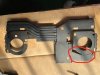
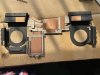
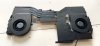
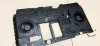
modified heatsink is almost ready...
original r2 heatsink (final edition) -> modded for compatibility with r1
 ssj92, Vanya, devilhunter and 6 others like this.
 -
Do you use a laptop at all now?
-
the latest command center does not allow me to adjust the GPU thermal limit. the reason?, how to fix?. my laptop still on 1.5.0 bios.
-
You need to install AWCC version 5.2.75.0 and OC controls version 1.2.50.1227
Before restart, go to C:\Program Files\Alienware\Alienware Command Center\OCControlService and mark "Profiles.zip" as read only
Go to your firewall and block "Alienware Command Center"
Now you can restart.
Enviado desde mi HTC One M9 mediante Tapatalknader_rizk2003, LoneSyndal, Fire Tiger and 1 other person like this. -
Is this a personal mod or something that you're planning to make more of?
-
What exactly did you modify other than mounting the fans?
Also, do screw holes even line up?
Also, what about Z-height to all components? VRMs, Memory, CPU and GPU? Did all those line up (gaps same as R1 heatsink) from the start?Last edited: May 10, 2020RMLJD, LoneSyndal and Fire Tiger like this. -
Si Señor. The el cheapo turdbook in my signature. Great value, but still a throw-away. Luckily, it was inexpensive. Otherwise, I would not own it. It was about $1500 with tax. About $1000 more than what I actually believe it is worth, but the best value in its class. It's unfortunate that most laptops sell for about 50-60% more than what they're actually worth.
Edit: I bought it for work. I travel for business when the world isn't acting super-stupid about COVID-19. Hopefully, that nonsense will be over soon. Otherwise, I probably wouldn't have any use for a laptop.Last edited: May 10, 2020cope123abc, LoneSyndal, Papusan and 4 others like this. -
My sub does quite well despite my modding thanks.Last edited by a moderator: May 11, 2020alaskajoel, Lopt, Spartan@HIDevolution and 1 other person like this. -
I have popcorn and comfortable seating...please proceeds...Last edited by a moderator: May 11, 2020Papusan likes this.
-
In case no one saw this yet. First R2 benchmarks.
https://www.notebookcheck.net/3DMar...for-new-Dell-Alienware-Area-51m.464412.0.html -
You don't need to use an older version, the latest one works just fine.
Virale, pathfindercod, jc_denton and 3 others like this. -
Wow. So there's possibly a R2 coming after all? That's awesome!jclausius likes this.
-
This modification is made by one enthusiast from China. He plans their mass production next month.
His shop is available at: https://www.ebay.com/sch/m.html?_odkw=&_ssn=cicichen594&_armrs=1&_osacat=0&_from=R40&_trksid=m570.l1313&_nkw=alienware&_sacat=0
He says that the motherboard and the location of the screws for the heatsink in R2 are significantly different.
Probably super graphics cards will not be compatible with the current generation or require a new heatsink
-
is it worth selling the laptop now?Spartan@HIDevolution and Fire Tiger like this.
-
GPU layout looks the same on that heat sink. Super cards are just rebrands with new Vram. TDP is the same on their super counterparts.
CPU uses new socket that is a different size. This is likely the heatsink design changed. They took advantage to add vapor chambers, which is nice.
GPU compatibility with the R1 should not be an issue if they left the GPU die in the same place. It's up to them though...Last edited: May 11, 2020jc_denton and Spartan@HIDevolution like this. -
It is actually not worth going for RTX 2080 Super, the ampere is the real deal.c69k, Biker Gremling, jc_denton and 2 others like this. -
yes because it would lose so much of its value once people know that there's an R2 around the corner.Fire Tiger likes this.
-
Did you do this?????
Before restart, go to C:\Program Files\Alienware\Alienware Command Center\OCControlService and mark "Profiles.zip" as read onlyFire Tiger likes this. -
I'd wait and see how the performance of the modded HS is before jumping on this. Perhaps this was just the first proof of concept unit, but there are some things that need to be ironed out.
The middle heatpipe is basically useless now, it's either punctured due to heat from soldering or flattened to such a degree that any capillary action will be heavily restricted or non-existent. There is a reason to why the wick structures have a minimum required height to function. I also have some doubts about soldering done with the vapor chamber, since its deformed along the solder path. Vapor chambers are really fragile, and will deform when pressures on the inside exceed a certain threshold, which is why they have a 110c max temp limit. Whereas most solder alloys need >160c temps, and 138c for low temp solder alloys, depending on what the Chinese modder used.
![[IMG]](images/storyImages/xXVtoGv.png) Spartan@HIDevolution, Rei Fukai and Fire Tiger like this.
Spartan@HIDevolution, Rei Fukai and Fire Tiger like this. -
Yeah obviously I did that. That's how it's working. My post was directed to the other guy saying that you need an older version. You don't.Fire Tiger likes this.
-
Yeah haha, this was found by _rogame like 3-4 days ago. An Area-51m R2 official forum is already up and buzzing since then!Rei Fukai likes this.
-
I've followed these steps, minus downgrading AWCC/OCc's, and my thermal slider is still locked.
-
The downgrading part is what gets it done... more so than the other steps... if you do half of a solution and it doesn’t work, well, it’s because you did only half of the solution.
Follow the steps! -
You need to do a proper uninstallation of the Alienware Command Center first
Reboot
Install Command Center, Do NOT reboot
Install OC Controls, DO NOT reboot when prompted
Set the profiles.zip to read-only
Now reboot
===========================================
Did you not see this? http://forum.notebookreview.com/thr...-owners-lounge.826831/page-2125#post-11012324 -
If you guys haven’t seen this yet then you’re welcome. Area 51m R2 benchmark leaks and it is stupidly powerful. Let’s hope they fixed all the issues from the first one.
https://www.notebookcheck.net/3DMar...for-new-Dell-Alienware-Area-51m.464412.0.html -
Firestrike benches have been leaked too. See @Spartan's post from Saturday - http://forum.notebookreview.com/goto/post?id=11011819#post-11011819
Papusan, jc_denton, Spartan@HIDevolution and 2 others like this. -
Oh that’s exciting.
-
Here's to hoping for a R2 with lots of tiny fixes from R1 launch!
-
I feel like an idiot but can anyone link the Area51-M drivers for the AGA? I can only find the M15, M17 etc.
Thanks in advanced! -
We can only hope. And here I was convinced I wasn’t gonna give Alienware another shot.
*OFFICIAL* Alienware Area-51M R1 Owner's Lounge
Discussion in '2015+ Alienware 13 / 15 / 17' started by ssj92, Jan 8, 2019.


![[IMG]](images/storyImages/I5QuzsL.png)


