Problems? See this thread at archive.org.
Yes, I do it all the time. Its fine. Not ideal, but it works in a pinch. Sometimes you have no choice. I have never had any adverse effect from it.
-
-
@sazistas Did you get anything from internal display while doing so? I am quite interested in removing the DGFF card and solely using AGA only
-
My motherboard was dead, so it didn't power on even without the DGFF and the internal screen connector goes directly on the DGFF, therefore it isn't possible to get signal on the screen without the DGFF card. My CPU also is the KF version which lacks intel HD output from the thunderbolt port. I plan to buy an AGA soon to use both internal and external gpus for vray rendering at the same time so I'll try to disconnect the DGFF and give it a try with the AGA only connected. It would be interesting if this works fine on the external monitor.twin snakes likes this.
-
Thanks for testing and good to know my theory was correct.
I have some theories on older AW upgrades too...makes me wanna pursue them hehe.
This is a great way to be able to use the laptop while waiting for a GPU replacement, etc.MogRules likes this. -
-
A question to the knowledgeable here.
Has anyone tried the Thermalright TF8 paste?
https://www.amazon.co.uk/TF8-Compound-Performance-Heatsink-Interface/dp/B07K442WXV
It claims higher heat conductivity than Kryonaught and has a better heat tolerance so doesn't dry out. -
-
Thanks sounds positive i'm going to give it a go. I don't want to use liquid metal and kryonaught whilst giving great initial results i've always found 6 months to a year later it becomes as bad or worse than stock paste.Biker Gremling, raz8020 and Papusan like this.
-
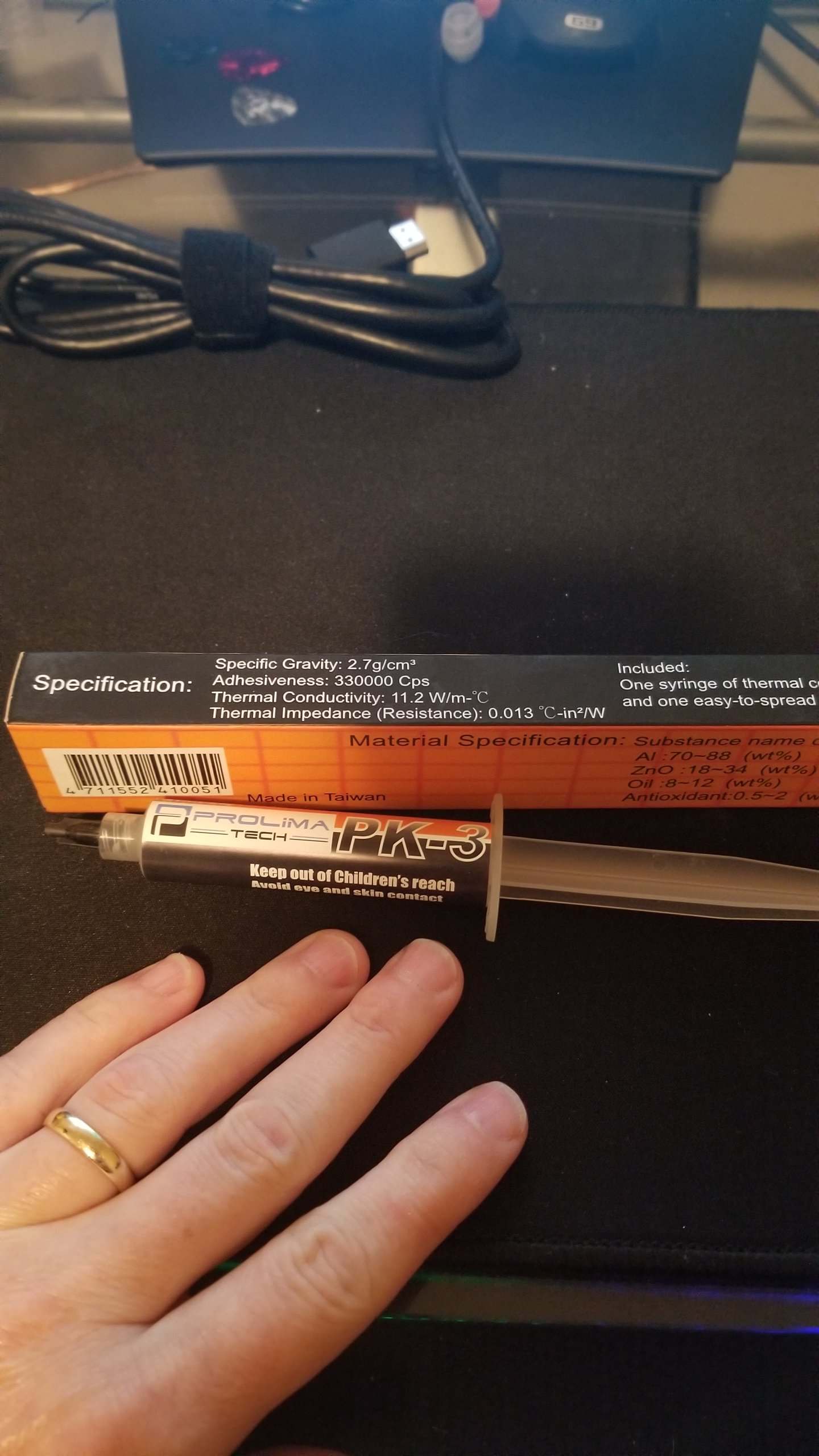
So the paste cam . About an hour late to have the tech come out yesterday. Looks like monday.
Note the details on the box...
As a bonus you can see what 4 years of american football and 10 years of martial arts did to my fingers.
And this is why I wnet with PK3. Stuff last for ever.
Not sure why it does not get more love
https://www.tomshardware.com/amp/reviews/thermal-paste-comparison,5108-11.htmlAttached Files:
Last edited by a moderator: Jul 4, 2020Fire Tiger likes this. -
-
Worst paste in the world to apply.
-
It's crap and and so is Kryonaut (not Kryonaught)
![[IMG]](images/storyImages/0WD6pTM.gif) . The best is
PHOBYA NanoGrease Extreme, GELID Extreme Thermal Compound, or IC Diamond
. The best is
PHOBYA NanoGrease Extreme, GELID Extreme Thermal Compound, or IC Diamond
The problem with Kryonaut is it quickly deteriorates in performance although it performs great initially but after a few days you start seeing temps rise quickly.
Last edited: Jul 3, 2020 -
I don't see thermalright TF8 on that list. What makes it bad? From what i've seen it seems to perform as well as kryonaut without the downside of drying out at high temps.
Phobya is like gold dust at the moment i can't find it anywhere and IC diamond isn't easy to find in the UK either. -
Err, Phobya is on Amazon UK. £12 + £10 delivery though
 Fire Tiger likes this.
 -
Yeah sod paying £10 delivery for 3.5g weight.DaMafiaGamer, Biker Gremling, jc_denton and 1 other person like this.
-
I posted an eBay link the other day for Phobya, its about £15 delivered from Germany. The exact seller I bought mine from.
https://www.ebay.co.uk/itm/Phobya-N...e=STRK:MEBIDX:IT&_trksid=p2060353.m1438.l2649jc_denton, Papusan, etern4l and 1 other person like this. -
It's not on that list but I posted that list as a general comparison. BTW, thanks for reminding me of thermal pastes, hadn't done a re-paste in a while so I just cleaned the heatsinks and applied GELID Extreme Thermal Compound for both the CPU/GPU! Result, very similar to PHOBYA NanoGrease Extreme so pick whichever one you want. Heck, I got 2 degrees less in my tests compared to PHOBYA NanoGrease Extreme but that's probably because it's still new. Still, this stuff is gold.
GELID Extreme Thermal Compound is probably the easiest paste to apply in the world! It's thick enough to make good contact yet viscous enough to be easily applied/spread.
X-Cross method FTW:
@Papusan @Mr. Fox @jc_denton -
Did you re-pad at all bro? Would like to try it but have no idea how to accurately measure the original pads and all the carry on that goes with it.jc_denton likes this.
-
I quit using Gelid GC Extreme about 5 years ago. Like many other thermal pastes, it works pretty decent at first, but it never lasted me more than a couple of weeks. It was too inconvenient and expensive to have to apply new thermal paste every 2 to 3 weeks. I quit using Kryosnaut for the same reason. Liquid metal is the only thing that lasts long enough to suit me. Even running my 7980XE bare die on water I see at least 10-15°C temperature reduction under load using liquid metal. Nothing else is capable of tranferring heat fast enough.DaMafiaGamer, Rei Fukai, jc_denton and 4 others like this.
-
BTW guys, I just remembered when the Dell technician visited me to replace my motherboard last time, this was the thermal paste that Dell uses as they sent it with the motherboard:
![[IMG]](images/storyImages/5HkbmBQ.jpg)
Shin-Etsu MicroSi
Me after spending an hour disassembling the system and applying GELID Extreme Thermal compound.....
![[IMG]](images/storyImages/EeChF7M.gif)
Pads? what pads? they came off with the panel and they stayed there, heck if you didn't mention this I would've never even checked.![[IMG]](images/storyImages/ixqNbwc.gif)
-
Me after seeing all this.... Haven’t time for this. I use “baked Conductonaut” and don’t think more about pasting Yooo have the time for this? You don’t bench?
raz8020, jc_denton, Spartan@HIDevolution and 1 other person like this.
-
PK3....i can't be the only one using it.
-
Well, actually, that's the seller I bought from last year BTW - was a bit cheaper then, obviously. You want the best thermal compound, you've got to pay up mate.
Spartan@HIDevolution likes this.
-
Yeah like buy a 5000 USD laptop and then cheapout on the thermal paste which is one of the most important factors for having a properly working laptop because you know, you wanna save 10 bucks!
![[IMG]](images/storyImages/heeur0M.gif) jc_denton, etern4l, Fire Tiger and 2 others like this.
jc_denton, etern4l, Fire Tiger and 2 others like this. -
lol.
Paying for a product is one thing. Paying almost the same price for delivery is another especially at it weighs nothing and is small in size. I've bought the thermalright now anyway so will see how that goes if it's crap i think ill psyche myself up to do the liquid metal.raz8020, jc_denton, Papusan and 1 other person like this. -
Which one did you buy mate?
PS: you have an M17x R4? or did you not update your signature?etern4l likes this. -
This delivery thing is a red herring in this case, because it's not available anywhere other than from the distributor in Germany. The thing is £25 on Amazon per 3.5g (or £15 on eBay I guess). It's Phobya way or the highway (e.g. £6.50 per 1g of Kroynaut which will pump out in a few months max) Actually, 3.5g of Kryonaut works out at around £22 therefore, I'd say Phobya is an excellent deal in comparison!
Last edited: Jul 3, 2020jc_denton and Fire Tiger like this.
-
Hello guys! apart from the nameplate data, who is better between Gelid Solution GP Extreme 12W/MK and Thermal Grizzly Minus Pad 8 8W/MK?
Fire Tiger likes this. -
Did you go for TRX as I suggested?
Gelid. I would rather use those than the max spec Fujipoly.Korben_Dallas, raz8020, jc_denton and 2 others like this. -
-
Still got an M17x R4 for now. Got the Area51m R2 arriving in 3-4 weeks which is what i'm buying the paste for.
TF8 as TFX doesn't appear to be in stock either.jc_denton, Spartan@HIDevolution, Papusan and 1 other person like this. -
Thank you all for the advice! I just went shopping:
Arctic Silver ArctiClean 60ml
Phobya NanoGrease Extreme 3.5g
Gelid Solution GP Extreme 12W / MK
x2 80x40x1.0mm
x2 80x40x1.5mm
x2 80x40x2.0mm
x2 80x40x3.0mm
What do you think?
jc_denton, Spartan@HIDevolution, etern4l and 2 others like this. -
Let me know how you get on with the pads, I've been toying with the idea but too afraid to go for it due to people claiming the pad sizing car vary from model to model.jc_denton and Korben_Dallas like this.
-
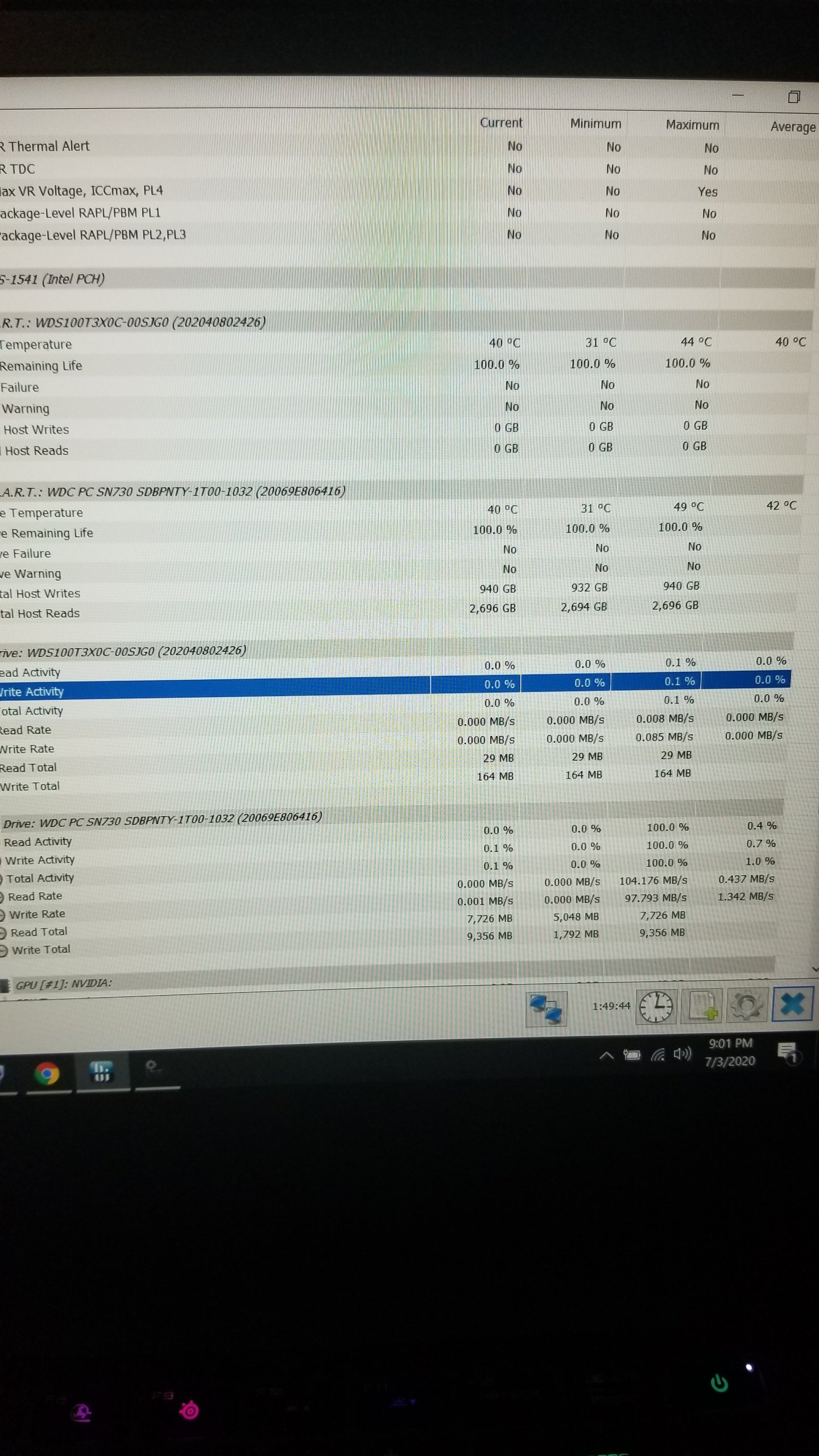
So a fast update on my Frankenstein thermal pad SSD stacking... the main pad is a grizzly. 8.w 2mm pad stacked on a "micro connectors" 4 .0 w ssd pad kit. They only had one of each in Stock. The quality of the grizzly pad was high and I would not hesitate to recommend it.
the new WD black is running 5 degrees cooler then the stock SSD on stress tests. (also a wd...a 730 i belive) rember the difference is more significant as the WDB is much faster....so performance =heat...
Compelling evidence u can stack effectively.
.
Or that MSI suxs at selecting thermal pads.
Also....since its my sons pc..he thinks I'm uberdad at the moment.
I really like the WD Black drive. The software changes skins when you switch to the gaming drive. Samsungs has more features though.
Proofs in the pudding.Attached Files:
Last edited by a moderator: Jul 4, 2020jc_denton, Papusan and Fire Tiger like this. -
-
Is this worth trying? Link , forum discussion
* Thermal Conductivity(W/ mk) : 14.3
* Thermal Impedance : <0.0028
* Specific Gravity : 2.6
* Useable Temperature Range : -250 / +300
* Electrically Conductive : No
![[IMG]](images/storyImages/s-l500.jpg)
-
Not familiar with the brand but 14 is impressiv .
-
Im actually running this right now.. Seems to be not too bad.. 9700k and 2080, My idle temps are really good. 30's and 40's no fans. under load about average.
Cheaper than most paste, (did the full coverage technique) may try a repaste with the pea and X just to see if temps differ.
All in all decent paste.Attached Files:
Darkhan, Fire Tiger and G46VW like this. -
-
Alienware Area-51m Drivers 04-Jul-2020
- Some drivers were downgraded as I found no difference in the newer drivers so reverted back to the official ones for the Area-51m
- Latest IRST is now included which gives you the option to DE-SELECT the Intel Optane module which is NOT supported on this laptop rather than having it installed anyway as previous versions of IRST did
- Delete the old Driver folder you had for the Area-51m and use these. They are the best for performance/compatibility
Guide: How to unlock the GPU Thermal Limit Slider in Alienware Command Center
After you download the ZIP file and before you unzip it, make sure it is not blocked by right clicking on it, go to Properties, then see at the bottom if it says "this file came from another computer and might be blocked..." click the UNBLOCK button then hit APPLY followed by OK! To prevent Windows from blocking downloaded files automatically, make sure you read this guide:
"Are you sure you want to run this file?" [Yes or No]
The drivers are organized in numbered folders with the correct installation order.
When Install the LAN Driver, Choose CUSTOM, then uncheck the box which says Killer Software. You can also expand the Drivers and uncheck Ethernet Drivers, E3100. You only need the E3000 Drivers. Keep the DELL Checkbox.
The WLAN Driver must be installed from Device Manager by right clicking on the WLAN Card, choose Update Driver, then browse to the folder where the drivers are located.
Please restart after every driver install even if you were not prompted because some drivers will fail to install if there are any other pending operations (ie. had the Intel HID Event Filter Driver fail to install once because I did not reboot, the driver package was installed but the actual device in Device Manager was not updated) -
Hey guys
Wanted to know your thoughts about this
Why would people want to sell their area 51 m r1 for the R2 while you only get things that are not necessary at all.
Let me explain i9 10900k ? 2 more cores ? Needed for what ? With my i9900k delided I've rarely seen the cpu over 30-40 percent of load in gaming and that set to 4.4 ghz.
While you could get some more performance for rendering you are very likely to underclock and undervolt the cpu as it gets warm like a frying pan !
I have a desktop with a i9_10900k with custom watercolooling and with cinebenchr20 it throttles right away 100 degrees !!!!!
So I had to delid the 10900k and change the ihs for a copper one + LM and now it is 80 degrees with r20 and WATERCOOLING with a load over 220 W
Regarding the graphic card the 2080 s provides only 7 percent more fps in game wich isn't worth changing now .
And the last thing the 300 Hz pannel ? That's even more useless because even then with my desktop with a 2080 ti overclocked and watercooled I can barely reach the native 240 hz of my Alienware monitor .
So that is my thought
What is yours ?
I think we should all wait for the Nvidia 3000 before making that big of a changeAttached Files:
-
-
Because some people just like to have the latest. Does it make sense from a financial point of view? Of course not
But it doesn't harm anyone so if they want to do it then why not?
Also to your last point the 300hz panel isn't exactly useless the people who want 300 fps would have the game settings on low anyway to achieve that framerate. For example i know the overwatch league players always play on low graphics to maximize fps. Higher fps = less input lag. -
If you have problem run above 4.4GHz you should check what’s wrong. Could of course be that you want to avoid problems as you have seen in the thread. Dell capped thermal trip point for graphics so the unified heatsink should easily cope with the Cpu heat from stock clocks.
Same here... Maybe change cooling setup http://forum.notebookreview.com/thr...g-owners-lounge.831618/page-116#post-11029037
“At 1.45v for 5-5.1 GHz, that’s a full 100mv more than what I use at 5.4 GHz (1.35v) on my CPU that loves to eat voltage. Is this to trick reviewers, or to confuse the public? You decide”Last edited: Jul 5, 2020Rei Fukai likes this. -
Have you ever seen one of the 0.000001% of gamers who might actually benefit from the marginal improvement offered by a 300Hz display (i. e. one of the pros), regularly play or compete on a 17" laptop display?
RMLJD likes this.
-
I completely agree with you for competition gamers but on a every day basis most player won't benefit from 300 hz
I just find the improvement so little while the area 51 m is still a beast !! -
I run at 4,4 (4.7 in the gaming center) the because I don't need more than this for gaming .
I have a profile that i rarely use, 5.00 GHz with -100 mv and the temps with cinebenchr20 go up to 90 degrees no more and in game around mid 70
70 degree s as well for the GPU with a slight undervolt -
Haha no but that wasn't my point. The point was those who wish to have maximum fps will run at low settings to achieve it.
-
I would honestly be surprised if more then a very small number of people actually go through with taking a hit on their $3k + laptop just to have the latest and fork out more money. I am sure someone somewhere will, but I don't imagine it to be all that many. Like you said, the performance differences are tiny just to have a small bump in GPU performance and a CPU bump that likely won't make much if any difference outside of a benchmark.
Someone, somewhere will always have to have the newest and best there is, so I am sure someone will do what your saying, but not likely very many.RMLJD likes this. -
Your own words. I can’t see much will fry at 90c
“While you could get some more performance for rendering you are very likely to underclock and undervolt the cpu as it gets warm like a frying pan !”
Still 25% increase in performance for those who need it. + better binned Cpu helps as well.
If we all said “won’t make any differences”... You or others could still be on 4 or 6 cores. The world go forwards, MogRules AMD is as now on 16 cores. Useful for streaming, running different tasks in the background while you gaming.
Last edited: Jul 5, 2020jclausius, raz8020, Mr. Fox and 1 other person like this. -
Sure enough, non-gamers and not-just-gamers would find plenty of use for the extra CPU power. Unfortunately, Alienware have made good progress towards the ultimate goal of shooing such users away from the brand
As for the games themselves, I feel that PC gaming has been mostly stuck in 2nd gear since the introduction of PS3 & Xbox. Almost all major games these days are ported from consoles or are designed with feasibility of a console port in mind, and as such they are not really optimised to take full advantage of high-end PC hardware. Sure, PC games look better by way of throwing more raw power at them, but there aren't any ground-breaking high-end PC exclusives that would come remotely close to maxing out the capabilities of the hardware in a meaningful manner.Last edited: Jul 5, 2020raz8020, DreDre, RMLJD and 1 other person like this. -
I still need to remove the Thermal Grizzly Carbonaut and repaste my Area-51m.
I have ICD, MX-4 and Noctua thermal paste. -
Well I think you haven't read what I wrotre well
90 degrees with a delided cpu , LM repaste and copper ihs before if was impossible to have stable stress test with cinebenchr20 on my area 51 m.
Say whatever you want but if my water-cooling desktop can barely cool down this new generation of CPUs that draw above 200 w in turbo mod I doubt the Alienware will do much better just with a vapor chamber
Or else they will probably wait for a few units to fry and then put a new bios
*OFFICIAL* Alienware Area-51M R1 Owner's Lounge
Discussion in '2015+ Alienware 13 / 15 / 17' started by ssj92, Jan 8, 2019.


 The R1 owners should keep their K chips for possible DGFF disaster. Or have one in spare(for test purpose or keep the machine running with a external screen after the dreaded smoke).