Problems? See this thread at archive.org.
Tested a lot of them
The nanogrease showed best results pretty much everywhere
-
-
Area51m R1 is getting an unofficial Vapor Chamber upgrade, the heat pipes are going to handle GPU only.
should be a 15% boost in performance.
The chinese seller reached me out, final phase of production. -
Do you have a link or something to show us the prototype ?
Sounds like a great news !c69k likes this. -
I'm gonna work with what I have for now. Anything will be better than these carbon pads since they don't make proper contact.
The CPU would have been better since GPU temps aren't as bad. Hoping the unified design allows it to bring both temps down.
Is this basically a R2 heatsink modified for R1 or it's made from R1 heatsink? -
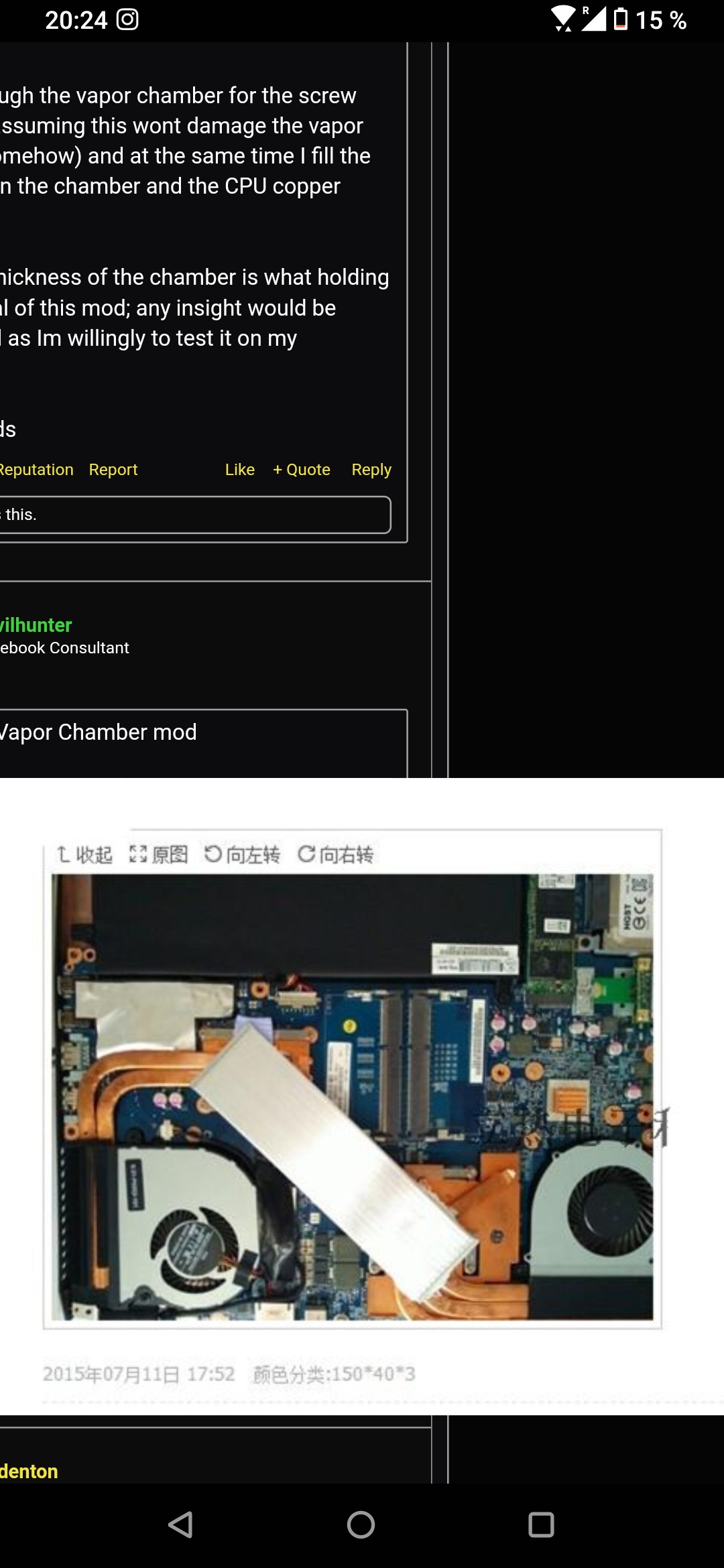
Is that the one ?
Attached Files:
-
-
more or less the same, with a different screw locations to fit into R1 case.
I will test it out myself and of course would report back.
havent heard him over a week, Ive got no reason to lie, Im not working with him. I asked him for parts turned out hes making them.
problem with shared heat sink on R1, if the CPU gets loaded at the same time GPU is loaded (case with BF V) it becomes much harder to cool the unit.
A dedicated cooling solution for GPU chip & CPU would result in a much better stable system.
I hope vapor chamber is promising and not over hyper.
I can use liquid Ultra or Gelid Extreme on the chips for the testing ( I prefer to stay away from liquid metal - degrade factor & not proper contacting on occasions).
Please share your thoughts,
Regards,
JejeeFire Tiger likes this. -
No, picture got deleted from ebay, I might be able to find it tomorrow.
similar to this however
https://tieba.baidu.com/p/6369991282?spm=a2g0s.imconversation.0.0.2a883e5f1B0Zka&red_tag=1415573126Fire Tiger likes this. -
-
How do you buy it ?
The guy intends to raise some funds like from Indiegogo ?etern4l likes this. -
I wonder what it will do to the warranty.
Here is an observation
...the MSI raider forum is awfully quiet. Happy people don't tend to post..... or maybe not as.....enthusiastic as the enthusiasts here.Biker Gremling, Papusan and etern4l like this. -
Probably will be listed on eBay since the seller account on eBay.
I was looking to buy a used heatsink and mod it myself but the seller sent me some pictures and told me he opened the thread on “taibo “ showing R2 heat sink.
Then he showed me casting molds of area 51m R1 heat sink with vapor chamber.
Let’s keep finger crossedFire Tiger likes this. -
Hi guys,
Just picked up a 51M with a RTX 2080 and a 8700 non K
Question - is there any way to undervolt the laptop, Intel XTU seems to be locked, is this due to Dell's latest BIOS ?jc_denton likes this. -
Check wich version of the bios you have by entering the bios when you boot
Otherwise I ran into this issue I just had to download an older version of intel xtu and that works fine -
You can also easily downgrade to bios 1.5 where you can undervolt through AWCC up to negative 100 mv
-
https://www.ebay.com/usr/cicichen594?_trksid=p2047675.l2559 Is this this seller? I know Chinese and tried to contact him several times, but getting access to a group of enthusiasts (QQ 1017577926) is quite difficult if you do not live in mainland China.devilhunter likes this.
-
Did you delid your cpu ?
Intel stock IHS is crap most of the time just deliding and changing for a copper ihs will just do fine
Of course at the risk of loosing the warranty but you can keep the aluminium IHS and put it back in case of needing dell assistance -
I thought that Intel IHS is nickel-plated copper?jclausius likes this.
-
Whatever they use the numbers are here
Stock IHS 4.7 GHz undervolt -100 temps with cinebenchr20 100 degrees within 10 secs
Copper ihs 4.7 GHz undervolt -100 temps stays around 78 degrees with fans on performance and no more spikes of temps
the copper ihs is slightly thicker which increase the mounting pressure as wellc69k likes this. -
Oh lord its on....Dell tech will be here any minute.
He told me he "reuses" the thermal pads!!!....all I have left is a 4mm pad that got delevery Sunday...that seems like a lot to compress...
 jc_denton, Fire Tiger and etern4l like this.
 -
-
Yes it is
Unfortunately there is still a huge difference compared to stock and delided which means they could have done a better job :/
Let's say if the job was better from both side we could have perfect thermals indeed
Last edited by a moderator: Jul 7, 2020 -
-
Latest bios, can anybody else confirm if this is bios related or non k chip issue being 8700
-
You should revert back to 1.5
I believe the latest bios stops you from undervolting if you don't want to revert to 1.5 , you can still undervolt with bios 1.7.3 -
The cluster continues. New MB in...no sound. Tech fought with dell for 1/2 hour. I fought with them. Finally. New card coming....
New board.
Rev 2.0. Rev A01. Build date 5/18/19.
Bios is 1.8.1. when i saw the date I figured it would be 1.5 and was happy....
Old board
Rev 1.0 A00 build date 1119/18
Some observations. Tech was competent. He uses " X " of dots plus a dot in the middle of each "V" if that makes sense. We reused pads. I may have to fix that depending on heat
To Dells credit old board was pasted well. They used a ton of psste..And still moist. hopefully soundcard is here tomorow. Tech is at least making money..Last edited: Jul 6, 2020Papusan, jc_denton and Fire Tiger like this. -
Hope you get it sorted out tomorrow with the new card.
I re-used my pads during my repaste and so far seems ok. I do want to re-pad just not got a clue about sizing and making sure I don't mess it up. -
Me also I saw it posted here at some point.....
-
Yes, this is the one.
People tried deliding 9900k, sanding and scrapping intel IHS and expose copper only, and also replacing the entire IHS with copper IHS
results are always within 3-5C which is totally stupid to go through that route.
Unless you get a really bad CPU that is miss behaving and you cant return it. Mine runs @ 4.9 Ghz -115mv and works and throttles only on some benchmarks (Cinebench) basically any rendering job will crush the CPU and cripple it.I tried to downvolt it to 130 mv and it still runs, sadly after so hours of testing it crashes. Maybe with vapor chamber it can be tammed.
Not sure if Vapor chamber can resolve this issue but I can only hope the new Vapor Chamber can tame 8 core CPU.Last edited by a moderator: Jul 7, 2020MogRules, DreDre, Docsteel and 1 other person like this. -
I have it myself, i9 9900k delided with a copper ihs and believe it or not I gained 20 degrees off the cpu by doing this
I guess I just got a bad unit and that's why there is silicon lotteryFire Tiger, Papusan and jc_denton like this. -
Likely subpar contact pressure with stock IHS and heatsink. Proper contact works wonders.raz8020, Mr. Fox, Spartan@HIDevolution and 4 others like this.
-
What IHS did you go for? I'm sure someone from the early days bought one but said it was too high for the A51m heatsink and recommended not going down that route.Spartan@HIDevolution likes this.
-
Alienware Area-51m R1 Drivers 07-Jul-2020
Alienware Area-51m R2 Drivers 07-Jul-2020
Guide: How to unlock the GPU Thermal Limit Slider in Alienware Command Center
After you download the ZIP file and before you unzip it, make sure it is not blocked by right clicking on it, go to Properties, then see at the bottom if it says "this file came from another computer and might be blocked..." click the UNBLOCK button then hit APPLY followed by OK! To prevent Windows from blocking downloaded files automatically, make sure you read this guide:
"Are you sure you want to run this file?" [Yes or No]
The drivers are organized in numbered folders with the correct installation order.
When Install the LAN Driver, Choose CUSTOM, then uncheck the box which says Killer Software. You can also expand the Drivers and uncheck Ethernet Drivers, E3100. You only need the E3000 Drivers. Keep the DELL Checkbox.
Same for the WLAN Driver, choose Custom, and only select the driver for the WLAN Card that you have
Please restart after every driver install even if you were not prompted because some drivers will fail to install if there are any other pending operations (ie. had the Intel HID Event Filter Driver fail to install once because I did not reboot, the driver package was installed but the actual device in Device Manager was not updated)PDUB72 and Biker Gremling like this. -
LOL guess who still doesn't have a laptop... Because parts are currently "unavailable" ... You know who, this guy here lol.
etern4l, Fire Tiger and Papusan like this. -
So...did some gaming tonight GPU temps have gone down a bit...BUT CPU has gone up a few degrees. And now the evo drive is running a bit hot also. Hit 70 degrees!!
I am thinking its the paste job. Might have a pocket. Dreading this. But I may have to repaste.....Last edited: Jul 7, 2020etern4l and Fire Tiger like this. -
I am planning to a clean install on my Area 51m with a new SSD. I was wondering what drivers are actually important to install from dell website? I am planning to install the alienware update app to get some of the drivers. Get the latest Nvidia and Killer wireless/ethernet drivers from their respective websites. Is there a driver that must be installed from Alienware website specifically?
-
The only things I can think of are the Command Center app and the OC utilities that go with it. Windows should take care of most of the rest of it. Obviously the Dell support site will have newer versions of some of those drivers, but the machine will work on a clean install with just Windows generic on everything. You will need the newest GPU drivers from Nvidia, but that's about it. Alienware update will do a decent enough job of updating all your drivers for you, just be careful with the BIOS, it will want to update that as well and I would recommend just doing that one yourself if your updating it.DreDre and Spartan@HIDevolution like this.
-
Its honestly not that bad, I had never done anything on a laptop other than installing SSD/RAM until I got the Area 51m, never even on a PC either.
Have your phone/alternate laptop handy and watch a teardown video as you go. Make sure to keep all the screws together and in order. I used the lid of my iFixit kit and put the screws from each phase in one little square. That way when putting it back together I just used the screws in reverse order (I know that sounds simple but it worked for me).
@Spartan post a few above yours is definitely what I'd use for your drivers. There are Clean Install and Windows Tweaks threads which I'd also recommend.
http://forum.notebookreview.com/thr...-owners-lounge.826831/page-2255#post-11030256
http://forum.notebookreview.com/threads/windows-10-clean-installation-guide.781178/
http://forum.notebookreview.com/threads/windows-10-tweaks-and-fixes-index-post-1.779394/Last edited by a moderator: Jul 7, 2020RMLJD, DreDre, Papusan and 1 other person like this. -
A vapor chamber can tame two 150W gtx 1080 OC'ed so an 8 core CPU should not be a problem. Not to mention Any C you can gain, is a C you get removed from the throttlepoint. Creating more thermal headroom is never bad for any compontent. It will make your laptop live longer, and more reliable. my R4 crapped out 1 day before my warranty would expire (tripod why why why design). I got upgraded to the r5 and sorted the heating problems immeadiately and now i'm running my R5 for two years without any issues.
Same can be applied to any machine. Heat = wasted energy (except when you can use a KERS system) in electronics and only degrades your component quicker than it should. But each to it's own thermal acceptance headroom. Anything above 85C for me is unnaceptable.c69k likes this. -
-
-
1) Install the latest driver from DELL (they give the best performance)
2) Install GeForce Experience
3) Login to GeForce Experience, skip the tutorial, then go to Settings
4) Turn off notification about driver updates
5) Click on the Games tab from the left pane
6) slide the FPS slider for on battery to 60 FPS
7) Then toggle OFF Battery boost
8) Let it optimize all your games
Note: The game must have been run at least once and you must have changed any setting. Reason for that is, when you change a setting, it creates like an INI file with the settings, that way GeForce Experience is able to alter the settings otherwise it will tell you that the game cannot be optimizedetern4l likes this. -
Ah OK, gaming-oriented battery life optimisation features (and I guess Shadowplay if someone needs that) - thank you. .Spartan@HIDevolution likes this.
-
No.
Only if you want driver update notifications is it worthwhile. -
If you as me visit different tech websites every day you’ll be noticed by most of them if Nvidia push out new and shiny. There is no need to install Nvidia’s spybox software.raz8020, RMLJD, ratchetnclank and 3 others like this.
-
Hello guys! soon I will get everything needed for the repaste and repad, as regards the application of phobya nanogrease extreme which method do you use? Better to spread with the spatula or X method?
Fire Tiger likes this. -
I always used to do the thin spread with a spatula but the paste is very thick and there is barely a difference with the X method .
I tested with a piece of plastic putting pressure and the way I got it spreaded all around the cpu IHS like the thin spread is a X + a drop about pea size in the middle of the xFire Tiger and Korben_Dallas like this. -
One way to think about this that seems to make a lot of sense is as follows: if the X method works great, you will get the same result as a thin spatula spread.
However, if it doesn't, you will get either too much paste or non-coverage, both detrimental to temps.Papusan, Korben_Dallas and Fire Tiger like this. -
I don't think too much is detrimental. I used the x method as I didn't want to put too thin a layer that the spreading method didn't make ample contact.
I used probably more than I should have in the hopes that it made optimal contact. -
Some time ago I saw a video of Gamer Nexus where they recommended the use of the point or the line on Coffee Lake, while the X method should be better on processors with a larger area, or at least that's what I understood
Fire Tiger likes this. -
Well, if you think about it - too much paste is suboptimal, because the paste is just there to fill up any gaps between the two contacts. Any more than that and it effectively becomes an insulator. Of course, gaps in coverage are much worse, also a risk with pea/X.Fire Tiger likes this.
*OFFICIAL* Alienware Area-51M R1 Owner's Lounge
Discussion in '2015+ Alienware 13 / 15 / 17' started by ssj92, Jan 8, 2019.