Problems? See this thread at archive.org.
I've seen that piece. Just look at the conclusions of Gsync vs VSYNC Off.
https://blurbusters.com/gsync/gsync101-input-lag-tests-and-settings/9/
They acknowledge significant input lag, however, the review is biased and downplays it. When does input lag become large enough to become significant? Obviously it depends on the game and the individual. When a healthy individual is playing FPS games, especially online which is arguably the most fun and challenging way to play them, the SLIGHTEST lag is noticeable, detrimental to gameplay and unacceptable.
For me, the lag is very obvious in CSGO using 144Hz display at FPS in the region of 250-300 (rather than the 700Hz the article falsely suggests would be needed to notice a difference) which my measly BGA turdbook achieves at default highest settings.
BTW for me it's not so much about mushy buttons, but more about the response to flicks. It almost feels like the trying to move around in a liquid.
-
-
Hey, guys...
So far, I have not been able to install the 2004 update for Windows 10 (May 2020). The message displayed is that "the Windows 10 May 2020 update is on its way". Anyone else with this problem?Fire Tiger likes this. -
Another question for the hive mind here. I was scouring the interwebs and came across this:
https://rover.ebay.com/rover/0/0/0?mpre=https://www.ebay.com/p/8036284458
The 2080 part matches. I want to upgrade to the 2080 for future proofing the question is would this work without any issues? Looking for some guidance before I drop a grand on this -
You might need to better heatsink as well, which is also on eBay.
-
Thats was another thing i was wondering. As long as there is no compatibility issue I can grab this "kit" and just upgrade to a 2080
-
I've got the same message, you can manually update but I haven't bothered.
http://forum.notebookreview.com/threads/w10-2004-feature-update-question.833250/#post-11031688 -
Look at the Windows 10 Clean Installation Guide
Use that to create a Windows 10 USB Installation Disk, then you can run setup.exe from the USB while you're in Windows and choose to upgrade. That will force a manual upgrade.
Make sure you have the latest drivers:
Alienware Area-51m R1 Drivers 07-Jul-2020
Alienware Area-51m R2 Drivers 07-Jul-2020
Guide: How to unlock the GPU Thermal Limit Slider in Alienware Command Center
After you download the ZIP file and before you unzip it, make sure it is not blocked by right clicking on it, go to Properties, then see at the bottom if it says "this file came from another computer and might be blocked..." click the UNBLOCK button then hit APPLY followed by OK! To prevent Windows from blocking downloaded files automatically, make sure you read this guide:
"Are you sure you want to run this file?" [Yes or No]
The drivers are organized in numbered folders with the correct installation order.
When Install the LAN Driver, Choose CUSTOM, then uncheck the box which says Killer Software. You can also expand the Drivers and uncheck Ethernet Drivers, E3100. You only need the E3000 Drivers. Keep the DELL Checkbox.
Same for the WLAN Driver, choose Custom, and only select the driver for the WLAN Card that you have
Please restart after every driver install even if you were not prompted because some drivers will fail to install if there are any other pending operations (ie. had the Intel HID Event Filter Driver fail to install once because I did not reboot, the driver package was installed but the actual device in Device Manager was not updated)jclausius and Fire Tiger like this. -
I am not into a debate, but there are a lot of games that even on a 2080 Ti desktop that cannot be run at full settings and maintain good frame rate stability, Gsync helps. As for input lag, Nvidia's settings help with that but its not a huge difference most people will ever notice. They will benefit for say an FPS by frame rate stability more. I can't play without it now personally, its one reason my AW 13 R3 sits in the cabinet unused, and all my time is here or on my desktop with the AW3418DW (Gsync enabled).
I guarantee you most players would never know the difference in reality blind-tested. Most just hear it's "better" and support it. You're reaction times have to be quite high to really see and feel it. Again, Nvidia does have a setting now for input lag that definitely helps, but ironically the faster the system the less of a difference any of it makes. Most players don't begin to approach the reflex time most pros have, so the question is a bit less of an issue. Even at 54 my reflex time is above average by 20% and while I can feel a slight difference, the reality is you adapt to slight lag unconsciously.Last edited by a moderator: Jul 13, 2020Dbentt likes this. -
Mine installs just fine, but it breaks the USB-C functionality as well. I can't connect my phone via USB-C anymore as the laptops just does not pick it up. Microsoft stated they were blocking the install on devices knows to have thunderbolt issues, so I presume that's why you can't install it yet. You could fresh install if you don't care about that. I fresh installed 48 hours ago just fine, but USB-C is still busted.
I did have it going before. I downgraded to 1803 from 2004 and it came back, but for some reason decided to tempt fate with a clean install of 2004, which just broke it again
c69k and Fire Tiger like this. -
Basically for any non-competitive/casual gaming on ultra gsync is fine, conversely for any competitive FPS (and possibly 3D RTSes, DOTA etc), you want to turn gsync and obviously vsync off and play on settings which yield 200 fps +.
I doubt it. I'm not a pro and the input lag due to gsync/vsync FPS cap is very pronounced. Of course, we can limit the discussion to people who play fast paced 3D games otherwise it's bound to get silly.Last edited by a moderator: Jul 13, 2020 -
G-Sync might be fine for single player games and such, where you want to turn everything up to max and simply enjoy the 3D world. But for anything competitive, gaming or benching, it's a no go.
-
Oddly enough at 52 my refractory period is down 20%....

-
So heres a weird one. Hopefully someone knows what this is....
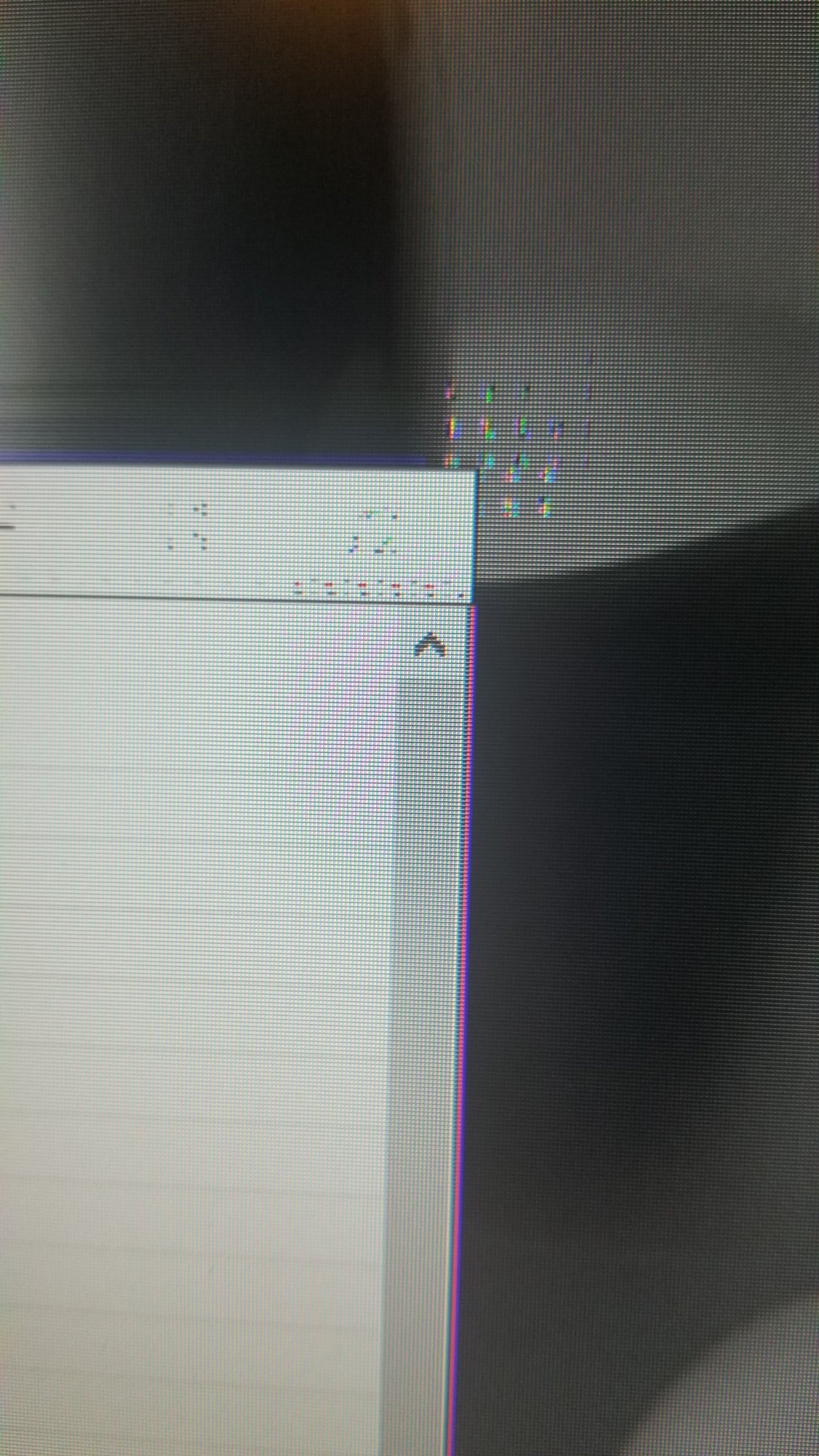
Since the motherboard swap if I leave the machine on but idling when i come back after a few hours i have graphical glitches...looks like the old Atari 2600 loading screens if that makes sense. No heat issues though....
Happens on the amazon music prime music window and printer window...
Also some times when I open a tab....
Any thoughts? Beside the obvious F#$%k Dell... -
Sounds like the dreaded space invaders:
https://amp.reddit.com/r/pcmasterra..._seen_space_invader_artifacts_before_friends/
Had these with my faulty m15 mobo, accompanied by frequent blue screens Book the muppets back in.
Papusan likes this. -
Yup that's it. here's a small sample. It gets much worse.
Theres no hope then except the hell of Dell tech support again? Do I need to take pictures for them?Attached Files:
Last edited: Jul 12, 2020 -
-
My best guess is that the RTX (or VRAM) is going, since this is supposed to be a common symptom. The theory would make particular sense if Dell replaced the DGFF card recently or some heavy overclocking was taking place.
-
-
I think he reused the thermal pads..
Its the latest. 451.67Last edited by a moderator: Jul 13, 2020Rei Fukai likes this. -
Doesn't mean they are worn out. Not proper fitted in place can be enough to give less heat transfer over to the heatsink. Or they are so compressed that they can't do the job properly.
Uninstall and try latest Nvidia driver from Dell. Use DDU.
In"Apps and Features" uninstall NVCPL (or use REVO under win10 APPS/UWP option) then go to "Programs & Features" and uninstall first PhysX then Graphics without rebooting.
Next go into device manager uninstall nV HDAUDIO "incl. driver software. Finally, reboot in safe mode and run DDU and "Clean and Shutdown". Startup your machine and install new drivers. -
Oddly enough I have not seen it in games....just when i leave it and come back in a hour or more.
So...what size thermal pads do I need for this? -
I don't have the machine. But read the whole thread
Thermal Pad Guide for Alienware Area-51m (9900K + RTX2080) -
Someone posted about this on Reddit a few days ago and they were also baffled by it.
-
Trying this now. Looks like last Dell GTX driver was may...Rei Fukai likes this.
-
Sounds like it's only happening while under 2D clocks.RMLJD likes this.
-
Thank you for this. Never used DDU before. Good tool!
Now we wait to see if it comes back. This could be from the new drivers...I did up date them from the geforce experience app within the last few days....totally forgot. -
I started getting this with my 2060 after updating to the 451.xx and it continued after upgrading to 451.67. Hoping you find it goes away after you installed Dell's latest driver. Pretty sure it will go away, unless Win 2004 also has something to do with it. I usually stay a version back w/ nvidia drivers. Only reason I upgraded to the latest this time was to check out the HAGS and VFR in Windows 2004, which I ended up disabling anyway.Last edited: Jul 12, 2020RMLJD likes this.
-
Way too early. But no artifacts yet...
Played and hour of games to get temps up.
Still no artifacts. Im cautiously optimistic.
Thank you everyone..I was losing it over another tech vist.Last edited: Jul 13, 2020Rei Fukai, Fire Tiger, etern4l and 2 others like this. -
Oddly enough, most BSODs and artefacts would occur in desktop for me too. For this to be a driver issue is extremely unlikely IMHO. Believe me, I wasted a lot of time following various reinstall tips ranging from drivers to whole system. A few hours of gaming is encouraging, but not a proof. A pad fit check/repaste is worth a shot, paying special attention to the GPU area. Is VRAM padded too?RMLJD likes this.
-
Not that you'd want to do it forever, but did you try setting the global setting in nvcp to maximum performance? It sounds like your card was having trouble in low power states/2d rendering mode.
-
Lucky you - don't look a gift-horse in the mouth
Certainly not benching, but I have had zero issues with in any FPS multi-player gaming. I mean, if you're going that route as a purist, you just turn all the settings down, play 1080p downscaled, and yeah, I can see that... not that hardcore
I think a truly good player would succeed nearly the same with it on or off to be frank except in corner-cases.Last edited by a moderator: Jul 13, 2020 -
I don't play much competitive these days, but I always keep my FPS titles tuned for constant 142fps at 144Hz. Perhaps it's just a habit at this point, but with G-Sync it just feels off for me, as the panel is already at ~9ms at 144Hz, so having high frames and removing as much latency with pre-rendered frames=1, is a must for when it comes to consistency.
-
What do you mean by "you had zero issues in multiplier FPS"? The only way that makes sense is if you are an amazing, elite player. Everyone else has issues with their game they are trying to overcome through practice (OK, excluding cheaters and griefers).
Anyway, the question is not whether you happened to perceive issues, but whether Gsync is more laggy than no gsync/vsync at high FPS, say 200+. Have you performed this exact comparison? If so, what games in? If in doubt, go ahead and grab CSGO and check the two video configurations out. -
Try capping at 2x your monitor refresh rate, see if you can feel the difference.
-
Should have said "increased 20%".....
Middle age suxs. .Docsteel likes this. -
I just mean I have tried it on and off, and I literally don't feel much difference. FWIW, I do not play at 200+, but again, I am in no doubt for some people it could be an issue. I just think to simply write it off entirely for everyone is a bit much. Look, i really am not down for a religious discussion of Gsync; if it hampers your game play by all means, don't use it. OTOH, for the "casual enthusiast" I think most will appreciate it more than just having to turn off all the eye candy to maintain frame rates in a certain range. I still say for most players, they will never know the difference on the question of input lag. Hell, most cannot get any real appreciable gain in real gaming performance (ie stats for their play) going above 120 hz refresh.... much less 240 hz. A good player, truly good, is going to do well regardless unless you go to extremes. I've seen people do incredible things with just 60 FPS.... against players with much better gear but less raw skill.
I think we need to make sure we understand I am distinguishing between the say 30% who would be fast enough and serious enough to see and feel a difference, and the bulk of more casual players who would never notice it and for which Gsync holds true value for more modest hardware or better eye candy. -
When I initially saw the videos about GSYNC, I was very enthusiastic about it but to be honest, I don't notice one bit of a difference with GSYNC on or off personally.etern4l likes this.
-
OK, I'm going to go out on a limb here and guess you don't really play games such as CSGO, Quakes, or Overwatch, to a significant extent. Therefore you don't care. The fact that you don't notice any difference between the two settings suggests you probably wouldn't enjoy the experience of playing such games anyway. That's fine, of course, but there is a difference between a good FPS player saying it doesn't matter, and a player who doesn't really specialise in the particular genre claiming so.
Part of the reason truly good players are so good is that they put in insane amount of time into the game, and thus they practice everything to perfection, with the routine stuff like aiming becoming automatic. Everything has to be of top consistent quality. Things like small sensitivity change can take weeks of readjustment. So those guys would def not be happy about the extra input lag! Would they manage on bad settings? Sure, but their aim would be off etc. (vs near perfection) and they wouldn't want to play that way for any length of time. Nobody serious would play on a 60Hz panel these days, when they can get a 144Hz 1ms gaming monitor for $150-200.
Again, there is some value in gsync for very casual gamers, but a lot of people (30% of gamers is a lot) would be better off with perhaps a higher refresh rate non-gsync option if they actually plan on using the laptop panel for low-latency gaming. Another point though, one I've made before, is that all that discussion about laptop panels for hardcore gaming is a bit pointless, because they are too small for any competitive gameplay. I would consider a 22" external monitor a minimum for gaming, and a laptop display would serve me best with top colour accuracy and low power consumption (which high refresh rates presumably compromise).Last edited: Jul 13, 2020jc_denton and Spartan@HIDevolution like this. -
I literally play Overwatch anywhere from 2-4 hours a day almost every day depending on what day it is. Have since Moira was released. FWIW, I run Gsynch on a laptop (obviously Area 51M R1) with Gsync and on a Desktop (Aurora R7, AW3418DW). I have tried all manner of combinations of settings, and my point is you can use Gsync which if your frames stay within a deviation of 10% and also tweak the Nvidia settings, its fine. Most players will never sense this vast difference with tweaking out for lowest input lag, and just "getting by" with Gsync. I am sorry, but I believe fundamentally this is true. This is NOT true for the most devoted CS:GO players, or any competitive FPS, and that is my point.
I don't doubt the technicals in the least of what you say, I simply don't believe for the majority of players, they will mind Gsync and its a decent option for them when they don't desire to kill the settings to get a stable 240 fps.
I am not saying most enthusiast-casual players play on 60hz, my point was there are people who DO still use those and are even making it to GM levels of play believe it or not at least in OW. My point is beyond even 120 hz most players aren't going to know the difference, much less get very ticky about input lag. I think our perception of the playerbase is very different. Again, I don't believe most players know or sense the differences, thus Gsync for them is a very useful solution.
Gear helps, but its just no substitute for skill.Last edited: Jul 13, 2020 -
Single player ...Check Eye Candy...Check.... Competitive.... Nope! LOL Must be why I prefer Gstink Old grandfather plays alone and has bad eyes, I need all the tricks and breaks I can get lol
jc_denton, RMLJD, Fire Tiger and 1 other person like this.
-
I am just not that demagogic about points like this, but I will take "Gstink" over the old days of highly variable frame rate any day. If I was going to ever hit GM and thought I might go to Top 500, you can be sure I would tweak _everything_. But for 90% of the competitive playerbase in most games, they will not see any distinct difference with Gsynch on and tweaked a bit in Nvidia to just running flat out no eye candy, low res settings. They just aren't that good and sensitive to know the difference, and a sudden drop in frames is far worse for their level of play than a 3ms difference in input lag.
There are players on console playing on televisions with terribly input lag who migrate to PC and still dominate through the same level because its about their innate skill to start. Getting dicey about "Gsync" vs. none doesn't even factor in at that point, and they aren't worrying what minor bit of input lag they get, they just automatically adapt. -
This is a pointless statement sorry, nobody is claiming that gear is a substitute for skill, however the following is true: better gear/settings can help people perform at a higher level, and top gear helps the most skilled/gifted people fully realise their gaming potential. To see this, imagine Overwatch was played at 1 frame a minute. This would be a great leveller indeed, literally everyone could play and having a higher reaction time would be useless. As we increase the frequency, most people would benefit but a few weakest ones would see little difference or no longer be able to play the game. By induction, as we get closer to 300 Hz the top part of the population continues to benefit, while others feel no difference. If there was no rank-based matchmaking some people would no longer be able to play the game. Of course, returns are diminishing, but given the consistency of advice from high-level players to set the game to high FPS with Gsync/Vsync off, the argument still holds.Spartan@HIDevolution likes this.
-
That's fine. Thankfully you don't go around telling people Gsync is the best invention for everyone since sliced bread.
Lopt, Spartan@HIDevolution and jc_denton like this.
-
Its a fact, its not "pointless".
As I said, I think we are focusing on two different groups of players with different needs. I am NOT disputing that for high level players they are better off without it, I am contending for MOST players its truly a moot point because they will never be good enough to really know the full difference and Gsync for 3/4 of the playerbase on average hardware gives enough consistency its good enough. I feel like you are most interested in putting your position first in this rather than seeing that for many its still a viable solution with benefits. Of course high level players will have a bible of settings they go to, they are minimalist, that's easy. We are not talking about them, nor is it necessary for everyone to follow exactly what they say in all situations.
Anyhow, I get enough of these kinds of endless debates in OW itself, I don't come here for it
Darkhan likes this. -
I feel we are on completely different wavelengths here. Game specifics could be at play as well. CSGO is the most punishing FPS I am aware of, hence perhaps the extra sensitivity.Spartan@HIDevolution likes this.
-
Good news! I have the LT on since 8:00. Played vids....music.....
NO GRAPHICAL GLITCHES!!Papusan, MogRules, Fire Tiger and 2 others like this. -
-
I think its laptop.Spartan@HIDevolution, etern4l and jc_denton like this.
-
Thanks. Temped to edit the original question beyond recognition
Spartan@HIDevolution and Fire Tiger like this.
-
The visual artifact issue is not reproduced running Linux w/ nvidia driver version 440.100.Fire Tiger likes this.
*OFFICIAL* Alienware Area-51M R1 Owner's Lounge
Discussion in '2015+ Alienware 13 / 15 / 17' started by ssj92, Jan 8, 2019.