Problems? See this thread at archive.org.
Hello Everyone.
I wanted to get into playing Metro Exodus but I cant play it with RTX on! It crashes after about a minute into it. I knew Metro Exodus had issues when it came out but after a year I thought it would have been straightened out. I am using DX12 but is anybody else still having issues with Metro Exodus?!
-
@Spartan@HIDevolution my bios updated from 1.5.0 to 1.7.3 through a windows update!! Now I have that cancerous gpu throttle, why throttle the gpu at 75c is beyond me. The lag I’m getting right now in games is insane. How do I go about stopping that from happening again? I’ve downgraded the bios following @ssj92 tutorial again and all is good, I’m just worried it’ll update again without me knowing lol
raz8020, Papusan, jc_denton and 1 other person like this. -
Your issue is the BIOS and VBIOS
1. Any BIOS after 1.5.0 introduces throttling the moment the GPU reaches 75C which is absurd since that is a very low threshold, run any game for a couple of minutes and you'll be way past 75C.
2. Dell also released a new VBIOS that reduces the GPU max wattage from 200W to 180W which also contributes to the low benchmarks you are experiencing.
I downgraded my BIOS to 1.5.0 (by force using the BIOS Recovery Method) and also downgraded my VBIOS back to the 200W version. (although this is not as important or critical as downgrading the BIOS itself in terms of performance loss)
See:
Force downgrade Alienware Area-51m Bios (or any Alienware) to locked lower versions
PS: The USB Flash Disk must be formatted as FAT not FAT32
Area-51m BIOS / VBIOS Collection (mirrors)
Here is what I recommend:
a) Uninstall Alienware Update AKA Dell Update and Dell SupportAssist otherwise they will keep nagging you to update your BIOS.
b) Flash the BIOS using the Recovery USB which you created using the guide I showed you earlier.
c) Immediately head into BIOS and make sure you disable Firmware Capsule Updates in the Security tab otherwise Windows will immediately upgrade your BIOS!
d) Once you're back in Windows, reflash the same 1.5.0 BIOS again but in Windows, I had to do that last time as I was getting weird behavior (I can't remember what exactly but once you have flashed 1.5.0 in recovery mode, you will be able to flash 1.5.0 again through Windows since you're not technically downgrading anymore you are just reinstalling the same BIOS) so do that to ensure the BIOS is 100% flashed correctly.
e) The moment the BIOS is flashed, go back into BIOS and load setup defaults then save and exit (from the last tab in the BIOS)
f) Now enter BIOS again, set your battery from Adaptive to Custom and tell it to start charge at 50% and stop charge at 90%. This will ensure the battery is never over charged and will thus prolong its life.
g) In the 2nd tab in the BIOS, I recommend turning OFF Power Share as that will drain your battery if your laptop had a USB device that needs power overnight (such as an external HDD or Game Pad)
h) While you're in the BIOS, ensure that Firmware Capsule updates are OFF -
Thank you bro, games are as smooth as butter now! Never disabled firmware capsule updates last time which is why it must have updated the bios on the windows update.
-
anytime mateyjc_denton, Rei Fukai, DaMafiaGamer and 2 others like this.
-
Absolutely!, joking aside I have nothing but respect for people that strive to eek out every last bit of performance and power from whatever system they use, ( I used to be one of those 35 years ago up until I went Mac for about a decade ) and I can still remember how I felt about it, I am pretty sure a few thought I had my priorities screwed up, especially back then it was not at ALL socially acceptable to be an adult "Gamer" in everyday mainstream America, I'm sure others here up there in years can remember - people either thought you were a lazy lay about or thought it was interesting but odd.
I honestly never thought I would see such wide spread social acceptance of adult computer gaming.
But I remember there is nothing quite like that feeling of being in the zone with your reflexes at their peak, makes you feel immortal.
Then you get older lol -
Ah...unreal tournament. Back then I was "Sir Campsalot" but I was death on the bathroom, Living room and Garage maps...
Crimwoo, Lopt and Fire Tiger like this. -
Hi guys, I'm looking for some advice.......
I currently have the i7-9700K / RTX-2070 combination...
I recently purchased a RTX-2080 R2 (w/Heatsink).... I figure the RTX-2080 GPU is still a very strong contender as it now sits between a RTX-2070 Super and a RTX-2080 Super..
I also purchased a higher 330watt adapter..
Should I ditch the i7-9700K in favor of an i9-9900K since I'm going to be right there at the time of the GPU swap..
I am also going to re-paste everything using Thermal Grzzly Kryonaut... Should I be fine with adding the i9-9900K... I'm on the latest BIOS, so if it was throttling before I really didn't notice it.. I also like having GSYNC.. I really wasn't doing too much overclocking.. Am I asking for trouble swapping out the i7-9700K for a i9-9900K? I'm looking for the best overall performance between gaming / video editing..
*Will the i9-9900K / RTX-2080 combination run at normal temperatures if left alone at its "default" frequencies (no overclocking)?? -
mine does, but it depends on each machine I guess. Undervolt it, and your already repasting, so chances are good you should be OK.
If your leaving it stock then you have a much better chance at just being fine gaming vs throttling. I can game for hours and not have any issues.
If you activate full fans then it gets loud, but it keeps temps even lower, or at least it does in my case. It only drops another 3-4c on the GPU, and it's QUITE a bit noisier, so you will have to gauge the trade off on that one. I usually just leave it on balanced.
The 9900k isn't going to make a big difference in gaming at all, so if that's your goal I would just stick with the 9700k. The 9700k will also run cooler. I don't see any point in changing the CPU honestly, unless you need the hyper threading.Last edited: Jul 14, 2020Spartan@HIDevolution likes this. -
Hi.... Thanks for the feedback.. If you don't mind me asking, what BIOS are you using and are you on stock Thermal paste? I'm tempted to just do it as Microcenter has the i9-9900K on sale for $429.
 Last edited: Jul 14, 2020
 -
1.7.3 and the 180w vBIOS. Repasted with IC Diamond, undervolted to -.130 and stock speeds.Lopt likes this.
-
Nope. had a 9900K in my first Area-51m then had a 9700K in my 2nd one. No difference (in my usage case) which is using Adobe Premiere/Photoshop Elements 2020, Gaming, watching movies, general OS snapiness, etc. Don't waste your money.RMLJD, Docsteel, etern4l and 1 other person like this.
-
Yeah, the whole system will run hotter due the unified heatsink. End result can be as the mess below.
New one bites the dust.
Little Purple Men Appear On Windows Startup - 51m R1. How to fix?raz8020, Rei Fukai, jc_denton and 1 other person like this. -
Hi... Could you please let me know the version number of the 180w Video BIOS.. I looked around in the driver's section and could not find any reference to 180w in any of the descriptions.
-
are you running any overclocks on the GPU? if so turn them off and try to play the game to see if it continues to crash. that game is sensitive to overclocking. if you do a google search on it you will find quite a few results that will show people having issues with crashing while running too high of an overcock or even any overclocks at all with it. there are a couple other games that do the same thing for people. battlefield 5, Control, outer worlds, ect...
i had a few crashes while using the overclocks that i use with almost every other game. i had no crashes at stock clocks with everything on ultra and ray tracing options on high.RMLJD, Fire Tiger and DreDre like this. -
Thanks for the knowledge. Metro seems to work now with no OC on my RTX 2080 in my Area 51M. I didnt have any issues with overclocking with CONTROL or BF5 with RTX on. I am using the settings you suggested with Ray Tracing on HIGH. It makes the game look more realistic with lighting from RTX. Thats one of the reasons I got me an ALienware Area 51!!!Fire Tiger likes this.
-
Hi.... I just noticed your signature... WoW, you have the newer Area 51M R2.. Congrats! So how hot does the i9-10900K / RTX-2080 combo run? Have you been Over Clocking? What's the Firestrike score?
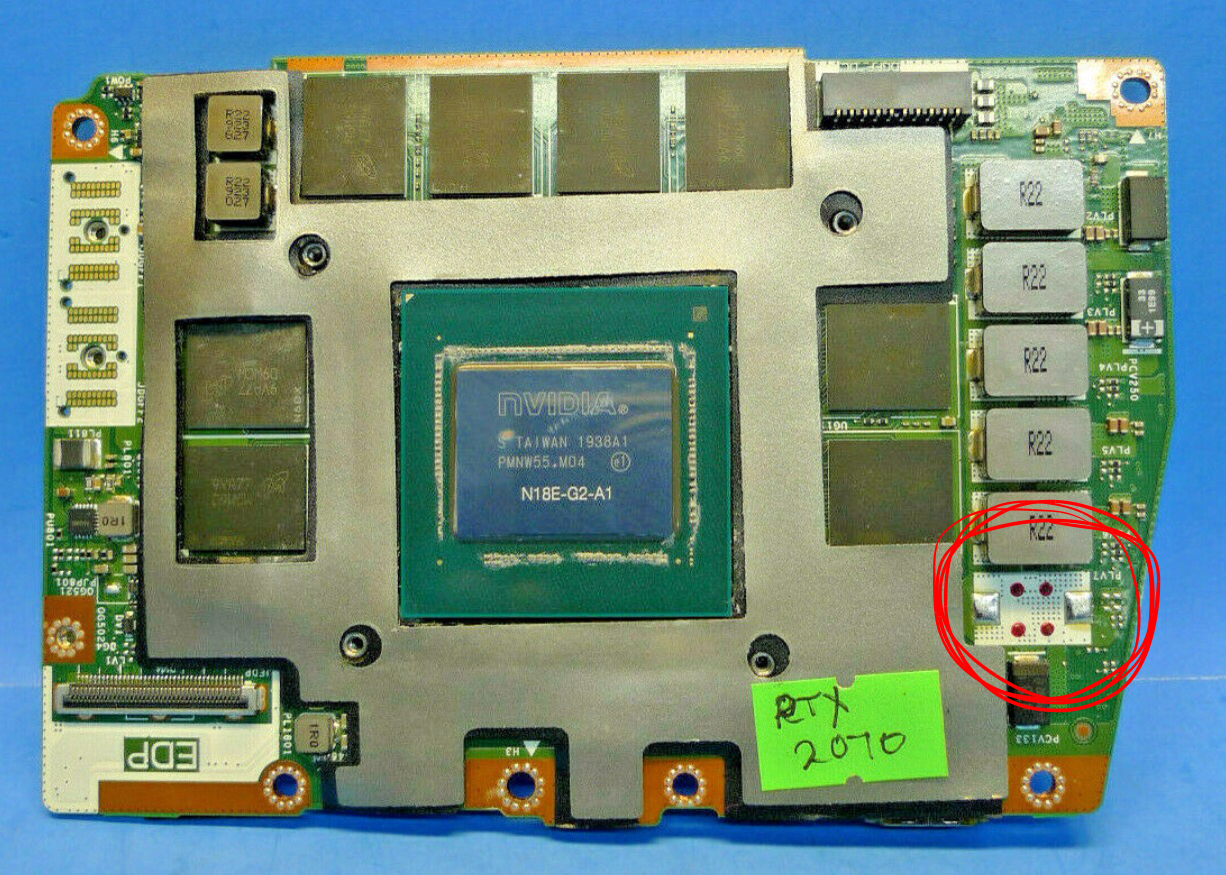
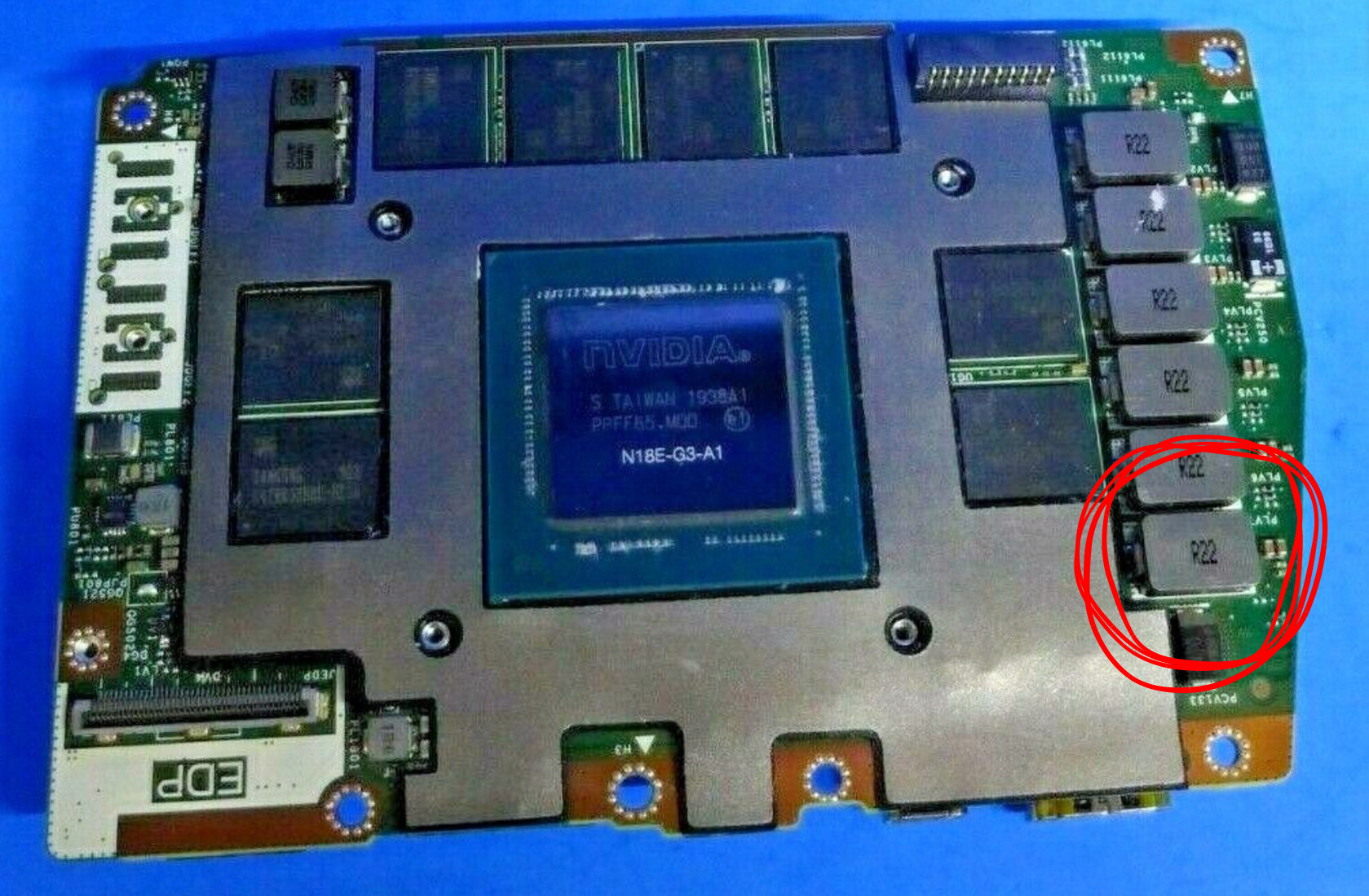
On another note..... I recently contacted a seller on eBay that was selling Area 51M RTX-2080 Cooling Fan / Heat Pipe units.. He wrote back to me that my RTX-2070 uses the same Cooling Fan / Heat Pipe setup except for an extra thermal pad that had to be added due to the RTX-2080 having an extra chip... I did confirm this with side by photos of a RTX-2070 / RTX-2080 and hopefully this post will help someone in the same upgrade situation to be aware of having to add the extra thermal pad to the heatsink.
Now here is where it gets better.. He further wrote... Wait a few weeks and there will be a much better Cooling Fan / Heat Pipe solution available.. Now this is pure speculation.. But afterwards I was thinking perhaps he meant the Cooling Fan / Heat Pipe from the newer Area 51M R2 will be available and will fit the older Area 51M R1? Could this even be possible?
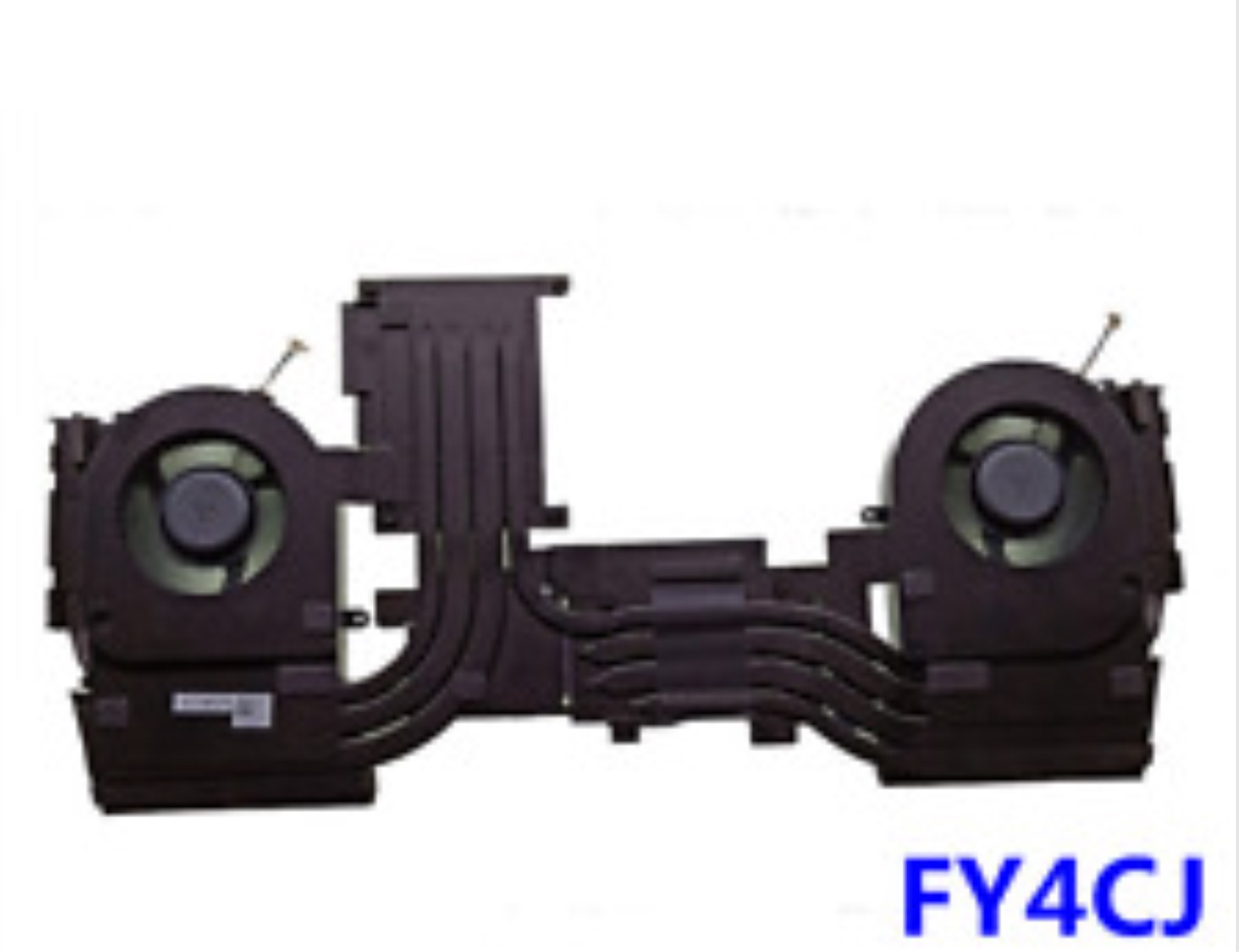
*The part number for the Area 51M R1's Cooling Fan / Heat Pipe setup with a RTX-2070 / RTX-2080 is FY4CJ.. Perhaps once someone does a tear down video of an Area 51M R2 this number can be compared with its Cooling Fan / Heat Pipe Cooling solution.Attached Files:
Last edited: Jul 15, 2020 -
-
The laptop you see in my signature is the one I ordered it still needs one month till I receive it. I currently have the Area-51m R1 with the 9700K/RTX 2080
-
I believe that the 180w is 1.0.0.5 ...or somethig like that.
-
RTX2080_180W_VBIOS_v1.0.0.5
Make sure to right click on the file you just downloaded, go to Properties, then hit Unblock from the bottom right as it may be blocked since it was downloaded from the internet, if you don't do this before you run the file, then it may not install correctly.
To prevent this automatic blocking of files in the future so you don't have to go unblocking every file you download to ensure it runs properly, follow the guide in this thread:
http://forum.notebookreview.com/threads/are-you-sure-you-want-to-run-this-file-yes-or-no.825668/Last edited: Jul 15, 2020 -
Just checked a retailer in my country (Romania) the r2 is available (in stock).
Its 4200€Fire Tiger likes this. -
Hi.... Thanks for the information... May I ask what your highest Firestrike / Time Spy scores are with the i7-9700K / RTX-2080 combination just so I have an idea what to expect from my upgrade.
-
Fire Strike (Driver 442.23-BIOS 1.3.2) OC 20 Core-150 Mem
Time Spy
DaMafiaGamer likes this. -
Thank you! -
Hello Spartan! Best wishes for your new assignment! Your temperatures are a little high, is it hot there in Dubai?
-
50C/122 F and my 9700K on my previous R1 is not a good bin so these temps with a -50mV undervolt and a repaste are as good as it gets. (No thermal pads or cooling pad or anything) Ambient Room Temp = 25C
-
These heat numbers make me a bit calmer over mine. Once again you are helping me my friend!Spartan@HIDevolution likes this.
-
Edit...temp settled down. Weird...
This laptop is so quirky im naming it"the ex wife".
So my new hyper x memory came...CL 14. 2x16 vs the 2x8 I had.
Now...here is something odd. As soon as I booted up after install the fans went on high. They stopped now. But Im noticing my temps are up about 5 degrees now at rest..
Can Ram cause that?Last edited: Jul 15, 2020Lopt and Fire Tiger like this. -
No
Probably just some system app running you need to keep your computer idle for 10 mins before you judge.
PS: Do you have any Logitech Device on your system? Also, Tobii .EyeX.Engine can cause very high CPU usage, you must add it to your Antivirus exclusions. For me even that didn't work I had to uninstall it and then install the latest one from the Area-51m R2's Drivers pageRMLJD likes this. -
So while playing in the bios I noticed a setting "select chassis color" what the heck does that do?
My theory is it unlocks 2666 hz memeory on white units to make up for the discoloration..Lopt, Virale and Fire Tiger like this. -
I saw that once when I reset my BIOS to defaults by holding the power off button for 30 seconds while the system was off. Save and exit, enter BIOS again and it's gone.jc_denton likes this.
-
Good call! took a out 10 min. For the temp to settle down.Fire Tiger and Spartan@HIDevolution like this.
-
I just grabbed a 2080 as well. Who is doing the GPU Swap for you?Fire Tiger likes this.
-
What's the consensus on the keyboard quality in the R2, and what is the feeling about the cooling solution?
Also what panel is in use for the 144 hz Gsync option? -
Probably better idea to post this in the R2 owner's lounge.Spartan@HIDevolution likes this.
-
You should be able to do this yourself. Not sure if you've repasted, but your about 3 quarters of the way there if you have. Likely take about 1-2 hours for a beginner like myself.RMLJD, Spartan@HIDevolution, Sabs47 and 1 other person like this.
-
Honestly taking the thing apart isn't that hard. I've done the basic stuff like adding a new SSD, adding more ram and changing the wifi card to 1650. Might as will give it the full effortFire Tiger likes this.
-
Hi..... I am, it's not that difficult.. There are also a lot of tear down videos on YouTube you can follow.. Did you see my post on the last page? There's an extra chip in the 2080 that you need to place a thermal pad on.. You also need to order a 330 watt power supply to go along with you 180 watt power supply.. This is very important.. If you had a 2070 your heat sink Cooling fans are good to go... If you had a 2060 you need to purchase the 2070/2080 Heat sink fan unit.. There on eBay.
Attached Files:
c69k likes this. -
-
I ordered some Thermal Grizzly pads to replace all the pads on the 2080 and artic MX-4 paste for repasting. Also have a 330 watt power supply coming in for it tomorrow. Good looking out!Fire Tiger likes this.
-
My best Fire Srtike score so far has been 19332 and 8429 for Time Spy... My 2070 and i7-9700K are running pretty good.. I'm hitting close to 5.1ghz.. I can't wait to see what the 2080 will bring to the table..
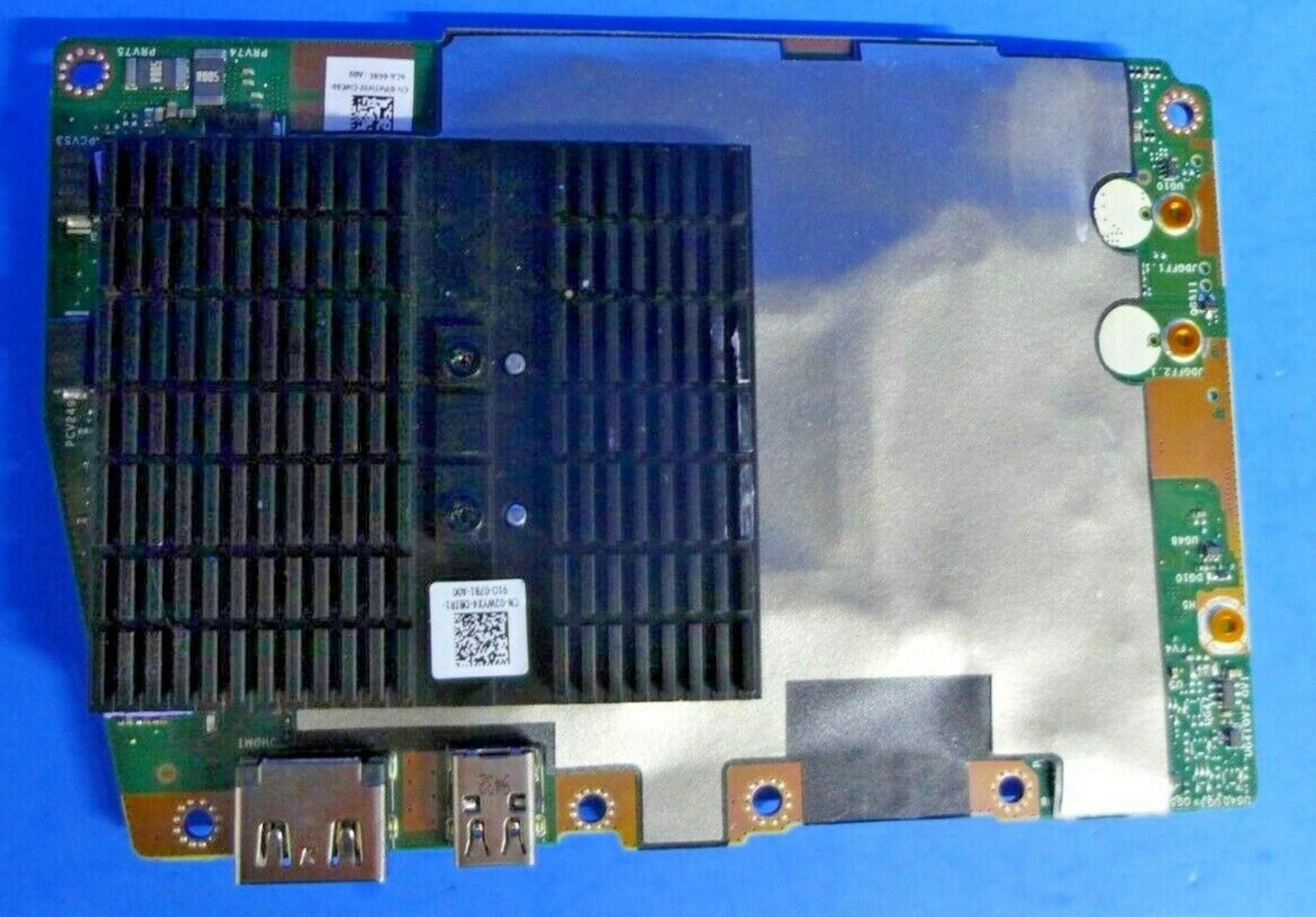
*Make sure your 2080 has the heatsink attached to the bottom as pictured in the photo below.. There are two revisions to the 2080 for the Area 51M R1... The 2080 with the heatsink is known as the 2080 R2 (2nd revision) and has nothing to do with the Area 51M R2.
Here's the link to my scores.
https://www.3dmark.com/fs/22482657 Fire Strike; 19332
https://www.3dmark.com/spy/12068961. Time Spy; 8429Attached Files:
Last edited: Jul 15, 2020 -
-
-
Guys which thermal pads do you recommend between Gelid GP extreme and Gelid GP ultimate?
Fire Tiger likes this. -
-
Since the OEM R2 heatsink is available, I don’t mind drilling some holes on area51m R1 mobo , anyone tried it ?
-
-
No. A complex conversion with a complete replacement of the copper base is needed.
Details here (in Chinese)Last edited: Jul 16, 2020devilhunter likes this. -
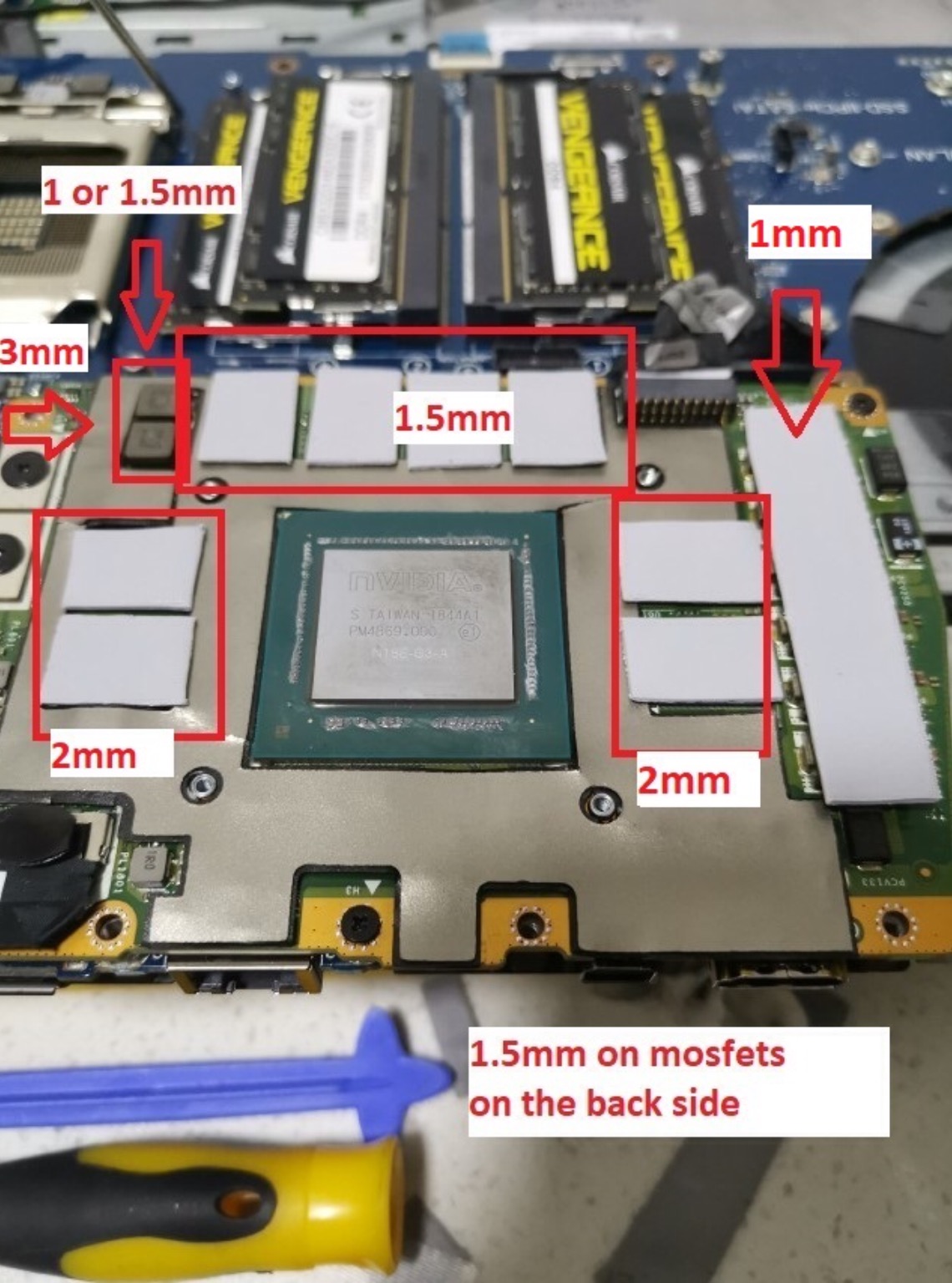
I 2nd the Gelid GP extreme... And if your re-doing the thermal pads on the GPU (Like the 2080 pictured below).. You will need 1mm, 1.5mm, and 3mm sizes to do it the right way.
Attached Files:
Fire Tiger and etern4l like this. -
-
My hunch is that it’s probably to select whether the unit is white or black and have it show up that way in AWCC etc. The graphic on mine shows it white because my chassis is lunar light.
That’s my only idea of what that could be.Last edited: Jul 16, 2020RMLJD and Fire Tiger like this. -
I have an area-51m with the 2080 rtx. It came with a 180w and a 330w power supply. Dell doesn't sell the 330w power supply separately as a replacement/additional unit, so I guess two 240w power supplies would be close enough? Going with this thought, I have 2 extra 240 power supplies from my 2012 m17x R4. Any reason two of these hooked up to my new area-51m wouldn't work fine?
Attached Files:
-
-
Thanks a lot, and very informative. I think the same guy is modding this R2 heatsink for R1 and hes planning to release it by the end of this week. He sent me a message yesterday at ebay.Rei Fukai likes this.
*OFFICIAL* Alienware Area-51M R1 Owner's Lounge
Discussion in '2015+ Alienware 13 / 15 / 17' started by ssj92, Jan 8, 2019.