Problems? See this thread at archive.org.
There is another App ? I only know about AWCC
-
-
Oh wow this says it supports i9-9900KS ! but on the Aurora9 ? is it cool to run this on my Area51m ?
-
I could be wrong, but I thought this is what AWCC installs when it gives the message about "Additional components required". I have it downloaded though, I'll give it a shot.Docsteel and Fire Tiger like this.
-
Ok installed it / hopefully correctly, it acted as an uninstaller first because it detected controls already installed so I did that then reinstalled it …. so far no OC controls in AWCC for the CPU still, maybe it needs BIOS 1.8.1 ?
I guess I will update bios and see.... -
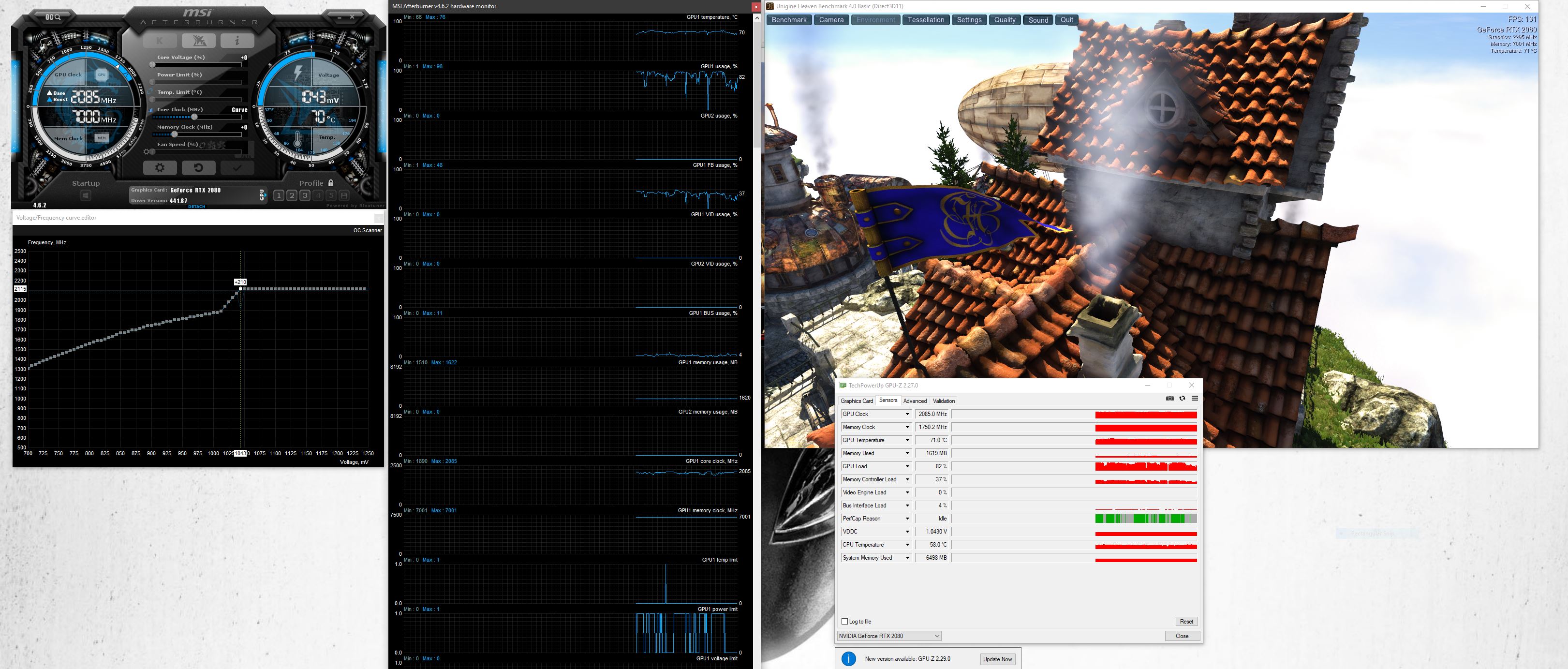
200W vBIOS, 1.8.1, GPU OC'd to 1995MHz @ 1000mv, 9900k running stock clocks with -125mV. Just ran a couple Time Spy and Time Spy Extreme benchmarks, and the GPU won't go over 76 degrees.Fire Tiger and Docsteel like this.
-
Not throttling then hitting 76 I take it?
-
Requires AWCC, it's part of it. I don't believe there is a separate OC utility. It's the same one I ran earlier with AWCC installed.
Attached Files:
-
-
Just making sure you are testing with latest OC App plugin which was updated on Dec. 6th right when BIOS 1.8.1 was released...Last edited: Jan 18, 2020Papusan likes this.
-
I'm not sure if you have the Unigine Heaven benchmark, run that on the Extreme setting you should see the throttling... I assume that's what you are trying to replicate?
-
Yep, that was the one I tested on earlier.
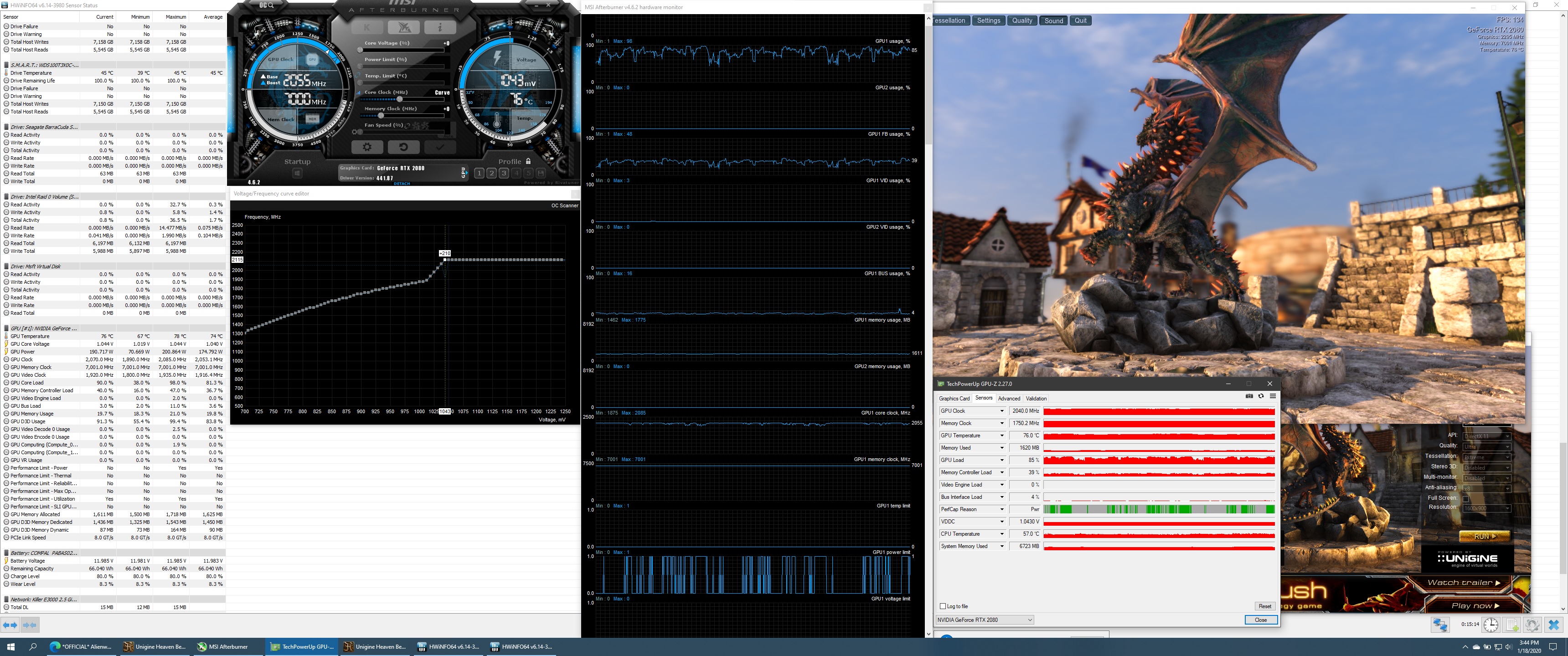
I do notice I'm getting significantly more power throttling than I did on 1.5.0, but no thermal throttling best I can tell. But I still can't get the thing to go over 76 degrees. Am I doing something wrong here? Balanced fan profile too.Attached Files:
-
-
It's been running for over 15 minutes now, and I've peaked at 78 degrees. Not saying it isn't an issue, but if this is as bad as it's gonna get, I can live with this.
Still interested to see if it does throttle with AWCC set to 87. Gonna run some CPU benchmarks on the side and see if I can't push it over 79.Attached Files:
Fire Tiger likes this. -
-
Ok so rolled back to BIOS 1.8.1 and 180w VBIOS , confirmed I'm running latest versions of AWCC and AWOC, RAM is measured at 2400, and no way to change it BIOS is locked down as always no access to CPU or RAM timings. AWCC still does not allow any control of the i9-9900KS even using the Version in just supplied by @Prema unfortunately.
I have controls for GPU in AWCC but of course using them results in strange behavior, one game in particular Control which works fine with Afterburner set at +100 core GPU clock CTD's with missing device errors when OC'ing with AWCC.
If I set GPU Core clock and memory to "0" and Temp limit to 78c in AWCC Control runs fine again and GPU temps stay at 74c ( this is on Balanced thermal and Performance Power in AWCC )
GPU MHz top out in the high 1800's vs high 1900's with Afterburner but of course temps are better and games seem to run fine, have not done any marathons with it setup this way but maybe I will leave it for a day or so and see.
So Basically at stock if your happy with a Ford Taurus engine in a Porsche body … its ok I guess.
This is the FIRST Alienware I have ever bought, and honestly it will probably be the last, it's too bad really people like me that are willing to spend the kind of money I spent on this are not around every corner I would think, and it could have been great with a little more effort on Alienwares part.
But in the end I probably would be happier with something like that Evoc Bob reviewed as ugly as it looks like its a lot more fun to tinker with, this thing is just finicky they way they have gimped it no tinkerability at all, you want to just get it working best you can and then not touch it again, and even then your grumpy about it.
No no more AlienWares for me.Last edited: Jan 18, 2020GTVEVO, raybies, Nicolas Paiva and 4 others like this. -
I agree with this 100%. All if my jokes aside the EVOC seems to have little real weakness besides aesthetics...and I think looks are overblown for laptops like these any way.
Of course I had $500 plus in dell credit to spend (and a free graphics accelerater to future proof a bit more)and have the 2070 so I'm still satisfied with the 51M for what I paid out of pocket. But its not what was advertised for sure especially with the 2080 folks.
I have had s lot of luck with dell over the years...but I sure dont understand how this was!!/is being handled.
If I was purchasing just OOP...I would go a different way.Docsteel and Fire Tiger like this. -
So what exactly is the disappointment? If you're having issues with overclocking it, I'd really suggest you get the voltage curve figured out with MSI. I'm amazed at how much voltage is supplied to these cards. Running Heaven right now, leaving the settings stock, I'm boosting to high 1800s (1875, just dropped to 1830 now), at 1034+ mV, while rapidly gaining heat (It's likely to thermal throttle any minute)
Using the voltage curve, I can get the card running steady at 1935MHz at 900mV. Temperature peaked at 71, and might have hit 72 given some time, but it was fluctuating anywhere from 67 to 71 degrees. This is all on the balanced fan profile.
I'm going to guess that the thermal throttling at 79 degrees is a bug that needs to be properly explained and demonstrated to Dell for it to be fixed. GPU-Z was reporting the card of having a temperature limit 87 when I set it to that in AWCC, but it still throttled at 79 which makes me think it's the BIOS. Whether or not that's intended is a different story, but I'd like to think it's not.
Of course, you can always roll back to 1.5.0 if that worked better for you. While you can't do an official rollback, there are instructions on how to force it. Again, the inability to rollback is something I think might be a bug, as Umar had previously said on Twitter that it was done for users who didn't want the throttling.Docsteel and Fire Tiger like this. -
Yup ben there done that, lol I've been here a while, I only went back to stock today to determine if MY A51 would magically start running my RAM at 2666 as SOME people seem to have achieved, it doesn't … so when I get tired of running gimped in the high 1800's ( or I experience some hard throttle ) I will roll back to 1.5.0 again which I have been running for a while now, I *might* play around with the 200w VBIOS again this time trying your UnderVolting the GPU idea, but my gut tells me it's 6 of one half dozen of the other, I'm not convinced that's really any better then the 1995mhz at 180W with Afterburner at +100 core clock I have been running, but I may try it to see.
My uneducated suspicion about the RAM issue is that Dell/Alienware may be "cherry picking" systems which pass the test during bulk system builds for online sales, my gut tells me they run an unrestricted BIOS during build and test, and the ones that pass are marked for higher RAM speed dialed in then the locked down BIOS is installed prior to sale, you can have the pricier higher RAM config for a price but we sure won't let you play around in there yourself.
I suspect they build laptops like they build CPU's and "BIN" the over performers to help recoup the cost of the failures. -
Do you have any hints, tips or guides I can follow to apply to my GPU what you have done to yours? I was on Far Cry 5 for about 10 mins tonight, with performance fans and Phobya Nanogrease on both GPU and CPU and I was hitting 79c and becoming thermally throttled. If you can help me set a curve/undervol then I might be able to reduce some of this heat.
-
Have you made curves in Afterburner before? If not take a quick look at the Undervolting guide that @Biker Gremling made it has pix! Basically CTRL F with Afterburner in focus / go along the bottom graph to 900v then go straight up from there to the pixel in your "existing" curve click it then you drag it and or use up dn arrow to position it at 1935MHz line as read on the left / then do the same for all the rest of the blocks to the RIGHT of that 900v where you started creating a FLAT LINE all the way to 1100v you can stop there that's as high as the card can go. then back in main afterburner screen click the big checkmark to APPLY your new curve / you should now see CURVE where it would normally show the CORE voltage number to the right of the slider.
Test away with your favorite benchmarks and games / if you have to high utilization and or temps back it off / low temps and underutilization you can bump up little bit and retest.
At least that's how I understand it , fell free to correct me if I am getting it wrong.Last edited: Jan 18, 2020Biker Gremling and Fire Tiger like this. -
I only have two sticks and tried this with 1.8.1 before going back to 1.5.0
There were no options and i tried two sets of RAM sticks. -
hmmm... possible.
-
Now I just did some more tests and I was unable to replicate your 1935mhz at 900v using a curve here / mine would not even complete a Superposition bench with that curve CTD /
I am completely willing to admit I may be doing something wrong with my curve on this machine / but I did my own curve on my previous laptop a Predator Helios 300 and that worked great as far as I could tell.
I reset everything and re enabled AWCC and set it up for +60 OC on the GPU 0 for Memory 78c for temp / Superposition does complete with good numbers max MHz was 1965 - ave 1365 and temps stayed at 74c / I did not observe any throttle or halting or glitch's, / more importantly to me anyway Control also runs with High settings which is max with RTX everything enabled which some machines are reporting having trouble with RTX debris / so I *might* have a new good setting here / I think I will sit on it for a while and see, This is BIOS 1.8.1 180w VBIOS.
Same results as me …. I really think Dell is cherry picking only certain build that turn out to be Capable of running higher speeds their mainboard supplier may be giving them a wide range of tolerances, but they have to by them all to get a certain price point.Last edited by a moderator: Jan 19, 2020Fire Tiger likes this. -
So Evoc is the most poweful laptop available right now? Who makes it Clevo? I didn't see that before in reviews only gt76 and 51m.
-
A curve that DOES work sort of that I tried last week on my Area51 was to start at 968v and 1900 - 1950 MHz …. the biggest reason I am NOT using a curve on this laptop is I got much higher temps using theoretically the same offset +130 in a handmade curve then I did just setting the core clock to +130 … the FAN response was much worse using a curve at least here, but every curve I tried ( and I tried quite a few going up from 968v in 10 - 20 v increments ) got me less MHz and less stability then simply upping the core clock, there *may* be a tolerance difference between all our GPU's as well / I am inclined to think Dell / Alienware cuts corners everywhere they can in manufacture and parts sourcing / just to be able to afford all that advertising and HUGE support apparatus they have ( not that they get their moneys worth from that support investment IMO )
I am certain that @gr33n2 has a profile that is working fine for him, just because I can not replicate it does not mean anything, each machine can have very different response to changes in voltage and timings due to paste / pads / what has been installed and uninstalled, what's left in registry and just manufacturing tolerances ( which I am coming to believe are none to tight on Dell / Alienware products ).
It certainly got my vote in Bob's review, I don't out and out HATE the Area51m I just wish they had spent the time and money to make it live up to all the hype.Last edited by a moderator: Jan 19, 2020Fire Tiger and lestat2k7 like this. -
I find the values I apply aren't always the values that stick either. For example, I just can NOT get it to work at 2000MHz. If I set to 2000, it'll drop to 1995. If I set to 2001, it bumps up to 2005. Make sure that the card is running at what you expect it to - sometimes when it jumps up a few MHz, it's enough to cause it to fail. I've also had some clocks that won't pass, say, Time Spy, but excel in Fire Strike, and have had zero issues in usage when gaming as well, so don't worry too much about what benchmarks say as long its running stable in whatever you're playing.
You might want to try dropping to exactly 1900MHz @ 900mV, and see if that works for you. I doubt the extra 35MHz will make a noticeable difference. I find the line between "works perfectly" and "utterly fails" is very fine.
First off, I'm not overclocking my CPU at all, but I do have a -125mV undervolt using throttle stop on stock clocks. It does get up to about 99 on a single core (looks like I have bad solder under the IHS, one core is always noticeably hotter than the rest). I have found that, when necessary, setting all cores to 47x (even single) significantly reduces heat by anywhere from 5-20 degrees. I'm not sure how often an given core was boosting to 5GHz, but 4.7 all cores gives me outstanding thermal headroom. All my testing done earlier was stock clocks with the undervolt though, did not downclock the CPU at all.
As far as the GPU goes, it really depends on demand in what you're playing. I have a few profiles saved in Afterburner, depending on how much demand the game has. I'd start first by finding what your GPU immediately boosts to, and and setting it at a lower voltage. I believe 1.043V is the max this GPU will draw (someone correct me if I'm wrong), but Afterburner shows that as being 1935MHz. So you can drop the curve down, and set a lower voltage, say 900 or 950mV, to 1935, then hit apply. Make sure as mentioned above that it actually sticks to that. There seem to be a few ranges where it'll either jump up a few MHz, or jump down a few MHz. Past that, it's trial and error.
Oh, and in regards to flattening out the curve past your voltage set point.... just hold shift and grab any part of the curve to drag the ENTIRE curve below the clock speed you want to target. Then, when you raise up your ideal voltage to your ideal clock speed, everything beyond that automatically becomes a flat line.
Current clocks I'm running are 1950MHz @ 900mV (which actually applies as 1965MHz) and 2025MHz @ 950mV (which applies as 2010MHz)
I give up. I broke this post some how. Let me know if something got lost.Fire Tiger and Biker Gremling like this. -
I also don't understand how it was able to keep the FPS even with a single adapter. How does that work? Either AW spend more time on where EVOC succeeds or EVOC spend some time in design because it looks very ugly but I know it's a powerhouse. Just that there is no reason to be only one
For me dream laptop would be power of EVOC, 1000 nits micro led 4K display (like in the new msi creator 17), design of AW, and ideally titan v, or rtx titan. Ignoring the last request this shouldnt be hard right? -
Sorry for the late response, bad weekend so far.
This was during normal gaming, benchmarks very rarely get my GPU up to the 'critical' temperature point. Generally speaking I only hit thermal limits (forced or otherwise) after prolonged gaming; I'm assuming as the heatsink assembly becomes saturated and the fans cant blow off enough of the heat fast enough. But I'm no engineer so that's just conjecture.
In any case my laptop was basically unusable until I rolled back. -
Control is very sensitive to overclocks. i was getting the same missing device errors randomly with a high GPU overclock too. a quick google search showed me it was a common problem with that game and not Alienware specific. i was still able to run a slight overclock with that game with no issues, but many people said to turn off your overclock completely with that game. interesting that you had different results from using averburner and AWCC though. it's obviously not a AWCC specific problem since people with other brand computers had the same device error problems with overclocks on message boards for the Control game.Last edited: Jan 19, 2020Lopt likes this.
-
Funny story I’ll share here. I couldn’t have been more excited to test a laptop like I was on the 51m. I got to it straight away and spent more time with it over the other two. Everything about it made sense until I started using it.
Some till me that mine was faulty but I see others with similar results. The wattage the CPU gets is ludicrous and so is the GPU temp limit.
Sure it can be tweaked and its bios flashed back but there comes a certain level of expectation when paying this much for a laptop and I don’t fell like it delivered. I’d still rock a 9700k 2070 model if it were me but that’s about the limit I could recommend unless you’re content with tuning, sacrificing Gsync and/or play titles that put less stress on the system.
It looks awesome! -
This is nothing new. Last year we saw the same happened with the XPS line.
http://forum.notebookreview.com/threads/xps-15-9570-owners-thread.817008/page-248#post-10890814
And I expect the RMA numbers wasn't high enough to deserve the same treatment for the thin... Dell let the Nvidia graphics run nice and friendly at 95C in the much thinner m17 models... https://www.reddit.com/r/Alienware/comments/castk2/overheating_alienware_m17_laptop/
Edit.
Read also my and TS author @unclewebb 's posts in ThrottleStop thread http://forum.notebookreview.com/threads/the-throttlestop-guide.531329/page-1089#post-10984434Last edited: Jan 19, 2020 -
So after reading all the stuff about Afterburner curves I went in and played around.
Have my 2080 running 1950MHz @ 900mV, so far stable for a few hours playing Destiny 2. Will do more exhaustive monitoring over the next week.
Also my CPU profiles have proven stable so far.Lopt, Docsteel and Fire Tiger like this. -
How were your temps?
-
This is pretty much the conclusion I read out of the sum of all the posts - if you want a decent looking laptop, good Gsync screen and good drive and memory upgrade-ability with good cooling the 2070+9700K you almost can't go wrong. There is some hope that a DGFF Ampere based card will appear with better thermals, so there is some possibility there. The lack of support for the 9900KS was a gut punch though I think that was unnecessary and might have helped some of the issues. There is always hope that Dell Engineering might come around on the question of the throttling and the BIOS, or even release a modified 1.5.0 level BIOS that does support the Gsync.... but I wouldn't hold my breath. If I have any other disappointment its that the AW GA cannot drive the internal monitor.... that would have helped take some of the sting out.
-
Pretty nominal. Highest I hit was 81C after playing all night and my core clock didn't dip below 1890.
Keep in mind I play with framerate capped at 143 on an ultra wide 1440p screen so my results will be a lot more demanding than the built in A51m screen.
Still better than before. It would go all the way to 87 before without throttling it via AWCC which I find to be extremely aggressive in its thermal and power limits. I can probably squeeze more out of this with a better application of nanogrease but I'm in no hurry to open this thing up again and scrape off the goop.
Picture attached of what my layer looked like before I reapplied the heatsink. Maybe someone can tell me if it is causing me issues.
After cleaning off Dell's tiling caulk:
![[IMG]](images/storyImages/189a1ff4be3d48bdb1d114a8b2fdb46c_1280.jpg)
After applying my own:
![[IMG]](images/storyImages/e5a2f49be99e8febccc7a2a7b0ddc5f0_1280.jpg) Fire Tiger likes this.
Fire Tiger likes this. -
You applied too much paste. A grain of rice on the GPU and small x on CPU -
Was under the impression that self spread methods didn't work well in laptops due to poor mounting pressure, especially with something as thick as nanogrease. Next time I'll try that
Rei Fukai likes this. -
I dont see any way they could have the GA drive the internal. Cnat inagine the bandwidth to send and receive that signal...Fire Tiger likes this.
-
Yeap... plus: the “thin layer” needs to actually be thin and smooth. The layers you applied look very bumpy and probably created air pockets (“bubbles”) between the heatsink and the dies. This will hurt your temps the most.
The thin X method has been proven over and over in various mounting and thermal paste spreading research to be the most effective and yielding the best results under load.
See here: https://www.pugetsystems.com/labs/a...ication-Techniques-170/#ApplicationTechniques
Also here is a pretty scientific paper on how much and spreading thermal paste. Punchline, too much paste that is very viscous with high conductivity gives worse performance than lower viscosity (better spread) paste with lower conductivity because the IHS and heatsink will be closer (less Z distance). This is likely why most benchmarks comparing Thermal Grizzly Kryonaut vs Phobya Nanogrease say Kryonaut performs better. https://www.semikron.com/dl/service...ermal-paste-application-en-2018-01-19-rev-00/
The thinner the layer (or less thermal paste, with a thin X for example) gives the best results.
There’s another research somewhere on different quantities of thermal paste that I can’t seem to find on my phone, comparing .1 mL, .2mL, and .3 mL of thermal paste; the winner was .1 mL, X shape... unsurprisingly.
There’s a lot of misinformation and misconceptions about this... but the X is also superior to the “applying a thin layer with a credit card” because it’s so hard to apply it evenly (thickness in one side of the die or IHS to the other is uneven), unless you have a robotic application setup like the one in the Semikron paper linked above.
The thin X shape helps during mounting to spread from the middle outwards and from the “spokes” of the X out to prevent air bubbles or pockets, while ensuring that there is enough material spread around the IHS so it actually covers all of it (also crucial, because if you don’t, you’re leaving performance on the table).Lopt likes this. -
lol where was all this thermal paste applying when I asked over a week ago?! I went with the apply one line and spread it across like peanut butter. Has done very well temp-wise for my gpu. used Phobya Nanogrease.
Virale likes this. -
Right - given thought that all the other laptops support it, its kind of surprising the flagship doesn't. Its not a deal-breaker, but its annoying nonetheless.
-
Lol, all methods “work” with enough thermal paste (not too much or too little), but the X is slightly better! Try it next time!Fire Tiger likes this.
-
Yeah, all methods works as long you don't have the dreaded TRIPOD
![[IMG]](images/storyImages/UgIDDB4.png) Rei Fukai, DreDre, Fire Tiger and 1 other person like this.
Rei Fukai, DreDre, Fire Tiger and 1 other person like this. -
I'm running 1.5.0 bios but when I was running 1.8.1 my pc3000 ram was still running 2333.Docsteel, Lopt and Fire Tiger like this.
-
I used the x method for my application of Nanogrease. I had watched about 100 videos as it was my first repaste ever. The consensus seemed to be as @Papusan stated, any method is fine and from what I saw too much was fine too, the only issue was with too little.
-
Thanks for the responses here guys. I might give it a go and see if it helps my thermals at all. I'm currently running my 9700k at 5ghz all cores with a -110mV undervolt.Papusan, Lopt and pathfindercod like this.
-
Here is another video by Bob of all trades with a good brief description of the process :
FXi and Fire Tiger like this. -
Thank you, I'm wondering if my CPU OC is causing heatsoak which is causing the GPU temps to look alot worse than the temps you guys are getting. My GPU is stock but 5-10mins gaming it hits 79c and starts the cycle. I definitely need to undervolt it and see how things are.Lopt likes this.
-
I’m pretty sure the I-9 9900k can put a heavy strain on the heatsink in this laptop unless it’s undervolted, I think everyone has pretty good luck at around -100 or -110mv and it makes a bid difference, I’m really glad I’ve got the KS it’s one less thing to worry about as it runs so much cooler, but I still undervolt my KS too.
I figure every C I can offload from the heatsink is a good thing.
Sent from my iPhone using TapatalkFire Tiger and DreDre like this. -
So I spent a few hours and I think I have figured out the business with "Locking" the voltage on the GPU, I tried 6 or seven different configurations from 900v up to 968v / I found that anything over 900v results in the power limit ( more on that later ) and all of the configs resulted in lower clock speeds, 1800MHz - 1835MHz range stable / I was deliberately aiming to eliminate hitting the power / voltage limits that hit to see what if any benefit that might have.
Almost all of the curves resulted in less stability / problems with various games / benchmarks / I payed special attention with the curves to make sure all points fell below the max CORE OC I have found to be stable many were far below even the +60 that I run in my known good AWCC settings.
On my machine if I reset afterburner to defaults and go back to my setup in AWCC GPU enabled Temp 78c Core +60 Memory 0 / I do hit power and Voltage limits as indicated by HWinfo and rivatuner / HOWEVER I see absolutely no effect on performance when these limits hit, my GPU max's at 1980mHz and stays in and around high 1800's to mid 1900's in games and my GPU Temp hits 74c and stays there.
So I almost hate to say it but for me with my setup The power and voltage limits seem to be working as they should and do not affect performance but work to keep the GPU at good temps / I never hit thermal limits here ( possibly because my CPU runs so much cooler ? ) my GPU core Voltage at rest is 0.613v and Max was 1.069v.
So maybe I am missing something here, but I am not seeing the point of special curves at least on my machine since I am getting ( I believe ) great performance with good temps using AWCC.
If anyone see's any flaws in how I am thinking about or approaching this please speak up, as I said before I have only done any Afterburner curves on 2 Laptops now and I fully understand that most of you here have much more experience at this.S1ammin, Fire Tiger and Docsteel like this. -
If the undervolt is correct you will necessarily have better consumption and temperatures at the same clock, currently my best curve is 1935MHz @ 925mV, 187W in timespy (vbios 190W)
Lopt and Fire Tiger like this. -
Can you share a picture of your curve? I'm taking note of all the curves posted so far to help me on my quest haha. I'm going to watch a few videos and finally give GPU messing another try. The 1st attempt a week or two ago resulted in me losing everything and having to start again. This time I want to go in prepared.Spartan@HIDevolution likes this.
*OFFICIAL* Alienware Area-51M R1 Owner's Lounge
Discussion in '2015+ Alienware 13 / 15 / 17' started by ssj92, Jan 8, 2019.


-preview.png)