Problems? See this thread at archive.org.
Yeah, good point, if only I used my eyes. What is that he's hiding is it the service tag or something?
This doesn't make sense, as far as I know even the machines that shipped with 2666mhz still don't hit 2666mhz. Surely Dell's own recommended/approved RAM would work on their recommended/approved BIOS. Something doesn't add up at all.
-
-
Most likelly because the pcb layout(either crosstalk, poor track length matching, jumping between layers a bit too much, reflections due to poor impedance matching, the list is long on what might be the root cause) between the CPU and the memory slots isn't all that stellar and the signals lose integrity(eye diagram if you want to search a bit) and you get memory errors, and it is now possible due to a revised motherboard layout that fixes it.
Papusan and Fire Tiger like this. -
 maybe i should call Dell to replace my mobo, as it is a faulty unit
Fire Tiger likes this.
maybe i should call Dell to replace my mobo, as it is a faulty unit
Fire Tiger likes this. -
If this is true in regards to a motherboard revision, surely we'd all be entitled to call and report a fault? Would this sort of thing not warrant a recall if they've improved something on a currently support product?
-
For many who are accustomed to playing with Gsync its horrendous. Why should you want color television when you have black and white?Last edited: Jan 23, 2020Lopt and Fire Tiger like this.
-
That's the thing, even my box specs list 2666 memory. No doubt I received 2666 memory, I just wasn't told the memory ran at 2400... foolish me for expecting 2666 speeds for the memory, you got me there Dell you sly whippersnappers!
Next you will buy a system that lists an overclockable CPU series but its binned so it can't be - but shame on you for thinking you could, sucker!!!!
I get sometimes there are bugs, I get that its a buyer-beware market, I get all those things, but there comes a point where its just plain misrepresentation if you don't fix problems.Papusan likes this. -
Has anyone that's tested it had Hyperx memory? I might give it a bash today and see if Hyperx hits 2666mhz. I also have the OEM memory it came with, could maybe swap over to that.
Docsteel likes this. -
My unit has 16 GB and despite being enough for gaming, all my laptops are 32 - I would like to hear your results but I thought some folks already had HyperX and still hard stuck at 2400...Fire Tiger likes this.
-
That is likely the case, I'd prefer not to but if no one with that memory has tried it I probably will.
-
"I tested it and I didnt not see it working. Ernie tried it and also did not see it working. There's clearly something we're missing. I have people looking into it." It's probably coming soon to public.
Fire Tiger likes this. -
these guys have lied to the community several times. I don't believe a word to them anymore. Only what I can test myself
Rei Fukai likes this. -
It may still be a factory setup procedure.
Like setting XMP right after a fresh BIOS reset via XTU or after a S3 resume from standby or doing it on battery or flipping the XTU / XMP BIOS variable manually via nvram/cmos software interface edit...Last edited: Jan 23, 2020 -
If its a factory feature are all existing owners likely to miss out, or is this something that you think could be implemented for existing owners via some sort of BIOS update?
-
As we can see large companies have many moving parts, but I am sure the left hand will figure out what the right one is doing rather sooner than later...
That as well as the top menu bar are blocked in each of their 2666 & 2933 shots.
Maybe a different 1.8.1 BIOS state after all...Last edited: Jan 23, 2020 -
I knew there were secret procedures behind the scenes !
Thank you for confirming it.
Sent from my iPhone using Tapatalk -
Not to be catty, but .... you don't _really_ believe that in the case of Dell do you?
-
If 51m r2 comes out with all of the issues fixed, what would you guys do? it seems like as good as DTR laptops are, selling them will be mighty hard unless you take a big loss but even then most people can't even imagine spending more tha 1-2k on a laptop.
-
Not sure I understand your reasoning,
If I spend $5000+ on a product that is advertised to perform certain functions I expect it to perform those functions.
This isn’t an Xbox
It’s a Desktop replacement containing desktop class CPU and GPU.
The very fact that we CAN rollback the BIOS and remove thermal throttle is kind of the point.
And I should not have to choose between performance or Gsync. This hardware and configuration CAN do both.
And I intend to keep pestering Dell/Alienware until they fix it.
Sent from my iPhone using TapatalkGTVEVO, PLANTONE, Fire Tiger and 1 other person like this. -
-
Now that’s GOOD news !
I encourage everyone to calmly and coherently keep the pressure on Dell/Alienware keep the issues out in front SPEAK UP be civil but be steadfast.
I think We have a good chance of getting some of this fixed if we are all persistent, and make them aware that we are not going away quietly.
Sent from my iPhone using TapatalkFXi, GTVEVO, Fire Tiger and 1 other person like this. -
Its still a good laptop for many users that opted for a 2070, the performance is about 15-25% off a 2080... that is nothing to sneeze at especially with the Gsync screen and upgrade options compared to most of what's on the market. To your point, a system with say a 1660 Ti would be a really good deal to pick up if you plan to go to a 2070, expand memory, drives, etc.
The real question is: do you _really_ believe Dell will release an R2 without its own issues?
The thing is, no one buys an "upgradeable" DTR, even limited as the R1 is, thinking of keeping it and then later on flipping it for an appreciable amount. Kind of goes against what is reasonable. Its like buying an RV and expecting it to "appreciate".Last edited: Jan 23, 2020lestat2k7, Lopt and Fire Tiger like this. -
Well, i would prefer the X170SM-G now that they have a good design. Hopefully rumous that intel will use pci-e 4.0 in z490 chipsets are true, so i can buy my Samsung 980 Pro with my 5GHz 10-core/20-threads processor =Plestat2k7 likes this.
-
-
How do you tell from software what panel installed?
-
Run HWiNFO64 in full mode and look at Monitor on the left click the little + to expand.
Chi Mei [Unknown Model: CMN175F] is what mine says.
That's why Gsync will not work on BIOS 1.5.0 this panel was not on Dell/Alienware "supported" list for Gsync when 1.5.0 was released.Fire Tiger likes this. -
Btw is 2080 inside 51m max q or desktop version? I couldn't find info on this. But if it's desktop then max power consumption of this card is 250W?
I wish we could put other cards if we choose to, like RTX 6000 mostly coz of its 24GB memory.
So basically even if the gpu is upgradeable we have to wait dell to make a MxM version of a card right? -
Would someone who has the 180W vBios installed mind extracting it using nvflash or GPU-Z please?
I want to try it on my HP OMEN 17 but I need a .rom file. I cant run the EXE from dell.
I take full responsibility if it doesn't work, but the a51m 200W vbios works so I think ill be ok. -
Yes only Dell supplied upgrade GPU will fit this.
Sent from my iPhone using Tapatalklestat2k7 likes this. -
That will also use i9? I thought x170 was supporting only i7s. By 10 core you mean the 9900Kf? I forgot the actual name.
If so that's pretty good news. But if I am not wrong, the power adapter of this was much less than 51m or the evoc Bob showed in his video, so I assume it will thermal throttling.
Also judging by the thickness, I am not sure if it will cool as well as the Evoc. But the design is much better than other clevos.FXi likes this. -
And it will sucks badly if Dell run out of panels who is validated on old firmware... This if you need replace the panel for one or another reason. This means no G-Stink if this is what you already have.FXi, Fire Tiger and Lopt like this.
-
Apologies if this has already been addressed but i'v tried searching for it and couldn't find a result.
I have an area 51m with the following config (i7 8700k-Rtx 2070).
I have been having issues with the left charger port, it's not detecting either one of my chargers (330w, 240w). Both the chargers are working fine as the right port detects them both. Is there anybody who can shed some light on this issue?
I am running the latest bios with battery charge config set to "adaptive" -
I have not seen anything like that reported here that I can remember, I hope you have bought warranty? Sounds like a possible hardware issue.
Sent from my iPhone using Tapatalk -
The laptop is in "basic warranty" until Oct,2020 but i am continents away from a Dell support center. Would you happen to know the correct charger configuration for the aforementioned configuration? I can't seem to find it.
-
I don't know exactly but I'd think it would have been 240w and 180w.
-
I know and i would like to use them as intended
Fire Tiger likes this.
-
As I understand the 2080/2070 both are desktop 2080/2070s in DGFF, down-clocked and power limited so its not quite the same output as a full desktop 2080 and 2070, but well exceed the Max Q designs considerably, I mean, its not even close.
An interesting comparison: my desktop an AW Aurora R7 with an 8700K and EVGA 1080 Ti does benchmarks for Timespy that are about 10% higher than my AW Area 51M with 9700K and the 2070... so that pretty much makes the A51M a true desktop replacement in my mind. With the 2080 onboard I believe the A51M would easily exceed my desktop by around 10% or so...Last edited: Jan 24, 2020 -
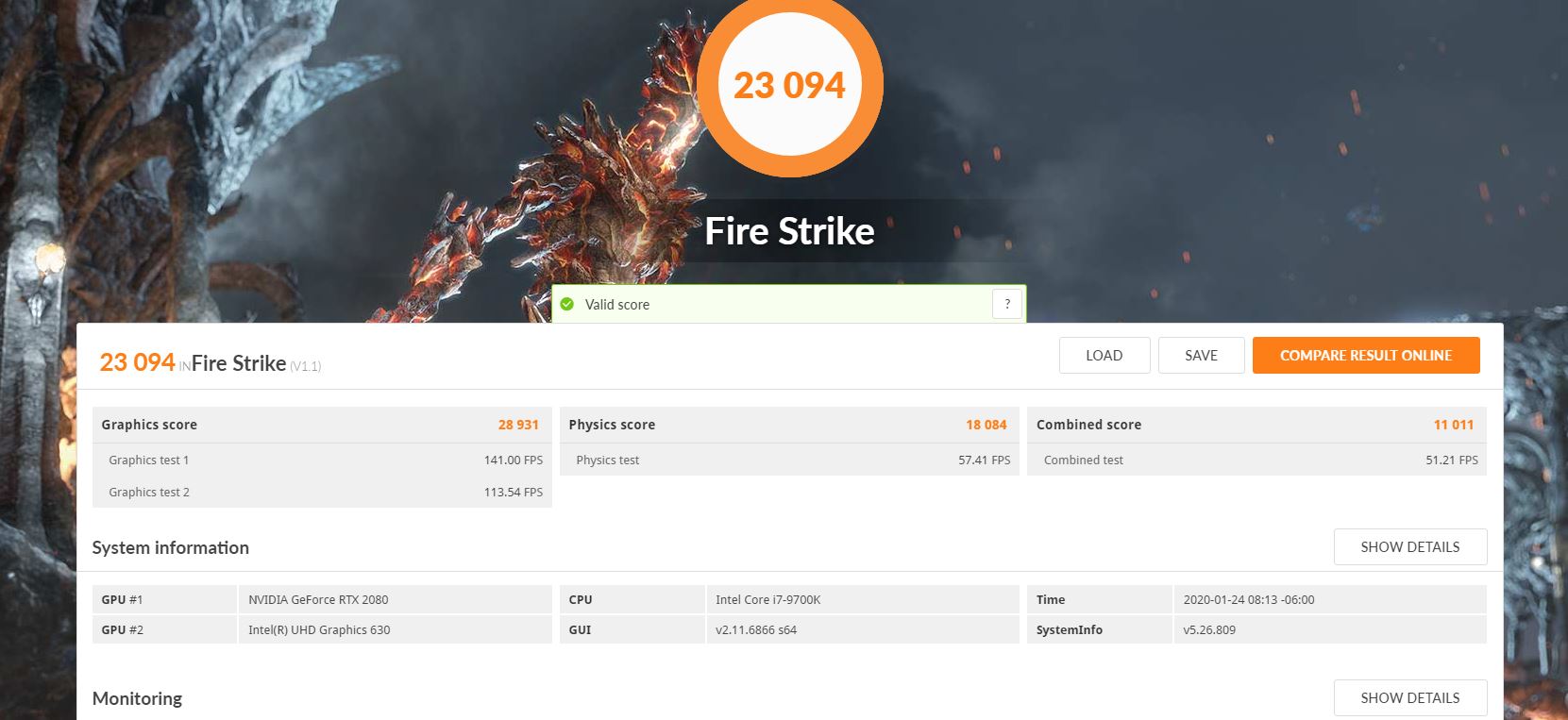
https://www.3dmark.com/fs/20858427
What were you saying about MQ not even being close?
Sent from my GM1917 using TapatalkFXi likes this. -
I was saying that based on another set of benchmarks I looked at over the weekend: https://www.techwalls.com/nvidia-rtx-2080-rtx-2080-max-q-gpu-comparison/
According to that article clocks:
2080 Max-Q: 735/1095 and variant of 990/1230 (80 and 90 watt respectively)
2080 Area 51M: 1380/1590 (150+ watt)
2080 Desktop: 1515/1800 (225 watt)
Curious because the 2080 Max-Q in that benchmark is clocking at 2085? Is it overclocked or are there different card specs ? The site for what I think is that system (ROG Zephyrus S GX701) shows a clock of 1330 at 100 watts and shows the same CPU.Last edited: Jan 24, 2020 -
exactly that... rtx 2080 max overclocked is about 30-31K Grafic Score... so yeah 20%+ IS not even closeFire Tiger likes this.
-
x170 will be sucessor of p775.
Seems like they'll official support up to 8-core/16-thread i7-10700k, but in prema i trust. The 10-core is named i9-10900k. I don't think power adapter will be a problem in any way.
edit: it will be 2x230W, i would prefer 330s but we still have the Eurocom's 780W single adapter option.Last edited: Jan 24, 2020lestat2k7 likes this. -
Not the rtx 2080 in this alienware, the most I got was 29500, most people run it undervolted anyway so average score in the 51m specifically is 27500-28k soooo not to far off actually :3
Sent from my GM1917 using Tapatalk -
ups
https://www.3dmark.com/fs/19137478
And why do you compare an heavily overlocked MQ with an undervolted 2080? The Best OC score vs. average? Apples and oranges..Nicolas Paiva likes this. -
so after a motherboard replacement cause my previous motherboard had a malfunction on the PCIe lanes (it was only running 2x instead of 8x) i'm finally happy with this beast of a laptop. Benchmark scores are pretty much in line with the desktop 2080 temps, however, are still abysmal.
Attached Files:
Fire Tiger and Virale like this. -
-
That mq was mine in a Asus zephyrus GX701 before I got the alienware, and that 31k score Is like one of many others who don't run that as daily driver, and the gx701 stayed cooler too with a heavy oc like that
Sent from my GM1917 using Tapatalk -
I had that happen to me... if you repasted/replaced pads and removed the GPU flexes, it’s likely that you didn’t seat them correctly and they weren’t making full contact, downgrading the PCI-e link. I disassembled, brushed the pins, and reassembled and that went away!
If you did that, the mobo change was overkill hahaha, if you didn’t, then that’s awesome!!!! Glad you’re on the happy side!Fire Tiger likes this. -
hi,
Got mine today, I followed the nbr guide for overclocking.
I tested it with @ 5 ghz adaptave voltage -115mv
is this a good silicon on 9900k? Im using stock thermal paste.
Is it worth replacing ?
One last question though, I noticed the default screen profile is set at "warm", any idea how to change it to neutral?
my cinebench is around 4700, but CPU is throttling on it anyways...
Many thanks.pathfindercod and Fire Tiger like this. -
Hello everyone! I give you my stormtrooper Area-51m.
Took me a while to put all of the decals on perfectly... but the result is fantastic. Bought the skin on eBay; this is the white cabron fiber skin. I have experience applying skins and this is one of my best applications yet. My unit is Lunar Light and had a small stain on the left side of the palm rest from rubbing a black microfiber on it -.- lol. I had my palm rest replaced (got the part from the technician and did it myself) and decided to protect it from the start. No more stains for me and it looks SICK!!! The lit parts like the Alien head logo on the lid, power button, and touchpad I covered with the punch outs instead of leaving them bare, and the lighting shines through and looks super slick!!!
![[IMG]](images/storyImages/70088d43cf4cae8da37ae921c747fe65.jpg)
![[IMG]](images/storyImages/019a1e997cc5001c3559fa8fcc52bc3a.jpg)
![[IMG]](images/storyImages/a42ea9e4a32ca11282b22c2567092b58.jpg)
![[IMG]](images/storyImages/6138318a16858ce527af44b8a8eace1e.jpg)
![[IMG]](images/storyImages/43625249ba72a20e289740bc4e816bda.jpg)
![[IMG]](images/storyImages/9bd8946a445c9adecab5826dd3bf0bb7.jpg) Last edited: Jan 24, 2020
Last edited: Jan 24, 2020 -
Its overclocked, and clock for clock... its an unfair comparison. In general terms the Max-Q < 2080 Laptop < 2080 Desktop. Unless you OC it then all bets are off
-
I must have this.... how hard was it to get on and look right? I really hate the two tone look of the rear in the Lunar White....
EDIT: Is the offer still up, I couldn't fine one that matched...Last edited: Jan 24, 2020Fire Tiger and Virale like this.
*OFFICIAL* Alienware Area-51M R1 Owner's Lounge
Discussion in '2015+ Alienware 13 / 15 / 17' started by ssj92, Jan 8, 2019.