 Problems? See this thread at archive.org.
Ok i made a heatsink for the PCH ... i was getting like 80°C on pch so.... i wanted to reduce temps and see if the power limit throttling is caused by heat... i bought the aluminum piece on a sound repair shop ... i dont know how to call it XD my english is not perfect as you can see lol ... i used a little piece of thermal pad 0,5mm tickness and 6W/mk ... is not the best, but make a good job. I took advantage of the disassembly and cleaned everithyng @VICKYGAMEBOY
EDIT
ok to everyone ... i tested a LOT and here is my conclusion: for AW15R1 and 17R2 models ...
1) confirmed = PCH overheating cause the Power limit throttling without any "visible" reason because they hide the PCH temperature ... the only way to see it, is from DIAGNOSTIC test at boot.
2) intel thermal framework is a problem without the proper driver of intel management engine ... i fount that windows update automatically the driver to 11.something version and the processor consume more voltage without needing it. for example playing battlefiled 4 at 2,5Ghz with 11 version, the voltage of the procesor is 0,86V with my undervolt ... and with the stock intel MEI 10(that you can find on the page of Dell) it consume 0,746V at 2,5Ghz and obiously less heat. you have to go to device manager and find the driver on system devices and uninstall the driver checking the option of delete the driver folder. also you need to uninstall the driver from installed programs and install it again. and to prevent a future update driver = http://winsupersite.com/windows-10/stop-automatic-driver-updates-windows-10
3) with the proper intel MEI driver and the thermal framework driver from Dell, you can adjust the power options in the advanced setting of your power plan (now with real efect) ... also you can make your fans spin as the A00 Bios using the A06 putting the acoustic limit to 5
4) putting a simple thermal pad (2 of 2mm thicknes, like a sandwich and 2cmx2cm) can improve your PCH temperature (i tested it and works fine) preventing the power limit throttling and 800mhz bug ... without any type of heatsink my cpu throttles down to 2,5Ghz at 15min of gaming and something arround 1,5 hours of gaming throttles down to 800Mhz for 2 minutes and later to 2,5Ghz again. PCH colling prevent this issue
![[IMG]](images/storyImages/2ebzn2c.jpg)
![[IMG]](images/storyImages/nzj6sp.jpg)
![[IMG]](images/storyImages/2961zsw.jpg)
![[IMG]](images/storyImages/260fo5i.jpg)
![[IMG]](images/storyImages/2u5f2i8.jpg)
![[IMG]](images/storyImages/20ie7na.jpg)
![[IMG]](images/storyImages/35ina12.jpg)
![[IMG]](images/storyImages/2saklrc.jpg)
![[IMG]](images/storyImages/4k7cxk.jpg)
![[IMG]](images/storyImages/34oydra.jpg)
![[IMG]](images/storyImages/qwwys9.jpg)
![[IMG]](images/storyImages/16a3dhz.jpg)
-
@judal57 wow nice job there, but how about copper shims.. use a thermal pad inbetween PCH and copper shim.. but seems ur getting a good temp drop.. 20c difference... its ok bro.. you dont have to speak english proper.. we all can understand.. why did u the remove the fan for ?? i might open my system tomorrow before installing windows 10 redstone 2, gonna try use some of the heatsink from my old amd motherboards.. lets see.
-
i used aluminum because all pch i saw before used aluminum heatsink ... copper have more heat transfer than aluminum ... but this heatsink come with thin blades ... this is better for cooling ... in any repair store of speakers you can find one ... i bought 2 of these for less than 1 dollar. i removed the fan to clean it propertly with isoprololic alcohol in spray ... the dust stuck between blades ... use a paint brush to remove dust ... dont forget to use a cellphone plastic kit to disassembly your laptop and prevent marks ..
-
Very nice indeed. ~16C drop in temp is well worth the mod for anyone having high PCH heat issues.
Mine stays around 69-71C max after hours of gaming...
Are you able to cook up a few since you have it going already with the cut out and measurements? I'm sure we'll be able to donate for the sake of convenience.
-
yes, i can do more ... i just need to find the proper heatsink again
looking the free space, i am going to do heatsinks for my SSD too...Last edited by a moderator: Sep 19, 2016iunlock likes this. -
That'd be nice!
Powered by: Quad Core Exynos + 6820HK -
Nice job. You made the right choice on metal because aluminum dissipates heat better than copper.
-
this is a myth.. copper does have better heat transfer.. dense..
-
Do you have any tests that show that? I'd be interested in reading about it.
-
I believe copper holds heat better but aluminum disperses heat faster
not sure on that thoughquickboat22 likes this. -
I would pay for such a heatsink
-
i can make heatsinks for the people that are interested ... but i have never sent something out of my country.
The copper transfers the heat better, and the aluminium stores the heat better than copper, getting the heat away from the PCH "passive cooling"
@VICKYGAMEBOY i want to install a mini fan above the wifi card .. in this space ... help me to find a little fan ...Last edited by a moderator: Sep 19, 2016 -
http://www.ebay.com/itm/5pcs-5V-2Pi...964585?hash=item338b8337a9:g:qmQAAOSw2GlXFeZe
maybe this can work ... now i need to know where can i conect it XD -
you wont believe me, i tried the same thing, installing a minifan i found on my old RIVA TNT card.. but sadly i have no place to fix it.. and there is no connection for power..
-
I'm going to do this heat sink mod too once I do a repaste. After a gaming session I saw the PCH max out at 82c. I'm not too crazy about that.
-
@Prema do you think this is safe to try https://www.bios-mods.com/forum/Thr...-MSI-BIOS-to-unlock-full-features-UEFI-Aptio4 seems like he can unlock the BIOS
-
The newer version are locked using a signature.
-
nothing to do to unlock that crap ?
-
Do you have the dimensions for the heat sink you used?
-
2,5cm X 2,5 cm 0,6cm thickness
HI, i saw this on a forum .... i would like to know ... how to make it, any suggestions ??? @VICKYGAMEBOY @iunlock
Last edited by a moderator: Sep 19, 2016Aman Krishna, Punisher5.0 and iunlock like this. -
How interesting.....3D printer?
-
Those panels are sold on taobao and alibaba.
-
Oh nice...I shall order some for fun. Will make for a great gift to others...
Thanks.
Powered by: Quad Core Exynos + 6820HK -
No prob, taobao is a very good source for alienware parts by the way. Alienware is huge in China and even has physical themed stores. It is easy to find parts that are harder to get in the west.iunlock likes this.
-
and how i find it ? back lid AW 15 ? lol
-
This is one of them. I would suggest searching trough related products on that website
https://world.taobao.com/item/53299...59.3.3DOQfj&scm=1007.12679.24488.532999750901 -
thanks ... but i need to find it from aliexpress or ebay .. because i dont trust on this chinense site XD i live in Colombia
-
Its pretty equal to Aliexpress. I dont knwo hwo to find it on Aliexpress.
-
its nice, but I don't like the bottom cap, with the fan.. I know its there for purpose.. but could have gone for someother alternative.. the drilled holes are supernice.. atleast for vent.. I'm just thinking is it possible to get a add another fan to the GPU fan joint.. just merge two fans.. but the volts gna be issue.. nightmare.
they have carbon fibre skins too.. nice.. but sadly I want only for palmrest.. its annoying with the grease or oil marks.. even though my hands are clean.. its so annoying to look at little patches.. end up cleaning 10mins on that.. still not perfect..Last edited by a moderator: Sep 19, 2016 -
LUckily I dont have oily hands so it stays clean for a long time. Once a week I clean it with a damp microfibre cloth.
You also could buy a roll of 3M carbon fibre sticker. which is the same material. Disassembly the palm rest and wrap it fully similar to here.
The results can be even better because like this you eliminate that sticker feel at the edges since it wrap around the corners. -
even I don't have oily hands, just that these palmrest is too sensitive to oily / sticky stuffs.. I might do the carbon wrap, ill go check on car decals shop.. they will have the best quality ones.. btw @judal57 you planning to get that backplate ? Alibaba is trusted one, but again the shipping might take longer.. depends on seller.
-
Same here. It would be cool to get one but the app has a lot of bad reviews on it and the store is unreadable for me.
-
Heat sink looks the same as the ones for the raspberry pi
-
ok to everyone ... i tested a LOT and here is my conclusion: for AW15R1 and 17R2 models ...
1) confirmed = PCH overheating cause the Power limit throttling without any "visible" reason because they hide the PCH temperature ... the only way to see it, is from DIAGNOSTIC test at boot.
2) intel thermal framework is a problem without the proper driver of intel management engine ... i fount that windows update automatically the driver to 11.something version and the processor consume more voltage without needing it. for example playing battlefiled 4 at 2,5Ghz with 11 version, the voltage of the procesor is 0,86V with my undervolt ... and with the stock intel MEI 10(that you can find on the page of Dell) it consume 0,746V at 2,5Ghz and obiously less heat. you have to go to device manager and find the driver on system devices and uninstall the driver checking the option of delete the driver folder. also you need to uninstall the driver from installed programs and install it again. and to prevent a future update driver = http://winsupersite.com/windows-10/stop-automatic-driver-updates-windows-10
3) with the proper intel MEI driver and the thermal framework driver from Dell, you can adjust the power options in the advanced setting of your power plan (now with real efect) ... also you can make your fans spin as the A00 Bios using the A06 putting the acoustic limit to 5
4) putting a simple thermal pad (2 of 2mm thicknes, like a sandwich and 2cmx2cm) can improve your PCH temperature (i tested it and works fine) preventing the power limit throttling and 800mhz bug ... without any type of heatsink my cpu throttles down to 2,5Ghz at 15min of gaming and something arround 1,5 hours of gaming throttles down to 800Mhz for 2 minutes and later to 2,5Ghz again. PCH colling prevent this issue
5) dell need to do something like this back lid mod, because the PCH, SSD's, HDD and ram dont recive fresh air and gets extremelly hot
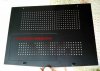
-
At least start to use heat spreader on pch as they used on their previous AW models. This cost maximum 50 cents. In worse case $ 0.75 usd!!
-
Link?
Keep in mind that adding more intake can change the pressure and air flow to the other heat sinks etc.
Im not sure how it would affect this particular laptop. However I am familiar with air pressure in a desktop case and it does matter.
Having too much open air vents lowers the pressure which reduces air flow efficiency.Last edited by a moderator: Sep 19, 2016 -
Very true. I'm going to order up some covers and hopefully having my AW on top of my laptop cooler would do it some justice. It'll be interesting to see how much of a difference it really makes.
Also, my PCH temp isn't an issue as it stays in the mid to high 60's most of the time even after gaming. I do have some thermal pad pieces left over so I'll put some on top of the PCH for fun and report back.Last edited: Aug 10, 2016 -
I not quite follow you. Dell should have done such as before. As in my AW17. Take away an important component to save 50 cents is just plane stupid!!
This is eg from Asus and Gigabyte. Of course they should use cooling for PCH!!
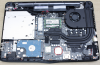
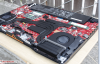 Last edited by a moderator: Sep 19, 2016
 -
Anyone got a link to the correct size sinks?
-
you can get 100 of these for under 20 usd
http://www.ebay.com/itm/100x-Alumin...043666?hash=item33aa9240d2:g:1PEAAOSwSWJXQ8Q1 -
As long if the PCH is under 85C it should be okay though. I have seen some with and without heatsink. A little metal plate is more of a shield though than a heatsink. Still thinking if I will mod this. Cant check my temp for some reason in HWinfo. Even though I enabled the configuration to read the PCH temp.
For me securing the heatsink is quite the issue. I like it for hardware to be secur ebut their are obviously no mounting points for a heatsink. Sandwitching it between the motherboard and chassis with thermal pads seems a little bit risky when it comes to thermal expansion (possibly) and thus falling inside of the chassis and cause a short.. Could use heatsink glue, the type that they sell with aftermarket coolers to secure ram heatsinks on videocards for example but that would be a problem if you need support because that is pretty much permanent. -
i dont have to secure anything ... i dont know if you disassembled your laptop at least once ... i made it 10 times or more ... (this model) the aluminum piece is pressed by the chasis ... i dont know how to explain you, but this is not going to move anywhere(indeed trying to move it with my fingers is impossible) ... you can see the photos ...
-
I thought you had a suggested heat spreader that cost $0.50 lol.
Papusan likes this.
-
Dell should offer you one for free Regardless. A heat spreader should be used, same as in their previous models. If there is place for it.. Why not?
-
![[IMG]](images/storyImages/s-l1000.jpg)
this type of pch "heatsink" is so thin ... that i think that made the same as nothing :S my AW m14x R1 come withis this type of heatsink and get hot as ****
i would like to see something like this in my model @Papusan
![[IMG]](images/storyImages/d708ec07bf1f9ec2e362e5bc5abab2d88e99af16860980f9ae7d3e23ff1f05426g.jpg)
i am going to make my own back lid in transparent acrylic with little holes for vent this will be amazing ... i will be able to see my SSD and ram without removing the lid
Last edited by a moderator: Sep 19, 2016 -
You should cut across the heatsink. So that it becomes larger cooling surface.
-
for PCH, I was thinking, how about we add a piece of copper and weld it to heatsink. according to my calculation there are 2 spots near bottom side of heatsink where u can extend it.. I'm just thinking.. that would dissipate heat better.. wish I had a spare heatsink.. and I also found a old Southbridge Heatsink, like the one u posted above. but I need to reduce the height of it..
-
Hi guys, I wanna ask would a 17x17x2mm heatsink helps cooling down the PCH temp? I am a noooob so I dont want to risk damaging the laptop, but I can see from the gap its possible to just slide it under and stick it with thermal paste. Thanks in advance
This is the product I'm talking about.
https://world.taobao.com/item/10349...93.1997994373.d4919385.zqbFmB&_u=4292eqtlc14d -
with thermal paste it is not possible to hold in place securely
I recommend thermal pad, then stuff some electrical tape on top of the heatsink to secure it in place -
the space is so tight, that it is not going to move anywhere
PCH heatsink mod alienware 15
Discussion in '2015+ Alienware 13 / 15 / 17' started by judal57, Aug 2, 2016.


