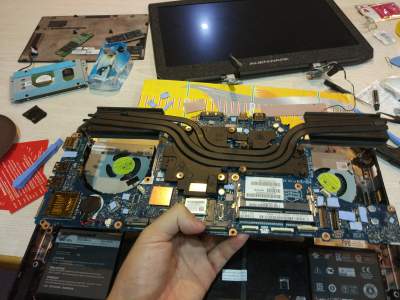
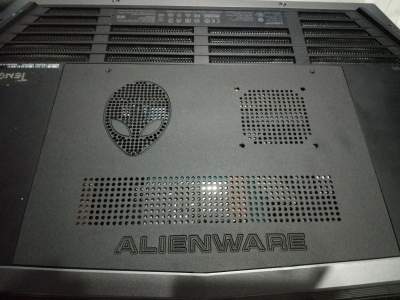
Problems? See this thread at archive.org.
You forget a third factor. Its right next to the CPU/GPU heat sink which does radiate a lot of heat, a DIY heatsink on the PCH catches that much easier than just the chip.
The mounting is a non factor here. It was mounted through 3M thermal tape on a perfect clean heatsink.
The numbers do not lie. I have to let my laptop work really hard to get the PCH to 80c (both CPU+GPU 100% load), which is well under the thermal limit if I may add. With the heatsink, even moderately putting stress on the CPU caused it to go directly to over 80c.
So you might think, that is odd. After this I removed the heatsink, cleaned it again with pure cleaning alcohol and the temps where normal again. Grabbed another heatsink with fresh 3M thermal tape, repeated the process and again it ran much hotter than normal. I should have filmed the process
Those all aluminum heatsinks just have a less good ability to lose the heat to the air itself and need airflow for that to hapen. The PCH chip die does not.
-
IR radiation? Radiation is optically coupled with the surroundings. At those temperatures that isn't a factor.
So the tiny die provides better heat convection than the heatsink with hundred times the surface area?
Not going to argue anymore. Maybe it really doesn't work, I don't know, but not for any of the reason you stated. -
The heatsinks that are linked in this topic are not 100times the die size, they are barely larger that the die itself, so with the indentations just double the die size. You can think what you want, I have tested it with those heatsinks and those where my findings. Dont forget that the heatsink fills up the little bit of empty space that is actually there making it much fuller than it already is. The little bit of airflow that is present around the PCH is now gone with filling it up with a heatsink. Dont treat the engineers as total idiots, if it would really help they would have placed a heatsink, now MSI, Asus and Alienware all did not use a heatsink in the same circumstances and configuration.Aleckhz likes this.
-
i connect the moded heatsink of the pch to the gpu heatsink using thermal pad (artic thermal pad) a good one... and it helped me a lot !!! i cant read the temperatures in real time because my model dont allow that ... but i cant ensure you dont surpass 80°C, i have the hotwell model, so on skylake should help more
![[IMG]](images/storyImages/23ji9ur.jpg) newlich likes this.
newlich likes this. -
Even 15 R2 has trouble querying precise temp. using Compal EC, usually system gets unresponsive & lot of stuttering. Even Intel PCH is buggy for me, sometimes it works and sometimes it doesn't. Correct me, if I'm wrong.
EDIT: Double post was because of my slow Internet speed.Last edited: Nov 13, 2016 -
the new Intel Dynamic Platform and Thermal Framework seems that help, in fact helped me
![[IMG]](images/storyImages/n5smb.jpg)
http://www.dell.com/support/home/us/en/19/Drivers/DriversDetails?driverId=NWWR5Attached Files:
Last edited: Nov 11, 2016 -
-
Why your max core frequency is only 2.99 GHz? You tuned down your clock? I thought the point of all these cooling is to let make it goes max (3.35 GHz) without scarify of speed?
-
that is because i make gpu OC, and i cant see any difference on fps or frame rate putting the processor at 3ghz or 3,5ghz, only more heat
http://www.3dmark.com/3dm/15957487 here is my actual performance -
@judal57 : Is there any further optimization to squeeze more points out of 15 r2? Also, cTDP options are missing after Anniv. update in Power options.
-
reinstall the Intel thermal framework with the link i put here.
you can go to premamod.com and search for your model and install the Vbios to unlock your gpu, then you can overclock your gpu using msi afterburnernewlich likes this. -
I'm seeing 2C difference after DPTF install. Any way to backup oem vbios to disk?
-
yes, you can but i dont know how .
-
tried Gpu-z to backup vbios and it said "Your display might flicker when the process starts" I clicked Yes and the next thing is it force quit itself.
-
For 15R1 and 15R2 optimus cancer you need to use safe mode with W10 to flash/read biosVasudev likes this.
-
I'll try that today.
-
Hi, I'm back. First of all, I wanna say thank-you for everyone who share their experience and try to help.
I've done my repaste, repad, PCH heatsink mod, and bottom cover mod.
Before, I faced throttling during playing Dota 2 after 30mins gaming. Max temperature 93'c and throttling around 90'c. After cooling mod, even though I tun wPrine, XTU stress test and Dota 2 together, max temperature 83'c, zero throttling for an hour. Actually there was a few seconds of power throttling, but it only drop my from 3.4Ghz to 3.2Ghz, unnoticeable in performance. I keep having current throttling in XTU during heavy load or stress test, but it doesn't drop my gaming fps or CPU clock speed at all. I believe it can be ignored?
The back cover I bought from Taobao is amazing. It is better than the original cover. It made of metal(aluminum i guess), like a passive cooling. When I touch the bottom after hours of gaming, it doesn't as heat as it was before.
All the result I mentioned above is without cooling pad. I believe it can do better or even a little bit of overclocking if I use a cooling pad.
Fall in love once again with my Alienware 15. Gonna enjoy the next few years of gaming with her.Attached Files:
Last edited: Nov 28, 2016Aman Krishna and judal57 like this. -
-
do u think a copper shim would do the trick ?
-
I do use copper shim for PCH, M.2 SSD and RAM.
Too bad I couldn't monitor the PCH temp. I can't prove whether thermal pad + copper shim lower PCH temp. But theoretically and base on this thread information, it should works.Aman Krishna likes this. -
what i did was after playing like 1 hour of gaming, quickly restart my pc and enter on diagnostic, so i can check that my pch temp were lower
in fact a thermal pad above the pch is better than nothing, a similar case you can see on EVGA pascal cards ... they have to send people thermal pads to put above some capacitors, the thermal pads are not going to make contact, but air thermal transfer is so low that thermal pads can improve a lot -
Incorrect i have that evga card. those thermal pads connect the vrms with the mid and backplate that act as a heatsink. those 20c temp difference isnt just because the thermal pads used.Last edited: Nov 29, 2016
-
I dont have a thermal pad , would a thermal paste be ok I have Grizzly kryonaut and Gelid Extreme which one would be better ?
-
the vrams are not the deffective thing, they include thermal pads for vram too, but i am not talking about vram, i am talking about capacitors
-
no, if you are going to apply thermal paste, you need a copper shim
-
Yeah vrm > voltage regulator module. they should touch after using the thermal pads. at least they do in my case.
-
Hi I read your posting will this PCH Heatsink fix work for my unit (AW17R3) as well? Since the mobo for AW17R3 is just the same for AW15R2. I was able to find it back home online so I just want to know if it is the correct type:
https://www.olx.ph/item/raspberry-pi-heatsink-ID6QeeL.html?p=16&h=6d16b91faf#6d16b91faf
Thank you very much for your time and I hope you'll be able to reply once you get to read this! -
The AW15R2 and AW17R3 have no PCH temperature issues whatsoever. NO need to do this mod. And in my case it was counter productive. The temps became higher because the heatsink started to work as a heat shield since it could notmove the heat away fast enough and was retaining it.
-
oh shiz ok so.. should I just stick to the drivers then? I did all kinds of undervolting to even repasting my unit but to no avail as thermal throttling is still happening during my 3-4 hour gaming sessions even though both gpu and cpu temps are under 75c degrees :/
-
Try doing a repaste by calling Dell or another technician if you're under warranty.
EDIT: Are you sure any unnecessary apps running in background? -
Define unnecessary? Because I might have removed most of it about a month ago but it's hard to tell as to which one would take up most of the cpu power.
-
Somethings seems off then. Are you sure its thermal throttling?
-
yep, while using msi afterburner once it hits the CPU temps goes up and the GPU coreclocks go down for about a minute then it goes back to normal again.
-
Sometimes UWP/native w10 apps keeps running in background and causes micro-stutters in games. If you go to AW Command Center install location you'll find iolo energy booster, simply click on it and it will suspend most unused apps and services while gaming.
Do you use DDU for clean installing GPU drivers? -
Guys, i am currently living outside of America and am in need to buy thermal pads.
I am having a had time finding them, so i decided to try aliexpress.
I will be doing a repasting and the PCH mod while im at it.
this is what i found on aliexpress:
https://www.aliexpress.com/item/100...lgo_pvid=c31144f0-8190-4ee1-9ce0-b121766ecfbc
is this any good?
if not, can you send me a better one (link).
what else would i need? i already bought the mod, waiting for it to be shipped.
Sorry for broken english. -
i used this fujipoly https://es.aliexpress.com/store/pro...lgo_pvid=1788e39c-be79-4663-9f6d-0752276ca09aVICKYGAMEBOY and Vasudev like this.
-
does the pch on an aw r3 15 have a heatsink?
if not can i use LM on it, or best use a thermal pad or normal paste?
tyvm
-
Use normal paste or thermal adhesive from arctic.
-
PCH is just one thing, make sure ur heatsink is in contact with all those power delivery VRMs.. ive seen prochot being triggerd due to those as well. get a thermal pad like arctic or fujipoly or GC extreme..
-
I got this from my old pc desktop mainboard, 5mm to the highest top and 3mm to the second. What is the exact height for the heatsink? Thanks.
 Vasudev likes this.
 -
You can ask @judal57 and see this link for an idea http://forum.notebookreview.com/threads/pch-heatsink-mod-alienware-15.794484/#post-10306100
You need a vice, some hacksaw blades and some tools from mech. engg. lab.tungd678 likes this. -
make it 3mm.. anything more.. ull have problem fitting ur bottom base back...Vasudev likes this.
PCH heatsink mod alienware 15
Discussion in '2015+ Alienware 13 / 15 / 17' started by judal57, Aug 2, 2016.