Problems? See this thread at archive.org.
There has been a bit of confusion or perhaps just plain misunderstood information about the QHD screens and previous troubles.
Yes as many know QHD screens previously had lines that seemed to bother some and not bother others.
Alienware has sourced a new QHD screen with the same specs (120Hz, 4ms, G-Sync).
As of yesterday (March 16th) the QHD screens now are the newly sourced ones.
For owners with existing QHD screens. You should be able to get a replacement for the "lines" problem via tech support. There is plenty of twitter documentation straight from Dell regarding the issue and the new LCDs.
Please be patient with tech support as some agents might not be aware of the "lines" attribute of the first LCD.
-
Can you get panel info on what it actually is?
-
Looking forward to the new screen.
-
Mine is almost on the way. I was opted to get the whole laptop exchange because the panel itself wan't available separately. Can't wait to see the difference.
DeeX likes this. -
sadly ill never trust dell engineers again after they fried my motherboard twice, trying to replace a keyboard......
if you can get the panel make/model id rather buy and do it myself then ever trust those muppets againPallab, Spartan@HIDevolution and Vasudev like this. -
What're you talking about?
They wouldn't send a tech to swap out the faulty display, so you opted to have the laptop replaced? -
At the time the new display was not readily available separately. Apparently they only have them with the whole new system to exchange to speed up the process. So I took the option of getting the exchange. It only took one day for the production to complete.Last edited: Mar 17, 2017
-
Please remove this image has it has sensitive details.
Can you please join me on Discord? I have somethings to tell you. -
I'm not on Discord but I just signed up. Want to just friend me SUADE8880?
-
Clicky Clicky
https://discord.gg/cFUYbgY -
Really interested knowing the panel details. The old is the AUO B173QTN01.0, unless the Alienwares use a different panel.
-
Deleted
-
Is this new panel still a TN or IPS
-
WHICH IS ABSOLUTELY FINE BTW EVERYONE!
Sent from my SM-G935F using Tapatalk -
Yeah, I know. Had no intention to criticise
 SYHAP and Pete Light like this.
 -
wow, excellent...
-
Excellent!
Another interested in the panel part number. Not Dell's part number. The one I can hunt for from another source
I have been wanting the 120Hz display since my first 17r4 The wait... The patients... -
Someone posted that they received a replacement panel, and the replacement panel was a AUO1496. Not sure if thats the new panel, but it could be. Can't find anything on it...
-
link?
-
I did some looking around and didn't really come up with anything.
This may be what he was referring to as its the only thing I can find with regards to that panel number:
https://www.google.com/amp/s/amp.re...ents/5ypcs9/alienware_17r4_qhd_banding_issue/ -
Im getting my 6820hk model replaced with a 7820hk, so i will post some pics when it arrives with a side by side comparison. I also swapped out my 1440p screen for a 4K one, so i will be able to compare that to the new one too.
-
I got this from dell tech support :-
"I have checked the new LCD panel and it is already available at our stock. We will gladly replace it, to solve your current situation with lines."
Just fyi...but no idea of model -
Could anyone tell us the Dell Part Number of this new panel so I can claim one as mine has dead pixels and I have been waiting for the new panel since January.
-
The old one 17.3 inch QHD (2560 x 1440) 120Hz was 391-BCXE.
The new one is: 391-BDFB. -
And the panel model ?
-
The descriptions of both are the same: 17.3 inch QHD (2560 x 1440) 120Hz TN+WVA Anti-Glare 400-nits Display with Tobii IR Eyetracking
Don't know actual panel model ID, as I don't have it on my hands yet. -
Gotcha. Been looking for the updated version no. or the updated model no. like of the original - B173QTN01.0
-
Em, ok..
@ScaniaV82299 asked for a
part number though. And I'm pretty sure that the most sale agents\tech support guys will know the right panel not by its model's ID, but the part number.
-
Yeah totally understandable. For Dell customer, the part no. is more important, for others we need the actual Panel info.
-
I tried to reach out and get the replacement screen since according to Frank, Dell was supposed to have them on the 21st. The tech guy said "Yes no problem we have them!" A few hours later, the status went to delayed. So I am not sure what the actual status is. Does anyone know the actual model panel info just as blood requested? I think I might get it quicker ordering it from eBay or something and just taking the hit.
I appreciate any help you guys can give!
Thanks -
To request a screen change do you need to have the receipt for laptop etc?
-
No, just the service tag and express code on the system.
Though, I don't think it matters. I am being told they only have them for new systems and not replacements. That the replacement stock is backordered until 2020 and there are zero other options. -
I was told the same thing hence a new system will be on the way for me as an exchange.
-
Will be interesting to see a side by side (old/new) Mine has the lines but I think they are less pronounced than some or i'm less sensitive to them.
-
Just had my screen replaced, the lines are gone.
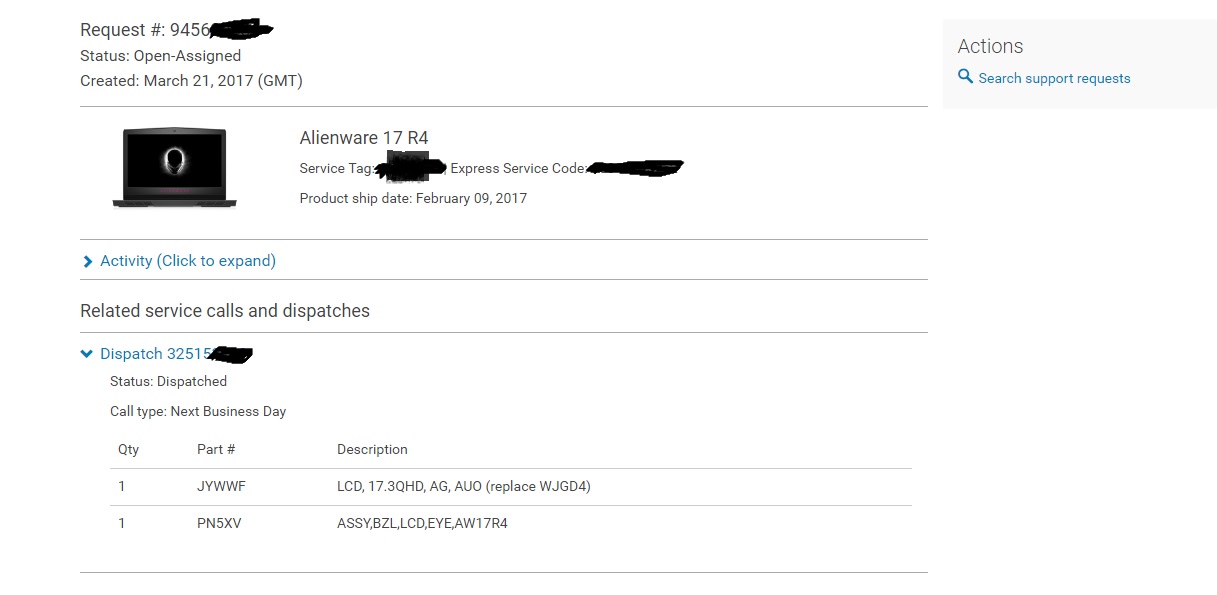
DELL PART NUMBER: JYWWF
Manufacturer: AU Optronics
Model:B173QTN01.4andyman404, bennyg, SUADE8880 and 3 others like this. -
That was the part # I was told as well. Any opinion on the new screen compared to the old one? Color, contrast, viewing angle? Thanks ahead for sharing
-
It seems very similar to the previous one but everything looks sharper and of course the lines on certain colors are absent. I'm pretty happy with the machine now, the old screen was just so bad, the difference is really obvious now the screen is displaying as expected.
andyman404 and MogRules like this. -
I'm confused, so some get the panels exchanged and others were offered a complete system exchange?
-
Believe me we are all confused. I'm dealing with DeeX right now to get it all figured out.
-
Dan, is yours skylake or kabylake if you don't mind sharing? Does gsync work?
-
Dan, Could you do us a favor and look on your dispatch and tell us what the part number is that is listed on the dispatch?
-
Frank Azor is handling my exchange at the moment as support were useless, will update when I know more.MogRules likes this.
-
Skylake and yeah, G-SYNC works
I don't have the dispatch info, an onsite engineer took all the documentation with them, sorry -
I was told this by the Dell rep on March 23rd. So they have replacements or they dont? Very confusing... I'll probably have the rep refer to this thread and see why so many options.
Alienware Technical Support <[email protected]>
To
rg0019
Mar 23 at 2:01 PM
I'm afraid that there's no ETA for the LCD screen Mr rg0019 but will be pending about that and once we that the ETA we email you.
It's that ok for you Mr rg0019
Thanks for your email -
We will be waiting for awhile for supply to ramp up. The best course of action is to try to push for an exchange since all the new R4 will come with the new screen. But even that will take at least 3-4 weeks.
MogRules likes this. -
Put in a request on Mar 20 for a new screen (1070/6700hq Model), was approved Mar 23, shipped via overnight (to hawaii). it is scheduled to be installed tomorrow morning (3/27).
Attached Files:
-
-
It seems to be a "spare parts" supply issue.
If they didn't have the spare parts to send to an onsite tech they would offer an exchange for a Kaby revision as they come with the new screen. The supply for the onsite techs and the regular manufacturing are totally separate.
I believe the spare parts supply issue has been resolved as I have now heard of multiple people getting their system fixed by an on site tech. -
Yeah, my screen will be replaced this week, no kaby lake for me
Updated QHD 120Hz 4ms G-Sync LCD Panel for Alienware 17 R4 (no lines)
Discussion in '2015+ Alienware 13 / 15 / 17' started by DeeX, Mar 17, 2017.