Problems? See this thread at archive.org.
what is the maximum speed of Broadcom 802.11n in 3820TG? I wanna buy the new dual band router 450Mbps + 450Mbps 5GHz/2.4GHz do I need a new wireless adapter to take advantaged of the router?
-
You do- whatever card do you have- which BTW you never specified.
You will need a three stream card and a third antenna- Intel 5300 or 6300 or Atheros AR9380 (sold as Bigfoot 1103 to people with more money than sense) -
I got DEV 4357 on my 3820tg
can I just use the Belkin N750 DB Wireless Dual-Band USB Adapter?
Belkin N750 DB Wireless Dual-Band USB Adapter F9L1103 -
Yes you can use the USB adapter although an internal mini-PCI Express with three internal antennas would be better in terms of range and convenience.
-
Nope. Doesn't work. Still having the old problem where clicking the Intel GPU icon does not switch my graphics to Intel GPU. Gotta switch graphics via BIOS...
-
Thank you! so I need three internal antennas in order to use 5GHz? how can I know if my laptop will work with Intel 6300
-
Hi! Does somebody using Windows 8 like me? How can i get Catalyst control panel working? Even swichable doesnt work. I've tried some drivers.. Can you help me, what to do on windows 8?
-
You don't need three antennas for 5GHz range not do you need them for 2.4GHz range as such. You need a third antenna to achieve 450mbps connection speed. With only two antennas both bands will work but at 300mbps.
Intel 6300 will work fine unless you buy one meant for Lenovo laptops. -
I see, the 3820TG only have two antenna how can I add the third antenna for the Intel N6300?
photos
![[IMG]](images/storyImages/73e3a682916012.gif)
![[IMG]](images/storyImages/b1a1ad82916014.gif)
-
You'll have to disassemble the notebook a bit (or a bit more if you want to do this properly).
Just don't think that routing it somewhere in the main unit is a good idea- it should be in the frame of the screen- otherwise you'll get interference. -
Continuation... No brightness change possible when having the BIOS set to use GPU only?
I still haven't done my clean install yet because all methods of getting switchable graphics to work, simply don't work... -
you're talking about windows 8, right?
-
Nope. Windows 7. For some reason I lost the ability to do brightness change when using Discrete GPU in the BIOS.
-
Ok, then i think it's time to do your clean install and install drivers from acer website! Very important: Set your bios to default before you start and don't change to discrete GPU or anything else!
If you get your switchable graphics back with this procedure, you know that you messed something up before. -
Hello
I'm trying to set up MPC-HC, following the link at the end of this post. The problem is that I get a ridiculous amount of lag. I've had this setup before, without the lag, but that was before I ed up the GPU drivers. I run Catalyst version 12.2 WHQL Unifl. Are there any new, stable ones? When I try to run AMD Mobility Radeon Driver Verification Tool, I get an error message saying that I don't have any supported devices.
Cheers!
EDIT: Looks like there's no lag at the PC monitor, but when I send the movie to my Sony EX400, the lag appears at the TV. I think I can rule out the GPU drivers then? Any solutions to the TV lag?
MadVR + Lav Filters + MPC-HC Guide for Anime -
Wow, totally missing the point with the post..and with an insult to boot... We all know that 12.6 is working with that method. It's 12.8-12.9 that is giving us problems...they wont install properly with "your method". Read a bit on the forum before you post your "insightful" post and try to keep a bit more humble tone, ok?
Anyway, I have tried leschats "catalyst_12.9_sep4_unifl_pt05" driver and they install no problem, but no Enduro support.
My path of installation that led up to a working 12.9 beta driver (don't ignore the full reboot requirements):
1. Install "VGA_AMD_8.741.1.6000_W7x86W7x64_A.zip" from Acer website
2. full reboot cycle
3. Install "ATI_11.6_W7x64_Alien9_switchable_v3.exe" from here:
Grafiktreiber (ATI/AMD) & Hybrid (ATI/AMD + Intel) & Realtek Audio Treiber + HDMI >>> Download + Anleitung - Acer-Userforum.de
4. full reboot cycle
5. reboot into BIOS and choose "IGP"
6. Install "12-6_mobility_vista_win7_64_dd_ccc.exe" from ATI website
7. full reboot cycle
8. reboot into BIOS and change to "AUTO"
9. full reboot cycle
10. reboot into BIOS and change to "IGP"
11. Install "catalyst_12.9_sep4_unifl_pt05.exe" ( WITHOUT any cleaning of previous drivers but WITH "test mode" enabled before installing. Choose "modern" Intel drivers when installing) from here:
http://leshcatlabs.net/wp-content/plugins/download-monitor/download.php?id=15
12. full reboot cycle
13. reboot into BIOS and change back to "AUTO"
14. boot into Windows with fingers crossed
It works for me.
![[IMG]](images/storyImages/129bf.jpg)
![[IMG]](images/storyImages/129b2.jpg)
![[IMG]](images/storyImages/129b3.jpg)
Uploaded with ImageShack.us -
Good day lads, Have any of you had this problem before?
I was getting atikpmg bluescreen erros every time I tried to get my notebook out of hibernation, so I uninstalled all the drivers and used a driversweeper to delete all the remaining registry and tools from AMD. I restarted the computer, the Starting Windows logo showed up but the after that the screen went completely off, I hear the windows starting up sound but have absolutely nothing on my screen, so I tried to connect the laptop to an external monitor, still no luck.
I booted into Bios and changed the graphics mode to descrete that booted up without any problems, I did however need to reinstall the drivers.
Every time I try to boot with "switchable" graphics mode though I have the same problem, the monitor is just black, I can turn the Num Lock on, and the PC seems to be working just fine, I just don't get any video output. What could be the problem, can anybody suggest something? Safe Mode works btw. -
Yep. Go back a few pages as I've experienced similar problems as well. Just use BIOS switchable graphics. I've given up with Windows switchable graphics.
-
Like I wrote a couple of posts up, switchable in Windows works just fine with 12.9 beta.
-
I follow the same procedures, not working for me. This is with a clean install on SSD.
The way Leshcat requires you to install the drivers is probably the reason why it's not working for me. Check back a couple pages. I described my problem with his drivers. -
Well, I actually did try first with the method described by Lechat and it did not work for me either. Thats why I explicitly wrote that you should NOT clean out the old drivers before, simply install them over the old ones. I also have this running on a SSD and 12.9b is running perfectly with switchable function in Windows. Actually I did left out one step, the 12.6 driver I did install in IGP mode. Maybe that package have some components needed for it to fall well out.
I have edited my previous "guide" to reflect that and some other clarifications. Try it again, it should work if you follow it to the letter.
How to install 12.9b -
Ok but how can I install the Stock 8.741 when everytime I boot with switchable graphics I can only see a black monitor?
-
Assuming you have modded BIOS, boot into discrete only, then uninstall drivers. Run Driver Cleaner as well and hope for the best. If it doesn't work, format.
-
Nope, I have normal BIOS, formatting is not really an option at the moment either.
-
There is a bug in DSDT table that prevents brightness from being changed. Here is the relevant code sniplet:
SBNL() is the method that gets called when brightness is to be changed.Code:Method (SBNL, 2, NotSerialized) { If (BCEN) { If (BCVE) { If (LNotEqual (^^^GFX0.IGID, 0xFFFF)) { ^^^GFX0.SPBR (Arg0, Zero) } If (LEqual (^^^P0P2.PEGP.DGID, 0x1002)) { HKEY (0x1C) } [B] If (LEqual (^^^P0P2.PEGP.DGID, 0x1002)) // << HERE[/B] { HKEY (0x1C) } } }
The if-else statement checks which card is currently active.
GFX0.IGID: Intel card
P0P2.PEGP.DGID: Switchable (or ATI on switchable?)
PEG3.PEGP.DGID: Discrete GPU
Looking at the code, it is checking which card is active and then sending it a notification to change the brightness. As you can see, it does not check if PEG3.PEGP.DGID (discrete mode) ATI card is active, but checks for Switchable twice. So, we change the line:
to:Code:If (LEqual (^^^[B]P0P2[/B].PEGP.DGID, 0x1002)) // << HERE
And it should fix the problem.Code:If (LEqual (^^^[B]PEG3[/B].PEGP.DGID, 0x1002)) // << HERE
Now, a modified BIOS file must be created using PhoenixTool to include this change in DSDT table. I could do it, but I am lazy. -
Might've been discussed before... How do I flash the modded fan profile? I was playing Diablo 3 yesterday, and the CPU was roughly 85C, while the 5470 was roughly 65C.
-
hi there, just now i just installed the 12.8 ati driver in discrete mode. It's working fine in discrete, but keep getting blue screen in switchable.
Any solutions to this? Thanks! -
Does full reboot cycle = restarting the pc? sorry for being noobie.
---------------------------------------------------------------------------------------
this link cant be opened
http://ati_11.6_w7x64_alien9_switchable_v3.exe/ -
Hello guys. So recently I've been getting abnormally high CPU temperatures of ~50 degrees idle and ~98 at 100% so I opened my beloved 3820 for some cleaning and re-pasting. Upon opening I discovered that one of the heat sink footings/screw mounts/thingy has come off the motherboard and only 2 screws still sitting tightly on the motherboard. (It is the footing on the right in the image attached.)
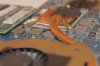
I tried using some two solution epoxy but that melted with heat and came undone. Right now, with some new IC Diamond I'm getting ~44 idle and ~90 at load but I'm worried that the heat sink can come loose with only two screws.
What should I do?
(My warranty dried up two months ago...) -
Yes, it means a full restart cycle. The reason for that is that some drivers are installed/replaced when booting up Windows again. I have fixed the link.
-
Thanks alot for the link! However, avast reported the dropbox link as malicious url~ not sure it's false or not.
----------------------------------------------------------------------------
By following the steps given, this happen, all the settings disappear~ help!Attached Files:
-
-
The high-side temperature seems high to me. I would typically get high side temps in the 70s or 80s. As long as you can't anchor that one pin, you're going to have less than 100% contact on the heat sink. 90C isn't fatal. If you don't have throttling from temps jumping over 105C, you might just let it ride. On the other hand, if you want to remount that pin, you have to use heat resistent epoxy. You should look at marine epoxy or aircraft epoxy. Once cured, they should handle the temps.
-
Maybe try this method:
http://forum.notebookreview.com/har...s/413380-control-fan-speed-registry-hack.html
I mean: change DSDT's registry copy instead of BIOS.
Edit: found my old how-to change DSDT.
[del]Here is the link for those how knows Russian:[/del]
Edit2: just tried the method. It doesn't work. Do not try to repeat.
Some details:
Downloaded DSDT by iasl, modified proper string, tried to compile, but got an error in 1st string of file. This string was:
So decided to ignore it (probably it was my mistake).
Removed the string and recompiled, got some warnings but no errors. Uploaded back by asl and rebooted (in IGD mode).
All was ok after reboot. But on next reboot when changed to PEG (Discrete) mode - got "You system not fully ACPI compatible" BSOD and moreover next reboots just hanged on POST screen. Pressing F2 didn't help - it only showed "Entering BIOS" string.
Decided to try to flash BIOS in Crisis mode. Not sure if it actually did something (still has 1.17, when flashed 1.13), but after power cycle was successfully entered to BIOS and able to change back to IGD. -
Finally 12.9 Sep4 UnifL on my lappy~
I keep getting bluescreen if use the typical way,
i'm frustrated and i just update my device manager to the latest version,
and voila, it works! -
Loading custom DSDT did not work in Windows for 3820TG because DSDT changes (probably by the BIOS?) to a slightly different one depending on which video card configuration you are using. The only way software load of DSDT might work is if you extract DSDT in Discrete mode, modify it and load it, and test in Discrete mode. The reason this happens is because the memory is mapped differently in the ACPI depending on which video configuration you are currently using. No wonder it didn't work in PEG if you used IDG DSDT.
That little iasl warning shouldn't matter. If DSDT worked fine with that warning, then I don't see why it wouldn't all of a sudden. In fact, I modified my DSDT to unlock unsupported brightness levels, modified the BIOS with new DSDT and it works perfectly fine in any graphics mode, but that same DSDT refused to work if I loaded it with asl in Windows. It appeas that the only way to make the modified DSDT work with any graphics configuration is to modify the actual BIOS, and make sure to modify the virgin DSDT (can be extracted from BIOS image using PhoenixTool, it is ACPI00.aml file in DUMP directory) and not a DSDT dump.
I am not sure why your computer hanged at the POST screen since asl DSDT load only affected the operating system and made no changes to the BIOS. Only thing I can think of is that it made some changes to the Embedded Controller memory that prevented the POST from going through. You probably just had to shut down laptop, remove battery and power, and hold power button for a couple of minutes.
I tried to make a new modification of the BIOS and it didn't work (OS didn't boot due to corrupted DSDT). I think I didn't use a virgin DSDT, which is probably why it failed. I must try again this weekend. -
Understood. Didn't know about this.
Same thoughts about corrupted EC or maybe CMOS (however my Fan speed modifications to EC seems remained untouched after "recovery").
I've tried to remove battery but it didn't help. Maybe just more time was needed.
Waiting forward. Custom brightness levels are also interesting. -
I have no clue what you just said or how to fix it... lol
I noticed that you have the Test Mode... Is there any way to get rid of it? I hate how Leshcat drivers require that weird installation method. -
I wouldnt say its weird. Its simply a reg tweak to allow for unsigned drivers to be installed, like XP has allways has been. I normallly disable it anyway... I run my win7 in super user mode and have spent some hours to let me be in full control of my PC. Anyway, its fairly easy to change:
Test Mode Windows 7 Build 7601" Watermark - Remove from Desktop - Windows 7 Forums -
Sorry if this has been answered (I swear I tried to search in this thread) - but has anyone managed to get switchable graphics to work in Windows 8?
Have tried almost all solutions here, but the issue is that Windows just boots into a black screen when Switchable is on, therefore preventing any proper install. The 12.9 drivers don't really work too.
EDIT: I got this to work through a workaround:
1) Switch to discrete mode and install RealVNC (RDP will not work as they utilize video driver hooks)
2) Turn back Switchable mode, remote into your black screen notebook and install the drivers from there. -
Thinking outside the box, I like it! So you have fully working switchable graphics now? Which graphics drivers did you install before the 12.9 driver? How about other functionality? Any other issues along the way to report?
-
Yes, switchable works perfectly. I've used the original Acer drivers 8.771 actually, haven't really got to try out the others. 12.9 beta didn't work for me. Have not tried the other unofficial drivers as I'm lazy to do so. Will probably wait for a finalized Win 8 driver before changing again.
-
I've had my machine for a couple of years now and it's working fine, but I'm getting tired of the screen. Is it possible to upgrade the screen to an LED display? If yes than how much does an LED display cost? Very noob question, sorry.
Worked on my brother's laptop for a couple of days and now I can't stand the screen on my laptop. -
It is a LED backlit display.
-
ATI Catalyst Drivers 12.10 has been released!
Release Notes -
Not switchable graphics though...
-
Hmm, i got an error while installing the amd driver from the acer homepage on windows 8. the installer found no components to install. any idea?
i have an older 3820tg with hd5650 graphics. -
UPDATE:
I've suceeded to install the Catalyst 12.11 beta driver with no problem directly from above installation. Did not even have to install it in discrete mode, simply installed it directly in switchable mode. All is working.
AMD Catalyst 12.11 -
i don't have the courage to look in all those pages, but did someone find a matte 13'' screen that could fit our little beast?
3820TG Owner's Lounge - Part Two
Discussion in 'Acer' started by Bronsky, Mar 13, 2011.


![[IMG]](http://imageshack.us/photo/my-images/507/129bf.jpg/)
![[IMG]](http://imageshack.us/photo/my-images/109/129b2.jpg/)
![[IMG]](http://imageshack.us/photo/my-images/221/129b3.jpg/)