 Problems? See this thread at archive.org.
In acer website you can find windows 8 drivers download page for 4820TG (still not 3820tg )
-
They don't work on Windows 7, at least not for the 3820TG.
Just installed them onto a fresh install of Windows 7.. Still don't work?! -
Ya I know, but I didn't bother with them. I tried all the WHQL drivers and only 12.6 works for me. I'll stick with BIOS switchable graphics...
-
It didnt work with my 5650 GPU, ati gpu works fine but when i try to switch to integrated gpu i get that blue screen
-
Proud owner of a 3820tg (i5 450m and 5650) and a lurker of this thread for over 2 years now.
Problems with gaming started a few months ago - games that rocked on high settings were lagging even in low.
The gpu had underclocked itself to Core 100 and Mem 150. Anyone had this problem?
I can get the performance back with AMD GPU Clock Tool (and overclock), but after reboot it always goes to the underclocked state.
Since I already started clocking the gpu, also tried to clock the cpu.
The clockgen that works for me is SLG505YC256BT - anyone know the hex values that need to be changed for this?
Going to buy a 250G SSD and 8G memory to give this unit a few more years.
Is it worth getting more expensive memory for overclocking?
Thinking about Crucial SSD v4 256GB SATA2, since sata3 would not be in use anyway - any ideas?
Br,
DrW -
I recently installed 8 Gb on mine as well. I don't notice any difference, but since memory is dirt cheap nowadays, why not?
As for the SSD, that I highly recommend. It seems a new PC after it. I chose the m4 thinking that if I change the laptop for a Sata III enabled one, I can take the disk along -
so after installing windows 8 I uninstalled that crap and went back to 7 ultimate because I was unable to play any of my games with 8...anyway I have tried probably 10 different drivers from leshcat trying to find one that doesnt give me a black screen when coming out of sleep mode....which driver works on our laptops? im going to try amds new 12.11beta6 for now and see how that goes.
-
Mine is working perfectly with the official 12.6 from AMD
-
I'm using 12.10 flawlessly. I recently upgraded to 8GB RAM. Didn't notice anything. This machine rocks with OCZ Vertex 2 (34 Gbit version). I purchased a leather skin set from eBay. Changed adapter with a smaller one and put a matte screen protector. Everthing looks great. I'm loving this thing.
 If only I could change the keyboard with a backlit one. Unfortunately no Turkish backlit keyboard found in eBay or somewhere else.
The only PC that I might replace with this one is Aspire Ultra M3-381TG. I don't know if it is released or not but when it comes out, I would really think about it. GT 640M is as strong as GTX 460M. Check out the M3-581TG review, if you haven't done yet. Ivy Bridge + Kepler is superb! -
the 12.10 from amds site? and does anybody know which gen intel card we have? im guessing 1st gen
-
I prefer to download drivers from Guru3D.
-
i installed 12.10 and i dont have the black screen problem but it wont switch to my intel card when i unplug the laptop nor can i force switch it
-
Try 12.6, I can do all of those things
-
tried 12.6 the original 12.6 download link doesnt work anymore but 12.6 v2 installed and I was unable to switch graphics because i would get the error "switching the graphics processors cannot be performed at this time due to one or more running applications" i then tried to install the 4820tg amd drivers from acer and still get the same message....this has become a headache
-
Hi and thank you for contributing to this community with your creative ideas. However, I would really appreciate if you could elaborate how exactly you did this. I understand that you used the latest Acer-amd drivers from Acer's website, but I'd appreciate a more thorough guide. Before you have remoted into your desktop, what drivers should you have installed? When you have remoted into your desktop, should you delete the current drivers and then install the Acer-amd drivers? I did do some experimenting myself with no success:
When I boot Windows 8 with "switchable" setting in BIOS it automatically installs two graphics drivers: ATI 5000 series & Intel HD graphics. My computer boots fine, and it tells me it's using Intel HD graphics, however the 5650 still seems to be running since my battery is draining too fast.
When I try to install the Acer-amd driver found on Acer's website it tells me that I already have the last updated version installed. If I try to install the latest version of Intel's HD graphics it says my pc don't meet the minimum requirements even though I'm in switchable mode. If I'm in discrete-mode I can install latest amd drivers from AMD's site but as soon as I boot in switchable-mode I get black-screen.
I really enjoy Windows 8, but if the switchable feature isn't working it's a big downside =/ -
Just use switchable graphics in the BIOS. I wasted so much time trying to do it in Windows it's not worth it anymore.
-
i got it working....the 12.6 up2 works but not up3
-
um quick question...what generation intel graphics cards do we have in our lappys?
-
Is here someone who can switch between graphics(ATI 5650) on Linux? Switchable graphics technology is 2-3years old, but I can't switch on Linux ... I ran Intel only, but I need HDMI now. I must go with discrete Mode, but I hate it....
What about flickering on low brightness, is it resolved?
And one more question, when I use builtin microphone, there is interference, probably from vga fan, but I have new fans... I'm thinking about warranty claim...
What do you think?
thanks. -
@boostjunkie92
Intel HD Graphics 3000 according to Wikipedia
@kubco2
About the flickering: It does get better for me if you go something like: Intels graphics application, energy, energy-features, choose "on battery" and then un-check the box which allows brightness change. -
Just Intel HD Graphics. First gen.
-
Hi,
got it working with catalyst 11.2 and 11.3 Alien9 drivers (64bit)
- ati 5650 with hdmi support (tried some games, all ok)
- intel graphics without hdmi support but power saving and therefore silent^^
Grafiktreiber (ATI/AMD) & Hybrid (ATI/AMD + Intel) & Realtek Audio Treiber + HDMI >>> Download + Anleitung - Acer-Userforum.de
1. Complete deinstall of all graphic drivers
2. reboot (switchable mode on)
3. Install alien9 catalyst 11.3 (read instructions)
4. reboot!
Afterwards switching the graphiccards works in most cases, otherwise reboot should do.
Unfortunately i found no newer driver that works. Spent a lot of time on this...
I cant imagine acer giving official support for win 8, its our problem -
Anyone's hard drives coming off lately? Mine keeps on coming out when I'm at school... Well it's the 2nd time it's happened, but very annoying as I'm left with no laptop to use for the rest of the day!
-
Hi and thank you for your post.
I did try to follow your guide but it does not seem to work for me.
I deleted my drivers, even did a driver sweep in safe-mode, rebooted and installed ATI_11.3_W7x64_Alien9_Hybrid_v3
In the log it said that it failed to install the GPU-driver and I was not able to start ATI application.
The thing is, even if I remove my drivers, they just get re-installed automatically as soon as I boot my PC. I tried to disable this but with no success.
Those two drivers that gets installed are named:
ATI Mobility Radeon HD 5000 Series (Microsoft Corporation - WDDM v1.20)
and
Intel(R) HD Graphics (Microsoft Corporation - WDDM 1.1)
The ATI-driver also gives a warning sign and when I check it out it says: "This device cannot start (code 10)".
This is starting to annoy me =) -
I installed the ATI_11.3_W7x64_Alien9_Hybrid_v3 driver with Windows 7 compatibility and admin rights...
edit: oh, and turn off UAC! -
- sorry for that -
The Reinstall of the drivers should not be the problem, I had that too.
You must extract the 11.2 files to c:\ and then run the install.bat-data with administrator rights.
But as you say I can remember that warning sign but dont know when it appeared.
I first tried 11.2- it worked. Later i installed 11.3 which is actually running on my system. -
I've been having a lot of problems with my 3820TG lately (HD 5650, i5 450M). Apart from sound crackling when playing movies, now I get random slowdowns (with accompanying sound crackling) everywhere. It doesn't matter if I'm playing a demanding game or a random emulator, it drops to about 10fps for about 20 seconds.
Any idea what could be causing this? I've tried a bunch of different drivers, both for video and audio, with no luck. I really hope I don't have to switch laptops now
-
Maybe throttling issues? Try monitoring the temps with a tool like HWmonitor
-
Clean vents and change thermal paste - my laptop was running at 100+C (cpu and gpu), after cleaning it dropped 60-70 depending of game and no more slowdowns.
Is the crackling (zergling on crack?) from speakers or with headphones/external speakers also?
If it is only the integrated speakers, open it up and check the cables - otherwise try clean install windows. -
Did anyone try installing 2 8G memory sticks for a total of 16GB? I know the specs say 8 for max memory, but 8 GB sticks did not exist at the time.
-
I'm finally ready to upgrade to an SSD, which height does it have to be? Are both 7.5mm and 9.5mm compatible?
Thanks! -
I believe it's 9mm as I didn't take the bracket off my Intel 320 120GB when I installed it (iirc).
Anyone else having trouble installing any other AMD driver besides the one from the Acer website? I've been trying to get the 12.6's to install (which have support for most legacy cards), and it BSOD's during the driver install every time. This is in discrete mode since AMD drivers won't let me install it otherwise (with good reason). I remember having more recent drivers on this thing before (circa Jan-Feb 2012, iirc). Anyway, maybe I'm forgetting to do something. Thanks guys. -
Me and a few more are running 12.11 (beta3) with no issues. Search on forum and you will find.:hi2:
-
I have a dead 3820T. The computer locked up, would not reboot. No bios screen - nothing. Just the power light, the HDD light would momentarily light, and the fan and hdd will spin up. Confirmed the hdd works in another laptop.
I found that removing and reinserting the memory worked for a few minutes. The notebook booted and ran fine, then froze again a few minutes later. Removing and rearranging the memory modules would once again allow the computer to boot. Finally I got it to run for about 45 minutes on one 2 gig module before it froze. Now there is no combination of memory that will work.
I disassembled the unit - everything is clean and the fan works. Does anyone know if this could be failed memory modules? Without any memory installed, does the hdd and power lights match what I've described? I may just order new memory as a repair attempt, although it seems unlikely that both modules would fail.
Appreciate any help!
Tim -
The search just redirects back to this thread. Could you link to the specific post(s) or clarify how you did get them to install? Did you install in discrete or switchable mode? Also, did you install just the driver or CCC and everything else as well? I've so far tried 12.6 and 12.10 and neither work, and I forget how I previously went about it. Thanks!
-
I'm using 12.7 beta drivers: Link
They seem to be the latest for me to switch video modes. I've heard that after after 12.3 though, there are no radical improvements for the 5000 series cards. Maybe 1-2 fps more. In addition, some reported that the card runs a little hotter after this version.
For optimum results, use 11.11c, as many say this driver is the best for the 5000 series. -
Hey just to let you guys know that this old notebook is still kicking, strong. :thumbsup:
After almost 2 years my 3820TG finally had the much needed CPU upgrade - for free by overclocking!
At 3.62GHz/172MHz this is the highest OC/FSB it could do, with single 4GB Samsung stick. NOT stable at all but still amazing.
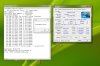
For peace of mind I settle with stable 3.34GHz/159MHz, not bad for a free 0.8GHz upgrade. I use ThrottleStop so that both core can run at turbo speed (x21) at the same time, a noticeable improvement for multi-thread situation. But the trade-off is the temperature can get really hot (10-15c hotter than stock though still not exceeding 105c limit). No laptop is built for such austere environments (heavy oc + prime95 + furmark) nor I'd use it this way.
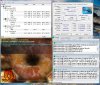
By the way the ThrottleSTope GUide is here if you are interested. You dont have to overclock to use it but for old latop every extra clock counts. -
Does anyone have a original backup image to after buy conditions left? Need it for warranty, maybe someone can upload it to here for example: https://www.transferbigfiles.com/
-
GUYS HELP!
I upgraded to 8GB Ram (2x4GB sticks) and now it just fails to load windows!
I used Corsair ValueSelect 1066 DDR3
Anyhelp would be appreciated! -
Thanks for the info about the overclock! I've also been thinking about ocing for a while. Earlier in this thread I read something about performance decrease (less fps) in games if you overclock the cpu. Has anyone found a workaround for that or is cpu oc still just for non graphics heavy applications?
-
Hello
I'm new on this forum. I bought an Acer 3820T i3 370m one year ago and last week I bought a mainboard of a 3820TG model with ATI 5650 Graphics and an i5 540m CPU. Now when I switch the laptop on it appers a message saying: "210: cpu variable MTRR configure failed. Press F1 to resume". If I press F1 the laptop boots well except for the CPU fan that is running at full speed. I asked the seller about this problem and it said me that it is a CPU problem. So I tried to use the i5 and also the original i3 CPUs on both mainboards. The result is that both CPUs works without any problems on the original board and have the same problem on the TG one... So the seller said me to put the bios chip from the original board on the TG one. I would prefer to buy another chip and change it in order to have a working board and to not damage the original one. But my question is: if it isn't the bios chip could it be the EC?
I'm on 1.19 bios with 01.15 version on the EC. I've also tried RW Everything to check the fan values and I've seen that the GPU fan has the bits 04 that means auto mode, instead of the CPU fan that has 14 that means manual mode. So I tried to change 14 to 04 but, after few seconds it changes aoutomaticcaly to 14... I tried the same on the original board and it works perfectly...
Can anyone help me?
P.S. Sorry for my bad English -
How's the battery life in Windows 8 ? Thanks.
-
Throttlestop is the work around.
-
Hi guys! im trying to find the 11.11c driver for my 3820tg, but i cant seem to find them from a reliable source. Any one know where to find them? Thank you so much in advance =)
-
i've read this thread for a bit but looks like most of you have the 5650 video card
I have the Acer 3820 with 5470 card, M430 2.27ghz model
I just switched to Win 8 Pro, and I'm looking for instructions to get my switcheable graphics card to work
can someone please be kind enough to provide me with instructions on which drivers to download and steps to install?
thank you so much! -
Guys,
I need to replace broken headphone jack in my 3820T.
Does anybody know where I can buy it?
I can see lots of offers at aliexpress.com but I don't know which is suitable for my model. -
anyone can advise how i can get the wifi console working on Win 8? FN + F3 still switches the wifi and bt on/off, but the menu doesn't show up
acer 3820 i5 m430 win8
thx! -
Has anyone switched the screen in 3820TG for a better one? If yes, which model?
I am annoyed with washed colours, it would be nice to have 13'' 1366x768 screen but with better contrast. -
So for you guys running Windows 8, there is no way to have switchable graphics with it?
Would love to use W8.
3820TG Owner's Lounge - Part Two
Discussion in 'Acer' started by Bronsky, Mar 13, 2011.


