 Problems? See this thread at archive.org.
I did the paste about a year ago...the vents are dust free....seems like this game is having issues with overheating peoples gpus...even though it is a cpu demanding game...how can I get my temps down?
-
-
Have you tried the custom fan profile bios mod?
my temps are reduced by 10-15c just by having the fans run at a higher speed than normal just look on the first post for links it's working so well. -
ya my fans are custom...the gpu fan is definately on 100%
-
Two part question:
1. Does anyone know where I could find a detailed list of all the components in my 3820TG-434G64n?
2. How would I go about buying a new left-side (facing the screen when on) fan for the machine? A friend suggested Newegg but I'm not seeing the right categories there.
The fan has been buzzing and clacking like crazy for about six months now and I've finally decided enough is enough. It started off only making noises when it was at full load, but now it's just constant including when the machine should just be idling. I've tried cleaning out the fan by disassembling and blowing compressed air through, to no avail. It's hard to describe the sound that's being made, but it's loud enough to give me headaches if I don't keep my earbuds in at all times (a somewhat close description might be a car ignition not starting, but at a distance). And it's definitely not the usual sound when the machine is at full-load.
If I get this fan, it will probably be the last time I'll be taking the rig apart. I've already broken the plastic moulding on one of the screen-hinge screws and the heads of all the screws area getting really worn down. Otherwise, this has been a great machine for the past 2.5 years. Too bad there doesn't seem to be a like-for-like replacement out there yet. -
I had that problem and did an rma and they gave me the i5-480m version with the 6550m but I guess it's too late for you now unless you have extended warranty
-
Did you try to update the drivers? because some are know to cause temps issues and is your cpu overheating too? My gpu is oced to 790/1000 and temps max out at 90C
-
I just want to say that I really love this machine with an ssd in it, I love everything about it except one thing, the screen. I would give so much if I could just get this computer with another screen! However I have just a puny i3, it's still as powerful as most i5 out there even new ones, the graphics card is still as powerful as the new one in the new Samsung Series 7 13" if you just overclock it a little. The battery is great, I actually really like the keyboard a lot, the computer is just really god damn fast for being 13", still! I think I still have to wait at least 2 more years until there is anything which is even remotely faster than this monster, I have only owned it for about a year and payed below 500usd for it, such an insane steal really.
Just wanted to state that this really is a legendary computer and it is just sad that the screen is as bad as it is.... a shame really for this masterpiece, overclocking, everything is just insane! Happy to be one of you guys =) -
Acer should make the 3820tgv2

-
Just installed my ssd + a fresh install of windows 8 everything running well now. Battery life is a bit better and everything is lighting fast thanks to my Mushkin Chronos Deluxe 240Gb
-
Hi Guys,
I'm having problems with my beloved 3820tg.
Recently it started switching off after a few hours of working (normal use - office apps + a lot of browser tabs). I'm guessing it's due to overheating, as the laptop won't start just after it powers down but powers up after a few minutes. Open hardware monitor shows temps of the CPU 77-104 C with current temp around 95. Is that high?
Also: has anyone tried replacing the headphone slot? Mine is broken (too heavy headphone cable) and I'm thinking of replacing it... -
Yes that is definitely overheating. Start with cleaning the vents by using canned air (gas duster) just to see how much difference does it make.
You will most likely have to disassemble the notebook anyway to apply thermal paste and on the way you might as well replace a headphone jack. The latter should be easy enough or impossible depending on your soldiering skills. -
Thanks.
Any hints on how to find the audio port model/size?
I might have to disassemble the laptop just to check it's dimensions. -
Try this, it may have the info about audio port Acer Aspire 3820TG Service Guide
-
hey there,
the CPU-Fan of my 3820G sounds weird an is probably about to die. I looked that replacementpart up on the web... however there seem to be a couple of different types of cpu fans that got built into the 3820 series - is that right?
I contacted Acer, to figure out which specific fan I'd need. The "support" only gave me a contact number to some technical-support partner of Acer. On the website of that partner was a 3820 fan with an heatsink included. Do I really need that? It it in either case necessary to (also) switch out the heatsink?
Just a new fan is about ~15 bucks.. a fan w/heatsink is about 100. :-/
thanks for help,
-max -
When I dismantled my laptop I had the impression that it would be much easier to replace the whole thing - heatsink + fan...
A related question:
how firmly should the heatsink sit on the cpu?
the service manual shows 3 screws but in my laptop only one holds the heatsink in place, the other two are loose, not attached to the mainboard. -
It's not supposed to be like this.
Please provide a photograph. -
Hi,
Just a quick question regarding 0% available (Plugged in, not charging)
I have tried every thing from a new battery to a bios reset
does anyone have an expertise on the matter?
thanks! -
Can't get the actual photo right now but the problem is with screws # 3 and 4 on the photo from the service manual.
It looks like are screwed into their mounts but the whole thing got loose. They are not attached to the mainboard. Only screw #5 holds the heatsink.
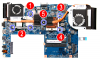
Should I attach them somehow? Glue them using superglue or something? -
Hi Guys, i found this forum while searching on google and i'm happy that i'm not the only one using this good laptop.
Do you guys know if the graphicscard is upgradable? i have the ati 5650 in this laptop and i want to upgrade it. -
@hidd3n
These two screws should go in tubular metal mounts. Are those mounts even there?
I think a photo is needed anyway.
@mobilemeneer
Sadly GPU is not upgradeable. -
@downloads
Here are the photos:
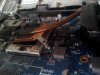
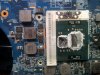
As you can see 2 of the mounts got loose from the mainboard. Only 1 holds the heatsink in place. -
That looks bad. You have to get it attached somehow because these have been sheered off and with only one mount you won't have any cooling.
It's hard to tell from a photo if soldiering would be OK or gluing would work- also I'm not proficient with such repairs so I would do better not giving advice on this. -
@downloads
Thanks for the info. Actually the gpu isn't that bad. But i installed the latest beta drivers from ATI and it seems that the graphics quality isn't that good anymore. I only play Starwars The Old Republic and want to play this game in a bit better quality.
Which drivers are you using? or what can you recommend me to do?
I'm still using 4gb of ram, i will upgrade it to 8gb in the near future and put a 250gb ssd in my timeline which will give this machine a great performance boost.
The problem is that i want to upgrade to something faster but i just can't find a device with the same size, weight en graphics this device really is the best for me but a newer version with a higher resolution should be even better
-
Happy to see, that the 3820TG owners lounge is still active.
Posting from a 3820TG
-
@ mobilemeneer
It's probably due to quality settings in Catalyst Control Center that the quality of the game is different since there are no known quality issues with AMD drivers.
I always try to use the most recent drivers due to all the optimizations and bug-fixing in them. -
He's not kidding! This thing is FAST Still running strong. looking at going to the 256 model!
-
I noticed my machine running hotter than normal, so last night I opened up my computer to clean the fans and reapply thermal paste. It seems that in my case, the same two mounts have come off; with only the single screw which holds both the GPU and CPU together, firmly attached.
It may be just due to oversight in Acer's part of how flimsy these materials are. Despite this, I put it back together and temperatures seem lower by 5-8C. I may have to start looking for another gaming/work laptop soon. Respect to this laptop nonetheless; it served me well for 2.5 years. -
It seems then that there was a faulty line of laptops. A pity the problem revealed itself after the warranty ended
For me stability is the important issue and while I don't mind the laptop running hot, when it shuts down while I watch one flash video too much, it becomes a problem.
I'm going to try to solder or glue these mounts when I apply the thermal paste so I'll let you know if it works. -
Thanks this worked great starwars looks great again and i raised the detaill only half now
i think i need to install more mem and maybe a reinstall of windows on my drive.
The problem with those laptop drives is that most of these drives are only 5400rpm. I have a 250gb 7200rpm laying around here but i will loose al my data and if i'm going to do a reinstall, a reinstall on a ssd is a better choice.
Oh by the way i forgot to ask if maybe someone has a lef cursor button laying around? mine didn't survive my little sons finger touching it the button made i nice flight through our living room
-
Hey guys, it seems the fan on the right side has slowed down and is causing a lot of heat issues. how can I solve this?
-
I'm using 3820tray app to get a more agressive fan profile when gaming, maybe you should have a look at that. It could also be dust in the fan. I use 3820tray.v21 which still has ATI fan control enabled. Playing Crysis 3 with an overclock on low quality and still getting 45 FPS from this monster. Best PC buy I've made, hands down.
-
I loved this machine! The balance of size, weight, power, dedicated graphics, 13.3" screen was difficult to find but this thing pulled it off.
What have people upgraded to that offers a similar mix of power and graphics capability in such a small form factor? Any recommendations? -
At the moment there isn't really any better alternative to 3820TG. All i found is slightly better configurations, but they cost double ore triple the price of 3820tg, and doesn't worth the upgrade...
Only thing i wish that this laptop had is backlit keyboard, and maybe a better screen.
I brought mine at second-had, and payed a little less than 400$, and is the best buy i made in my life
-
Hey everyone,
about 6M ago I replaced the thermal paste on my 3820TG's CPU because of cooling issues. The CPU has been running great ever since. I initially planned on replacing the paste on my GPU as well but held back when I realised that he chipset was connected to the cooling system with thermal pads. With the GPU having gotten increasingly hotter, I think it's now time to replace the paste.
So does anyone here have any experience with this? What did you do with the thermal pads? Did you replace them, leave them be or even used paste instead? How about the GPU itself, can you use standard thermal paste for that or does it need some special kind? -
hey all, i been experiencing some problem with the switchable graphics. I recently updated to Leshcat this. My intel graphics work perfectly, but my ATI graphics couldn't change the brightness, and even watching youtube, or facebook video, it turns out to be green all the time.
any suggestion on what should I do to correct this problem?
Thanks! -
I think you already know the answer/solution to your problem... That driver may have some bugs, so your best choice would be to revert to the old driver you had before...
Or you've done something wrong when you installed the Leshcat driver. Did you followed the steps here, that shows you how to clean the driver before you install Leshcat? -
The CPU and GPU can be pasted with the same thermal paste. I simply reinstalled the thermal pads where they were (over the chipset).
-
What would be a better buy for this laptop?
this;
http://www.amazon.co.uk/gp/product/...act_title_1?ie=UTF8&psc=1&smid=A3P5ROKL5A1OLE
or
this;
Corsair Memory RAM 8GB (1066MHZ, Unbuffered, SODIMM) DDR3: Amazon.co.uk: Computers & Accessories
im aware it can only really run at 1066mhz so it will be bottle-necked but its actually cheaper to get the 1600mhz memory. So which would be better for this laptop? -
I did exactly the same steps as listed there. I revert to version 11.6, and it's working. However, after I reboot, ccc couldn't be started.
-----------------------------------------------------------------------------------------------------------------------------------------------------------
update: I updated to 12.9, and all problem was solved except for watching flash video online. Is it adobe problem?
-----------------------------------------------------------------------------------------------------------------------------------------------------------
I tried it with firefox, all video came out green. I tried it with IE, it turns out black. Both have sound playing.
However, I tried it with Chrome, it just plays normally. -
Well I bought this RAM
Corsair 8GB DDR3 1333MHz Laptop Module CL9 SODIMM | Ebuyer.com
however despite multiple reports of 1333mhz ram being fine for this laptop even if its the i5 version, it fails to boot into an operating system no matter what platform. It gets passed POST but midway through booting it fails.I had my friend test the RAM in his laptop and it worked fine. Is there any way I can get it to work by modifying the clock speed of something? I'd really appreciate some help on this. -
Did you buy 1x8gb or 2x4gb? cause I don't think the 3820tg supports 1x8gb
-
I bought 1x8gb :S I didnt think it mattered. Well look like i'll have to sell it on ebay or something.
-
You could try to trade it with a 2x4gb. I'm pretty sure a lot of people would be interested. Btw you should try to buy an SSD it's a worthy upgrade. I bought a Mushkin Chronos Deluxe 240Gb for 185$ and the performance increase was huge coupled with my 8gb ram.
-
Greetings,
i have a little problem. I've uninstalled the catalyst drivers ( with driversweeper ) and now my win7 doesn't boot, only in safe mode. I run only on the IGP selected in the modded bios.
I've read somewhere that maybe some other drivers (chipset) was removed by driversweeper, but i'm unable to restore the machine with the chipset installer, nor driver sweepers backup function.
Anybody can help?
Btw this is my secondary system ehich chrashed, its a W7 32bit, extremely tweaked for DAW use so i would not like to reinstall it, if possible
EDIT: Problem solved via reinstalling the intel igp driver. -
Anyone else have an issue playing HD video files? I never really noticed before but lately I seem to be having a lot of stuttering playing 720p files on my laptop on my TV.
I was running through the HDMI out and having stuttering, if I overlcock the GPU this goes away.
I tried running through the VGA out and still having a stuttering issue using the intel card.
I can play the same video on my girlfriends Acer 15" laptop on the intel card through HDMI (i3 processor no overclock) without any issue at all.
Anyone have any idea what might be causing this? Only time I have this issue is with HD video. I can play games like Borderlands 2 and NBA 2K13 on the same TV at 1080P without any issue
-
Hello.
Can you help me with my problem? Ive installed Windows 8 on my 3820TZG(sry, maybe wrong topic | P6100, HD5470). When I launch Catalyst Install Manager, there is no Catalyst Control Center to install. What can I do to fix it?
PS Ive disabled intel card in bios. -
:hi2: After ~2 years of using this Acer Beast, my Ati video started to getting problems. I have artifacts when using the discrete video card. In Bios, after booting, Windows doesn't load etc. Only when windows is Booting,Safe mode and in the GRUB menu of ubuntu/windows it shows without problems.
In my modded BIOS if I choice only Intels integred card everything is OK and runs perfectly.
I try clean instal of Windows 7, Ubuntu and flashing BIOS to 1.19 again. Same problem.
I thing the GPU fail when I try updating to the latest ATI drivers from the ATI's site.
And before that sometimes the laptop Freez for couple of seconds in Windows, even after clean install.
P.S. The laptop is runing on Adata 2x4GB 1333mhz, and Intel 120gb SSD now.
I did try using the factory RAM and HDD... same problem occurs -
Seems like the soldering of your card degraded. 2 Options (at your own risk of course)
1. QuickFix (XBOX-soldering):
I would not recommend it but it solved exactly this problem for a friend of mine. It was a girl, alone in a foreign country, so i had to come up with a solution even she can perform. I told her that she should start any mid-intense task (small game) and block all air vents of the notebook... It got extremely hot essentially resoldering the graphic-chip.
On the 3820tg however we have a seperate cooler, so i would only block that cooler. Take msi afterburner and check you temperature, if it reaches somewhat 110° for some time it should be enough to fix your artifacts for some months
2. Not-so-QuickFix
If you are able to disassemble your 3820tg you can take out the motherboard (remove everthing, from cooler to cables) and put it into a baking oven. Then bake it for half an hour. The temperature is object of a lot of discussions, a poll said the right temperature is at about 130°C
Defekte Grafikkarten GESUND BACKEN! - Seite 61 - ComputerBase Forum
hope it helps -
My CPU fan is acting up lately, it makes this "scraping" noise. Is there a "standard" replacement fan I can buy and replace the other one with?
3820TG Owner's Lounge - Part Two
Discussion in 'Acer' started by Bronsky, Mar 13, 2011.


