 Problems? See this thread at archive.org.
Yes, I changed the thermalpaste hope it's non conductive, took it from some old fancy desktop cpu cooler kit, the original paste was already hardened. Now CPU runs really cool and newer throttles on full load 95C is max that I saw
(with earlier i5 460m there was regullar drops to 1200mhz as it reached 100C in a span of a minute or so, I had to lift the bottom of the notebook or in hotter weather to put external fan underneath to awoid throttling)
I think lock ups was software or RAM related as 8gb is easily filled with my software :/ as far as of today there was no lockups, only few in september, but CPU I changed in january. still running fine this workhorse
-
-
Yesterday I got really ugly bsod caused by radeon graphic drivers. I was hoping it was just sw, but today it just got worse. Artifacts, driver crashes... It crashed also in live linux so hw is failing for sure
Atleast there is IGP, but playing games never be the same
-
I noticed that on intel video the image is much brighter than on ati/amd
-
Still looking for a solution to my problem. Does it mean that the BIOS in the replacement motherboard is modded? If yes, how can I reflash it with the standard BIOS? I tried creating a bootable USB drive to ref lash it in DOS but if I use phlash16/force, I get an error saying that I can't flash the BIOS due to Memory Managers. Help please.
-
I cleaned my notebook today but I'm still getting weird noises from my fan on low speeds. Can the CPU fan be disassembled ? I mean can this thing be pulled up on the picture ? I tried but I'm scared to pull harder. And if it can be separated will it be okay if I spray some WD-40 in hope to cure the noise ? Or should I put grease
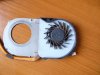
-
Fantastic notebook. Have been using it since 2011. Upgraded to 8gb, ssd, i580 (oc 3900). 10k in 3dmark06 (5650 oc to 675 - 1000). Still rocks! Have been reading this thread since 2012. It was really helpful! Special thanks to Bronsky.
-
I couldn't agree more..! This laptop might actually be the best tech purchase i've ever made.. It has the perfect size for studying, it has the battery life that's perfect for studying and when studying is over it has enough power to be able to game on.. !
-
Has anyone had luck getting the GPUs working in switchable mode with Windows 10 TP? I'm using the Leshcat's 14.4 and everything works perfectly aside from brightness control with AMD GPU. However, I've tried 4 or 5 Leshcat's drivers with Windows 10 but none of them seem to work well, the latest Leshcat driver and the ones offered in Windows Update even cause system to reboot before computer enters the Windows. Both Intel and AMD discrete modes work perfectly.
-
Any chance we will get official windows 10 drivers? since it looks like we will get free upgrade to windows 10 from windows 7.
-
Its been a long time since I have visited this thread, probably three years or so.
I just re-inherited my old 3820tg (Canadian version i5 and hd 5740). I gave it to my daughter a few years ago and she stopped using it so I took it back. It is upgraded with a OCZ Vertex 2 SSD and 8 gigs of ram. Still works perfect and is still a great laptop for general use.
My question: I am thinking of upgrading the wireless card and wondering if there would be any issues getting a card that included blue tooth. I was thinking of getting a Intel dual band wireless card that includes blue tooth. Anyone see any problems with this? -
You will have no problems with this upgrade as long as you avoid cards that are meant for Lenovo or HP. These would not work.
-
ATM Switchable graphics is bugged on windows 10
-
Too bad the switchable graphics isn't working on windows 10. I wonder if there is any chance this will get fixed by the time it is officially released in the summer. But the 3820tg is getting pretty old so maybe its too much too hope for.
Is there some place to look for updated drivers for the 3820tg? I see the Acer site is listing drivers from 2010. Having said that I am currently using all the original drivers that came with the machine save and except for the graphics driver and it is working perfectly so maybe I should leave it alone. For a graphics driver I am using the latest AMD release along with the latest Intel drivers. That combo is working great for me and switches just fine (except for some games when I have to switch to discrete mode in the bios to get them to work).Last edited by a moderator: Apr 24, 2015 -
One thing I should have asked. If I am upgrading my wireless card to I need one with blue tooth or not? In other words if I don't get one with blue tooth will I lose my blue tooth? The reason is that I can get an Intel 6205 card from a friend but I don't think that card has blue tooth. My thinking is that if I want blue tooth I need to get a card that has blue tooth but maybe I am wrong about that?
-
@Roamer55
Most likely BT is integrated in your current card. Check what card exactly is it and you'll know.
In that case upgrade to 6205 would indeed mean no Bluetooth for you. -
My current card is an Atheros Ar 8151. I Googled it but haven't found reliable information on it yet.
Oops that is the ethernet adapter not the wireless adapter. Guess I'll have to dig a big deeper.Last edited by a moderator: Apr 28, 2015 -
I bought an intel 7260 card as it was on sale. I figured that even if the bluetooth was not part of the old card I could disable it. Well I am having a few problems. It appears the old broadcom bluetooth adapter wasn't part of the wireless card as it shows up in the device manager. Worse though is that Intel bluetooth device just shows up as a generic bluetooth adapter. The intel blue tooth doesn't work even if I disable the broadcom in device manager. If disable the generic device the broadcom one works fine. I would like to if possible get the intel bluetooth working as it is bluetooth 4.0.
I assume that the broadcom driver is not running the intel card but I haven't checked that yet by pulling the Intel wireless adapter.
Any suggestions appreciated. -
Excuse the stupid question but you did install the driver for Intel Bluetooth (it's separate from Wi-Fi driver)?
-
@Roamer55. The Bluetooth on the 3820TG is on a separate card than the wireless card. The wireless card is accessible from a door on the back of the unit. The BT is a small module that sits under the KB. You can see it if you go to the old thread where we were modding a backlit KB. It shows the BT module. I don't think there's a way to get the combination card working. I think you're stuck with the BT 2.0 from the module. Sorry. Thankfully, your wireless card works.
-
Thanks guys. Downloads: I did install the intel bluetooth drivers - in fact tried it several times.
The Wifi is fine so that is great. I was hoping that by disabling the Broadcom card I could somehow get the Intel side working. It appears that there are some issues with this card's bluetooth and that it does sometimes show up as a generic bluetooth adapater (and then generally doesn't work right) even when the intel drivers are installed. This appears to be happening to me. The intel driver installs without error but in device manger it shows the device as a generic bluetooth adapter not intel bluetooth 4.0 as it should. I can uninstall both and then install the intel - again no error and but device manager reports a generic adapter and uses a Microsoft driver dated 2006!
There is some hope I guess in that it is clear that there are two bluetooth adapters in the system. You can only use one at a time of course (and the intel one doesn't work with the generic Microsoft driver) but they are both there.
I might try an older intel driver to see if it helps at all but I am not sure that this is worth too much more effort especially since I have both Wifi and Bluetooth. Anyway thanks guys. If I do sort it out I`ll post. -
Well I did get it working using a non current driver. It is not too old (less than a year) and it works fine from my limited testing so far. So it is probably a driver issue. However I would say that my blue tooth headset doesn't sound all that great and I would say sounds not quite as good as I would expect. Not sure if this is the headset or some issue with the card or maybe the two don't work too well together. But I did get it to work. Time will tell though whether it really works right or not.
I must say though that this 3820tg is a pretty good laptop even five years on. Happy to have dragged it out of the dustbin and back into service. -
Just to follow up on the Bluetooth audio. I think I have just forgotten that Bluetooth audio is a compromise and the compression that happens affects quality. The headset I was using is a pretty good one so the quality issues are actually emphasized. My next challenge is to see if I can get Widi working. The 7620 supports Widi and the machine otherwise meets the requirements. The Intel tool tells me its compatible and downloads and installs the software but alas the Widi program starts and then exits with no error message. Maybe this is just one bridge too far a machine this old.
-
Not sure if anyone is still following this thread but wondering if it is possible to change out the screen for something a bit better. I see that replacement screens are available but if they are the same as the original then there would be no point. One site has both gloss and matt finish screens but doesn't say who manufactures them. As you can no doubt tell nursing some extra life out of this machine has become a bit of a hobby of mine.
-
You could replace the screen as long as the connectors would be the same but you won't be able to upgrade to FHD as it is a single LVDS machine.
-
Thanks Downloads. I know I can't get FHD on the machine but was looking for better color and contrast etc. I can't tell from the on line ads if the screens they are selling are better or just a direct replacement for what is already on the machine. I probably won't do anything about this unless I can verify that what is available is a substantially better screen from what I have now. Its not worth the effort or the money if it is the same or only marginally better.
-
How much do you think I could sell the i3 version for?
Great laptop, just don't use a laptop anymore, full desktop. -
Has anyone tried installing windows 10 on their old machine yet? Do you think the drivers will work?
-
I have 3820TG and upgraded to Windows 10 (from Win 7 pro). Everything seems to be fine until I tried to launch games.
Starcraft 2 displays black screen with cursor visible only, game launched - I hear menu/music sounds, but it's not possible to play.
using AMD Catalyst I switched graphic to Intel ("Power saving") and was able to launch Starcraft 2, but it's not fun to play on Intel graphics.
Minecraft self-updated and seems to work, but crashed on some maps.
Generally games that heavily uses discrete graphic just show black screen.
Windows 10 reported no issues in "Device Manager" and installed video drivers:
for Intel HD - Intel driver from 2012-11-26 (seems it just left original driver?)
for ATI discrete card - AMD Catalyst drivers from 2015-07-15, I found newer Catalyst (2015-07-30), downloaded and installed it, but it didn't changed driver version. Black screen problem still exists.
Switched BIOS to "Discrete card" only, rebooted and got VGA compatible driver. Updated driver via Device manager and Win10 downloaded and installed Catalyst drivers from 2015-07-15.
Starcraft 2 and other games started to work properly!
I don't believe AMD will fix driver for old HD5000 switchable graphics cards, so conclusion is:
3820TG capable to run Windows 10 smoothly (especially with 8GB RAM and SSD upgrades),
but due to switchable graphics problem you have to change BIOS settings to switch between graphic cards. (Actually similar to Win8 issues, but you don't need to install leshcat's drivers) -
Running Windows 10. Driver installed well. In fact, the driver Auto switches between my Intel and my AMD Graphics which I like as I was suffering from the screen going black after switch and having to restart bug.
However, my AMD GPU Clock tool is not working so I am stuck at regular clocks and can't overclock my GPU. I'm hoping someone can help me out with this...
Edit: So everyone knows, I did an in place Windows 10 upgrade and I was running the Leshcat drivers. Not sure if that helps anyone. -
hi. can you tell me which Leshcat driver should i install on windows 7. and how should i install them?
-
I installed win 10 on discreet as it was pretty obvious everyone with old cards had problems and it works, though of course no intel card. I was bored, so I tried with both cards and pretty much what I expected, AMD card mostly on strike and black screen while intel works. So I guess discreet is the way to go.
We're lucky we can just disable the intel card, some people with older laptops really can't do much, but stay on 7 or 8. So even old, this laptop is still awesome in some ways and I still see no need to buy a new one. -
Hello, i just replaced GPU fan (bought this one) in Acer 3820TG due to rattling noises.
Problem is that the new fan always run on full speed, even if the GPU temperature is fairly low (about 50 °C ~ 122 °F). The blown air is also relatively cold.
Notebook's BIOS unfortunately doesn't allow any fan control.
Any sugestions? Thank you very much.Last edited: Aug 12, 2015 -
For those that may be interested I was able to get switchable graphics working at least to some degree in Windows 10. I ended up installing Windows 10 twice but I don't think I really needed to do that. The problem that I had was when I booted the machine I couldn't see the login in screen. When it got to that point the screen started to flash, you couldn't see anything and you couldn't proceed. What I discovered is that if you either boot up on the battery or pull the power once you see the flashing screen that everything works fine. Once logged in you can reconnect the power without issue and the switchable graphics appear to work. One caveat is that I haven't tried any games or other things that might stress the switchable graphics. So some of the black screen issues that have been reported may be there and you may still need to revert to discreet graphics in the bios to get some stuff to work. I am using the stock AMD drivers and not using any modded drivers.
Here is the long story of how I got to this point:
The first time I installed Windows 10 I did in an in place upgrade with switchable graphics enable in the BIOS. It all seemed to work just fine until I rebooted. Upon hitting the login screen things went bad and the screen started alternately flashing blue and white or sometimes black and white. I reverted to my Windows 7 install so I could use the machine. Then I had the idea that it was a conflict with the switchable graphics so my next attempt was another in place upgrade but this time with the switchable graphics disabled in the bios. Everything worked fine and when the machine rebooted the login screen would appear as normal.
Being adventurous I enabled switchable graphics and booted up the machine. It all worked fine on the first boot and upon logging in windows update installed the drivers for the intel card. I rebooted at that point and although the log in UI looked a bit weird I was able to see it and to log in. The switchable graphics tab appeared in the AMD Catalyst software and it appeared that switchable graphics was working. I noted that under the switchable graphics tab the loginui was locked to low power. This gave me the clue that maybe if I pulled the power the machine would stop trying to switch between the two graphic cards at the login UI (which is what I think may have been happening). It turned out I was right (at least so far). However I have not done sufficient testing to know if the switchable graphics works properly or not.
My theory is that some component necessary to properly switch the graphics cards does not get loaded until after login to the desktop. With the power pulled the machine doesn't try to use the AMD card and this solves the flashing login UI problem. Just a theory on my part I have no proof other than the work around seems to work fine.
I don't think my original install was bad and had I tried booting up on battery or pulling the power I think it would have worked fine.
Hope this is useful for someone. -
Just a wick update. When you hit the login screen and see the flashing you can disconnect the power and once you see the login screen you can immediately reconnect the power and it will work fine from there on in.
-
After some experimentation its clear I have many or all the same issues that others have with the switchable graphics and windows 10, for example black screen on starting games. For now I mostly run on discreet graphics unless I am going to be using it on battery then I manually switch it in bios to switchable. Just an FYI in case anyone is still monitoring this thread.
-
Hey guys,
I'm new in this forum and using my 3820TG for about 5 years now.
I installed an old HDD to do some test if windows 10 works well. I did the same about 2 months ago having some problems with the switchable graphics and also with the bluetooth device. But this time everything works pretty good. Let me tell you some details.
For the switchable graphics I decided to unlock hidden BIOS features, so I can switch in BIOS to AMD only or Intel only, whatever I need. For me that's good enough until I use the notebook at home with an external hdmi monitor most of the time. For the monitor I always need the AMD graphics anyway and I'm sitting next to the power supply, so no need for switching to Intel. And when I use my notebook elsewhere, Intel graphics is good enough and I can switch to it in BIOS to increase battery life. I let windows 10 automatically install both drivers and they are working well. Asphalt 8 from windows store works perfectly, also on external display (2 month ago I had black screen on games from store). I'm not really a gamer but I will also do some test with league of legends next days until I play it sometimes when I feel boring ;-)
Windows 10 always installs the latest AMD catalyst driver (maybe crimson in future?!). At the moment my GPU is displayed as HD 5000 series but it's a 6550M. I've read somewhere that maybe there is no DX11 support when recognized as 5650M (finally the same GPU) but if I run dxdiag it displays DX11 support so I guess it should work well. The only little problem that I have on AMD graphics is, that the brightness of the internal display can't be changed directly. But I found a little workaround for that: You can change brightness using fn + arrow keys as usual (you will see no change in brightness) and after that turn off the backlight with fn + f6. After turning it back on the brightness is changed to the new value. No big deal until I don't change brightness really often. Running on Intel graphics, I can change brightness as usual only with fn + arrow keys. Somewhere I've read that AMD is working on some windows 10 issues with their graphics driver (also for some old hybrid graphics like in 3820TG), so maybe there will be a fix for that brightness issue soon.
2 months ago the bluetooth driver from acer homepage did not work for me. I was not able to install it and windows 10 itself did not find any driver for it. But the current version of windows 10 found the driver with windows update and it seems to work well now. And for those of you who are interested: Standby, WiFi and touchpad are working well and the battery life using Intel only graphics seems to be as good as before.
But after all the good messages, there is also one that's slightly bad. If I run CPU-Z on windows 7, no TDP is shown. But if I run it on windows 10 it shows a TDP of 25W (usually my i5 480m should have 35W). This seems to cause lower CPU frequencies. When I stress my CPU with CPU-Z on windows 7 it always uses the maximum turbo frequency of 2.93 GHz on both cores and it never throttles down (max temps about 80°C). But on windows 10 both cores are running only on 2.8 GHz and sometimes go down to 2.67 GHz. HWMonitor shows power consumption of the CPU which most of the time doesn't exceed the 25W. Also temps are lower, about 75°C. So the lower TDP causes lower CPU turbo frequencies on permanent CPU load. Maximum turbo frequency of 2.93 GHz is only reached on peaks of load. Does anyone have an idea how to tell windows 10 that the CPU should work with 35W TDP?
I think I will finally upgrade to windows 10 on my SSD within the next few weeks until most of the stuff works well. If somebody wants me to test anything, just let me know
- the brand new coffee4freeBronsky likes this. -
Hello, after some time, I wanted to get my Acer 3820TG of the first generation some fresh updates. Haven't touched any drivers or anything since 2010.
I wanted to use this notebook again.
I unscrewed everything and cleaned the dies of both CPU and GPU with alcohol, applied fresh thermal paste.
I ordered a Samsung Evo 850 SSD with 250GB, going to do a fresh Windows 7 Install.
I also want to upgrade the ram, unfortunately it's 2x2GB installed, so neither modules will be further used.
Now here comes the issue.
It's a Intel HM55 chipset, which means max 8GB is supported, but only up to 256x8bytes configuration, which means dual-sided modules with 16 blocks each module is needed.
The manufacturers don't give a **** and you simply can't tell either from the pics nor from the specs how the memory blocks are arranged.
I had to send back my first order because it was only one-sided 512x8bytes config. Didn't even bother to install it.
Anyone got the same problem and found a definitely working Ram?
The Apple certified rams aren't a good indicator either, because usually they mean Macbooks starting from 2011, which supports 512x8bytes arrangements.
I hope somebody still cares for this device and read the forum
-
I used the following ram and it worked fine for Acer 3820TG:
Corsair Apple 8GB Dual Channel Kit DDR3 1066 PC3 8500 204-Pin Laptop SO-DIMM Memory (CMSA8GX3M2A1066C7)
Link to Amazon found here:
http://www.amazon.ca/dp/B00505EZYW/ref=pe_386430_30332290_TE_3p_dp_1
It says its for apple computers but it is just standard laptop ram and it is the right specs for the 3820. Worked just fine. -
I know this page is pretty dead now, but my 3820TG I bought from Bronski finally died, i believe it is the motherboard. Does anyone have a motherboard or a whole 3820TG for sale? I have had a new laptop for nearly a year (v15 nitro balck edition) but love the portability of the 13.3" 3820 so please let me know if anyone has parts or a computer, thank you!
Bronsky likes this. -
Try to find Kingston KVR1066D3S7/4G somewhere, I also tried many different modules but found those working in pair like a charm.
http://forum.notebookreview.com/threads/3820tg-owners-lounge-part-two.561840/page-336#post-9548004Last edited: Jan 25, 2016 -
You can find a lot of them on Aliexpress, but they ain't cheap.
http://www.aliexpress.com/item//32544692978.html -
Not sure if anyone is keeping up with this thread but one thing I have discovered is that the switchable graphics cause problems on boot up in windows 10. You can eliminate this if you set the bios to discrete graphics. It is also pretty easy to get around the issue by either booting on the battery or pulling the power when the screen starts to flash. What is interesting is that once you boot into windows 10 if you have fastboot enabled then so long as you shutdown and don't do a restart then the next time you turn on the PC it boots fine. I am guessing that the fast boot option saves the working state and when it loads that from the hard disk it loads the "working" configuration. On a restart that "working" configuration is lost and if you are plugged in the computer goes into a loop trying to switch between the two graphics cards. As noted pulling the power for a second works or booting on the battery and plugging the power after boot. But once you boot and and do a shutdown and "save" your working configuration then you are good to go next time.
As a side note now that Steam has in home streaming working I can use my gaming computer to run the games and stream them to my now ancient Acer 3820TG. Since the gaming computer does all the heavy lifting I can play pretty much any game I want on this PC at high settings. Gives a bit more life to this old girl. -
Bronsky
I know it's been a few years since Aunmar last raised this issue, but it's been plaguing me for years and I'm ready to tackle it head on. Given that the problematic USB ports I have aren't on the MB and are on their own card, it seems like the problem should be fixable. My SD card slot works just fine. Does that mean the problem is a software one? Awaiting your wisdom... -
My old 3820TG. It's 8 years old, right? Hopefully, you can find a motherboard. I would go with the best GPU you can find. HD 6xxx series?
If it is a software issue, you won't have a functional USB port on the right side of the 3820TG. If only the two ports on the left are out, it is an issue with the subboard most likely. If you have a multimeter, check for signal on the sub-board side of the controller.Last edited: Feb 19, 2016 -
Someone earlier in the thread confirmed that these modules work, I have ordered them- http://www.amazon.com/dp/B00505EZYW/ref=pe_386430_30332290_TE_3p_dp_
-
Thanks Bronsky! Can't believe you're still watching this thread. I have a working USB port on the right side. The mystery is that my SD card slot, which you previously noted is on the same sub-board as the left USB ports, is also working. I don't have a multimeter but can probably get access to one- do I need to take the whole laptop apart to get access to that sub board?
-
I stop by from time to time. Loved my old 3820TG. If you have a functional USB on the right, you probably have a hardware issue. The SD card reader can function even when the USB ports fail. I would check the ribbon first before changing the board.
-
http://leshcatlabs.net/forums/showthread.php?tid=999
@Bronsky: Can you put this thread on the first page? Working update for windows 10 with switchable graphics working. No brightness issues on either card, new UI and you can now run discrete/switchable without having to flash your screen, they automatically switch depending on the app you use. No more black screen or anything else. -
Done.
3820TG Owner's Lounge - Part Two
Discussion in 'Acer' started by Bronsky, Mar 13, 2011.


