Problems? See this thread at archive.org.
Alright. Heres what I have on mine.
BIOS Version v1.6
VDA BIOS VERSION INTEL VER 1533
ser num LXAPD0X821036dd2300
uuid D1E9FA10268911DDA70E00AOD1A6F37F
Got to say, it looks like you have corrupted BIOS..
I pm'ed you on the CMOS deal.
-
, I knew those stupid numbers could not be right! T_T
Ok, so, assuming I have a corrupted BIOS... is this it? What's the course of action I should take now? -
Well let me look around and see how to fix.. I remember reading a deal on how to fix bad BIOS at the all you wanted to know sticky. OR reset. PM sent.
-
So, I unplugged the CMOS battery, left it hanging there for 1 hour or so and when I plugged it back, first thing I've noticed is that the BIOS config returned to normal, I had changed some configs before.
But, still, no good, those creepy numbers are still there and, I still cant boot. -
Just tried to install Windows XP, no luck either, it gets to the part where it says "installing devices" and then it freezes or shuts down.
Mini Windows XP though, works fine on any level, doing anything that it can possibly do.
I'm absolutely hopeless.
EDIT: Right about now, I've also flashed the BIOS to see if that would fix anything and, entering the realm of absurdities, I've removed the HD from my 6920g, placed it on a different machine, installed, both W7 and Fedora and then, moved the HD back to my notebook.
It... didnt work. Safe mode gives a blue screen, any repair mode also gives a BSOD with error 0x0000007b (0xfffff880009a9928, 0xffffffffc0000034, 0x0000000000000000, 0x0000000000000000), googling it around might give me something but, I bet it's related to the fact that the OS was installed in the HD while it was at another system, not to the real problem... And, regular startup just reboots. -
I as well loaded OS in the hard drive via another machine
and it wouldn't take either with bsod like you had, though
I didn't get the numbers. Once I was able to get by the
password and reset BIOS, and the drive reformatted in
my 6920, I was able to load up Vista. So yes you seem
to be right that unless one loads the OS using the 6920
it won't go. I just don't know why you can load the mini xp
and not the other.
Did you set the time and date up in
the BIOS once you reset it ? I don't know if that has
anything do to with it or not. Wish I be of more help for
you. Are those weird numbers still there even after the
flash ? -
Yeah, the numbers were still there after the flash, nothing changed... Weird thing is that I read somewhere that they would change if I flashed it.
And no, I haven`t set any time or date configs on the BIOS, I tought that was automatic, it isnt? -
No you have to set the time and date. With those weird
numbers, I'm not sure what is happening. Did no happen
to note which version of BIOS you had before the flash
and what version you have now ? -
Yeah, before the flash, I had 1.14, or 1.4 version installed. I remember that I updated it because I tought it would solve the throttling and overheating issues. I`ve used it for quite some time until I did the upgrade to version 1.16.
-
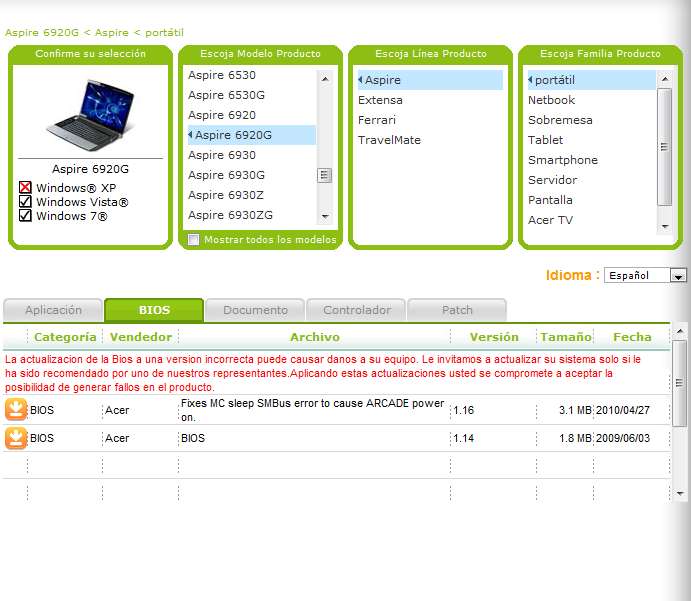
I went to Acer's site and saw only the 1.14 version. Where
did you get 1.16 from ? That may be your prob..This link
loads the 1.14 through zip. I would try to flash to it, but
I'm thinkin' that 1.16 was bogus and jacked the BIOS that
came with the unit. That would not be a good thing. My
concern is that the BIOS for the unit are corrupted and
not repairable unless sent to Acer, and I hope I'm soooo
wrong.
http://global-download.acer.com/GDF...tep3=ASPIRE 6920&OS=ALL&LC=en&BC=ACER&SC=PA_7 -
That's... weird.
I'm pretty sure I downloaded that 1.16 version around here, at some topic.
And, the 1.16 couldnt be the problem, I mean, I flashed it so it would solve the problem, it was there before. But I'll try to flash it back to 1.14.
And, another detail, when I try to pass MemTest86+ software to... you know, test the RAM, it reboots, quite at the beggining, actually. It just happened today or, I've never noticed it before. Anyways, I tought that it would suggest a memory issue, right? RIGHT? And maybe, it could even screw up the BIOS info (it may be a little farfetched but... it just seems possible), but ok, let's say it's a memory issue, that leaves a few questions like, how does it work on Mini Windows? Or, what about the fact that I took one of the RAM out and it rebooted, and I took the other one out and it rebooted anyway... Or the fact that I've tested the RAM on another pc and it worked fine...
EDIT: Just flashed back to 1.14, no changes yet. =/ -
I must say that you are wrong, there is a V1.16 BIOS version.
I've installed it some time ago... I don't remember when... and it is running fine.
Attached Files:
-
-
All right I'll buy that. I didn't know there was a 1.16 avail.
So what happened to his BIOS to get the numbers he is
getting ? I as well am a newbie to this Acer with PHOENIX
BIOS. Do you have any clues why this might be
happening ? By the way, how's the weather down your
way. I've heard it beautiful down there..Sorry to go off
the topic, but I always love hearing from folks outside
the U.S. -
In any case, I've went back to 1.14 version. And I even managed to find a way to edit the UUID and serial numbers directly, ahahahah.
Obviously it didn't work.
Navratil Software System, when used, tells me that theres a virus on the system, which just seems stupid to me since the HD is brand new. And also says that the system date is wrong (it is set in 2006, wrong indeed), but I dont know how to correct it and I never had any problem of the kind. I don't think it's gonna solve the main issue here but, anyway...
I'm officially out of ideas. -
The Problem: Audio still comes out of my speakers even though my headphones are plugged in and the audio is also coming through the headphones.
Can I manually disable the speakers somehow?
I only need a temporary short term fix to this problem as this laptop is heading to the Acer care center to have the power jack replaced, the dvd drive replaced, possibly now the audio jack replaced, checked for overheating issues and be totally wiped and restored to factory condition.
As you can see this latest problem is relatively minor but a temporary fix would be great. Surely I can simply click a setting to disable the speakers while the headphones are plugged in?
Your advice is much appreciated. -
Make sure that Realtek Audio Manager is running (for Win 64 bits process name is RAVcpl64.exe) It is responsible for detecting if something is connected to the audio jack and disabling speakers.
-
As far as the BIOS deal again, have you looked at the sticky
regarding Acer's with PHOENIX BIOS ? You may be able to
get into the "hidden" BIOS if it isn't corrupted or maybe
someone with more exp than I on this matter may have
a tip. Here's the link.
http://forum.notebookreview.com/acer/480992-acer-laptop-phoenix-bios-bios-mod-request.html -
Thanks for the assist ng2c, a light at the end of the tunnel, at last.
Just need to understand exactly what to do there, its being a little complicated .
.
-
I have recently been doing some gaming on my 6920g (call of duty 4 and some other older games) and have tweaked the settings so it runs really smooth. My problem is when I am gaming my hardware draws alot of power and I have gone through several power adapters in the past year and want to know if I can get a power adapter that is better suited for long time gaming use with a heavy load.
After a couple hours of hard gaming my adapter is almost too hot to touch! I also own a sager np8170 which has a monster power brick that is made for gaming, so if I could fine one along those lines for my acer that would be awesome.
I have done some slight overclocking of the video card, but I make sure my machine is on a cool mat and also monitor the temps VERY closely and have not had any issues with the machine itself, so the overclocking might be causing the extra draw.
LAN parties for the win!
-
**bump** sorry if I offended people with bumping this thread, but there are still people out here with 6920s!
-
Hi. I don't speak english very good but i understand well so please don't be angry about my mistakes...so to the question, i have 6920g and i thought about graphic replacment from my ATI RADEON HD3650m 512MB to NVIDIA GeForce GTX260m 1GB from ASUS and here is my question,CAN I DO THAT? I'm sure that there is GTX260m MXM II 2.1 you can find it but i must be sure that it works,does someone try it?
Here are the sites with GTX260m 1GB GDDR3 MXM II 2.1
http://www.mini-laptop-accessories.com/asus-g50vt-nvidia-gtx-260m-1gb-ddr3-mxm-vga-card-p-9826.html
or
http://www.systemboardcn.com/index....0m-1gb-mxm-vga-card-p-n-60-nv3vg1000-d01.html -
I'm pretty sure that the ASUS mxm card contacts are backwards, but I could be wrong... (someone please correct me if I am)
If I were you I would go for a nvidia geforce 9600m gt with 512mb ddr3 that is NOT from ASUS.
*edit* both of the links you sent are ASUS cards and they ARE backwards. -
Pretty sure it won't work. You can search the Acer forum to find a thread with the compatible GPUs for the 6920G.
-
I find posts but no one said anything about that card.So i asked if it work becouse maybe someone have to deal with it.
I thought about 9600m gt 1gb ddr2 becouse it's a C1 revision and it can be over clocked to 780/1000/1800 but A1 gets 650/850/1625 as said by lizzarddos -
Hey guys. I cracked the screen on my Acer Aspire 6920G so I bought a replacement and installed it myself. But its not coming threw as clear and the old one. Its got like a whiteish tint to it and at first I couldnt change my resolution but that fixed itself I guess.
I checked the connections and theyre all in tight and all that. And im 90% sure I bought the right one.
16" WUXGA Full HD 1920 x 1080 pixel resolution, high-brightness (250-nit), Acer CineCrystalTFT LCD
Please let me know if this is something I can fix or if I should get a professional to work on it (my friend has a friend).
Thanks guys -
Sounds like its just not calibrated correctly. I have never done much with that, but pull down the white balance in the nvidia control panel and see if that solves your problem. Also you might want to upgrade to the latest drivers from nvidia that came out today, that might just solve your problem.
do you mind providing me a link to the place you bought your screen from? I have been wanting to upgrade to a 1920 x 1080 display as mine is only 1366 x 768 -
**EDIT - Downloaded new driver, seemed to do the trick! thanks man
Here is the screen I bought:
Skyline Engineering: Acer Aspire 6530 6920 6935 16" WUXGA (1920x1080) HD LCD LTN160HT01
Buy it, install it, and let me know what happens haha -
Upon further inspection its not totally fixed. Although it did clear it up a little some colors still arent coming threw clearly. Any other sugestions?
-
The quality of the screens that were put into these machines aren't the greatest. I have a sager with a 120hz 72% color gamut screen which is almost too crisp. When going back to using my acer it is shocking how washed out the colors look on the machine. When comparing side by side with other laptops of the same year it is normal, and about as good as its gonna get. (unless you can find a higher color gamut screen for sale)
Maybe the screen in the laptop is different then the one you had to begin with and that's as good as it will get, but then too maybe there IS a problem that I don't have the expertise to diagnose.
-
hey, are you joking? i have used mine nearly every day for the last 4 years
i had a 9600GT card until just a few days ago when i finally packed up
but, it lasted for 3 years, about 2 years of gaming, so not too bad for an ebay engineering sample
9500m is back in there now and all is well.
i actually have 2 hard drives and multi boot 8 os's, various windows and some others i cannot mention here
certainly no offense taken here anyway
-
Hey guys,
I apologize if this problem has already been posted about. For some reason the thread search function is not working (I end up at a 'do process' page which is blank instead of the search working).
My power jack on my 6920G is obviously messed up. In order to manage a secure power connection, I have to rig the plug at an odd angle which will almost certainly bend the jack with the result that eventually it will not work at all. This is particularly a problem because my battery is completely shot, and I don't have the $ to replace it. So I'm trying to either fix the jack myself, or replace the jack (on eBay they sell for ~4$, see link below).
Symptoms wise, because the connection is not secure, the 'plugged in' light flickers on and off, and the screen does the same (to reflect plugged in vs not plugged in power settings).
Does anyone know exactly how to do this? It looks like you simply have to take off the cover that says "Dolby Home Theater" or the rounded peice behind it; how do you remove these?
Also, will this take any soldering/etc or would I simply need to remove and replace the power jacks? Or might there be a solution without buying a new jack?
Thanks in advance!!!!!
Jack:
OEM NEW ACER ASPIRE 6920 6920G 6935 AC DC IN POWER JACK CABLE HARNESS CJ89D | eBay -
It should be easy enough to replace although you'll have dismantle the whole notebook to route the power cable properly.
Service manual can help you do that properly. -
just uploaded the PPL hardware unlock info for anyone that wants to overclock their 6920g.
http://forum.notebookreview.com/ace...erclock-upgrade-9600-ssd-overclock-happy.html
hope it helps others. -
Hello Everyone!
I'm back from my mission. If anyone needs help, just post here or PM me.
Cheers! -
just ordered 2 x 512GB Crucial M4s for my 6020g.
I intend to clone my current disks as i have 9 OS's on there right now.
cloning partitions will be properly aligned for ssd (using BootIT).
i will enable trim for ubuntu, various windows and another os.
anything else i need to know or do to get the best from the ssd's? -
Has anyone tried running Win8 on this thing? Will the Windows 7 drivers work?
-
@BNRJJ8, yes and yes.
almost everything working oob, sound, networking, even IR.
needed win 7 driver for card reader.
and fingerprint reader but win 7 driver seems to be ok.
launch manager says windows is wrong version.
its using a setup.inf to check, any ideas what i have to change (regedit?) to force it to run?
EDIT: win 8 has its own OSD (on screen display) for volume and brightness which works with FN control and cinedash.
so all is well
-
Hello!
I just registered here and I am looking forward to get some advice from fellows 6920 owners. I am not expecting you to give me everything on a ''silver plate'', I can read through information myself but lack knowledge of reliable reference web-pages.
I have had my Acer Aspire 6920G (by the way, why does the topic title does not contain the ''G''?) I have mine with the T5750 CPU, Nvidia 9500M GS. Win Vista Home Premium, 32 bit edition, original, the one that came with the laptop, all updates applied. Have reduced all visual settings to increase performance, since I really do not need them, have also turned off indexing for now.
I bought this laptop to use it mostly like a regular PC, and I barely carry it about. A year ago I bought a cooling bad (some Thermaltake model, I have to keep the laptop a bit off-set to the right edge of the pad to keep it cooled efficiently, and I ever since I have the pad, I have the bottom cover removed).
I have had very few problems so far. The ''biggest'' one has been that for some reason one day 1 of the RAM modules refused to keep working (as my fellow electrician-enthusiast with quite some experience found). So, he changed the module. 2nd problem I have been having, as it seems, mostly after having switched the laptop off using the main power button, is that upon switching it on again it does not switch on with the first try (its random, usually takes it 2-3 times or a battery removal to be sure). What happens? It turns on to the black screen and in white it says that the system folder is corrupted or something like that. It really is not an often thing, barely happens when I turn the laptop off using the Start Menu. I have checked my HDD, it has no bad sectors not has it shown any signs of ''dying''.
That is about it regarding ''problems''. Lucky you. Now, it has been a very faithful companion, and I have played some games on and off (Bioshock, CoH, World of Tanks, currently, those are the most ''heavy ones'' that have made the GPU/CPU heat up.
I regularly clean the air outlet (you know, the dust cover from the fan outlet). If you do not do that on a regular bases, the dust can make quite a ''wall''.
Anyway, when playing games my CPU temperature has not gone above 41 degrees Celsium, and my GPU - 65 degrees Celsium. Have ha donly 1 instance where I THINK there were some artifact-like thingies on the screen but it only happened once.
What I would like to know is:
1) Any use changing the thermo paste on both the CPU as well as the GPU? AFAIK one of them has the ''pad-like'' thing instead of a regular paste on it, will that be a problem if I replace it with a regular paste? (I have disassembled the laptop as far as the HDD, heatsink, fan, RAMs, network card goes but have not had the stomach to try remove the heatsing heads from CPU/GPU). I know a specialist would be the best but can I take them off myself? They seem to have sticked to the CPU/GPU so I do nto want to break anything, can I?
2) What other maintenance works would you recommend to prolong its life-time?
3) Is it worth installing Windows 7 on this machine? Hardware wise.
4) Should I update the BIOS? Have not done it after I bought this laptop.
Hope someone still reads this topic... -
1. Yes it's probably a good idea to change the thermal paste- might not be worth much but decrease of several degrees is always good. Thermal pads are for RAM modules on GPU and you can leave them in place.
2. Nothing more than what's being discussed comes to mind. You can't do anything about nVidia bumpgate issue so prolonging won't work here. If your card decides to die on you it will regardless of your best efforts. Upgrade-wise SSD is always a good thing to go for assuming you have the cash and feel like spending that much.
3. Yes it is worth it. Vista is heavy and slow- for whatever reason Win 7 feels more snappy and it doesn't put more load on a system. So that one is definitely worth it.
4. One version of BIOS resolved an issue with this Win XP-based Acer Arcade thingy that would sometimes launch instead of normal OS once you've pressed power button.
I'm not ure if the issue you describe with starting a laptop is not indeed related to this. You could update BIOS to the most recent one which definitely employs this fix and see if it helps. -
What is the bumpgate issue you are referring to? Do not get the meaning of that term.
I have acquired the service manual, just need to get a small screwdriver and print the manual and I shall attempt to change the thermal paste this weekend, hopefully. And, if there are those pads, should I remove them or leave them? Since the way I understand it is either pads or paste but not both, right?
I am tempted to clear it thoroughly, since I know there might be crums and dust beneath the keyboard but I will have to disassemble the whole laptop, thats what puts me off a bit... -
Cleaning the keyboard is no easier when the laptop is dismantled. Nothing gets beneath the keyboard- if anything it gets under they keys.
Also 6920G is a pain to dismantle fully- I would advise against it.
You can replace the thermal paste without disassembling the notebook entirely- just through the service hatch.
As for thermal pads on RAM- leave them be. For the amount of hear RAM dissipates these are OK, just replace the thermal paste on GPU and CPU dies.
See here for some info on nVidia bumpgate. 9500M GS you have is affected and it may die on you any day- nothing you can do about it though. -
Thank you for your replies!
I will just change the thermal paste for now; and leave the keyboard alone. -
Hi all,
I havent really had any issues with my 6920g other than replacing the battery a few times. Until now....
I booted up my 6920g today and it started to act up, bios will load and it will then move to the windows login screen just as I'm going to type in my password the screen will switch off. when I close the lid and open the screen, it will sometimes display and show however far process of logging in.
At a guess, I'm thinking the LCD flex Cable as become damaged? What do you guys think?
-if I boot up a second time with screen lid already open it will display all the way to login then switch off. Even if I do this process a few seconds after the screen switches off
Please help me fix this problem thanks inadvance.
R -
Hello, again!
So, I have decided I would like to install Windows 7. Something is bugging me though. What shall I do with that hidden Acer Windows Vista (the current OS) partition then? -
You can delete it or leave it if you don't want to mess with partition flags and all that. Either way is good.
-
Perhaps a silly question. IF I dislike the Windows 7 for some reason, can I use that partition (assuming I had left it intact before I installed Win 7) to get back to the Windows Vista I have had the whole time? I would love the option to get back to factory settings just in case (I would back up everything user-related, of course). I have never even seen that partition that is why got all these questions.
-
In theory it should work. To be on the safe side burn recovery DVDs- those will work for sure.
-
@ trollisljotiresns: it is very unlikely you will not like windows 7. i binned the vista and all the recovery partitions less than 1 week after i bought it (4 years ago). it never worked properly.
Install the Windows 7 64bit version. Windows 8 also runs with no problems (see my post above) but I have made mine look much like windows 7 anyway.
Ubuntu works great if you like that sort of thing (i.e. free). There is 'another' OS that also runs well.
if you can afford an SSD it will trnsform it beyond belief. My Windows 8 and Server 2012 start up from cold in about 10seconds. Windows 7 (with 2 years worth of addon programs) takes less than 15 secs. Word 2010 will start in less than 2secs. -
Got a question fellas. Looking at a 6920g for a buddy and the WD SMART warning is comin on at boot and hes atempted to reinstall windows and it wont proceed due to the warning. Vista and 7 stop after the format stage saying they cannot install windows on any partitiion. Ive tried everything. Ran every hard drive tool available and no luck. My question is does the modded bios have the option to turn SMART off cause the stock bios doesnt. Ive booted Parted Magic and turned it off but its a pre os option that is needed to stick. I know he needs to replace the hd but all sectors have been fixed but SMART wont go away. Any ideas?Also, I never got to see this thing running with an os so if it doesnt have hdmi would i assume it doesnt have the nvidia card? dont see anything about it on boot
-
@Majorbean: hard drives are really cheap now. just get a new one. there is nothing worse than a hard disc failure, its always a pita even with full backups.
if you dont need the capacity (i.e. just for browsing/networking) buy a small ssd, the laptop will fly even on the old dual core ( i have 2 515gb ssds)
check the white label on the bottom. if it says 6920G then it has probably a 9500M. the sticker on the front by the arrow keys always says Aspire 6920 even with an nvidia card (the G bit on the end of the number)
forget vista, its pants. win 7 is the best, all drivers are there or on acer website.
AS6920 Owners Lounge
Discussion in 'Acer' started by CQSTELUSH, May 21, 2008.