Problems? See this thread at archive.org.
Have you already compared them?
If the specs are the same, then you can go ahead.
Michael
-
-
I just got an as1410 su2300 used. Great condition. I notice the space bar doesn't have the same feedback as other buttons. Is this normal?
-
That depends on how the previous owner (mis)treated the keyboard. Some kind of wear could have happened, and these keyboards are not as solid as that of my old Dell.
Michael -
thanks. I tried undervolting, followed directions. I adjusted the voltage but the actually voltage does'nt change. I'm familiar with using rmclock with other cpus. Does rmclock no like the su2300?
UPDATE: although rmclock reports 1.0125v, cpuid reports .9v so I guess it works -
Replacement Laptop Keys | Laptop Key replacement, Acer, Dell, Compaq, HP, Sony & More will fix that space bar key for you. I had the same problem with space bar key and CTRL key. bought the key and retainer. Good as new. FYI: you have the AC29
I have no association with this company. My keys were well worn.. -
is anyone else getting aggressions because of this little "beep beep beep beep" sound the 1810 makes in idle mode? (fan has to be out to hear it though) It's really annoying..

-
I don't hear it.
Either my lappy doesn't beep, or my ears are not good enough
Michael -
beeping?? Is it not more like high pitched humming?
That's "normal" for almost all Pentium M, Core and even Arrandale notebooks, when running on battery. I haven't seen a notebook not affected by it in the last 5 years!
The source of it seems to be some resistances on the mainboard when the CPU throttles down on battery mode. -
At least for the SU4100 I wouldn't expect that since this CPU only switches from 1,3 to 1,2 GHz.
Michael -
@razor2: yes, "high pitched humming" is a better description, it's what I meant
it's very silent, but as I am so very sensitive as regards laptop noise I wish there was a solution
And it's not only on battery for me, also on AC.
I tried to deactivate the CPU throttle in the energy options but it didn't help. I thought I've also read about this topic somewhere here, but I can't find anything...
@michael_recycled: you're lucky!
-
Its definitely not ok on AC...try to get it repaired while it is still under warranty... -
I don't think that the tech guys would even hear it, it's really really silent, I can only hear it when I'm working and it's completely silent and also only from a small angle. I guess there's nothing to change about it as it seems to be sth. deep inside the cpu management or sth. I will just accept it :/
-
Need help troubleshooting after coming up empty searching for a fix.
I was running the stock BIOS and recently installed the 3314 BIOS update to fix the power drain problem and the computer has been a mess since then. At first it wouldn't turn on at all, nothing. I figured out that if I leave it unplugged with the battery removed, I can boot it after about a day. It boots up and loads Windows, but then it dies after less than five minutes.
I had just enough time to roll it back to the 3310 BIOS update. Kept dying, but sometimes I can reboot right after, other times I have to wait 24 hours. Dies within five minutes of boot whether Windows has loaded or I'm just looking at options in the BIOS menu, so it doesn't seem to have anything to do with Windows.
I've never encountered anything like this before. Any ideas? Any help is much-appreciated. -
Just a wild quess.Maybe the BIOS battery needs replacement.(The fact that it revives for a while after some time led me to that idea)
-
Another wild guess:
remove the battery, unplug the PSU and press the power button for half a minute or so.
Then reattach the power cable and see if it works. Try the same with battery only.
Michael -
Replacing the BIOS battery is past my skill level since I'd have to take the unit apart. Tried the power button trick, no luck. But thanks for the help, I appreciate it.
-
My 1410 Acer has the following problem:
When waking from sleep, laptop will not recognize ext. hard drive. Is there a solution for this? I have 32 bit W7 installed. -
Try installing Intel raid manager.
-
Can you please supply link?
-
Second result in Google
http://downloadcenter.intel.com/Sea...roductProduct=Intel®+Rapid+Storage+Technology -
Haven't been using my 1410T much since I bought an HP Slate 500 last December. My daughter has reached the point in school where a small laptop for note-taking, mobile e-mail, and surfing and other netbook functions would be ideal. I dusted off the 1410T, charged the battery and it is being pressed into service again.
My 1410T is the SU2300 CPU model, has been upgraded to 4GB RAM and has an Intel X-25 SSD (40GB). I'm typing on the 1410T at the moment. I had forgotten how responsive it was. After working for the last 6 months with a single core Atom CPU, I really miss this level of performance from my everyday carry-around device.
I'm clean-installing W7 on the Intel drive. Other than that, the 1410T is ready to go. I had forgotten what a great little notebook this is. It is incredibly durable. It is about 14 months old and still performs quite well (with my little upgrades). It has turned out to be a great investment.
Bronsky
-
hello Sir,
I would like to buy an Timeline X 11.6" with i5 and hsdpa but I don't have any idea which model number has this configuration , could you help me ?
thank you -
I have an Acer 1810 with the UNDP1 and sim slot and I would like to install some something like the "one click internet" in the Vaio vpcz , also as I would like to add. the internal bluetooth I need to know wich driver to download because when I press "FN and F3" it show only 3G and WIFI.....
what can I do inorder to improve my little laptop?
thank you -
If Bluetooth were intact then it should work out of the box.
Interesting. On my 1810TZ Fn-F3 only deals with Bluetooth. WLAN and 3G can not be enabled or disabled with that switch.
With 3G device present and enabled, you should have access software preinstalled.
Michael -
Hello Michael,
thank you for your prompt help.......
I attached e picture with what my 3G connection say ........and often times say to download the TIM Italia firmaware because missing from my system and I click ok .................but nothing change and I think because this laptop is from AT&T provider... than if so what can I do in order to use my UNDP1 Gobi1000 ? can I set up it for my provvider? or replace it with an unlocked one?
about the bluetooth I bought a little dongle with micro switch from ebay
http://cgi.ebay.com/MINI-USB-2-0-BL...I&otn=3&po=LVI&ps=63&clkid=783990733751762982Attached Files:
-
-
Indeed, your 3G device might be locked. Or it's only the access software. Uninstall that software and either use Windows built-in 3G support, or see if you can get some unlocked software. See, what Acer support website has for you. These should normally be provider independent.
Sometimes newer or older versions of the drivers and software that were intended for older or newer models work better. So for the Gobi device you might additionally, check the drivers and apps for 1810, 1820 and 1830 (just to start with). The other Timeline (38xx, 48xx, 58xx) models are also worth to be checked.
EDIT: I have just seen that you are already running Acer's software. I know the Huawei software (for Huawei data cards) is unlocked, at least here in Germany. Perhaps for your card, locked and unlocked software is available from Acer. Or check with your mobile provider - perhaps they have "optimised" software available that works with your device.
end EDIT
As for the Bluetooth device: Fn-F3 does not work for external BT adapters. Additionally, it seems as if the seller does not know what he is selling
Apart from that, this thread is about the 1410/1810 series. If you are talking about the 1830 in your sig, than any advice given here might be useless since 1810 and 1830 are totally different computers.
Michael -
Just a tip, in case someone else has this problem.
I had a problem with my Acer 1410. After about 5-10 minutes of usage it would blank the screen and turn off after 3-4 seconds. When I try to turn it back on, the lights blink but nothing is displayed on the screen and there is no HDD access.
How I fixed it:
1. Remove battery and disconnect AC adapter.
2. Press and hold power button for 25 seconds.
3. Press and hold power button for 1 minute.
4. Turn the computer over, and remove the bottom panel in the middle.
5. Take out both sticks of RAM and put them back in. Make sure they are in all the way.
6. Connect AC adapter and try to turn it on. Should work right away. If it doesn't, repeat the whole process.
Fixed it for me. -
Hello Michael,
thank you again for followup , I have already used the driver for the 1830TZ and nothing changed so at this point I think that I should go in some AT&T center and ask them if I can have unlock the UNDP1 card.
-
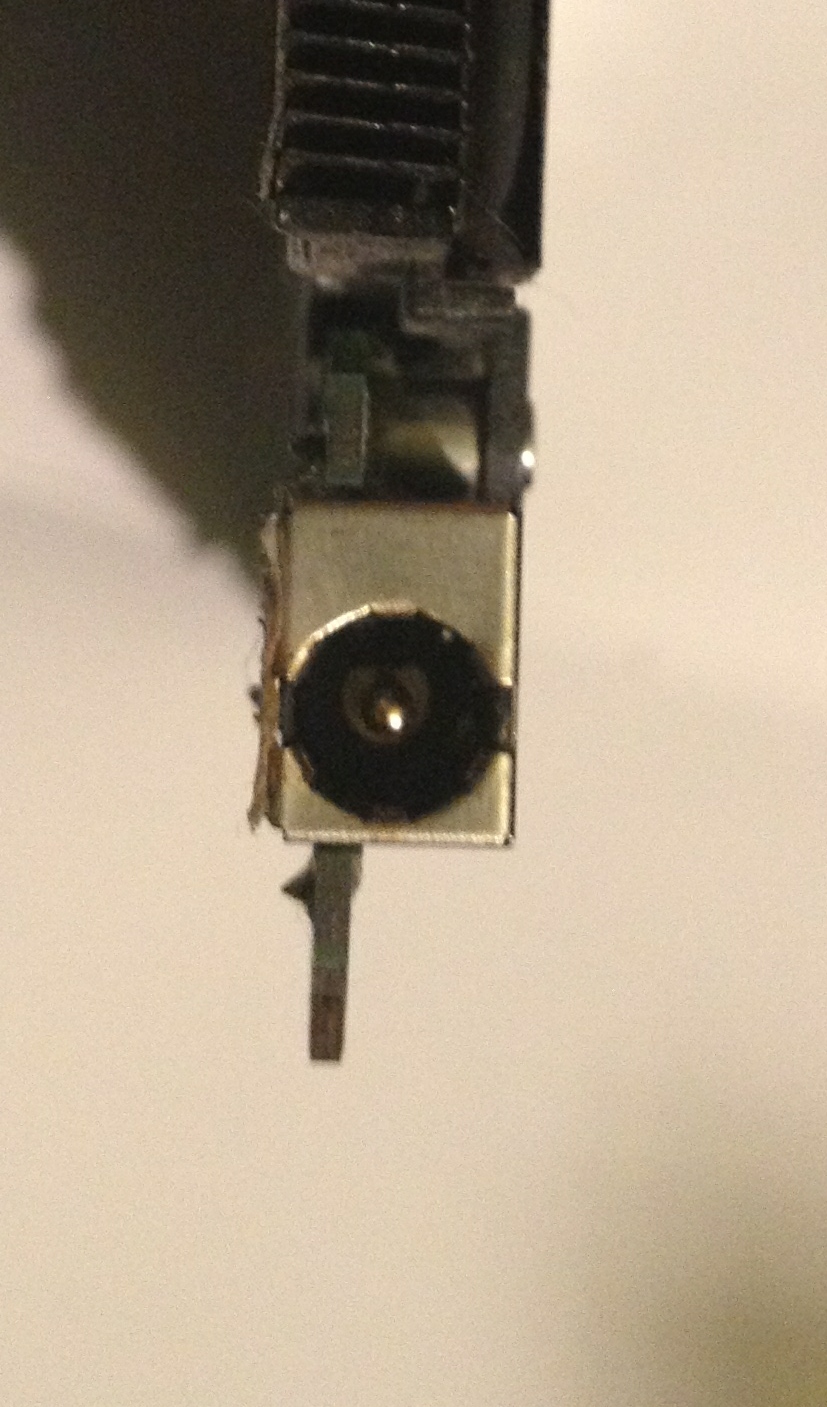
Ok, I need help. I have a 1410 and its been a great machine for the last 2 years.
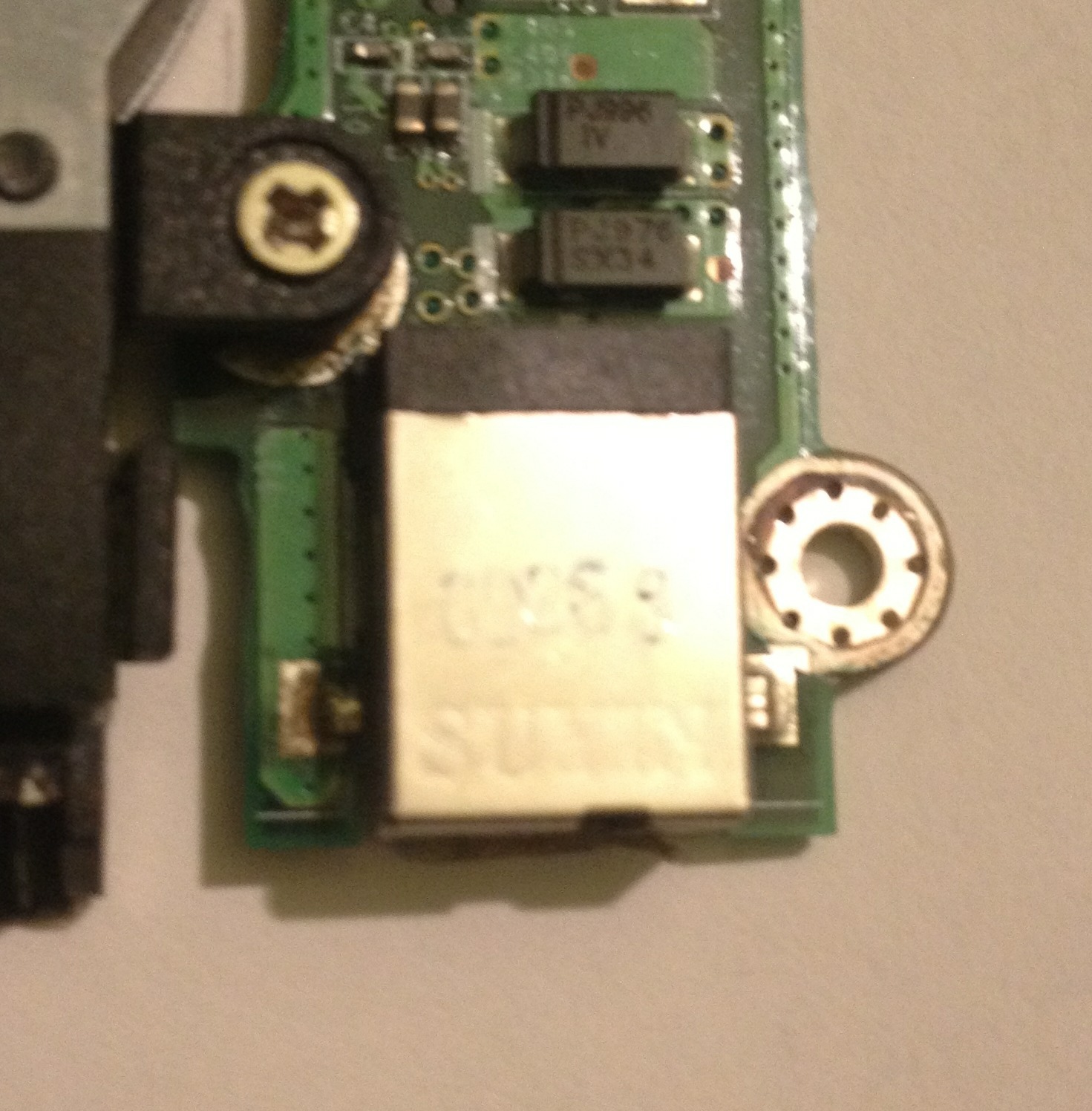
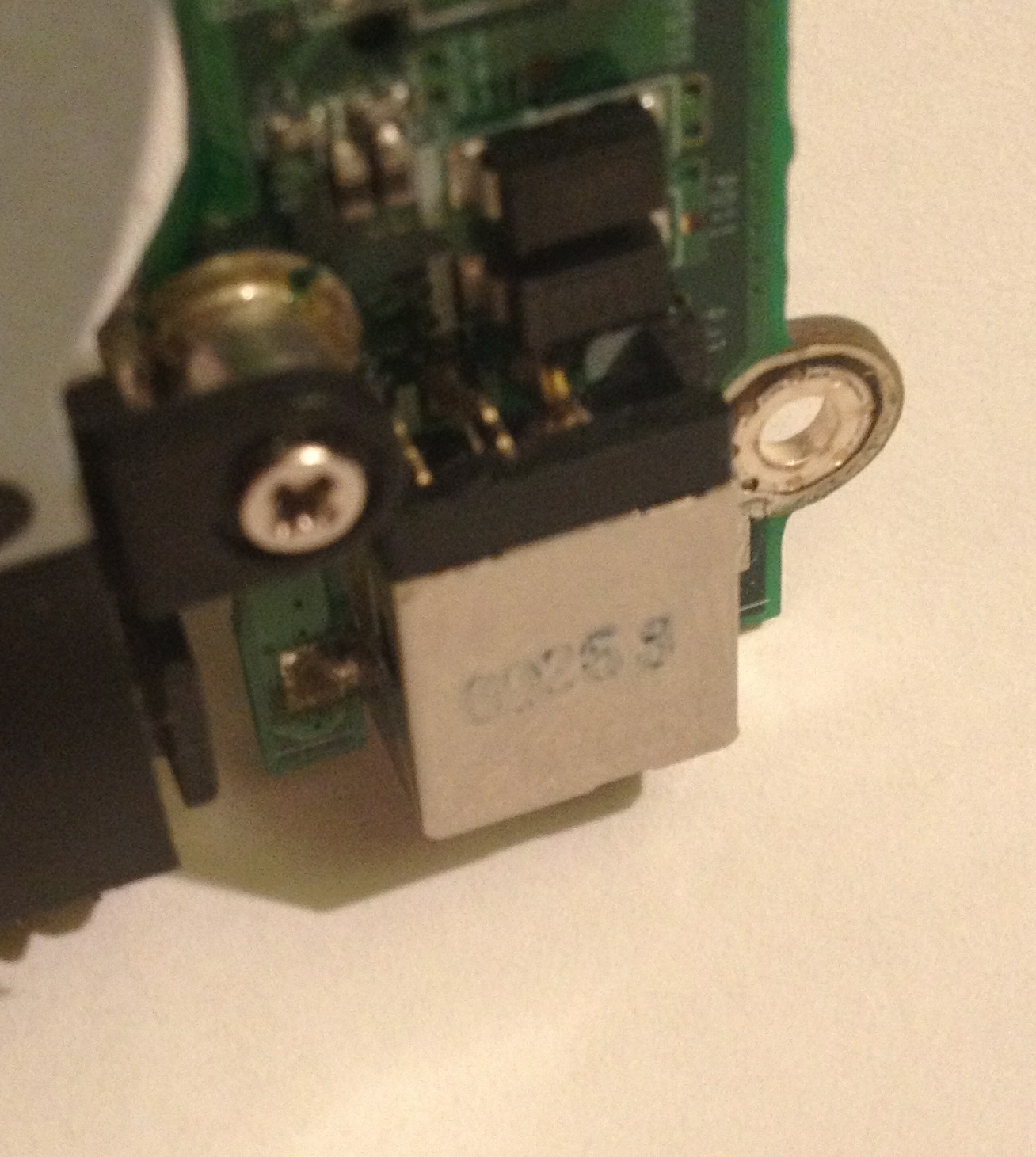
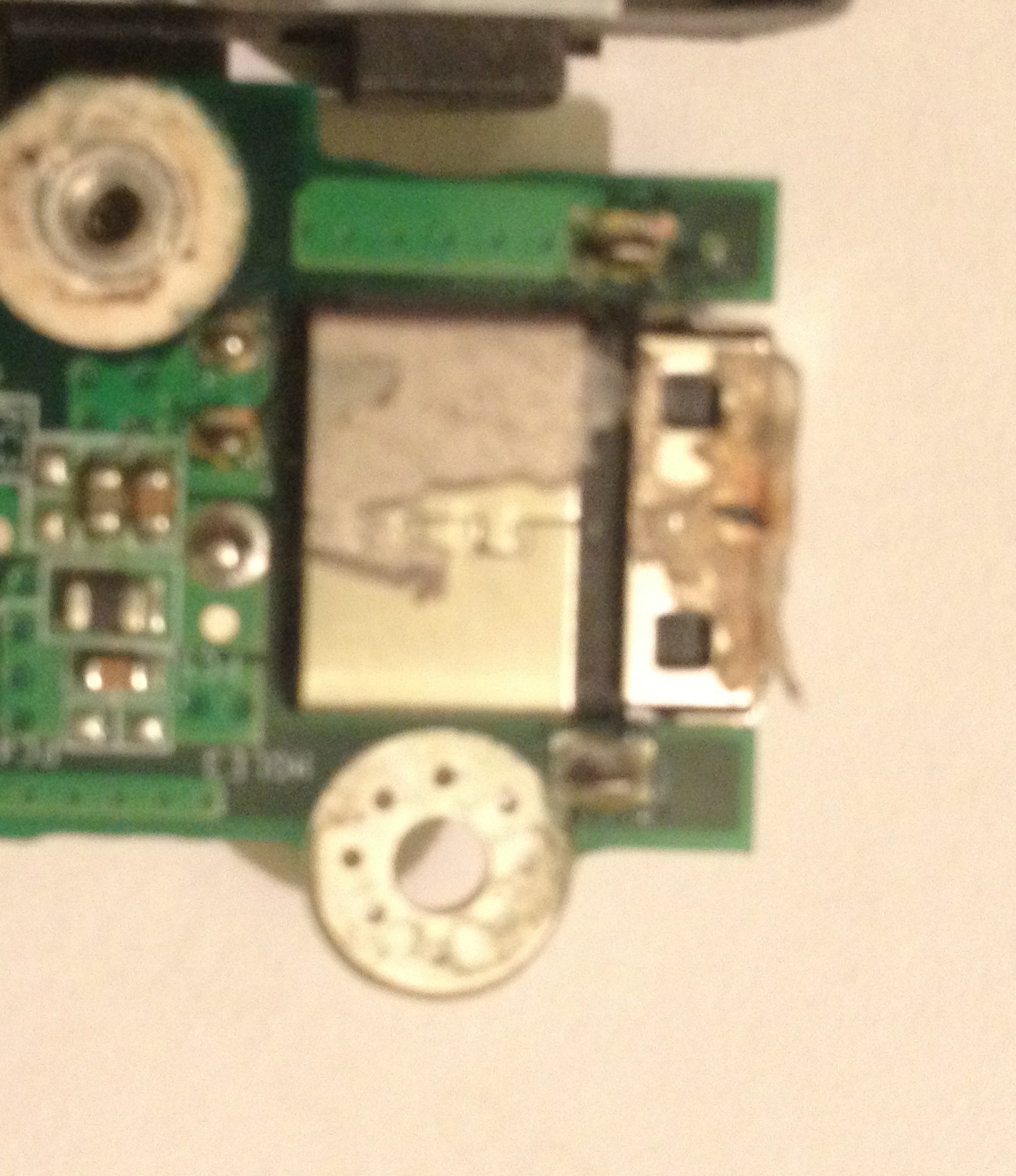
Perfect speed/weight/size ratio. BUT I now have a dc jack issue. The powercord has to be shifted to just the right spot to have it charge. I have several ac adapters and its definitely the dc jack on the motherboard. I took it apart and tested with a multimeter and see lack of continuity if I wiggle the center pin on the jack. I'm fine with a desolder and replacement of the jack but i cant find a the correct dc jack unit.
Attached are 4 pics of the original jack.
Ebay has one link that might be close but still seems off to my eyes.
Acer Aspire 1810T/1680/1410 65W 1.65mm Pin DC IN Jack | eBay
Type A
Can't find any websites to order from either.
Can anybody point me to a replacement dc jack? I need to replace the battery too but no reason to order a battery till i have a way to charge it.
thanks
dale -
I tried installing a graphics driver update from Intel today on my 1810T and during the install my screen went completely black. Usually it blinks on and off a few times, as with any graphics driver update, but this time it just stayed black after a minute or so. It's been about ten minutes so far, not sure what I should do.
Any ideas? -
Hello,
I have an Acer Aspire 1410. (SU3500, RAM 2GB DDR2, HDD 250GB, Intel HD Graphic card)
On windows xp battery life is shorter than on windows 7?
battery keeps me on windows 7 home premium 6 hours, but on windows xp only 3 hours.
Do you know what could be the problem?
Sorry for my bad english.
Good day!
Acer Aspire 1410 and 1810 Timeline 11.6" Thread
Discussion in 'Acer' started by ohiomoto, Oct 9, 2009.