 Problems? See this thread at archive.org.
I tried to boot pc from tftp server to install OS but it didn't boot up. I've searched about it, everyone says PXE rom doesn't work properly.
I have Intel Core 2 Duo T5600. You can see the error message.
Thanks for everything!
![[IMG]](images/storyImages/8Bewc.jpg)
![[IMG]](images/storyImages/Pk6q3.jpg)
-
That is normal warning message when you select VT-x. That is not error.
Regarding flashing BIOS, use dos version (phlash16.exe) instead. You will need to prepare DOS bootable disk. Remember, PBE can produced bad image sometime. I usually build the image 2 to 3 time & make sure all of them identical.
EDIT:-
To use "Virtualize Intel VT-x/EPT or AMD-V/RVI", you need to edit .vmx file & make sure these lines exist (source: [SOLVED] Virtualised Intel Vt-x/Ept requres execution mode ):-
Setting "Virtualize Intel VT-x/EPT or AMD-V/RVI" in hardware settings alone doesn't work, it will revert to monitor.virtual_mmu = "software". I only tested this on my Dell though.Code:monitor.virtual_mmu = "hardware" monitor.virtual_exec = "hardware" vhv.enable = "TRUE" monitor_control.restrict_backdoor = "true"
-
I already edited vmx file before but when I powered on the vm it told me "doesnt support Vt-x" bla bla... Anyway I will reinstall Vmware 8!
Thanks for everything again. -
"Virtualize Intel VT-x/EPT or AMD-V/RVI" require processor that support Intel VT-x/EPT or AMD-V/RVI. Intel only started to introduced Extended Page Tables (EPT) since Nehalem architecture. Intel Core 2 Duo T5600 only support VT-x, not VT-x/EPT. So, you can't use "Virtualize Intel VT-x/EPT or AMD-V/RVI" because the lack of EPT technology in T5600. With T5600, you can select "VT-x or AMD-V" in VMware.
-
You can install 32-bit guest OS without VT-x. 32-bit guest OS will run just fine.
-
he should put preferred mode on AUTO instead of specifying it...
That will always come out best. -
will be any differences with or without VT-x?
-
From naked eye, with older processor like yours, there will be no difference in term of performance.
-
Hi Kizwan, I couldn't import the gpxe rom into Aspire 9420 1.24 R9 V4 (this is the latest bios mod I could find) PBE is reporting offset error. I would appreciate if you could import the gpxe rom to latest Aspire 9420 in your free time.
-
Where I can find the latest PXE rom?
-
gpxe-1.0.1+-10ec8168.rom
here is the gpxe rom for aspire 9420 (realtek 8168)
thanks a lot kizwan -
Hello. Help me to set the frequency of the clock through the BIOS. I am able to successfully overclock a prograummu SetPll (SLG8SP585), but it should be done every time the laptop and set the frequency of 1MHz.
From the BIOS via SM-BUS installation registers are set when you turn on the clock, but there are only 13. Registers frequencies - 15,16,17. How do I modify the BIOS?
Make out a firmware phoenixtool191.
Looked through the bytes of WinHex. The files 30303030-3030-3033-0000-000000000000.pei and BB.bin
![[IMG]](images/storyImages/30d5ef7b2020t.jpg)
Located repeating sequence of numbers that can be seen through the SetFSB.
![[IMG]](images/storyImages/05835a29f6f8.jpg)
Help me please.
Aspire 5740G Laptop
Sorry for my english -
The new ROM doesn't work. Error after flash.
![[IMG]](images/storyImages/15022012440.jpg)
Sorry, I can't help you.Last edited by a moderator: Feb 6, 2015 -
There is nothing to do

Thank you for trying Kizwan -
Hi there, Ive got an Acer Ferrari One, and im running ubuntu 10.10, however it wont let me use cpu scaling. I've tried lots of things, and the only solution I've found was flashing a modded BIOS (for and Acer Gateway, which uses the same processor). Can this be solved modding the Ferrari's BIOS?
Thanks! -
oh..so sad...btw, tq for give try n help me..
-
What do you mean by "cpu scaling"?
-
New Infos?
-
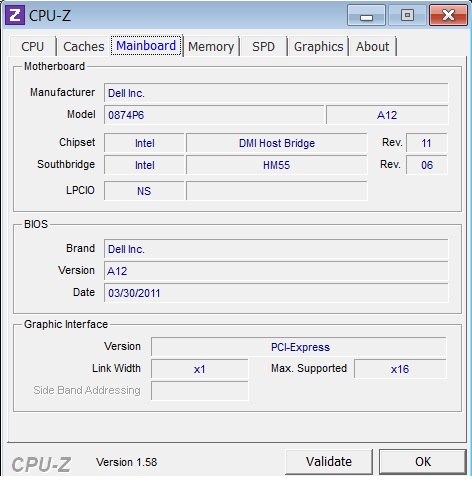
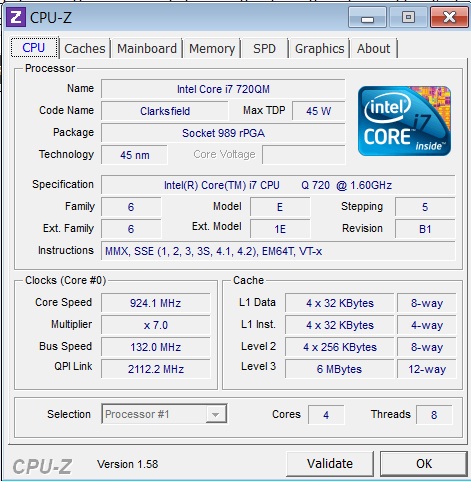
Hi, kizwan. Hope you can help me with a hyperthreading problem I'm having on my laptop. HT was already enabled when I bought it, but when I went to check the BIOS set-up menu for an option to disable it, it wasn't there. I'm fairly ignorant about the hardware side of things, so please excuse the layman.
My laptop configuration is very similar to yours (Studio 1558, Intel Core i7-720QM) and I've attached two screenshots taken using CPU-Z, with CPU and Mainboard tabs opened. Please let me know if you need any further information.
Here's the latest official Dell BIOS - http://downloads.dell.com/bios/R301434.exe
It didn't fix the HT problem, and given that the 1558 was discontinued, official channels don't hold much promise. Many thanks if you find time to look into it..Attached Files:
-
-
Hi, can someone mod a bios for my Acer 5315 to enable the VT? I have a T7300 and cant find where to turn it on, here is the link to the original bios if someone can modify it to include VT please
http://global-download.acer.com/GDF...ep3=Aspire 5315&OS=722&LC=en&BC=Acer&SC=AAP_9 -
No. I don't have much time to look into this.
Hi,
You can set number of cores using msconfig > Boot > Advanced options... > tick "Number of processors" > set how many cores you want. Or you can use modded BIOS: http://forum.notebookreview.com/7091490-post1473.html
Each time you change any settings in "CPU Control Sub-Menu", make sure you do like this:-
press F10 > "Save & Exit" > before windows load, shutdown computer > after several seconds power on your notebook again.
On my 1557, if I didn't exit "CPU Control Sub-Menu", when selecting "Save & Exit", my notebook shutdown automatically. I believe this is also true on 1558. I find this is appropriate action when enabling/disabling HT, cores, VT-x, VT-d & Turbo Boost. -
5315 = 5720 = 7720, electronically at least. Use Black Edition or MXM Edition to get the VT option.
-
Would this be a download? Cant seem to find any download link
-
Hi all,
Unfortunately I suffered a bad flash (9423wsmib). So I tried creating a crysis disk on a different laptop. But I went against all advice, 4gb flash drive on a windows 7 32bit system.
When the flash went wrong it gave an error advising me to reboot with the crysis disk. Two strange things. The laptop wouldn't turn off (had to pull the plug an battery) and now it doesn't do anything when pressing the power button. Is this normal? It doesn't do anything even when inserting the crysis disk and using fn+esc.
For troubleshooting purposes.
Is it normal the power button doesn't work (might it be broken)?
Does it matter that much that I used windows 7 and a 4gb flash drive?
Or am I screwed? -
Hi Guys/ kizwan
Can someone please mod this bios for me to enable the VT and/or other settings as well? http://global-download.acer.com/GDF...ep3=Aspire 5315&OS=722&LC=en&BC=Acer&SC=AAP_9 -
Hi,
For BIOS recovery on Aspire 9420 series notebook, you need to use floppy disk. This means you need USB floppy drive. BIOS recovery will not work with USB flash drive. CRISIS package for Acer Aspire 9420 is available in BIOS Recovery section.
If notebook doesn't powered ON at all, LED indicators & fan remain OFF, basically no sign of life at all, you will not be able to do BIOS recovery. Removed both battery & AC adapter, press the power button for 20 seconds, plugged in AC adapater only & try power ON your notebook again. You also might want to try removed the CMOS/RTC battery too (notebook disassemble is required). -
kizwan, thanks for the link, the modded BIOS worked like a charm
-
After posting "Requests" to have bios modded and only one not so useful reply. I have gone and modded my own Bios, That's right me a beginner have taken the 1.45v bios for my Acer 5315 - hence the username and have gotten hold of an editor and done the change, Now my Bios has VT enabled as well as some useful features that I will later explore.. So rather than waiting until Christmas I have not only learned something new but did it myself
-
Any chance of modifying Acer Aspire 7739zg BIOS to enable integrated graphic advanced options? Notebook has intel integrated and discrete nvidia 520m graphic. Integrated cannot be switched off and it is constanly consuming 1024mb of ram. Hence I cannot use winxp and half of ram
-
Aspire 7739ZG have Insyde BIOS. Sorry, Insyde BIOS is not supported here. This is Phoenix BIOS thread.
Please go to BIOS-MODS. -
Sorry for not replying earlier. You should know from the thread title, you're in the wrong place since your notebook have Insyde BIOS. You also did open a thread for your issue here: http://forum.notebookreview.com/acer/647777-need-bios-mod-enable-vt-acer-5315-a.html#post8335940
-
Kizwan you are my hero! The 20 secs trick worked and the laptop shows signs of life! What does this 20 secs thing actually do?
I am not out of the woods though. And my latest quess is that there is still something wrong with the bios.
The situation right know:
The laptop boots and does post.
It tries to load windows but hangs after the animation. The hdd led comes on very short.
After a failed boot it asks to repair which also fails.
I can enter the bios (no advanced menu, that is supposed to be there right?).
I can enter the safe mode list. But no option worked.
When trying safe mode it hangs on an avg sys file so I suspected a corrupt os.
I can boot ubuntu from a flash drive. I delete some avg stuff and when booting into safe mode it gets past these files but hangs on classpnp.sys. Seems to be a known problem with a lot of causes and few solutions.
Back in ubuntu I can access all file on my hdd so that is fine. I am trying to make a bootable windows 7 flash drive but I am struggling. There is no real good software to do this on linux. I read somewhere that a drive with a boot flag and all files should work as well. Well it boots and loads all windows files but once again hangs on the animation. This is very strange in my opinion. Why would it load ubuntu from a drive but not windows 7? Tomorrow I am trying to make a proper flash drive.
And I have some strange observations:
First of all the power on led keeps blinking from green to orange and the battery led from orange to off. It even continues without the green when the laptop is off and there is still a battery or ac present. This is also true for the leds from usb drives.
Last but not least I tried the crysis disk I made on a flash drive and it is recognized as a crysis disk when booting. But it does nothing and advices to reboot the laptop.
Any suggestions, maybe trying to flash a good bios again? -
Almost fixed it! It actually was the bios. After wasting huge amounts of time to figure out how to get this windows 7 bootable flash drive build on Ubuntu I had to spent even more how to do something simple like making a dos flash disk. I really need to start learning about linux.
But long story short a flashed the bios with the stock v1.24 as supplied in the crisis pack. After that all lights went back to normal and windows booted. Had to fix some files and reboot a few times but everything seems okay.
Except one little nuisance which I vaguely remember. My bluetooth switches on when windows starts loading. After the launch manager is loaded it is switched off again. But after a minute or 2 it switches on again (automatically). I can switch it of using the hardware button but it will go on after a few minutes. I find this very annoying. Is this a bug in the bios? And is it fixable?
And while I am at it what kind of goodies can I unlock in the bios to give my old work horse a little more power? -
One of the older modded BIOS for Aspire 9420 does automatically turn ON bluetooth if OFF. Back then bluetooth is not detected in linux. So, I modded the BIOS to automatically turn ON bluetooth when OS loading. The side effect is bluetooth will automatically turn ON after several seconds turning it OFF. Latest modded BIOS don't have this function anymore (back to default).
Modded BIOS only contain VT & keyboard related menu, nothing else. You can overclock CPU using SetFSB or SetPLL. The latter is free.
The "press power button for 20 secs" method is for clearing any residual electric charges. These residual electric charges are to be believe causing notebook to behave improperly. -
But you would expect different behaviour of the bluetooth device on stock bios?
-
With stock BIOS, bluetooth should behave like normal. Meaning, if it OFF, it will remain OFF.
Try check DSDT on your notebook. Download iasl.exe. Open command prompt window & enter this:-
Open dsdt_xxxxx.dsl file with text editor & search for:-Code:iasl.exe -g
If " Method (_Q3F" contain two store command like this:-Code:Method (_Q3F, 0, NotSerialized)
it means, somehow the modded DSDT from modded BIOS you tried earlier is installed in registry. These two store command are the one responsible automatically turn ON bluetooth. The _Q query methods are always executed when called by embedded controller. That's why it seems like looping, meaning when bluetooth is turned OFF, after several seconds, it ON again, indicating the store command is executed.Code:Method (_Q3F, 0, NotSerialized) { Store (One, BTEN) Store (One, BTLD) } -
My read out is this:
It is a bit different. So how do I solve this? Do I find this registry key and delete it?Code:Store (One, BTEN) Store (One, BTLD) HKEY (0x3F) -
If your notebook already flashed with stock BIOS, the only solution is to reinstall windows. I'm afraid there is no alternative.
Strange though. It should revert to original DSDT when you flashed with stock BIOS. Try latest modded BIOS at post #12 (MOD_R9_4). -
It seems to be solved now. I tried the modded version and it kind of worked. The bluetooth module stayed off and the button worked. Two things were different though when enabling or disabling instead of the green lettering a window appears with a checkmark. And when the laptop wakes up from sleep the led goes on. After pressing onces the module is turned on and the led remains on. Pressing again will turn the bluetooth module off and also does the led. The dsdt output:
To learn a bit more I flashed the same stock bios file again and the error (bluetooth remaining on) is reproduced. These bios files I extracted from your crisis .rar's. Now I noticed there are two: one on the bottom of the first post and one in the middle. I can't remember which is which but I had both files on my usb drive so a flashed the other one. The issue seems resolved now. Bluetooth behaves as expected. The dsdt output:Code:Method (_Q3F, 0, NotSerialized) { Store ("Debug _Q3F", Debug) HKEY (0x3F)
To me it remains strange why this HKEY (0x3F) is still there. But also that there are two different bios files.Code:Method (_Q3F, 0, NotSerialized) { HKEY (0x3F) }
Anyway I am very happy again and I thank you very much.
Oh before I forget when I flashed the modded bios the menu seemed exactly the same as before (and after). -
" HKEY (0x3F)" is exist in stock BIOS. For the modded BIOS, you should use the first one in post #12. Does your notebook have VT capable processor? If not, VT menu will not visible. When you said stock BIOS, where did you downloaded it?
-
Kizwan:
As per my annoying PM, here is the BIOS as "untouched" as possible.
I realize that the actual BIOS file is probably what you wanted but I figured when you said "untouched" you wanted it as pure as possible, so here it is, straight from Gateway!
http://dl.dropbox.com/u/9529502/BIOS_Gateway_9C.23.00_A_A.zip
In the case you only wanted the .WPH file as extracted from the zip:
http://dl.dropbox.com/u/9529502/IMV-041.WPH
Either way, I appreciate anything you can do to it to unlock/unhide/enable hidden menu's/options/visuals! (Oh, and IDA ), when it comes to setting up a PC/System, I am a FREAK in that I try to tweak everything as far as I can, even so far as unplugging the WiFi switch (on my P-7805u) to disabling firewire and the extra SATA channels in device manager
If I could do more, I would!
EDIT: so yeah, not Acer, but Gateway P-7805u, any unlocks, enabling, updates possible, much <3 -
Hi,
Please can You help me, my laptop is not Acer but has a Phoenix bios, can please mod my bios by adding a microcode support for Intel T7300 SLA45.
My laptop is Toshiba Satellite L500-1EN. The previous CPU was Intel® Celeron® Processor 900 SLGLQ
The latest Bios is
http://support1.toshiba-tro.de/tedd-files2/0/bios-20100629135948.zip

-
hi,
can anybody help me to unlock hidden menus and efi for an acer 1810tz?
latest BIOS (3314 with slic) download: 1810tz.zip -
OK. I'll modded your BIOS later.
Please post the exact error message. The one when you need to press F1 to continue. Please check T7300 SLA45 CPUID using AIDA64 (Motherboard > CPUID > CPUID Revision). I want to confirm T7300 SLA45 CPUID is 06FAh.
Your notebook have Insyde BIOS. Sorry, Insyde BIOS is not supported here. Please go to BIOS-MODS. -
Hi, Mr. kizwan
thank You so much for Your fast answer here is the info that You requested:
The message is:
02F0: CPU ID : FA No Microcode Update Loaded for Alternate Processor
Press <F1> to resume, <F2> to Setup
For T7300
CPUID Revision 000006FAh
For T7500
CPUID Revision 06FBh
I just adjured CPU T7500 and planing to put it in the same laptop next week, so please be so kind to add microcode for him too or if it not possible to add two microcodes just for T7500
Thank You very much for the assistance
-
I'll see what can I do. I'll let you know later.
-
Does anybody can help me how to restore the Bios of my Acer Aspire 4736Z. i think the bios crashed/brick. tried to update it but the laptop suddenly shutdown, now when i turned on the laptop it shows only "Black Screen".
-
This is modified BIOS for Gateway P-7805u. It's based on BIOS_Gateway_9C.23.00_Windows_P-78. Use at your own risk!
Gateway P-7805u BIOS 9C.23 EIST MOD.rar
( MD5: EA0DADB42C1BD02225C4DE9676A68EE5)
Changes:-
- Unlocked Intel section
- Unlocked Enhanced Intel SpeedStep Technology (EIST)
For enable dual-IDA mode using ThrottleStop.
![[IMG]](images/storyImages/GatewayP-7805uBIOS9C23EISTMOD1.jpg)
![[IMG]](images/storyImages/GatewayP-7805uBIOS9C23EISTMOD2.jpg)
Please make sure your notebook can recover corrupted BIOS with CRISIS disk before flashing BIOS with this modified BIOS image. I will not responsible for any problem. Good luck.
Last edited by a moderator: Feb 6, 2015 -
This is modified BIOS for Toshiba Satellite L500-1EN. It's based on bios-20100629135948\BIOS210. Use at your own risk! Please give feedback!
Toshiba Satellite L500-1EN BIOS210 CPUID 06FAh 06FBh MOD.rar
( MD5: 85A1088B0ABC93868E635C33052C0541)
Change:-
Added support for processors with CPUID 06FAh & 06FBh.
[ Replaced Microcode Update for CPUID 0001067Ah (2000h bytes) with CPUID 06FAh (1000h bytes) & 06FBh (1000h bytes).]
Please make sure your notebook can recover corrupted BIOS with CRISIS disk before flashing BIOS with this modified BIOS image. I will not responsible for any problem. Good luck.
Acer Laptop with Phoenix BIOS: BIOS MOD Request
Discussion in 'Acer' started by kizwan, May 3, 2010.


![[IMG]](http://radikal.ru/F/s017.radikal.ru/i403/1202/51/30d5ef7b2020.jpg.html)
![[IMG]](http://i1236.photobucket.com/albums/ff457/Kizwan_Chronos/15022012440.jpg)




![[IMG]](http://i1236.photobucket.com/albums/ff457/Kizwan_Chronos/GatewayP-7805uBIOS9C23EISTMOD1.jpg)
![[IMG]](http://i1236.photobucket.com/albums/ff457/Kizwan_Chronos/GatewayP-7805uBIOS9C23EISTMOD2.jpg)