Problems? See this thread at archive.org.
you need to make sure you use an OEM version of the installer, otherwise if it was retail or msdn copy, it would not work
-
You might want to check out this guide. http://forum.notebookreview.com/6465732-post1612.html I would stay away from Torrent W7 Images as they many not be perfect. Use the W7 official Images and you can be confident that there is no nonsense. You can input the laptop's keycode and use the phone authentication.
Bronsky
-
Anyone able to chime in on this? This thread has a lot of posts and I can't go through every single one of them...
-
install drivers that are found on the support page of acer website and you should be able to maintain all of those hardware key shortcuts.
-
Which is the driver for FN+F5 to working, to change to dualview?
-
Launch Manager ?
-
+1 it is Launch Manager
Note: The latest Catalyst drivers will likely break the brightness controls when using the ATI GPU. -
hi guys
i wanna change my 750 gb 5400 HDD with a 7200 rpm or better with a SSD...
may i have the impressions by who has made thing change before???
it increases noticeably the reactivity of the entire system???
thanks -
The SSD would make the system have better reaction, the 7200rpm don't or at least not really noticeable....
-
An upgrade to SSD is probably the best money you can spend on your Acer if you don't need a ton of storage. I use a 120 GB SSD and a 500 GB 7200 extrnal HD.
Bronsky
-
Hello everyone, I am new to this forum and have a little issue that I hope you guys can help me solve. I recently purchased this 3820TG laptop and have been quite satisfied with it up until a couple days ago. Problem is when I try to wake it up from sleep/hibernation mode the screen stays black. I am having to close and flip open the screen in order for it to lit up again. Also I am unable to adjust the brightness of the screen after sleep/hibernation mode. Help is appreciated, thanks.
-
Hi. Please don't mislead people. 6550 has a 50Mhz higher Core clock and more voltage. It's different from 5650, albeit not by much. It's faster out of the box and overclocks better because of the higher voltage.
Also, what's with the tone. Isn't LOL something 10-year old socially inept world of warcraft players use? Chill out a bit. There's no need to be rude.
i3-370M and i5-480M are not the same. i5 features Turboboost, i3 doesn't so it's 2.4Ghz vs 2.93Ghz on the i5 with TB enabled. That's a bit of a difference in my book.
-
He wasn't misleading anyone- the statements was "The 6550 and 5650 are the exact same chip" which is true.
All in all both facts are accurate about 5650 and 6550 being the same chip and about i3 having HT.
Whereas your comment on use of "LOL" is rude and is a poorly disguised personal attack.
I suggest you chill out a bit and while we're at it don't multi-post. -
hey guys, long time reader of this thread, though i havent read it all, i dont think anyone has touched on this.
Would intel's new msata ssd 310 ( link) fit in this slot: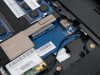
I assume this slot is for a bluetooth adapter, so i dont imagine it's gonna go at sata3 speeds, but would it work? I'd love to have a dedicated 80gb drive for steam games on my 3820, as my 128gb kingston isn't big enough. -
I've been having some minor problems myself with switching between laptop and standalone display when opening / closing the lid, resuming from sleep / hybernate etc.
Have you tested this with the Integrated and Dedicated GPUs separately? As in switch to Intel, hybernate, switch to ATI, try again. You could also change Switchable to Dedicated in BIOS, unistall ATI drivers and try hybernating again before installing new ones to see if it's software related.
Hope this helps. -
No, it will not work.
-
very concise. why?
-
Hi Fabry. It's not worth the trouble switching to a 7200 rpm. You will hardly notice a difference. Plus, it's 750GB on a 5400 rpm which means the data is packed more densely and therefore your HDD is faster than a lower-capacity 5400.
I've gone straight for an OCZ Vertex 2 SATA II 240GB with the following specs:
Read Speed Up to 285MB/sec
Write Speed Up to 275MB/sec
Sustained Write Up to 250MB/sec
After all I've read about SSDs I was expecting a miracle. There is definitely a difference but it isn't ground-breaking. A few facts:
- installing Win 7 took about 10 minutes? It was really fast, I was in shock
- system starts up and shuts down almost instantly. 10-11 seconds from switching the laptop on perhaps? It's very convenient if you restart a lot, otherwise I think the original hdd is fine
- apps such as Firefox, mail, Office etc. load instantly as well, again very handy if you use them a lot or run a lot of apps at the same time
- everything is generally faster and smoother, the difference isn't night and day though. the lappy was pretty fast with a regular HDD anyway
- loading games still takes time. I tried Empire total war which has a lot of loading screens and I was expecting more of a boost than I actually got. It's faster, but far from as fast as it should be
- my SSD benchmarks on average 30MB/s slower than manufacturer's specs
- I've not seen much improvement in battery life, but the lappy seems a bit quiter with no HDD spinning
- 3820tg only supports SATA II up to 3 Gb/s so don't go spending on the latest SATA III SSD, you won't get the benefits
Overall if you want a general boost across the board and have the money to spend, go for it. Otherwise a standard HDD should be sufficient
Hope this helps
-
This is probably a long shot but have you got comodo installed? Because when I first installed comodo and pressed the screen off button and went to turn it back on the comodo defence+ was stopping it from being allowed to turn the screen back on...sort of like a UAC thing...I only knew because the light was shining on it and I could just about see the screen just the light wasnt coming on....
-
yea i installed a fresh copy of windows and i installed the synaptic drivers from the acer site
-
Read the paper of the SSD (section 5.0). The slot must have a special design to support the sata signal on a few pins. The standard on doesn't work.
Full ack.
I have done the same upgrade
-
Some users are reporting that the screen flickers when running off the battery.
All rights I'll give that a try once I'm doing homework. Going to make an image of it first though. Hopefully Acronis works.
I have a WD Blue 640GB (WD6400BPVT) hard drive that spins at 5400RPM. Does anyone know how good it is compared to the one in the AS3820TG-7945, which I believe is a Hitachi HTS545050B9A300? I'm hoping it's faster in terms of read and write speed so that it's worth the hassle of switching them out, but the specs seem to be the same. -
That sums it up really well. I expected a slight increase in gaming but I didn't see it. Just install times and load times were improved.
I'm still on the fence about upgrading from my I3 to an I7. There's a seller on e-bay with a QS (not ES) I7. I was debating an I5 but I think I'm going for as much stock power as possible because I'm just not interested in overclocking the thing. -
How about things like level load times in games? Can you feel a difference in how long that takes? Because in games like Crysis it can take a while to load the next scene.
-
Thank you for posting this comprehensive review of a SSD from a everyday use / practical perspective. I found it quite informative and pertinent.
I repped you +1 point for taking the time to write your post. -
Hey, thanks for the reply but since I'm a rookie when it comes to tweaking around computers. What exactly do you mean by switching to intel hybernate then switch to ati and aswell as the switchable to dedicated in BIOS?
Hello, no I do not have comodo installed but thanks anyways. -
Just wanted to inform you guys that I have brightness control working with the latest Catalyst drivers. I guess it has something to do with the order that I installed the drivers in, since I did something differently compared to the last time I updated the drivers, last time I lost the brightness control.
-
What!? I thought Comodo Firewall was fantastic?
-
Hi! Please how can i completely clean the video card drivers? CCC and switchable is not working for me and i've tried a lot of things :S
-
Alright, so I took apart my laptop and put it back together to see if that would fix the blank screen.
However, now the blue light that indicates power simply slowly blinks, not turning on fully.
Does anyone know what this means? -
Hi, apologies for using so many shortcuts! Here's what I'm proposing you do:
If your GPU drivers are correctly installed, you should be able to right-click on the desktop and select a 'manage graphic cards option'. I'm not sure what it is exactly, but it's the one that allows you to choose between your inegrated Intel GPU and dedicated ATI GPU.
On that selection screen, choose the Intel integrated GPU and Apply. Screen will flash and your laptop will switch to integrated graphics mode. It won't let you play any games but battery life will be much improved. Once the Intel GPU is selected, try hybernating and putting your laptop to Sleep mode. Test if it works correctly.
Assuming it works as it should, go back to the GPU selection and pick ATI dedicated GPU. Apply settings and test sleep / hybernation again. If it doesn't work this time, there's a problem with your AtI GPU or drivers.
The last bit, is to go into BIOS (press F2 as your laptop boots, you have to be quick.
Find the option that says graphics mode - switchable and change it to dedicated / discreet. This will disable the Intel integrated GPU and run your laptop only on the dedicated ATI 5650/6550 chip. Once you're in Windows, download the stock AMD / ATI driver from Acer website (there are links on the first page). Run the installer, choose to Unistall the drivers, reboot your PC. After reboot your resolution should be much lower (everything will be bigger) because your AMD / ATI driver won't be installed. Test your sleep / hybernation settings then. Finally, run the AMD / ATI driver installer you downloaded again and install the driver. Reboot your PC, test hybernation / sleep again.
If everything works as it should, enter BIOS again and switch the option back from Dedicated to Switchable.
Remember to always switch to Intel GPU when you need more battery life.
Good luck! -
Run the uninstaller for ATi Catalyst Install Manager and choose express uninstall. Then restart. After restarting, go to device manager and expand the display tab, right click on both the ATi Mobility Radeon HD5650 and the Intel Graphics Media Accelerator HD and uninstall both of them. Restart again. Then go to control panel, uninstall the ATi Catalyst Install Manager again, select express uninstall. Done Wonder why AMD makes it such a pain in the to uninstall though, even when you select uninstall display driver in the uninstaller, it does not remove the driver :/
-
Hi there. I'm not sure how to clean the Intel integrated GPU driver, or if it's even necessary (never was for me and I tried a lot of ATI drivers to find the best one).
To wipe out everything from ATI, follow this procedure:
1. Set your graphics mode to Dedicated in BIOS
2. Use ATI driver installer to Uninstall the current driver (choose the uninstall option)
3. Run an app called Driver Sweeper. Select ATI, select Analyse, tick every ATI driver found that you want removed, select remove. Reboot PC when asked.
4. When you boot back into Win7, your ATI / AMD drivers will be completely wiped out. Do what you want at this point, install stock ACER driver or the newest 11.1 from ATI
-
It's in sleep mode.
-
thank you very much about the SSD infos,
i'm very tempted purchasing...
a brand and model raccomended??
my 750 gb HDD will be on an external 2,5" usb box!!! -
Ha ha well I just finished copying everything onto my original 750 GB HDD, it's become my external USB backup drive like you say.
For brand / model, I would personally recommend OCZ Vertex2, not tried the other ones though. One thing to always check is the interface, you want to buy a SATA II drive (not SATA or SATA III which the 3820tg doesn't support).
SATA II drives tend to have a '2' included in the name so look out for that, then check Read/Write/Sustained Write speeds. For a SATA II drive, they should be around 270-280 MB/s. SATA III drives go up to about 335 MB/s but our laptops don't support that unfortunately :-(. -
Thank you Spartan and Too!
I've mixed your answers and did everything
I hope it's clean now
But, if i want switchable and 11.1 ati driver too. should I install acer driver first and then the ati in discrete mode? And there are two acer ati drivers. An older and a newer
Which is better for installing 11.1 after?
Hmm i've found a "new" (december 22) driver in the 4820tg and 5820tg -s downloads I give it a try, but why didn't it appeared in 3820tg?:O
Oops sorry for the double post and thanks for the edit :$ I just didn't noticed :/
...
It's still the same. When click on the graphic propertires (which should be CCC) it starts the ccc but i can check it just in taskmanager and on the waiting cursor for alitle time. When i unlpug the notebook, it just dims but not switches And i cant start the switchable graphics config too. It starts a new ccc.exe in taskmanager for 1-2 seconds.
Attached Files:
-
-
It is fantastic! But they have this other thing called defence+ bundled with it...part of the firewall package and its kind of like UAC/ It asks permission before it allows anything to run. It can be easily disabled though.
-
Hey I got 9315 points in 3Dmark06 with 430m at 3Ghz with Turbo, and GPU 681/1055
Tomorrow i'm going swap the 4gigs at 600mhz of ram with A-data 8GB 1333(1060mhz working) and see whats we'll be the difference in score
-
what I did to get mine working
had stock
installed acer drivers fom nov 2010, HERE -->> Acer Support: Drivers & Support Documents - Notebook / Aspire / Aspire 3820T
go into bios switch to discrete
install 11.1
switch back to switchable
everything fine -
I've installed the same driver :S okay now i try 11.1 but i don't think that it will work.. :S
-
yeah, a 750 gb ext HDD is very handy!!
so the ocz vertex 2 is the more qualified, it has something more than the other brand and models?? -
@MadeOfSaint
Which PLL definition are you using with your I5-430M? Are you able to use the Asus G73JH?
Bronsky
-
@Bronsky here's my current setup and in 3Dmark'11 it scores P1303 (if all stock - P1033)
I try all the clockgens written in the 1st post, but the system freezes or getting an error. Only this works. And only this version ot SetFSB (the freeware) works with my 430m.
![[IMG]](images/storyImages/a221e7835c02abc1543b9b99a879aa1e.jpg)
See more gdfgf images here!
Is the setup Ok? It's too overclock or what The temps are all okey.
edit: This is with the 4GB of RAM.
And what is the optimal settings of GPU clock? with 681/1055 i got 9315, with 680/1080 I got 9154 in 3DMark06.
And is it worth and make sense to update to 2x4GB of RAM, I ordered main, but...
with running 3DMark06 i got max temps of:
CPU: ~80 C
GPU: ~70 C
They are normal, right?Last edited by a moderator: May 7, 2015 -
The SLG PLL definitions seem to be the ones that work on the earlier Acers. My original 3820TG got the best results with the SLG8LV595V PLL clockgen. Your base clock went from 2.26 to 2.69 which is a decent OC. Turbo to 3.0 looks about right. Your temps are not out of line. If you ever have to remove your CPU, I would suggest new thermal paste (IC diamond 7 is my fav). While you're there, check your clockgen to make sure you have the right def.
On the GPU, optimal is the best clocks you can get without anomolies. It is a trial and error process. Yours looks about right.
Nice work.
Bronsky
-
How much battery life are you guys getting with max brightness on?
I'm getting around 3.5 hours (with backlit keyboard mod) -
Those of you waiting for Sandybridge units may be waiting a bit longer. Intel has found a flaw in the SB CPUs and is recalling units that have already shipped. No word on whether this affects dual core notebook SB units. Stay tuned. Intel finds Sandy Bridge chipset design flaw, shipments stopped and recalls beginning -- Engadget
Bronsky
@kendikong - sounds about right with Wifi and BT on as well. -
Hey guys, sorry for just jumping in on this thread. I just recently purchased a 3820tg-7360 which comes with the i3-370m. I was wondering if it was posisble replacing the cpu with an i7-620m? If so, is it even worth it??
-
There is a link on the first page to a guide written by Kindan on how to swap the CPU in this machine. As to the benefits, I have not yet done this mod but plan to in the future with an i5-540m or i5-580m because I do not need the i7-620m in my day to day routine. I'm sure many users will post their experience with an upgraded CPU and I can recall one of Bronsky's posts about noticing the difference between the i3 and two i5s that he has had.
-
The article was updated and it affects all the chipsets they've already the released (the H67 and P67 chipsets) but only affects the 3Gb/s SATA ports (4) and not the 6Gb/s SATA ports (2).
Acer TimelineX 3820TG Owners Lounge. Info, benchmarks, tweaks, mods and upgrades
Discussion in 'Acer' started by Hendrickson, Jun 1, 2010.