 Problems? See this thread at archive.org.
Meaning that dual cores will be delayed or not? Sounds like not.
Bronsky
-
At the moment the most newsportal are writting no. Because the most laptops are using only the two Sata3 ports and not the Sata2 Ports.
-
I believe it is worth it,
I had a core i3 370 came with my 3820tg also,
replaced it with a core i7 620m ( for around 220 dollars)
It is a good upgrade if you not planning to overclock,
as for me this notebook 's main use is gaming,
overclocking cpu on this notebook will not give you more fps, it could even give you worse FPS, no idea why.
so getting the fastest cpu you can afford is good way to go.
620m stock at 2.67 and turbo to 3.3ghz
it is more then enough to run new games these days.
don't forget to upgrade the Harddrive to SSD.
my notebook cost me after upgrade , 1100 dollars.
it is better then anything that i can find( for the size/weight/ peformance)
unless i go 1800-2000 on a sony. -
hy rx,
is the 620m the fastest i7 cpu (dual) that fits in our 3830tg ???
thanks!
p.s: why not a i5 580??? -
i7 640M is the fastest....
-
The 640M is the fastest but the first gen CPUs are the least expensive. I think the 620M is about $100 cheaper than the 640M.
Bronsky
-
Hi,
Is there anyone who have a solution to my issue with my 4820TG and intel SSD performance ? here is the link to my post
Thx -
Quick and very biased review of the different 3820TG models, I had them all.
I started with the i3 w/5470 version, then traded for an i3 w/5650 and then traded for an i5 w/6550 version. All trades were within the 14 day return policy, so except paying $30 for the 5% restocking fee, the upgrades were purely based on cost differences between the models. Price difference between the i3 w/ 5470 and i5 w/6550 was about $160.
I play a bit of Fallout New Vegas, which is fairly representative of new(ish) games.
This game was pretty much unplayable on the i3 w/5470, without lowering the resolution to 1280x720 and minimum detail settings, no AA or AF. Even then it just felt sluggish overall, and at times frame rates dropped to under 20fps. I don't have hard numbers, but I've been playing games for decades, and I know when something is fast.
The move to the i3 w/5650 gave by far the biggest speed bump. Fallout New Vegas played very well on it at 1366x768 and high detail settings and 4xAA, 8x AF. Even where the i3 w/5470 was stuttering, the i3 w/5650 maintained frame rates above 30-40fps easily.
Upgrading to the i5 w/6550 resulted in insignificant game improvements. I'd be lying if I said I could feel the difference to the i3 w/5650. Benchmarks may show a few extra fps here and there, but not enough to really matter. So why did I change it to the i5 w/6550? Well, I was within the 14 days and the upgrade cost me only $80. Slightly better CPU and video card for that much, I thought was worth it. If I were to buy an aftermarket i5 CPU I'd be looking at MUCH more than $80, and I'd have to disassemble my entire laptop.
So there you go. Completely biased, unscientific review. But if gaming matters to you AT ALL, spend the extra money for the 5650 or 6550 and forget the CPU.
-
ok..
maybe if i´ll find a good-price 640m...
btw, if i would change my internal 750 gb hdd with a ssd (ocz or corsair i´ve seen, or better wait the ew generation ssd???) and put it in an external 2,5 usb box, which is the best box in "performance"????
(i know i´m a little bit OT with that question but i know that in this thread i´ll find some solutions by 3820 owners!!) -
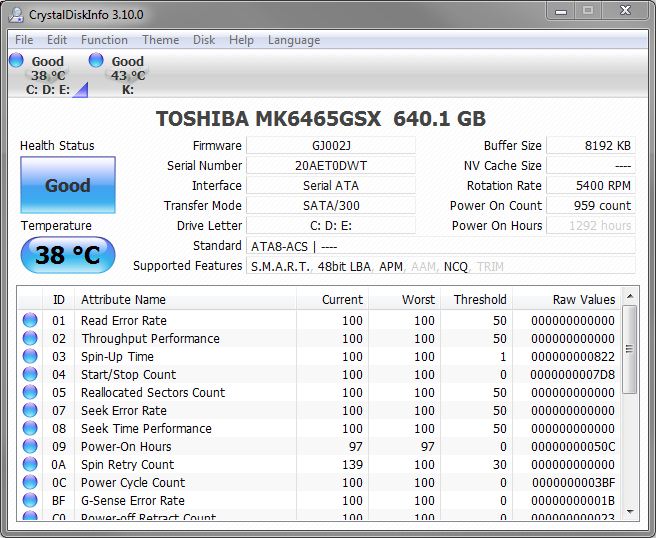
Hey why the internal hard drive is connected with Sata, not sataII?
Attached Files:
-
-
SATA/300 is SATA2...
-
FYI, New VGA AMD drivers:
Acer Support: Drivers & Support Documents -
How'd you trade like that?!
And yea, the GPU would give the biggest jump in performance. -
guys...
sorry if i´m boring but....
i´m trying OCing my i5 480 with setfsb (2.2.134.98) but something is going wrong..
i´ve selected the ICS9LPRS365BGLF CLOCK GEN, as wrote in the mini guide on 1st page of this thread, and pressed down GET FSB... well
when i set the parameters with the slider and press SET FSB, windows crash showing artifacts and the only thing i can do is switching off the lappy and reboot...
whats wrong?? ive to change the CLOCK GEN???
or the parameters i set aren´t right???
may you tell me some (rock solid) parameters to set on the first slide to set the right fsb???
thanks a lot!!! -
When you Get FSB, does the slider value is negative number ?
-
Acer does not use the same PLL in its notebooks. We have identified at least 3 different ones in Acer notebooks. So, lets start at the beginning. If you have an I5-480M, the odds are that your unit will use the Asus G73 PLL definition. Have you activated the shareware version or are you trying to use the freeware version?
You might try this. When you get FSB, move the slider to where the slide is at 160 on the first setting on the left in the top window. Then try to set fsb and see what happens. I have an overclock thread around here somewhere that might help as well.
A screen would be nice too.
Bronsky
-
Guys before overclocking, don't forget to hack the BIOS to disable Turbo mode! I haven't looked into hacking the BIOS yet but hopefully, we can reduce voltages too. I highly doubt that though....
Is there a way to revert back to stock BIOS? I assume there is...
Edit: Switching out the hard drive atm. Switching the WD500BEVT with a WD640BPVT! -
Wow. There are over 9000 posts in this one thread alone. That's more posts than on most messageboards....
WOW! -
Hehe... Smart wheeling and dealing. I just got lucky becase the i3 w/5650 was open box and I did not have to pay restocking fees. And then I caught a sale on the i5 w/6550 at Canada Computers which btw is still going right now.
Also, I noticed the screen brightness changing on my laptop. Some people experience it at all times. On mine it only happens on battery with the Intel GPU, and only when I switch between bright windows to a dark desktop. I have a feeling this is related to the switchable graphics, and not a faulty display.
Edit: After playing around with the Intel display settings, I discovered one interesting fix. In the Intel control panel, go to Power -> Power Features -> On Battery and disable Display Power Saving Technology. -
Anyone got a link on how to mod the BIOS? I only found this and it's a couple months old and some new BIOS got released.
Is this the modded BIOS? -
You have not to flash the bios. The way under the this link is still working.
The other Bios deals with an modded DSDT. But I'm busy at the moment and haven't take a lock inside.
Best regards -
The (modded) Bios doesn't support to change the CPU Voltage.
It seems, the t you have to do a hardware mod for that option. -
The Intel CPU and chipset inside the Acer very lazy. You have to do a few mods inside Windows to get the higher speed out of it but you also reduce the battery runtime.
-
Hi all,
every +- 30mins during playing music on 3820TG the whole system (including sound) is freezed for a second.It is disturbing.
I am thinking about update of BIOS. Are there any differences between 1.17 and 1.19 for me? I have a HD5650.
Which version do you reccomend? Thanks and sorry for my english... -
Hi all,
I ordered a 3820TG to replace my m11x R1 so I will pretty soon be a owner of this little monster : Acer Aspire TimelineX 3820TG-484G75nks Specifications - Notebooks - computeruniverse.net
It's a great one right ? (am not too much expert on notebooks)
Juste some questions before receiving it :
- The 6550m is quite the same as the 5650 right ? So it should o/c very good like the 5650 ?
- As anyone of you already opened up this notebook ? I would like to know if it's possible to access the CPU and GPU in order to change the thermal compound.
Thx (and sorry for my average english)
-
Acer's always far behind with their driver releases
Current VGA_AMD_8.752.0.0 as of 2011/01/31:
- ATI: based on Catalyst 10.7 / 8.752 (July 2010)
- Intel: based on 15.17.7.2141 / 8.15.10.2141 (June 2010)
HP Envy release 8.771.1 as of 2010/12/03:
- ATI: based on Catalyst 10.9 / 8.771 (Sept. 2010)
- Intel: based on Intel HD 15.17.10.2189 / 8.15.10.2189 (Aug. 2010)
-
What hard drive do you have ? Cause I have seen this on the thread of the 4820TG :
"Question:
My laptop freezes/stutters in games for several seconds every few minutes. Is there a solution to this?
Answer:
If you have a Western Digital hard drive then you need to download quietHDD and enable it during Windows 7 startup (startup folder, etc.). Then you will need to disable APM in the program.
***Credit goes to Osiyo and Downloads***"
Maybe it can be that ? The one I will receive has a Western Digital so I think I well install QuietHDD to prevent bugs. -
6550m has +50 MHz and should OC slightly better since it has as well +0.1V. But I guess that a good 5650 may outperform a bad 6550... it's still luck
There's a CPU replacement guide linked in the first post of this thread. The official service manual should be on the internet (google for: SG_Aspire_3820T_3820TG_04282010.pdf).
Serveral members replaced the compound successfully and got reduced temps
-
Does anybody know how to get Bluetooth to switch on by default on startup?
-
I have OCZ 60GB SSD drive, I hope this is not the reason....
-
I don't think anyone has figured that out yet.
Amazing ... isn't it? Hard to believe that the 3820TG is still generating as much interest as it is. It is an old system in tech years and it still holds its own, even the early models against the refreshed ones.
Bronsky
-
here you are...
![[IMG]](images/storyImages/setfsb.png)
Uploaded with ImageShack.us
wich is the difference with the share version?? -
Try this method....
-
If you didn't contribute 800 yen to Abo-san, you are using the freeware version. If you did, he gave you a key to unlock the shareware PLL definitions.
Try the method Lee_what2004 gave you and if that doesn't help, try moving the slider to where the FSb moves from 18.3 to 166 and see if you can setfsb from that point.
If not, I would suggest donating to Abo-san and he will tell you if the Asus G73 PLL will work for you. I think it will.
Bronsky
-
Today I get my 3820 TG and i am very happy about it but i am a little bit confused about CPU. I orderd one with die I5 460M and now i get a 480M ok thats good for me but wenn i use it on battery the cpu doesn't go under 1330 mhz. But i thought die min. clock of the I5 is 1060 mhz.
It's the new model with the Radeon 6550.
And by the way I have the LGD023F Scrren and so far no problems okay it is a little bit less bright than the screen of the 4820 Tg i had before but the angels are a lttle bit better. -
No, 1060MHz is the ram timing..
The i5 480M will run at 10x multiplier which resulting 1330Mhz.. -
does anyone have this small problem? graphics switching is fine, but after I play bad company 2, acer power says something about its still in use and I cant switch, even after I close everything. Works fine after I restart
-
hi guys...
tryed Lee method but something gone wrong, i've changed the parameters then i've pressed update and apply.. so the cpu speed bumped to 3200 mhz.... but when i've pressed set fsb all crashed.... i've done something wrong?????
but, one moment Bronsky,explain me well, i've to contact mr Abo, pay him 10 bucks, tell him that i've a 3820tg with I5 480 and ask if the g73 pll works in my lappy??? if yes he give me a code to put in the shareware version that enable the g73 clock gen???
how can mr abo san know if my 3820tg is able to work with that pll?? what he checks??
the Asus g73 is the only pll i've to comunicate to our asian friend???
thanks a lot, and sorry for the stress!!! -
He has you print out a PLL diagnostics screen and a dump/printout of CPUz.txt from the tools page. Then he tells you if he thinks you unit will OC and what PLL to use. If it can't he will probably offer to refund your donation.
Bronsky
-
Hi guys - I'm a new 3820tg user- bought it today ;]. I bought the cheapest but the newest version with i3 380m /6550/500gb/BT 3.0/2gb ddr3. Waiting for ocz vertex 2 180gb now and thinking if i need additional 2gb ram... or 1gb? Do I need it ?
I oced 6550 to 750/1040[max memory freq in the program]] with msi afterburner and burned with furmark extreme mode for 11 minutes- no errors , max temp 96 [no cooling pad ].Now its cpus turn- Is there any possibility of ocing my 380m ? -
So... I either flash that BIOS in the link, or try to mod it myself? I didn't really get your post.
-
@Lee
thanks but sometimes for a very short time the multiplikator drops to 9x but only for a very short time.
I use CPU Z to see the clock rate.
And is their a programm to forece the cpu to stay at the low clockspeed so save energy? With my old Dell D410 was this possible and its increased the battery perfoamance, ok its decrease the perfoarmance but it is still fast enough.
And after 6h of usage i like die screen it is only a very little bit darker than the screen of my 4820tg but ist is hard to compare becaus the last 2 days i used my tv as screen for my back up computer. -
oh thanks, very clear...
update: with the "lee method" i've hit a 160 mhz fsb so whit a x22 multiplier i'm at 3520 mhz... not bad..
two things:
1- are there others parameters (or numbers in that parameters) to change in diagnosis screen of SETFSB to obtain more than 160 fsb with the "Lee method"???
2- is there a way to fix the multiplier on max value (x22) in battery mode too??
thankss!! -
about the ram,, that really depend,
i have mine with 8gb memory just because i want to disable the pagefile completely for space and also speed,
if you are sure you will never run out of the memory then it is ok with 4gb -
Yes I had the same problem I updated the Chipset driver, and it works fine now.
But before I updated it You had to right click the desktop and go to configure graphics to make it switch back. -
It is their way to save energy and heat...
If you want it to run faster, you can adjust on the power management,
increase the minimum power state from 0% to 100%...
Or you can use throttlestop, it should be able to force it run at lower speed...
Change the number 97 to 96 or lower and press update... -
Only use the mod by yourself.
The modded Bios has nothing to do with activating the hidden menues. -
oh, thank you very much!!!
so, decreasing the 97 value to 96-95-94 ecc i'll increase the fsb step???
how much increase for any step number thank
(p.s: i'm asking it because now i can't use my lappy )
-
Each decrement increase around 7MHz if not mistaken..
The number 39 to 38, increase around 3Mhz.... -
thanks, updated the chipset driver. Working fine so far.
Acer TimelineX 3820TG Owners Lounge. Info, benchmarks, tweaks, mods and upgrades
Discussion in 'Acer' started by Hendrickson, Jun 1, 2010.




![[IMG]](http://img34.imageshack.us/i/setfsb.png/)


