Problems? See this thread at archive.org.
you don't remove the bottom plate. You remove the blue strip on the top first and then remove the whole keyboard. The bottom stays there stuck with the lcd and hinge.
-
-
Hi again, i 'sort of' solved my problem with 3DMark : it seems when you are on battery that the NVIDIA card is not used by the system... I tried to force it in the NVIDIA control Panel but it seems useless...
Has anybody manage to run something on the nvidia card (3DMark 11 is easy to test cause it won't start with the intel card) on battery (i was uder 50% when i tried it the first time i think)
I understand the computer do this to get more battery lifetime but what if i don't care about battery lifetime but care about performance...
Thanks in advance... -
When on battery the P button is automatically switched on. Click it once to turn off and you'll be able to use your nvidia

-
Gosh, i lost more than one hour on this crap yesterday!!
Where did you find such information (juste to know if i'm complete dummy on see if i didn't miss something else important!!) -
While we're at it, is the battery button (on the front) actually useful at something ?
-
Yeah seriously what does it do?
-
just finished the witcher 2 on my 4830tg: no throttling, temperatures always around 62-64°C. I'm quite surprised there was no big fps difference between high and low graphic settings 18-27 fps with low settings 15-20 with high.
-
I have a couple of question about the 5830, hopefully someone will answer them
How is the screen? Is the build all plastic or metal? Thanks
-
cpuz, i tested with hon sc2 cpu was always at highest speed no throttling. highest temps around 81
-
Yes, as long as the Alienware M11x-R3 and Sony VAIO SA are much more expensive than the 3830TG.
The other option is by pressing Alt+F10 when the BIOS appears (that Acer logo the first time you turn on), or by using the "eRecovery Managament", no disc needed
Don't worry, ACSC (Acer Customer Service Center) will change the battery for free. And to repasting, you can say the ACSC to do that, free when in warranty. I recommend you to take the SuperCare Warranty, so your 3830TG will be under warranty for 3 years. I got it for free from a promo, the normal is Rp675.000 (around US$80).
The HD 3000 in my 3830TG is not as bad as most people said, the performance is on par with nVIDIA G310M in my 4740G, which should be on par with AMD Radeon HD6470M in the Sony VAIO SB..
Mine is always on (I can feel the airflow from the vent), but not at the full speed. But that may be because I live in Indonesia (26-32 Celcius)
Nothing more than an indicator.
The lid is metal, the others are plastic. -
One more question. Does it have a backlit keyboard?
-
it does not
-
it's used to check battery level when your laptop is off. Comes pretty handy if you leave your laptop for too long and don't have time to boot it up to check for battery
-
been gaming for 5 hours on the 3830tg and it hasnt went into throttle mode. im very pleased with this laptop!
-
I could "game" for hours without throttling, if it's the right game! I played some bad company 2 and it took about 5 minutes to get up to 90 degrees with throttlestop. I think I need to look into some better cooling options.
Amazon just delivered my 3830tg, and I must say I'm impressed. I went from an 8lb 15.6 inch Asus that could also melt my leg hair, to a 4lb 13 inch fireball. Overall I think it's an upgrade, I love the 13 inch form factor, and it feels like it's built really solid. The battery life is another huge plus.
I'm going to game for a few more hours and log my temps, see how it does. I always game on my lap (leaving space in between for air to move) but I may try it on a table or desk for awhile. -
i was playing sc2 for 5 hours so yeah. if it doesnt make the laptop throttle no game will.
-
Does the 3820tg have the same power connector as the 3830tg? Or all acer laptops have the same power connectors?
-
My 4740G charger works with the 3830TG, and vice versa
-
Starcraft 2 doesn't use the graphics card so much, even with the Intel it does run quite well. World of Warcraft, Aion, Crysis 2 oder Duke Nukem Forever are much better to test the limits of the machine.
I suggest to use an external display with throttlestop in monitoring mode to detect the throttling. Maybe newer 3830TGs don't have it anymore, because Acer may have found the problem.
I'll send mine in for the second time next week, they promised me to care for my problems. Last time they didn't even unpack it in the service center, just told me that the throttling is perfectly normal and part of the cooling design. -
on ubuntu i saw my capacity is on 81%
i just use your way to calculate the wear with my Acer 3830T (i just have it for 1 week now) and i have a unbelievable 19% wear on just one week
i called acer to they replace my current battery,i have to send them
i have a panasonic battery... -
If it is really happens, then I will ask Acer if I can get the fix for free, or even free replacement
-
Well, I'm just sending it in for the second time. If it's not fixed after that I am able to return it to my shop and get my money back. I hope they can do something about it, because - apart from the throttling - I really love the machine.
-
from my desktop experience sc2 heats up my gpu/cpu more than wow, with wow i can run at 30% fanspeed with sc2 if i dont run 40% it overheats. crysis 2 and bulletstorm i also run on 40% fanspeed and the temps werent higher.
my max cpu temp was 77 gpu 70
monitor throttle is easy, run cpuz run hwtemp run the game you want to test with. alttab after the gaming session (dont quit the game) check cpuz, if its running at 1.2ghz instead of 2.1 you are being throttled.
how high are your ambient temps. do you use a cooling pad? -
WoW always uses over 90% of my CPU (even in x27 Turbo Mode), but highly depends on your actual position (Stormwind with its many players may be okay to test). It's more stress on the CPU. It takes around 10 minutes till throttling. Crysis 2 and Duke use more of the GPU and cause throttling after 2 minutes on my machine. All games were tested on 1366x768 with high / ultra settings on my machine.
My max CPU temp was 100°C - then the notebook shut down. GPU was stable at around 90-95°C. My ambient temps are around 25°C.
Where do you get your fanspeed from? My fan always runs at the same speed (I think 100%, but cannot confirm it yet) - even in idle mode.
Alt-tabbing always causes the CPU to loose temp at once, even if the application is still running. So the only true way to monitor temps is on an external display WHILE gaming. -
how could you configure the nvidia system control if the software doesn't support the model GT-540M? I was looking in the nvidia web page, but the last version (6.06) doesn't include this product.
-
@mavo82
i was talking how how my desktop gpu fanspeed. you cant change laptop fan it will be on max while gaming always.
do you use a laptop cooling pad? my ambient is 23C but i put the laptop on a set of dumbbells to lift it up since i use a 24inch monitor and keyboardmouse. if i just set the laptop on the desk my temps go to 85C, but after lifting it temps are around 77C range.
it doesnt say its supported but you can still use it to overclock. but i use msiafterburner to oc because its got a much better interface that shows tracks temps/clocks -
Just experienced this playing outside for the first time.
I didn't think it could get that hot.. never had the problem at home before.
It definitely shouldn't
Even if the cpu gets a bit cooler, cpu throttling will persist until gpu (or cpu, not sure) is A LOT cooler, so it's enough to check by alt-tabbing.
An easier method would be to log the data, throttlestop does that pretty well. -
I've had a cooling pad, but the effect was minimal, leading to throttling just 2 mins later. Lifting the notebook results in lower temps, however I don't play on it while holding in into the air, but putting it on a table. A notebook should NEVER require a cooling pad. If it doesn't work correctly while on a table, it's misconstructed.
The CPU/GPU temps get to 50°C in less than 1min after alt-tabbing from a game to the desktop. -
Do you have the i3 version? I remember some talk on here earlier about the i3 maybe having a lower intel throttling temp. Like 85 or something. Is there any truth to that?
-
I guess it was UncleWebb - the author of ThrottleStop - who said that, so it might be true. I have the TG, so I don't know anything about the i3.
-
Anyone selling one of these & prepared to ship to the uk? mint or new condition full boxed? pm me and i will buy it off ebay.
-
it got throttled when i blocked the vent and temps got to 90.
but when im just gaming the temps dont get that hot.
when u alttab obv the temp goes down but theres a reason why theres a max temp and current temp. and cpu will be always at max freq even when u alttab out of a game. so if you got throttled it would show 1.2ghz instead of 2.1ghz (for 2310m) -
Did you get yours from staples. Thinking about going to get one here soon. $599 is a pretty good deal, and if you have to use throttlestop on the i5, then why bother spending the extra money.
-
yes i got mine at staples. and yep no reason to get the i5 version.
staples has 14 day return policy too so if you dont like it you can just return it. -
Hi everyone,
I have an acer aspire 5830 TG and I am having trouble taking out the battery. Can anyone help? Thanks. -
read the first page.
-
Yes, that's unfortunately the truth about Panasonic batteries. How you done a calibration? Try this guide.
I reached 14% within 7 days, but now after calibration and not using the battery all the way down, it's changes between 8% and 10%. And that's after 9 days of use... not perfect, but acceptable. As long as it doesn't go higher
It's a built-in battery... you can't remove it
-
Oh I see. Is there anyway to maximize battery life since it's a built-in battery?
-
Is anyone else getting a k2 exception when trying to play hon? I looked everywhere and no one has an answer. I just downloaded it and I haven't been able to play
-
I am sorry but this question might have been asked already. i tried using the search thread* function, but it is not working properly.
I just bought the Timelinex 4830t from amazon a few days ago and am wondering how i can access the speakers on top of the keyboard to work? So far the sound is only coming out from the buttom of the laptop.
Thank you! -
im playing hon right now it works fine
-
I already did calibration but nothing change,the wear increase Day after day...
u'r guide's wrong http://batteryuniversity.com/learn/article/battery_calibration
You must not go under 7-10% of the battery,otherwise it will damage the battery ! -
I added CPU power consumption and VID reporting to the ThrottleStop 3.30 log file for the Sandy Bridge CPUs so you can keep a better eye on this throttling issue.
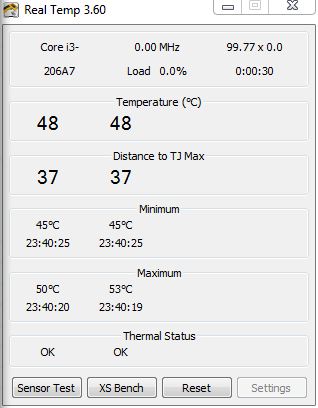
The documentation says that some of the Core i3 CPUs have a 85C throttling temperature set by Intel. If you want to confirm this, post a screen shot of the RealTemp Settings window. It reads the maximum TJMax value directly from the CPU and show it at the top of that screen. I've never seen a CPU with a 85C TJMax so hopefully someone with an i3 can post a pic.
RealTemp 3.69.1
http://www.mediafire.com/?4uixpjtezznuzkd -
there you go
Attached Files:
-
-
Looks like the Intel documentation is correct and the maximum really is only 85C before throttling begins. That doesn't give a person much wiggle room when trying to run these CPUs in a cramped laptop with poor cooling.
The latest version of RealTemp that I posted supports the new Sandy Bridge CPUs better if you are interested. -
I was checking the nVidia Control Panel, but I think that the changes for overclocking has to be assigned to a profile, really?
Also, which are the changes that you set up in order to OC the nVidia graphics card?
thanks!
Adding comments to the previous post, I was able to change the frequency of the Graphics clock (765MHz) and Memory clock (965MHz), these are configs that I read in previous posts, but how do you know which is an appropiate config? is a matter of trial and error?
Thanks! -
Can I get some screenshots of your config with the ThrottleStop? I have the Acer TimelineX 3830 TG.
That would be really helpful in order to set up this tool! -
Wonder when the promised BIOS update will be released...
-
As far as I know, the 4830 model has no speakers on the top.
Which bios update do you mean? I don't think Acer will release another one, the last one included only cosmetic changes. -
Notebookcheck said Acer was working on the throttling problem:That was in May, Acer released an update in June, but that didn't fix the throttling problem, so I'm thinking they're still working on it?
Acer TimelineX 3830/4830/5830 T/G
Discussion in 'Acer' started by lee_what2004, Feb 6, 2011.