Problems? See this thread at archive.org.
Should I just return my laptop and wait for the new version? (Undoubtedly going to happen)... I only paid 429.99 for it though (not including tax)..
-
-
question can you post a cpu-z screenshot of this cpu with your laptop? thanks.
-
I don't think you understand just how big of a difference 1.1ghz extra makes. Before I would have to run my i3 at 1.8ghz. Now I have 2.9ghz. COD Black Ops went from unplayable to playable at 1600x900. It is a very CPU bound game, as is Starcraft 2. Dead Island saw massive improvement as well. The GT540M when overclocked is quite capable.
http://img33.imageshack.us/img33/7145/winsn.jpg -
Wow that's some impressive modding, rbl_posse, I wish I had the time (and tech know-how) to devote to something like that. I'd love to have that extra 1ghz, it would get me 60fps running anything from this gen.
-
I just finished charging up again, pulled the plug it says I have 99% (no longer 100%), 1hr 15m but then it jumped to 7h 30m, now its 8h 14m. I think it will take a while to settle down. Unfortunately, it also says 12.48% wear now. Update: been on less than a half hour, says 4 hrs left.
Yep.
I'm following your lead, if you take yours back I'm doing the same. If you do, let me know how it goes. -
I'm confused. You started with an i3, but the screen shot shows an i5, but you bought and tested an i7? Which one is working? And if so, was it the new processor or the mods that made it work?
If I were trying to deal with throttling (I'm not really) I'd go to the hardware store and look for a thin copper plate and start by putting that on top of the heatsink and see if that does a better job of displacing the heat...then put heat sinks on that.
These problems will ever be solved by Acer. The way they operate is replace a defective model line with an newer defective model line and leave the ones holding the current ones in the dust. I'm not new to Acer. -
I talked to the Acer rep to get the pulator info and she said there is "no guarantee" that they'll change the battery so I'm taking mine back to staple for an exchange today. I'll ask if the replacement has the same probs if I can return i within the 14 days (It says 100% satisfaction guarantee in the first 14 days so I don't see how it'd be a prob, but it's better to make sure...)
-
i dont know about you but i was very aware how slow this laptop would be when i bought it. for 200 more i couldve gotten a laptop with a gtx 460m why would i spend more time and mod a laptop that wasnt designed to game?
for one you have to get another cpu that works, then you have to disassemble everything which voids warrenty, then if everything goes well you are .8ghz faster than you were and you have to sell the 2310m to gain some money back. now doesnt that list of hassles make buying a better gaming laptop sound so much easier. -
Good, let me know how it goes and I'll go from there. I'd need only a hour if the Panasonic battery shows up again, but definitely, I'd want a full 14 days to check everything else out.
-
It was designed to game, but they failed. He wants to see it he can fix it.
yeah, I wouldn't do any of that until after the warranty has expired. Even then, I'm not interested in gaming so why bother? -
I think they're refreshing the models.
The 3830T with i5-2430m will be released in Europe soon. (no release date yet)
...and it's even cheaper than the 2410m version
-
I talked to them on the phone to make things clear before I go. He said that you can bring it in and tell them what's wrong and they'll test it and exchange it (or refund you). He also said the 14 day process doesn't get reset. So if you're having probs with the replacement you can take it back again as long as it's 14 day of the date you purchased and return it or exchange it again. So it's probably better the sooner you go...
What CPU socket does the 3830 use? -
since when are the timeline series designed to game? they are meant to be portable multimedia laptops.
-
The hardware is good enough to game on but the cooling is fail...
-
Yes, I started out with the i3-2310M. I originally ordered a batch of Q16M i7-2620M CPUs (2.7ghz up to 3.4ghz turbo), but my order was cancelled because they had no more stock. I was able to confirm from someone online that the Q17N i5-2520M was basically 100% compatable with the 3830TG so I went with those instead. While it was still a risk, I was quite confident and it paid off.
Upgrading the i3-2310M to the i5-2520M without doing any of the heatsink mods still has plenty of advantages. For starters, my 2520M runs at 1.15V at 2.5ghz, as opposed to the 2310M which used 1.225V for 2.1ghz. The 2520M only uses 1.225V for full turbo, which is 2.9ghz/3.2ghz. Plus the i5 has an extra 15C headroom. If you change the paste to IC Diamond while you do a CPU upgrade, running 2.5ghz while playing games may be possible without overheating and without a laptop cooler.
I spent $479.99 on my 3830TG. In order to get a gaming laptop I would have had to have spent twice as much. Also, I don't want to carry around a heavy, chunky, plasticy, ugly gaming laptop around campus all day. As I mentioned the GT540M is no slug when overclocked. Mine is at 825 core/1000 memory which is higher than GT550M clocks, and that card is near the very top of class 2 video cards on notebookcheck. I'm not an extreme gamer, so playing COD Black Ops, SC2 and Dead Island on high at 1366x768 or 1600x900 on medium on my 24" LCD at home is good enough for me.
I got an amazing deal on the i5's because I bought them bulk direct from a supplier. I will make money when I sell my old i3. Warranty isn't a concern for me because my last Acer lasted over a year (I get a new laptop every year) and this laptop has only cost me ~$520 thus far.
It is the rPGA988 G2 socket. I'm quite curious if the 3830TG will be compatible with Ivy Bridge when they are released.
The funny thing is today I opened the laptop up in a lecture and check core temp after the machine had first booted up. I was at 22C on both cores with a fresh boot. I thought it was an error but nope, it was legit. -
It only cost you $40 for the new CPU? Were do I get in on that deal??
I'm running 31c on mine with the i3 on both cores when not doing anything.
I'm not the most decisive person...not sure what I'm going to do with this thing. Its only really useful if I can get at least six hours between charges without killing the battery. I figured $430 before tax was a good deal even without the extra gpu. -
The $520 was the amount I'm into it including the diamond paste (which I will use for other purposes as well), the heatsinks, and the GST on the laptop.
The i3-2310M will sell for roughly $110 on eBay, and lets just say the fact that I can sell the 2520M's for $100 and return a small profit means that I will certainly make money when I get rid of my i3.
I'll let you know how battery life is effected by the i5. I've been typing notes and browsing for the last little bit and battery care is telling me 5h41m left on 72%. -
I came across this link, http://www.principledtechnologies.com/clients/reports/Acer/Battery_&_Performance_TimelineX_3830TG-6431.pdf
and dont know how reliable they are but they claim as per mobile mark 2007 testing, the battery life of 3830tg is 10hrs 25 mins. It is an amazing figure- does anyone get this figures on their machines?
I bought 3830tg from amazon and my friend will bring it to India on 15th Oct 2011.
Atindra
current laptop acer travelmate 270 series purchased in 2004 and still working fine
-
Yeah, you might get 10 hours....in sleep mode.
-
lol...
on a serious note, my 7yrs old acer gives 100 mins of battery life with its original battery.
My aim to post that link was, their report seemed very comprehensive and thorough but I just wanted to check has anyone tried to imitate their settings and measured battery life? They have followed BAPco testing protocol.
There are not enough detailed reviews for this laptop and not many user reviews too. Mostly people are complaining throttling in gaming. I would love to hear other graphic intensive applications with these laptop like Photoshop and video editing simultaneously (running pinnacle, Adobe crative suit), or running 3D modelling programs for bio-molecules or chemical compounds (Gaussian and DFT calculations) or 3D engineering drawing programs like CAD, ProE while listening music. There are many things a dedicated graphic card suppose to do other than gaming. And in doing all these may consumes a lot of battery too. If running simple office applications and photoshop, illustrater etc gives 10hrs battery life than its a big plus.
Atindra -
I get 4.5 hours in idle mode out of my machine. Acer checked the battery twice and told me everything is just fine, no replacement needed.
In Germany, the 3830TG is advertised by Acer as a portable working and gaming machine. They use the two phrases "enough battery for a working day" and "made for demanding computer games" (not sure if demanding is the correct word in english). As I cannot use it for more than around 4 hours and as the throttling triggers each time I start a game for 5mins, the machine is unusable for me. I get around 50°C in idle mode already. -
if acer advertise the timelinexs are gaming machine then they are fail. my almost 5 year old desktop is faster.
if you see the available benchmarks you can see that is it not strong enough to handle any recent games unless you have really low fps expections. i was a lil disappoint because i thought it would handle sc2 on lowest settings, i was wrong even after ocing the 540m to 825/1000 it was not enough. -
I am playing Battlefield 3 beta on my 3820TG (specs below) at medium to high settings with no problem and have not OC'd the GPU yet.
-
And other than running 95C on CPU and 84C on GPU, my 4820TG can play any modern games at 30+fps (oced a little on the GPU) at low or medium settings. And I can play for hours with it running that warm with no hiccups or crashes. The x830TG series is seriously dissapointing. Compare the x830TG to the discount K53TA from Asus with a very overclockable CPU and quite capable 6650GPU which for $450 can game all day as well with another 5 to 10 fps better than my 4820TG. The K/A53TA, K/A43Ta are serious competition to the throttling mess that is the x830TG series. The A53TA, which is the version sold elsewhere than bestbuy goes for ~$600 right now, but I expect that to drop $50 to $100 in price over time, and at $500 or so it'd be a great machine by comparison. Temps running games for hours on them run in the 75 to 85C range, no throttling, and the machines run quite cool to the touch.
-
everyone have different standards on fps. i for one cant play a mp fps with less than 60fps. even 60 is pretty damn low. and sc2 on lowest is playable if i dont care about winning, fps dips to 20-30 when medium size fights happen.
but its ok because i dont plan to play much games until the next gen desktop gpus come out. -
Thanks for the tip about putting ramsinks under the heatpipes, rbl_posse. I caved in and went for the full re-paste, the hardest part for me was just getting the plastic shell separated. Definitely easier than it is made to look in that teardown guide.
I just used some Zalman aluminium ramsinks that I had on hand. To make things quick I just clipped them shorter using a nail clipper, and then filed them even.
The re-paste helped a bit - combined with a Coolermaster U2, things seem to be under control. CPU hasn't been over 72 degrees during some quick Starcraft. I didn't play long enough to get up to max supply, but framerates kept up better than before.
edit: actually, I have a question about the CPU swap you did. I'm not familiar with the type of CPU mount used here. Is the socket on this motherboard a PGA or BGA? I have had a CPU replaced on a Sony UX, but that was a BGA so I had to send it out to have it done professionally. If the swap in this case is something I can do myself, I might consider doing it. I'm already running stock with the i5 2410m, so it would only be worthwhile going up to an i7 2620m (same 35W TDP) or something similar. -
I'm glad you were able to get it all taken apart and put back together with no problems. Its fairly difficult to do, and easy to break something. As far as adding heatsinks goes they certainly cant hurt your temps, and placing them under there is removable should you need to use your warranty. I know for a fact the heatsinks made a difference on my notebook, but then again I added 9 of them.
The CPU is rPGA, so it can be easily replaced. Just turn the slot head screw 180 degrees to the left to unlock the CPU, remove and replace, and then turn the slot head screw 180 degrees to the right to lock the new CPU in place. I really wanted to get the Q16M ES i7-2620M but the issue is that at this point nobody has tested that particular ES chip in the 3830TG. I went with the Q17N i5-2520M simply because it was nearly a sure shot. You could get an OEM or QS i7-2620M, which would work for sure, but expect to pay over $250, which isn't worth it. The 2620M likely only uses 1.15V for 2.7ghz, so it's the second best bin available. -
I wanted to purchase the Acer Aspire Timelinex 5830tg. It was released in June in my area and sold out before I could order. This happened a second time, and now it is discontinued in my country. Will this be replaced by another model? Is there some way to purchase the model I wanted?
-
Yep. Buy a Lenovo x220. You might even get 10 hours out of it and its way better build than an Acer.
-
Those two machines aren't even remotely similar. If the OP wants a 15" laptop with a GPU, the X220 is sure to disappoint.
-
I was playing Battlefield beta for a while last night. It's a lot more graphics demanding than I thought. Settings were at auto which were all medium and a high texture quality and I was getting about 40fps and max temp of 89c. Graphics were still really good even at medium.
-
That is simiilar to the performance of my 3820TG with the GPU unclocked. My temps were a bit lower. Good to see the 3830TG can handle the game. I have my notebook hooked up to my LG 24" display (75hz) and sidewinder keyboard. It is a pleasure to play. Game runs smooth.
-
Thanks again rbl_posse, it's good to know that a CPU swap is so simple.
For $150 give or take, I would be willing to try one of those Q16M ES i7 2620m CPUs. If it works, it will have cost way less than what I paid to get a C2D U7700 into my Sony UX. If it doesn't... sucks but at least I can report that to the community.
On further upgrade notes: I'm thinking of upgrading my Atheros WiFi module to an Intel 6205 or possibly 6300. Both of these support 2.4GHz/5GHz dual band. Does the 5GHz band require a special antenna, or can I re-use the same two antennae that are already in place?
The 6300 also has 3 antenna connectors. I'm guessing it will not be simple to install a 3rd antenna if I can even get a hold of one..
Anyway... I asked a question a while back about not getting HDMI output on a clean Win7 install, video drivers direct from Intel/Nvidia. Has anyone found a solution, or not encountered this problem? -
6300 works fine without a third antenna but that's just a 6200 then so if you're not planning an upgrade just buy a 6200 in the first place.
-
Intel 6205 or Intel 6200?
-
It's the same thing- basically 6205 is slightly improved 6200 as far as I know.
Given the choice of both for the same price I'd choose 6205 but if there was a price difference I'd probably go for 6200 (assuming it would be the cheaper one) -
The 6205 is $2 cheaper at my usual provider.
-
That kind of solves it- 6205 it is.
-
If you don't mind, can you pm me where you get your parts?
-
I got my timelinex replaced at staples. This laptop feels wayyy different. So far so good, the trackpad feels slightly rougherer (not really that bad), the screen seems brighter, the buttons are easier to press and the keyboard area doesn't flex as much. I'm going to see which battery it has but so far so good. The returns person even let me return and rebuy my product (at the sale price (actually suggested it)) so I can get full 14 days to test out my replacement. <3
BTW I got the Sanyo from Acer too (even though I told them not to send it and let me send it in...). I still don't get why they used 2 boxes one for a battery holder and one for the battery. Both boxes were huge in comparison to the actual product. What a waste of money...
Edit: Facepalm. The laptop's colors are too blue now. orz.
Edit:
![[IMG]](images/storyImages/sanyobattery.png)
I guess I'll just live with the screen (use a icc), the hardware is much better than my old timelinex. -
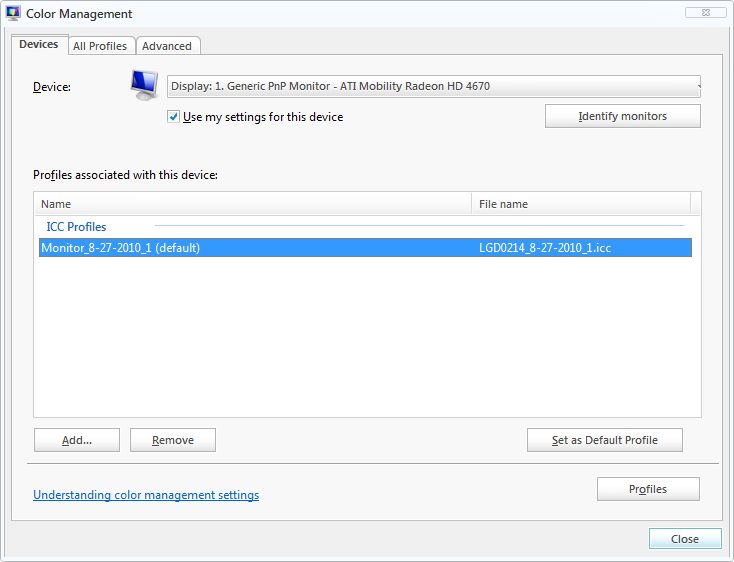
Has anyone figured out how to use ICCs with windows? I tried everything in color setting but nothing is working. I generally don't use windows so I'm pretty lost. Google has failed me.
edit: I could send it into Acer and just get the screen fixed... now that it has a sanyo battery... -
Double click the icc to install it,
then open Color Management,
Go to "Advanced" tab,
Go to "Change system defaults",
Go to "Advanced" tab,
Tick "Use Windows display calibrations",
Go to "Devices" tab,
Go to "Add..",
Choose your icc,
"Set as Default Profile",
Close,
Go to "Devices",
Tick "Use my settings for this devices",
If still no changes, select the "Set as Default Profile". -
Still no change...
-
Similar to this ?
When you tick/untick "Use my settings for this device", no changes at all?Attached Files:
-
-
Yes :|
/message cap -
What about if you calibrate the Windows yourself ?
-
That works.
Man why does Acer have such poor quality control? There is no way someone could not notice a display this off and this blue...
I don't think I'm going to ever buy an Acer product again. -
Anyone been able to run 2 external monitors on the 3830/4830 using both dsub and hdmi?
-
Did you find a fix?
-
but probably will be a good upgrade - now there's not many 450mbps-capable routers, but in (maybe) two years will be. and i'm sure there will be a laptop upgrade in two years, also...
Acer TimelineX 3830/4830/5830 T/G
Discussion in 'Acer' started by lee_what2004, Feb 6, 2011.