Problems? See this thread at archive.org.
It's not going to be enough to prevent throttling, I can guarantee it. Even with my extensive modifications, including adding 9 BGA ramsinks, lapping the cooler at the contact points for the CPU and GPU, and using IC diamond synthetic diamond thermal compound, I have to disable turbo boost in most games. I can run my 2520M at 2.5ghz all day though.
-
I will do burn-in tests after I try the mod later, maybe tomorrow. Currently at x21 with the laptop elevated it will reach around 93C and stay there (in DX:HR). If it could lower the stabilized dissipation temperature just 2-3C that would be enough for an extra 1-200 mhz, but we'll see what happens when I try it.
Does the 2520M run cooler or hotter than the standard 2410M? If cooler, will any 2520M do or do you need to find an ES model? -
I would suspect that the 2520M runs cooler at 2410M speeds because it is higher binned silicon. This is only because the 2520M will require less voltage to run at the same speed.
I'm not sure how your 2410M behaves, but at base clock (2.5ghz) my 2520M uses 1.15V. If your 2410M uses 1.15V for its 2.3ghz base clock, then the 2520M will use less volts for 2.3ghz (it uses 1.10V). -
But it's compatible by design? I can just to the electronics market and ask for a 2520M?
-
Just got a 4830TG but I think I bought the wrong version, its only 1 gb gpu memory, but do i really need 2 gb? I dont use to play games at all, sometimes I can try out a game for a few times but not often at all. Mostly Im just surfing the web, play some poker, watch some videos (up to 1080p but not that much, got a htpc for that).
I have connected a 24" lcd monitor, can I use the geforce for that screen only or do I have to configure it to be used for eached program? Connected via hdmi.
Is it bad for the computer/or the screen to remove the hdmi cabel while the computer is running?
What diagnostic programs do u use? For battery and to check temperatures and stuff? Is there any special programs designed for Acer or is it for all systems?
Any good tips to save the batterylife as long as possible? -
Any of the full powered Sandybridge dual core processors will fit into the same PGA socket. I have a last generation I5-540M and it runs cooler than my I5-450M that it replaced.
-
Sure, I can do that. Unfortunately I won't be back from my business trip until Thursday evening. I can say that I played SC2 without throttlestop with all graphic settings on High for over an hour and FPS never dipped like it would without the coins.
Again I used Furmark for my testing... which should by far push the system more than any game out there.
I'll use Furmark + Prime95 next time I'm back home.
I think it really is YMMV... perhaps my 3830TG left the Acer factory with TIM applied relatively properly -
Hi.
What is the height of ramsinks you applied on heatpipes (after sanding)? And before (applied by you on opposite side of the heatpipes)?
Thanks. -
From where did you download your video drivers?
I'm using drivers downloaded directly from Intel & Nvidia. I wouldn't throw out the possibility that somehow my monitor isn't communicating properly. I haven't tried it with a HDMI TV yet. -
I just requested those 16 BGA heatsinks from Gelid Solutions like rbl_posse suggested so hopefully they come through with that.
After seeing what the coins can do I think if I pasted on as many heatsinks I can to the heatpipes, it will take much longer for temps to get up to 90c at 23x.
I don't trust myself taking apart my computer because I usually break things and my computer is the last thing I wanna break. So these heatsinks are my best option. -
I tried the coin trick, I only got to do it for 10 minutes before I went to work but DX:HR stayed at 82C running at x22 which is pretty good so far.
-
What I told them was that I owned an Icy Vision Rev.2 and that my BGA heatsinks were falling off, so I requested replacements. If you emailed them saying "could I buy some BGA heatsinks" or something along those lines, you might not get a response.
Just so you know before hand, you will have to sand down the heatsinks to make them shorter, in case you werent already aware. -
Yeah I went all the way back and found your post on that. I emailed them and just said I need replacement BGA heatsinks and they just sent me back that it'll be $8 and to send them the mailing info. I don't know how to send them the paypal info and stuff but hopefully they get back quick.
How high are the heat sinks? I measured the nickel and dime to be about 3mm.
I think now the problem with the coins/heatsinks is dissipating the heat so it doesn't heat up too much over time. -
Just using the drivers I grabbed from the ACER site, i was using the Intel to HDMI to my 24" TV in the bedroom to stream a show from MTV for the daughter.....
-
They are about 6mm, and I sanded mine down to about 4mm. I could have gone a little further, but sanding them down was a bit tedious and I wanted to leave as much as possible intact. The bottom panel has a very slight bulge, but it still slides on quite easily and doesn't come loose in the slightest.
-
2 hours of rage, max 90C x 22
-
Acer should hire you guys to engineer the 3830TG replacement.

-
I wish I stayed in electrical engineering as my major in college... I think I would have this problem figured out by now
Payment sent for the heatsinks. They're coming from Hong Kong(half way around the world) so I don't expect them to be here in the next couple days.
Also ordered the Notepal U2, I don't think the U1's 1 fan is doing anything. Now I'll have the bigger(in surface area) lift and 3 fans. I'm keeping my fingers crossed that they will lower temps 7-10c.
I'm really considering building a PC for ~$600. I didn't think I would be gaming this much and would like the extra power:/ -
could someone post the model of bluetooth adapter for acer 5830 ? if possible both the models atheros and broadcom that could be mounted on the machine.
-
That might be the best they could do, I guess. All their newer models (aspire and travelmate) are concerned by the throttling. Instead of improving the cooling they port the faulty system on to the Packard Bells as well. Steve Jobs once said "I'm sorry, but we don't ship crap" - for Acer, the opposite might sound right in these times now.
I do have the Notepal U2. Didn't improve the cooling really well. Before I had 5 mins till the throttling started, now it's 6 mins. In fact, it just delays the whole process a bit. Shipments from HongKong takes around 5 days, they're pretty fast there
Btw, Acers PR department is now rechecking my repair logs and calls me back next week to tell me, if they may take my 3830TG back or not. I might get my "Happy Ending" right for my birthday
-
Acer is a funny company that way. It makes some really great products and some really not so great ones. Apple can afford to be selective. It charges a lot for its products. Acer works on an incredibly slim margin but prices its high-performance notebooks at the bottom of the market.
The problem with Acer is that it produces such a volume and works on such tight margins that it can't absorb the losses that can accompany a failed design. Because of that, Acer tends to ignore performance issues like the throttling in your 3830TG. Acers have had throttling problems in the past and they basically ignored it until the next scheduled model refresh. -
If it wasn't for throttlestop, the info gained from this community, and the free Xbox360 deal I would had returned my Acer 3830tg to amazon. You are right when companies demand sales they weaken their quality assurance lines only to affect the customer further that's why you see this issue happening with Acer. Will i buy an Acer in the future? it depends if they are not willing to take action on engineering issues, then just like any other company they shouldn't be in the business if they don't want to do their job right.
-
Did some more tests tonight. I turned up my home's heater a bit since weather is getting cooler. I'm using an elevation pad that raises the laptop from the desk by about 2 inches.
Anyways, with my cpu locked at 2.7 ghz with turboboost, I ram Furkmark for 20 minutes and cpu+gpu temps stayed around 89C.
Then I ran just prime95 with "In-place large FFTs" setting (maximum heat, power consumption). At 2.7 ghz the laptop went up to 99C and I stopped it right there. So then I locked at 2.2 ghz with ThrottleStop and repeated the test and saw temps stay at around 90C.
Then I ran both prime95 + furmark at the same time at 2.2 ghz and saw temps stay around 95C. Scaled cpu down to 2.0 ghz and temps stay around 90C.
Again, these 2 apps push the cpu and gpu beyond any actual game out there. Without the coins in place, I would never have gotten these temps.
Since then I've been able to enjoy gaming without using Throttlestop.
Note: I'm using 5 nickels and 5 dimes. Any more and it messes up the door from holding the coins in place. I'll try getting some adhesive TIM so I can use maybe 7 pairs of coins which should help temps even more. -
Honestly, I've given up on Prime95 + Furmark. It simulates more load than any game will. I can run forced turbo (2.9ghz/3.2ghz, it seems like one core does 3.2 and the other does 2.9 in games) + gpu overclock on most games, and never go above 95C after 2 hours or more of gameplay, yet with Prime95 + Furmark it fails in ~10 minutes.
I know I've already posted my cooling mods, but I didn't have a picture of the heatsinks over the GPU. I didn't need to sand them down at all, the only thing I had to do was cut away a small bit of a plastic with a $5 saw. Dropped temps by 6-8C alone.
![[IMG]](images/storyImages/DSC_0453.jpg)
-
Did sanding the heat sink help anything? I don't know if I should remove the coins and try sanding. Or maybe just buy the new processor.
-
what about any quadcore enthusiasts with the 3830tg ? Come on out
I know your there
-
I use Duke Nukem Forever and Starcraft 2 for testing, together with an external display running CoreTemp or ThrottleStop in monitor mode. I call this real-life-conditions and Acer won't be able to tell me that this kind of load never happens under normal conditions
Maybe, the Acer engineers are just forbidden to play games at work That might explain why they didn't notice the throttling.
Bronsky, I perfectly understand why they do what they do, but it's just like greatpolaris said: if they don't do their job right, they shouldn't sell products. If Acer doesn't stop to ignore my complaints, I'll probably start my own PR campaign against them. I don't care about them losing or gaining money, because it's none of my problems. -
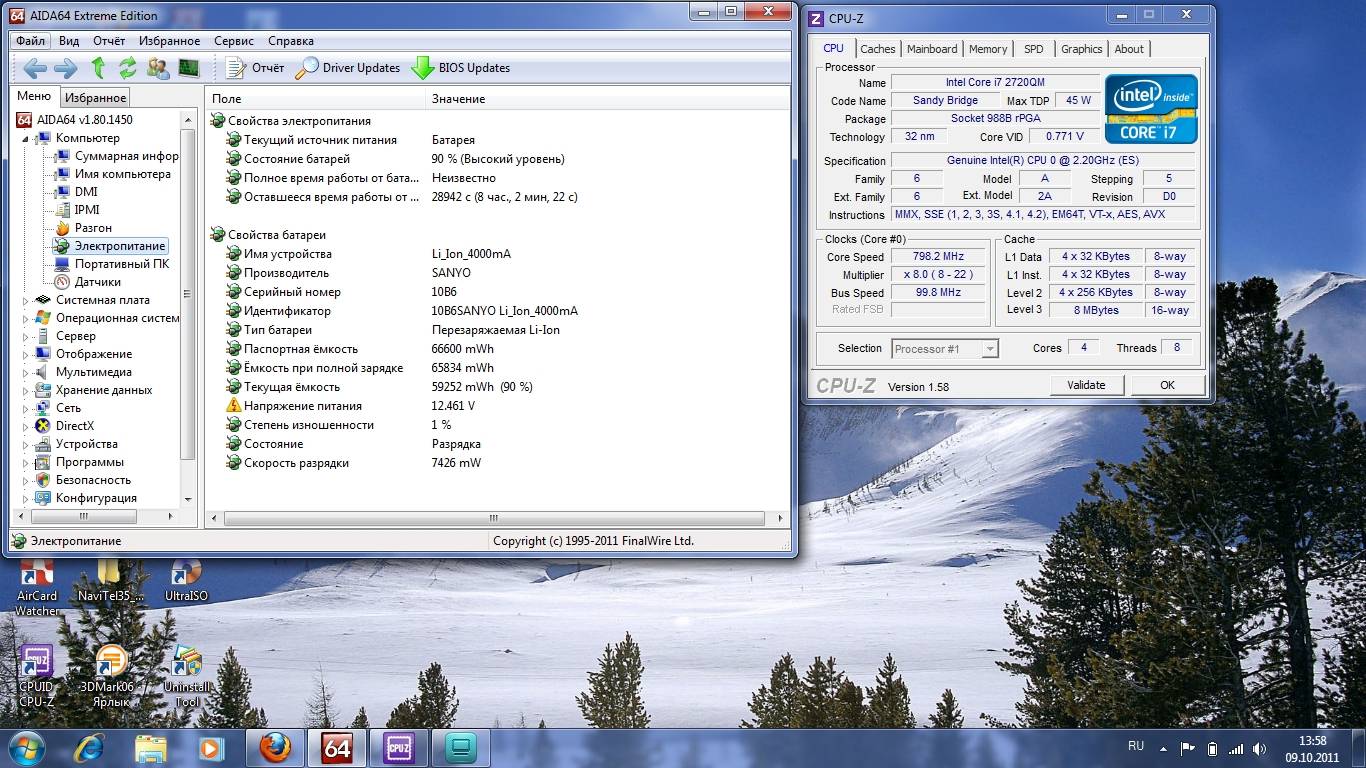
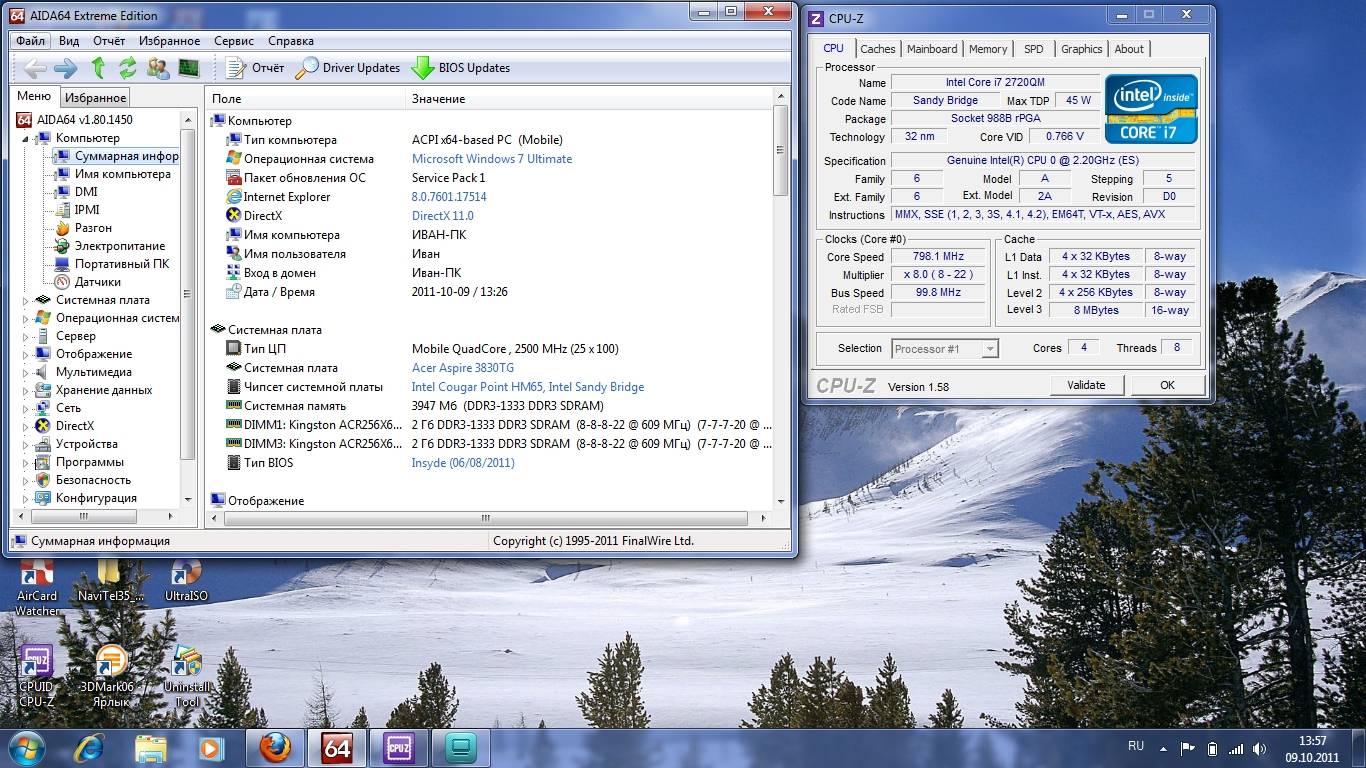
From there (russian forum).
Attached Files:
-
-
Honestly man, I'm not sure. I did all of my modifications in one shot. Lapped the heatsink, removed black paint from heatpipes, repaste with IC Diamond, added 9 BGA heatsinks, and swapped to the i5-2520M. All in all I went from nearly shutting down (~83C temps, shutdown at 85C) at 1.8ghz with no GPU oc, to 2.9ghz with an aggressive GPU oc peaking at 95C in Dead Island, 87C in Black Ops.
Are you running the i3-2310M or i5-2410M? If you are running the i3 I highly recommend an i5-2520M (ES version). The 2520M can run at 2410M speeds with less voltage, and of course has 2.9/3.2 turbo instead of 2.7/2.9 turbo.
PM me if you are interested in acquiring a CPU for upgrade. For me, many games went from unplayable, to 60fps+. Well worth it in my opinion.
Very interesting. The user "heatless" on this forum reported that he couldn't get any ES quads to work in his 3830TG. That CPU-Z shot indicates D0 stepping, which is the earlier ES as well, with D2 stepping being the QS (qualification sample), which is identical to OEM.
I think I'm going to go ahead and grab some 2720QMs for testing
-
Holy Moses, 2720QM
I'm still waiting for my 2620m ES to be delivered. Quad core sounds tempting but I'm not sure I want to go to 45W. I will look into adding more ramsinks over the GPU when I do the CPU swap. -
Turns out I was wrong about the steppings. Both Q154 (ES) and Q1CL (QS) are D0. Only the retail is D2.
However I believe the screenshots above are the Q154, simply because Q154 has CPU name: "Intel Genuine CPU 0 @ 2.2ghz", while the Q1CL has "Intel Core i7 2720QM CPU @ 2.2ghz (ES)".
The quad is for sure more of gamble. It costs more, and the 3830TG was never released with a quad, so I'm very surprised that quad ES micro-codes exist in the 3830TG bios.
Plus, the 3830TG VRM was likely not designed with a 45W chip in mind. Could very well shorten the life of the voltage regulation, and hence the motherboard itself. Seeing as the cooling system, which is fairly important was under-engineered to such a pathetic extent, I'm not sure it's a great idea either. 3830TG can barely handle a 35W chip with extensive mods, so I can't imagine how hot a 45 watter would get. If end up trying the 2720QM, I'm going to cut away almost all of the plastic over the GPU and chipset, and add even more heatsinks, plus heatsinks all the way down the heatpipe.
And of course, many games don't even utilize 4 cores. -
I'm really happy with the coin trick so far- I just wish there was a way to make it more permanent so I don't need to worry about the coins moving around when I take my laptop with me. Rage 2 peaks at 87C elevated, 92C flat on glass (x22 throttle). It idles a full 10C lower than before! (44 vs. 54C), and this is with the gf540m oc'd to 790/1000.
I'm running on a 2410m right now and I've been mulling over buying the 2520m. Money is a little tight this month and I was hoping to buy some clothes instead of a new CPU but we'll see haha. Living in Hong Kong there's a huge computer market near my work where I can buy just about any component (except, strangely, those magical little ram sinks) so I'll check there first to see if I can pick it up and have it installed in person. Cheers though. -
You could perhaps add some adhesive thermal compound, although that would be a potentially irreversible solution. Impressive results with the coins nonetheless.
Well Gelid Solutions is based in Hong Kong, so if you emailed them about the ramsinks I'm sure you would be able to buy some and receive them very fast. -
I plan to use some left over Arctic Silver Ceramique (the epoxy type) to get the nickel + dime together. Then use a tiny bit of aluminum foil padding so each coin stack is pressed against the door firmly. I'm pretty sure this will keep the coins in place. Also I should be able to support 7 stacks instead of the current 5 stack... should see a bit more temperature improvements... will keep yall posted how it goes.
-
New Intel Core i5-2540M 2.6Ghz ES mobile CPU > 2520! | eBay
Came across this today. Would the i5-2540 fit in the 3830tg? I mean this one's only $110 and the dealer is reliable. -
Yep.
10 char -
Not sure how good of an idea it will be to stack the coins right up against the door. They are positioned right under the vents after all, and while the coins themselves will be exposed, there might not actually be any airflow over them (and other parts of the HS) if you have blocked the vents completely. I would leave a bit of a gap to be sure.
I didn't remove the mesh from my door, but I could only fit one penny before they were pressed up against the mesh Eventually I just removed them, I have ramsinks under the heatpipes like rbl_posse did and things are fine.
If you expect you will be doing a long gaming session in a safe place, actually having the door off completely, combined with a cooler like the Coolermaster U2 reduces temps by quite a lot. I only tried this once or twice though as my temps are fine as they are. -
After messing around with laptop-modes a little more, I get about 6:30 of battery life (i3wm and wireless on). How does that compare to my other Linux friends?
-
Was reading up on some testing of the ES Q154 2720QM, and some people were reporting lower performance than a retail chip, yet others reported higher. They were using PassMark.
I decided to run PassMark on my ES Q17N 2520M, and got a score of 3905.6 for CPU. On PassMark CPU Lookup, on average the 2520M gets 3582.
I think because I had ThrottleStop on forced turbo I got a higher score. It's funny, the i3-2100 got 3845, so my notebook basically has a desktop i3-2100 in it in terms of performance. -
I don't think any of the i3's have Turbo, unless if you were just getting around Acer's throttling (I honestly have no clue, just injecting a bit of info here).
-
does anyone think is possible to get a hacked bios that increases the throttling temperature for the 3830tg :-o ?
I wonder if enough complaining to Acer would do anything, we already had many owners do this though =/ maybe we need to rally up and throw effective molotovs at them, they might take action
-
The throttling isn't the problem, the heat is.
-
The heat is the problem indeed. A higher throtteling temperature will lead to a shorter life of the components and to 1min more gaming without throttling. If you want to try it, use ThrottleStop.
-
I understand that heat is the problem, ultimately a recall from Acer and an improved cooling solution would be ideal, but that's very crude. Most of us wont use the laptop at full combined gpu + cpu load all the time, that's why i wasn't so critical about the Bios fix (perhaps lower vcore option & higher throttle limit). In all honesty though if our laptops fail within a year of use because we game some, I wouldn't feel any guilty about it because it was their mistake in the first place they can always take action and make it right.
-
Acer won't improve the cooling, as this is too expensive and they cannot afford it. They even ship their newer models from Acer and PackardBell with the same cooling solution and hope that people will buy it.
-
I just added some more features to ThrottleStop for the newer Sandy Bridge CPUs. It might give you a few more options to control your overheating T3830TG. Changes include access to a wider range of turbo multipliers as well as being able to adjust clock modulation in finer steps. Clock modulation is an easy way to control CPU performance and heat in Sandy Bridge CPUs.
Version 4.00 is available in my sig. -
Excellent update. Very useful for my 2520M which has a wide variety of turbo options. Thanks.
-
NotebookCheck new review with the 3830tg (i7/SSD)...
Core i7 2620M
128GB SSD
8GB of RAM
Review Acer Aspire 3830TG (i7/SSD) Subnotebook - Notebookcheck.net Reviews -
The same lousy throttling as in the first 3830TG. Acer is resistant to learning.
-
That's sad to see that new review, I don't I'm going to ever get another Acer that's so ridiculous. I understand it's a business, but they simple don't care lame.
Anyways do you guys think this laptop air extractor will help any with the 3830tg? http://www.ebay.com/itm/Notebook-La...ltDomain_0&hash=item1c1b3f9e00#ht_5255wt_1163
it seems to be good to be true, but i noticed most usb cooler pads run in very low rpms making the purchase some what useless (spending over 60$ it's a bit expensive) , my current cooler isn't doing that well anymore.
Acer TimelineX 3830/4830/5830 T/G
Discussion in 'Acer' started by lee_what2004, Feb 6, 2011.