Problems? See this thread at archive.org.
I don't think this cooler-thingy will do any good- probably just a lot of noise.
-
-
what kind of cooling system 5830tg have? is it liquid-based or freon-based? i'm looking to upgrade it to I7-2630qm and i don't know if will be supported well.
-
It's more like, they don't care. This unit is defective IMO and adding an I7 and an SSD wont cure a crappy cooling system.
-
I totally agree. Seeing these mods with gluing on coins and whatnot wont do much either I'm afraid, more of the 'self suggestion effect' I believe. You simply can't defy physics. Just accept the fact and wait for next iteration that is built on 22nm process, then these problems probably are solved.
-
I don't see what is in such defiance of physics. Admittedly, coins don't add much surface area, but ramsinks do a bit more. The airflow from the fan isn't great, but it's there. As long as you don't block the intake vents, the airflow should stay about the same and with added surface area, the components will be cooler (and your exhaust a little warmer?)
Do what you can to keep things under control. Every bit counts. 2 degrees is the difference between being 1 degree over the throttling threshold and being 1 degree under it. -
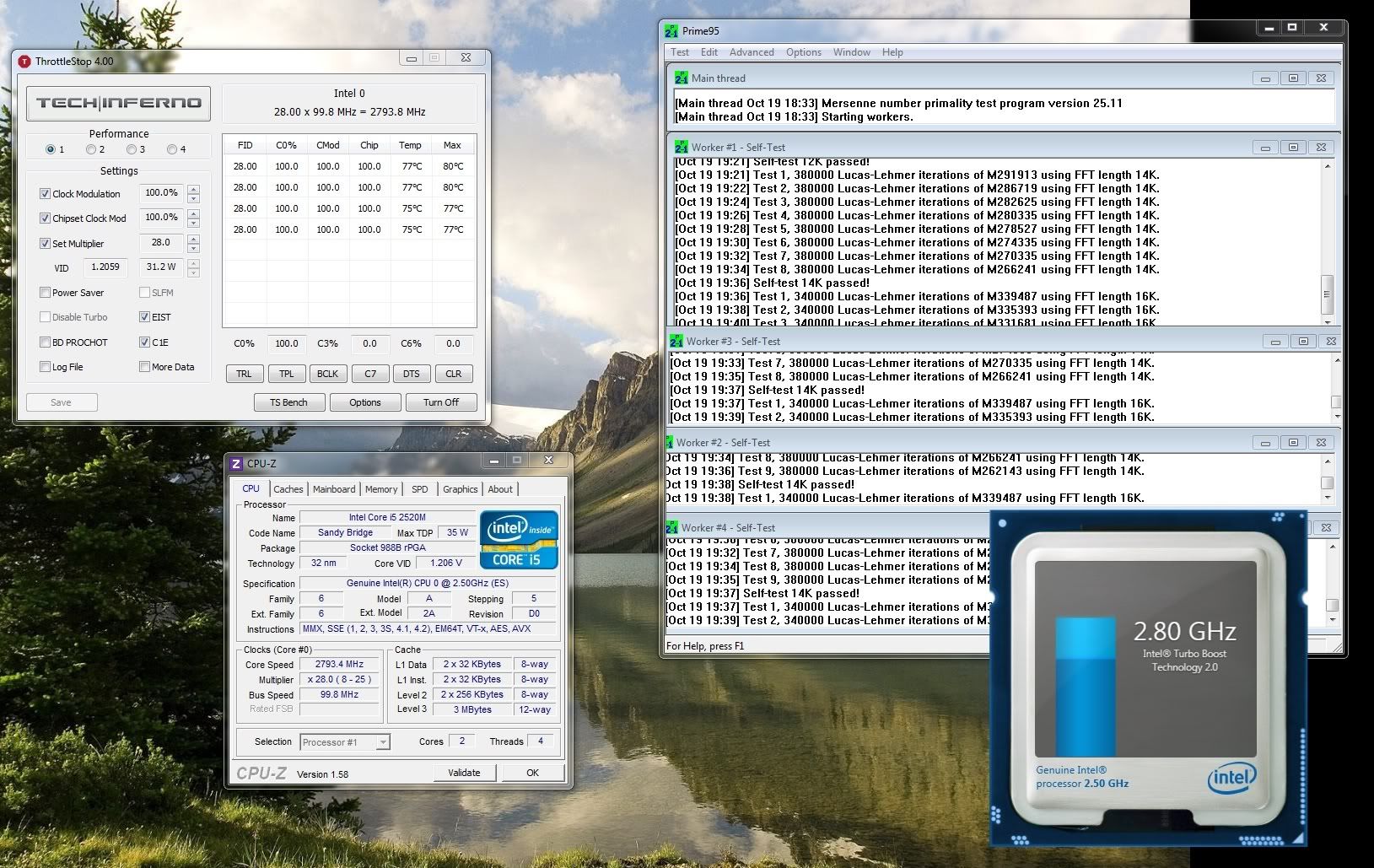
Here is that self suggestion effect giving me an absolute max of 80C after an hour of prime (no laptop cooler, flat on a wood desk, ES chips also require slightly more voltage than final D2 revision).
-
How come throttlestop doesn't read your processor?
-
Well the name of the CPU is "0", because it is an Engineering Sample. Look at CPU-Z under specification, it also says Intel CPU 0.
A 2520M with the specification/name "Intel Core i5-2520M CPU @ 2.50GHz (ES)" is a Qualification Sample.
Still running Prime95 as we speak. Absolute max is now 81C, but it hovers around 78C and has been running for over 2 hours now. -
The 5830TG has the same cooling as the other two: a metal-plate running over the hot parts and a little fan trying to get the thing cooler.
I don't know if the 5830TG does throttle, as it has some free space inside. The 3830TG and 4830TG throttle for sure with every CPU (unless you modify the cooling system).
I totally agree. But most people aren't engineers and want a device which "just works". -
The fact that you could solve the GPU heat issues with some copper pennies or glue-on heat sinks makes it even worse that Acer has done nothing to remedy the thousands of 3830TGs that are throttling out there. All they had to do was stick with the cooling system in the 3820TG.
-
isn't that <answer> cute? but it's WRONG!
anyone with some technical skills? i'll break apart this laptop, only to find what kind of cooling system is there, i'll spend few hundred <credits> to buy a new processor, just to find that a forum member gave me a <romanian term: BELEA!> reply.
, man? ?
...just imagine what did i said, in those deleted words )
)
-
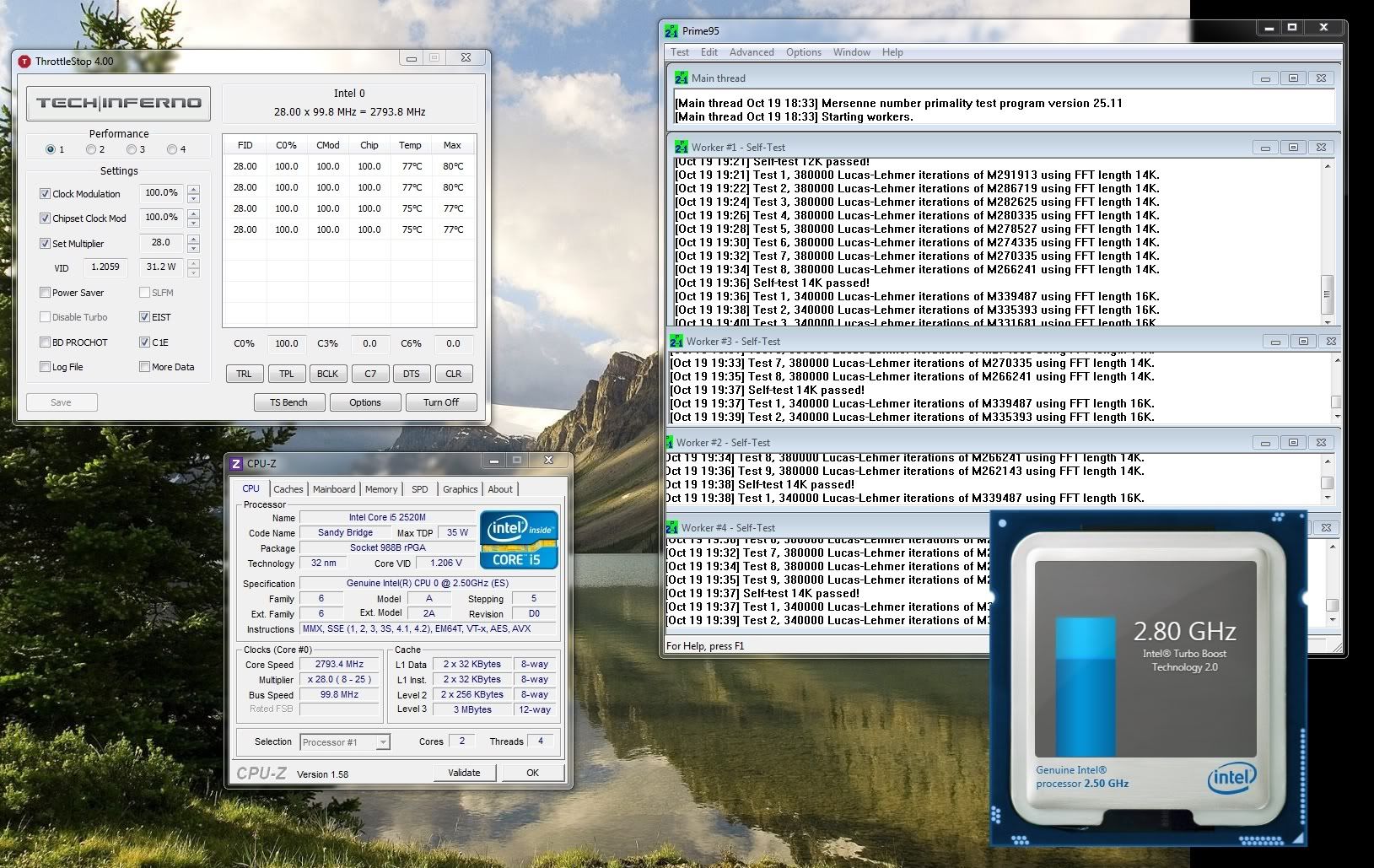
According to the tests I read, the 5830TG has the very same throttling problems, so I assume it uses the same cooling solution as on the picture below (basically a metal plate + fan). I'm no englishman, so I don't know the appropriate words. Should be clear enough though.
You may find more infos on the 3830TG-teardown here: Gadgets and Hacks: Acer 3830TG-6431 TeardownAttached Files:
-
-
Hi, Thanks for the new version! Can you possibly post a list of which properties to best set for the 3830?
Thanks! -
I think they're on the first page of this thread.
-
I just installed a Hard Drive Caddy in place of my DVD drive on my Acer 4830TG. It was pretty easy, but it would have been easier if I had known how to remove the original DVD drive first! After removing all the screws and trying to pry open the back cover, I realised that I only needed to actually remove one screw in order to remove the drive! Anyway, the caddy is working well with an old 100GB SATA drive; I'm looking forward to replacing it with a 1TB drive very soon
The caddy I bought was a cheapy from eBay - only AUD$11.69
Although, like others in this forum, the new HDD is not showing up in the BIOS, which makes it difficult to use a boot drive. Did anyone find a solution to this? -
same here cannot boot into 2nd drive. but i'm at peace now.
it doesnt bother me as much anymore.
-
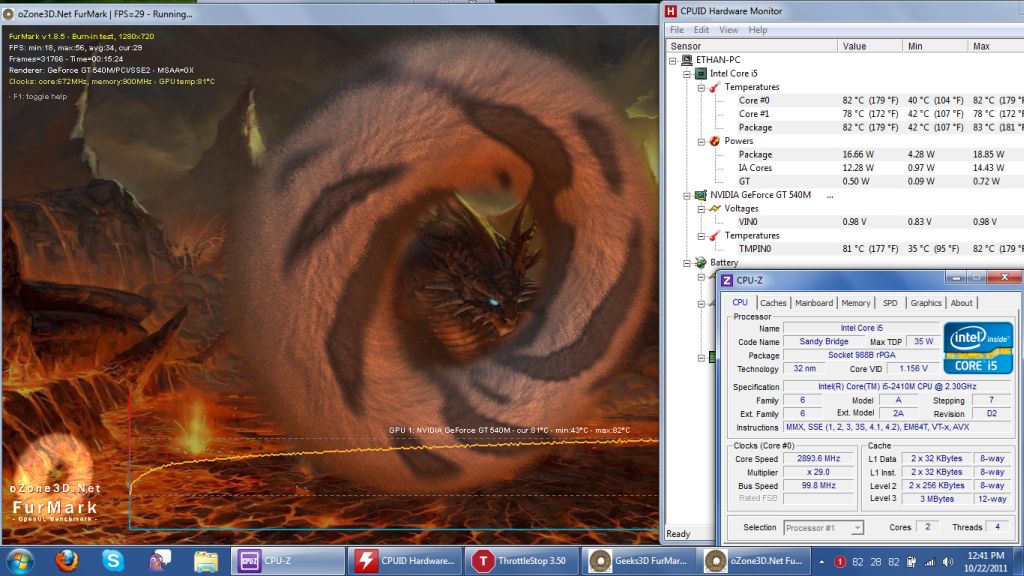
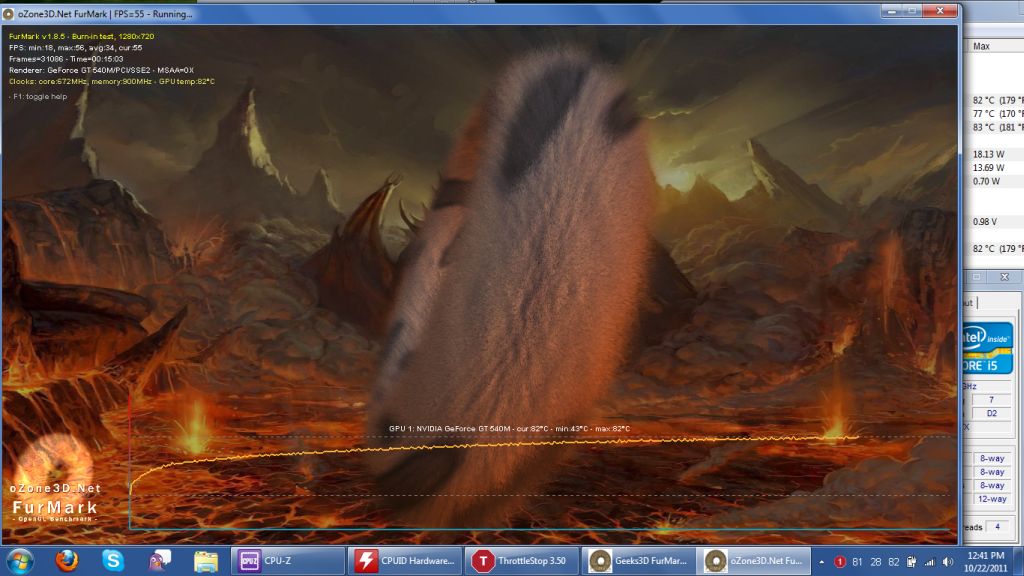
So I ordered some Arctic Silver Alumina Therma Adhesive from Amazon and finally got to try the coin trick with SEVEN coin stacks.
What you do is blue the nickel and dimes together to make seven stacks. Then lay them along the heatpipe, as it fits seven stacks perfectly. Then close the door which actually holds the coin stacks in place really well, since they no longer will slide over each other.
Results are impressive... ran 15 minutes of Furmark again and max temps were 82C with the cpu locked at 2.9 Ghz turbo. Although to makes things a little more modest, the coin trick decreases the time it takes heat to ramp up as opposed to actually decreasing the heat ceiling. But in terms of practical usage during gaming, this is still a huge benefit as throttling is basically non-existent any more... no game out there will push your GPU as hard as Furkmark.Attached Files:
-
-
Great results man. Keep in mind that Furmark only maxes out 1 core. It is possible for a game to heat up your system more than Furmark alone. The ultimate test is running 4 threads of Prime95 and Furmark at the same time, while trying to stay under 100C. I don't think anyone has been able to do that thus far.
-
Would a Seagate Momentus XT (500GB) fit inside a 3830? Thinking about swapping out my standard 750TB drive for one of those...
-
Yep, it fit's perfectly... don't forget to update Intel sata drivers and also seagate firmware (SD28)
-
Hello fellow 3830TG owners,
In my quest to upgrade the LCD I've run into a slight snag. I'd really appreciate your expert input. I was able to purchase a 13.3" 1600x900 screen here and replaced the original screen without a hitch. However, when I turn the laptop on with the new screen, the backlight comes on but the screen remains black (laptop boots into Windows just fine). My guess is that the data cable is unable to support that high of a resolution. I've been hunting for a dual channel LVDS LED cable for some time now without much success. Oh, and I've put the old screen back to make sure there's nothing wrong with the 3830 data cable.
I found a data cable for the Thinkpad X301 on ebay. That laptop has the 1440x900 resolution. Do you think it would work with my screen? There's also a Thinkpad T510 cable (that screen is 15.6 1600x900) that I am considering.
I welcome your comments. Thanks. -
Great stuff, finally someone that has managed to source a replacement panel!
If it is the cable then I'd go for the T510 cable. Your vga wont know how big of a panel it feeds a signal to, so better match the resolution. Please report back when you do more progress, this is interesting. -
Hey sulo251,
I'm also interested in a mod to replace the LCD screen.
Have you tried to see if you can get external output working to another screen while you have your new 1600x900 installed? That would point to the cable being the problem.
From what I've read, it looks like you will need a dual channel LVDS cable instead of the single channel ones most 720p laptops come with.
Short answer, try this part:
HP PartSurfer
Alinc Technologies | 656805-001 | Display Cable Kit - ALU FHD | LCD
(or anywhere else you may be able to source it)
Long answer:
http://forum.notebookreview.com/har...de-help-why-wont-my-screen-work-properly.html
http://forum.notebookreview.com/acer/593689-possible-upgrade-screen-resolution-aspire-5750g.html
dual lvds cable | eBay
http://forum.notebookreview.com/hp-...91-modding-dv6t-dv7t-quad-edition-2011-a.html
Oher LCD Dealers:
LAPTOP SCREEN, LCD panels from $42. Dell, HP Compaq, Toshiba, Acer, IBM Lenovo, Sony, Gateway, Apple, Asus replacement screen display panel
http://myworld.ebay.com.au/screenintaipei/?_trksid=p4340.l2559 -
Update on cables:
Looking into the Thinkpad option, Lenovo site has repair and parts lists here:
15.6-inch HD+ LED-backlight LCD service parts - ThinkPad T510, T510i, W510
LCD Cable part for both FHD (1080p) and HD+ (900p) screens is:
75Y5557
Available from:
http://www.sparepartswarehouse.com/IBM-Lenovo,Laptop,part,75Y5557.aspx
Lenovo thinkpad t510 LCD/LED Cable 75y5557 50.4CU03.002 | eBay
FRU 75Y5557 for IBM ThinkPad
75Y5557 , T510 T510i W510 LCD Cables | ACS Computer Parts Outlet, lowest prices on the internet! -
I've purchased an HDMI to DVI cable so I can test the new screen. It should be here next week hopefully Tuesday or Wednesday, I'll report my findings then.
In addition, I didn't want to just buy random parts from international sellers for two reasons: shipping would take forever and no returns. Also I bought the screen for about $90 and it makes little sense to spend $50 on a cable.
Nevertheless, I did purchase two data cables to try out. One is an OEM Acer Aspire 7736z data cable, since that laptop has a 17'' 1600x900 LED screen. The other is an Inspiron 17R cable (also 17'' 1600x900 LED). I'm hoping either one of those will light up my panel. The cost for both was around $35 total. I'm aware that the cable will probably be longer than the old one but we'll cross that bridge when we get there.
In the meantime, fingers crossed! -
Any model numbers for those two?
Bet's on the Acer one working, at least it's from the same manufacturer. -
Nice, impressive mental suggestion!
-
this is a buy for me if the 1600x900 screen can be put in...
-
Don't you think that would be tiny and hard to read at 13.3"?
I've got 6 coins in now, runs DX:HR at x23 steady, which is up from x22 before. 3dmark06 got 9777 not quite 10k.
-
i'm a former owner of Vaio Z's.. 1600x900 is actually very very easy to read. 1080p on a 13 might be difficult, but 1600x900 on a 13 is about the same pixel density as 1080p on a 15
-
Hey all, been following this thread for some time now, and finally grabbed one from the local Microcenter. I noticed that the original laptop went out of stock for a while, and I thought I had missed the chance to buy, but then MC restocked with a newer model number, the AS3830TG-6424. It appears to be about the same, only it's got an Intel i5-2430 processor stock.
In some preliminary testing, I noted the throttling issue right away. I think some of the thoughts about the throttling being tied to the GPU are correct - if I pushed my processor only the tests would run up closer to the Intel thermal ceiling at about 100C, but if I ran a test that used the GPU as well, throttling was almost instant, sometimes even seemingly below the noted 85C mark. Regardless, my point is that I think I've verified that the issue is still applicable to this newer model.
My question is - has anyone else gotten this newer model with the updated processor? I think it might actually be running a little bit hotter, but without extensive testing I can't confirm. I was hoping that the new processor would come with a slightly different cooling design, but I think that I'm going to end up in the same boat as everyone else, either tearing it apart to finish the job for the Acer engineers, or looking elsewhere for my tiny game-able road warrior.
The other thought I had was that, in looking at the extensive reviews of nearly every other system in this category (12-13.3" with a competent GPU), almost every manufacturer at least "ran hotter than I'd like," according to reviewers. Some even had similar throttling issues. Even though I agree with many posts that say manufacturers shouldn't sell products with design flaws...I'm wondering that if everyone else has the same issues, maybe the problem is based on a reference design that companies are using? Could it be that Intel or another vendor, maybe a mobo manufacturer or nVidia have released a reference standard that doesn't quite cut the mustard? To have a similar combination of parts (i5/SB CPU + GT 540m/HD 64xx) run hot in all machines of the sub 14" class, it seems that at least one manufacturer would have stopped at some point and said "what's going on here?"
To more directly reference models with issues, I'll point to the modders of the m11x, the Sony SA models, and some complaints about ASUS models that run hot when they're not of the RoG variety. Another interesting point is that Samsung, ASUS, and some other manufacturers seem to have released this type of machine (13.3ish, sub 5 lbs, and no optical drive) with a 525m or similar Radeon GPU, with far less heat issues.
Any thoughts? Just trying to see where everyone is on this issue. I'm thinking that yeah, I'm a little upset that they'd sell an overheating computer, but then, nobody else has been able to bundle all these parts together satisfactorily either...maybe the problem lies somewhere else? -
Acer already solved the problem with the 3820TG, which had a dual fan design and ran in the mid 70s under max load and never throttled.
-
Hi all, I need help.
- A few weeks ago I wrote here that the battery in my laptop has increased capacity.
- I was answered that this is normal,that one of the articles could have more memory.
- But I notice every + - 14 days re-increase capacity (since from buy laptop). Battery life is still + - the same as when buying.
- But I am afraid what it is, I owned before this laptop three laptops but did not increase capacity but always reduced battery after some times, but not increase, so I'm afraid what is happening.
- Could someone please help with this and tell me what's wrong with my battery, please.
- I want to thank everyone in advance what would help me with this, thanks.
THIS IS MY NEW SCREENSHOT FROM DATE 25.10.2011:

Between this screenshot and the first one screenshot(which is here down) I create more screenshot +- every 14days one and always little increase capacity. What is this?Help me please.
THIS MY OLD MESSAGE IS FROM DATE 09-18-2011, 01:00 AM WITH FIRST INCREASE:
-
Have you ever re-calibrated the battery by fully discharging it (leaving the notebook idle if possible) and then fully charging (with notebook switched off)?
-
Hi Download,
- I bought the laptop battery to wear out of the box 2% since then, only reduced, then there was zero, and now it only increases the capacity.
- Recalibraci I've never done.
(for recalibration, I also found nothing in manual) - I recharged notebook for first time after buying into fully loaded to the max, and since using it as follows: Charged to 100% and discharge into max 30/40% and then again to charge a 100%.
(I've never completely discharge, it is bad for liion and lipol bateries, it's write everywhere in internet everywhere which solves problems with batteries)
You have idea what could be my problem. -
@ Thomsomc
I think the problem starts with the Fermi GPU which is hot. Acer did not have as many problems with the amd gpu's, even in single fan/heat sink designs. The wholesale swap from amd to nvidia without significant design engineering is the most likely problem. Nvidia probably understated it's design criteria as well.
Even with the Fermi gpu, the 3820tg's unique cooling design would have been adequate IMO. It was a dumb and short-sighted decision to abandon it. It is nothing short of amazing. My Acer runs routinely under load at 3.66 ghz with no adverse effects that I can see, even a year later. -
@PepeCZ
While it's true that fully discharging Li-ion cells is not healthy for them in the long run that's probably the only way to re-calibrate the battery.
By that I don't mean form/format the battery- which is something that used to be done with Ni-Mh batteries- re-calibrating is meant to let the chip in your smart battery know what's the accrual capacity.
So battery capacity isn't growing at all- it's just smart battery that's showing false value. -
What are your OC settings? I'm at 800/1000 and I only got 9334. -
to downloads: Hi, okay I would like make this step today - what is the exact procedure? let the battery discharge (but not completely) and re-charge on full? or should I use a special button? or what steps would you recommend to me in my case, please? Thank you in advance for your answer.
-
Hi, I just purchased a 3830TG with an i5. I was wondering if anyone knew if the board supported i7 CPUs?
-
790/1000
Are you running the latest drivers?
edit: resolution is 1280 x 768 I think -
Yeah I think the problem was that I was running it on my 1600x900 monitor. I did it on my laptop screen at 1280x768 and got 10684...... but I just changed to an i5-2540m (es), had throttlestop running at 30x, and have the "Battlefield 3" drivers from a couple days ago.
I just finished my mods now I have pretty much everything rbl_posse has and heatsinks running all through my heatpipe.
BF3 is pretty awesome. I'm getting ~40 FPS on low with a multiplier on throttlestop at 29x. I can do that for about 45 minutes until my GPU reaches 80 c then it goes down to 26. I haven't seen my temps go over 90c since I finished all the mods earlier. -
That's sick man. Your 2540M is the Q16P right? What voltage does it use at 30x? 1.2209V?
Sorry I didn't respond to your PM. Swamped with mid terms and I figured you could figure it out on your own, which you did haha. -
It's 1.2009 at 2.9, I can't seem to get it over 2.9ghz (which I'm now realizing it's not going over that) when I do prime95, though I don't really know how to use it.
Haha it's cool I was afraid I was gonna break something. The heatsinks help a lot and are well worth the $8. Installing everything was actually a little easier than I thought and the new cpu is awesome.
And it seems that the "auto" setting on BF3 video settings are better, it sets everything to medium except 1 high and I'm getting ~35 fps. -
I'm jealous, for some reason they don't sell new mobile chips in HK
You can only get ones salvaged from 2nd hand laptops. Couldn't find any ram sinks either. I guess I'm happy enough with x22, if I want to play games it makes more sense to just buy a PS3/Xbox360 for the price of a new CPU.
-
Just curious, what are you using to monitor your CPU speed? ThrottleStop?
I've found that CPU-Z refuses to register speeds higher than 2.9ghz on my 2520M, even though I routinely hit 3.2ghz web browsing. So maybe that is why. I've found that ThrottleStop is the most accurate tool I've used for monitoring clock speed. Intel Turbo Boost monitor is great as well. You should be able to do 3.0ghz with 2 cores active and 3.3ghz with 1 core active, although running it slightly slower has it's advantages. When you run prime, make sure to select only 1 thread. Maybe use Super Pi Mod and run a 1M test to make sure your turbo boost is kicking in, I know that app uses 1 thread only.
Anyway, great results, glad everything worked out okay for you. If you are already noticing results from swapping over from a 2410M, I'm sure you can imagine how I felt after ditching my pathetic 2310M
-
ThrottleStop is excellent for monitoring. Just use an external display, so you may have a look on it while gaming.
-
Ideal way of doing this is to leave the notebook idle but change power-saving settings so that nothing gets disabled or hibernated, wait until it hibernates on its own when critical battery level is met and then recharge it fully with the notebook off.
Since that takes ages you'd probably want to just browse or type/work or something like that until the laptop hibernates and then recharge it (still preferably when it's off).
It's important to keep the load constant- otherwise battery chip might get fulled by sudden drops in battery capacity and consider it a lost capacity while it was in fact you momentarily putting your foot down. -
i took a glimpse at this thread, and i notice that you all complaining about the 1 fan in the 3830t model, is it that bad ?
i know that overheated machince getting destoryed with the time, and it's dangerous to the motherboard... is the system stay cool when computer is idle ? and how fast is it getting heated ? like after 40 minutes of browsing and watching movies or just by playing games and video rendering ?
EDIT *i'm refering only to the 3830T model. -
Ahhh, I gotcha. I don't really need anything over 3.0ghz anyway since I won't game with it over 3.0... I was worried I got a crappy processor for a second haha. I was monitoring with throttlestop and the intel turbo boost monitor and they were both at 2.9.
In hindsight, I really wish I could go back and buy an i3 and just upgraded it. I would have saved $100-$200 and have the same system.
rbl_posse and I both got the engineering sample chips from ebay. Just look up i5-2540 es on ebay. The sellers are reliable and I got mine in a couple days all the way from china (I'm from Pennsylvania). For the heatsinks, we emailed Gelid Solutions and asked them for replacement heatsinks for the "Gelid Icy Vision Rev.2." They were only 8 bucks and their service was quick. You have to sand them down to fit but they're SO worth it. Way better than coins and they actually stick in there. All in all, I bought the processor ($110), heatsinks ($8), and some AS5 ($7)... So far it's all worth it. Gaming at 2.6GHz stays around 83c CPU and 73c GPU.
I have a PS3 and Xbox and I'd rather play games on my laptop all the time. I only play like NHL and other sports games on my consoles. I just wish I could find a comfortable way to lay on my bed and play BF3 with my keyboard and mouse
Acer TimelineX 3830/4830/5830 T/G
Discussion in 'Acer' started by lee_what2004, Feb 6, 2011.




![3830TG-6431_Teardown_005[6].jpg](images/storyImages/_3830tg-6431_teardown_005-6.jpg)