 Problems? See this thread at archive.org.
Yes, quite helpful (+rep). What processor are you using? I'm guessing you modded your own vBIOS to get 0.65? Mods I've seen just go down to 0.8.
I'm hoping to squeeze in a little extra copper on the pipes, and I'll probably drill some holes in the panel too.
Still curious of anyone knows if LCD models are interchangeable for 3820 and 3830's. I would GUESS, but...
-
I did but I wrote a program as well as instructions on this thread on how to self mod the vbios which should be really helpful. The processor in my 3830TG is the i5-2430M.
As Far as LCD panels I would imagine they would be interchangeable as long as it fits, they all normally use the same plugs anyhow. Last LCD I had to swap out was in a 2006 laptop however and I know they've changed a bit with the plugs since then. -
Does anyone have a pointer to a manual or a video on taking the internal battery out of a 4830T ?
After 1 year my daughters battery is down to just a 45 minute life and needs replacing.
cheers
Bob. -
Well I've been spending a fair amount of time trying to find a way to control the fan speed in the 3830TG by digging around in the Embedded Controller and figuring out what does what.
I've discovered at offset 0xAB
MODE, 1,
, 2,
INIT, 1,
FAN1, 1,
FAN2, 1,
FANT, 1,
SKNM, 1,
it is by default set to 8. If I set it to 0 the fan turns off.
I am assuming "MODE" allows one to determine manual vs bios controlled.
at 0xAD I see this
FSSN, 4,
FANU, 4,
Which I am assuming controls the fan however changing these values have no effect. I've tried changing the values at 0xAB as well seeing if maybe it would make a difference but I've not had any success yet.
If anyone might have more insight to this it would be greatly appreciated. -
Got a working 4830T-6678.
Any reason to upgrade the bios from 1.10 to 1.12 on this model? No nvidia gpu to worry about.
On another note has anyone ever seen a 14" IPS panel that would work for these? -
1.12 Fixes some problem with the battery in windows 8 Afaik.
Well I've been trying very hard to access to the fan controls on the 3830TG, this is what I've found.
The Embedded Controller has some control over the fan, but the most anyone has seemed to find was to turn the fan completely ON or OFF.
There is a SSDT entry in the ACPI which seems to give some indication the fan is controlled through Super IO at Port FFD2 Data 0003, but apparently Super IO chips require some kind of Configure Key to get into them. So far I've had very little luck.
I've also noticed that the Bios Flashing software describes CMOS data at Port 0070 and Data 0071. I've not determined what any of the values do in this.
I've been using the program R/W Everything in Windows but this might not be the best approach?
Also the Acer Aspire 5755G seems to have a very similarly setup Embedded Controller from what I've found out looking at its DSDT. I came across some information about it since people are having issues with that machines fan being stuck at one constant speed. -
First post here, been following bits and pieces of this thread for a while and was wondering if you guys could help me out. My 3830TG was working fine on Windows 7 (other than the throttling) and I updated to Windows 8 when I received the cheap promotion. It works pretty well with Windows 8, after the 1.12 bios update, and I notice that the boot times seem to be much faster.
The problem I have is that the laptop randomly freezes when leaving on overnight or even sometimes in school in the middle of class. Is there a solution for that?
Oh and mouse drivers specifically for Windows 8. The ELAN drivers seem to be totally backwards and the Synaptics drivers work about the same as the default ones. Seems like I have an ELAN touchpad, just the drivers don't work too well. -
Could be graphics driver, try updating them.
-
Does anybody know if I can install engineering sample quad 2630QM "ES" into 4830tg and boot successfully? We know that it was not possible with 3830tg but what about 4830tg?
-
The fan never gets louder than when you're flashing a new bios.
-
I've noticed this as well. I've been trying to sort out why this is but I honestly lack some skill in being able to.
-
Maybe some debuggin tools, like ollydebug might put you into right direction?
Edit: what about my issue on page 418, post 4179? -
I am assuming you mean MSI Kombustor. I am able to get this programming running properly so maybe it is something with your OS or how you have you settings in the nvidia control panel? I am running a modded 1.12 bios.
-
Guys,
I have figured it out. Replace the fan. that is the answer. I have tried everything including the repaste, taking the crap of the vents and the mini heatsinks, but when I replaced the fan that did it. Now my GPU doesn't go past 70 and my CPU hit 77 max after playing wow for 6 hours. My old fan was still spinning and it looked fine and didn't make any weird noises, but for some reason something must have messed up and it couldn't go at full speed so I think that was the issue. I was about ready to sell the laptop, bu I figured I might as well try the last thing that would cool it.
Hopefully u guys see it, The fans are like 10 dollars on Ebay. So good luck. -
Can we see an ebay link to the fan?
-
This is the exact one I got, because it was the cheapest one there and as I said I was about done with the laptop.
Genuine for Acer Aspire 3830TG 4830TG 5830TG CPU Cooling Fan | eBay
So give it a try if u want to, also about the laptop not being able to cool itself normally out of the box, I think that it is BS because my laptop was fine out of the box and for a long time after that. Anyways its not an expensive fix and it's pretty easy to replace the fan, there are only 4 screws and some type of black covering over the fan and heatsink that is taped on, but it is easy to remove. I've opened up a ton of laptops, and usually it was easy to tell when a fan was bad based on whether it is was making sounds or not spinning, but this one looked like it was working fine and it wasn't making any. -
Not a kombustor only, i use it at stress test.
3d mark still not passing.
which settings you refer to?
edit; where i can find latest build to test? -
From what I measured you cannot set the voltage below 0.8. It will be set in the settings of the BIOS but the GPU doesn't apply it. Instead it sets it to default voltage. That is 0.98 if I recall correctly.
I checked that with Furmark. When setting the voltage to 0.8 the temperatures are well below stock and even plateau at some point (wasn't the case for me with normal). Setting the voltage to something lower gives the behaviour as with default BIOS.
best regards -
I have a 3830tg, and updated to the modified bios, and without thinking I disabled the onboard gpu (thinking I wouldn't need to have optimus anymore) and now when I try and turn on the laptop it is just a black screen. Is there a way to reset the bios and settings again?
Thanks -
at the worst you would have to open the case and pull [very carefully] the cmos battery . I'm sure there are vids on youtube that would show you the proper disassembly procedure. that effectively resets the bios.
but if only the inboard display ic is disabled, do you not get full vid once windows boots? windows doesn't need live vid to boot. if it will not boot to the windows login screen [load the outboard gpu drivers] they you may be incorrect about the problem. were you using an external monitor by chance or have you tried hooking one up before boot to see if you get anything on it? -
dunno where the cmos battery is on this particular model, tried hooking up to my tv but still nothing. im thinking its not booting at all. Only sound is the sound of the fan an hardrive hum.
-
@Yuna I do not completely understand what you are trying to tell me but if you cannot get the modified bios to work with your GPU correctly flash a bios that doesn't have a voltage mod. These mods probably won't work as expected on every machine and you use them at your own risk.
@gruenebohne You can get the GPU voltage lower than 0.8v if you modify the video bios, which isn't an easy task. I wrote a tool and instructions on how to do this which is buried a little ways back in this thread. This isn't a great solution for everyone and the lower you Drop GPU voltage the more likely the GPU is to become unstable in heavy 3d applications. Most OS applications will not report the voltage of the GPU correctly either from my experience.
@KraZy_SkitZy although I've not discovered the right keypresses for it, you can recover the bios to stock using a USB flash drive and a special key combination at boot.. at least I'm assuming you can because many other machines that use Insyde Bioses are able to. I would contact Acer and tell them you had went to upgrade your bios and when it rebooted it wouldn't start back up. I really doubt they will give you much assistance but it is worth a shot. In the meanwhile if I can figure out the proper key combination I will let you know. -
Weird. I do the BIOS mod. All hardware tools I could find report the lower voltage. But as I described above, the testing suggests that the voltage ist not actually lowered below the 800 mV point.
Anyway, lowering the idle voltage should not make a significant difference, since the 540m should be turned off due to Optimus.
Edit: For those who still get throttling in games with the 0.8 V BIOS.
I found that lowering the clock speed to 600/1200 (core/shader) helped a lot. This is way better than having the CPU throttle mid-game making every modern game choke. For most games (I play) the lower GPU clock does not make any difference in perceived performance and even lowering the graphics settings slightly seems a fair tradeoff.
Hope that helps.
-
I figured I would do a benchmark showing furmark and the lowered voltage I am running. It is indeed reporting at 0.65v across the board. I'm not entirely convinced the temperature drop is all to great however.
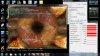
Edit; I discovered while testing that the voltage the GPU wanted to use was the highest one entered into the vbios, which I originally had at 0.85v even though I told it to use 0.65v at high performance. I simply went in and edited all of the predefined voltages to be 0.65v and reflashed. This seems to have fixed everything for me. -
There are some solutions for Insyde BIOS recovery, give it a try:
INSYDE BIOS recovery on Acer Aspire 3810GT -
I will try this right now and report back here.
Edit: I can confirm your findings. Setting all the voltages in the vBIOS to 640 mV solves the problem. The temperatures are not noticeably lower than say 800 mV or so i think. I will run the same test with 830 mV, which is the lowest voltage in the default vBIOS table. -
Where can we get the latest BIOS mods?
-
I will investigate the sub-800 mV thing and post a BIOS according to the findings.
Edit: I did a test with 830 mV and found very similar results to the 640 mV settings.
640 mV: ------------ 830 mV:
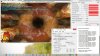
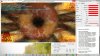
Lowering the voltage this far should make the GPU highly unstable or even inoperable. Probably, the voltage regulators are limited to some value around 800 mV.
Edit: I did a test on 800 mV. Here is a comparison:
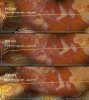
For some reason the fan did not turn to the highest speed during the 800 mV run. So the maximum temperature is a tad higher compared to the previous tests. -
You are saying it _should_ make it unstable and that afaik has been the case for some people, but not for all and definitely not in my experience. the only way to truly know what the chip can lower itself down is to grab a multimeter and probe the thing while its at full load... or pull up technical documentation on the chip (good luck with that idea).
This question I ask in some ignorance about how the programs poll for their data, but if the chip can only truly lower to 0.8v then why do they all report lower when its set to lower?
Why are you so set on the notion the voltage cannot be dropped below 0.8v? -
Because power consumption and excess power are highly dependent on the applied voltage. If the voltage would indeed be lowered according to the setting in the BIOS, then the experienced temperatures should be lower. That is not what I found and not what you found. To me, the only viable explanation is, that the voltage is not actually lowered bellow some point.
Edit: Shure enough, we can only truly now if we measure it directly with a multimeter. In any case: What is the point of setting a lower voltage, when all we can "measure" indicates, that the voltage is not changed?
-
This is a re-post from the Overclock forums. I'm in a bit of a pickle and wanted to query for more advice from this community as well.
I've got the 5830TG in i3 variant and I've done everything except for reapply thermal paste. I am using MSI Afterburner OSD server and HWiNFO64 to view my temperatures in-game. While playing Global Offensive my GPU does not go above 70 degrees and my CPU never hits anything over 75. Even so, the modded BIOS installed prevents the CPU from throttling on it's own until 90 degrees. I've got a laptop cooling pad with a gigantic fan blowing in to the non-obstructed vents. But... IT STILL THROTTLES!! For seemingly no reason at all my frames drop from 120+ to under 50.
I feel like I've cooled it enough so that it shouldn't do this... Is it because I have the i3? I hope I'm not out of luck without an upgrade to the i5... =[
My work DELL Latitude E5530 with the i7 Intel HD 4000 does a better job and NEVER drops my frames. It's a built-in video card!!
Frustration... -
Hey,
I searched the forum but couldn't find a solution so sorry if it has been discussed before.
I have a 4830TG and I just upgraded to win8, I have installed all the drivers and flashed to the newest bios.
Everything works fine except the P button and its led. I believe it indicates which graphics card is in use and the button lets me to use the dedicated one when I need? The fact that the button doesn't work means it is always using the NVidia chip? Is there a fix available for this problem.
Thanks. -
P button works with Acer's power management mode for better battery life. There is no external indication of which gfx you are using, the NVIDIA GPU activity icon in the taskbar lights up when the GPU is in use and goes back to gray when not in use.
-
I guess you would have to install one of the applications that acer provides on the support page for this laptop. On my 3830TG I have the Acer PowerSmart Manager and Launch Manager installed and the P-button is working. I would install those two as the first seems to handle the power switching and P-button and the second enables all the Fn-buttons.
Regarding the function of the button. It doesn't switch the integrated & dedicated graphics cards. All it does is switch the power profile (e.g. screen brightness, wireless power saving, etc.), though the default settings from Windows should work just as well. With the button working you can switch back to pluged-in profile when on the go. I personally don't use that at all since modern CPUs with tons of RAM are more than sufficient for about anything and the drop in performance when switching to battery mode is negligible (modern CPUs have very fine grained power control that is working regardless of power profile). -
I have 5830G with i7. It goes hot while playing CoD MW2 and Black Ops...
I read somewhere that changing thermal paste with Arctic Silver 5 would lower
temps for about 10C. The problem is that I also read somewhere that I would have to disassemble the whole laptop to remove heatsink...
Is it true? Or I just have to remove bottom cover, then heatsink and simply change paste
If someone has already changed thermal paste, can you attach some photos (of removed bottom cover)?
Thanks. -
The CPU and GPU share the same heatpipe. The GPU won't remain lower if the CPU is higher than it in temperature. That makes far more sense to me than what you are suggesting. This also makes more sense in the results I've gotten with lowering the GPU voltage.
-
@cpetersen4 repasting the HSF can help with throttling but the best option you've got is to use the throttlestop program. I often use this with games like BF3 and Skyrim, setting the multiplier to about x20 or x22 to keep temperatures low. The machine will throttle if the GPU sustains 75C otherwise. I have noticed that setting the multiplier to x20 keeps the CPU and GPU around 70C which is a very tolerable temperature imho. My 3830tg uses the i5 and a multiplier of x20 is about 2000mhz.
@ hoheyt Im not entirely certain on this but I think the 1.12 bios fixes problems regarding the battery and P button. Disregard this if you've already got that flashed.
@xfim You will have to do a completely teardown of the machine... unfortunately I do not have any resources available to show you how to do this. Your next best option is to use a program called Throttlestop and lowering the multiplier of he CPU a little. It kinda sucks but its imho the best option to lower temps and stop throttling. -
@ xfim
There is a link to a service manual in the first post of the thread that has disassembly instructions with pictures. -
Shocking news! I think I'll take it to service and let them change it. I would be sad if the plastics would break... Is it sturdy enough for total tear down?
Thanks. -
From my experience with the 3830tg you can definitely do a complete tear down, but it requires some patience and care. The plastic is a bit on the cheap side and I did break one of the screw mounts on mine.
If you've never done a tear down on a laptop before I wouldn't suggest that one to be the first. -
So you are not 100% sure that 5830 also needs total tear down?
If it is needed, I'll use cooling pad and pair it with throttlestop.
For now, I have set multiplier to 25.0 and I have uplifted it with eraser--> lol -
If you can do the teardown or get someone to do it and repaste it with arctic silver or some other decent thermal paste I say go for it. It will definitely be better than what its shipped with.
-
So you are not 100% sure that 5830 also has to be totaly disassembled?
Thanks. -
I don't know what the teardown is like on a 5830 or how easy it is to get at the HSF so no I'm not. I only own a 3830TG.
-
I was searching on Youtube if someone has disassembled 5830TG/G but there is only about 3830 and 4830...
High temperatures (stock thermal paste) is the only thing i don't like on this laptop, though battery is non-removable
Thanks anyway,
cheers... -
Do not be so worried about temperatures. Going above 90C won't hurt your PC, at least not straight away
. I am running ThrottleStop for the whole time with setted max possible mulltiplier (I think 28x).
I do a lot of video conversion (CPU and GPU involved). My 4830TG has a lot of hours with temperatures close to 100C. That was when my fan was covered with dust. With clean fan it is better - never above 90C. I don't pity my laptop, I don't expect it to run 50years.
I am going to put some quad i7 to it and see what temperatures I get.
The only thing I'd like to know is - will 4830tg boot with engineering sample 2630QM (ES)? -
Yes, that's a good point, but no. In FurMark the CPU does barely any work as can be seen here:
View attachment 89942
The CPU is about 4% loaded, not much more than when idle on the desktop (see bellow).
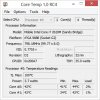
However, the temperature difference over idle is huge. This suggests that, when running FurMark, the GPU is the major temperature driver and the CPU reports the same temperature as the GPU accordingly. So it's the other way round. -
Hello people!
Sorry to break in the discussion, but here is a question: does 3830TG actually have possibility to boot UEFI?
I'm running BIOS v1.10 with unhidden menus and with "UEFI boot" and "EFI boot first" options (spelling may be incorrect, but these are two EFI-related options in Boot tab) enabled - and I can't get it to boot this way... -
From my own experience, the unhidden menus are very unpredictable. Some options actually change something, others do nothing. For a lot of switches I can't verify that they work. So I switched back to the locked BIOS as it works just fine. My suggestion: do the same. Acer would be very stupid to implement functionallity that is never exposed in the final product. My guess is, that UEFI is not porperly implemented in the BIOS or some hardware (is any needed? i'm not an expert on that.) is missing.
Do you need UEFI? What for? Just curious, because I can't think of anything that requires it. -
I need it to boot Windows from GPT (and I need GPT since I've got an over-2TB HDD).
Of course, Linux boots BIOS-GPT just fine, but I still need Windows for some tasks, and using hybrid MBR (like I currently do) means being able to access only first 2 TB from Windows.
Acer TimelineX 3830/4830/5830 T/G
Discussion in 'Acer' started by lee_what2004, Feb 6, 2011.


