Problems? See this thread at archive.org.
So you have a 2TB+ drive inside your laptop that you want to boot from?
If not, that is 2TB+ via USB, and you don't boot from it you should be fine without UEFI. Also have a look here: Windows Support for Disks with Capacity Greater than 2TB.
-
-
Wher can i get latest modded 1.12 mod bios?
-
USE AT OWN RISK
1.12 Mod.zip - Latest Modded 1.12 Bios
AcerTools.zip - Tools for editing the video bios voltages by yourself. -
I like your tool. No hexeditor anymore.

-
Nedemai, can you look into your 1.10 bios mod and 1.12 and find what is changed else? Cos 0.85v version from 1.10 do fine, but 1.12 gives me driver errors.
And can i set voltages like 0.8 4? or 0.8 6?
Or can we unlock to change those on the fly in windows? -
Nedemai, can you make a modded 1.12 bios for acer 3830 with 0.9v?
I want to try if with 0.9 i can make overclock, because at 0.85 i can go over 680mhz, -
@yuna, I've looked into 1.10 and 1.12 vbios mods and although there are some slight differences I didn't notice anything that should cause your GPU to stop working unless the vbios it uses is something different that you suggest it is. Either way I have created 2 versions of the modified Bios, one uses the older modified .85v vbioses from the 1.10 mod, and a redo of the vbioses at 0.85v from the 1.12 bios. If these for whatever reason do not work for you there isn't much else I can do. If you want to be able to set the voltage to 0.84v or 0.86v you can use the tools that I linked in the previous post, or you can flash a bios with no voltage mods and use software tools in the operating system to do this.
@mrSpinx because since I was doing it anyhow I have created a 0.90v version of the vbios mod that you can use at your own discretion.
I would like to make it clear I am not providing any more bioses with voltage mods. Ive released instructions and tools to make it easier on how to do this. I will however answer any questions you might have about the process of how to do this.
If a new bios for this line of Acers releases I will have no issue unlocking the bios menus if I am able to, but that is all I will provide from now on.
I have tested and verified all of following modified bioses work 100% on my 3830TG.
Use at own risk and MILAGE MAY VARY!!
Mods.zip - 0.85v from 1.10, 0.85v redone from 1.12 and 0.90v vbioses... all bioses as 1.12 -
> If you want to be able to set the voltage to 0.84v or 0.86v you can use the tools that I linked in the previous post, or you can flash a bios with no voltage mods and use software tools in the operating system to do this.
Which software can i use to set desired voltage in windows?
My MSI Afterburned did not allow me to change voltage
Can this be done on only acer/non-v-mod bios? -
NVIDIA Inspector should allow you to do this.
-
On official acer bios?
Well, i tried but nothing happened.
Maybe i should have clicked some buttons more/do some preparations? -
hi, sorry to hijack this thread out of the blue, but given that its 420+ pages long and contains 13" 14" 15" variants its hard to search through all the posts...
anyways, i have a 3830TG, with an i3 cpu and GT540M gpu running windows 8, and i am interested in getting more juice from the gpu in safe and stable way. the only physical mod i did (well it wasnt really a mod) was did a teardown, and repasted some arctic silver i had in the fridge for years onto the cpu and gpu.
now the cpu temp hovers around low-to-mid-40C when kinda idle just surfing the web, and go up to around 60C when its loading stuff. is this temp normal? this is because when i tried some gaming it went to as high as 80-81C (gpu was in the 70s) and was worried about what happens if it hits the 85C mark.
im kinda new to overclocking the gpu. i have not yet tried the modded bios. i read that one can use msi afterburner or install nvidia system tools to alter the clocks. which is the better method? how do i know how much to crank up and how do i know that its safe for the system? is there a tried-and-tested and safe setting one can use across all 3830 models?
thanks in advance -
Concerning the overclocking part, it's totally normal to have the CPU temp around 80°C. If it hits 85°C, nothing really bad happens but a throttling of the CPU (it means that the CPU will run at ~1Ghz instead of ~2.4Ghz). The same thing happens if the GPU temp hits 75°C.
To overclock the 540m, look at this video : How to Overclock NVidia GT 540M Tutorial - YouTube
And this topic : http://forum.notebookreview.com/dell-xps-studio-xps/563356-overclocking-gt-540m-12.html
I used Nvidia tools and it works great, but MSI afterburner is also good too. An alternative can be RivaTurner. It's safe to overclock until you reach too high temperatures (75°C for the GPU, 85°C for the CPU). Above these temps, the CPU will start throttling and you will lose the benefits of the OC. You can also use ThrottleStop ( http://forum.notebookreview.com/har...arket-upgrades/531329-throttlestop-guide.html) to get rid of the throttling issues but take care at the temps ! -
running furmark burn-in test now for about 10 mins, gpu temp is 87C and still rising, but how can i tell if the gpu is throttling? fps hasnt dropped yet.....
add:
never mind, fps, core and mem clocks plummeted after awhile so i guess thats where the throttling kicks in, guess i need to lower my clock speeds.......do people just crank up the core clock only or do they crank up the memory clock as well? how long should i run the burn-in test for to know if its considered stable? -
Both clocks. The CPU throttles when the GPU reaches 75°C.
-
running the burn-in test again at lower core clock speed (750) and default mem speed. ran it for almost half an hour and fps hasnt dropped, gpu temp is 92C, cpu hovers around 80C.....how would i know for sure if the cpu is throttled or not?
-
Run CPU-Z or throttleStop at the same time and look at the multiplier part. If the multiplier is stuck to the value 12 (or 11), it means that the cpu throttles.
-
but what i dont understand is, isnt the furmark burn-in test only stress the gpu only and not cpu? my cpu for the most part is under idle status at x8 multiplier because its not doing anything most of the time (sometimes it jumps to 15 or 16 for one second and then drops back to 8, maybe some background process), am i supposed to put the cpu under stress together with the gpu at the same time?
i guess in the meantime i will put the cpu's power management at 100% minimum and maximum to make sure it's at full 20x multiplier even when idle (my cpu is i3-2310M)
after running the test again for half an hour, gpu is at 94C, no fps or clock drops yet. but cpu multiplier is not stuck at 11 or 12, but fluctuates from 20x to anywhere between 8x to 19x (it does try to go back to 20x and it does for a short time but drops again, and back to 20x), cpu temp is at 80-83C, is this a sign of cpu throttling?..................oh now it's stuck at 8x so i guess the cpu is throttled right? -
on a different topic, is it possible to put a i7 quad core cpu into a 3830? being a 45W TDP cpu as supposed to 35W, i would expect to have an impact on battery life, but would the 13" form factor be an issue in terms of heat/cooling etc? will our standard 90W ac adapter be enough to handle the system?
-
It is possible but it's also not a good idea considering how many cooling issues this series already has dealing with 35W CPU.
PSU will be fine too. It's just the cooling system that you'd have to worry about- and that's one big worry.
I would advise against it. -
Yes exactly, you only stress the GPU with furmark.
If your GPU reaches 94C, your CPU must be stuck at multiplier x11 or x12. If not, it means that you have a program (maybe throttlestop?) which doesn't let your CPU throttle.
I think the best solution to test your OC is to play a game. You can log the CPU/GPU temp and also the multiplier value while you're playing (throttlestop does that). And after you can use these info to draw something like that :
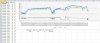
This is my computer while playing battlefield 3 : the gap between 18:06 an 18:12 is the throttling issue at the right moment when the GPU reaches 75C. -
so i have tried the 0.85V 1.12 undervoit modded bios and i was able to maintain around 70C on the gpu in furmark for just over an hour, at stock clock speeds (crashes if i try to bring it to 550M levels). cpu temps stayed a tad below the gpu temp when idle (between 65-67C), and goes up to on par with the GPU's temp if i set constant 100% cpu speed (x21 multiplier). would the decreased temps (from throttling level) help offset the increased TDP (and heat) of a 45W cpu?
-
No they wouldn't be enough- 10W adds far more than undervolding subtracts. You could make a rough calculation (that would be worthless since these would be theoretical value) but all in all there's no way you've made enough difference now that adding another theoretical 10W wouldn't cause overheating.
These are just not the laptops to do that. Maybe you could upgrade to the fastest CPU that still is 35W- that would be 2 core but at least it wouldn't throttle. -
very well then i shall put aside the wishful thinking of doing quad on my 3830, especially now that i practically have no more throttling issues without the use of throttlestop, though i did repaste the chips with arctic silver.
i will prolly stick to my stock i3-2310M for now. thanks to the 0.85V modded bios i am no longer in the throttling zone with stock gpu clocks and i3. raising the gpu clocks to 700/1080 puts the gpu temps right at the 75C mark. cpu does throttle at this point but only down from 21x to 20x which is negligible so i think i will stop any further OC while its still good -
So!! What panel should I get to gain one of these three things:
1. touchscreen panel
2. 1600x900 panel
3. 1080p panel
machine: 4830TG -
just get a new machine like the acer ultra M series, or S7 series
-
I am running 2670QM now. I have same temperatures as before replacing 2410m (for the same type of work - video conversion). Mostly because cpu repasting and getting rid off those metal covers on bottom vents. I usually does not exceed 90C which is good for me.
Then, I recommend Quad i7.
Although battery time surely will be shorter, for example when browsing. Little load make every core to be clocked up. There is no problem at idle though, as it uses the same energy as 2410m (according to Throttlestop).
Core parking (C6 state) seems to be helpful for energy saving. Process lasso is able to change parking levels and enable it. By default, I had had parking disabled.
After short testing:
Ok, that might be confusing but core parking in case of cpu with turbo, in practise will rise performance but also increase energy consumption. It allows processor to reach its max frequency (3.1ghz in case of 2670qm), but also cause it to sit at quite high frequency for most of the time (single core gets loaded heavily so cpu is clocked up) and this is quite energy demanding.
Is it even possible? -
how many hours of battery life r u getting? i usually have these settings for my laptop:
- zero or lowest screen brightness
- maximum battery life setting for intel graphics power management (assuming ur running on optimus)
- maximum processor state on battery at 5%
i usually get 8-9 hrs on my 3830TG that way while browsing on firefox n not doing anything else, mainly because i force the cpu muiltiplier to the lowest possible when on battery. so i wonder if battery life on a quad will be better if one forces it at idle speeds all the time while on battery -
so i see that panasonic batteries tend to wear out quickly, but just look at mine:

-
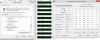
It looks it will be hard to get your scores.
I've done quick test. One hour on battery and 22% gone, but 4:05 hours left.
Brightness was almost on lowest. Multiplier sat at 8x. CPU parking enabled - most of the time 2 cores were parked at C7 state.
Minimum cpu load was 6% because some apps were doing things.
There was SSD running and HDD spinning constantly. 4830TG machine.
I think I can easily get below 20% per hour. Maybe next time.
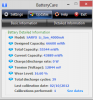 It looks also that my battery is a little worn.
-
oh so u have a HDD and SSD as well, that may explain the increased power draw.....and not to mention you have 16% battery wear too. i only have one ssd and very luckily i still have a full health battery
so i guess 5 hours under your current situation, if we restore the 16% to your battery assuming your battery can do 100% charge, i guess a quadcore can potentially do 6 hrs if you have a fresh battery. and if we kill the second HDD and we can get abit more too
then if u dont mind telling me the average power draw/discharge rate under low level use. for me anywhere between 5-8Wh so overall i can get a good 8 hrs with our 60+Wh battery (lowest screen brightness possible, 5% max cpu load, 1 ssd only, wifi and bt on, web surfing only). only if i start to say open up a media player to play music will it hit over 10Wh. so if one can sustain below 10Wh (the lower the better of course) that will be great -
hi Nedemai,
I'm getting a strange issue with your vmod 1.12 bios. I've been running 1.10 with a .85v mod for a while with no problems. When I switch to 1.12 with .85vmod and run something graphics intensive, the application will crash with and I'll get a message saying the nvidia video driver crashed. I've tried flashing your .9v mod, .85vmod, .85vmod old vbios, and tried editing a 1.12 bios to .85v with the same problem. Reinstalling the video driver and trying different driver versions hasn't helped either. The 1.12 standard and your modded menu's only 1.12 bios work fine though. I've reverted back to 1.10 .85v bios for now.
Maybe it's the way you started editing the vbios starting in 1.12?
I'm on a 4830tg btw -
im also running the 0.85v 1.12 bios, one thing i find very interesting about this is that if i overclock my gpu and run a furmark test....and have gpu-z active at the same time, i get a driver crash. same thing if i do a winSAT with gpu-z active
however, furmark test and winSAT DOES NOT crash if i DO NOT have gpu-z open.
so i wonder if the gpu-z is causing any conflicts
i have yet to try out a game though; only done furmark tests.....any free n good actual game benchmarks i can run and test on the 540M? -
Hello. Sorry for my bad english.
I've recently upgraded my acer 4830tg CPU from i3-2310m to i7-2640m and i have a strange problem. Laptop turns on fine, i can see processor upgrade in bios - but my laptop fails to boot OS (windows 8). I have it installed on OCZ Agility 4 SSD drive that worked well before CPU change, but now, on the boot screen, windows starts disk check that freezes at 40-60%, after that laptop reboots. I've tried to launch chkdsk from windows installation cd, but it fails at these 40-60% with "unspecified error occured" error. I've tried to reinstall windows, but it says "formatting failed" or "failed to create partition" error, that makes reinstallation impossible. I've also tried to switch between IDE and AHCI modes, nothing changed. Have to mention, that i have another drive, HDD, installed where optical drive have to be. I CAN install windows there, but cant boot (system doesnt seem to accept it as bootable), i've cloned HDD with installed windows to SSD drive - windows said that it cant configure itself to work on my system.
I've reversed my CPU replacement, put old i3 back in place - system fixed errors on disk and worked well. I've seen people upgrading their 4830tg to i7, even quad-core 45 TDP (instant example: Acer 4830 TimelineX Upgrade i7 Samsung 830 SSD - YouTube), but my choice - 2640M is 35 TDP (just like old i3) and 2nd gen, so chipset should be okay. What am i doing wrong? Is it some kind of hardware incompatibility or can it be fixed somehow? I didnt tried installing other OS or using modded BIOS - is there anything that could help?
Thank you in advance. -
I don't use gpu-z. But I just tested it without using nvidia inspector and with no luck. I usually run throttlstop and run either battlefield3 or folding@home gpu to test.
@AyoKeito Are you running the latest(1.12) bios? -
Yes, i'm running 1.12
I've flashed to modded menu version, but cant see anything useful for my situation.
I've also had this modded bios before CPU upgrade, i just flashed to Acer bios before CPU replacement. -
Nedemai, i tested redone 0.85v 1.12 version - it's working like 1.10, as expected. I think you should try to double-check what you changed - probably some happened in modding time and now it hurts some of us?
-
@AyoKeito Try to swap your drives and see if you can boot from HDD.
@chroma_cg
Yeah, before it was more like real scenario. Music was playing, some torrent downloading, and few other internet applications running and wasting ~0.5% of cpu each.
Now another test, more synthetic, and easy to reproduce to do comparison if anyone want.
Testing environment:
-every ty application closed
-Opera browser open, Google.com refreshing every 15sec. (to do that click right somewhere and set up desired refresh time)
-Brightness set to minimum and screen on for whole time
-ThrottleStop running and used for monitoring purposes only
-nvidia GPU is not used
-CPU maximum state set to 0% at powersaving windows profile (this makes 800mhz clock)
-CPU parking enabled and set up to 0% in windows power option (if you don't have this option, unlock it with ProcessLasso). This allows idle cores spend 99% time in C7 state. This might be helpful even for dual core cpu.
-wifi enabled, BT not, my second drive was sleeping
Result of quick test from full charge to 90%->89%:
-time on baterry = 41min
-estimated remaining time when crossed from 90% to 89% - 6:20h
-power consumption for whole 4830TG = 7.6W, reported by Throttle Stop
-mininmum 2670QM power consumption observed = 3.6W, but most of the time about 4.5W, when browser was refreshing up to 6W
-4th and 3rd core parked beautifully for most of the time, 2nd core parked when idle, but wakes quite often, 1st core unparked. (When I say parked I mean core spends in C7 state above 50% of cpu time )
So I can run 7 hours on my battery, if lucky. -
so i just got myself a i7-2630QM quad core cpu. i have been looking up prices on ebay and an i5 seem to cost around 100 bucks, but just so happens some local guy was able to offer me a i7-2630qm for 125 bucks so i took the plunge. could have gotten the i7-2670QM but for 35 bucks more for 0.2ghz performance increase its not worth the extra money in my opinion; i was upgrading mainly for the 100C cpu temp limit from 85C on my i3
just installed a i7-2630QM onto my 3830TG, will do more tests later but for the record everything boots well without reinstalling the OS (samsung 830 256gb with windows 8 pro)
just added cpu parking, set to 0%, for the first half hour of using on battery, remaining battery time fluctuates greatly between 7-9 hrs (balanced power profile, screen lowest brightness, cpu parking at 0% and forced at 8x multiplier, max battery life power setting for intel graphics, wifi on, bluetooth off, actual browsing on firefox, outlook running check email every minute).
like dzid, i also get 10% power drain in about 43 mins. so i think my results are pretty close to dzid's
so all in all, i think it is very possible to get 7 hrs with a i7 quad core cpu if u have the right settings and tweaks
if i have time i will try to do a more synthetic test like dzid did but i doubt it will make much difference
checking the cpu with prime95 stress tests, with HWmonitor to check cpu temps. what i noticed is that the cpu's "package" temp is on average 15-20C higher than the "core" temps, even when idle.
so when idle my cpu temps are:
core: 25-27C
package: 40C
doing the prime95 for half an hour now, cpu temps are:
core: 80-81C
package: 96C
the cpu has a temp limit of 100C, so i wonder if it applies to the package temp or the core temp -
For me 2670QM (75£) was cheaper than 2630QM. (and than 2640M). I guess it was because it is less popular than 2630QM and less people were bidding. Yes they are almost the same, but I like the thought 2670QM can run above 3ghz and still use the same power as 2630QM when underclocked to 800mhz.
I've check HWmonitor and my package temperature is usually the same as hottest core. I thing it might be some offset on core "sensors". (Bear in mind, it is possible that Intel calculate core temps basing on one sensor and some thermal model.)
My lowest core temps are 38C when uber idle.
As it comes to cut off temperature (Tj), I guess it will temperature of the hottest part of cpu, in your case the package. You can check it. Run benchmark for 2 minutes with covered vents. It should not harm. I've been there many times. Cpu will be just throttled. -
to be practical, i doubt i will ever stress the cpu like prime95 under normal use, and idle temps seem good and battery life seems good so i think im happy with the upgrade
but to be honest, i doubt i have much use of the quad cores coz my use is mostly really light (surfing) maybe some mild gaming (no BF3 or crysis). i did try some video conversion though; using premiere to encode a 2-minute H.264 720p mp4, runs much faster than when i was using dual core cpu before. doing a test conversion with max bitrate and 2pass h.264 conversion right now and package temp never exceeds 90C (stays at 86C for the most part)
ADD:
screw hwmonitor, im redoing prime95 cpu-only test, but this time using coretemp to check on cpu temp instead. cpu throttled after 2 hrs down from 20x to 14x. max temp was 98C before throttling began and now hovering in mid-85C for a couple of minutes before going back to 20x again (and jacking up the temp once more) and i think an infinite loop of repeat behavior will happen. guess that means the cpu works the way it should to prevent overheating and shutting down
ADD2:
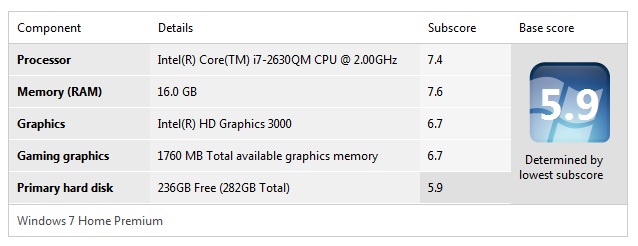
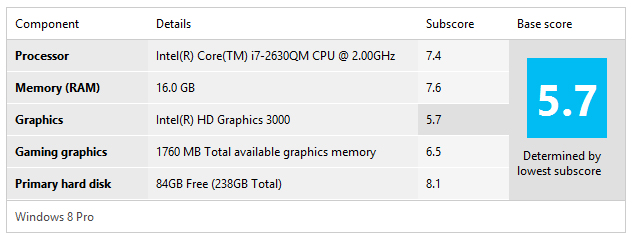
also i dont understand why my graphics WEI in win7 is higher than in win8, see attached screenshot (hard disk WEI is different because win7 is on HDD and win8 is on SSD) -
It is possible that I did something wrong and that is why I made a re release of the mod. Its a little hairy keeping track of 5 different vbioses for 3 different voltage mods (15 different rom files in total).
I did take a rather thorough look at what I had changed and couldn't find anything that looked like an issue beyond 1 bios file I had edited differently. it is possible some systems use that bios file instead, and given I only have 1 machine to work with it is had for me to determine where people might have problems. -
I haven't done anything different in modding the bioses. The .85vmod old vbios are the exact same vbioses I used from the 1.10 mod, and had been added in the same was to the 1.12 bios as I did to the 1.10 bios. I am starting to think that there are other changes to the bios that affect the performance and operation of the gpu in the 1.12 bios. I would suggest for now unless you are running windows 8 to use the 1.10 bios.
If you would however can you copy down and provide me the vbios number your machine uses? You can find this information in the bios menu at boot, just hit f2. -
Hello again.
My problem with CPU was successfully resolved. It seems that i messed up with some connectors in my laptop, probably with hdd one. I've reinstalled new CPU and now everything works fine. -
turns out the 0.85v bios gives artifacts when gaming if you go beyond 700mhz core clock.
switching to 0.9v bios and i can OC to 800mhz so far with no artifacts and temps are not too bad either so far (not too much difference). will do furmark tmr and see if its stable
ADD:
doing furmark test, gpu temp going to 85-90C which i dont feel too comfortable with, going back to 0.85v and stick with 700mhz core clock (gpu stays at 70C in that case) -
Nedemai, redone 0.85 1.12 bios actualy is 0.83, so on desktop/furmark all ok, but Battlefield Bad Company 2 - driver crashing, 1.10 so far working good.
double checked - nv inspector + gpu-z -
Thanks Nedemai for looking into it. My vbios version is N12P-GS VER70.08.45.00.34
-
Does anyone know how to get bluetooth to turn on at startup on my 3830tg ? I'v tried unchecking the option in device manager to allow system to turn it off.
-
Hi Nedemai,
I'm really thankful for you efforts.
I have a question though, I have a packard bell nx69hr500 which is kind of same with a 4830, since the bios you modded works quite fine. My question is: how can I hardware mod this pos so I can play games? I am considering buying new fan, paste, may be soldering a fan controller? Thanks. -
Well this is a bit off topic for this thread but I'm willing to offer what advice I can. Send me a private message with a link to the support website of that machine since the number which you provide doesn't seem to pull up anything useful to me.
-
Thank you for your concern mate.
Support Download
you may find the machine there.
En NX69HR is the code name for that machine. Plus it's as same as 4830TG. A generic fan speed override? heatsink block and an external notebook cooler is the way to go I think
By the way, I couldn't find a way to PM you unfortunately.
Acer TimelineX 3830/4830/5830 T/G
Discussion in 'Acer' started by lee_what2004, Feb 6, 2011.