 Problems? See this thread at archive.org.
New elantech's touchpad drivers are out! they finally work and they are better than expected! 2 and 3 fingers scroll is now enabled! donwload them here
ELANTECH Drivers
tip: you can calibrate the device through control panel -> touchpad
-
Yea they do seem to be the same machine more or less, the Bios at a quick glance is the exact same less a few minor differences (boot logo mostly)
So far in all the modding of my 3830TG I've found the best way to keep the laptop cool is to repaste if its possible for you, use a laptop cooler or prop the machine up so its not flat on a surface, and lastly run throttlestop at a reduced multiplier when gaming.... I know running throttlestop isn't the most desired solution but keeping my 3830TGs i5 at 2000mhz when I do game really makes a noticeable difference in temperatures, rarely going above 70C even in the most demanding games. I've yet to try this with a CPU stress test however. -
Doesn't work for me, and I have an Elantech touchpad. Which laptop are you using?
-
Hey thanks for your sugesstions mate, I've fixed it by myself.
Kind of like Dr Frankestein but my machine is like 40 degrees cooler when it's under regular load.
I broke the grills under the fan, gpu, cpu and rams. I broke the plastic casing where both the fan and the heatsink meet. Then I applied a no name silver thermal compound.
GPU, at idle, 700 mhz core, 900 mhz memory the gpu runs at 29 c degrees, under extreme burn in test in furmark only merely 50 degrees.
CPU, at idle, Turbo multiplier 2410m, CPu runs at 34 degrees, Prime95 torture test a bit of everything setting merely hit 65 degrees.
Both furmark and prime running, Cpu hits max 81 degrees, gpu hits max 67 degrees. I'm quite happy now. And your 0.83v bios is tremendous. Thank you. -
I have a 3830TG and elantech's drivers never worked for me..i mean i had that blank screen bug.
Now with the new 2013 version (11.7.8.5) i have no issue -
So what's it mean when your battery suddenly drops from about 50% to 6% and forces a shutdown? Getting sick of the funky powersupply issues with these things. Glad I didn't do any warranty breaking mods.
-
4830T - cannot adjust screen brightness
The machine is 2nd hand off Ebay and upon arrival the brightness function (Fn + arrow left/right) did not work. The adjustment slider in the Control Panel moves to and fro, but it makes no difference (Win 7). However, I can alter the speaker volume using Fn + arrow up/down and showing the OSD icon.
So far I have:
- installed Win7 again with the factory restore discs
- then Windows update
- installed latest drivers from Acer's website
- tried Acer's Epower and PowerSmart utilities
- installed Acer's Launch Manager
- latest display driver from Intel
- upgraded BIOS from v1.07 to 1.12
Help, what have I left out?
Might be of significance that his laptop has a SSD, installed by a previous owner. -
not at all
you should install acer utilities last - after video drivers. and about video drivers... intel first, nvidia after. -
Hello to all, my first post here... Acer aspire 5830tg, i5, 8G ram, ssd adata, 2 years old...
after reading all you're posts and try almost everithing (repasting, taking out the nets ecc) i still was'nt satisfyed with my temperatures (overall the system cooled with about 20 degrees)....
Since thereis no way (yet ) to modify the speeds of the fan (at least for me it did not work) I changed the approach: HARDWARE MOD ENGHAGED
so I rewired the fan tru a litle potentiometer at first then I put a litle switch on the case where the security pin normaly inserts (like in stores) on the left side.
Now for those of you who wondered how the fan work: There are 4 wires red (plus 5v), Black (negative 5v) Yellow (rpm response from the fan to motherboard) and a Brown (PWM signall).
When the EC (embeded controller) send the signal to pwm (range from 0 to 5 V) the fan spin accordignatly, tru the yellow the motherboard know how fast the fan spin.
Now I've desoldered the Brown from the fan and tied on one terminal of the swithc, the wire that goes to the fan is tied on the central pin of the switch and on the othe extremity of the switch I've put the 5v from the fan. So when the switch is on one position the fan recive the original signal from the motherboard, on the other position recive 5V and spins at max rpm, now I can play starcraft 2 with settings on max for hours before a fps drop occure.
WARNING: the 5v (red whire) of the fan is on when the charger is plugged so take care not to touch it with no other part of the computer.
if you have anny questions dont esitate to ask@ [email protected] -
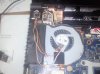
that's what I mean, now I ve installes the original bios and I have no throtling (at list not yet).
I -
I think that you have to mdify the power settings for you're power scheme under the advanced mode, by default you got all the options on power save (like intel graphics, processor ecc)...
-
Back to my problem with the screen brightness not working, I now know it is a hardware fault. I took the SSD out and plugged it into another computer. Windows booted and the brightness control worked straight away.
There's also an annoying flex in the keyboard in the area of the right Ctrl and directional keys, as if there's a screw missing underneath. The keys go very 'deep' into the 'surface', if you understand what I mean. Could this be linked to my problem? -
This mod has caught my interest. How does this work when you set the fan full tilt? Can you draw up a circuit schematic so I can understand what you did exactly?
-
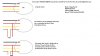
It's realy simple: disconnect the brown wire and sent 5 v instead (from the red wire of the fan) Ive put a switch in mine so it toggle from the 5v (full power) to the original controller. If you want a more stylish solution you can even use a potentiometer like the ones for the volume in the portablie radio (it was my first thought but the I decided for a switch because I was to lasy to make the cut
I'll draw a schematic this days.
here's what i mean, at first I've tryed with a potentiometer so I can vary the rpm
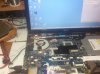
Disclaimer: If you play with your compute ropen on the table shortcircuits may occur I had to put my battery 24 hours in the freezer after a short so the controller reset itself
-
could you please doo me a favor and try starcraft 2 on ultra settings and tell me how many fps and what temp the gpu stands, just for having a compare, I found that starcraft is more stesfull than a 3D stress program since it uses the cpu and the gpu toghether and there are both on the same rail so the temperatures realy rise. on ultra I have the gpu at max 75degree Celsius and the processor hit 80-85.
-
Can you change brightness when for instance you are in BIOS?
-
is the software controll work? when tou click on the battery symbol and try to change brightness?
-
a qick draw in paint:
PS is it you that modifed the bios? I try it on mine and is indeed unlocking the menu but seems that the changes have no effect on my machine, not even the logo change
-
I did mod the bios to unlock the menus as well as provide some vbios voltage mods however since there are many different models of similar based hardware its hard to predict how these mods will work on every machine. The logo you need to change yourself using the ezH20 software.
I also like the idea of this mod as well, its very simple and efficient.
Edit; I don't play or have a copy of starcraft 2. -
Can't change when inside BIOS either, but that is normal for the 4830. Thank you for the replies though, I have now unfortunately had to return the computer to the vendor and am expecting a refund.
-
Hey there, i hope i am right in this section.
I've got the acer 3830TG with 4gb ram. Now i read that a user in his specs has 16GB.
In the internet normally you find a limitation of maximum 8GB for the 3830TG.
Is it now possible to take 16GB or would i have to change the board or sth. else?
Now i can't write him a pm, because i have to had 5 quality posts to get the pm service.
I hope it's ok that i postet it here!
Greetings
Maddin -
hi, im not the user you are referring to, but i can tell you that the 3830TG (and likely 14 and 15 inch models as well) can support 16gb. in fact, i am typing this post with my 3830tg with 2 8gb ram modules installed, for a total of 16gb, and has been running fine for a month since i upgraded the ram
there is no need to change anything; just open the bottom cover and replace the ram with 2 pieces of 8gb ram modules and you are good to go
unless the ram is soldered to the motherboard, most if not all sandy bridge and ivy bridge laptops can support 16gb ram -
Hey, thanks for your answer!
Yeah all facts i found said that it is possible, but there were on few sites infos that 8GB are max.
If you did it a month ago can you advise me a good 16gb kit? -
i bought whatevers on sale at the time, any ram that is PC-1333 or PC-1600 would do, best to have 2 of the same ram for dual channel....i think mine is patriot
-
K i wanted to buy one from corsair - they are not to expensive at this time.
Can the 3830TG deal with the PC-1600? or will it be downclocked to PC1333 ?
I thought the 2450M just can run with PC1333 -
it will be downclocked to PC-1333 if u get PC-1600, but sometimes PC-1600 prices are not too bad for 16gb so i think it comes down to pricing
-
Can you help me with undervolt? I was trying to edit the modded 1.12 bios with your tool, but no luck. I have 5830TG and 540m 2GB, does it matter that its 2GB? Bios is 70.08.45.00.42. After all i tried to flash your modded bios with undervolt, still nothing, stock values.
-
OK just had somme time to play with my computer, the problem is not the gpu voltage ortemperatures, the problem is with the turbo technology becausethe turbo stays up to 2700-2900Mhz untill the processor hit 85degrees Celsius, ofcorse the gpu help rising that temperature since they are on the same heat pipe.
Now there are 2 possible ways I'll go from here:
1: separate the heat pipes and add a ultra slim fan for the gpu on the right side where it suppose to be the sim card for the umts modem (behind the alimentation plug) or
2:- get rid of the dvd (that I can always use with an usb adapter) and go the extreme way with 2 fans and a peltier cell
Now writting ths I just realise that for gaming purposes is another way to cool even more (it just hit me) all I have to do is get an extenssion of the heat pipes like a wallwt plug (the european one) and use a totaly extern coller (like the water coolers on desktop computer) with the difference that the water do not come even close on the processor but transfer heat only to the pipe) afer lunch I'll go search for a radator and go whelding i'll keep you all posted
-
hello good people here,
4820TG owner speaking. I'm thinking of getting 4830T with smashed screen for tiny bit of cash. and was thinking if I can replace the glossy 1366x768 panel with matte and/or higher res panel at 1600x900 or does it have to exactly the same specs just to be on the safe side?
I would of course make sure that the connectors and such are identical.
thanks -
It's unlikely that anything above 768p would work as Acer uses single LVDS on notebooks that do not have an option of high resolution display.
So as far as another 768p screen goes you are safe but 1600x900 most likely won't work (unless someone can confirm it's a dual LVDS unit and the cable has all the wires) -
thanks, I'll just use OEM replacement then.
-
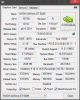
Nedemai, can you please describe how to modify voltages, step by step, for 1.12 bios? My GPU:
Thanks! -
found another thread... looks like your right. DAAMNNTITT
-
Use this, instructions contained inside and use at your own risk.
AcerTools.zip
To recap quickly you will need to edit the video bios for you machine (4780C336-5426-4724-BEC4-1DA2B6E75108_1_757 and 4780C336-5426-4724-BEC4-1DA2B6E75109_1_760) since they both have the same version number.
Load them into the 540mEdit.exe program (which I coded myself), and change the voltages as desired. the P1 - P4 describe performance states and the machine will set the GPU according to load.
Load the modified video bioses into Nibitor and save with Nibitor since my program does not handle checksums. If you don't do this the bioses will not load on the machine and the gpu will not have drivers loaded for it.
Using ezh2o you need to load the new video bioses into the bios itself. Open P4LJ0x64.fd in ezH20. Click Binary-Rom, Click either On Board VGA or External VGA (doesnt matter) Change the ROM GUID to that which is desired (4780C336-5426-4724-BEC4-1DA2B6E75108 and 4780C336-5426-4724-BEC4-1DA2B6E75109 for you) and load in the modified video bioses. Make sure you do this for both of them and that the numbers correspond.
I hope that makes sense and works for you. If you do something wrong the GPU probably won't load. If you set the voltages too low the GPU will crash on high load. If you are having trouble and just want to get it working again just reflash to a known working bios. Use at own risk! -
I have to thank you, work like a charm!
-
I have a 3830TG with an i3-2330M. I did some of the mods, here are my before and after temps for people too see.
The Temps are GPU and the Load is taken after 12min of furmark.
Nedemai's 0.80v BIOS 1.12:
Idle before:42
Load before(After 12min): 73c
Idle After: 39c
Load After (After 12min): 67c
Vent mesh removal:
Idle After: 37c
Load After(After 12min): 64c
I'm still debating the thermal paste change. Does anybody have before and after temperatures, so I can gauge its effectiveness? -
in my casethe difference is about 5 °C cooler after repasting...
after the manual fan controll I've got another 15°C coller... -
Thanks! I'm going too be sending my laptop in for the battery replacement and ill do it when it gets back then.
-
Hello everyone,
Just discovered this topic and was glad because I also have a 3830TG and a few problems/questions.
Is it possible to wake the laptop via wake-on-lan? I have been able to capture the magic packets in windows, and also enabled the feature for the network device, but it doesn't work. I guess there should be an option in BIOS to enable this, but it is missing.
Is it worth installing a modded BIOS if I don't want to overclock? What other features are there?
I've been reading that you have problems with overheating. What are the signs? I don't play a lot, but I have played Mass Effect 3 for example, and I don't think I have experienced throttling (that should show as FPS dropping to a very low value, right?). I usually use the laptop closed and propped up on the leg of an external monitor. Warm air does come out, but nothing much happens.
Where do you get the latest drivers for every internal device? Acer support webpage doesn't really have the newest of everything.
Thanks for the help -
Hi guys, i have 4830TG, probably the oldest series with 2410m processor and i have it about 1,5 year so battery is also pretty damaged (39% of kapacity si already gone).
So my first question is if i send it to service is there any chance that i will not have to pay for new battery? And if no, how much will it cost (preferably in euro)?
My second more comlex question is about overheating... yes i know everyone asks about this again and again... i have tried to search for any info but this thread has more then 400 pages! and the search function is not working very well (or i am not searching for correct terms) and google hadn't found anything useful when talking about 4830TG specific tuning. So far i have bought Cooling Pad which works very well but for playing games like Sleeping dogs it is not enough. I also use Throttlestop* but again new games need more power so with combination of Trottlestop = mostly unplayable.
*Had to decrease cycles 2 about 75% then the processor keeps about 85°C even with Crysis 3 but games are more like a slideshows
Could you give me some advice about other steps which i could do to rise processing power and/or lower temps? (to prevent some useless replies, i know when i rise processing power i rise temps as well in most cases).
My other ideas are:
--New cooling paste - Tunig TX-4 can cooldown temps up to unbelievable 11 degrees (seen it in a review somewhere)
--Do something with fan (preferably software option coz i am not a techie type, but would be thankful even for hardware-mods)
--Do something with bios - i have read someting about modded bioses (mostly from nedemai) from this thread but would need more description what does the modification do/add/modify so i dont end up with lappy blown in to my face
Appologize for so exhausting post any ideas are welcome except those containing hammer or similar tools or buying new lappy
-
I was told by a service rep that the battery is covered under the two year warranty (in the US). I'm not sure if it's the same in the EU. But you should do that before making any changes to the hardware or flashing the modded bios as it will void your warranty.
You'll probably get the best benefit from the cooling paste. Opening the laptop, you'll also see some plastic mesh covering the vents below the cpu and gpu. You can remove those to lower temperatures as well.
You may want to look at overclocking the graphics card. I've found it's more efficient for increasing game performance vs cpu speed. The modded bios allows you to lower the voltage going to the gpu which further lowers temperatures. However, it will reduce the amount you can overclock. you'll have to experiment with different voltages to find your best setup. I have my vgpu changed from .98v to .85v and am still able to run a slight overclock. Also, overclocking the graphics memory doesn't seem to impact temperatures much. -
If you take out the nets,repaste and do the fan mod to make-it go at full power you don't need throtle stop. One thing that alot of people is not aware is the real problem of this laptop, the turbo boost technology that runs in the background, let me explain: the processor runs at 2.3 ghz (in my case) but the turbo boost made him work at 2.7-2.9 when gaming, this rise the temperature exponentialy, when you run on battery the turbo disable himself so you won't have so much heat. Even with turbo disable it runs realy well as it run at 2.3 ghz, the people throttled with 18 multiplier so it mean 1.8 ghz but even then the turbo boost sommetimes kicks in, that's what I've seen using a second monitor...
In my case when I put the fan at max speed with no other mods I'm able to play nicely with no throtle...
and one more thing: ifyou have the computer fora year or so you have to oen and clean the fan, you'll not belive how much crap is in there.. -
First thank you for so fast responce i was afraid that this thread is dead.
To Matt761:
I am glad to hear about the 2-years warranty hope that it will be the same here as i bought it in one of our biggest computer hardware specialized companies.
I have already downlaoaded the nedemai tools for gt540m modifications but i dont fully understand how to do it. In his guide he writes about using his extracted unmodified vbioses but when i load it into the tool there are many values and i dont want to end up with not booting computer so i would have to manually reset bios via motherboard's hardware swich (which i hope is present
Do i have to only modify the highest value (used under heavy load?) and also dont know how to flash the rom. I have downloaded Nedemai edited .85v rom but it is .fd file and i dont know what to do with it. Little noob here
To Aurelrica:
I was hoping in your answer coz i have seen some of your "modifications" i would say more of miracles which u have done to your... uhm 5830tg it was? Not sure now. I was mostly interested in your rewiring of fan to gain control over it. Did you also managed to add another fan? U have written somewhere that you are going to try it, if it wasnt just a joke
.
And about Turboboost well you are right i will try it because althought i didnt noticed any turbo kicks in and i was watching it on my secondary monitor, the true is that when i play with 75% of processor power then it coresponds to turbo off. Never thought about this that way before but it worth a try.
Also i am afraid of opening the notebook - i am not a technical type and i dont want to void the warranty (till there will be any other way), but i am aware of the dust coz i am maintaining other two desc comps (cleaning every 3 months) and inside it always looks like in mummy sarcofagus .
-
The highest value is the one used for heavy load/gaming. The other ones are for lowusage/powersaving states. The os runs off the intel graphics. So if you set them too low, it won't crash until you start up a graphics app. I think I had the low ones both at .80v with highest being .85v
Use insydeflash.exe to flash the bios. You can get it with this version:
*** USE AT OWN RISK ***
1.12 Mod.zip (by Nedemai)
To flash the bios, copy the .fd file to the P4LJ0122_Silent directory. It should overwrite the .fd file already in there. Then execute the InsydeFlash.exe file and it will start flashing right away.
btw there isn't a hardware swiitch to reset the bios. But there's a way of flashing from a usb drive if the computer won't boot. Don't ask how I know
Cheers! -
Thank you for this guide clear and easy. I am glad to hear that it is unbrickable model... it is the same iron man as my phone
. I have Optimus 2x and i have modded (different ROMs, BBs, RILs) it many times, now i have full signal even in subway, which i normally hadn't at all. When i was testing best setup i have bricked it many times... thx to the man who included a service mod although i am pretty scared of disassembling whole lappy... hope i won't have to do that.
Update about warranty:
I have contacted a service center of that company and although they had whole day to answer my question (if the warranty still applies), that is usually more then enough, i did not received any answer... i will wait a little longer, but i think when they saw the word "warranty" in the text they have just deleted my message... probably will have to call them.
EDIT:
I have received an answer now. The battery really has 24 months warranty but it applies only to a malfunction not to the wear level. For it is only 6 months :/... will have to move to US probably to Alaska coz there are low temps so i would be able to play without overheating
Also after disabling turbo when playing (in throttlestop only, not in bios), notebook is a little cooler (about 2°C) so the turbo really did something even when it shouldn't. Still it heats to 87 when playing Black Ops II even without turbo and 94 when playing Crysis 3. This notebook is really extremally powerful but it has serious overheating problems... -
Did you try manually setting the multiplier in Throttlestop? Click the set multiplier checkbox and set it down to your baseclock.
-
Can someone tell me if wake-on-lan is possible with 3830TG? Do I need a modded BIOS for that so that I can enable it there too?
Apart from showing some extra settings what do these modded BIOSes do? Is the CPU voltage lowered so that it doesn't overheat? Does it still work at the same frequency? In which comment can I find more info about this? I can't look through 400 pages
Is it possible that mine doesn't throttle during games? I am even using it with a closed lid, which probably makes temperature even higher, but I haven't experienced sudden drops in FPS.
And where do I find the actual modded BIOS? -
To Ajnauron:
Problem isn't in controlling frequency. Problem is the heat in higher frequencies. So setting multiplier is good sometimes but useless when i need high performance. Difference between turning off turbo and setting exactly the same frequency by manually adjusting it (for example by setting multiplier), is 2-3 degrees lower temperature when turning turbo off.
To Jamesch:
Can't tell u anything about wake-on-line feature, but if u have read at least this page, you would have known more or less everything, you are asking about modded bioses. Also if u r playing less demanding games, u don't have to experience throtlling or if u use throttlestop, then u may have that process, which is responsible for lowering the frequency, disabled. -
I've been pursuing the exact same thing with trying to reduce the heat while running the CPU at the highest frequency possible. I've re pasted, modified the bios, and even made some minor hardware mods such as removing the mesh on the bottom of the machine. While this all has had some significant impacts on CPU temperatures I've come to the conclusion that the only way you will reduce the temperatures to acceptable levels while still being able to us turbo and higher CPU frequency is most likely heavily modify the hardware of the machine. This would include making the fan spin faster, adding metal to the heatpipes, maybe even cutting an intake hole below where the fan sits so it can get more air.
Failing this the only option you are given is to use throttlestop and either let the CPU burn at high frequencies or come to a compromise and set the multiplier lower. Yes this will reduce performance but there isn't really much other option except letting your machine fry. I usually lock the multiplier to around 20 - 22 on high load applications and this usually doesn't bother me too much.
The only other option that might work that I've though about is installing an i7 CPU which by default actually runs at faster speeds, and I'm assuming at cooler temperatures to boot. I'm not sure if this is the case and would need someone to verify, but I think it would work. Right now I have the i5 -2430M in my machine.
Acer TimelineX 3830/4830/5830 T/G
Discussion in 'Acer' started by lee_what2004, Feb 6, 2011.


