Problems? See this thread at archive.org.
hmm it's doable, with a microcontroller and flexy circuit board... too much work tough... i think I'll buy a lighted keyboard for another model and adapted on mine... the only problem is that I have the italian verssion and to make things worse I have the 5830 model with numpad on right side.. for the 48xx and 38xx models there is a compatible lighted keyboard alredy on sale...
-
Yes, and as I said that leaves you with the entire top plate in one piece that still has to be disassembled. The keyboard itself is attached to the top plate with a lot of screws (maybe 8 of them) that are covered by a sheet of plastic glued down to the bottom of the keyboard. One you rip that plastic off (it not only hides the screws, it's also glued to the keyboard, aluminium tray, top plate in different places), you cannot reinstall it. I improvised a replacement by using two sheets of thinner vinyl used to make store signs.
Taking apart the laptop to repaste is easy, I've done it twice. Taking the keyboard itself out is a hell of a lot more difficult.
-
Taking apart a 3830TG to repaste isn't that easy so don't act like it is. It is certainly something I wouldn't recommend to someone who has never taken apart a laptop before even though these machines really do need the repaste.
-
Honestly I don't have the 5830tg for a long time, but it looks like I'm having some heating issues already.
What happens; when I play games the fps drops to 3/4 fps which I assume is throttling. With throttlestop I can pretty much stop it from throttling (still not playing on the fps I would like to have which this kind of system but still).
The problem is, that if I use Throttlestop the temperatures are skyrocketing to 90C+, which makes my system shut down after some a couple of mins.
I also tried to run hwmonitor, and for some reason the temperatures doesn't get as high as they get while gaming.
Any ideas on this? -
The heat and throttling issues are well known with this line of laptops from Acer. One thing that can help mitigate the heat problems is to apply better thermal paste to the CPU and GPU in the machine but it will only get you so far.
Throttlestop is an excellent program to use to stop the throttling however you will need to set the multiplier lower than what the CPU can achieve if you want to keep temperatures down. If you don't you will quickly hit TJmax and the machine will turn off under load.
The reason the CPU gets hotter when gaming is because more load is being put on it.
Another thing that might help is undervolting the GPU but in my experience its benefits are barely noticeable. Your best bet is to repaste the CPU and GPU and to use throttlestop at mulitple which sets the CPU a bit lower than its max to keep temperatures down while still having acceptable gaming performance. -
Thanks for the fast reply!
What I'm noticing, I pretty much have to put the multiplier to 22+, otherwise it will start throttling again, and with the multiplier on 22 it will go up in temperature.
I also thought about undervolting as some people said this could lower the heat, but I tryed a few things out and it seemed like the voltage wasn't adjustable.
About the repasting, def. gonna get this done when I'm back in my home country again as I've heard those timeline's aren't the easiest to repaste.. Just takes some time that's why I'm asking you guys
-
after repasting you may try my manual fan controll, it will emprove alot...
Nedemai did you try it? I just modified my friend's 5830tg too he cannot belive how crysis run
-
I have not mostly cause I need to work out a nice way to put a switch on my 3830tg and I've not really thought about it too much. I tend to use my desktop almost exclusively anymore so that sits in storage kind of waiting for me to blow up my desktop somehow.
-
Dear all,
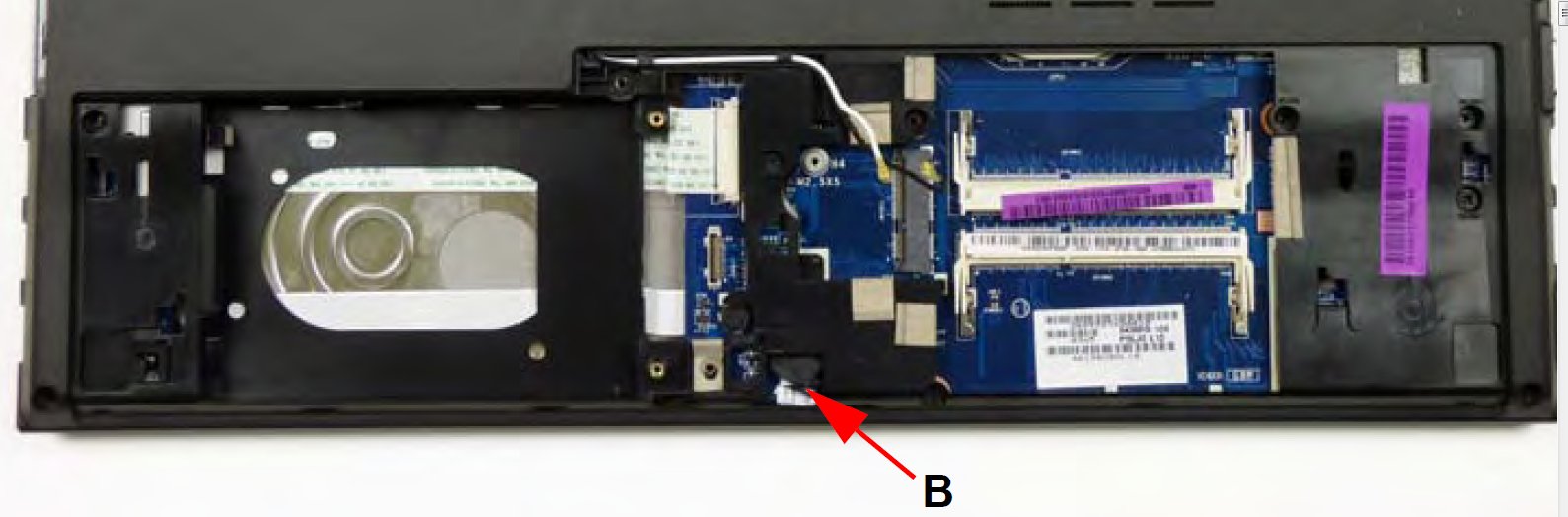
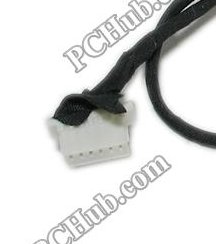
I'm writing to ask you for some help regarding bluetooth module connection cable.
When I was taking apart my 5830TG I accidentally torn away the wires from the plastic connector placed on the motherboard. Now I am having hard time to fix the wiring.
Can someone please take a look at the colour order of wires going into the connector marked on the attached picture (5830TG BT.jpg)?
Second picture details the connector I messed up.
Let's say that looking at the picture the the first pin from the left in no 1.
Many thanks for help.Attached Files:
-
-
Can someone who has repasted AS5830 tell me how much it took it for the first time and temps before/after for CPU/GPU?
Thanks. -
Hey everybody,
I have an acer timeline X 5830TG, with CPU i5-2410M, 4Go RAM Kingston, and Nvidia GeForce 540M.
I have it since July 2011.
During a year I used it with windows, and then i used it with ubuntu since October 2012 (6 month ago). (and I try fedora for 2 weeks).
I had about 7h battery with windows : awesome ! (and I did not notice any change after a year)
Then with linux, about 5h thanks to bumblebee.
But recently, I discovered my battery wasn't worth more than 3h30min anymore (even with windows). (and laptop mode doesn't seem to have any big effect)
Thanks to Everest, I saw that the battery power had crushed down from 66600 mWh to 41525 mWh.
So i began wondering a lot :
1 - I use my computer plugged to AC most of the time, or I use the battery during 3-5h in the train. I guess the battery stops recharging as soon as it is full, since the battery is embedded; and since there is no other way to use it, I guess Acer included kind of a switch system (either material or software) between battery and AC, just as for mac books.
2 - Since the battery life was still the same after a year of use with windows, I think this system really exists
3 - Since the battery life crushed down after 6 month of linux usage, I guess the system was a software, ans that linux doesn't have it (or at least, not by default), and that linux goes on recharging the battery even when it is full.
=> questions :
- Am I right ?
- Does anybody know a linux software that could handle the battery/AC switch ?
Then yesterday, I discovered for the first time the reset button (a very little hole on the back of the computer. You have do introduce a needle to press the button.). Then I finally opened the back of the laptop (removing only one screw, to have access to the hard drive and the RAM). I discovered a switch on/off for the battery (near of the hard drive) (so there is at least a material switch system. The question still remains : is there also a software system ?), but this switch is automatically set to On when you re-assemble the computer. (so i could run windows without the battery while the computer was still opened, but I find no way to do the same after closing the back of the computer)
Do anybody have anymore information about it ?
I would like to stop destroying my battery so fast
Thanks for your help
P-S : It seems like nobody asked that already, but since I didn't read all the 441 previous pages, I can't be sure. Sorry if it so. -
I think it's not the software problem (Linux). I had similar battery issue on my phone. It worked well for years. One day, its capacity was around 70% smaller. That happened within one day!!
This doesnt really mean that its not the linux problem.I wrote what I think.
Maybe Windows has the system (stops charging when battery is full and linux doesnt have).
Im using windows since i have mine (November 2011) and battery lasts maybe 4h if i disable discrete graphics in bios and everything to lowest... -
So you can disable the graphic card in the bios ? How do you do that ? I always failed trying that...
-
Ok, owned my 3830tg for about 1.5 yrs now. Just played portal 2 yesterday for ~4 hours and everything was fine. This morning went to turn it on and it make a horrible grating noise. I think it was the fan because it didn't turn on like normal. A few min later, another horrible grating noise and then the fan comes on. Anyone had the fan die on them? Anyone know where to get a replacement fan? There was nothing stuck in the vent either.
-
the first time is always the longest it took me an our or so, then the second, 3'rd ecc took me like 10-15 min...
you can disable the nvidia, not the intel hd that's integrated in the processor. To disable nvidia you'll find in bios the menu: grphics: switchable--- put it to integrated and yo'll have only the intel hd, but onestly you do'nt need too do that since you have the nvidia menu where you can specify what graphics to use with each application, from there you can manualy select wich graphics to use, choosing only Nvidia battery life will drop like to 1 hour
is probable that you have dirt in the fan, open the laptop and properly clean the fan and the cooling grill (you'll have to take out the metal cover of the fan, the 3 litle screws)... I run my fan, in gaming, at full speed for monhts now and never had anny problem... -
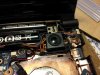
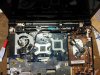
I decided to do the fan hardware mod aurelrica had mentioned. I had finally dug out a switch that would fit nicely where the kensington lock was. Everything went well and I am in the process of benchmarking the results right now.
I have attached some photos so you can see how the mod looks. This laptop is a 3830TG
-
So I benchmarked the fan mod to check out the results, These were quick tests without allowing the machine to rest much in between. I feel I should mention I am running a stock bios at the moment. No voltage mods to the video bios have been applied. I used Throttlestop to lock the CPU multiplier. I had also repasted the HSF in the machine about a year ago.
Prime95; - 10 minute test.
TURBO - 77C CPU - 55 GPU
2.4GHZ - 70C CPU - 55 GPU
SKYRIM - approx 10 mins each test running around in the wild. Settings at medium.
TURBO - 85C CPU - 77C GPU
2.4GHZ - 77C CPU - 72C GPU
2.2GHZ - 75C CPU - 72C GPU
FURMARK - 10 minute test
TURBO - 66C CPU - 72C GPU
Overall it would appear this mod has helped bring temperatures down a fair bit which is especially noticeable when using turbo. Its obvious that there is far more airflow then when set to use the bios control. I plan to run another benchmark session with the video bios voltage mods later.
Edit;
Well just a bit of an update. I did reduce the GPU voltage to 0.70v and completely disabled Turbo in the bios (max speed 2.4Ghz). Ran furmark again, tried Skyrim, and decided to run prime95 again as well.
Prime95 - 10 minutes
2.4GHZ - 70C CPU - 51C GPU
SKYRIM - 30 minutes
2.4GHZ - 75C CPU - 65C GPU
Furmark - 10 minutes
2.4GHZ - 61C CPU - 60C GPU
All in all I think I've solved my throttle issues without needing throttlestop. I had set temperature goals for running this machine at 2.4GHz and I've pretty much hit them. I wasn't expecting that the voltage mod to the video bios with the increased fan speed would make such a significant difference. It would appear disabling turbo in the bios might have had some effect as well. -
@Nedemai
Great results. Though, I just want to repaste mine. Now it gets over 90 with cooling pad. (turbo enabled 3.2ghz avg in crysis 3) i7-2620m. I just want turbo without more than 85. -
the cooling pad's are not so efficient because the air flow does not go inside the laptop, for me they work as much as two packs of cigarettes placed under
find a litle switch like wee did and make the hardware mod... also remove the litle nets under... -
well done Nedemai
-
Cooling pad cools down the plastic at the bottom so its not that bad.
When laptop was new, thermal paste wasnt that bad so colling pad cooled down for more than 10C
Now its around 5c -
Does anyone know if the modded BIOS for these models in this thread would work in the M5-581T-6405 model?
If not, I really need the raw UEFI BIOS .fd file for this model, 2.09 or 2.11 so I can flash it back with the battery reset/Fn/Esc method.
Thanks!
EnvyHac -
No they will not since the laptop you listed is a different model number completely. I'll see if its possible to get the .fd image for you.
-
I forced my battery (1.5 years old) to last over 6h.
Just download Advanced System Care 6 free, go to turbo boost, choose game mode, and disable as much as you want. I now have around 60 processes
and cpu idles at 35-40c
Also, brightnes to min and cpu freq. to 800 mhz max. (I forgot to lock cpu to 800mhz) -
someone have a bios with uefi support ??
o try to open all options in menus, but cannot boot in uefi mode windows instalation -
Without using the program you suggested I managed to get 5 hours of gameplay off the batttery in Skyrim setting the processor to 1.2Ghz and setting Skyrim to use the Intel HD graphics (ran at approx 20fps). I set the brightness down to minimum as well.
This was done a few months ago. It certainly helps if you can disable uneeded processes from running in the background however. -
Well,i use ASC 6 because of turbo boost. before i used turbo boost, cpu temp was maybe even 7c above.
when battery was new, it lasted 7h of normal use (min brightness, surfing, all processes enabled) -
Hi guys! (sorry for my bad english, I hope u will understand)
I have a 5830TG with throttling issues, now I use modded bios (1.12 0.85v by Nedemai) I set max temp 90C in bios and press f10(save settings) but it doesnt work, I mean still, if the cpu reaches 84C switch from 2.0 Ghz to 0.8Ghz.. + now there are many options in bios but I dont rly know all of them, which settings what does actually.. did I something wrong? (everything else works fine just this throttling, if the cpu reaches 84C and always at 84C. Even if I switch off HT and set the temp to 90C, that is the maximum)
I have the 5830tg with i3-2330M 2,2Ghz cpu, and gt540m
Thx for help! -
one more thing, if I use throttlestop, the cpu temperature reaches 85°C and the notebook just shut down, the same happens, if I disable PROCHOT in bios, -> no throttling but shut down if cpu 85°C . Even if I set shut down temperature 90, 100, or 110°C I think the bios settings doesnt work at all, or I did somethig wrong, but nothing happend, everything is the same 84°C trottling or 85°C shut down if PROCHOT disabled.
-
Well first thing to note is that the TjMax for the i3-2330M is 85C, as soon as the processor reaches or goes beyond that the machine should shut down to prevent heat damage. I highly recommend you do not run the CPU at 85C for a prolonged period of time. To reduce temperature I suggest turning off turbo or turning down the frequency of the processor.
There has been other people who've reported that setting the throttle temperature in the bios does not work. I also have had issues with this.
The GPU will cause the CPU to throttle if it sustains or goes above 75C, this is something to watch out for. The CPU and GPU share heatpipes so it causes some really unwanted issues with heat. You can reduce the heat output of the GPU by reducing the voltage the GPU runs at when its at full load. I've personally managed to get the voltage of my GPU down to 0.65v before it becomes unstable. Do not expect the same results for your machine but most people usually can go as low at 0.8v before running into stability issues. -
Oh I see now, the i5 processors has TjMax 100C, the TjMax for i3 processors is only 85C.
The GPU is maximum 65-70C and I can use the GPU at 0.85v but at 0.83v the GPU is unstable, at 0.8v I cant use the GPU at all. Even if I underclock it (I tried 600Mhz,500Mhz but its unstable), only 0.85v works. Maybe the only thing what I can do is turning down the frequency of the processor. If it runs at 1.6Ghz it works fine, without throttling, but its not enough for some games, never mind.
Thanks for your help! -
Hi!
My GF has (as well as I) an Acer Aspire TimelineX 3830TG running Win 7 x64 HP and she but not I have a very frustrating problem.
The battery indicator jumps from: "Connected and charging", "Connected and not charging" and "Not connected" even though when she has her AC-adapter plugged in.
When she play games she always gets "Not connected" and sometimes she gets BSOD:s.
The only change from "stock" H/W is that I have installed more RAM to both our computers, both have the exact same type and model of memory, Corsair (can't remember model name right now).
*** EDIT: Memory is CMSO4GX3M1A1333C9 in both our computers. So the one that was preinstalled (4GB) and this extra memory (4GB) - CMSO4GX3M1A1333C9. EDIT***
The BSOD info is as follows:
0x000000d1 (DRIVER_IRQL_NOT_LESS_OR_EQUAL)
and the filenames: ntoskrnl.exe+f20c4 and athrx.sys+9a66d. This is for two BSOD:s and for the last one its the same error and filename (ntoskrnl.exe) as before with the exception of athrx.sys and instead rdyboost.sys+52d5.
Have done a clean full factory reset from the recovery partition but I have not tried with Memtest or done any HDD diagnostics.
athrx.sys seems to indicate the Atheros WLAN-driver but I have the latest installed when checking with Acer:s website.
Will try and update BIOS but in the mean time, what might be the problem? The same error (BSOD but not the charging issue) has occured before we did a factory reset.
Would be grateful for advice. -
Latest driver and Acer website don't go together. You could have checked in a museum as well
Acer does not update drivers. The most recent drivers can be found here. -
Thanks for the link, will try it and see if the system becomes more stable.
Updated her BIOS just now to the latest version (v.1.12) but it didnt solve the power issue, don't know about the BSOD:s.
A funny thing though, every time she turns on her computer Windows warns that Acer:s battery management program is uncompatible with her version of Windows (and thats after restoring via Acer:s recovery partition).
I have uninstalled this utility and see if this solves the problem as well.
---
Edit:
The installation of new drivers didn't work and it caused a new BSOD with a new error:
SYSTEM_THREAD_EXCEPTION_NOT_HANDLED 0x1000007e
and the drivers failed to install, had to rollback to Acers drivers and with the old one it worked.
Still the same issue with the AC-adapter and think it still will do random BSOD:s with the same error as earlier (0x000000d1 (DRIVER_IRQL_NOT_LESS_OR_EQUAL)) -
hmm, it seems like you have a hardware problem here, maybe a bad wheld, the hardest to find and diagnose, sommetimes the whelding paste make a bad contact.. if you're practical with electronics you shoud rewheld the capacitors on thealimentation side (after checking them with a multimeter) just folow the cables and look for the datasheets of the converters... the schematics would help alotby knowing the right values.... i do no have them unfortunatly...
-
Hello
First of all I'm no computer expert, but I'm not afraid to try.
My computer has been running very hot lately, so I decided to attempt to open up my 4830TG to clean the fan and while I open it up, add some extra heat sink to further aid the cooling ability. Took me approx 2hrs to take the laptop apart and put it back together. I accidentally pulled too hard on a small cable and I tore it clean from the plug. I put everything back together and the computer runs fine, but now the computer doesn't detect my battery. Unless I plug it in with the charger, the laptop won't power on.
I was wondering, where does everyone get their Acer spare parts from? I googled it and looked at a few website, but none seem to have what I'm looking for. Unfortunately I also do not know what that part is called. I hope the owner of this photo doesn't mine me using it as a reference. The cable attaches from the Pwr On/Pwr Off button to the motherboard. If anyone can help me, I would greatly appreciate it.
Thankyou
![[IMG]](images/storyImages/110426210940c0e8ffcf2725da.jpg)
-
Thanks for the reply.
In my country (Sweden, hard to guess right) we have something after the warranty has expired that covers less then the original 1-year warranty but still gives consumers some kind of protection.
The name of that protection or service is hard to translate so lets call it "warranty-light" I'll take out the memory I installed and then do a full factory reset as well as try with my AC-adapter since we have the exact same model. If it still does not charge properly then its not her AC-adapter (since mine works) and I'll return it to the store and ask them to repair it and hope that it is covered. Thanks for your reply though, if I would do such a procedure then it would def. void any kind of "warranty-light" I might still be entitled to.
-
@86b If I were you I would try some DIY or buy new connector on ebay and maybe try to soldier a bit longer cable to what you already have.
-
So I have the Acer 3830 TG and I installed a new SSD and windows 8 in it.
Problem is, I cant get the Nvidia drivers installed, I am trying to install 320.18 drivers.
I tried to go into device manager but only shows the INtel HD 3000 and not the GT540M.
Any solutions to this? -
I have a 4830th I bought used. Don't get me wrong it rocks but I took it apart to clean it and added a few copper plates to the heat pipe to keep it cool seems to run great but my problem is now that I have it back together the slightest pressure on the plate to which the mouse is mounted to shuts my system offalmost like it is being shorted out. Can anyone help?
-
you might just not plugged well a connector, on the cover there is a button that power off the computer when you take off the cover... try put it to on manualy...
mine after 3 years give a windows message that I should change the battery... still runs 1 our tough these days I'll put the battery in freezer for 24 ours to reset the eprom
-
Can somebody please help!? I started to disassemble my 5830 and im stuck on removing palm rest. front side is easily
uplifted from the black bottol plastic but the keyboard side of palmrest is stuck and i dont know how to remove it.
I already removed all screws from the bottom -
When you UN clipthe front it should almost hinge up disconnect the mouse pad wire and continue on from there. Send me a photo if you can
-
Solved my problem was a short nothing a piece of paper under the mouse can't fix. Sadly I am running need for speed most wanted at medium and barely taxing this thing
-
Only front side hinge up. Keyboard side is toughly connected. Ill maybe take it to Acer/Lenovo/HP service and they should know how to repaste it :/
-
Ah, google translate is getting worse
But anyway, NFS most wanted should run very well. Maybe it's not running on Nvidia GPU. (You can force it to run on dedicated gpu like this: NVIDIA Optimus guide ) -
I am running nfs most wanted on gpu no problem. Problem now is my battery I just got won't take a charge. Bought it used but can't get it to juice up any suggestions? I have 2 batteries so willing to try anything
-
Hey, I've done this fan mod. Sometimes I use it so fan goes at 100% speed but even with that I can reach 100C on CPU (when also GPU is runnng heavily)...
But anyway,.. I just want to warn you, that today, after half an hour of using 100% fan speed when I switched it back to normal mode the fan didn't spin at all. Only some periodical buzzing was heard from it. After few trials going back and forth with a switch I put laptop into sleep. When I resumed windows back, fortunately the fan was spinning again.
It works now, but I am a bit worried about using the switch again -
I've done the mod too and I think the problem is that the pwm signal (the wire connecting to the switch) becomes weak with longer wire lengths. I first tried a very long wire and the fan wouldn't spin at all. But when I shortened the wire, the fan would spin up more normally. Flipping the switching still gives 100% fan speed regardless of wire length.
-
Guys, did anyone managed to find another screen for our 3830 model?
I want something higher res, or an IPS screen.
Acer TimelineX 3830/4830/5830 T/G
Discussion in 'Acer' started by lee_what2004, Feb 6, 2011.