 Problems? See this thread at archive.org.
Nedemai and aurelrica, when the fan is at 5V, does it spin like it does when updating bios? Is it faster than the max speed allowed without the mod?
PS stupid Acer, why did they limit the fan speed in the first place...
-
I would have to say yes. It definitely spins as fast as it can go when you do that anyhow.
@matt761, I ran a fairly long wire and never noticed any issue with the PWM signal.
Now I've been digging around and playing with other hardware and I've come up with 2 things I might do with this laptop. The first and more relevant is there is pads for a header on the motherboard for a second MINI PCIE card. I've got a dead laptop motherboard with two headers on it I might end up desoldering and throwing in my acer. The only question is why would I want a second MINI PCIE in my laptop?
The second and a little more involved is socketing the EEPROM. Now why would someone want to do this? Well to explain my reasoning I've got a HPmini 311 laptop, which if you set bad bios settings can brick the device. This requires desoldering the chip and reprogramming it with a proper programmer. I know this because I did brick my HP mini 311 and had to go through the process of fixing it. ( I made a thread on these forums about it)
Now why would socketing the EEPROM be useful in this Acer? It makes reprogramming the chip really easy for a bad flash. To be perfectly honest I've yet to get my Acer to recover from a USB flash using any methods, and Im not entirely sure there is one available for this Acer. Now Im not entirely certain I plan to flash my Acers firmware again, but this mod regardless allow me to near effortlessly pull out the chip and reprogram it at my own whim.
Does socketing the eeprom work? YES it does. I've done it with a Dlink router which uses the same technology for its EEPROM and it works flawlessly. The only thing now is to try and reduce the size small enough to fit in laptop, Which seems perfectly possible with the parts I have on order. -
Hi!
Having problems with my 3830TG and need to send it for repairs but I have changed the original HDD to an SSD and have given away the ordinary HDD which came with the computer to a friend.
I guess I'll need exactly the same HDD in order for the computer to have 100% original parts before I send it in? Otherwise they could just blame it on the SSD.
If so could some kind soul help me identify the original 500GB HDD which came with the computer?
It was a 500GB HDD and if I go to "Zandparts" which seems to distribute spare parts for Acer they lista a harddrive that they call:
HDD.9.5mm.500GB.5K4.SATA.4K
Partnumber: KH.50008.021
for around 1200 SEK which is around 120€. I think I remember the disk being Seagate or it could be Western Digital (not so many harddrive manufacturers to choose from) and if I could only find the "real" name for the HDD (i.e. WD5000BPVT) I could get it alot cheaper, for around 400SEK which is around 40€.
---
I'll expand on the problem:
I had an SSD which become "locked" after I changed the SSD to another ordinary 2.5" HDD. I got the SSD swapped for another one and now when I'm trying to install Win 7 x64 it does not detect the (new) SSD.
It does not even detect it after I've loaded SATA-drivers. Now the REAL problem is that POST takes forever and the SSD intermittently shows up in BIOS. Sometimes it does, sometimes it does not.
If I try to boot from a DVD or a USB-memory that sometimes work, sometimes not. Sometimes I get a black screen "forever" and sometimes a black screen with a static cursor. Sometimes it actually loads what I now have on my DVD/USB. Thats why I want it send in for repairs. I had the same problems with my former SSD (now I have a new one, brand new, 1 day old) and of course another error - HDD Lock but that is beside the point.
Tried "IDE Mode" and "AHCI Mode" but nothing seems to work.
I also don't have any recovery DVD:s so I'll guess in order for Acer to even want to "touch it" I'll need the original HDD (same brand/model) as well as recovery DVD:s. IF I get the same error then I guess they would take a look at it?
---
Edit:
Talked to the store where I bought it and they took it in even with my SSD (which I also swapped there, an old SSD towards a new one since the old one had problems).
Keeping my fingers crossed! -
Might be the wrong place to ask this, but would my 3830TG, i3 GT540m be able to run Metro Last Light?
I searched everywhere I could think of, and the minimum specs seem to be met. But will it be remotely playable? -
NVIDIA GeForce GT 540M - NotebookCheck.net Tech
If LL is just like Metro 2033, you will be fine if you run @ low. -
Thanks, I saw that page but Metro Last Light is supposed to be more demanding than Metro 2033. In any case, I bit the bullet and tried the game. I am happy to report that at 1280x720 with all settings on low the game is playable. It may not look that great, but you still get the atmosphere, gameplay and story line which is all I can ask of this little laptop.
With Vsync off the frame rates are not bad at all, but there is very noticeable tearing, so I kept Vsync on. -
Hi everyone,
I need some help regarding the 3830TG model of this laptop. I just upgraded the CPU from the stock i3 to an i5-2540M. After playing some games, i noticed that the laptop still maxed out at 85c before throttling.. Should that not be at 100 now with the i5? Im not sure what I should be doing to increase that.
Thanks -
Ok so nevermind that, my throttlestop is somehow showing me temperatures that are way off vs realtemp.
-
85c is a limit from acer, I think.
Use throttlestop to 'rise' it to 100c.
But be careful sitting near 100c when GPU is enabled. You may get unexpected scary shutdowns. -
Just a few updates.
I Can't solder to the extra PCIE port, my equipment is too clumsy for the job.
I have proven socketing the EEPROM works.. on a HP mini 311. Useful for someone like myself who likes to tinker in BIOSes and needs a way to easily restore a bad flash. I really don't know why laptops just dont have some sort of socketed EEPROM to begin with.
Either way Ill be doing the mod to my Acer laptop sometime in the future when Im feeling less lazy and have the time. -
Does anyone have a Bios recovery method for this laptop seems mine is toast,I think. It will just turn on but it won't even get to the bios screen. I have looked at a couple of methods but neither have worked. Does any one have a method for this specific model 3830tg-6415
-
I've not actually found a proper bios recovery method for this laptop. You could contact acer and say that during a bios flash the machine suddenly powered off and it has since stopped booting and see if they might give you instructions. They might just tell you to send it in for repairs and that could be costly.
Otherwise you will need to reprogram the eeprom on board. I know of ways to do it but it at least requires soldering knowledge and a serial eeprom programmer. -
Hey guys, I've been watching over this thread for over a year. I absolutely love my 3830TG-6412 that I bought from Staples for $420. The original specifications were:
Core i3 2310M
750GB HDD
GT 540M 1G + HD 3000
4GB DDR3
Recently, I've decided to upgrade my CPU. I got this great deal on an i7 2640M ($100) and put the CPU in yesterday. It works great.. but I'm concerned about the temperatures. With the Core i3 I used to idle around 40C and now with the i7 I idle around 45 - 50C when I use throttlestop to keep the multiplier at 11x. The temps seem a bit high especially when it turbo boosts to 3.2+ GHz. I was wondering if there is a way to turn off turbo boost and to keep the CPU running cooler - I don't really care for turbo boost because 2.8GHz (at stock) is more than enough for me. Also, is there anyway to maximize battery life? I used to get around 10 hours with the Core i3 but the estimated time with the i7 is around 7-8. I have tried using the Core Parking method already and it did help a bit. Any help would be greatly appreciated.
@Justin Cider - This has happened to me, the laptop screen turns on, doesn't post, and gets stuck with just the "-" sign on the screen. What I did was take off the bottom cover, remove the battery connector, and then reseated the RAM. This is what I believe fixed my laptop. I also tried to use some Acer crisis recovery disk but I don't think that worked. Hope this helps,
Yuvin
Just a side note, every time I take apart this laptop, I have one hell of a time trying to get the I/O board connector back onto the motherboard after I have plugged in all the other ribbon cables. Is there a correct method to do this? Do you guys plug in the ribbon cables in a specific order? Thanks. -
Throttlestop lets you disable turbo or set the cpu multiplier.
When putting the laptop back together I always go from left to right, starting with the power switch connector and ending with the IO board connector. -
Thanks for the reply, and yep, throttlestop does let me disable the turbo which is great. I also have a question about my battery.. I did the powercfg command in the command prompt and printed out the data on an HTML document. My battery is listed as a Panasonic, which according to many forums is the worse than the Sanyo one and wears out easily, but my battery has the following stats:
Battery:Battery Information
Battery ID 18BPANASONIC Li_Ion_4000mA
Manufacturer PANASONIC
Serial Number 18B
Chemistry Lion
Long Term 1
Sealed 0
Design Capacity 64800
Last Full Charge 72943
As you can see, the last full charge is much greater than the designed capacity which worries me a bit as I'm afraid that it's over charging and may meltdown? Is this normal to have the battery have a much greater capacity than it was designed to? I've been running this laptop since late 2011 and it's mostly been on the charger - but there have been times where I've taken it on trips and mostly drained the battery. Thanks,
Yuvin -
It's not overcharging- it's just that your stats are crap.
Try to recalibrate the battery by running it until the notebook shuts down (not hibernates- dies completely).
That might work or might not- my battery does recalibrate only one way- up. It does not accept the fact that the capacity diminished in time.
Also you are right that Sanyo cells are by far the best. Sony ones seem to be the worst. -
I'm also looking for it. I know it works in 3820, but the boads are different.
-
Are you looking for a BIOS recovery method?
Edit: Also regarding downloads' post, I've done two discharges on the battery by using it until it refuses to power on anymore and my battery stats are still off:
Battery ID 18BPANASONIC Li_Ion_4000mA
Manufacturer PANASONIC
Serial Number 18B
Chemistry Lion
Long Term 1
Sealed 0
Design Capacity 64800
Last Full Charge 70308
I guess my battery is like yours and wants to believe that it doesn't wear out.
-
hello,
i've just upgraded my 4830TG to I5 2520m and now struggling to handle the heat problem while gaming.
i've set my throttlestop 2 profiles as well so my overheat not rising much, but i still curious:
I've placed my cooling pad to prevent overheat, but i think its doesn't work to act like cooling pad, instead my core temp keep rising while gaming.
so, is there any good recommendation due the cooling pad? i mean like the characteristic of the cooling pad, how much fan, the fan location, or anything else?
thanks -
Hey guys,
So I have the Acer 3830TG and I installed a new SSD and windows 8 in it.
Problem is, I cant get the Nvidia drivers installed, it always gives me error
I tried to go into device manager but only shows the Intel HD 3000 and not the GT540M.
Any help? Thanks -
Check to see whether the Graphics mode is not set to Integrated GPU Only in the BIOS.
-
Also install the Intel drivers before you install the Nvidia.
-
OK I feel like a pretty big idiot, but I can't seem to get the hard drive out of my 3830TG. I'm going by this guide and it simply states "remove the hard drive" like it's no big deal. I've removed the back cover and the two screws on the hard drive mount as shown in the picture below
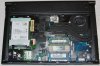
but it won't budge. Am I missing something incredibly obvious or is it more complicated than I think it is? -
1) Detach the SATA connector from the hard drive. Slip a fingernail on either side of the large, dark gray plastic SATA connector(right below where it says "Hard Drive" in green in the picture, and pull it downwards, in the direction of the wireless card. It is a snug fit so you may need to ease it down gradually rather than pull it down all at once.
2) Remove the SATA Board connector - pull straight up on the orange tab. To reattach it you'll push it straight down.
3) Unscrew the two screws holding the hard drive to the chassis. Then slip a finger under the metal bracket under where you just unscrewed the screws, and lift upwards. You'll have an easier time doing this if you do lift up on both sides at once. -
That worked great, thanks. Only problem now is the screws in the hard drive caddy are too tight to remove... I don't have any tools outside of a screwdriver at the moment so I'll have to take it into a shop. Thanks again for the advice!
-
What, I've never had that happen. Either use a screwdriver that gives you a better grip, or if you've stripped the screw head while trying to remove it, stick a thick rubber band between the screwhead and the screwdriver, it should give you the grip on the screwhead you'll need to remove the screw.
-
Guys, I have a simple question: I just replaced my 3820TG with 3830TG. I knew about throttling issue on Sandy Bridge CPUs. But I wonder if this issue contains all the CPUs or not. Mine has an i5-2430M processor. Is it affected by that? Or is it just a trouble for i5-2410M?
-
All 3830TG models, even the i3s.
-
And i3s even has worse this issue...
-
Wow, that was a bit shocking.
USB 3.0 was the main point for me to upgrade. Also I paid nothing for upgrading. That was another point. My second question:
- Throttlestop really works on this machine? How can I test? Playing GTA IV is enough?
In addition: I replaced the wi-fi card with Intel N 1030, which I used for 3820TG. It works flawlessly. Most important thing was the wireless display feature, which I couldn't manage to operate on 3820TG. It now works. Great.
Do you know anyone that replaced the CPU with a quad core Sandy Bridge? 140 dollars on eBay, maybe I might replace in the future. -
>- Throttlestop really works on this machine? How can I test? Playing GTA IV is enough?
Working. Just look at TS stats or burn CPU with LinX
>Do you know anyone that replaced the CPU with a quad core Sandy Bridge? 140 dollars on eBay, maybe I might replace in the future.
Don't bother. You cant cool that with stock CS, even with throttlestop -
Thanks for being reply and being so honest.
What I read is that I should replace CPU with a dual core i7, such as 2640M, because of TDP. But I doubt +1MB of cache and 500 MHz of speed are worth upgrading. That's why I asked for quad core and 45W TDP. Anyway, it is not a good idea, as nobody recommends it.
By the way, I got an idea; what if someone changes CPU with a CULV one? For example; Core i7 2677M? Do you think it might provide more battery life? Maybe 10 hours at once? 17W TDP with a performance of nearly Core i5 2430M seems nice.
-
I honestly recommend quad. I have 2670 and I am able to cool it without any problem if not using GPU. With GPU it's also alright, although if both runs at 100% it will overheat, meaning close to 100C. Which is not that big deal, you will just notice massive throttle, and in worst case PC will turn off. Just remember to have clean radiator, mine chokes with dust quite often.
You would probably get 10 hours with 2677M, but it's really hard to find those low tdp cpus on ebay. -
I'm not so sure about quads. On my 3830tg with the 2430m, repasted with arctic cooling MX-4, I still get up to 93C on cpu-only tasks. Adding a quad with higher tdp doesn't sound like anything other than creating even higher temps, and there's already not much cooling capacity to work with here.
Also keep in mind that in gaming the 540m is going to hold you back no matter what cpu(from the Sandy Bridge generation) you have. That's not to say the 540m is slow, but it is the bottleneck in this case. Upgrading the CPU is only going to improve cpu-bound tasks like video encoding without cuda support or other numbercrunching scenarios.
Plus keep in mind that due to the throttling issue you will never be able to use both components(CPU+GPU) at their full potential, as the cooling system cannot handle both parts at 100% without either throttling the cpu or reaching critical temps(100C), at least without significant and moderately risky mods. As such you will not get your full value's worth for the money you spend on a quad. If you were considering a cpu upgrade to a higher tdp/quad-core on any machine it would be best used on a machine, any other machine, that has the sufficient cooling capacity for both. -
Guys, have you tried the modded 1.04 or 1.08 BIOS? Do they provide fan speed control?
-
No, it doesnt.
-
Dammit.
I would like to slow down the fan, while I'm using it on the bed. It is noisy, when downside is covered with something soft.
-
I upgraded my Core i3-2310M to a Core i7-2640M on my 3830TG. I have to say, the day to day operations of the laptop seems to be a bit faster, and since I got the i7 for only $80, it was worth it. The laptop does seem to run cooler with the i7, but that's probably because I replaced the thermal compound. I use throttle stop with two profiles set up as stated before in this thread to get good performance without throttling in games.
-
Hey all,
Most of us probably have expired warranties or either being on its last days. Just letting you know that after playing some Red Alert 3 using throttlestop and reaching around 90 degrees, my keyboard became partially dysfunctional. Luckily I have 2 years of warranty on my 3830tg, so I sent it back to Acer. It came back with no bluetooth but they did replace the keyboard. I had another problem of strange display cyan color flicker, and they ignored it. I sent it to them again, this time they replaced the display but still ignored the bluetooth issue. I fixed it on my own (one pin in the port was bent), but just wanted you all to beware of throttlestop use: this is a cheap machine and it can't dissipate heat all to well. At least try to keep a good airway while using it, and avoid plugging it to external displays with higher than 720p resolution for gaming. -
so far i've using 765/965 but significantly raises my temp at it peak ( 80C gpu, 76C CPU, at x24 multiplier), but it on default volt. is it possible to decrease heat with decreasing volt as well?
so, what's the highest and the most stable gpu overclocking settings and not raising heat too much? in addition with lowering my cpu clock multiplier.
btw i have i5 2520m
much appreciated -
I'm glad that I didn't purchase this particular model considering the many issues and red flags it raised. bottleneck CPU and GPU, massive throttling, overheating, underperformance under demanding and needed circumstances, noisy fan, etc.... I think these particular models should be even selling only for $300 given these concerns. the funny part is that some opportunistic individuals are taking advantage of people who are not tech savvy. believe me, I even saw a posting selling a year old used 3830tg selling for $600. lol.
-
Sometimes this sort of thing is very difficult to avoid...a laptop's cooling system is usually not mentioned in the system specs, and just looking at the laptop cannot tell you whether the laptop throttles. On top of this, not every single laptop gets reviewed by the major review sites, and to make things worse even fewer review sites do any stress testing to determine if the laptop's cooling system is sufficient to cool the CPU+GPU at load.
-
I have a 4830TG-6450 with i5-2430M,Nvidia GT 540M,4gb ddr3,1tb WD sb.The original hard drive that came with the laptop had crashed a couple of days back so i had to purchase a new 1tb WD scorpion blue hdd.I have installed all the drivers but when i run my Windows Experience Index now it shows a lower rating.I t had 5.9 as d least score and now it has come down to 4.5.I don't really remember the actually breakup of the original laptop.So can anyone suggest me what can be done to get back the original score.The least score in d latest sheet has been given to the processor.
-
Hello, From what I undertand from the WEI, each component (hdd, cpu, gpu,memory) gets its own score the lower one is shown. If you change the hdd it is possible the new hdd is so slow it lower your score or maybe the drivers were not installed correct.
-
I've had my 3830tg with the i3 and an SSD for two years now. No throttling at all, the battery still works very well and generally had no complaints. If you read through this thread, you will see that the i5 has throttling issues, and knowing that, I avoided it. Overall, I'd say my 3830tg is amont the top 5 laptops I've owned. By a quick mental calculation I had about 25ish laptops so far.
I'm not sure where you get your prices, but if you can find them, the 3830tg goes for about $350-400 in Toronto. Expensive, but considering I play Skyrim, Metro Last Light on it, it's worth the money. Still faster than the Haswell laptops without a dGPU.
Windows Experience scores get updated by Microsoft. If you run the test infrequently, you will see significant drops. The idea is the fastest computers of the day get a maximum score of 7.9. Older computers drop down gradually to reflect their age. -
How do I stop the dmw desktop window manager from using my dedicated graphics card? I have GT540M and 3830TG.
-
I'm not surprised the i3 not throttling considering the clock speed. although it still very warm and noisy and noisy is a Big No No for me. don't get me wrong, I like the 3830TG compared to the netbooks I had which are now painfully slow, hot, very noisy and really annoying. but sadly, the timelinex is now outdated for my intended use, despite how much I like it form factor and lightness.
the price that I mentioned is from a guy who was selling his "USED" unit on craigslist. I'd say that guy is a . I can't comment on your comparison with regards to the i3 you have and haswell as I don't know exactly if you are comparing the same clock speed and same igpu. besides, ivy bridge and haswell aren't really that far off with regards to performance. maybe a 10-15% improvement but mostly on energy efficiency, heat emission, and additional future instruction set.
I bought the V7 and so far it's ok. I have yet to put out a user review about it. so far, my impression about Acer isn't that great at all. -
Sanyo vs Panasonic batteries test.
As we speak I have two 3830TGs in front of me, one with the Panasonic battery and the other with the Sanyo battery. Both are about 2 years old judging by the warranty expiration date. I just purchased the Sanyo 3830TG for a friend, so I don't know what kind of usage patterns it had, however given the wear on the touch pad and lack of it on the keyboard, it was NOT used for gaming. My Panasonic 3830TG on the other hand went through roughly 300-400h worth of gaming, is repasted with Arctic Silver 5 and has an old Intel SSD.
Both laptops started with a full (as reported by Windows 7) charge. I started Furmark at almost the same time, and left the Burn-in running until the laptops asked to hibernate. At that point I shut them down, and left them to charge for 10+h. Now when running furmark, P was giving a longer runtime than S throughout, however when it reached about 20% reported capacity, it suddenly dropped to 11%, asking to hibernate. It then shut down on its own within a minute. S on the other hand reported more consistent times, and shut down gracefully.
Here are the results of my informal test (using S for 3830TG with the Sanyo battery and P for the one with Panasonic battery):
Runtime:
- Both S and P batteries died within minutes of each other, with P lasting about 5ish extra minutes.
Temp:
- S (OEM paste w/HDD) had a 75 degree maximum temp for the Nvidia card
- P (repasted w/SSD) had a 65 degree maximum temp for the Nvidia card
Battery stats given by powercfg -Energy:
- S battery stats
Design Capacity: 66600
Last full charge before drain: 60218
Last full charge after drain: 56055
- P battery stats (I had an extra test I ran 2 months ago)
Design Capacity: 64800
Last full charge from 2 months ago: 72943
Last full charge before drain: 72090
Last full charge after drain: 69455
Observation:
In other words both S and P saw a significant drop in capacity simply due to recalibration, with P suffering about half the losses of S. But it's obvious the Panasonic battery is reporting its capacity incorrectly, leading Windows 7 to overestimate runtime. However in real world usage there are virtually no differences between these two batteries. Two years later they still have very reasonable capacities, allowing for 4+h of normal usage or 1+h of gaming (it's unlikely the GPU will ever be pegged at 100% while gaming).
Take my observations with a grain of salt, as I have a sample size of one per group. Hardly statistically significant, but at least it put my mind at ease that Panasonic batteries are garbage as others stated. They just have a flaky capacity meter. -
Hey there guys, since I felt that the only thing missing from my 3830TG now was a backlit keyboard, I've just ordered one from eBay and I'm getting ready to create some sort of mod to get it power. What I was thinking was to tap into the right USB port on our laptop and have a small little switch where the Kensington lock is. I'll keep you guys updated as to how it goes, I'm just currently waiting on the keyboard to arrive.
-
Hey guys, I'm thinking of getting a used 3830TG as a secondary laptop for travel and maybe even Linux.
I've read up on the throttling issues with the laptop but I'm planning on getting a i5-2557M (17W) CPU and some Shin-Etsu to fix the throttling issues, for the price I'm paying it's still a better by than any other netbook or ultrabook currently on the market considering the GT 540M is still a very capable GPU on a 1366x768 resolution display and the i5-2557M which runs @ 1.7Ghz/2.7Ghz is just as fast any Celeron or Pentium Haswell CPU.
What do you guys think, will a i5-2557M 17W CPU with Shin-Etsu thermal paste and GPU Voltage Mod fix the throttling issues?
Acer TimelineX 3830/4830/5830 T/G
Discussion in 'Acer' started by lee_what2004, Feb 6, 2011.


