Problems? See this thread at archive.org.
The buttons will do nothing when it's off...
-
Tried the "Fn+Esc" while the laptop was on and connected to external monitor. Still no luck trying to get any for of video to display external or on the laptop. Also disconnected that wire for one minute and no luck.
-
Find where the EEPROM is stored, look up the model number, find the procedure to reset it (probably something like ground pin X and make pin Y go high). There's probably an easier method, but that's what would work for sure.
-
Hey every one,
Could some one be nice enough to summarize the possible mods that can be done to the 3830tg?
I know about the thermal paste, i5's and ram but is there anything else? This might sound crazy but is there a way to get a touch screen on it?
thanks! -
So after no way to figure it out I ordered a motherboard off ebay. It was a used pull and works perfectly. However the "P" button (top right of keyboard) doesn't seem to function and num lock and caps lock don't illuminate, any ideas? But the caps lock and num lock function do work. Tear down was easy now can be done fairly quickly. I'll be upgrading the cpu, stripping the heatsink of all black paint and polishing it to a mirror finish. Will also be adding low profile copper ramsinks to the heatpipes. One thing I noticed between motherboards is my original board had Vendor: GBM and the replacement from ebay was Vendor: HannStar. Aside from the minor locks status lights everything works.
-
find J1 on the motherboard. on most acer models i've seen it is near or under the RAM,
it's just 2 little solder points where jumper pins could go. after finding that.
make sure your big battery and ac plug are both removed.
now take a flat blade screwdriver and connect those two solder points, this drains the power that holds BIOS and CMOS settings in memory
hold short for 5 seconds atleast.
plug AC in and power up.
now if your VIDEO BIOS is ok and talks to the MB BIOS then you should see a screen and time, date, and all settings should be defaults.
what BIOS did the MB use? and is that what you are trying to recover? or are you trying to flash video bios? if that is the case i have no clue.
but there is a BIOS RECOVERY for INSYDE type bios based motherboards that has worked for many, including myself.
anyway, good luck, and just look for 5315 BIOS RECOVERY for a start on research if you need it.
bigO
protip: this works great for clearing CMOS virus that those old shcool people remember.
. -
Still no any way to control FAN from windows?
At least take it to BIOS flash levels? -
-i7 quad (I run 2630qm with HT disabled)
-Modded BIOS(s) to undervolt GPU
-Solder on mPCIe slot (maybe also SIM slot)
-Adhesive heatsinks or copper coins to heatpipe
-IIRC Backlit keyboard -
Links are dead can someone upload all made bios mods to secure servers.
1.12 mods are not workiing on my 4830tg it is crashing in all games or any cuda using software.sorry for my english. -
I've recently bought Acer 3830TG. I dissassembled, change thermal pads and thermal paste (Zalman STG-2). After assembly the battery is not detected. I noticed that I didn't pull the switch to off position while I was doing the disassembly. Can somebody help me? Is the battery dead or the motherboard connector?
EDIT.1
I've checked almost all pages of this thread and found one solution but I think it don't work.
It might be possible that I flashed BIOS with battery switch OFF, so I checked if it's ON and then flashed v1.02 - didn't help. Then flashed v1.12 - still no battery detected.
I've noticed if I press reset battery button, the battery indicator goes orange and the rapidly blue - battery charged FULL. But can't turn on with AC plugged in. When I turn on on AC, battery indicator goes off but if I turn PC off the indicator doesn't go blue again.
Can anybody help? -
Still no words about FAN controlling from windows?
Can this tool somehow help us?
ftp://ftp.support.acer-euro.com/notebook/aspire_5750G/fan/FanController_V1.0.0.3.zip -
Yeah, it really annoys me that the fan is CAPABLE of running faster than it normally does at full load, like during a BIOS flash. I wonder why there's two max fan speeds like that.
-
I remember reading at some point it might be possible to edit the DSDT to change the behaviour of the fan. When I started looking into it I got frustrated and had decided it would be easier to just do a hardware mod.
-
Umm, DSDT? You mean edit APCI bios table?
-
Lovely, the bottom hinge cover on the left side fell off on my laptop.
![[IMG]](images/storyImages/K0XjvgT.jpg)
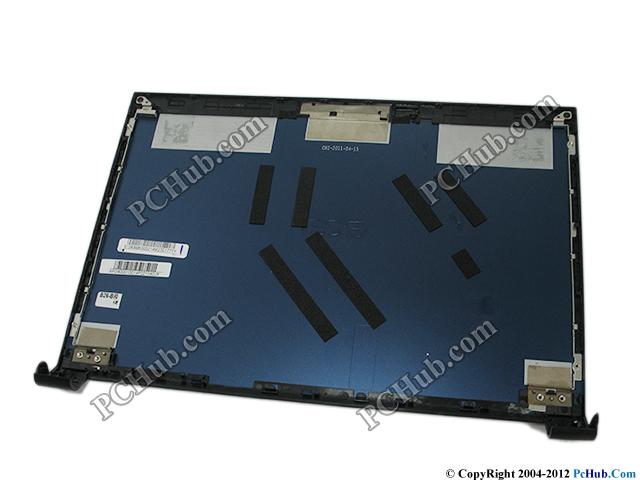
The hinge cover plastic is glued to the back cover, which snapped off.
![[IMG]](images/storyImages/wWJz6dT.jpg)
So this is what it's supposed to look like. See how it's all connected on one piece?
![[IMG]](images/storyImages/115099d1408852636-acer-timelinex-3830-4830-5830-t-g-acer-aspire-3830t-series-lcd-rear-case-ap0i6000100-1-91449.jpg)
Seen it happen to two of my friend's 3830TGs, not surprised mine happened. To get access to it, just take the front bezel off (two screws and then just clips).
Probably going to get some glue on it and see if it holds. Such a poor design, no way to just replace the small cover.
EDIT: Superglue worked, although not really the best solution in my opinion.Attached Files:
-
-
Hi guys, Im an owner of Acer 5830TG, I ve got this huge issue, When Im playing any game at all at start everything is doing great 60+ fps at Diablo 3, looking great and smooth, 10 minutes later suddenly 3-5 fpses, i suppose what happens then is just my Nvidia Graphics Card suddenly turns off and switch back to Intel HD Graphics, im checking the temperatures and they re not higher than 60-65 degress both on GPU and CPU, after a while of playing at 5 fpses temperatures goes back to 45-50 and my Nvidia is running again so I have 60 fpses again, I don't know why thats happening, but it makes most of the games unplayable and I really want to fix it. I installed newest drivers - didnt help, i changed paste and cleaned everything including fans - didnt help, i just downloaded modded BIOS 0.85v - still nothing. I really need help.
So please anyone? -
You have throttling issues. This issue can be "fixed" with ThrotleStop ( TechPowerUp). You can override automatic turbo mode and force to 18-22x the cpu multiplier. You can loss some fps but much less than auto.
-
Hi,
Well my cooling fan is about to crap out in my 4830TG-6430. I ordered a new one on ebay.
I haven't had any issues w/my laptop up to this point, when it comes to heat, but when I do open the laptop up in order to replace the fan, I will replace the Thermal Compound.
Another thing I'm thinking about, is to remove the black paint, which is certainly preventing any decent heat transfer from happening. If anywhere, it will be at the radiator end, next to the cooling fan, being careful not to damage the thermal tape.
The cpu that I have, is the i5-2430M, 2.4/3.0 GHz, which is a 35 watt model. I'm thinking about buying a i7-2620M, 2.7/3.4 GHz, off of ebay. It too is a 35 watt CPU, so heat shouldn't be an issue w/it.
I've had the laptop for some three years now, and love it. It's the perfect size and weight for me, and still support gaming. I'm tempted to upgrade, but haven't decided on what to upgrade too, since I haven't found anything like it. I've been looking at a Lenovo Y40, but it has an AMD Radeon R9 M275 GPU, and an HP Envy 14T, w/a Nvidia 850M GPU. They both come w/an Intel i7-4510U CPU, which is only dual core w/HT, and is soldered in. I like the Lenovo Y40 black carbon fiber finish case a whole better than I do the HP all silver case.
Finally, will my Acer 4830TG-6430 laptop support 16 GB memory max? I presently have just 8 GB. The CPU specs say that it will support up to 16 Gb.
Thanks.
P.S. - Are the modified BIOS's still available anywhere? What is modified in them? -
Although it is also 35W TDP, it will generate more heat.
-
Did you ever find out how to get the lights to turn on again? I also had to order a new Motherboard and replace it with the stock one and my lock lights don't work either.
-
Hi Guys, I purchased my Acer 3830TG from Amazon back in September 2011. I recently got a notice about my battery dying down and it is on it's last legs. Is there a guide to replacing the battery?
-
Just an update to this thread. I have the i3-2330M version running the latest stock bios 1.12 with latest NVidia drivers. The GT540M is overclocked to 765/965 with Arctic Silver 5 thermal compound applied to the video and cpu chip two years ago. The interfering vent meshes are still there and I have added 5 stacks of penny pairs to the heat pipe, held just by the external backplate. Applying Throttlestop with 20x multiplier selected, I play Diablo 3 for 3 hours at a time. I get temperatures around 85°C to 97°C max. When it reaches 97°C though, I get momentary throttling, maybe 2 or 3 seconds worth before gameplay returns to normal. I have noticed that turning down the multiplier to 19x and 18x reduced the max temperature by 1°C to 3°C, so I only hit 94°C or so. This eliminates any throttling, even though I have the default options checked on Throttlestop.
Anybody else have a similar experience? -
 Well, this forum format is certainly different!
Anyways, I have decided to remove the wire mesh over the back cover grills to help with the airflow. I have noticed another 2°C - 4°C temperature drop during 100% load while playing Diablo 3. Max 85°C to 93°C now and no more throttling!
-
My webcam on this laptop isn't working (4830TG). Started after a reformat I think (haven't used this system in a while). Whenever I try to install the Webcam app (CrystalEye) I get ""no webcam device found". Don't see it under device manager nor do I see any errors.
-
Just installed Windows 10. Here's the run down
Upgrade went great, took ~20 minutes. After rebooting, all of the devices were working. There was just one small issue with the trackpad drivers, I think Windows installed the Elan drivers, and my computer has a Synaptics Touchpad. After solving that, everything has been awesome, it boots up in seconds compared to Windows 7.
The GT540M supports DirectX 12 with the 353.62 drivers, but unfortunately the integrated graphics don't. Anyway, most of the gaming I do on this laptop is on the GT540M, but I would've been very happy to see the Windows 10 interface animations taking advantage of the new APIs.
Update as soon as you get the notification! -
I have a 38380TG-6412 w i3 2310M , installed 240GB ssd and have 8GB ram. I think it is time now to swap out the processor, get rid of the fan running 100% all the time and tweak it out to improve performance.
No reason to sell it yet as it is decent enough for a kitchen laptop
Where is the tutorial to change cpu, I see this is a loong thread looking for some quick help and assume an i5 2410M is the chip to go with, BUT would an i7 work, if so which exact model is required and how much more modification for the extra heat?
Appreciate the feedback -
I would put in a 2540M. The I7s generate a lot more heat with out a significant amount of increased power.
I don't know about the tutorial but I had a 3820TG and it was a breeze to swap in the CPU. You remove the KB, remove the screws on the bottom and in the RAM/HD doors, disconnect the Wifi card and the antennae, split the body and remove the cover. Unscrew the Motherboard, disconnect the speaker plugs, the Fans, the power, the Display connection, get the antennae wires out of the way, unplug the USB card, the BT module and the KB and flip the main board over. Remove the CPU and replace. I would recommend IC Diamond 7 as it provided 10 degree difference in operating temps. Also take off the GPU heat sink and repaste while your there. Reverse assembly and you're home free. You might want to look up a disassembly manual to get familiar with the unit, but it is fairly easy to do.
Good luck.
BTW, just dropped by to say that it looks like Microsoft has taken a page from Acer and its Timeline series 38x0TG with powerful CPU and serious dedicated graphics in a very portable package. Timelines were probably the state of the art in their day. Particularly the 3820TG. -
hello, I'm missing couple of years from this forum (Ionly get in here vhen I mod my acer) I've changed my I5 (35w) with an I7 2670qm (45w), the internal circuitry supports 45w chips (somme models where out from acer with the i7) and I must say that the temperatures are lower than with the i5 (maybe more threads work better). try to do the hardware fan mod (You'll find it like 10 pages ago posted by me) all the sany bridge cpu's are supported...
hi I don't know if you're still active on this forum, can you send me please a picture with the second pci pads (or if you have somme kind of schematics) (where is on you're board). I'm thinking on an adapter to put a desktop gpu on my laptop and it seems that even with pci express 8x will work well. i stll want my wifi card in tough... I've changed the i5 with an i7 and it's much faster but when rendering video I'd like a nice gpu... now I was thinking to watercool the laptop...Last edited by a moderator: Oct 12, 2015 -
only the hardware mod I've made... there are a couple of people that use it and it's working fine. the only drawback is that when you're at full speed and then pass back at the normal embed controller sometimes will stay off untill it reaches the next proggramed state (on mine 5°C) , it's ok since at full speed you'll have lower temperatures...
-
the reset pins are under the sim modules, there are 2 of them, one reset the bios paswword and the other one I have no ideea search for the service manual and you'll find the procedure there, i tryed to uplod the manual but it's 17Mb and this forum does not allow more than 2Mb...
did the same thing on mine causing a short circuit, then I've put the battery in a plastic bag and le it 2 days in the freezer, it came back to life, also try to put the back cover back on thaptop, it has a switch that disconects the battery when you take of the cover... (at liest on mine is there, try measure if the switch is letting current pass trugh)Last edited by a moderator: Oct 12, 2015 -
What goes here that would make the manufacturer decide to cut out an outline in the plastic here and set it up so the outlined part in the plastic can be removed?
Attached Files:
-
-
it must be for somme optional: card reader, simcard or infrared port... they use to have a lot of optionals... I wish mine had a 3g modem wit his own simcard..
-
Hey Acer fans
Looking for Schematic (block diagram) of the acer 3830tg-6431 (JM30_HR mobo). It is not listed in "Tim's" link. If no Schematic all I am trying to confirm is the unused 52 pinout where I believe a 3G/WWAN card was to be. Confirm if the pinouts are wired for PCI-e? or USB? My hope is for PCI-e--->Super Talent CoreStore Plus 128GB Mini PCle Solid State Drive (MLC).
Thanks
Airgetcha -
Do you have a multimeter? Check if the 3.3V, 1.5V and GND pins are connected to start with.
-
I found this video to be a pretty good guide.
-
No multimeter at the moment. Any other suggestion?
As time/money permit I will obtain a meter and follow through but a simple schematic/diagram would makes this so much simpler.
Thanks
Airgetcha -
Do you mean the space below the fan? I don't know if it helps, but Mulzoffh managed to install a wireless Xbox 360 PC adapter there.
-
Ajnauron
Thanks, this gives me more confidence.
The space depending on your point of reference would be below or between you and the fan If your facing your screen. The space sits below the shift, Z,X,Ctrl, Fn...Keys. I believe, and correct me if I am wrong, the "Xbox 360 PC adapter" is a control device like a mouse and therefore likely operating on the usb bus. I am trying to confirm that these pinouts are connected to both the usb bus and more importantly the PCI-e bus as this will have the highest throughput. 2.5 G/s?
Thanks
Airgetcha
Aurelrica
The service manual you have if for the 3830tg-6431? (jm30_hr)
if so, I am willing to purchase from you as I refuse to pay acer or some third party like "wordpress.com". Service manuals should be included in the purchase of laptop!
Thanks
AirgetchaLast edited by a moderator: Dec 27, 2015 -
Just adding to the database of knowledge for any Acer Timeline 3830TG owners left. I bought a i7-2620m cpu off ebay to replace the i3-2330m cpu. Like others before me, I'm using the modified version 1.12 bios, nVidia GT540M overclocked to 765/965, taken off all the dust screen grills on the bottom, and placed a few double stacked pennies on the heatpipe. Arctic Silver 5 compound was replaced with Ceramique 2.
I use the laptop to play Diablo III on lowest detail, resolution, no AA with ThrottleStop set to x27 multiplier to run the CPU at 100% but preventing turboboost. In 1-3 hour sessions, the CPU temps max out at 94°C - 98°C and the GPU maxes out at 92°C. I get 20 seconds or so of throttling when the cpu reaches 98°C or higher, not sure if it's the CPU or GPU that causes this (frame rates drop from 30+ to 9 or 10).
Other than that, I'm very happy with the speed and snappier response time in all programs that came with this upgrade. -
Hi guys,
I've been a happy owner of a 3830TG since autumn 2011, but I recently ran into an annoying problem. I've mainly been using the laptop for on-the-go-gaming (Civ V, CS:GO, FM15, that kind of stuff), and since it has by far surpassed the lifetime I expected, I decided to go on with the thermal mods. I disassembled it, applied some Thermal Grizzly, removed the mesh and prepared the heatpipes for mounting of some heat sinks that I've ordered (but not yet received).
Everything went good, except for one little detail: my touchpad is behaving very weird:
Most of the time, it simply does not react. If I uninstall it, and then restarts the computer, the computer does recognize it, and installs the drivers automatically. Still not working though. Restarts doesn't matter. Fn+F5 doesn't matter. The only thing that works is using the battery reset button at the bottom (the very small hole). Upon startup, it is very much alive and working splendidly. Multiple restart, with and without power adapter, it keeps working.
However, when I leave it off (plugged in, or not, works the same) until evening the next day, it is the same way again. It doesn't react, neither tough nor the mouse buttons. The only thing that works is the battery reset button.
It's a bit annoying, but not the end of the world. However, does anyone have any idea of how I could fix this? -
I'm looking for the modded BIOS files, but they seem to be offline everywhere. Anyone with a valid link for 1.12 modded?
-
Doo the hardware fan modification as I showed in a previous post, you'll run much lower temps...
-
The biggest results I got from doing something software-based was with doing the undervolting. That dropped temps 10+ degrees alone.
-
For those still around with a 4830TG, I just repasted the thermal paste on my CPU and GPU and I cleaned the fan. The results are amazing, I must say. Before, the fan was on the whole time, with idle temps above 60 degrees C. When running a game, throttling was a problem, with temps quickly in the high 90 degrees C.
Now, temps when running a game are in the 60 degrees C, and idle in the 30s.. And I didn't even add extra heatsinks or removed the grills. The laptop became very usable once again, for some of the games that are a little bit older.
Also, I tried overclocking the GPU as per a 550M. This does seem to work well. However, I'm not able to write the clocks to the VBIOS file with Nibitor. Anyone knows how to do this?Last edited: Oct 27, 2016 -
Hello, I need help.
I used HDMI cable to connect notebook with a 24''TFT, which supports 144hz.
I have an 3820TG with ATI 5650, which according to the driver info supports only 1080p@60hz.
Can I somehow force the 75hz, which is the max. refreshrate with HDMI connection, or is the graphic card really limiting? -
Hi, did anyone manage to get ahold of the modded 1.12 bios for 8530TG?
Any help appreciated - every source seems to be down.
xfim likes this. -
What are the benefits of a modded bios?
-
Greetings,
I also wanted to find a modified bios for my trusty old 4830T. Seems all the links are dead so I went ahead and studied how to edit the InsydeH20 bios. While my own efforts didn't pan out to complete satisfaction, I was able to use the work of others to fully unlock the advanced options in the v1.12 bios, including UEFI boot. I wasn't able to get a UEFI shell though. While not necessary to boot in EFI mode, it would have been nice to have an interactive EFI shell available at boot. Maybe someday I'll figure out which EFI modules need to be installed in the bios to get the EFI shell to work.
I put it up on my google drive, so hopefully that'll work. Cheers!
https://drive.google.com/open?id=0Bz469GTV9GPyWFMxcXNVb2pYYW8
Open the Acer bios flasher installer for Windows using 7zip, overwrite the same file name inside, and then flash as normal.
William
Acer TimelineX 3830/4830/5830 T/G
Discussion in 'Acer' started by lee_what2004, Feb 6, 2011.