Problems? See this thread at archive.org.
Hey guys, i kinda fix my 6990's issues with shut downs it was the PSU itself.I did a reinstall of windows I cant seem to be able to install non modded drivers and my cards are stuck with max AA\AF (maybe other things to but these are most noticable)at all resolutions, if resolution is to high the display driver crashes this happens no matter what modded driver i install or setting i put on CCC. Im thinking these settings got stuck in cards memory maybe....anyone got any solutions?
-
Is there anyway you can get the Dell stock drivers to install? I would do a driver sweep, and clean everything out, then install the Dell drivers, and then the AMD modded drivers over top of the Dell drivers.
This makes me think I need to look at my settings since I just did a fresh install. Although my system works at the 19x12 resolution just fine. Although I couldn't get the dell drivers to install with 6990s in the system, but had no issues getting the modded AMD drivers working. No shutdown issues either, though I never tried to sleep the system. I might have to do more testing. -
Thanks. I know you have posted this already. I appreciate you doing it again so I didn't have to find it. +1. I will try it tonight. Assuming my installation goes good that is.
-
Thanks, gotta love copy and paste.

-
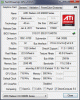
this is how my GPU z reads my cards atm on 11.9 mod drivers
MASTER card
![[IMG]](images/storyImages/bmn.png)
![[IMG]](images/storyImages/cx0.png)
SLAVE card
![[IMG]](images/storyImages/pp.png)
![[IMG]](images/storyImages/b8a.png)
notice how the BUS Interface are different, is that normal? and yes DR650SE i was able to install all drivers before i had my power issue but right now i cant use dells or ATI's says i dont have a compatible adapter or the detector just doesnt read it so it dont give me option for display driver -
Is there any way you have a 5870? You could put that in the system and it would install the Dell drivers. Then you can install the ATI drivers overtop. That should resolve some of the issues. I know if you install ATI drivers overtop of Dell drivers, it helps because it retains some of the functionality that the Dell drivers provided for the 5870s. Thats why I never recommend a clean install and drive sweeper of the display drivers unless needed to start from a clean slate.
-
Hey Ghost,
Welcome back, was wondering where you "disappeared" to...sorry I couldn't resist
Looking forward to seeing how the 6990's work out for you. -
hey grey yea ive been staying stealthy lol and DR i do have my 5's. So i just remove my 6990's install 1 of my 5's then install the dell driver recommended for the 5870's and finally go to ATI website to install lastest driver?. Once i finish installing that lastest driver ill reinstall the 6990's and hopefully it will boot in ok?
-
That should work, just make sure that you only have a 5870 in. Probably won't boot with a 5870 and a 6990
-
Hilarious. Thanks. Just installed the 6990s. Sigh....both cards work. No Crossfire. Can't find it in any settings. Didn't you have this problem Greywolf? Looks like I am joining the club. Already tried uninstalling, driver sweeping, reinstalling drivers. Guess I can try and open it up to re-seat the CF cable.
-
Have you tried installing your drivers over the Dell drivers? Also try reflashing your vbios. Did you look through CCC for the crossfire enable button? I remember having an issue like this when messing with my 6990s, after doing a fresh install, don't remember what I did to get it working. I know I installed Dells drivers package, but it wouldn't install the display driver. Then I installed the modded desktop 11.9 beta drivers. That might have done it for me.
Wow, can't believe how many people are having this issue Has anyone who had this issue successfully figured it out?
-
Primary Adapter
Graphics Card Manufacturer Powered by AMD
Graphics Chipset AMD Radeon HD 6900M Series
Device ID 6720
Vendor 1002
Subsystem ID 043A
Subsystem Vendor ID 1028
Graphics Bus Capability PCI Express 2.0
Maximum Bus Setting PCI Express 2.0 x8
BIOS Version 013.011.000.017
BIOS Part Number BR40793.004
BIOS Date 2011/05/04
Memory Size 2048 MB
Memory Type GDDR5
Core Clock in MHz 715 MHz
Memory Clock in MHz 900 MHz
Total Memory Bandwidth in GByte/s 115.2 GByte/s
Disabled Adapter
Graphics Card Manufacturer Powered by AMD
Graphics Chipset AMD Radeon HD 6900M Series
Device ID 6720
Vendor 1002
Subsystem ID 043A
Subsystem Vendor ID 1028
Graphics Bus Capability PCI Express 2.0
Maximum Bus Setting PCI Express 2.0 x8
BIOS Version 013.011.000.017
BIOS Part Number BR40793.004
BIOS Date 2011/05/04
Memory Size 2048 MB
Memory Type GDDR5
Core Clock in MHz 715 MHz
Memory Clock in MHz 900 MHz
Total Memory Bandwidth in GByte/s 115.2 GByte/s
Why does the second adapter say disabled. It is enabled in Device Manager. Also shows to be working properly. Haven't installed Dell drivers. Haven't tried vbios flash yet. Looked through CCC and no CF option available. It has been removed. -
Crap, I had an issue similiar if I remember. Try installing the dell drivers, reboot, and than then AMD desktop modded drivers. Let the dell driver package run through the motions. I don't think it'll install the display drivers, but after that install the AMD drivers. That may work. I believe I had issues seeing the crossfire thing too. Wish I could remember.
-
Hey DR650...not yet..a few of us are trying to get to the bottom of it.
Ghost are you using your own crossfire cable? or one that you purchased? Have you tried either and do they work?
*EDIT* I don't know if this is comforting or not, but both of my cards showed enabled but just didn't communicate
with each other across the crossfire port. So hopefully this is something driver/windows related and not crossfire related.
Also if you haven't tried this, install the desktop modded drivers (as DR650 suggested) and see if that makes a difference. Seems to help a lot of folks (myself included originally). Just something else to consider if you aren't doing it already.
Good luck! -
Those modded drivers...Are these them? download from Guru3D.com
Man. Well I'm not comforted, but at least it is good to know. I'm currently downloading the drivers from the above link. We'll see if this works.
Oh and I am using the 2nd CF cable that I purchased from Mythlogic. I also have the 1rst cable and the R2 cable. I can try swapping them tonight if drivers don't fix the problem. -
Looks like that Guru3D modded installation won't install the display driver. So I guess I'll try installing 11-8 again and see what happens.
-
Hey Ghost,
These might be the same, but try the mobility link here:
AMD Catalyst 11.9 RCx (8.89 August 10) Win7/Vista/XP/Mobility (Mod) - Guru3D.com Forums
Should include the display driver -
And....No Good. Drivers installed. Everything working except CF. I will have to try reconnecting the CF cable when i get home.
-
Yup that's the same one I tried. I'm thinking this is either a hardware problem (booooo) or a vbios problem. Since my card says Disabled in CCC hardware information, it sounds like maybe vbios is single card? I will have to look at it later tonight.
-
Sorry man, I hope you can get it sorted out when you get home.
-
Hey I gotta be positive. I haven't had 2 cards working for this long yet. So I just need to get them talking to each other and I'll be all set.
-
I just installed everything from the Dell driver package except the display driver. I then installed only the display driver from the 11.10 Preview. I did this to see if I could get my shutdown/sleep problems to go away. No go. I wish there were some way to get a system BIOS that supported the 6xxx cards so this stuff would quit happening.
And that is a good attitude to have Ghost. You'll get it figured out. Something has to work. You have the same exact type of cards as DR650? -
try installing all options from 11.10 Preview, this fixed the shutdown issue for me.
uninstall ur current driver with ati express, then use driversweeper to remove all remaining. then install 11.10 Preview with all options and I think this should fix it -
Man I only got a 3300 on 3DMark11. Would have thought it would be higher. Even on one card, which it was clearly not using the second. 3DMark11 said my card was a 6970. Should be 6990s. How do I know that I got a 6990s?
Not sure if I have the same cards as DR. He got them from PKhetan and I got mine from Mythlogic. They are Clevo I was told. If I wanted to flash the vbios to stock CF 6990 vbios, where would I get it? -
Ghost, look on GPU-z. If you have 1120 shaders, you have a 6990. If you only have 960 shaders, it is a 6970.
You may want to have DR650 dump both of his VBIOS from the master and slave and send them to you. Ichime mentioned in the first post that you must have a CrossFire VBIOS flashed.
Come to think of it,
Should my ES card be using a 6970 VBIOS, or a 6990 VBIOS?
I wonder if a different VBIOS would fix anything. -
ya i actually never thought about it, but it would be great if it could fix the gpu fan issue
-
When i had the M15x and the 6990 installed i never had any issues running the 6970 or 6990 vbios so i am not sure if it will make any difference but its certainly worth a try if your having shut down issues.
I believe the fan issue is the way the GPU is manufactured so it wont make any difference what BIOS you have on the GPU and you will always have to use software to adjust those fans regardless.
Mxmupgrade was selling the Clevo cards for instance with the Dell BIOS installed but it still required 3rd party fan control. -
Yeah, the GPU fan issue is not going anywhere for the Dell cards.
The Eurocom 6970M I have has one issue, and that is that it will not accept any driver but the AMD Preview. Everything else works like butter. I really believe that the 6970M CrossFire is the 'sweet' spot. Makes me want to keep the one I have and acquire another one for CF. -
Turbo,
My first set of Clevo cards had the same "problem" where I couldn't get a stock driver to install (even on a clean windows install), and only the modded mobility drivers worked. I honestly have no clue how that would happen or why that would be. My current Clevo cards work fine off the stock drivers (just need to get another to work with crossfire). It may just be a different combination of different drivers to get the cards to except the standard drivers.
It's odd for sure, and I have no reasonable explanation for it. -
Greywolf,
The one glaring explanation for all of it is the fact that Dell never intended for anything beyond a 5870M to go into these units. The majority of all of the problems we're having has to do with the system BIOS. Fix that, and you've got 100% compatibility with any card that physically fits, as well as a fix to the problem with the PSU. I would seriously donate $100 to the guys who release the modded BIOSes if they could fix all of these little nagging problems. At the end of the day, my card works just fine though. -
Hey Turbo,
I agree completely. I'm hoping one day we can get the bios all sorted out, and truly make it a plug and play scenario. -
I don't know if that day will ever come. I'm seriously debating if I should crack open a cold beer and throw that 6970M back in or not. I really can't justify all the issues the 6990M has just because it runs 1-2 fps faster in Crysis. Don't know how tough it will be to get rid of the 6990M ES though either.
EDIT: Beer is cracked. I'm putting the 6970 back in and taking my chances selling the 6990. See you boys in a bit. -
I think a cold beer about now sounds perfect
-
The ES card should sell fast on these forums for probably $400 ish .
Tables 21 had quite a few 6990 ES and they were gone in a matter of days.
Ahmadmud bought 2 of those 6990s from him and i think he cut him a slight deal only because he was getting 2 of them so id say $375-400 would get you a quick sale. -
Table21 is who I bought it from. I am extremely happy with the performance. All of the other issues are just a huge turn off. Would the 6990M ES work correctly in a Dell laptop that was compatible, like the R3 or M18x?
-
If it is an Eurocom card then id say it would probably work but no better/worse then what you guys are experiencing on the R2s.
There are other guys with MSI laptops for instance who want 6990s so its not just limited to the Alienware crowd which is a good thing.
I sold my OEM card just 2 days ago to a guy with a 15inch MSI machine so it seems everyone wants the AMD card no matter what make or model.
The hard part i guess is knowing whether it works for them or not but as long as people know going into it that its not your responsibility to know it works and its there's then it should be fine. -
This...this exactly
-
I'm in for $100 if they can get a higher wattage AC adapter to work.
-
Ditto on the $100.
Cracking open my third beer
-
1120 Shaders check. Tried swapping CF cables. Still no CF. Card reads disabled adapter in CCC still. Going to try installing OS and video driver on new HD to see if it is software related. Be back soon.
Cracked open 2 beers. Hadn't planned on drinking tonight. -
Don't know if you're tried this yet, but are your running the Custom vbios? And if not, which version are you using?
I've tried 4 different vbios' on my cards from various dealers and all of them have not had problems with CFX. Other problems have existed with certain vbios' but never CFX not working.
I find it strange that it will work on some systems and not on others even with identical video cards . . . . hmm. There has to be something going on here on a hardware level. Does anyone know if there were minor revisions released by Dell on the R2 that weren't advertised? Like for example, with the PSP 3000, Sony has out of the eye of the public, used several different motherboards which didn't affect the PSP on a user level, but subtly changed the inner workings. Perhaps Dell did the same?
My model is a semi - old R2. Very early 2010. My replacement motherboard is even older. Made sometime mid 2009. For the people not having problems or very limited problems, what are your approx manufacture dates? Are they all generally from the same time period? What about the people having problems with CFX? -
Hmm I don't know the mobo date, but I've had two replacements. The first one I had replaces this past winter and had another a couple months ago. You May be right. If anyone wants to send me their cards ill test. My last mobo worked with xfire 6970s and this one works with 6990s. If mobo is the issue, those under warranty could get a mobo replacement
-
I also wondered about the age of the laptop and whether that has anything to do with certain irregularities in builds. I definitely have an R2 and it was purchased in July of 2010.
On to my continued problems....
I have tried each card in each slot.
I have tried 2 different CF cables (both Clevo from Mythlogic)
I have tried another hard drive with a clean OS and 11-8 drivers.
I have tried to increase my brain power by drinking beers in multiples of 2. I'm on 6 now. Not providing tangible results.
I have not done any vbios editing.
Here is my GPUZ info:
Does this look like a vbios issue? I'm running out of ideas. Basically I can't get a 6970 or 6990 2nd card to function properly in my laptop. Would flashing the modded mobo BIOS as DR did be worth a shot? I'm about to play disk wars with this second card. Someone stop me.Attached Files:
-
-
Ghost, you have not tried any VBIOS stuff yet? Get DR650 to dump his slave and master BIOSes and send them to you. Seriously, try it.
-
Hey guys,
I also had originally considered the motherboard to be a possible suspect as to why some of us have cards that work and some don't. I did send my cards to a forum member here who did have 6970's working as crossfire, but was unable to get my cards (and cables) working in a crossfire configuration in his machine.
Unfortunately he no longer had the cards or the cable that he originally used, so couldn't verify what component was a problem.
Based on that I don't believe my issue is system related...however I can't say that's true for everyone.
That leaves me with only two possible conclusions, assuming it's not system related.
Either there is a discrepancy in the crossfire cables that some of us have...that for whatever reason some work with the 6970's and some do not. This could explain those of us having problems using Dell crossfire cables (but wouldn't explain those using crossfire cables from other vendors)
Or there is something specific to the revisions of the individual Clevo cards that we are receiving. Has anyone heard of a problem with the Eurocom or Dell cards being detected or having crossfire problems? Or have they all be Clevo related?
That leaves me with two possible scenarios that I've been struggling with over this past month waiting for my card to return from RMA. Either we (those having problems) can send our cards and cables to a forum member and have them test the components individually against a working machine to see which component fails.
If both cards and cables work in another members system who currently has a 6970 or 6990 configuration, then that limits the problem to the system itself. So Motherboard, Processor, or some other strange incompatibility that manifests itself in some systems and not others.
Or if luck shines upon us, one of the cards (or the cable) will not work and we'll immediately be able to determine the problem to be HW related.
The other option is to purchase another set of cards and hope to get a pair that works...not the most scientific and definitely the most expensive option.
The fact that another member here has purchased cards that were known working in crossfire in a X7200 but doesn't work as crossfire in the Alienware, seems to indicate that there is some sort of system compatibility thing going on. Again maybe specific to the Clevo cards, or maybe specific to the crossfire cable that we are using.
I know after struggling with this for 3 months, I'd really be curious to get to the bottom of it, so that all this time and effort can be of a benefit to others who are encountering this as well.
Good luck to everyone, as always I'll keep you all posted. If I come to any realizations I'll be sure to let everyone know. -
Just PM'd him. I'm worried about it since the last time I updated a vbios on the 6970s my laptop never booted with them again. But I do need to try it since I can't think of anything else it could be.
-
Ahh. OK. Well I can totally understand that. A black screen after a VBIOS flash is a nightmare. I am just hoping that all of this can get figured out before the R2 is truly 'outdated', and it isn't worth experimenting anymore. There has to be some combination of GPU brand, CF cable, VBIOS, etc., that works.
-
crysis warhead sometimes crashes my display driver and laptop freezes up with on settings higher then "gamer" Also seems to totally shutdown my lapto when it starts to charge Batt. while playing on high settings.......im on 6990 CF driver 11.9 atm
What i think the solution might be here is to get the Clevo 6990m drivers to install but i can only seem able to install modded drivers even when i put one of my 5870 on. I was able to install the Dell 5870 driver but i could only install modded drivers past that. The 11.9 driver from the AMD site is a modded driver but the AMD site has a detections proccess before giving up the actual driver i was able to get thru the detector for it with my 5870 even though i was still not able to install non modded drivers.... -
IDK if anyone has tried to install these but they are located at bottom of list on x7200 VGA download section on clevo site
-
i swapped VBIOS on cards also increased voltage to 1 then installed CAP1 for 11.9 after that installed 11.10 B2 driver and all my problems seem fix
[Guide] Installing AMD Radeon Mobility 6970 / 6990 in your M17x R2 (Single GPU and CrossfireX)
Discussion in 'Alienware 17 and M17x' started by ichime, Jun 9, 2011.