Problems? See this thread at archive.org.
Western Digital has recently released a 1tb 2.5 HDD, the code name is WD10TEVT.
I am using my M17x like a giant "game library"so this is a good news for me.
However there is a detail I still don't know...
This 2.5 HDD will have an unusal thickness of 12mm instead of the common 9mm.
I heard that some 17inch notebooks would be fine but what about our M17x?
I didn't find this info on AW website so I wonder if someone already tryed a 12mm HDD on it...
-
There was already a thread about this and I think the answer was no.
-
Well, the only thread I found about it said yes with no confirmation.
It was a comment from Moo, saying it can be spaced. -
bwaaahhh??
A confirmation of such a procedure would be very useful information -
just to clear it all up, i purchased a 750gb drive. and have just put it in the 2nd bay. there was/is a small problem.
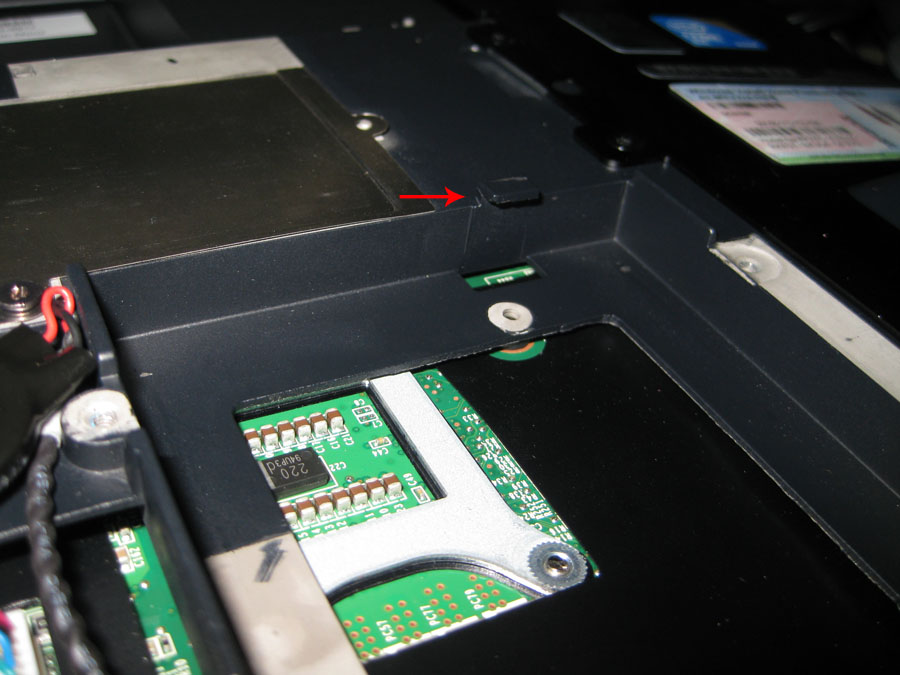
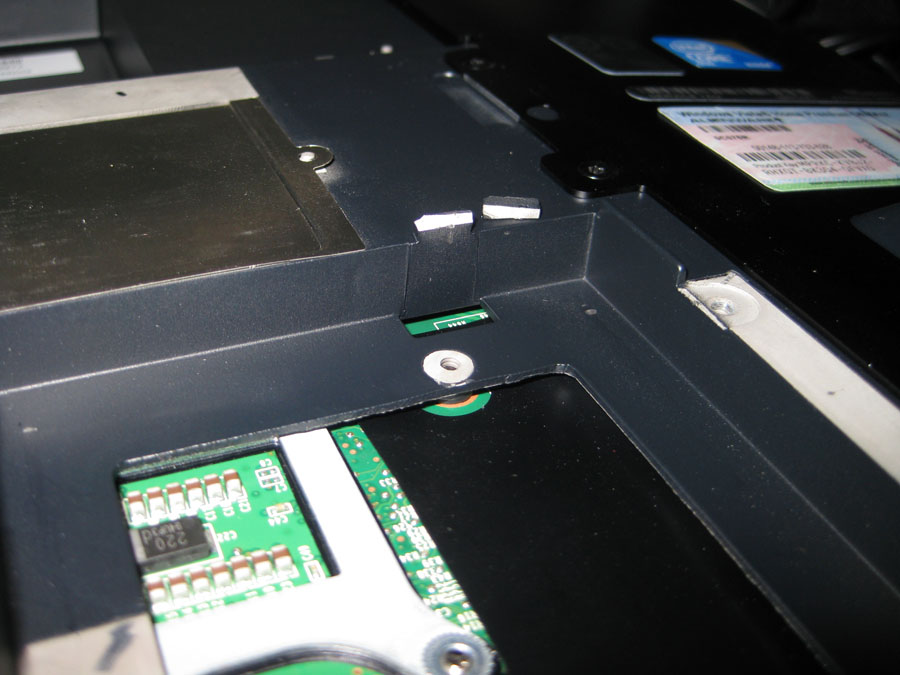
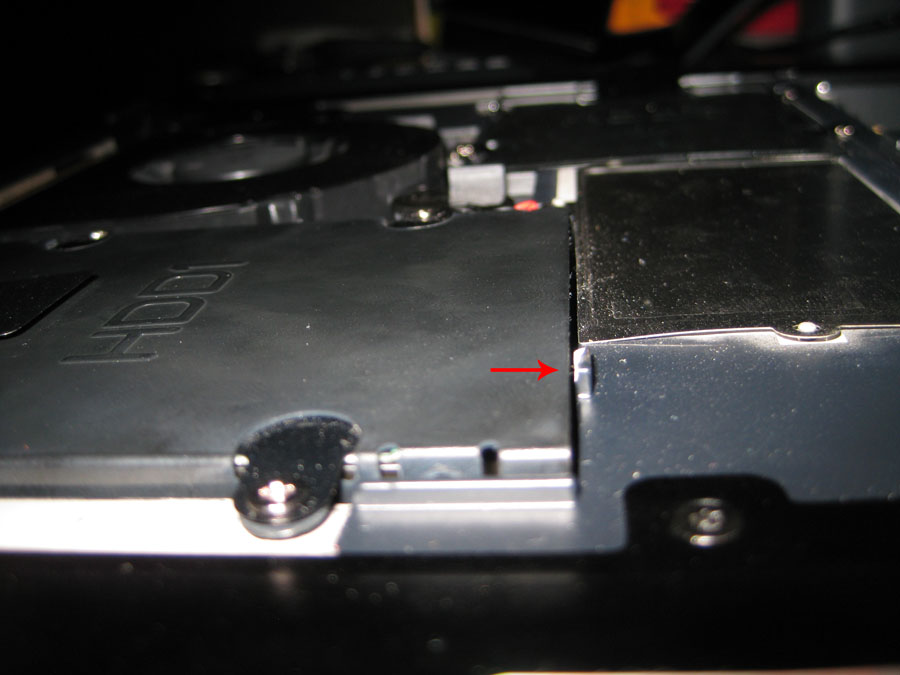
theres a small latch/holder looking piece that constricts a caddy with a 12mm drive to go in smoothly. i was adamant on making that bad boy fit so i had to break it off.
i know i know, most of you are thinking are you freaking nuts?
anyhow, once i took that small piece off, the drive fit ok. i had to screw in the caddy a bit more and shazaam. works prefectly. there is more than enough clearance from the caddy/drive to the notebook cover.
i am off to work, but i can post pics tonight when i come back to show/explain what i am blabbing on about here..
-
Awesome if this works, because what people haven't thought about, is that this will also mean it can take a Velociraptor drive! (removed from the 3.5" bay adapter of course) As they are also the 12.5mm height (idk about thermals though)
Can you fit both drive caddies in with each populated by a 12.5 mm drive? -
From what I know it won't have sufficient power. Not sure if it is true but that and the thermals would be a challenge (there's no fan for the HDD's).
-
That's quite the good news!
It fit snug? not loose..or not too constricted?
EDIT: [This] is the link for the 1TB version. If you select "Buy Locally" from the tab menu, it lists Dell as one of the resellers that carry the product, so that would mean I can order the drive along with the laptop...although I can't find Dells listing of the product :< -
as for the thermals sleey0, the velociraptors dont get especially hot compared to regualr 2.5" drives, WD sells them bare for enterprise use, that is just eye wash for consumers to make them feel more 'leet
you may be right about the power draw, but only one way to know for sure
-
Anyway, yeah.. I almost purchased a velociraptor a minute ago until the wife asked what I was doing.
It kinda doesn't make sense anyway because SSD's is where it's at and they should be MUCH cheaper in a few months time. -
At 5 200 RPM and 8MB buffer WD's 1TB HDD isn't really perfected enough yet.
That and and by the time I fill up 500Gb of storage on a laptop HDD the 2TB SD cards will be on the market. (which is a couple of years away ;þ) -
agree'd....
-
Yeah sure... You need 7200rpm to store your music!
BTW... About 500GB... I have 600GB of flacs .
-
I got the laptop in my sig about 2 weeks ago, and I've used up about 400GB already.... lol...
You people need to get into anime and heavy gaming, you'll beg for 2 TB -
well, though wd says they released those two models, i can't find a seller for either..
i think i'm just gonna buy a 500gb and save my money and save the headaches of trying to force a 12mm hdd into my m17x -
750GB here [Click Me]
-
Thanks for the useful info.
For doubling my HDD space I would chope the latch without thinking twice. -
told yall there would be plenty of clearance
DIDN"T I ? -
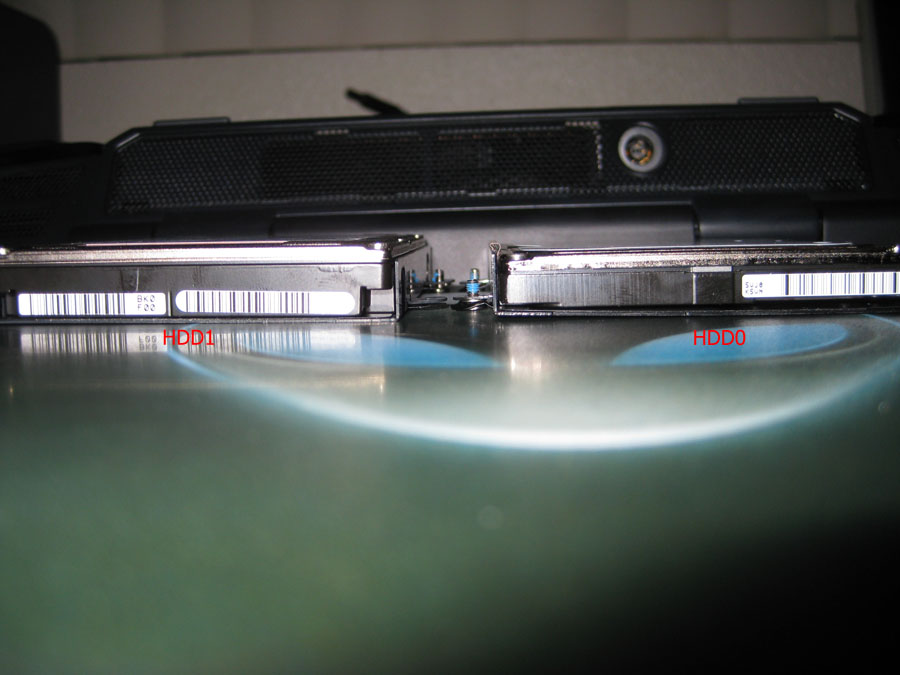
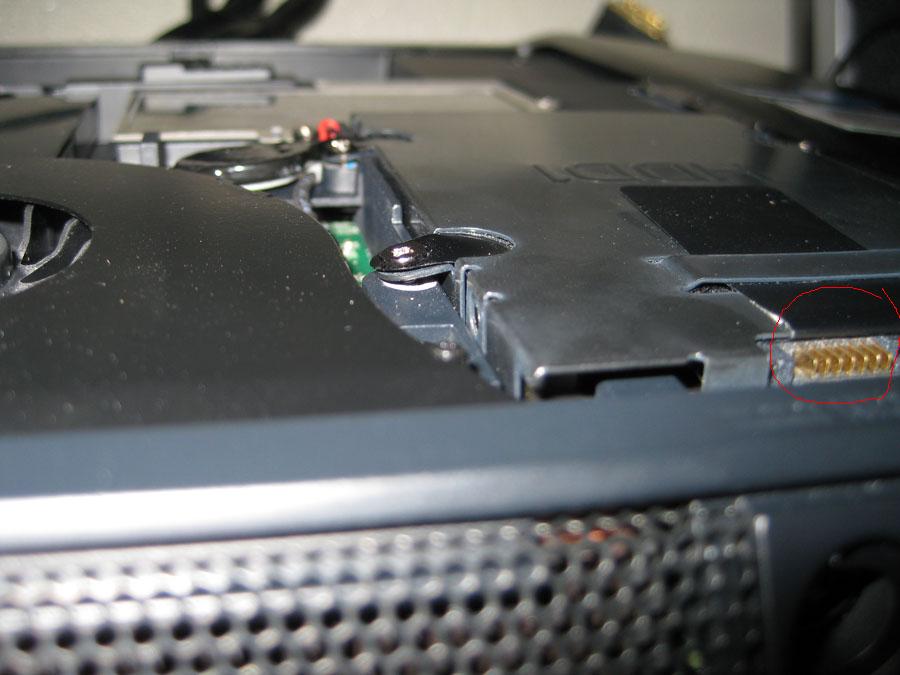
ok so here are some pix i took to show you guys what i was talking about..
1. this shows the thickness of the drive compared to the regular one.
2. the small piece that keeps the caddy/drive in it place but also doesn't allow a thicker drive to be put in.
3. the small piece i broke off.
4. you can see how i screwed the caddy in and got somewhat bent since the drive is bigger.
5. finally, a side view of the small piece i broke off making it clear for the drive to fit.
hope this pretty much answers everything i explained earlier. i have already filled it up with about 470gigs of music.
Attached Files:
-
-
looks....effective xD
and the M17x case cover fits just fine? -
the case cover fits fine. it clears the drive. they do not touch.
-
Good to hear : D
Curious though, how does the drive stay in place and not touch the cover? (and not rattle) when you broke off the piece that kept it that way..?
EDIT: nevermind, forgot about the screws xDD
Ahhh..I feel a drop in IQ -
hehe, its ok. i got a PM asking the same thing.
-
but can you do this for both drives? or just the outside/bottom one?
-
OK, not that I am gonna try this (1TB already) but +Rep for being a man.
-
Games are going on an SSD and are getting uninstalled when they're beat.
Anime is watched streamed via the internet and the stuff I really like gets saved to my home server and/or burned to DVD. When I anticipate I'll need them there I'll copy them over to a laptop which is why I want the faster transfer rates. ;þ -
well I don't have that many dvds and I HATE streamed anime, the quality is so low! And games are for multiplayer my friend lol.
I have about 100 DVDs between my friend and myself just full of anime alone, there's no way I could hoard all of that on any single computer unless I had about 4 1TB HDD on them plus external ones.
I wouldn't mind a SSD you know, but right now space is an issue for me rather than the speed. It's what works for ya best ^^. Less money + more memory = better deal for me. Especially since in my currency I basically multiply whatever you pay by about 6.4 or thereabouts. So yeah when I wanna max that alienware and it cost $5000, that's something like $40,000 to me ^^. SSD can wait lol -
the thicker drive can ONLY be put on the 2nd drive slot. it will not fit in the first one at all. since the first drive slides a bit inward to lock into place, it only allows for a regular sized drive to fit, so its a no go for the thicker one.
-
Thanks for the posts,just got my 2nd SSD out and will put the 1Tb inside!
-
I was just wondering whether this little 'mod' would void the warranty in any way?
-
Probably not since it's a tiny piece of plastic, but heres what I'm doing,
[GUIDE] M15x Optical Drive HDD Caddy Installation (56k Warning) -
^^In case you don't use your optical device that much.
-
Well if you do use it from time to time, like I do, you can make it an external, which I will be doing with the following, which I've already picked up.
Slot Loading Optical Drive Bezel Panasonic/Mata - MRC-0089 - Mac Recycling
enclosure
USB External Enclosure For SATA Laptop DVD Drive Burner - eBay (item 110511352514 end time Nov-19-10 08:07:41 PST) -
That enclosure is cheap and a PITA to work with...I had one and ended up ditching it
Sadly there appears to be NO other mini sata optical enclosures though.....so you would be best off just buying an external dvd drive and either using that or stealing its enclosure for your own drive -
Speculations on those pictures,
I have both WD (for about 1 year now) and recently I purchased Seagate (it is little thinner) and none of them work into the m17x.
If you look at the picture attached (circled in red), you will notice the connector not being properly attached to the notebook. It is attaching it only on the top (maybe 1-2 mm) and the hdd doesn't start at all...
Please do not make a mistake making those changes (breaking the piece from the system), as it does not FIT!
Only idea is to use the caddy, if you are not much a fun of dvd-rom or have an external one.
Cheers!Attached Files:
-
-
But in Post #19, where that picture was originally posted by Mozster, he says that it does work. He mentions that it's already got 470GB of data on it.
I just bought one off of Newegg. Will post screenshots from within Windows confirming if the 12.5mm HDD is compatible or not. -
Yes it does work it's been almost a year i'm running a WD 1TB in my m17x R1 with the piece removed.
-
Thanks Katalin! Question, I realize that the connectors don't completely engage, but is a good portion of the connector in contact? Not like there's a high amperage draw across them...but just wondering. +1.
-
Yes the connectors stay out a little bit,but around 3/4 of their portion is in contact(more than enough
)
Secret is to bent the caddy properly and it should be fine. -
M17X R3 does NOT have enough space for a 12mm drive, I tried the first day I got mine to make it fit, was able to close the bottom lid but the drive won't stay connected to the sata connection port. If someone wanted to customize the adapter or something (make it a little longer) it might work, but also the drive would not be screwed in place, not really worth the effort. I just got a 750Gb drive instead for now.
-
i don't know the inside of the R3 but us we had to bent the caddy and remove a tiny piece of plastic.
-
Hmmm. Now I really don't want an R3.
-
I was thinking of making a custom hold down bracket to make a 12.5mm drive fit in the second HD bay in my M17x but decided to just get a 750gb for now.
It wouldn't be too hard to do that (may still do it at some point) I would just need to get some thin metal and make a few measurements.
Heck, I even have a spare secondary HD caddy I could probably just cut up and bend to work.. but I am being lazy.
I wonder what it would take to make it fit in the primary HD slot?
(haven't tried since I have a SSD in there now)
D. -
Debaucher, are you talking about an R1 or R2? The 12.5mm already fits in them.
-
The R2.
I know that you can get it jerry-rigged in there to work but some people have gotten random disconnects since it does not fit completely.
I want a more permanent/secure fit which would not take much more that a backing plate that you can screw the HD into and then fasten on the edges like the stock HD caddy does.
I know that some minor modification to the HD caddy would achieve this (probably cut in in half so that I could bend the edges a bit to make is screw onto the chassis correctly (as tight as possible and so that there is not HD movement) but like I said.. I am being lazy
D. -
As soon as you screw in the bent caddy you won't get any movement so no dissconnections.
As for fitting it in the HDD0 slot it's a no go unless you cut thru the chassis
-
Just got it installed. Now I just wish I'd have gotten one sooner.
Attached Files:
-
-
Nice! Congrats! I got my 1TB in the optical drive bay, and love it. It actually performs better than my other drives I used. I think it's due to the drive density. My other drives were 5400RPM, and this is 5200RPM. When I open the drive, I use to have to wait a half sec for the icons to load. With the 1TB I don't, so I'm loving being able to have everything with me
-
Yeah, and with the nature of your job, you need it all in one spot too I'll bet. I want to get another 1TB in the optical bay too!
-
We got the same Samsung 1 TB,i have had mine installed a while it performs really well. well worth it if you like a big storage drive.
Attached Files:
-
12mm thickness HDD in M17x?
Discussion in 'Alienware 17 and M17x' started by Natadiem, Aug 10, 2009.