Problems? See this thread at archive.org.
A short will kill the card no matter what it was running.
Are you guys using a thermal pad on the back of the card?
-
-
Uh.....a lot of drama in here

Sorry to hear the card is dead Gratz.
With only 1 month warranty on 7970m's, we must put the card uder full load for a longer period of time and let it reach optimal maximum temperature, just to see if the card can bare the pressure and will not go down shortly after warranty period. To not have DOA does not means that everything is ok obviously, as glitch can happen at the later stage
-
Ye, we will when u're getting yours?
-
ouch, it really hurt to read this@dead 7970M
getting mine in approx. 2 weeks if all goes well! ill make sure to include the pad on the backside of the card, as well as benching it thoroughly to make sure its absolutely stable before warranty runs out!
cheers -
Where is this pad at? Is it obvious when you're replacing the card? I'm just curious to it's placement for when I upgrade my card.
Or you could just take it to the local hospital and have them x-ray it for you. Unsoldered balls will be round while soldered will be oval (squashed)
-
So sorry to hear about the dead 7970M. Man oh man!
So I'm guessing that the Thermal pad on the back of the GPU is only required for the M17x R3 Alien yeh?
I've not noticed it on the M18x Notebooks or M17x R2. Or will the Chief be needing it as well?
I've also just pulled out a 6990M from my R2 and polished it off. Its looking good as new and ready for a new home.
lol.
Cheers.
-
I'm getting mine same time as you ASAP
-
Looking forward to hear from the R2 users about the 7970m.
-
In an unrelated note, upgrade your laptop is impossible to get a hold of after you pre-order your 7970m. I accidentally put my home address in Paypal for shipment and have been trying to get them to ship it to my work address. 4 days of emails have resulted in 1 return email stating "so and so is your contact, I've forwarded your email to him" which resulted in nothing.
-
I had the positioning of the thermal pads right when the card died, BUT I had the pad on the back of the card, where it meets mobo, BigT is saying it may shorted because of that
we must clarify if we need the pad or not before 580 users can continue upgrading their GPU
because I guess that pad is there because of the rams (they look like rams) on the back of 580, there is nothing on the back of amd cards, so which one, use the pad or not?? -
Don't use pads, but make sure there is a bit of insulating tape or something to stop the card from contacting the mobo.
Also I've had problems with artifacts on POST I've solved it by insulating the x-plate a bit better. It seems that, for me at least, a simgle layer of sticky tape wasn't enough so I layered it up. I reckon that the x-plate was conducting bits on the card. Try it. It may or may not help, just throwing it out there. -
I've always used that big pad between mobo and GPU for AMD and Nvidia (only because it was always there to begin with)... It's only really useful for Nvidia cards because of the extra amount of RAM, may not be worth it for the AMD cards?
Anyways, getting my card tomorrow. -
I'm sorry to hear about your card Gratz. That really has dampened people's spirits
>>> I apologise if this is a really dumb question, but can you not return it to where you bought it from and get a replacement under warranty?
I'm confused. I thought thermal pads were there to help with heat conduction and cooling? Are you guys using it to ensure the gfx card doesn't come into contact with the mobo and thereby ensuring against shorts? I never realised you had to do this
-
The pad between mobo and GPU is used only for the Nvidia GPU Vram at the back of the card, because the backplate only covers one set of chips. The other set of chips is covered by a big thermal pad piece. However, the pad seems to be placed there for both AMD and Nvidia cards... maybe to prevent contact? I have always had it with no issues.
To prevent contact between the GPU and mobo there is a very thin layer of black plastic tape, which is more than enough, however it doesn't cover the full length of the card. So you HAVE to use the big thermal pad to cover the rest. -
People I appreciate all the thoughts! Thanks everybody, now let me explain the situation with some pics
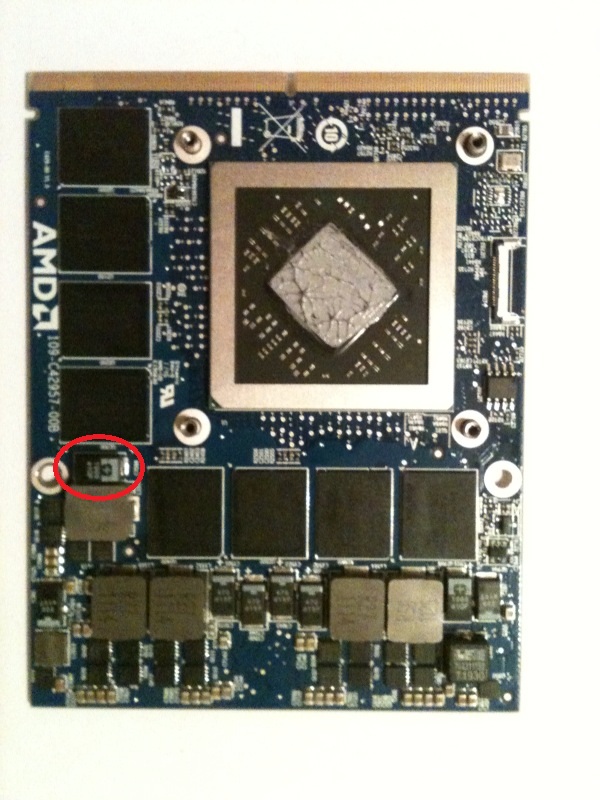
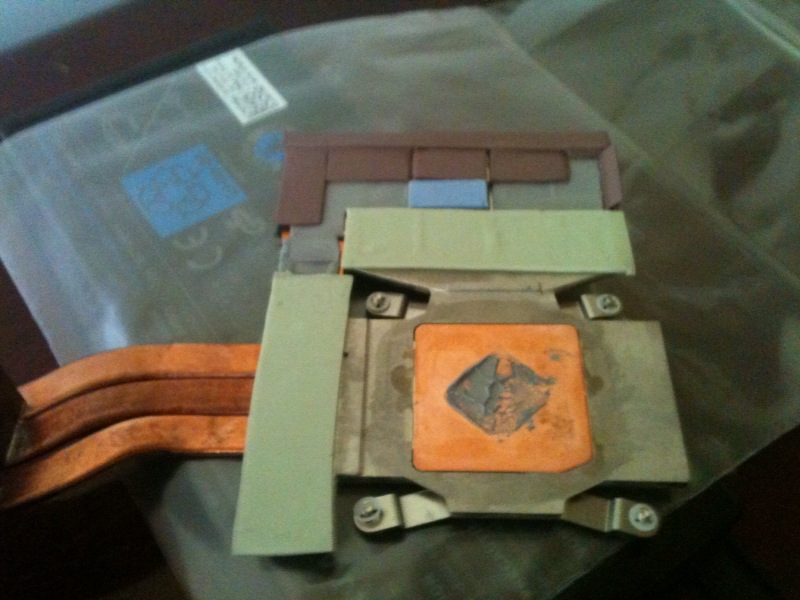
The thing in red circle below, was a little too close to the heatsink when I installed the card, everything else was lining up perfect, and I had the pads covered as per Slick's guide when the card died (for about an hour I had a different positioning as darned frozenCPU took 3 days to send my pad) but at the end my pads are in picture below
So when I restarted the computer, it gave 6 beeps, I did play with the heatsink a little, to make sure everything was alright (didn't change anything), I got into windows, and then in 2 minutes of nothing going on (was talking to my gf), she says your computer's weird, and I see all crazy artifacts all over the place, and boom, darkness, then whatever I tried I didn't pass beyond the post..
As soon as I got my hands on my 580, put it back and in windows in an instant, installed the drivers everything is working..
But the good thing is, our contact says he maybe able to check it and fix it, so I am sending the card back before cooking commence At least I will be the first to cook a 7970m
Otherwise, I am ordering a new heatsink asap (as some screws rendered useless, kinda, because of immense screwing operation yesterday)
I may try to do flashing the card, but I don't think it will do any good (I mean if problem was vbios, it should see bios on the boot right?) and he will try to do it anyway, and he knows these things much better than me, so I guess shipping it asap makes more sense
Attached Files:
-
-
Thanks for the heads up bro!
Send it back to Table asap, that's the best course of action. -
WooHoo!!! Exciting times Geo Man!
You better go rest up lol in preparation and anticipation.
Cheers.
-
Haha! I like your optimism brother! I'm sure you'll have it back in working order in no time
Right. Is this only an issue for concern for M17x-R3 owners then?
Thanks Geo! -
Yeah, only R3 owners.
-
Cool thanks for the confirmation brother GEO!
Cheers.
-
where are you guys buying these cards?
-
upgradeyourlaptop seller on ebay. PM him through ebay
-
Thanks Geo
-
Thank you.
-
I dont see any 7970m actions at all from Upgradeyourlaptop..........do you have to PM him to order one of these? How about just calling up EUrocom directly and just doing a phone order since upgradeyourlaptop IS Eurocom?
-
email/PM them from their ebay store is what I did, or just call them im guessing
-
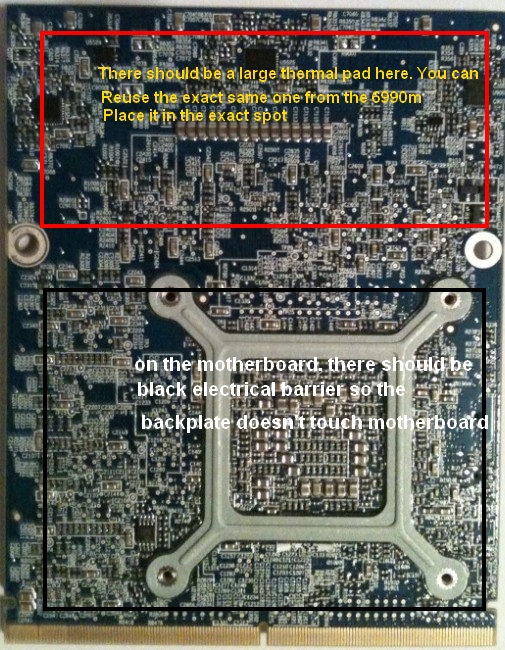
no gratz, you need that big pad on the back of the card. I just reused the large thermal pad on the back of my 6990m. You did it correctly
I've attached a pic and will update the guide
But i want to reiterate that Grazt, you did it correct, you need the large thermal pad on the back of the 7970Attached Files:
-
-
oh Slick, again I felt the perma sadness must cheer up!! a ton of things to do today!!!
BYE BYE CARD!!! BYE BYE P5.5k 3dmark11!!! BYE BYE HAPPINESS!!! BYE BYE CARD!!!
-
Grazt, i feel the sadness too. Sorry for your loss. Hang in there bro!
you know what you should do...go and hang out with your gf later. Leave the computer at home. GO and stay at her place and forget about Aliens for one night. And as a last resort, when you get the courage, put the card in the oven on a cookie sheet...200c for 10mins
-
yeah that's what I am thinking but I will send it to our contact before cookie sheet
maybe there is still hope?
-
The top of that cap isn't conductive. The front and back are and you won't get an arc at that voltage.
-
Well, I really have no clue at this point, we'll see what our contact does to fix it, I want this beast going so much! damn!! NO SADNESS!!! cheer up people!
28nm is legen... wait for it... (back me up Widezu!)
-
backing up hopefully that all with be fine after eating some cheese and other products that are...
-
DAIRY!! legendary!!! guys, really the love within this forum is so much, it is such a relief.. THANKS PEOPLE!!!
-
Cheese ftw!!
Edit: actually cookies ftw!!
Sent from my Samsung Galaxy S2 using tapatalk 2 -
Heh, I would probably be more concerned with the $500 paperweight rather than the 3DMark score, that is why I don't think I want to try upgrading myself with an unwarranted card, this would happen to me and I would be out $500.
-
You could always scrap it for the gold and copper. Make a dollar or two.
-
don't forget the silicon you could melt down as well.
-
IF the card is completely dead, i wasn't kidding about cooking it in the oven for 10 minutes. It has resurrected many vid cards.
Grazt, if it can't be fixed, and as a last thing to try, cook it on a cookie sheet. I wasn't kidding -
Faint heart never won fair lady. Some folks are highly risk averse; others will seize the moment and reach for the brass ring. Sometimes there is failure, but other times you grab the ring and win not only the prize but also the psychic satisfaction of accepting and overcoming the challenge. Kudos to Graz-zt and SlickDude80 for taking the risks involved with determining whether and to what extent the 7970M will work in the R3, opening up whole new levels of performance for us. A blown card is a PITA, but also a badge of honor in our world. +Rep all around.
-
Is 200c warm enough? I thought lead free solder melted closer to 220c.
-
Thnx Rev! I often feel that we are the innovators and i was/am fully prepared for the consequences (knock on wood). Hopefully nothing happens to to our 7970's
I read somewhere that someone tried 250c and it melted a whole bunch of other stuff lol
perhaps 220c -225c would be better to try
AND if anyone thinks i'm nuts...it is common practice in some manufacturing methods to take a PCB, put solder on it, and bake it. the oven may be more industrial in scale...but most of us have a home version in the kitchen -
I think you're nuts, but not because of the oven idea.
Just make sure it cools properly before you grab it to pull out of the oven. If the solder is still "wet" for a lack of better term and you jolt the board and the component shifts = bad news. -
^^^ LOL
and good point. make sure its completely cooled down and dry before touching the card after -
Also, if he's going to do it make sure the card is 100% flat. Cool it down slowly. Leave it in the oven to let it all cool down.
However, I really don't think this would help in this case, like katalin said.
Edit: In addition, I would also point out that oven-baking/reflowing is really just a temporary fix anyway. -
Chief, rest assured, you don't need the thermal pad for the M17x R2, its sole purpose in the M17x R3 is to insulate the card from the motherboard.
Under the GPUs in the M17x R2 you have the fans for each card. -
I'll just quote this...
Send it back to Table, best you can do. -
I read that...but if you're at the point where you're putting a nail in it and hanging it on the wall, at least its one last thing to try
-
Did he get a 30 day warranty or anything on it? If so, oven baking has the potential to void it.
-
Gratz, before you installed the backplate (X-plate), did you put anything between it and the card in order to avoid direct contact with one of the components (capacitors etc.)?
My money is on one or more shorted capacitors, resistors..
AMD 7970m available for buy
Discussion in 'Alienware 17 and M17x' started by flingin, Apr 20, 2012.